





-
![]()
-
![]() Recycle Bin Recovery: How to Recover Deleted Files in Windows
Recycle Bin Recovery: How to Recover Deleted Files in Windows October 20,2026
 6 min read
 -
![]()
-
![]()
-
![]()
-
![]()
-
![]()
-
![]() How to Fix a Corrupted Hard Drive Without Formatting (2026 Complete Guide)October 20,20266 min read
How to Fix a Corrupted Hard Drive Without Formatting (2026 Complete Guide)October 20,20266 min read -
![]()
-
![]()
Page Table of Contents
PAGE CONTENT:
Data loss is a universal nightmare. Whether it's years of family photos, a critical thesis, or vital business documents, the panic is real. Many tech-savvy users turn to powerful, command-line tools like DDRescue for help. And for good reason—DDRescue is a remarkably robust tool for creating sector-by-sector copies of failing drives, intelligently skipping bad sectors to salvage as much raw data as possible.
However, for the vast majority of users, DDRescue presents a significant challenge. Its command-line interface and steep learning curve can be intimidating, and it's not a complete recovery solution. Once you have a disk image, you still need to extract the files you actually need from it. This is where a modern, user-friendly alternative like EaseUS Data Recovery Wizard becomes the superior choice. If you're searching for a powerful DDRescue alternative, look no further.
The Power and Limitations of DDRescue
Before exploring alternatives, let's understand DDRescue's strengths and weaknesses. GNU DDRescue is a data recovery tool that copies data from one file or block device to another, intelligently handling read errors. Its key features include:
- Resilience: It does not stop at the first error; instead, it skips bad areas to continue copying readable data.
- Log File: It uses a log file (mapfile) to track progress, allowing you to interrupt and resume the recovery process at any time.
- Multiple Passes: It performs multiple passes (e.g., scraping and retrying) to maximize the amount of data recovered from a failing drive.
These features make DDRescue a fantastic "first responder" for physically failing hardware. However, its major drawback is clear: it is a command-line tool with no graphical user interface, making it difficult for non-technical users. Even after successfully creating a disk image with DDRescue, the job is only half done. The image itself may contain a damaged file system, making it impossible to simply mount and browse. You then need a file-level recovery tool to scan the image and extract specific documents, photos, and videos. This two-step process is complex, time-consuming, and requires significant technical know-how.
EaseUS Data Recovery Wizard: A Powerful and Accessible DDRescue Alternative
For users who prefer a streamlined, all-in-one solution, EaseUS Data Recovery Wizard offers a compelling alternative to the command-line complexity of DDRescue. It combines powerful scanning engines with an intuitive interface, making professional-grade data recovery accessible to everyone.
1. Unmatched Ease of Use
The primary reason most users will choose EaseUS over DDRescue is its simplicity. Instead of memorizing complex terminal commands, you are guided through a clear, three-step wizard: Select Location -> Scan -> Preview & Recover. This straightforward approach is invaluable when you're already stressed about your lost data. As detailed in the source article, Disk Drill, while user-friendly, faces tough competition from EaseUS, which offers a more intuitive and streamlined experience.
2. Superior Recovery Capabilities and Success Rates
EaseUS Data Recovery Wizard is not just easy to use; it's also incredibly effective. It boasts advanced scanning algorithms, including the SmartSector Rebuild (SSR) technique, designed to reconstruct files that have been split across storage sectors over time—a common reason why standard tools fail .
While DDRescue creates a raw disk image, EaseUS directly recovers over 1,000 file types, including photos, videos, documents, and emails, from a wide range of storage devices (HDDs, SSDs, USB drives, SD cards, etc.) . Tests comparing EaseUS to other professional tools like R-Studio show that EaseUS consistently achieves a high recovery success rate, particularly in scenarios involving overwritten data, lost partitions, and even BitLocker-encrypted drives—situations where R-Studio is ineffective.
3. Generous Free Version
Unlike many other tools that offer only a paltry 500 MB of free recovery space, EaseUS allows you to recover up to 2 GB of data for free. This generous free tier lets you thoroughly test the software's capabilities and preview your recoverable files before committing to a purchase. As mentioned in the source article, this makes it a significantly more attractive option than Disk Drill for users who are new to data recovery.
4. More Than Just a Recovery Tool
EaseUS Data Recovery Wizard goes beyond the basic functions of DDRescue. It includes features that add significant value, such as:
- Preview Before Recovery: You can preview files (like photos or documents) to verify they are intact before recovering them, saving you time and storage space.
- Advanced Photo and Video Repair: The Pro version can repair corrupted video and photo files, a critical feature for photographers and videographers that DDRescue cannot address.
- Crashed PC Recovery: With a bootable USB created in WinPE, you can recover files from a PC that won't start, a scenario where using DDRescue would be extremely complex.
Here is how you can use this data recovery tool to recover your lost files:
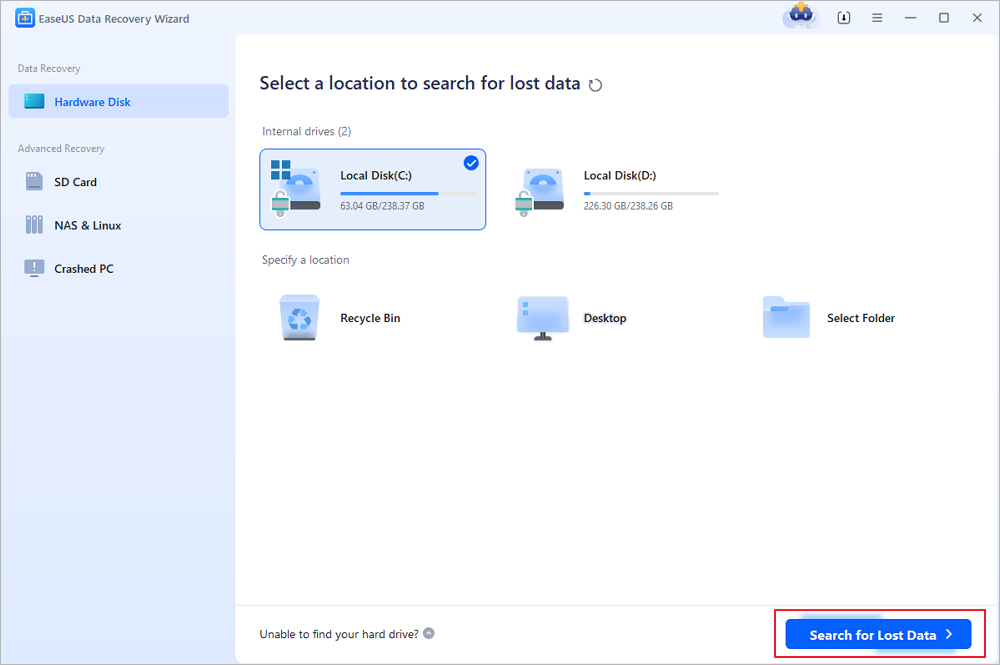
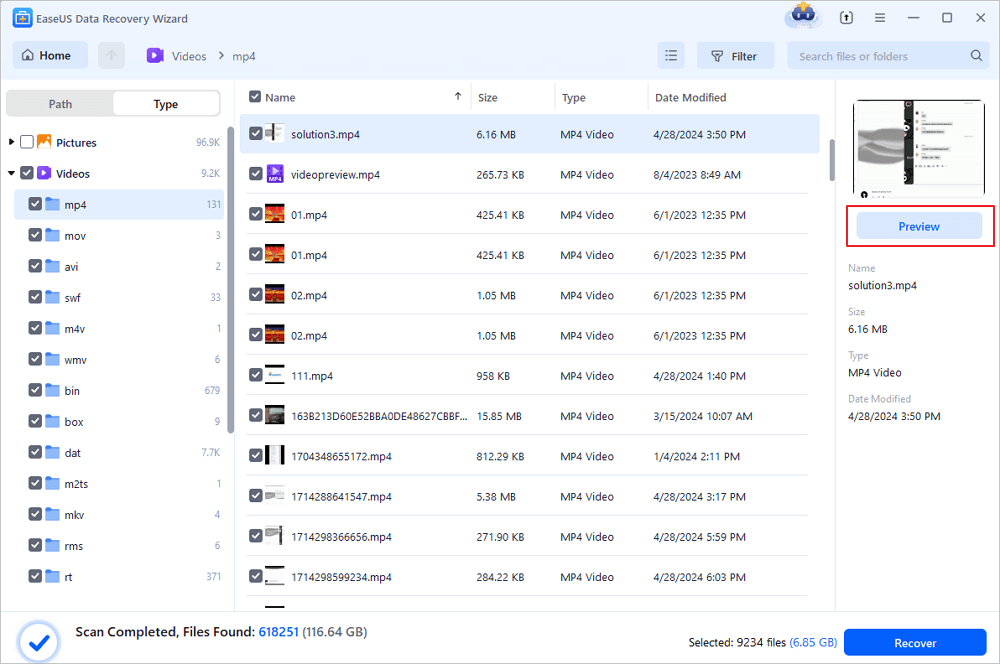
Step 1. Choose the exact file location and then click the "Search for Lost Data" button to continue.
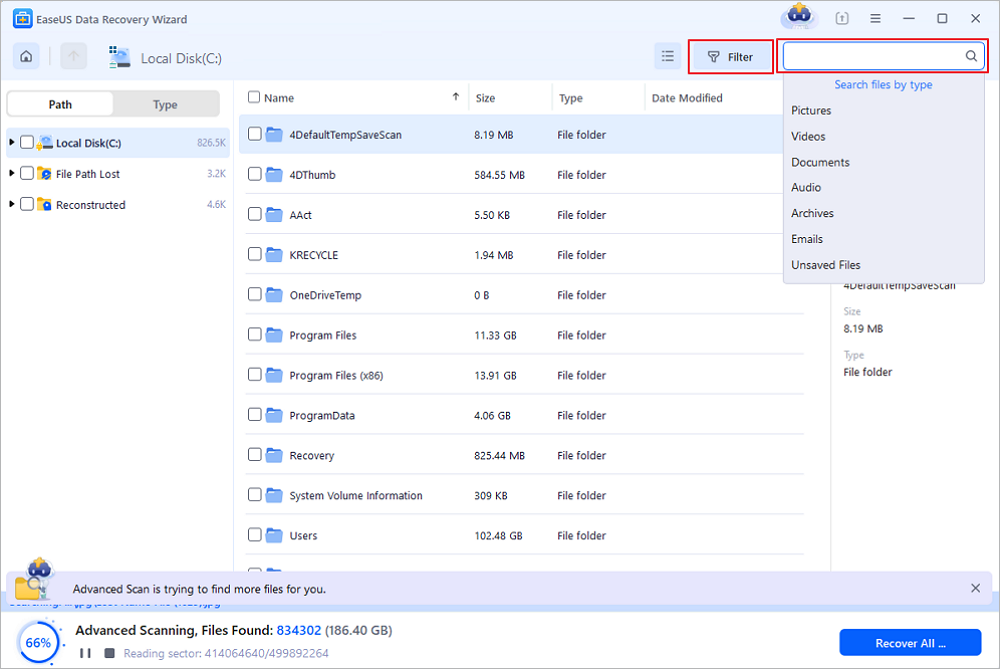
Step 2. After the process, locate the deleted or lost files in the left panel using the "Path" or "Type" feature. Or, you can apply the "Filter" feature to find the deleted files.
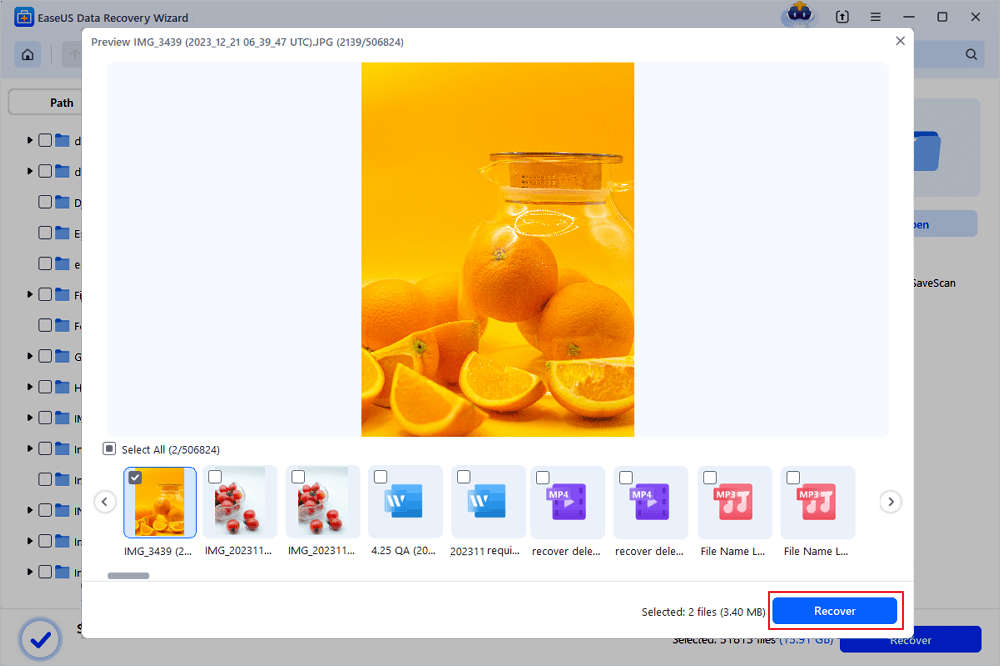
Step 3. Click the "Recover" button and save the restored files – ideally, it should be different from the original one. You can choose a cloud storage, such as OneDrive, Google Drive, etc., and click "Save" to save your recovered files.
Conclusion
For the technically proficient user who enjoys working in a command-line environment and needs to handle a physically failing drive, DDRescuer remains a powerful tool in the data recovery arsenal.
However, for the vast majority of people—including photographers, students, office workers, and home users—EaseUS Data Recovery Wizard is the definitive alternative to DDRescue. It provides a robust, user-friendly, and highly effective solution for recovering lost files from almost any data loss scenario. It transforms a complex, multi-step process into a simple and guided experience, saving you time, stress, and potentially your most important digital memories.
FAQs on DDrescue Alternative
Here are some questions that you may be curious about on the DDrescue alternative:
1. Is EaseUS Data Recovery Wizard a good ddrescue alternative for non-technical users?
Absolutely. While ddrescue is a powerful command-line tool for creating disk images, it requires technical expertise and a separate file-recovery step. EaseUS Data Recovery Wizard offers a graphical interface and a simple three-step process, making it an ideal ddrescue alternative for everyday users who want to recover lost files without learning complex terminal commands.
2. Can EaseUS Data Recovery Wizard handle physically damaged drives like ddrescue does?
ddrescue excels at reading data from failing hardware by skipping bad sectors. EaseUS Data Recovery Wizard is designed for logical data loss—such as accidental deletion, formatting, or partition corruption. For physically failing drives, experts often recommend using ddrescue first to create a disk image, then using EaseUS as a ddrescue alternative to scan that image and extract your actual files.
3. Which tool has a higher success rate for file recovery, ddrescue or EaseUS?
They serve different purposes. ddrescue is about raw data extraction from damaged media, while EaseUS focuses on file-level reconstruction. For scenarios like overwritten data, lost partitions, or corrupted file systems, EaseUS often achieves a higher success rate because it can recognize and rebuild over 1,000 file types. Many users choose EaseUS as
Was this page helpful?


 Why Trust EaseUS
 Editor Reviews








