






Looking for an M3 BitLocker Recovery alternative? If your BitLocker-encrypted hard drive has become inaccessible, files have been deleted, or a partition has been lost, choosing the right data recovery software can make a difference.
M3 BitLocker Recovery is a dedicated solution for recovering data from encrypted drives. However, you may want an alternative with a different recovery workflow, file preview options, or broader data recovery capabilities.
EaseUS Data Recovery Wizard is one alternative worth considering. It provides a graphical data recovery workflow for supported storage devices,
What Is the Best M3 BitLocker Recovery Alternative
An M3 BitLocker Recovery alternative is software that helps users retrieve lost, deleted, or inaccessible files from BitLocker-encrypted storage devices. EaseUS Data Recovery Wizard is one option for supported recovery scenarios, particularly when users need a familiar file scanning and preview workflow.
The best alternative depends on your specific problem:
- Deleted files: Consider data recovery software that supports scanning the affected encrypted volume.
- Corrupted BitLocker drives: Evaluate whether the software supports your drive's current encryption and file system state.
- Lost partitions: Look for software that supports lost partition and file recovery.
- Forgotten recovery keys: First check whether the original recovery key is available in your Microsoft account or organization records.
- Physically damaged drives: Stop using the drive and consider professional data recovery.
M3 BitLocker Recovery vs. EaseUS Data Recovery Wizard
BitLocker, Microsoft's encryption tool, is a robust solution for securing Windows systems. However, recovering lost or forgotten recovery keys can be a nightmare, especially for businesses or individuals with sensitive data. While Microsoft provides a built-in recovery tool, third-party solutions like M3 BitLocker Recovery, EaseUS BitLocker Recovery Tool, and other M3 BitLocker Recovery alternatives offer enhanced features and user-friendly interfaces.
This article will introduce the M3 BitLocker Recovery alternative, EaseUS BitLocker Recovery Tool, and provide full steps to restore data from a BitLocker-encrypted hard drive even without a recovery key.
What Is M3 BitLocker Recovery Alternative
M3 BitLocker Recovery software is designed for professionals and tech-savvy users who demand precision and reliability. It supports BitLocker data recovery on encrypted drives and partitions on Windows 11, 10, 8, and 7. It also offers multiple methods, including resetting the password, extracting the BitLocker recovery key, etc.
However, the M3 BitLocker Recovery software requires basic technical knowledge to navigate advanced options and lacks an automatic backup feature for recovery keys. If you are not familiar with data recovery, don't worry! According to the data recovery software review, the M3 BitLocker Recovery alternative, EaseUS Data Recovery Wizard, has a user-friendly interface, which helps you retrieve your data even on a BitLocker-locked drive.
Propose that you have no idea how to find the BitLocker recovery key and don't remember it; EaseUS BitLocker Data Recovery Tool helps access stored data on the BitLocker-encrypted drive without putting the recovery key or password.
How to Use M3 BitLocker Recovery Alternative
Install the EaseUS BitLocker Recovery Tool on your Windows PC, then follow the steps below to recover the data on your hard drive that has BitLocker enabled. We also provide a video tutorial that helps you understand the full operations.
- ⏱️Time Stamp:
- 00:47 - How to Find BitLocker Recovery Keys
- 01:36 - How to Download EaseUS BitLocker Data Recovery
Share this article with your friends on SNS to help them learn how to use the BitLocker data recovery tool on a Windows PC when their hard drive is locked.

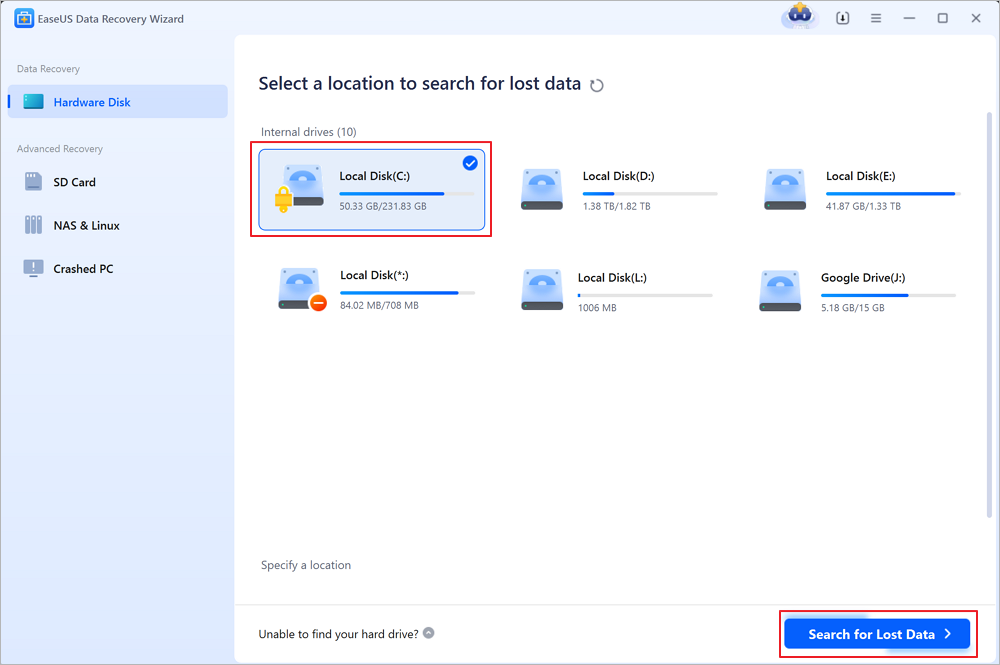
Step 1. Choose the encrypted drive to scan
Launch EaseUS Data Recovery Wizard, and you will see the BitLocker encrypted drive displayed there. Hover the mouse on the BitLocker partition or storage device from which you want to recover data. Then click "Search for Lost Data".
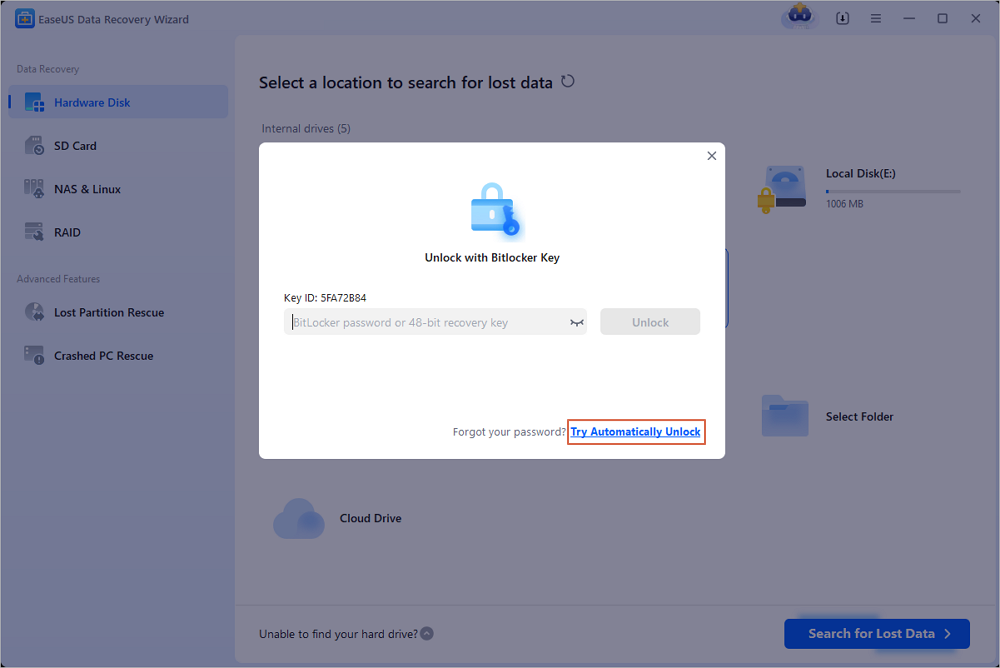
Note: If you don't have a key or password, you can use "Try Automatically Decrypt", which may help you scan your recovery key from your Microsoft account or your C drive, then decrypt the drive without providing your password.
Step 2. Select and preview scanned files
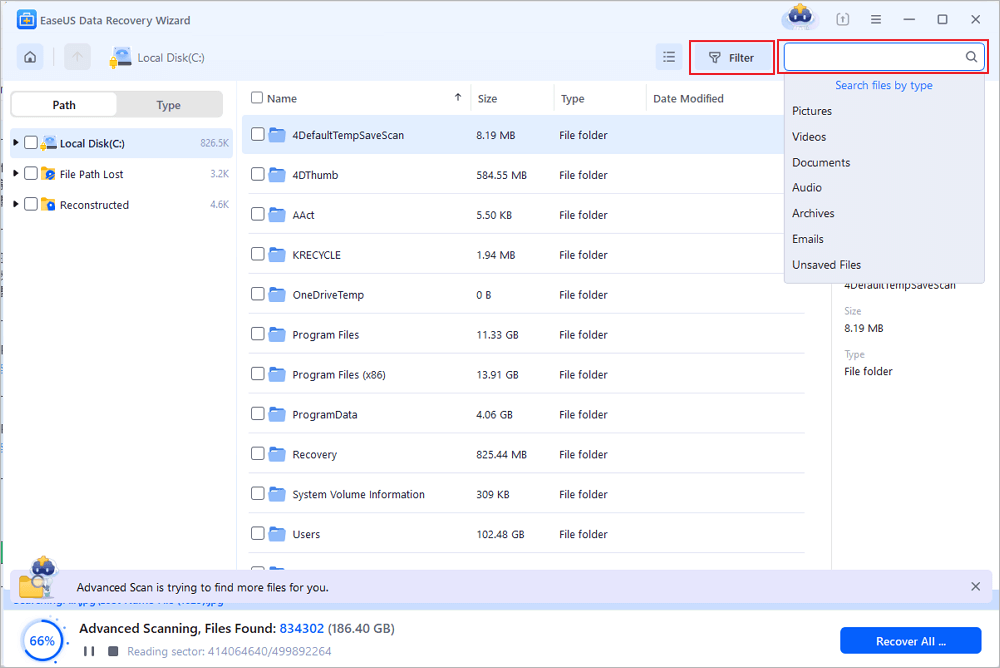
The software will start a quick scan for deleted files and perform advanced scan for more lost files from the BitLocker device. When the process completes, you can apply the "Filter" feature or use the search feature to find the lost files in a short time.
Step 3. Recover lost files from BitLocker encrypted hard drive
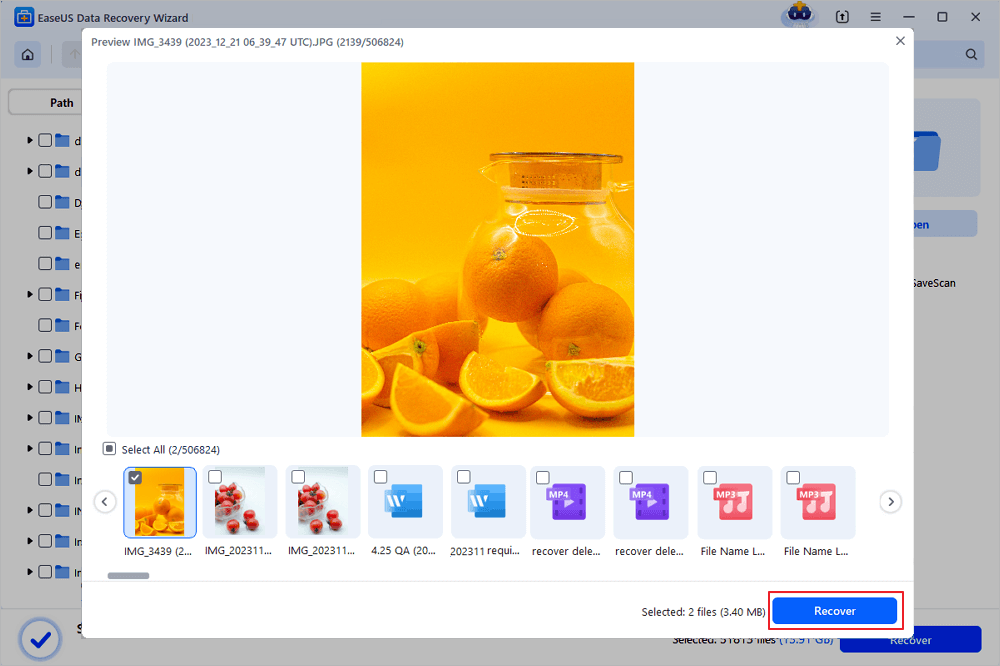
After previewing the file, click the "Recover" button to restore deleted or lost files from BitLocker encrypted partition on Windows. You can choose a cloud storage, such as OneDrive, Google Drive, etc., and click "Save" to save your recovered files.
Conclusion
This post introduces a powerful and trusted M3 BitLocker Recovery Software on Windows PC, providing full steps to restore data from an encrypted BitLocker hard drive. Install EaseUS Data Recovery Wizard to unlock a BitLocker drive without a recovery key!
M3 BitLocker Recovery Alternative FAQs
Here are questions people frequently ask about the M3 BitLocker Recovery alternative:
1. What can I do if I don't have a BitLocker recovery key?
Find your recovery through your Microsoft account. If you set up your system and enable BitLocker yourself, your recovery key will be in your MS account.
If you can't find the BitLocker recovery key or can't undo any changes that caused it to be needed, consider resetting your device using one of the Windows recovery options. However, you should note that resetting your device will remove all of your files.
2. What is the best BitLocker recovery tool?
EaseUS BitLocker Recovery Tool is an on-premise solution that helps restore lost encrypted files using or without recovery keys or passwords.
3. How do I get past BitLocker recovery?
Select the "Skip this drive" link at the bottom of the page where you are asked to enter the recovery key. You should be presented with a menu that lets you get to Command Prompt via "Advanced options > Troubleshoot > Advanced options > Command prompt".
Was This Page Helpful?
Related Articles
-
BitLocker on External Hard Drive: Encrypt & Decrypt
![author icon]() Brithny/2026-11-19
-
BitLocker Drive Encryption, How to Unlock BitLocker Drive
![author icon]() Brithny/2026-11-19
 Brithny/2026-11-19
-
Clone BitLocker Drive with Clonezilla & Alternative [2026 Guide]
![author icon]() Jean/2026-11-17
-
No BitLocker Recovery Key Found for This Device? Fix Now
![author icon]() Dany/2026-11-19
 Jean/2026-11-17
 Dany/2026-11-19


