





 About the Author
 Reviews and Awards
 Mac SD Card Recovery
If your recently deleted photos are missing or you can't find the "Recently Deleted" album on your device, follow this structured guide to troubleshoot and recover your recently deleted photos and videos.
Why Are Recently Deleted Photos Missing
The "Recently Deleted" album in the Photos app is not like a standard folder. It only appears in the sidebar if it contains at least one photo.

If you deleted photos more than 30 days ago, they have been permanently erased, and the folder will vanish automatically. Suppose you haven't deleted anything recently, the folder simply hides itself until it has something to show.
In summary, recently deleted photos may be missing because the 30-60 day retention period expired, they were permanently deleted, or they are stored in a hidden/shared library. Check the Trash/Recently Deleted folder, restart your device, or use a data recovery app to try to recover them.
Basic Check to Fix Recently Deleted Photos Missing
First, let's make sure the folder isn't just hidden from view.
Step 1. Launch the Photos application on your Mac.
Step 2. Look in the left-hand sidebar under the "Utilities" or "More Items" section for "Recently Deleted".
Step 3. If you don't see any sidebar at all, click "View" in the top menu bar and select "Show Sidebar".
Alternatively, click the "File" menu at the top of the screen. If the folder is just hidden, you might see an option called "Show Recently Deleted". Click it to make the album visible.
- Tip
- Apart from checking the sidebar, you can delete an item that is not important to test if it shows up in the "Recently Deleted" folder. Read more checklists on the Apple official page:
- https://support.apple.com/en-us/118558
Missing Recently Deleted Photo Recovery After 30 Days
If your photos were deleted more than 30 days ago, they are gone from the "Recently Deleted" folder, but they may still exist on your hard drive until overwritten.
#1️⃣. Restore Deleted Photos from Time Machine
If you use Time Machine for backups, this is your best bet. To restore deleted photos from a Time Machine backup:
- Step 1. Connect your backup drive.
- Step 2. Open Photos and enter Time Machine.
- Step 3. Scroll back to a date before the photos were deleted and restore them.

Don't forget to share this post on SNS to help more people learn how to fix the Recently Deleted photos missing error on a Mac.

#2️⃣. Recover Deleted Photos Using Data Recovery Software
If you don't have any backup, you will need reliable Mac data recovery software, such as EaseUS Data Recovery Wizard for Mac, to scan your hard drive and recover permanently deleted files on a Mac.
🔔Important: To avoid overwriting the lost photos, stop using your Mac immediately and, if possible, install the recovery software on an external drive.
Check out the following steps to recover deleted photos using EaseUS Data Recovery Wizard for Mac:
Step 1. Scan for lost photos
Select the location where your valuable photos were lost and click the "Search for lost files" button.
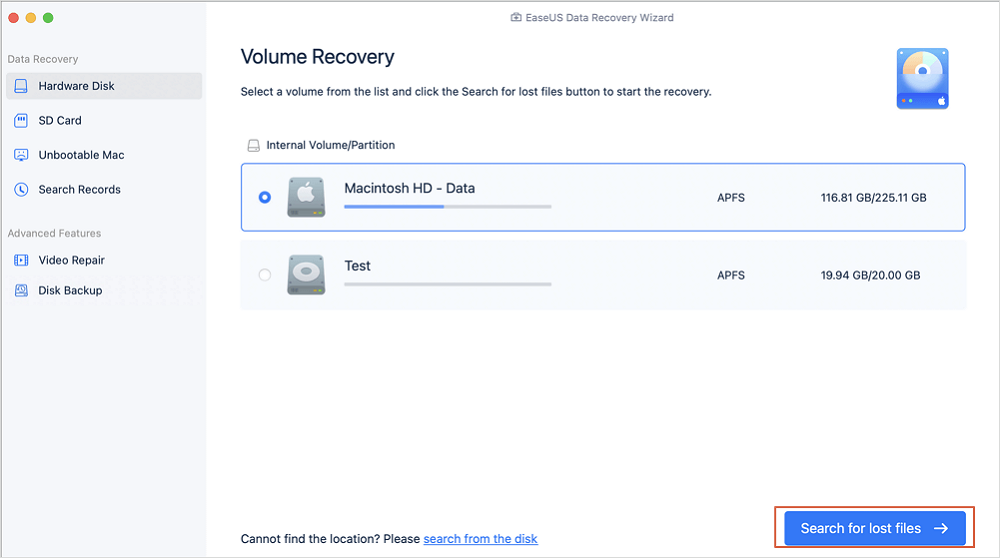
Step 2. Select wanted photos
EaseUS Data Recovery Wizard for Mac will immediately start a scan on your selected disk volume. Meanwhile, the scanning results will be presented in the left pane. By Path and Type, you can quickly filter the photos you've lost earlier.
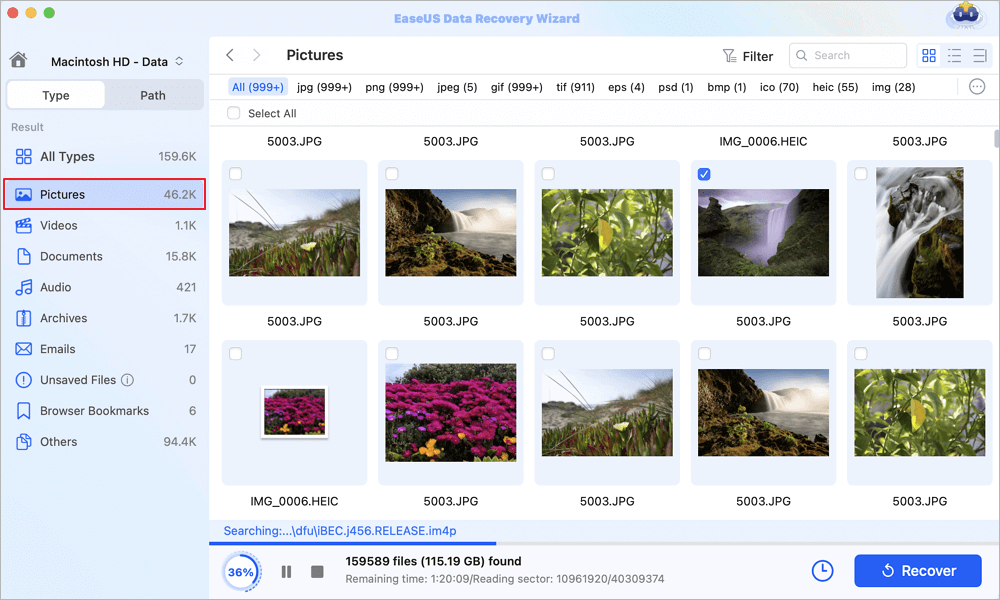
Step 3. Recover lost photos
Select the target photos and click the "Recover" button to get them back at once.
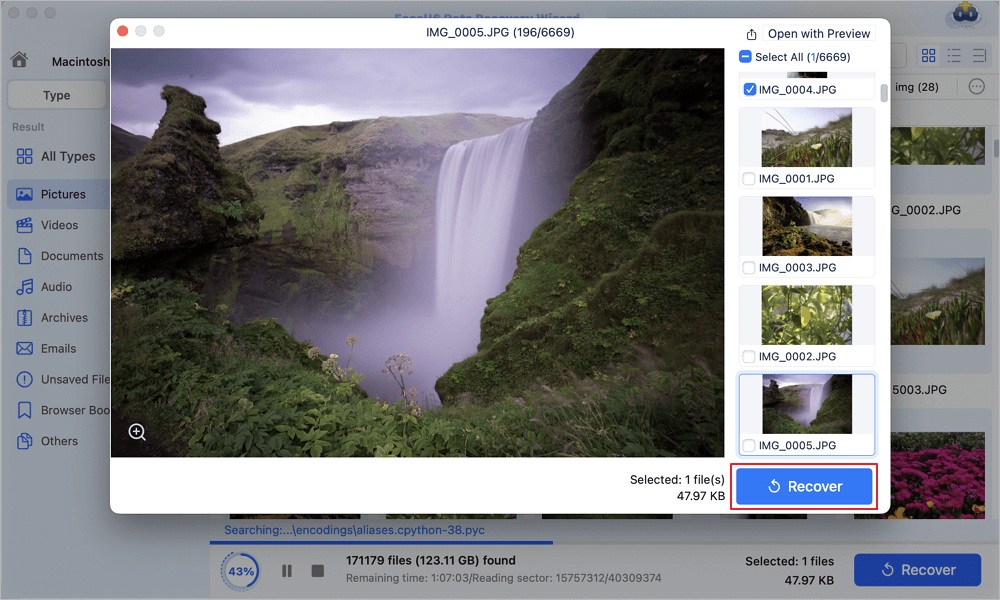
Conclusion
In summary, the reasons why "recently deleted photos missing" are missing are that the 30-60 day retention period has expired, they were permanently deleted, or they are stored in a hidden/shared library. Check the Trash/Recently Deleted folder, restart your device, or use a data recovery app to try to recover them.
If the above methods failed, consider reliable and trusted Mac data recovery software - EaseUS Data Recovery Wizard for Mac. It scans your Mac's internal and external hard drives to find the missing photos.
Recently Deleted Photos Missing FAQs
1. How to recover recently deleted photos on Apple?
- Go to icloud.com/photos, then sign in to your Apple Account (if necessary).
- Select the Recently Deleted album in the sidebar.
- Select the photos or videos you want to recover, then select Recover.
2. Can you still recover recently deleted photos?
You can restore recently deleted photos and videos that are still in your trash. Items that are permanently deleted can't be restored. If you're missing photos and videos, check your trash.
3. Why are my deleted photos not in the recently deleted on my iPhone?
In iOS 18 or later, the Recently Deleted Photos album sits in the Photos Library under Utilities. If your phone does not come with a Recently Deleted folder, you need to use the Customize & Reorder function to select Utilities, so Recently Deleted displays afterwards.
Was This Page Helpful?

Finley is interested in reading and writing articles about technical knowledge. Her articles mainly focus on file repair and data recovery.

Brithny is a technology enthusiast, aiming to make readers' tech lives easy and enjoyable. She loves exploring new technologies and writing technical how-to tips. In her spare time, she loves sharing things about her game experience on Facebook or Twitter.
-
EaseUS Data Recovery Wizard is a powerful system recovery software, designed to enable you to recover files you’ve deleted accidentally, potentially lost to malware or an entire hard drive partition.
Read More -
EaseUS Data Recovery Wizard is the best we have seen. It's far from perfect, partly because today's advanced disk technology makes data-recovery more difficult than it was with the simpler technology of the past.
Read More -
EaseUS Data Recovery Wizard Pro has a reputation as one of the best data recovery software programs on the market. It comes with a selection of advanced features, including partition recovery, formatted drive restoration, and corrupted file repair.
Read More
Related Articles
-
How to Recover a Deleted Webp File on Mac [Image Recover]
![author icon]() Jaden/Sep 29, 2026
Jaden/Sep 29, 2026 -
Photos Disappeared from Mac After Tahoe! How to Recover
![author icon]() Jaden/Sep 20, 2026
Jaden/Sep 20, 2026 -
How to Recover Deleted TIFF Photos on Mac
![author icon]() Jaden/Sep 20, 2026
Jaden/Sep 20, 2026 -
Fotók helyreállítása sérült SD-kártyáról | Magas sikerességi arány
![author icon]() Cedric/Sep 23, 2026
Cedric/Sep 23, 2026
 Jaden/Sep 29, 2026
  Cedric/Sep 23, 2026

