





-
![]()
-
![]()
-
![]()
-
![]()
-
![]()
-
![]() How to Fix a Corrupted Hard Drive Without Formatting (2026 Complete Guide)
How to Fix a Corrupted Hard Drive Without Formatting (2026 Complete Guide) October 20,2026
 6 min read
 -
![]()
-
![]() Free Toshiba HDD Recovery: Perform Toshiba Hard Drive Recovery for FreeOctober 20,20266 min read
Free Toshiba HDD Recovery: Perform Toshiba Hard Drive Recovery for FreeOctober 20,20266 min read -
![]()
-
![]()
Page Table of Contents
PAGE CONTENT:
There's nothing quite like the frustration of returning from an intense match with your GoPro, only to find that your precious football footage is missing or corrupted. Whether it's a stunning goal, a crucial save, or the post-game celebrations with your teammates, these are moments you can't re-create.
Here's the good news: GoPro football footage lost is usually recoverable. The key is to act quickly and use the right tools. This guide shows you exactly how to get those irreplaceable videos back.
Why Does GoPro Football Footage Get Lost
Understanding how data loss happens is the first step to successful recovery. Based on how you use your GoPro, here are the most common scenarios:
- Accidental Deletion: You might have hit the delete button while browsing or managing files on the camera or your computer.
- SD Card Formatting: It's easy to format the SD card in your GoPro without first backing up the footage, and it wipes everything clean.
- SD Card Corruption: Improperly removing the SD card while the camera is writing data, or using a low-quality card, can corrupt the file system. This is one of the most frequent issues with action cameras.
- Interrupted Transfer: A sudden disconnection during a file transfer from your GoPro to your computer can corrupt or erase the original footage.
- File System Errors: Incorrectly unmounting the SD card or using it across multiple devices without proper ejection can cause errors.
The Best Way to Recover Lost GoPro Football Footage
If you've emptied the recycle bin, formatted your SD card, or the footage is simply inaccessible, you'll need professional data recovery software. While there are many tools out there, EaseUS Data Recovery Wizard stands out as the top choice for recovering high-resolution video files from almost any storage device.
It's designed to handle the exact problems sports fans and action camera users face, from recovering files after a quick format to rescuing footage from a corrupted card. Here's why it's the go-to solution for GoPro users:
- High Success Rate: It can recover over 1,000 file types, including MP4, MOV, and HEVC files produced by GoPro cameras.
- Supports All Devices: It works seamlessly with SD cards, microSD cards, USB drives, hard drives, and even your computer's internal storage.
- User-Friendly Interface: You don't need to be a tech expert to use it. The simple, three-step wizard guides you through the entire process.
- Generous Free Version: You can recover up to 2GB of data for free, allowing you to verify that your footage is recoverable before you make a purchase.
Step-by-Step Guide to Recover Your GoPro Footage
Follow these simple steps to get your football videos back:
🏆EaseUS SD card recovery leverages patented video fragment reconstruction technology to deeply repair video files lost due to accidental deletion, formatting, or corruption. Explicitly designed for cameras, action cameras, drones, and dashcams, it accurately restores complete and playable precious footage.
Step 1. Select the SD card to scan
- Download and install EaseUS Data Recovery Wizard on your Windows PC.
- Use the proper way to connect your SanDisk/Lexar/Transcend SD card to the computer.
- Open EaseUS SD card recovery software and choose SD Card Recovery on the left panel. All connected drives will display here. Select your SD card and click "Scan for lost data".
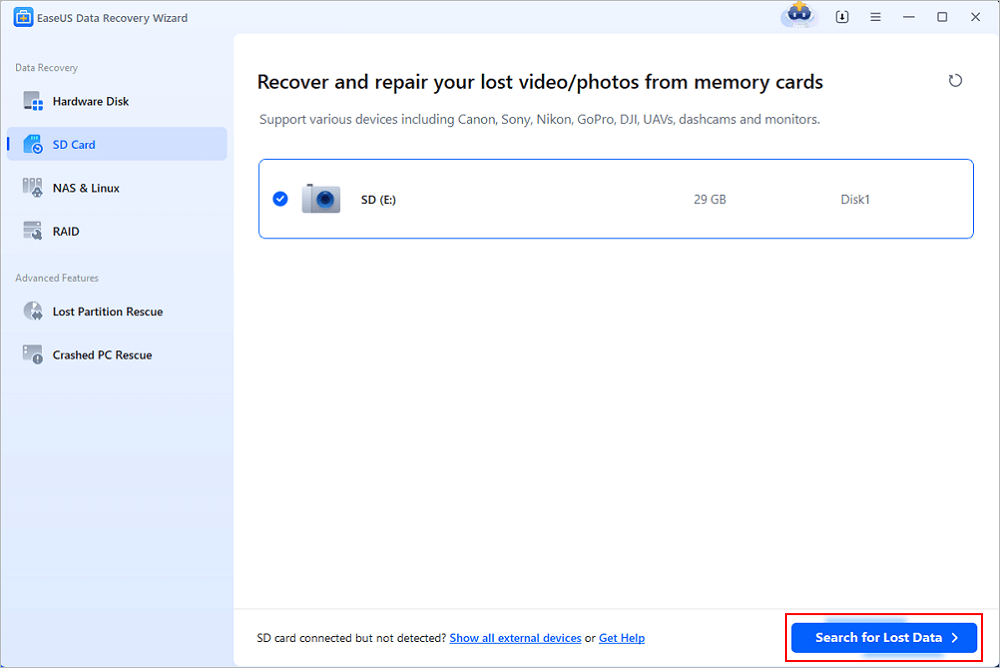
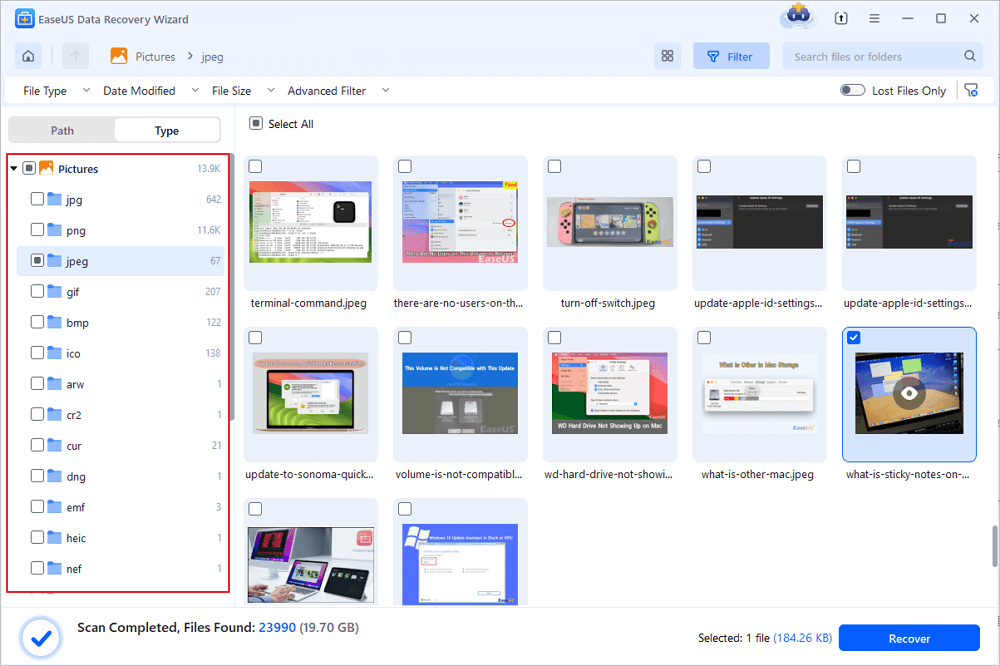
Step 2. Check for scan results
- Wait for the scanning process to complete.
- Specify one or several file types to show up, like Pictures or Videos.
- Click "Preview" to check if they are the wanted files.
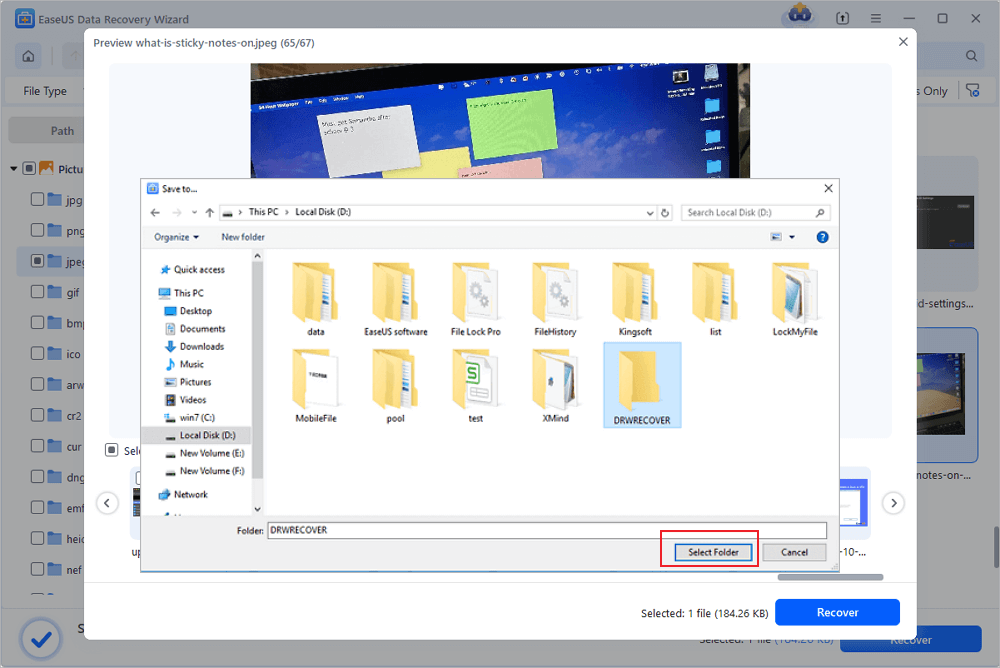
Step 3. Recover SD card data
- Preview the recovered files and click "Recover".
- Choose a different location to save the recovered files instead of the original SD card.
💡Want to know more about SD card data recovery? For example, what is the best SD card data recovery software? How to recover a damaged SD card? How to recover data from an unreadable SD card...Go for SD Card Data Recovery FAQs and restore your precious lost files.
Share this post with users who are facing the same GoPro video lost error:

How to Prevent Losing GoPro Football Footage Again
Once you've recovered your videos, it's crucial to take steps to protect your future footage. Here are some essential habits for every GoPro user:
1. Backup Immediately After Recording
Don't wait. As soon as you're done filming, copy your footage to your computer, an external hard drive, or cloud storage (like Google Drive or OneDrive). This should be your first action after a match.
2. Use a Reliable, High-Endurance SD Card
Action cameras write a lot of data quickly. Cheap SD cards are unreliable and more prone to failure. Always choose a high-endurance card from trusted brands like SanDisk or Lexar, designed for constant video recording.
3. Always Eject Your SD Card Properly
Never just pull the card out of your computer or camera while it's being accessed. Always use the "Safely Remove Hardware" feature on your computer and turn off your GoPro before removing the card.
4. Format the SD Card in Your GoPro
Instead of formatting the card on your computer, use your GoPro's built-in format function. This ensures the file system is set up optimally for your camera, reducing the chance of errors.
5. Keep Recovery Software Installed
You don't want to be searching for a solution in a panic after losing data. Install software like EaseUS Data Recovery Wizard ahead of time, so you're prepared for any unexpected data loss.
Conclusion
Losing your GoPro football footage can feel like a disaster, but it doesn't have to be a permanent one. By acting quickly and using a powerful tool like EaseUS Data Recovery Wizard, you have a good chance of recovering your action-packed videos. Remember, the most important steps are to stop using the affected SD card immediately and choose a reliable recovery solution. With the right approach, you can protect your memories while continuing to capture all the best moments on the pitch.
FAQs on Recovering GoPro Football Footage Lost
Here are some frequently asked questions you may be curious about:
1. Can I recover GoPro football footage after accidentally formatting my SD card?
Yes. Formatting does not permanently erase your data—it only removes the file index. With reliable recovery software like EaseUS Data Recovery Wizard, you can scan the formatted card and recover your MP4, MOV, or HEVC footage as long as you haven't written new data to the card afterward.
2. How long does it take to recover lost GoPro videos?
The time depends on the size of your SD card and the scanning depth. A quick scan typically takes 5–15 minutes, while a deep scan on a 128GB or 256GB card may take 30–60 minutes. You can preview recoverable files during the scan to save time.
3. Is the free version of EaseUS Data Recovery Wizard enough to recover my footage?
The free version allows you to recover up to 2GB of data, which is often enough for several short clips or one long match highlight. It also lets you preview files before purchasing, so you can confirm your footage is recoverable with no upfront cost.
Was this page helpful?

 Why Trust EaseUS
 Editor Reviews








