





Table of Contents
 About the Author
 Related Posts
ASF files are a classic multimedia container format widely used for streaming videos, archival recordings, and downloaded video content. Many users encounter common issues, such as ASF files that fail to open, refuse to play normally, or cannot be fast-forwarded or skipped. These issues usually come from corrupted file headers, damaged index information, incomplete downloads, incompatible codecs, or improper file transfer.
Common Symptoms of Damaged ASF Files
Before starting the repair process, it is important to confirm whether your ASF file is truly corrupted. Typical signs:
- The video cannot be opened by any media player
- Audio plays without video
- Video appears with black screens
- Playback freezes immediately after opening
- Fast-forward and progress dragging do not respond
- The file shows an incomplete size after downloading or transferring
These problems mostly occur due to broken index data and damaged internal structure of ASF files. Ordinary media players can only decode intact files and cannot rebuild corrupted file structures. This is why simple playback software often fails to solve fast-forward and loading errors.
Method 1. Fix ASF Files with VLC Media Player
VLC Media Player is one of the most powerful free cross-platform media players with built-in codec support and lightweight repair functions. This method is suitable for ASF files that can still load but cannot fast-forward or experience intermittent playback.
- Open VLC Media Player on your computer.
- Click "Media" in the top menu and choose "Convert Save".
- Click "Add" to import the problematic ASF file into the program.
- Select a compatible output profile such as H.264 MP4 format.
- Choose a new save path for the converted file and click "Start".
- VLC will remux the ASF stream data and rebuild the file index.
- After conversion, open the new file to test the playback and fast-forward functions.
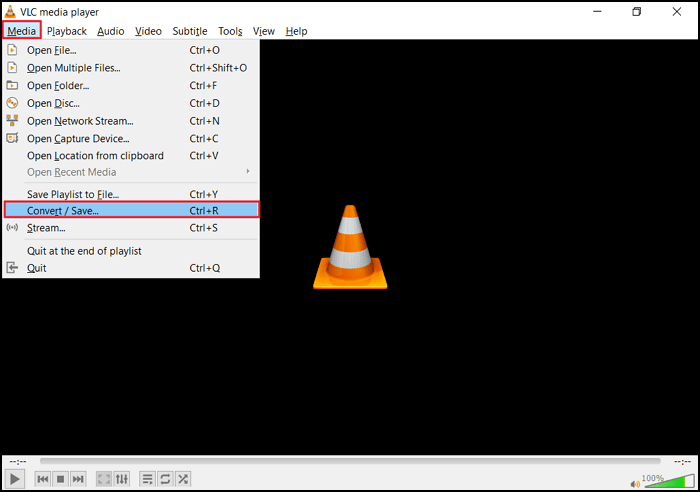
This allows VLC to automatically repair small structural errors during decoding. However, VLC only works for mild damage. It cannot repair severely corrupted ASF files with missing data blocks or broken headers.
Method 2. Use EaseUS Fixo Online Video Repair
If VLC cannot resolve ASF playback and fast-forward errors, you can try reliable online video repair tools. EaseUS Fixo Online Video Repair stands out as a safe and convenient web-based solution. It requires no software installation and can quickly fix mildly corrupted ASF files directly in the browser.
EaseUS Fixo Online Video Repair supports mainstream video formats, including ASF, MP4, MOV, AVI, and more. It can automatically repair damaged file headers, rebuild missing index information, and restore normal playback and fast forward functions. The platform uses secure cloud processing and will not leak your video privacy.
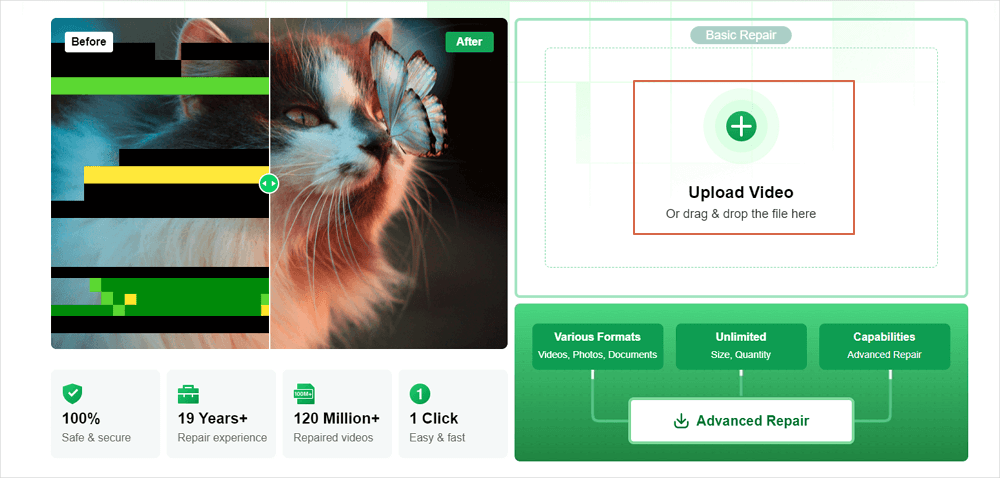
Step 1. Open EaseUS Online Video Repair and Upload Problematic Video
Open EaseUS Online Video Repair page: https://repair.easeus.com/, click "Update Video", or drag and drop a corrupted, broken, or not playing video to the right area to upload.
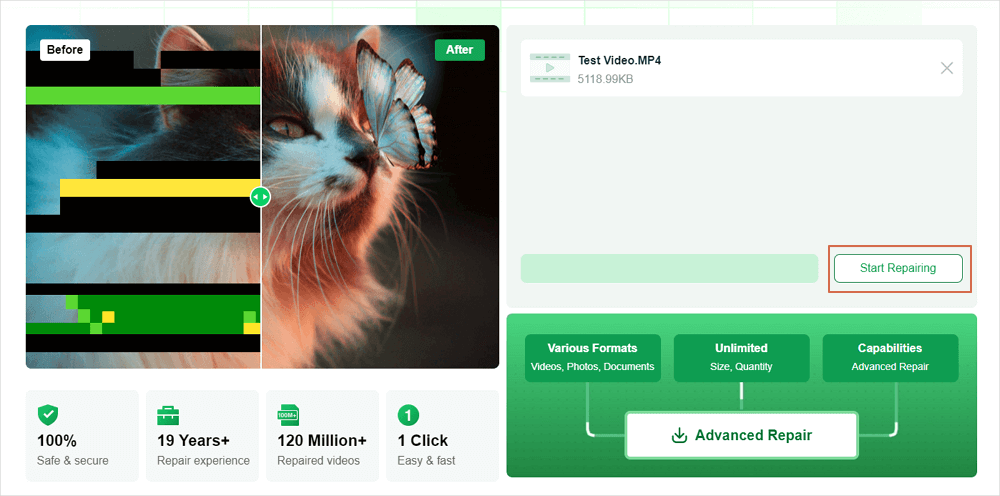
Step 2. Enter a Valid Email Address and Start Repairing Video
Enter a valid email address and click "Start Repairing" to upload and repair the malfunctioning video.
Step 3. Wait for the Automatic Uploading and Repairing Process to Finish
This online repair tool will automatically upload and repair the corrupted or broken video for you. You can leave the repairing page opened and continue doing other stuff.

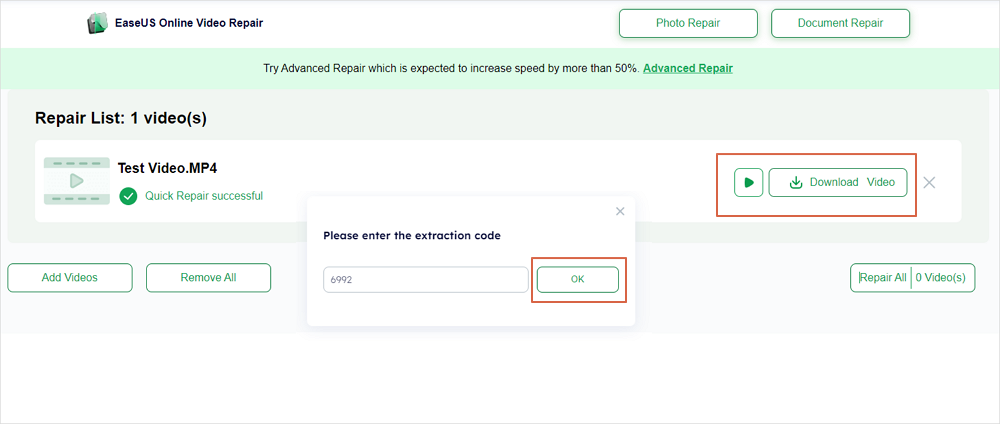
Step 4. Enter Extraction Code and Download Repaired Video
When the repairing process completes, you can preview the video at the right pane. Also, you'll receive an email with a video extraction code.
Go and find the code, reopen the online repair. page. Then click "Download Video" and enter the extraction code, click "OK" to start downloading the repaired video.
Method 3. Repair ASF Files with EaseUS Fixo Video Repair
For severely corrupted ASF files that cannot be fixed by players or online tools, the desktop version of EaseUS Fixo Video Repair is the most reliable ultimate choice. It is a professional, dedicated video repair tool designed to handle all types of video damage, including broken headers, lost index blocks, frame corruption, audio-video desync, and unplayable or unskippable ASF files.
EaseUS Fixo Video Repair supports full automatic repair and advanced manual repair modes. It deeply scans the internal structure of ASF files, reconstructs damaged data segments, and restores complete playback progress and fast forward functionality.
The steps in the operation are simple and beginner-friendly:
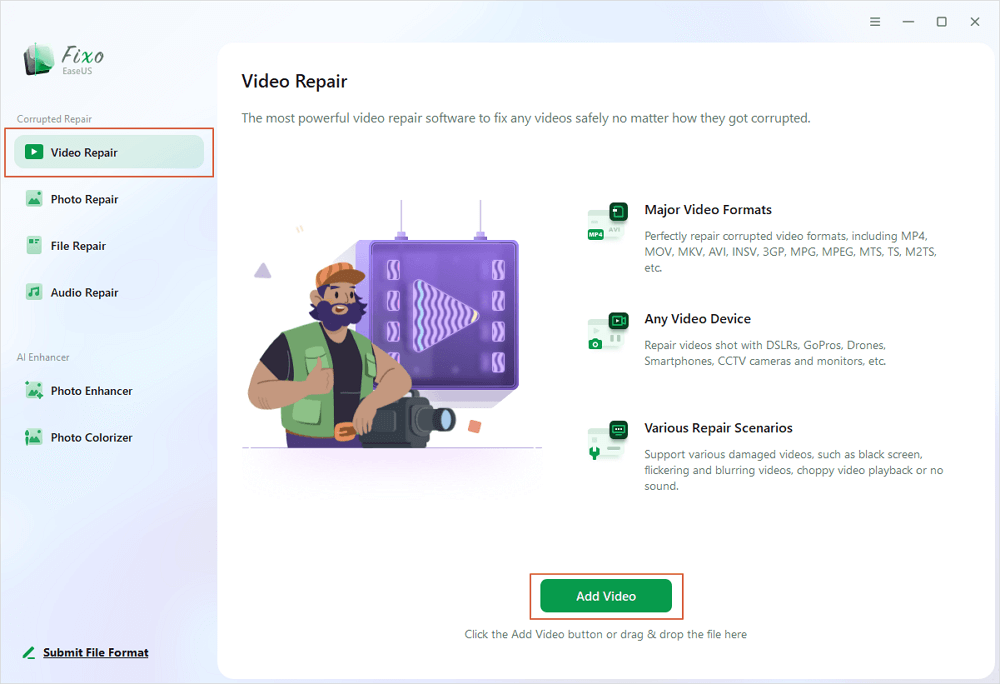
Step 1. Open Fixo on your local PC. Click "Video Repair" and add the corrupted MP4/MOV/AVI/MKV/3GP/FLV/MKV/WMV video files by clicking "Add Videos".
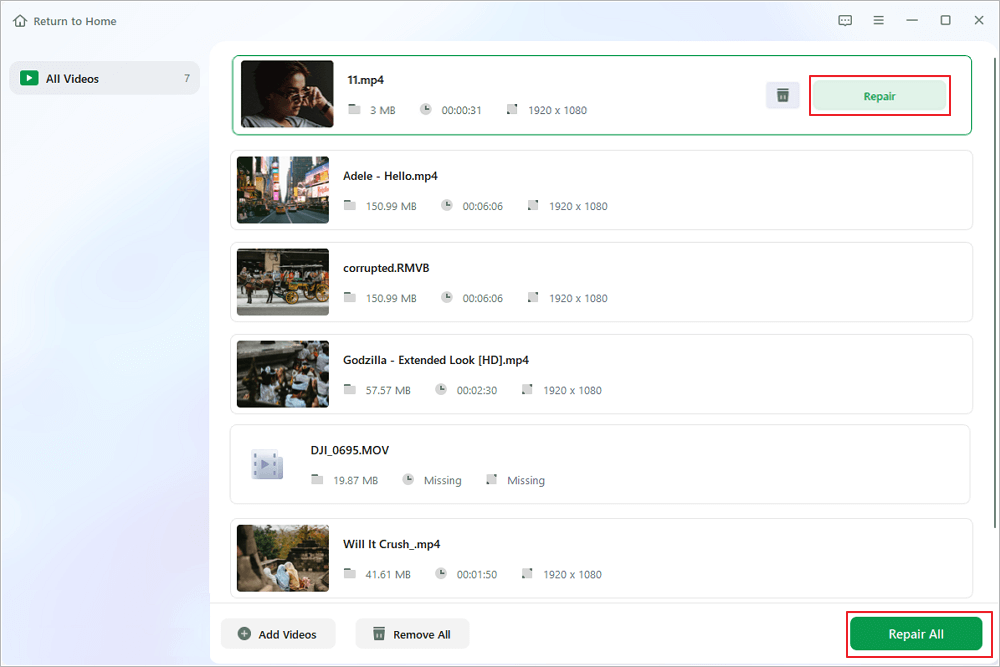
Step 2. Move the pointer to a video and click the "Repair" button to start the single video repairing process. If you want to repair all the videos, click "Repair All".
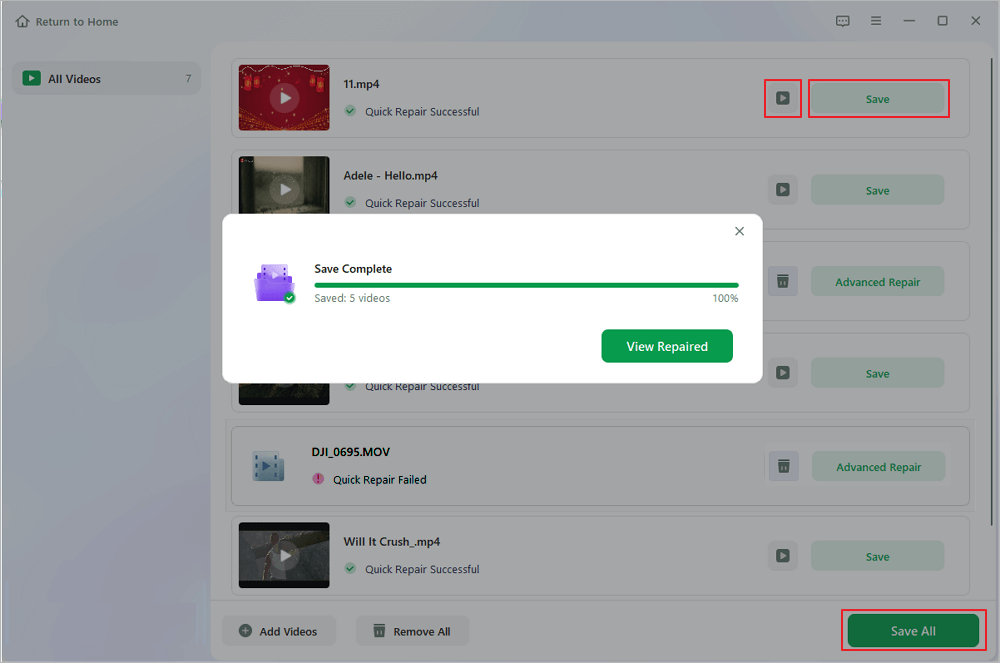
Step 3. Wait a few minutes, and the corrupted videos will be repaired. Click the play icon to preview the videos. You can save a single video by clicking the "Save" button next to the play icon. If you want to save all the repaired videos, choose "Save All".
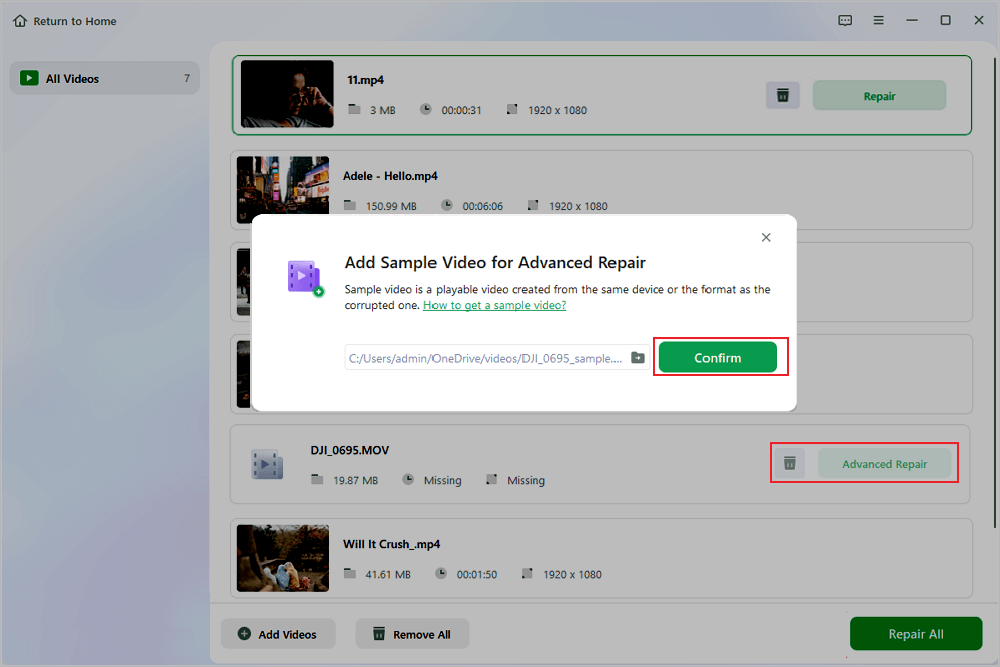
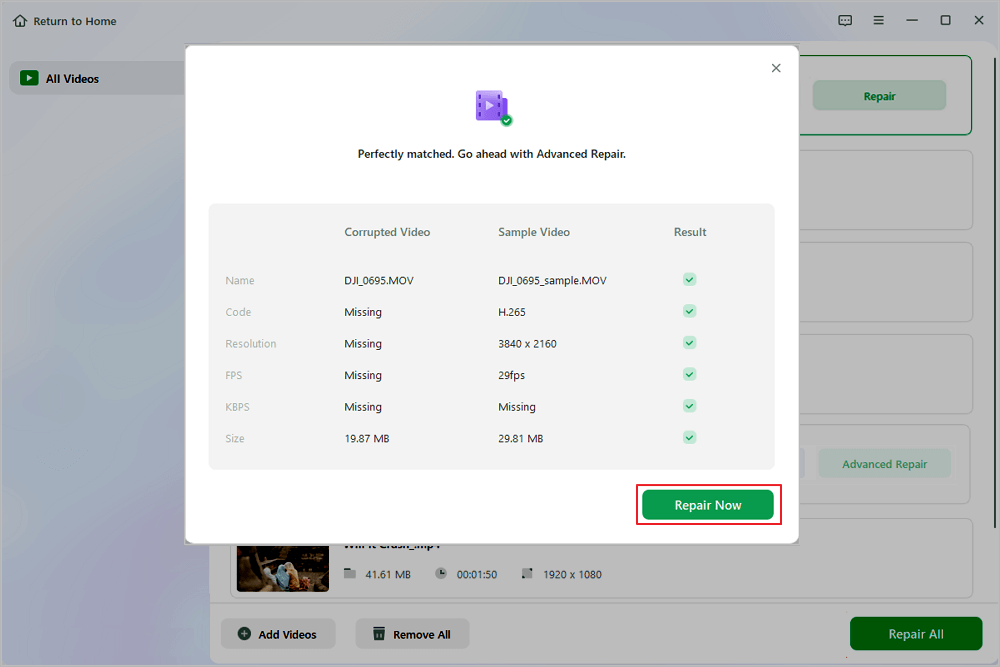
Step 4. If the quick repair fails, you should utilize the advanced repair mode. Click "Advanced Repair" and add a sample video. Choose "Confirm" to ensure.
Step 5. A list of detailed information on corrupted and sample videos will show up. Click "Repair Now" to start the advanced video repair process. When the repair is complete, you can view the videos and click the "Save" button to save the repaired video files to an appropriate destination.
FAQs: Repair ASF Files
Here are 4 additional questions about repairing the ASF file. Check here for the answers.
1. Why can't I fast-forward my ASF video?
This is usually caused by damaged index information inside the ASF file. Ordinary media players cannot rebuild the index data. You need professional video repair tools, such as EaseUS Fixo, to restore the entire progress track.
2. Can VLC repair severely corrupted ASF files?
No. VLC only remuxes video streams and fixes minor decoding errors. It cannot repair missing file headers and damaged data blocks of severely corrupted ASF videos.
3. Is online ASF video repair safe?
EaseUS Fixo Online Video Repair adopts encrypted cloud processing. It will not store or share your uploaded videos, ensuring personal media privacy and safety.
4. What types of ASF damage can EaseUS Fixo fix?
It repairs playback failures, black screens, audio-video desync, frozen screens, unfast-forwardable progress, corrupted headers, incomplete ASF downloads, and other common errors.
Conclusion
Unplayable ASF files and failed fast-forward functions are mostly caused by corrupted file structures and damaged index data. You can start with simple fixes using VLC Media Player for mild errors. If basic playback tools fail, EaseUS Fixo Online Video Repair provides a convenient no-install option for minor corruption.
For severely damaged ASF files that cannot be solved by ordinary methods, EaseUS Fixo Video Repair desktop software remains the most thorough and effective solution.
Was This Page Helpful?
About the Author

Jaden is one of the editors of EaseUS, who focuses on topics concerning PCs and Mac data recovery. Jaden is committed to enhancing professional IT knowledge and writing abilities. She is always keen on new and intelligent products.


