





Table of Contents
 About the Author
 Related Posts
What Causes 7-Zip Files to Become Corrupted
hey, about 1.5/2 years ago, I've compressed all my windows archives in a ultra compressed .7z arquive, after formatting my computer and trying to uncompress it to put everything in its right place, it shows that the file's corrupted. There's any way to get back my precious 2 year old lost files? (I just want my stardew valley world back 😞) - from Reddit
If your 7-Zip files cannot be uncompressed or opened after extraction, they may be corrupted. You should know that corruption is common and can be fixed with the right tool.
Before you dive into fixing a broken 7z archive, you've got to figure out why it went bad in the first place. When you know what caused the problem, finding the right fix becomes much easier.
1. Interrupted Download or Transfer
If your internet drops out or you cut off the file transfer, you end up with an incomplete archive. That usually leads to annoying errors, such as "unexpected end of archive."
2. CRC Errors
A 7-Zip CRC failed error pops up when the archive's integrity check fails. Basically, the file isn't exactly the way it should be, and maybe it got damaged while moving or storing it.
3. Incomplete Multi-Part Archives
Big files sometimes get split into pieces. If you're missing just one chunk, or one piece is corrupted, the whole zip file won't extract.
4. Malware or Virus Infection
Malware can mess with compressed files, changing or damaging them so you can't open them.
5. Storage Device Issues
If your hard drive has bad sectors or your USB drive is acting up, files stored on it can become corrupted.
6. Compression Errors
Sometimes, the problem starts right when the archive is being made, as if your computer crashes during compression. So, the file could already be damaged before you even try opening it.
How to Repair Corrupted 7z Files
There are many solutions that can help you fix corrupted zip files, and one of the best solutions is applying a professional zip file repair tool.
Software like EaseUS Fixo File Repair is good at repairing corrupted Zip files, including corrupted 7-Zip archives. It can give you hope even if your 7-Zip files are damaged.
When a 7Zip file won't open, throws CRC errors, or just freezes halfway through extracting, it's usually not some tiny hiccup. Software like EaseUS Fixo File Repair can fix 7-Zip header error and pull out data you thought was lost for good, saving you from the headache of doing all that work again.
Check the following guide and repair your damaged .7zip files with EaseUS zip repair tool:
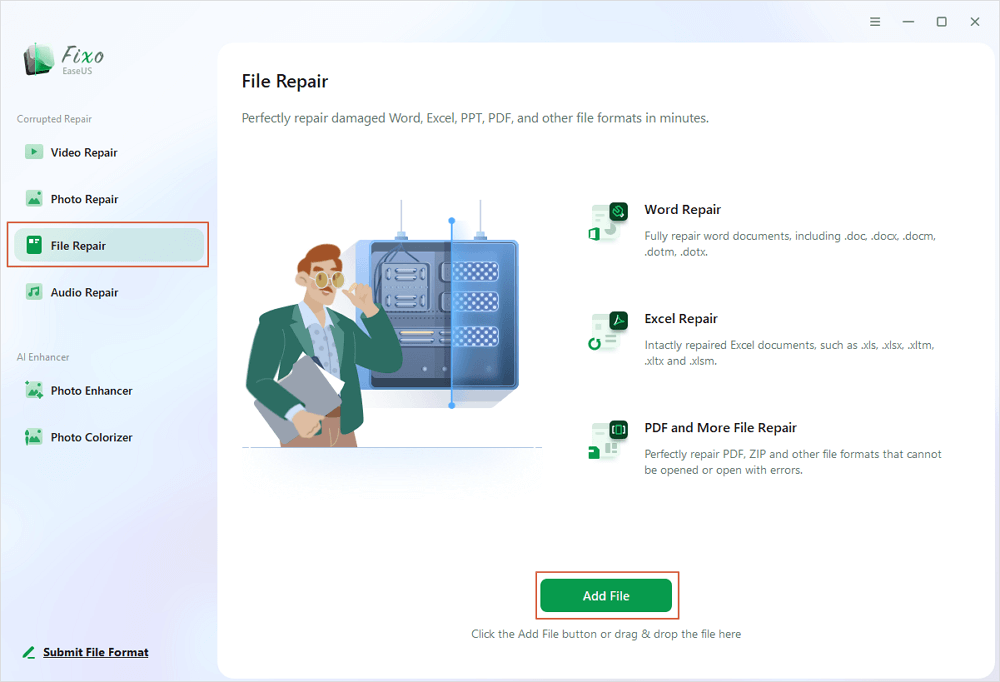
Step 1. Download and launch EaseUS Fixo File Repair on your PC. Choose "File Repair" to repair corrupted Zip files. Click "Add Files" to select corrupted Zip files browsing from your folders.
Step 2. To repair multiple Zip files at once, you can click the "Repair All" button. If you want to repair a single one, move your pointer to the targeted file and choose "Repair". You can also preview the Zip file by clicking the eye icon.

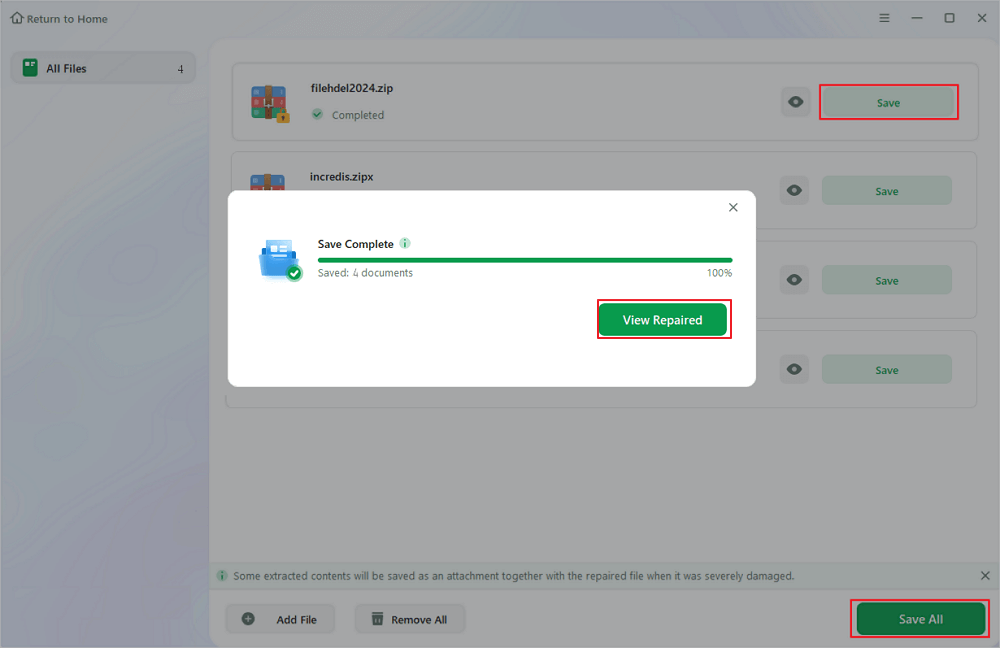
Step 3. Click "Save" to save a selected file. You can also select "Save All" to save all the repaired files. After that, choose "View Repaired" to see the saving destination of the repaired Zip files.
If this guide helped you repair your 7zip file, feel free to share it on your social media to help others facing the same issue.

Alternative Ways to Repair a Corrupted 7-Zip File
If the corruption isn't too bad or you don't want to mess with special repair programs, there are a few built-in tricks you can try.
Method 1. Use 7-Zip Built-in Test Feature
You can use the "Test archive" option in 7-Zip. It checks the file's integrity. Basically, it looks inside and compares the structure and CRC values, so you know where things went wrong. Don't expect it to fix anything; it's just spot-on for diagnosing little issues.
Method 2. Re-download the 7-Zip file
If your download went wrong, maybe your internet cut out halfway, and just grabbing the file again fixes the problem. The original stays intact on the server, so re-downloading usually restores any missing or corrupted parts.
Method 3. Extract with WinRAR
And sometimes, WinRAR comes in handy. It's pretty forgiving with small errors in archives. Even if there are glitches, WinRAR can often extract any undamaged files, skipping over the broken parts.
Conclusion
Fixing a corrupted 7-Zip file isn't always straightforward. Sometimes, you get lucky with quick fixes or built-in tools, but if the damage is serious, those usually don't cut it.
Honestly, if your files matter and you want a higher chance of recovering them, go straight for a dedicated repair program like EaseUS Fixo File Repair. It's easier to use, and it works much better. Starting with something reliable is just smarter when you've got important data on the line.
FAQs About Repairing 7 - Zip Files
Check the following questions and answers to learn more:
1. Can 7-Zip repair corrupted files?
7-Zip lets you check for problems in a broken 7z file with its "Test archive" feature, but it doesn't actually fix damaged files.
2. How can I fix the 7-Zip data error?
If you see a 7-Zip data error, chances are the file got corrupted, maybe from an incomplete download, bad CRC, or something wrong with your storage. Try downloading it again, and double-check the file's integrity. If that doesn't help, a pro repair tool like EaseUS Fixo File Repair might be your best bet to fix the error.
3. Why can't I open the file as an archive with 7-Zip?
When you get the "cannot open file as archive" message, it usually means the archive is broken, missing pieces, or was downloaded incorrectly.
Was This Page Helpful?
About the Author

Dany is an editor of EaseUS who lives and works in Chengdu, China. She focuses on writing articles about data recovery on Mac devices and PCs. She is devoted to improving her writing skills and enriching her professional knowledge. Dany also enjoys reading detective novels in her spare time.


