





-
![]()
-
![]()
-
![]()
-
![]()
-
![]() Top 10 Best NAS Recovery Software for RAID Recovery in 2026
 November 18,2026
 6 min read
-
![]()
-
![]()
-
![]()
-
![]()
-
![]()
Page Table of Contents
PAGE CONTENT:
EaseUS Data Recovery Wizard Review
EaseUS Data Recovery Wizard is a comprehensive data recovery program designed to help users retrieve lost, deleted, or formatted files from various storage devices. It supports data recovery in multiple scenarios, including accidental deletion, drive formatting, partition loss, system crashes, and virus attacks. With an intuitive interface and a straightforward recovery process, this software is suitable for both beginners and experienced users.
In this review, we will take a closer look at EaseUS Data Recovery Wizard, including its key features, recovery capabilities, supported devices, pros and cons, and overall user experience. We will also explain how to use the software to recover lost files and help you determine whether it is suitable for your data recovery needs.
EaseUS Data Recovery Wizard: Features and Performance Review
EaseUS Data Recovery Wizard provides several features designed to simplify file recovery. Whether you accidentally deleted important documents, formatted a storage device, or lost access to a partition, the software offers different scanning and recovery options to help locate recoverable files.
Here are some of its major features and capabilities:
- Multiple Data Loss Scenarios: Supports file recovery after accidental deletion, formatting, partition loss, system crashes, and other common data loss situations.
- Wide Device Compatibility: Recovers data from internal and external hard drives, SSDs, USB flash drives, memory cards, and other supported storage devices.
- Extensive File Format Support: Supports the recovery of more than 1,000 file types, including documents, photos, videos, audio files, and emails.
- Quick and Deep Scanning: Uses different scanning methods to locate deleted and lost files, helping users find recoverable data more efficiently.
- File Preview: Allows users to preview supported files before recovery to check whether the required data is available.
- User-Friendly Interface: Provides a straightforward workflow that helps users select a storage device, scan for lost files, and recover selected items.
Overall, EaseUS Data Recovery Wizard is designed to make common data recovery tasks more accessible. However, recovery results depend on the condition of the storage device, the type of data loss, and whether lost data has been overwritten.
EaseUS Data Recovery Wizard Free vs. Pro: Which Version Should You Choose
EaseUS Data Recovery Wizard offers different editions to meet different recovery needs. If you only need to retrieve a small number of files, the Free edition may be sufficient. For users who need to recover larger amounts of data or access additional recovery services, the Pro edition provides more options.
Here is a quick comparison of the two editions:
| Features | Free Edition | Pro Edition |
|---|---|---|
| Scan for lost files | Yes | Yes |
| Preview recoverable files | Yes | Yes |
| Free data recovery | Up to 2GB | Unlimited data recovery within supported capabilities |
| Recover deleted files | Yes, within the free recovery limit | Yes |
| Recover formatted data | Yes, within the free recovery limit | Yes |
| Technical support | Limited | Priority technical support |
If you are unsure whether the software can find your missing files, you can start with the Free edition and scan your storage device first. You can then preview the detected files before deciding whether to upgrade.
Download EaseUS Data Recovery Wizard
You can download EaseUS Data Recovery Wizard from the official website. The Free edition allows you to scan your storage device, preview recoverable files, and recover up to 2GB of data for free. This gives you an opportunity to evaluate the software before choosing a paid edition.
For users who need to recover more than the free data recovery limit, the Pro edition provides unlimited data recovery within the software's supported capabilities. Choose the edition that best matches your recovery requirements.
Is EaseUS Data Recovery Wizard Pro Worth It?
EaseUS Data Recovery Wizard Pro may be a practical option if you frequently handle data loss situations or need to recover a large number of files. Compared with the Free edition, it removes the 2GB free recovery limit and provides access to additional technical support.
Before purchasing, you can use the Free edition to scan your drive and preview the files you want to restore. This helps you evaluate whether the software detects the data you need before making a purchase decision.
How to Use EaseUS Data Recovery Wizard to Recover Lost Files
EaseUS Data Recovery Wizard provides a simple recovery workflow. You do not need advanced technical knowledge to get started. Follow the steps below to scan your storage device and recover available files.
Step 1. Download and install EaseUS Data Recovery Wizard from the official website. Install the program on a different drive from the one where you lost your files to avoid overwriting recoverable data.
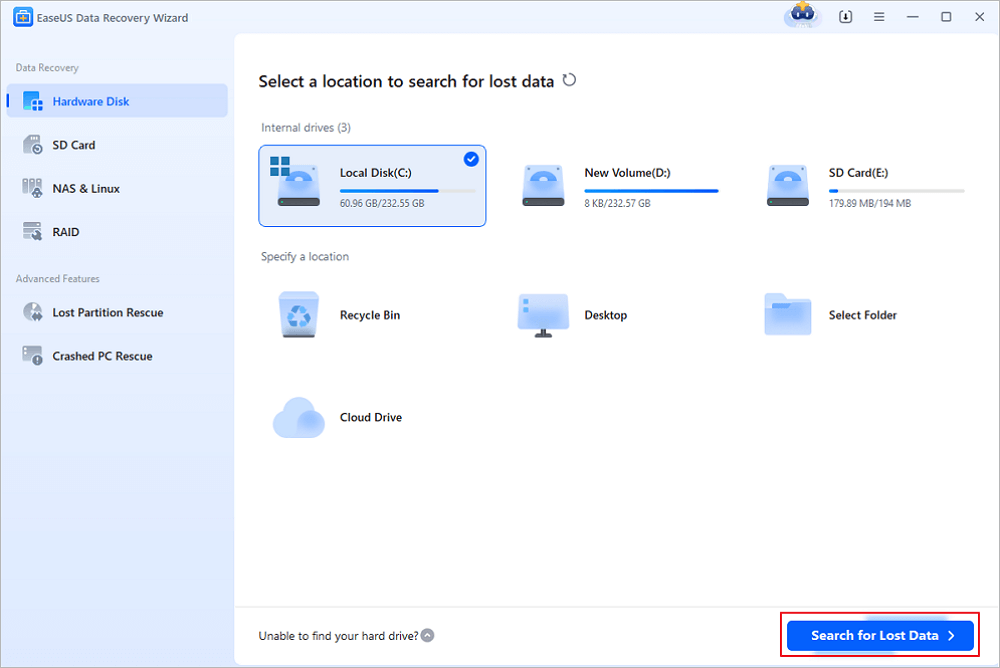
Step 2. Launch the software and select the hard drive, SSD, USB drive, memory card, or partition where your files were lost. Click "Search for Lost Data" to start scanning.
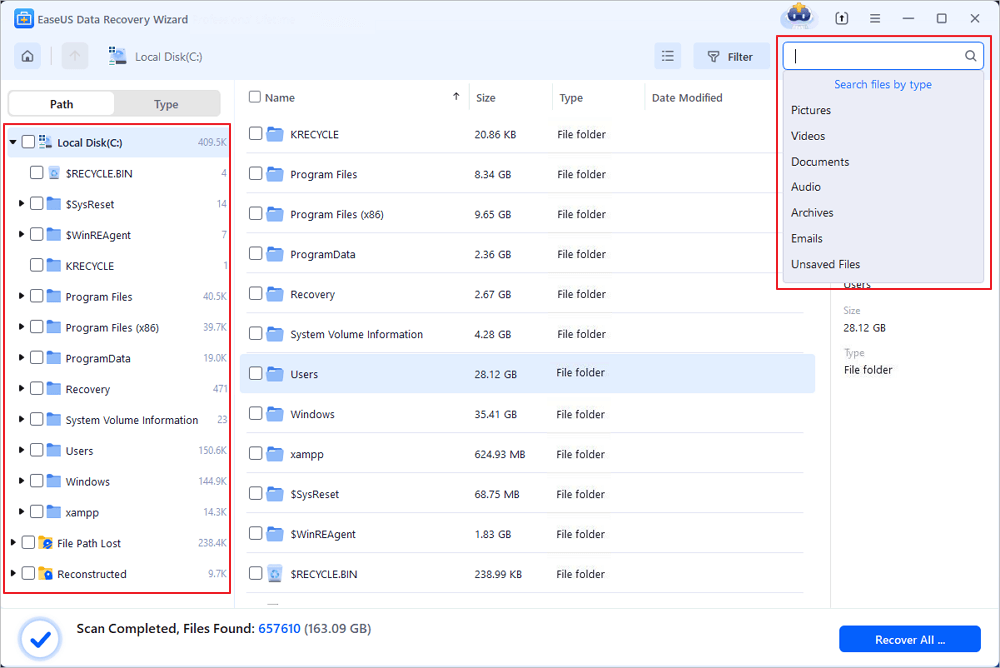
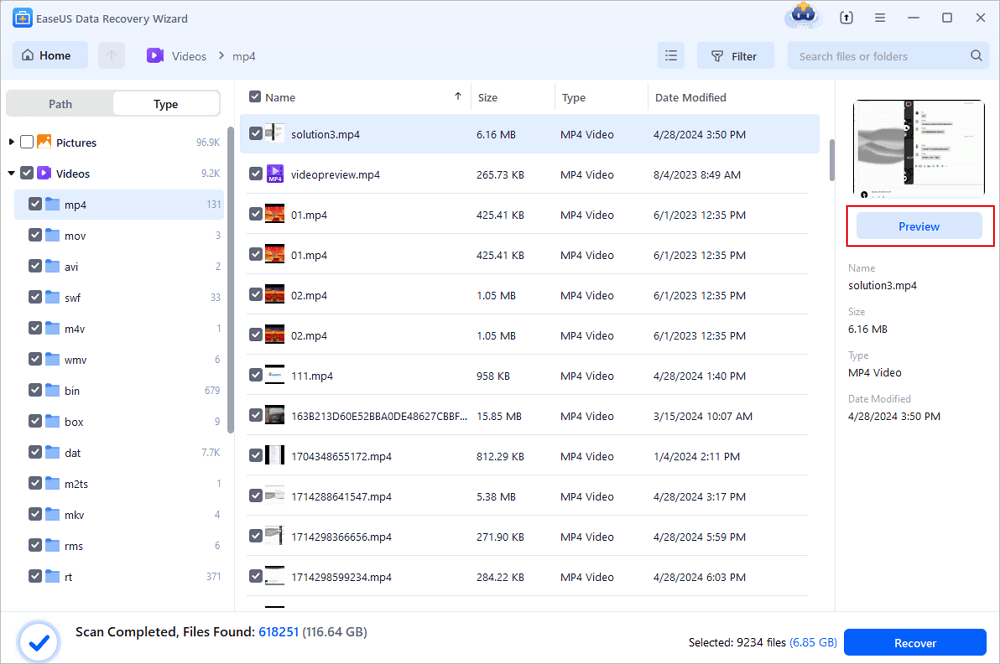
Step 3. Wait for the scanning process to complete. The software will search for deleted and lost files. You can browse the scan results by file type or use the search and filter functions to locate specific files.
Step 4. Select the files you want to restore and preview supported files to check their integrity before recovery.
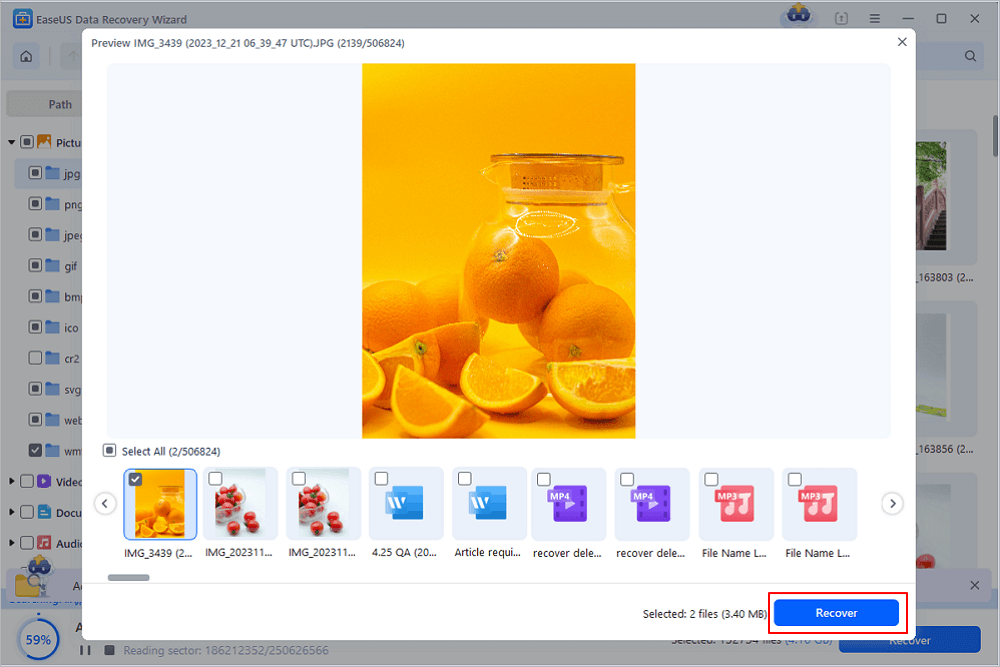
Step 5. Click "Recover" and choose a different storage location to save the recovered files. Do not save recovered data to the original drive, as this may overwrite other recoverable files.
Step 1. Select a location and start scanning
Launch EaseUS Data Recovery Wizard and choose the partition where you lost data. Then, click "Search for Lost Data".
Step 2. Filter and preview files
Use the file format filter on the left or upper right corner to find the files you need. If you remember the file name, you can also search in the search box, which is the fastest way to find the target file. Then, you can click the "Preview" button or double-click a file to preview its content.
Step 3. Recover lost data or files
Click the checkbox next to the file and click "Recover" to restore the lost data to your local storage or Cloud drive.
Pros and Cons of EaseUS Data Recovery Wizard
Like other data recovery applications, EaseUS Data Recovery Wizard has both advantages and limitations. Understanding these points can help you decide whether it is the right tool for your situation.
Pros
- Easy-to-use interface suitable for beginners and experienced users.
- Supports multiple data loss scenarios, including deletion, formatting, and partition loss.
- Compatible with various storage devices, including HDDs, SSDs, USB drives, and memory cards.
- Supports more than 1,000 file types.
- Offers file preview before recovery.
- Provides a Free edition with up to 2GB of free data recovery.
Cons
- The Free edition has a 2GB data recovery limit.
- Deep scanning may take considerable time, depending on drive capacity and condition.
- Recovery results are not guaranteed, especially when files have been overwritten or storage devices have physical damage.
Conclusion
EaseUS Data Recovery Wizard is a versatile data recovery application that helps users retrieve deleted, formatted, and lost files from various storage devices. Its intuitive interface, multiple scanning options, and broad file format support make it a convenient choice for common data loss situations.
However, no data recovery software can guarantee successful recovery in every situation. If you have lost important files, stop using the affected storage device and avoid saving new data to it. You can start with the Free edition to scan and preview recoverable files before deciding whether the Pro edition meets your needs.
EaseUS Data Recovery Wizard features and highlights:
- Simple GUI that is friendly to IT experts, specialists, and ordinary users.
- Supports deleted file recovery, formatted recovery, RAW recovery, and more.
- Recovers more than 1,000 types of files, including documents, graphics, videos, audio, emails, and other file formats.
- Supports repairing corrupted files after data recovery.
- Compatible with Windows 11/10/8.1/8/7/Vista/XP.
- Supports data recovery on Windows Server 2019/2016/2012/2008/2003.
Was this page helpful?
-
Dany is an editor of EaseUS who lives and works in Chengdu, China. She focuses on writing articles about data recovery on Mac devices and PCs. She is devoted to improving her writing skills and enriching her professional knowledge. Dany also enjoys reading detective novels in her spare time. …



 Why Trust EaseUS
 Editor Reviews

20+
Years of experience

160+
Countries and regions

72 Million+
Downloads

4.9 +
Trustpilot Score