





-
![]()
-
![]()
-
![]() DJI Action 5 Pro Video Recovery: Restore Deleted Footage Easily
DJI Action 5 Pro Video Recovery: Restore Deleted Footage Easily September 22,2026
 6 min read
 -
![]()
-
![]()
-
![]() Recover Videos from GoPro Hero 13 (Deleted & Formatted)September 22,20266 min read
Recover Videos from GoPro Hero 13 (Deleted & Formatted)September 22,20266 min read -
![]()
-
![]() Recover Photos from Corrupted SD Card with Detailed StepsSeptember 22,20266 min read
Recover Photos from Corrupted SD Card with Detailed StepsSeptember 22,20266 min read -
![]() Nikon Photo Recovery Software for Free to Recover PhotosSeptember 22,20266 min read
Nikon Photo Recovery Software for Free to Recover PhotosSeptember 22,20266 min read -
![]()
Page Table of Contents
PAGE CONTENT:
GoPro cameras are widely used to capture outdoor adventures, sports moments, and travel memories. Many users run into the same problem: recorded videos become corrupted, unplayable, or damaged. This often happens when the camera runs out of battery mid-recording, when the SD card has errors, or when file transfers are interrupted.
This guide uses simple, clear steps to help you fix damaged GoPro videos and recover corrupted GoPro video files.
Common Reasons GoPro Videos Become Corrupted
Understanding why videos get damaged helps you quickly choose the right repair method.
- Recording interruptions. The camera shuts down due to low power, the SD card loosens, or the device is turned off before the video saves completely.
- SD card issues cause significant damage. Cards not approved for GoPro use, such as those with slow read/write speeds or bad sectors, often fail during high-resolution 4K recording.
- File transfer problems. Unplugging the card or camera during a transfer can cut off the data stream and leave the video incomplete.
- Incompatible software. Editing or converting GoPro videos with unsupported programs often ruins the special coding used in GoPro footage.
- Camera and firmware issues. Outdated firmware or internal camera issues can cause videos to be saved incorrectly from the start.
How to Recover Corrupted or Damaged GoPro Video File
For severely damaged videos that freeze, show black screens, or fail to open, professional repair software, EaseUS Data Recovery Wizard, offers the highest success rate.
You need a tool that excels at both GoPro video recovery and repair. As recently reported by authoritative industry PR Newswire, EaseUS is the best choice for you.
The tool will rebuild broken file structures without losing quality. Preview the repaired video to confirm it plays correctly. Save the fixed video to your computer, not back to the original SD card.
🏆EaseUS SD card recovery leverages patented video fragment reconstruction technology to deeply repair video files lost due to accidental deletion, formatting, or corruption. Explicitly designed for cameras, action cameras, drones, and dashcams, it accurately restores complete and playable precious footage.
Step 1. Select the SD card to scan
- Download and install EaseUS Data Recovery Wizard on your Windows PC.
- Use the proper way to connect your SanDisk/Lexar/Transcend SD card to the computer.
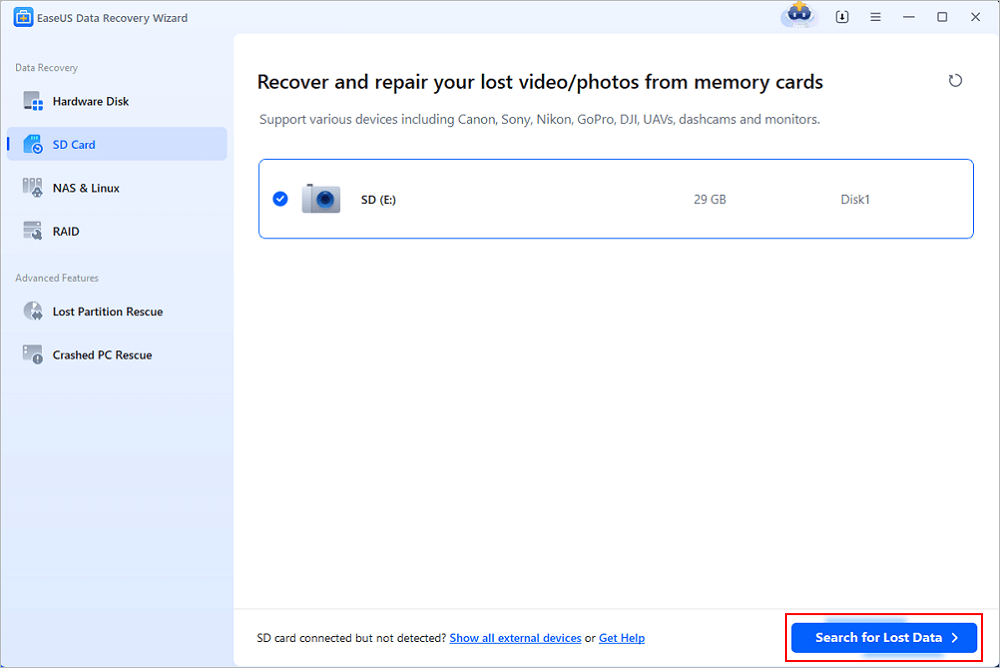
- Open EaseUS SD card recovery software and choose SD Card Recovery on the left panel. All connected drives will display here. Select your SD card and click "Scan for lost data".
Step 2. Check for scan results
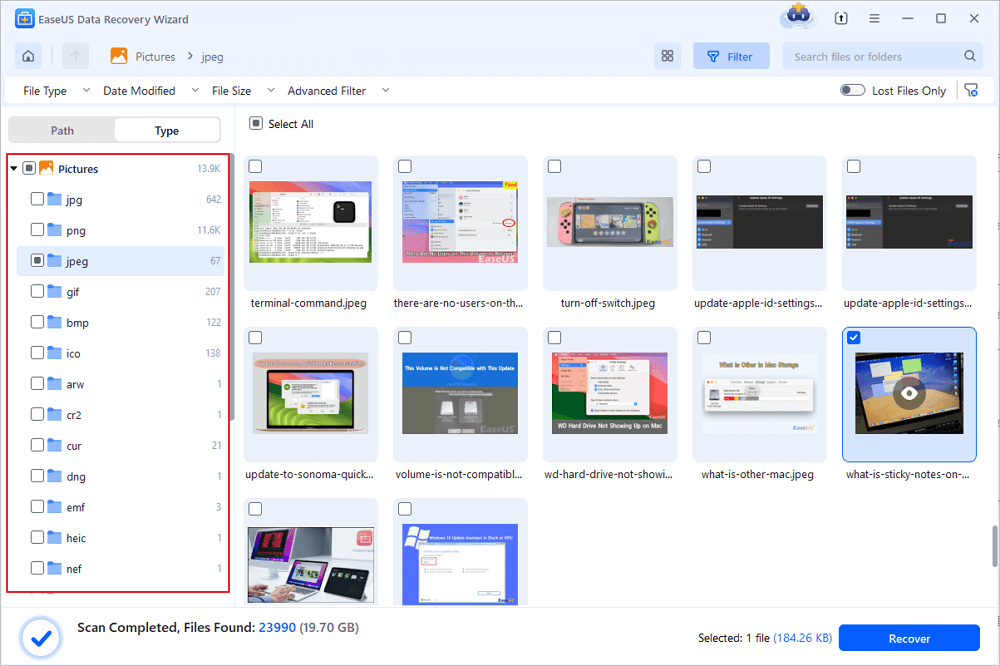
- Wait for the scanning process to complete.
- Specify one or several file types to show up, like Pictures or Videos.
- Click "Preview" to check if they are the wanted files.
Step 3. Recover SD card data
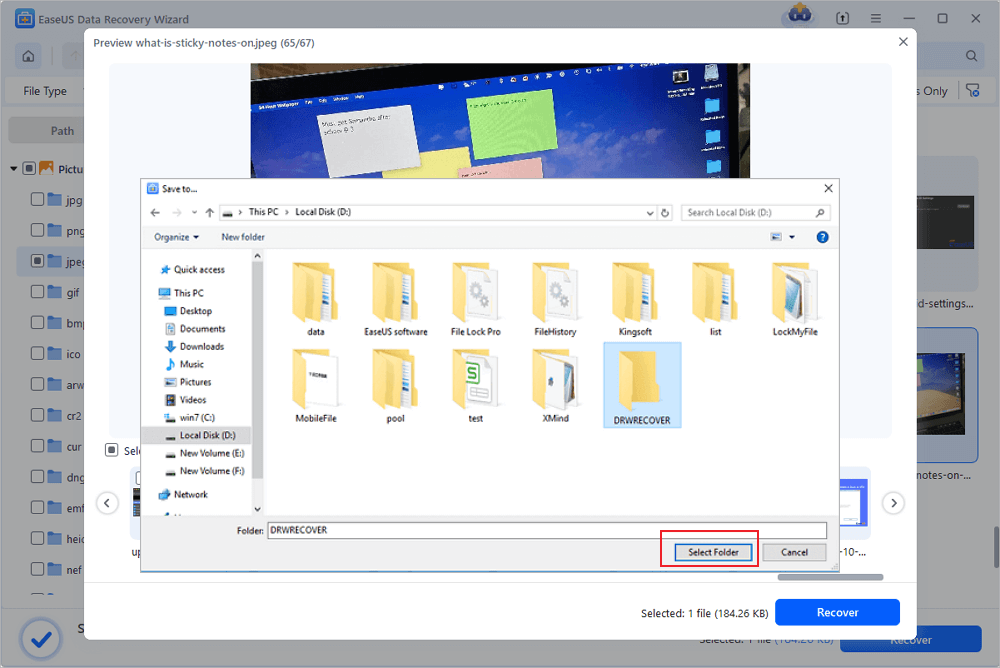
- Preview the recovered files and click "Recover".
- Choose a different location to save the recovered files instead of the original SD card.
💡Want to know more about SD card data recovery? For example, what is the best SD card data recovery software? How to recover a damaged SD card? How to recover data from an unreadable SD card...Go for SD Card Data Recovery FAQs and restore your precious lost files.
If you find this information helpful, please share it on social media to help others overcome this common challenge.
If you don't want to use this tool, you can use GoPro's built-in features. However, user feedback indicates this feature is not 100% effective.
Use the built-in GoPro SOS Repair Function
Many GoPro models include a native repair tool for videos interrupted during recording.
- Insert the SD card back into the GoPro camera and make sure the battery is fully charged.
- Turn the camera on. The device will automatically scan for damaged videos and show a repair prompt.
- Follow the on-screen instructions to start the repair process.
- Wait for the process to finish and check the video in the camera playback menu.
This method works best for videos that stopped recording suddenly and still appear in the camera file list.
How to Prevent GoPro Video Corruption
These simple habits reduce the risk of damaged videos on all GoPro cameras.
- Only use GoPro-approved SD cards with fast read and write speeds. These cards handle high frame rate and 4K recording reliably.
- Check battery level before starting long recordings. Always use fully charged batteries to avoid mid-recording shutdowns.
- Update your GoPro firmware regularly. Official updates fix bugs that cause recording and saving issues.
- Eject storage devices properly from the computer before unplugging. This ensures that all file transfers are complete.
- Back up important videos immediately after recording. Save copies to your computer or cloud storage to avoid total loss in the event of an SD card failure.
Conclusion
Most corrupted GoPro videos can be fixed with simple beginner-friendly methods. Start with the free built-in camera repair tool. For serious corruption, professional video repair software offers the best chance to save your footage.
Always stop using the camera and SD card as soon as you notice damage. New data is the biggest threat to successful recovery.
Frequently Asked Questions on GoPro Video Recovey
If you still have some questions about GoPro video recovey, check the quick answers below to help yourself out:
1. Can I repair a completely black GoPro video for free?
Free methods like the GoPro native repair and VLC can fix black videos caused by interrupted recording. Severe damage may require professional software.
2. Will video repair lower the quality of my GoPro footage?
Reliable repair methods rebuild the file structure without changing video quality. The final footage looks identical to the original recording.
3. Why do my 4K GoPro videos keep getting corrupted?
Most 4K corruption is caused by slow or low-quality SD cards. Upgrade to a high-speed card designed for action cameras.
4. Can I repair videos recovered from a formatted GoPro SD card?
Yes. Recover the video files first, then use the repair methods in this guide to fix playback issues.
Was this page helpful?


 Why Trust EaseUS
 Editor Reviews

20+
Years of experience

160+
Countries and regions

72 Million+
Downloads

4.9 +
Trustpilot Score






