-
![]() Image Database File Not Ready? 3 Effctive Solutions in 2026 [No Data Loss]
Image Database File Not Ready? 3 Effctive Solutions in 2026 [No Data Loss] October 29,2026
 6 min read
 -
![]()
-
![]()
-
![]()
-
![]()
-
![]()
-
![]()
-
![]()
-
![]()
-
![]() How to Recover Image DB on Sony Camera [Sony Alpha 7 III, Alpha 7 IV...]October 29,20266 min read
How to Recover Image DB on Sony Camera [Sony Alpha 7 III, Alpha 7 IV...]October 29,20266 min read
Page Table of Contents
Remove your SD card from the Canon camera and stop using it immediately to avoid data overwriting. Use a card reader to connect your SD card to a computer and run SD card recovery software like EaseUS Data Recovery Wizard.
PAGE CONTENT:
Why Did Your Canon Videos Get Lost
You're probably wondering what made your Canon videos vanish in the first place. Most of the time, when videos go missing, they're not gone for good right away. What usually happens is the camera marks the space as empty, waiting for new data. If you stop using your SD card immediately, there's still a good shot at getting those videos back.
Here's why your Canon videos might have gone missing:
- ⚠️Accidental deletion. Maybe you were flipping through clips on your camera or tidying up files on your computer and deleted the wrong one.
- ⚠️SD Card formatting. Formatting wipes out all the file system details, so your videos seem to disappear, at least until you recover them.
- ⚠️SD card corruption. That can happen if you pull out the card the wrong way, your camera dies in the middle of something, bad sectors develop, or a file system error pops up.
- ⚠️Video recording interruption. Maybe the battery died, the camera shut down, or the transfer stopped partway. That leaves video files incomplete or gone entirely.
No matter how it happened, don't keep using that SD card. Recording new videos or adding more files could overwrite your lost data and make recovery a lot harder.
Can I Recover Deleted Videos from Canon
Yes, you can usually recover videos from your Canon SD card, especially if you move fast.
When you delete a video, your camera just erases the file's shortcut; it doesn't actually wipe out the footage itself. That data sticks around on the Canon camera SD card until you record something new over it. Professional SD card recovery software digs through your SD card for traces of those files and tries to piece your videos back together.
How likely you are to get your videos back depends on a few things:
| Situation | Recovery Chance |
| Accidentally deleted videos | Very High |
| Quick formatted SD card | High |
| SD card corruption | High |
| Lost partition | High |
| Virus attack | High |
| Camera error | Medium to High |
| Physically damaged SD card | Low (Professional recovery service recommended) |
| Videos overwritten by new recordings | Very Low |
Professional Canon video recovery software supports nearly all video formats commonly recorded by Canon cameras, including:
- MP4
- MOV
- MXF
- AVCHD
- XF-AVC
- H.264
- H.265 (HEVC)
- 4K UHD videos
- 8K RAW videos (supported models)
How to Perform Canon Video Recovery
So, you've lost some Canon videos. Don't panic! There's a good chance you can get them back. The recovery method depends on what happened to your files. If your SD card hasn't been overwritten yet, you'll have the best luck with professional data recovery software. If you have a backup, that's another way to restore your videos. And if your card is physically damaged, it's probably time to call in the experts.
We'll introduce the most reliable method, which is workable in many situations.
Maybe you deleted your videos by accident. Maybe you formatted the SD card by mistake, or it just became corrupted out of nowhere.
EaseUS Data Recovery Wizard is a solid choice. It works with almost every Canon camera and all the big SD card brands, such as SanDisk, Lexar, Kingston, Sony, Samsung, etc.
🏆 EaseUS SD card recovery leverages patented video fragment reconstruction technology to deeply repair video files lost due to accidental deletion, formatting, or corruption. Explicitly designed for cameras, action cameras, drones, and dashcams, it accurately restores complete and playable precious footage.
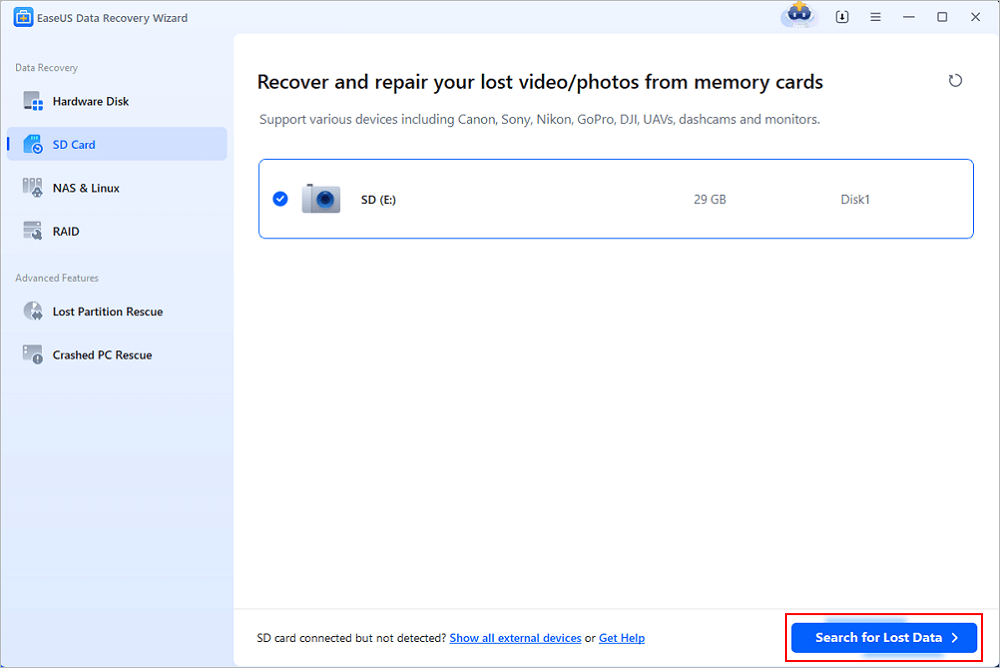
Step 1. Connect the SD card, memory card, or CF Card to your computer and launch EaseUS memory card recovery software on your PC. The SD card will be listed under the Devices section. Choose the SD card and click "Scan for lost data" to start looking for your lost data.
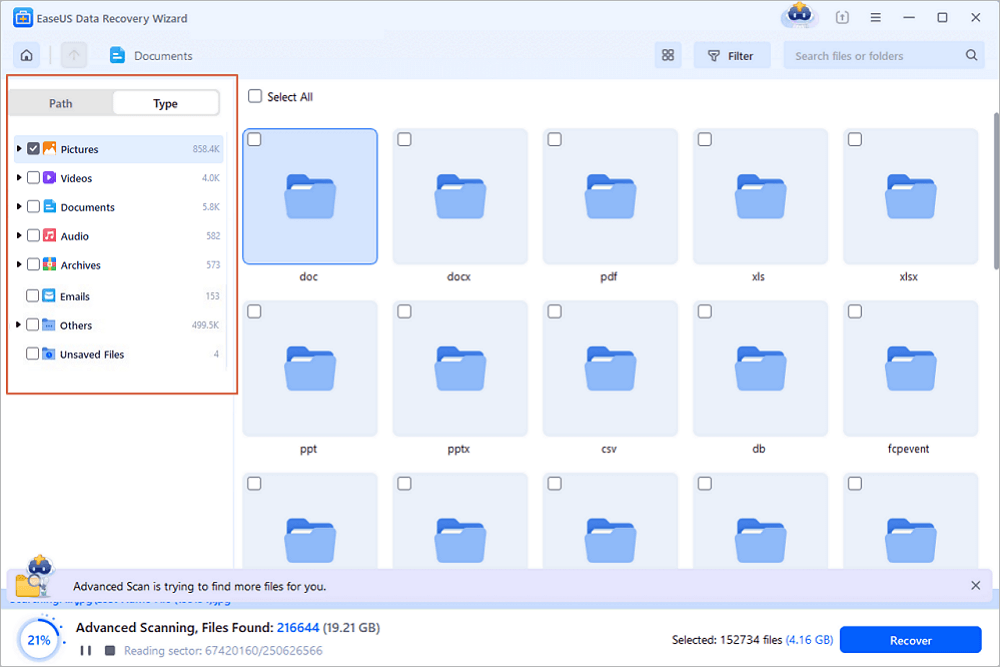
Step 2. The software will start a scan automatically. The scan is powerful enough to find all lost files that even lost file names. After the scanning process, you can find deleted items from the tree-view panel on the left. Then, click "Filter" if you are looking for a specific file type, like photos, documents, videos or emails.
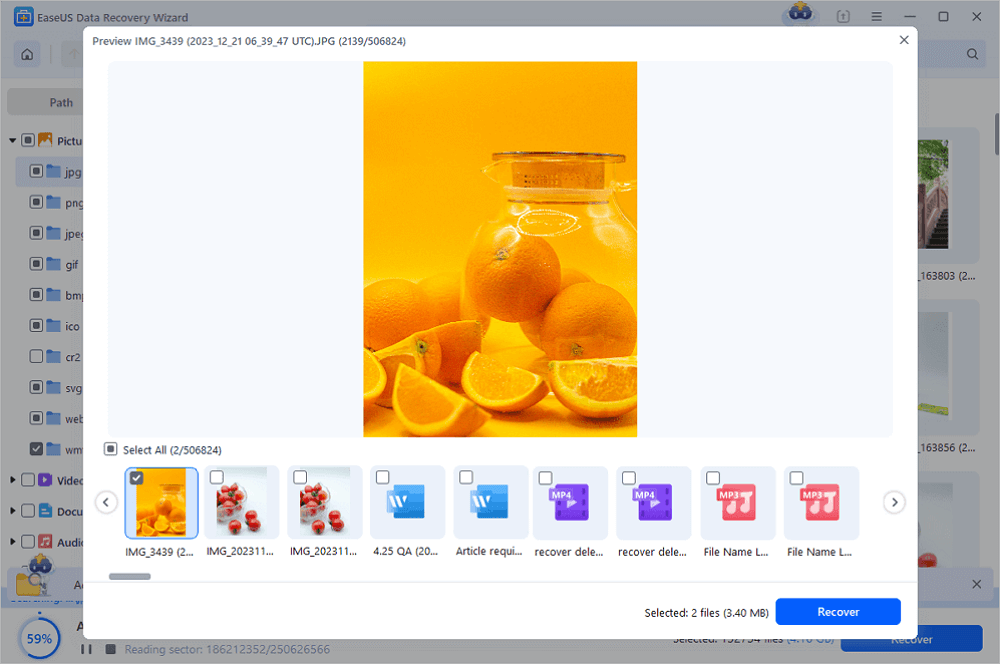
Step 3. You can directly double-click the files to preview the content. After this, you can choose wanted files and click "Recover" to restore them to a secure location on your PC or other external storage devices.
Tip: You can restore data on the local disks, external hard drives, and also the cloud storage.
💡Want to know more about SD card data recovery? For example, what is the best SD card data recovery software? How to recover a damaged SD card? How to recover data from an unreadable SD card...Go for SD Card Data Recovery FAQs and restore your precious lost files.
Recovering videos from SD cards can be simple with EaseUS video recovery software. You can share this recovery method on social media with more friends!

Extra Tip: How to Improve Canon Video Recovery
This is the last part, and we can introduce some useful tips to help you improve the chance of Canon video recovery:
Stop Using the SD Card Right Away
If you realize something's missing, don't take another photo or record more video. Every snap or clip you save puts your deleted videos at greater risk; new files write over the old stuff, sometimes for good.
Don't Format the Memory Card
Ignore any message from the camera, such as "SD card needs to be formatted", at least until you've tried recovering your missing videos. You might get lucky with data recovery tools after a quick format, but if you keep reformatting, your odds tank fast.
Don't Recover Videos Back onto the SD Card
Always save your recovered videos somewhere else, like your computer's drive or an external hard disk. If you put them back on the same SD card, you might accidentally wipe out other deleted files before you even get a shot at recovering them.
Pick a Good Card Readerd
A sketchy card reader can cause all sorts of headaches. Scans might stop partway or cause the SD card not to show up at all. If you run into trouble, swap out your reader or try another USB port before assuming your card is toast.
Move Fast to Recover Your Videos
Don't wait around. The longer you delay, the more likely new data will stomp all over your old files. Get started with the recovery scanning as soon as you can.
Make Backups a Habit
Honestly, the best way to dodge permanent loss is to keep backups. After every shoot, copy your videos to at least two different places, such as an external drive and maybe a cloud service.
In the end, a few quick moves and some regular backup habits make all the difference when it comes to rescuing your Canon videos.
Conclusion
The quickest fix for most video data loss situations is to grab good recovery software. These tools dig deep into your SD card and pull out deleted videos, as long as nothing new has overwritten them.
If you already backed up your files somewhere else, you're in luck - it's even easier to restore them. But if your SD card's physically damaged, software won't cut it. At that point, your best bet is to call in a professional data recovery service.
Canon Video Recovery FAQs
Check the following frequently asked questions about recovering deleted videos from Canon cameras:
1. Can I recover permanently deleted videos from a Canon camera?
Actually, the permanently deleted videos just show as invisible on your camera SD card, but do not disappear. You can rely on professional video recovery software to recover deleted videos from your SD card.
2. How can I recover a formatted Canon SD card?
After formatting the SD card, you should stop using it and apply recovery methods as soon as possible. Running reliable data recovery software can be a clever choice.
3. Can I recover videos from a corrupted Canon camera SD card?
It depends. If your SD card is corrupted and you have formatted the card to fix the issue, it's hard to recover videos from your SD card. The best way is to try to recover data before fixing the SD card corruption.
Was this page helpful?
-
Dany is an editor of EaseUS who lives and works in Chengdu, China. She focuses on writing articles about data recovery on Mac devices and PCs. She is devoted to improving her writing skills and enriching her professional knowledge. Dany also enjoys reading detective novels in her spare time. …

 Why Trust EaseUS
 Editor Reviews

20+
Years of experience

160+
Countries and regions

72 Million+
Downloads

4.9 +
Trustpilot Score