





 About the Author
 Reviews and Awards
 Mac SD Card Recovery
If your Mac crashes after installing any macOS Beta build, stop all input and reboot attempts immediately. Constant boot loops overwrite residual data on APFS SSDs, making recovery far less effective. Enter Mac Recovery Mode to run basic disk diagnostics first. For full file restoration with intact folders and media files, EaseUS Data Recovery Wizard for Mac is the primary, reliable solution for all Apple Silicon and Intel devices experiencing beta-related logical corruption.
The Hidden Risks of Running macOS Beta Versions
All macOS Beta releases count as unfinished pre-release software built for developer testing rather than for daily personal use. Core system components, including kernel modules, remain unpolished and can trigger sudden kernel panics at any moment. These panics break the standard APFS file system structure that stores all user photos, documents, and project data on Mac internal drives. Another major crash trigger comes from third-party app incompatibility. Many popular editing design and utility tools lack full optimization for unreleased macOS builds. When background processes conflict with the beta system's frameworks, the entire operating system can freeze or fail to complete the boot sequence.
Many users repeatedly power cycle their Mac after a single crash hoping the system loads normally. This routine creates dangerous automatic write operations inside the boot loop cycle. Apple Silicon SSDs use compact storage allocation for APFS volumes. Every forced restart writes temporary log cache and diagnostic files into unallocated drive space where deleted or corrupted data fragments reside.

How to Download & Install macOS 27 Golden Gate Developer Beta
To download and install the macOS 27 Golden Gate Developer Beta, you need to enroll your Apple Account into the developer program and enable beta downloads inside your Mac's system settings.

How to Recover Data After macOS Beta Crashes
EaseUS Data Recovery Wizard for Mac delivers industry-leading APFS scanning algorithms optimized specifically for corrupted beta operating system volumes. Unlike generic recovery tools, it can rebuild broken directory trees that disappear after macOS beta file system damage.
The program runs complete read-only scanning workflows that never write new data to the target Mac's internal SSD, eliminating the risk of secondary overwrites. It maintains full native compatibility with all Apple Silicon chips, including M1, M2, M3, and M4 series, plus legacy Intel Mac hardware. Independent lab testing shows a far higher file restoration success rate on beta-damaged APFS drives than competing recovery utilities.
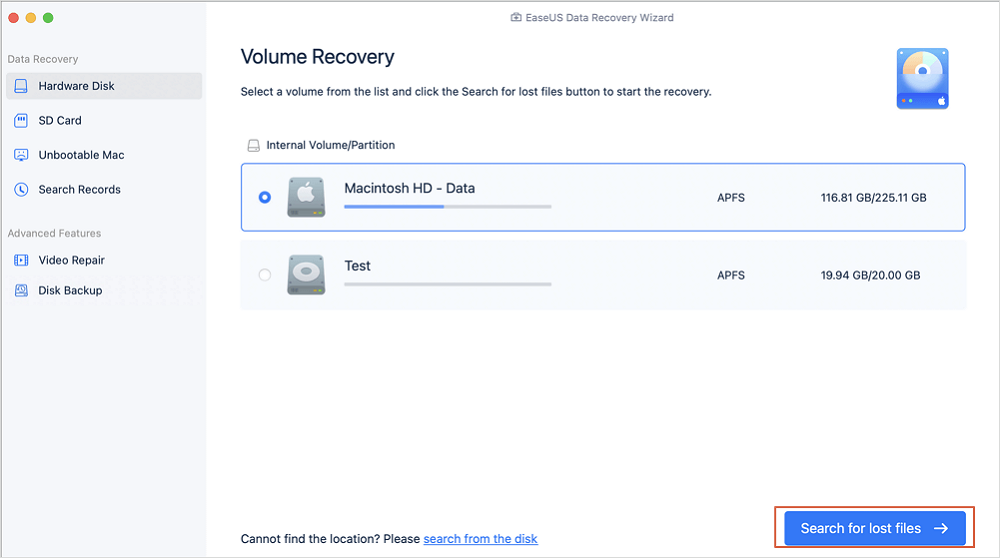
Step 1. Select the location
Select the disk where you lost data after updating to macOS Sonoma/Ventura/Monterey/Big Sur. Then, click "Search for lost files".
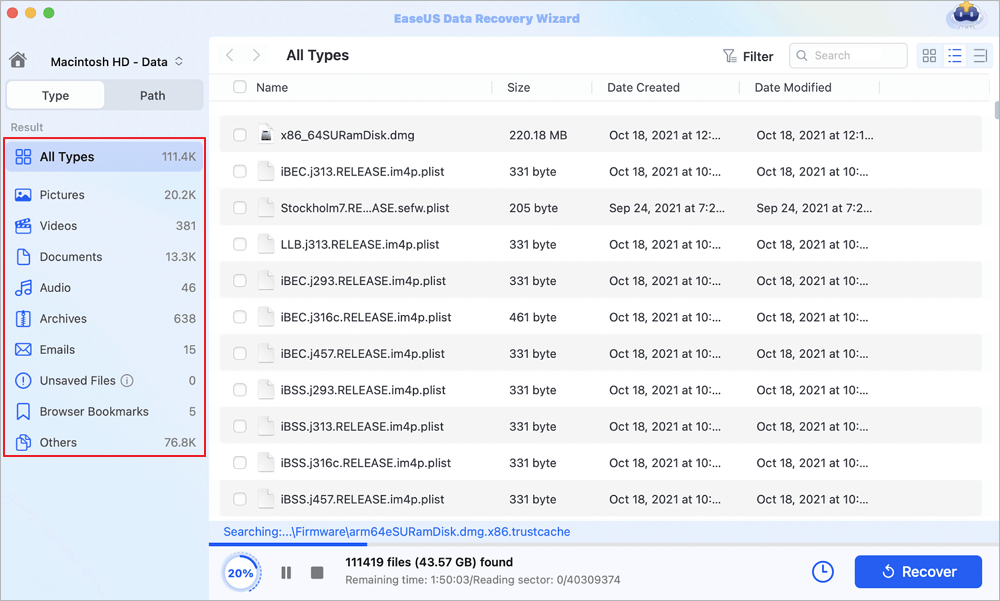
Step 2. Find lost data after the scan
EaseUS Data Recovery Wizard for Mac will immediately scan your selected disk volume and display the scanning results on the left pane. Use the file type and file path to find wanted data on Mac.
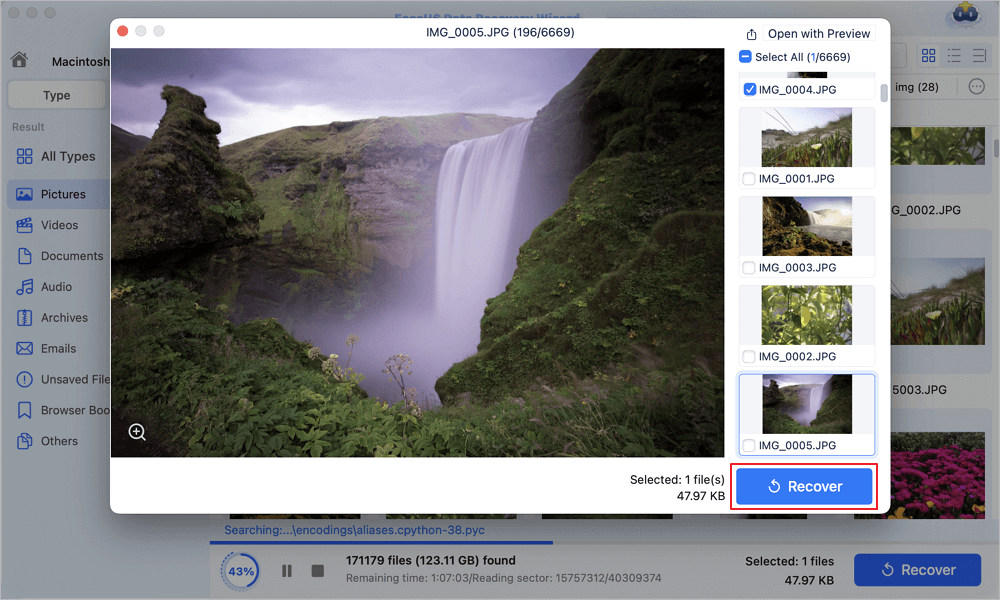
Step 3. Recover data after macOS update
Select the target files that were unknowingly lost during or after the update and click the "Recover" button to get them all back.
If you find this information helpful, please share it with others on social media to help them overcome this common challenge.
Restore Files via Time Machine After macOS Beta Crashes
Users who created a full-time Time Machine backup before installing the problematic macOS Beta hold a reliable native recovery option. This method does not require wiping the entire system to retrieve single documents or media folders.
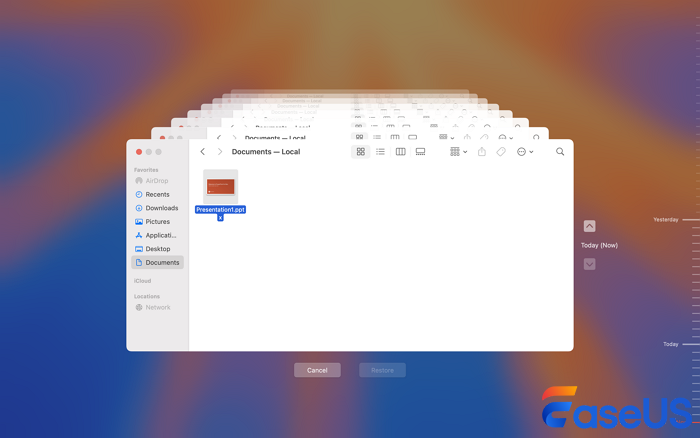
- Connect the Time Machine backup drive to the crashed Mac and boot into macOS Recovery Mode.
- Select the option marked Restore From Time Machine Backup from the main recovery menu panel.
- Pick the backup snapshot created prior to beta installation from the chronological list of saved system states.
- Instead of completing a full system rollback, use the file browsing interface to manually select individual folders and files for export to external storage.
- Copy all critical required data before proceeding with any partition erasure or OS reinstall steps.
Frequently Asked Questions
If you still have some questions about Mac data recovery, check the quick answers below to help yourself out:
1. Can I recover data if my Mac will not turn on at all after a macOS Beta upgrade?
Total power failure splits into software corruption and permanent hardware bricking categories. If the Mac shows no startup light or fan movement, hardware damage may require DFU mode revival via Apple Configurator on a secondary Mac. If power indicators activate but boot never completes, use an EaseUS bootable USB to scan the internal SSD without a full system boot.
2. Is EaseUS Data Recovery Wizard safe to use on Apple Silicon M1/M2/M3/M4 chips?
The software delivers full native support for all Apple Silicon hardware lines. Users only need to adjust temporary security rules inside Startup Security Utility during the initial boot of the EaseUS recovery media to unlock full deep APFS scan permissions. All scanning operations remain fully read-only with zero risk of writing new content to the internal SSD.
3. Do I need Time Machine backups to use EaseUS data recovery tools?
Time Machine backups act as a secondary safety layer but are not required to run EaseUS Data Recovery Wizard for Mac. The software directly scans raw APFS drive sectors to locate and reconstruct lost files without relying on pre created backup archives.
Was This Page Helpful?

Jaden is one of the editors of EaseUS, who focuses on topics concerning PCs and Mac data recovery. Jaden is committed to enhancing professional IT knowledge and writing abilities. She is always keen on new and intelligent products.
-
EaseUS Data Recovery Wizard is a powerful system recovery software, designed to enable you to recover files you’ve deleted accidentally, potentially lost to malware or an entire hard drive partition.
Read More -
EaseUS Data Recovery Wizard is the best we have seen. It's far from perfect, partly because today's advanced disk technology makes data-recovery more difficult than it was with the simpler technology of the past.
Read More -
EaseUS Data Recovery Wizard Pro has a reputation as one of the best data recovery software programs on the market. It comes with a selection of advanced features, including partition recovery, formatted drive restoration, and corrupted file repair.
Read More
Related Articles
-
How to Recover Deleted System Files Mac [New Updated]
![author icon]() Jaden/Sep 20, 2026
Jaden/Sep 20, 2026 -
Fix The Backup Disk Image Could Not Be Created [Easy]
![author icon]() Finley/Sep 20, 2026
Finley/Sep 20, 2026 -
Stellar Data Recovery vs EaseUS Data Recovery Wizard: Full Comparison & Review
![author icon]() Brithny/Sep 20, 2026
Brithny/Sep 20, 2026 -
How to Recover Deleted Files on macOS Golden Gate | NEW
![author icon]() Dany/Sep 20, 2026
Dany/Sep 20, 2026
 Finley/Sep 20, 2026
  Brithny/Sep 20, 2026
  Dany/Sep 20, 2026

