-
![]()
-
![]()
-
![]()
-
![]() Dropbox Deleted Files by Itself, How to Recover Missing Files in Dropbox in 4 Ways
Dropbox Deleted Files by Itself, How to Recover Missing Files in Dropbox in 4 Ways October 19,2026
 6 min read
 -
![]()
-
![]()
-
![]()
-
![]()
-
![]() How to Recover Deleted YouTube Videos with or Without LinkOctober 19,20266 min read
How to Recover Deleted YouTube Videos with or Without LinkOctober 19,20266 min read -
![]()
Page Table of Contents
If your lost files total less than 2GB (such as a few photos, videos, or Word/PDF documents), you don't need to purchase the paid version.
You can use the free version of EaseUS Data Recovery Wizard to recover and export up to 2GB of data at no cost.
PAGE CONTENT:
Discovering that Bitdefender has quarantined or deleted important files can be alarming. While antivirus software plays a crucial role in protecting your system, it can sometimes mistakenly flag legitimate files as threats—a situation known as a false positive. This guide combines official Bitdefender procedures with reliable recovery methods to help you recover Bitdefender deleted files without asking safely and efficiently.
Understanding Bitdefender's Quarantine
When Bitdefender detects a suspicious or infected file that cannot be disinfected, it isolates it in a secure area called Quarantine. Files in quarantine cannot be executed or read, making them harmless. It's important to note that uninstalling Bitdefender will not restore quarantined items to their original location; they remain isolated unless you manually restore them.
Bitdefender automatically manages quarantined files according to default settings:
-
Rescan quarantine after threat information update: Automatically scans quarantined files after each threat database update. Clean files are moved back to their original location.
-
Delete content older than 30 days: Files quarantined for more than 30 days will be permanently deleted with no recovery option.
For business users, administrators can configure additional quarantine policies, including options to copy files to quarantine before disinfection to prevent data loss in case of false positives.
Method 1. Recover Bitdefender Deleted Files with Data Recovery Software
If Bitdefender permanently deleted your files (either automatically or because they exceeded the 30-day quarantine period), third-party data recovery software offers a viable solution. Even if you're a computer novice, the powerful file recovery software with simple operating instructions can be helpful! The EaseUS Data Recovery Wizard can recover files deleted by antivirus software and files that have been removed from the Recycle Bin. Numerous file types, including audio, video, images, Word documents, etc., are supported for recovery.
Here is how you can recover files deleted by Bitdefender with this data recovery tool from EaseUS:
Step 1. Select the drive and start a scan
Launch EaseUS Data Recovery Wizard and select the partition or drive where the files were originally saved before being deleted or emptied from the Recycle Bin. Click "Search for Lost Data" to search for recoverable files.
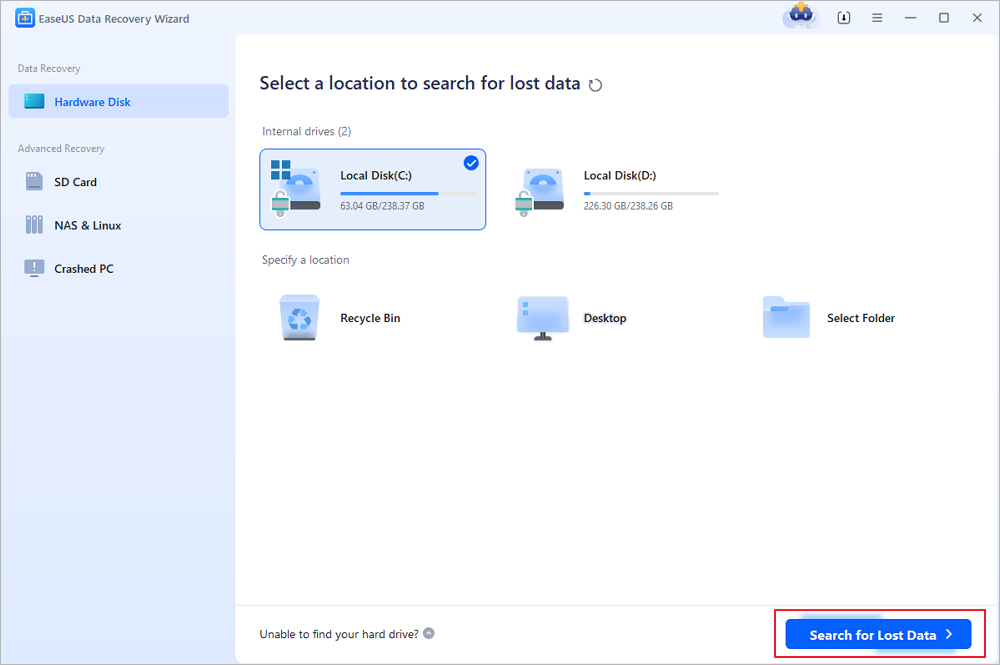
Step 2. Find the files deleted from the Recycle Bin
After the scan is complete, browse the results and select the files you want to recover, including documents, photos, videos, and other file types. You can filter by file type or enter a file name in the search box to locate specific items.
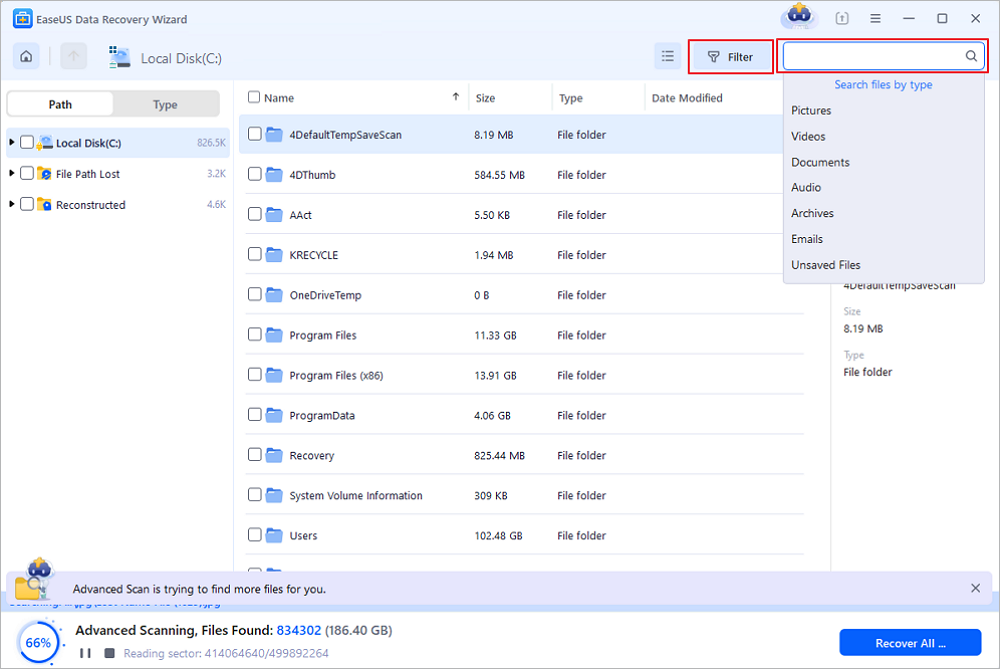
Step 3. Preview and recover files from the Recycle Bin
Preview the found files to check their contents. Select the files you want to restore and click "Recover". Choose a different drive, external storage device, or cloud location, such as OneDrive or Google Drive, to save the recovered files.
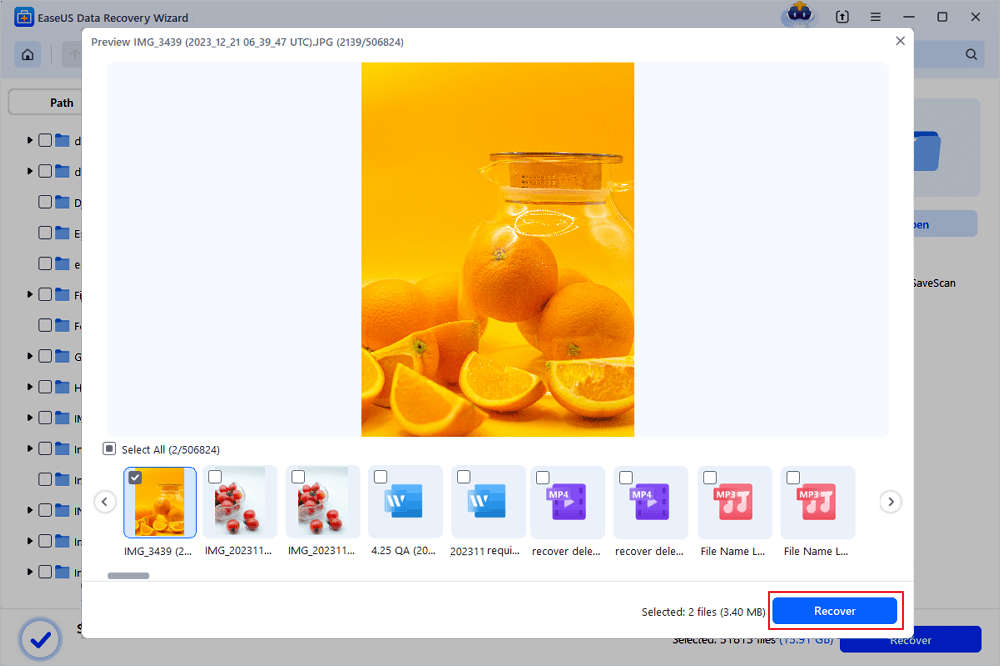
(Note: The free version provides up to 2GB of data recovery. You can restore everyday files within this limit without purchasing a license. For the best chance of recovery, avoid saving new data to the drive where the deleted files were stored.)
Method 2. Recover Bitdefender Deleted Files from Bitdefender Quarantine
If your files were quarantined rather than permanently deleted, this is the safest and most straightforward recovery method. Here is how you can do this:
Step 1. Open Bitdefender and select "Protection" from the navigation menu. You must be signed in to Windows with an administrator account to restore quarantined files to folders with administrator-level access. If needed, right-click the Bitdefender shortcut and select Run as administrator.
Step 2. In the Antivirus pane, click Open, then navigate to the Settings tab.
Step 3. Click Manage quarantine next to Quarantined threats.
Step 4. Before restoring, open View Settings and toggle Create exception for restored files to on if it's off. With this option enabled, the files you restore from quarantine will be automatically whitelisted from future scans to prevent subsequent quarantine.
Step 5. View the list of quarantined files showing the file name, threat name, original location, and quarantine date. Select the file you wish to restore and click the Restore button.
The files will be returned to their original folder immediately and will not be scanned automatically again.
Method 3. Contact Bitdefender Support to Recover Bitdefender Deleted Files
In cases involving complex false positive scenarios—particularly when many files are affected or restoration fails because original folders no longer exist—Bitdefender Support should be contacted.
According to Bitdefender's Expert Community, the ATC4.Detection module (Advanced Threat Defense) can occasionally trigger widespread false positives, especially when software exhibits suspicious behavior like launching multiple programs with administrator privileges. If files cannot be restored because their original folders have been deleted, this requires investigation by the support team.
When contacting support, provide:
- Relevant detection notifications and logs
- Names and paths of affected files
- If possible, samples of files believed to be incorrectly detected
Understanding Exceptions and False Positives
How Exceptions Work
When you restore a file and enable the "Create exception for restored files" setting, Bitdefender whitelists the file from future scans. However, exceptions may not always work as expected due to:
- Behavior-based detection: Advanced Threat Defense might override exceptions if the file exhibits suspicious behavior at runtime.
- File modifications: If a restored file is modified or redownloaded, Bitdefender may see it as a new file not covered by the previous exception .
- Cloud intelligence: Files flagged as known threats globally may still be quarantined despite local exceptions.
Reporting False Positives
If you suspect Bitdefender has mistakenly flagged a legitimate file, you can submit the file to Bitdefender Labs for analysis. Once confirmed, false positives are corrected within hours via automatic updates.
Conclusion
Recovering files deleted by Bitdefender is often possible through the quarantine restoration feature, data recovery software, or support intervention. The key is to act quickly, especially if files are approaching the 30-day quarantine expiration period. When restoring files, always create exceptions to prevent recurrence, and maintain open communication with Bitdefender Support for complex cases.
Was this page helpful?


 Why Trust EaseUS
 Editor Reviews

20+
Years of experience

160+
Countries and regions

72 Million+
Downloads

4.9 +
Trustpilot Score