






Windows 10 activation requires a valid digital license or a 25-character product key. If your PC was previously activated, you may be able to activate Windows again without purchasing another license.
In this guide, we'll explain 2 ways to activate or reactivate Windows 10: using an existing digital license, entering a valid product key, and running the Windows Activation Troubleshooter. We'll also cover how to check your activation status and fix common activation problems.
Important: These methods don't bypass Windows licensing requirements. If your device doesn't have a valid license or product key, you'll need to obtain one before activating Windows.
Windows 10 reached the end of standard support on October 14, 2025. Activation and security support are separate matters, so an activated copy of Windows 10 does not automatically receive ongoing standard security updates.
Reasons to activate Windows 10 on your PC
The unactivated Windows 10 offers similar features as the activated ones, but one can have many advantages with the activated version. Here are a few things that prompt users to activate Windows 10.
- Avoid seeing the annoying Activate Windows. Go to Settings to activate Windows Watermark at the bottom right of your screen.
- Users can observe lags and delays after prolonged usage.
- Microsft restricts the synchronization features on various Windows devices without the activation version.
- You cannot personalize wallpapers, lock screens, colors, themes, etc.
Windows 10 Activation Preparation
Before activating Windows 10, check the following to avoid common activation issues.
1. Check Your Windows Edition
Go to Settings > System > About to check whether you're using Windows 10 Home or Pro. Make sure your product key or digital license matches the installed Windows edition.
2. Check Your Internet Connection
Make sure your PC is connected to the internet so Windows can communicate with Microsoft's activation services.
3. Sign In to Your Microsoft Account
If your digital license is linked to your Microsoft account, sign in with the same account before attempting to reactivate Windows.
4. Check Your Activation Status
Go to Settings > Update & Security > Activation to check whether Windows is already activated. If activation fails, note any error code displayed to help identify the issue.
5. Backup Important Data
While trying to activate Windows 10, there can be a risk of data loss from your current storage. Make a backup of your data using free backup software like EaseUS Todo Backup with just a click.
👇Click the download button once to install EaseUS free backup and recovery software on your PC and make a full backup of the operating system, applications, personal data, and entire hard drive or a single partition.
Secure Download
How to Activate Windows 10 for Free in 2026
The post includes 2 methods to activate Windows 10 for free; some require the product key, and some do not. Let us get into the details.
Activate Windows 10 for Free Using the Activation Setup
This method requires no additional software, and you can have the Original Windows 10 by just using a product key.
🔎Here's how you can do it.
Step 1. Press Windows + I to open the Settings on your device.
Step 2. Navigate to the Update & Security section.
Step 3. Select Activation and click the "Change Product Key" menu to add a new product key.
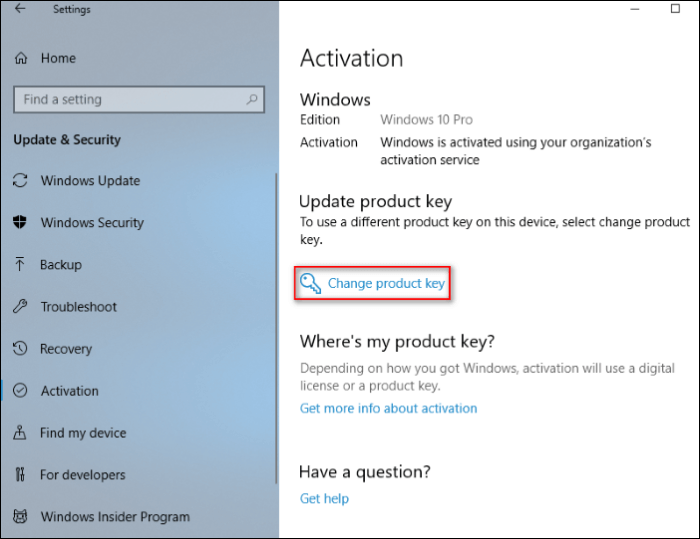
Step 4. Now, enter your product key.
Step 5. Wait until the activation process is complete, click on the prompts on-screen, and click the Next button at the end to finish the process.
Step 6. After completing, you can see "Windows is activated," indicating that Windows 10 is ready.
Activate Windows 10 with a Digital License
A digital license is an activation method that doesn't require you to enter a product key. It is associated with your device and may be linked to your Microsoft account. If you previously activated Windows 10 on your PC with a digital license, you may be able to reactivate it after reinstalling Windows. Follow these steps:
- Open Settings.
- Select Update & Security > Activation.
- Check the activation status.
- Make sure your PC is connected to the internet.
- Sign in with the Microsoft account associated with your digital license, if applicable.
- If Windows isn't activated, select Troubleshoot if the option is available.
- Follow the on-screen instructions.
If your digital license is valid for the installed Windows edition, Windows may activate automatically after the license is recognized.
Note: A digital license is not a way to activate a PC that has never had a valid Windows license.
Tips: How to Use the Windows 10 Activation Troubleshooter
If Windows 10 was previously activated but now shows an activation error, the Activation Troubleshooter may help you resolve the problem. This can happen after reinstalling Windows or making significant hardware changes. You can follow the steps below:
- Open Settings.
- Select Update & Security > Activation.
- Check whether Windows is activated.
- If Windows isn't activated, select Troubleshoot if available.
- Follow the instructions the troubleshooter displays.
- If prompted, sign in with the Microsoft account associated with your digital license.
- Restart your PC if necessary and check the activation status again.
The troubleshooter can help identify problems such as an edition mismatch or a license that is no longer associated with the device. If it cannot find a valid license, you may need to enter a valid product key or contact Microsoft Support.
Note: The Activation Troubleshooter helps resolve activation problems. It does not provide a new Windows license or bypass product activation requirements.
How to Check If Windows 10 Is Activated
To check whether Windows 10 is activated, follow these steps:
- Press Windows + I to open Settings.
- Select Update & Security > Activation.
- Check the activation status displayed on the page.
Windows may display one of the following messages:
- Windows is activated: Your Windows copy is activated.
- Windows is activated with a digital license: Your device has a digital license.
- Windows is activated with a digital license linked to your Microsoft account: Your digital license is associated with your Microsoft account.
- Windows is not activated: Windows needs a valid license or further troubleshooting.
You can also check the activation expiration status using Command Prompt:
- Search for Command Prompt in the Windows Search Bar.
- Open it as an administrator.
- Enter this command: slmgr.vbs /xpr
This command displays the activation expiration status. It is only used to check activation information, not to activate Windows.
Share this article on social media if you find it useful.

Conclusion
The Activate Windows watermark is annoying, and to enjoy the perks of the OS, you need the active version. Everyone who installed the ever-popular Windows 10 would want to know how to activate Windows 10. The post introduces how to activate Windows 10 by entering a valid product key and reactivating Windows using a digital license. Follow the steps to get the Windows 10 active version on your PC quickly.
This whole activation process can be a data loss threat if not done correctly, so back up essential data with EaseUS Todo Backup to safeguard your data in all emergencies.
How to Activate Windows 10 for Free FAQs
Here are some of the most frequent FAQs on activating Windows 10 for free. If you have similar queries, I hope this will help you.
1. Is it legal to activate Windows 10 for free?
Yes, if you use a valid digital license or product key that you are authorized to use. For example, reactivating Windows on a device with an existing digital license is a legitimate activation method. However, using unauthorized product keys or third-party activation tools to bypass Windows licensing requirements is not a legitimate way to activate Windows.
2. How do I check whether Windows 10 is activated using CMD?
Open Command Prompt as an administrator and enter: slmgr.vbs /xpr
Press Enter to view the activation expiration status. You can also check the activation information through Settings > Update & Security > Activation.
3. Can I activate Windows 10 without a product key?
Yes, if your PC already has a valid digital license. Windows can activate automatically when it recognizes the license associated with your device. If no valid digital license or product key is available, you'll need to obtain a Windows license.
4. Is Windows 10 activation permanent?
Activation can remain valid as long as the license remains valid and is used according to its licensing terms. However, activation does not mean Windows 10 will receive ongoing standard security updates. Windows 10 reached the end of standard support on October 14, 2025.
5. What should I do if Windows 10 won't activate?
First, check your internet connection and make sure your Windows edition matches your license. Then go to Settings > Update & Security > Activation and run the Activation Troubleshooter if available. If the issue continues, check the activation error code or contact Microsoft Support.
Was This Page Helpful?

Updated by Jerry
I hope my articles can help solve your technical problems. If you are interested in other articles, you can check the articles at the bottom of this page, and you can also check my Facebook to get additional help.

Jean is recognized as one of the most professional writers at EaseUS. She has continually improved her writing skills over the past 10 years and has helped millions of readers solve tech problems on PC, Mac, and iOS devices.
Related Articles
-
4 Ways to Factory Reset ASUS Laptop Without Password
![Brithny]() Brithny/2026-10-29
-
Break Windows 10 Roll Back Limit - Roll Back to Windows 7/8 after 30 Days
![Jean]() Jean/2026-10-30
-
Fix BitLocker Could Not Be Enabled Error Now [Easy]
![Finley]() Finley/2026-10-29
-
How to Activate Windows 11 for Free| 2 Ways
![Jerry]() Jerry/2026-11-23
 Brithny/2026-10-29
 Finley/2026-10-29
EaseUS Data Recovery Services
EaseUS data recovery experts have uneaqualed expertise to repair disks/systems and salvage data from all devices like RAID, HDD, SSD, USB, etc.


