-
![]() [Free] TestDisk for Mac - File Recovery Software Review
[Free] TestDisk for Mac - File Recovery Software Review October 29,2026
 6 min read
 -
![]() Disk Drill vs EaseUS: Features, and Recovery Performance ComparedOctober 29,20266 min read
Disk Drill vs EaseUS: Features, and Recovery Performance ComparedOctober 29,20266 min read -
![]() EaseUS vs Recuva: Which Data Recovery Tool Works BetterOctober 29,20266 min read
EaseUS vs Recuva: Which Data Recovery Tool Works BetterOctober 29,20266 min read -
![]() Top 10 Photo Recovery Software for Free [Easily & Safely]October 29,20266 min read
Top 10 Photo Recovery Software for Free [Easily & Safely]October 29,20266 min read -
![]() PhotoRec for Mac - File Recovery Software Review [Free Download]October 29,20266 min read
PhotoRec for Mac - File Recovery Software Review [Free Download]October 29,20266 min read -
![]() Recuva for Mac Free Download - Recover Deleted Files!October 29,20266 min read
Recuva for Mac Free Download - Recover Deleted Files!October 29,20266 min read -
![]() PhotoRec vs EaseUS Data Recovery: Full Comparison & 2026 ReviewOctober 29,20266 min read
PhotoRec vs EaseUS Data Recovery: Full Comparison & 2026 ReviewOctober 29,20266 min read -
![]() Recuva Review: Features, Pros & Cons, and Real Recovery ResultsOctober 29,20266 min read
Recuva Review: Features, Pros & Cons, and Real Recovery ResultsOctober 29,20266 min read -
![]() EaseUS Data Recovery Wizard for Mac Review [Update in 2026]October 29,20266 min read
EaseUS Data Recovery Wizard for Mac Review [Update in 2026]October 29,20266 min read -
![]() Data Recovery Software Review Hub | Tests, VS & Top PicksOctober 29,20266 min read
Data Recovery Software Review Hub | Tests, VS & Top PicksOctober 29,20266 min read
Page Table of Contents
DiskWarrior has historically served as a well-known directory repair application for older Apple operating systems utilizing the HFS and HFS Plus file systems. However, modern macOS environments demand broader file system support, full compatibility with Apple Silicon chips, and true deep sector file extraction capabilities. DiskWarrior lacks full support for modern APFS drives on macOS, prompting Mac users to seek versatile modern alternatives.
PAGE CONTENT:
DiskWarrior was designed around legacy directory structures, so its functionality on modern Mac computers is severely limited, especially when dealing with APFS-formatted system drives or encrypted internal storage. As Mac hardware technology advances, Apple users require comprehensive data protection software that goes beyond simple directory rebuilding.
Today, modern Mac recovery tools scan deep drive sectors directly to rescue lost photos, documents, videos, and system databases even when directory structures are totally destroyed. This comprehensive review evaluates the best DiskWarrior alternatives available for macOS today, analyzing their features, performance, compatibility, and overall value for Mac users.
Why You Need a DiskWarrior Alternative on Mac
While DiskWarrior performed exceptionally well on mechanical hard drives formatted with HFS Plus, modern solid-state drives and updated macOS releases introduce challenges that older repair utilities simply cannot address.
- APFS File System Incompatibility: Modern Mac computers run on APFS, a file system optimized by Apple for flash memory and solid-state storage. DiskWarrior cannot rebuild APFS directory structures, rendering it largely ineffective for primary drives running modern macOS releases.
- Focus on Directory Rebuilding over Data Extraction: DiskWarrior attempts to repair the file directory so the Mac volume can mount again. If the underlying NAND memory or magnetic drive sectors are physically degraded, attempting directory repair can write new data over lost files, causing permanent data destruction.
- Apple Silicon and macOS Security Restrictions: System integrity protection and hardware-level encryption on modern Apple M-series chips impose strict limits on low-level disk modification tools.
Top 6 Best DiskWarrior Alternatives for Mac Review
The following section reviews the top seven software alternatives to DiskWarrior for macOS, highlighting their key capabilities, system compatibility, and suitability for various Mac data loss scenarios.
1. EaseUS Data Recovery Wizard for Mac (Top Recommended)
EaseUS Data Recovery Wizard for Mac stands as the premier replacement for DiskWarrior on macOS. Unlike legacy tools that try to alter system directories, EaseUS uses advanced deep scanning algorithms to parse Mac storage media directly, retrieving lost files without altering the target drive structure. Whether your Mac drive suffered logical corruption, accidental formatting, partition loss, or macOS system crash errors, EaseUS extracts data safely and reliably.
- Uses dual scan modes to quickly locate recently deleted Mac files or deeply analyze raw sectors to rebuild lost partition indices.
- Restores over one thousand file types on Mac, including images, video footage, office documents, audio recordings, compressed archives, and email databases.
- Guarantees that no data is written to the source Mac drive during the scanning process, eliminating the risk of overwriting fragile data fragments.
- Provides options to generate a bootable Mac recovery drive, allowing file extraction even when macOS fails to boot.
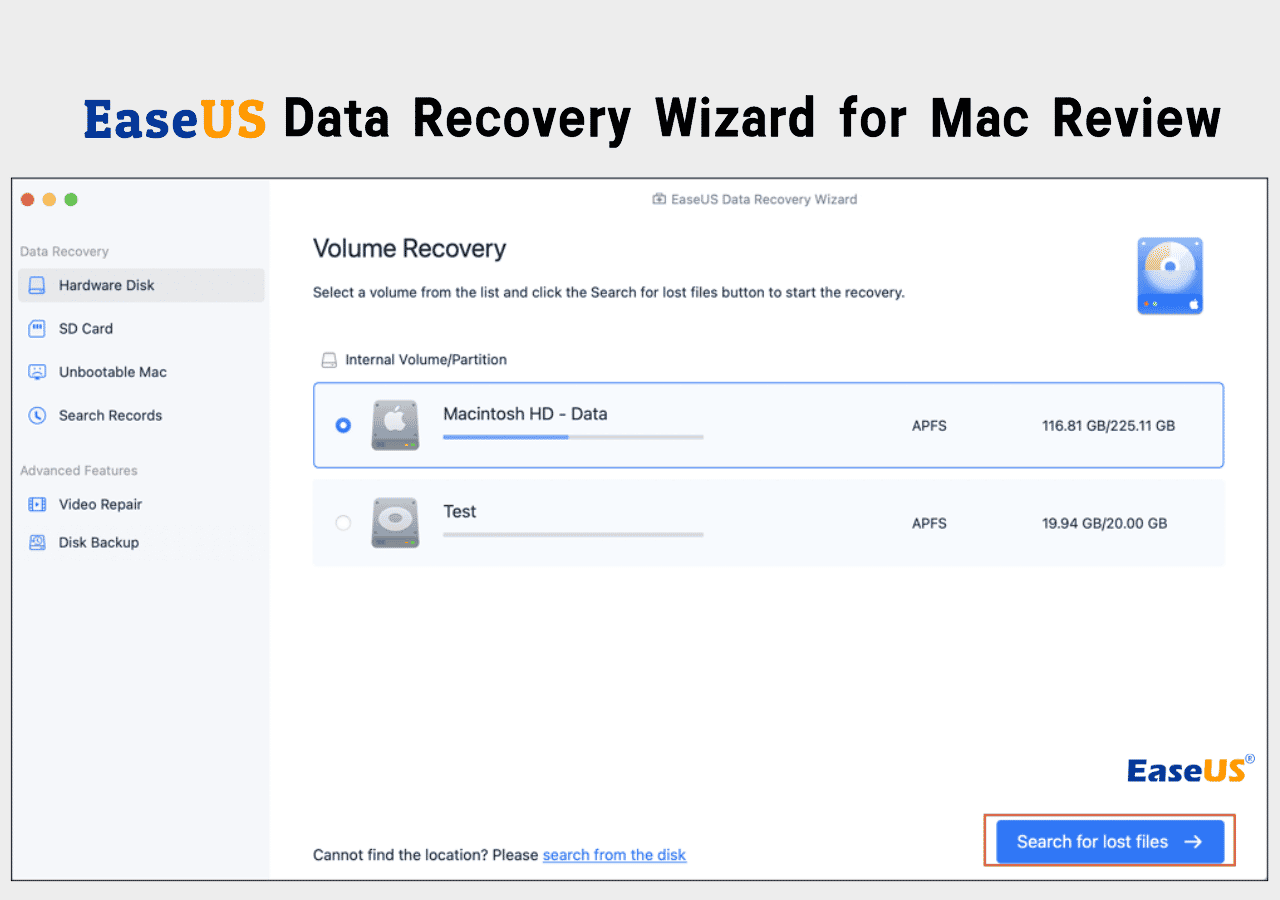
When facing lost files or a corrupted volume on your Mac, using EaseUS Data Recovery Wizard for Mac provides a simple three-step recovery process. Follow the instructions below to safely extract your data.
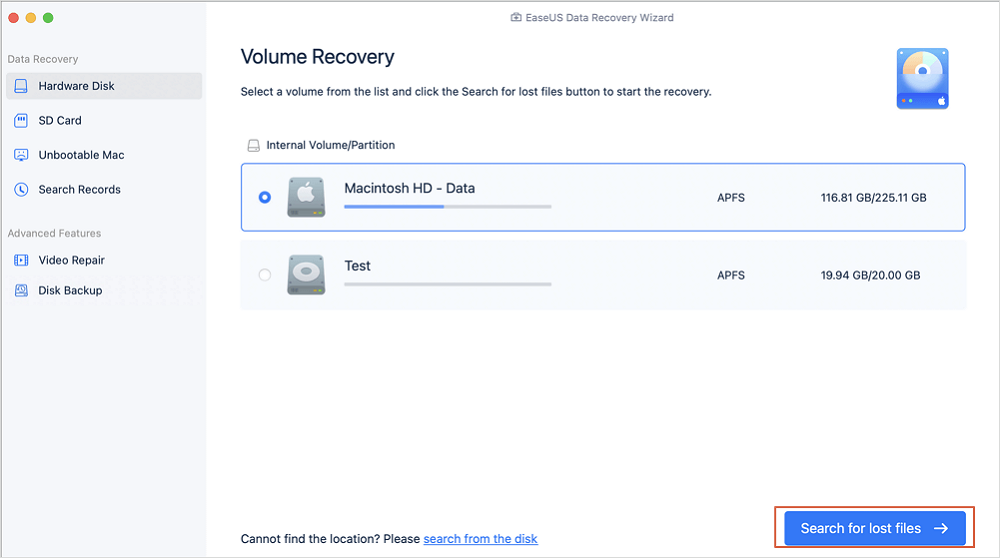
Step 1. Search for lost files
Select the disk location to search for lost files (it can be an internal HDD/SSD or a removable storage device) on macOS Sierra, High Sierra, Mojave, Catalina, Big Sur, Monterey, Ventura, and the latest Sonoma. Click the "Search for lost files" button.
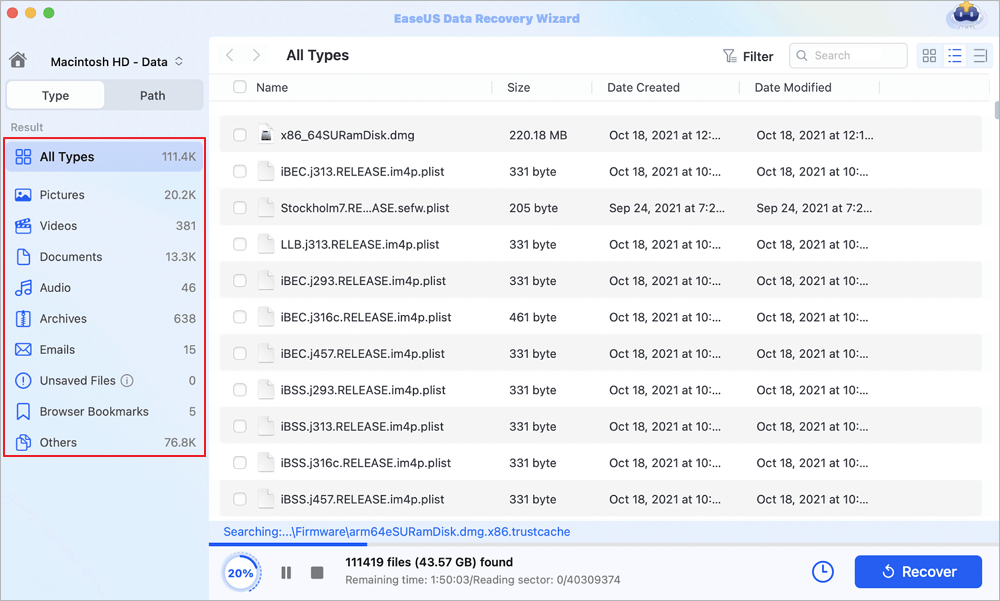
Step 2. Go through the scanning results
EaseUS Data Recovery Wizard for Mac will immediately scan your selected disk volume and display the scanning results.
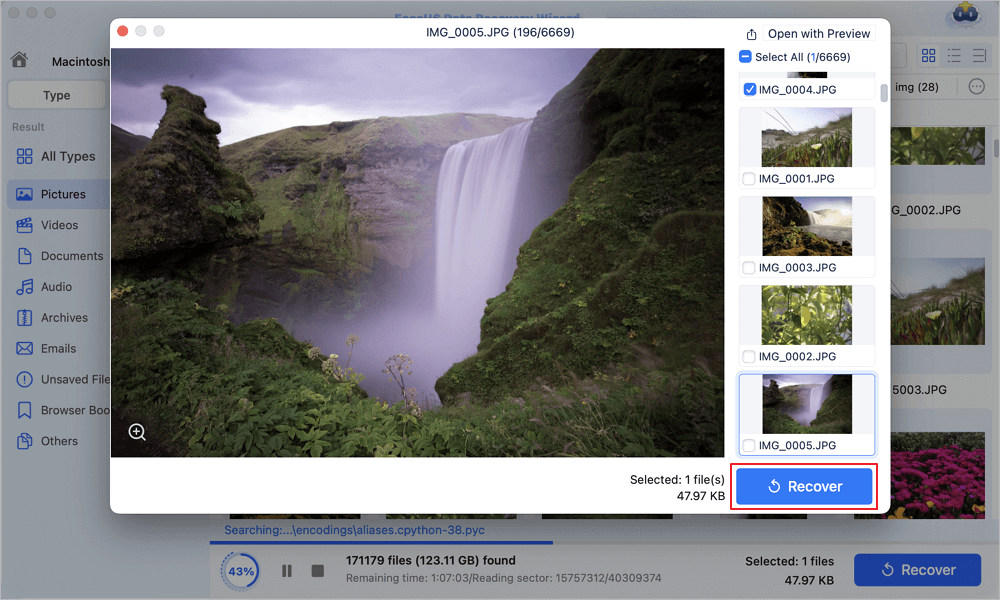
Step 3. Select the file(s) and recover
In the scan results, select the file(s) to preview and click the "Recover" button to have them back.
If you find this information helpful, please share it with others on social media to assist them in overcoming this common challenge.
2. Data Rescue for Mac
Data Rescue for Mac, developed by Prosoft Engineering, is a professional-oriented recovery utility designed specifically for Mac environments. It focuses heavily on data extraction from Mac drives experiencing logical failures or minor hardware issues. Data Rescue avoids modifying the target volume, choosing instead to clone failing Mac drives before running diagnostic routines.
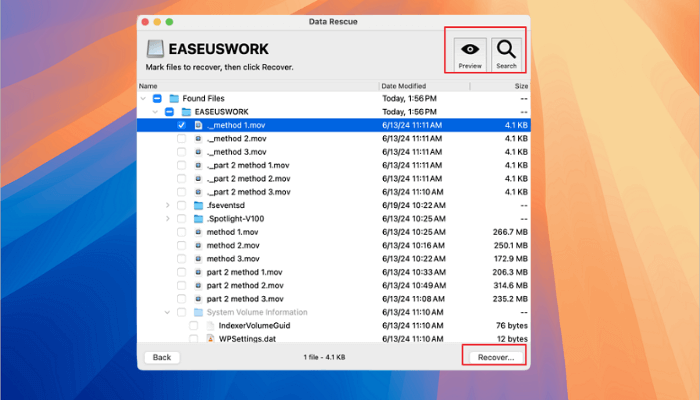
Data Rescue is well suited for IT specialists managing Mac deployments who require detailed technical logs and raw hex previews. However, its licensing structure operates on a per-drive or subscription model, which can become costly for individual Mac consumers looking to recover a single laptop drive.
|
Advanced drive cloning capabilities designed to protect failing Mac storage media. |
| Detailed file filtering and technical metadata display tailored for macOS admins. | |
|
User interface is less polished than modern commercial Mac alternatives. |
| Pricing model is less favorable for occasional home Mac users. |
3. Stellar Data Recovery for Mac
Stellar Data Recovery for Mac is a long-standing utility capable of rescuing lost files from unmountable Mac hard drives, encrypted APFS volumes, and corrupted external storage devices connected to a Mac. It supports modern APFS file systems and features customized scanning options for specific media formats like high-resolution video files or specialized digital camera raw formats.
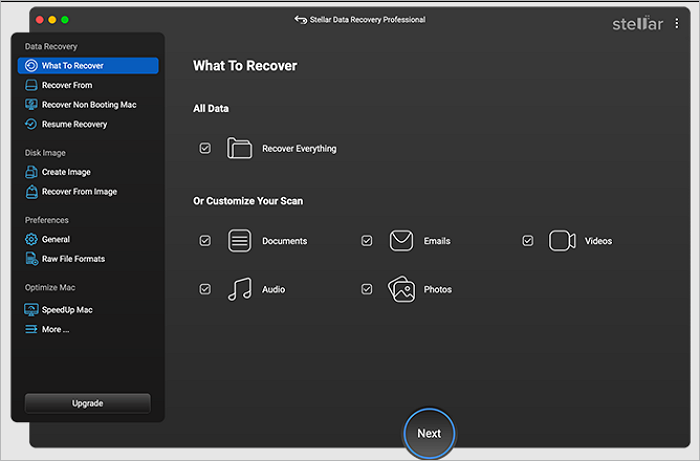
Stellar provides a deep scan option capable of locating files based on file signatures when directory tables are lost on macOS. It also offers advanced tiers that include video and photo repair capabilities, making it a viable alternative for creative Mac professionals working with damaged media files.
|
Strong performance when recovering specialized audio and video camera files on Mac. |
| Includes file repair options in higher-tier Mac software editions. | |
|
Deep scanning mode can slow down system performance on older Mac hardware. |
| Interface layout can occasionally feel cluttered with multiple technical submenus. |
4. TechTool Pro
TechTool Pro, created by Micromat, is closer in spirit to DiskWarrior than to pure data-extraction tools. It is a full-spectrum diagnostic and hardware maintenance suite designed exclusively for Mac hardware. TechTool Pro checks Mac memory modules, monitors battery health, tests drive SMART parameters, and attempts partition repair on supported Mac storage configurations.
While TechTool Pro is an excellent tool for general Mac hardware testing and ongoing system maintenance, its raw file recovery capabilities are less specialized than those of dedicated Mac recovery utilities like EaseUS. It is best used as a proactive Mac maintenance utility rather than an emergency button for lost file extraction.
|
Comprehensive Mac hardware diagnostic suite testing RAM, sensors, and drive health. |
| Proactive monitoring features to warn Mac users before total drive failure occurs. | |
|
Limited capabilities when recovering files from deeply corrupted APFS volumes. |
| Primary focus is Mac maintenance rather than dedicated emergency file extraction. |
5. Disk Utility (Native macOS Utility)
For Mac users seeking an immediate free option without downloading third-party applications, Apple includes Disk Utility within every copy of macOS. Disk Utility features a function called First Aid, which verifies partition maps, checks file system structures, and attempts to repair logical disk errors on connected Mac volumes.
First Aid serves as the first line of defense when a Mac volume refuses to mount or behaves erratically. However, Disk Utility cannot perform raw file scanning or recover files permanently deleted from the Mac Trash. If First Aid fails to repair a volume, turning to a dedicated Mac recovery tool like EaseUS becomes necessary.
6. PhotoRec and TestDisk for Mac
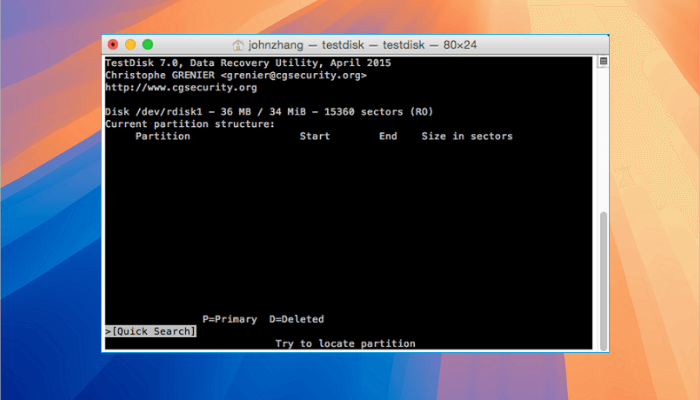
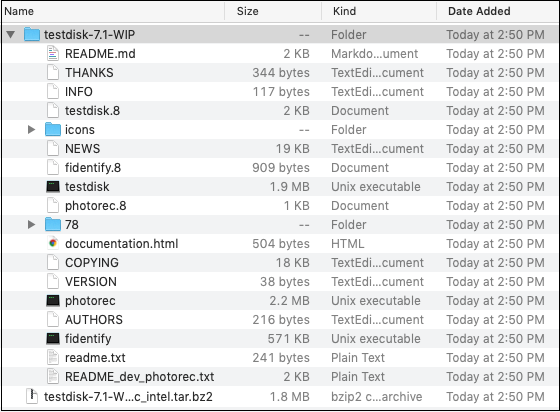
PhotoRec and TestDisk are open-source command-line utilities available for macOS. TestDisk focuses on recovering lost storage partitions and making non-booting drives bootable again, while PhotoRec is a raw file data recovery tool that ignores file systems to search for underlying data signatures directly on Mac storage media.
Because these utilities operate entirely through the macOS Terminal interface, they require technical command-line knowledge to execute correctly. They are completely free and powerful, but the lack of a graphical user interface makes them challenging for everyday Mac users.
Comparison Table of Top DiskWarrior Alternatives for Mac
The table below provides a quick side-by-side comparison of the top DiskWarrior alternatives for Mac, detailing macOS compatibility, supported file systems, primary strengths, and target user bases.
| Software Name | Supported OS | APFS Support | Primary Strength | Best Suited For |
| EaseUS Data Recovery Wizard for Mac | macOS Native | Full Native Support | Deep sector file extraction, intuitive Mac interface, high success rate | All Mac users needing fast, reliable file extraction on macOS |
| Data Rescue for Mac | macOS Native | Supported | Drive cloning tools designed to safely handle failing Mac hardware | IT professionals requiring technical Mac drive analysis logs |
| Stellar Data Recovery for Mac | macOS Native | Supported | Specialized media file recovery and damaged video repair tools | Creative Mac professionals working with raw photo and video formats |
| TechTool Pro | macOS Native | Limited Support | Full Mac hardware diagnostics and proactive system monitoring | Mac users seeking comprehensive hardware testing and prevention |
| Disk Utility | macOS Native | Built In Native | Basic volume verification and First Aid partition repair | Immediate first step troubleshooting for unmountable Mac volumes |
| PhotoRec and TestDisk | macOS Terminal | Raw Data Only | Free open source signature scanning without data limits | Advanced Mac users comfortable operating Terminal interfaces |
Conclusion
While DiskWarrior holds an important place in Mac history as a pioneering directory repair tool for legacy HFS Plus drives, its relevance has waned in the modern era of APFS file systems, Apple Silicon chips, and flash storage. Modern macOS data loss scenarios require software solutions that prioritize non-destructive data extraction over risky directory manipulation.
Among the various alternatives evaluated for Mac, EaseUS Data Recovery Wizard for Mac stands out as the ultimate modern replacement for DiskWarrior. Combining powerful deep sector scanning, broad file system compatibility across APFS and HFS Plus, full Apple Silicon support, and an accessible Mac interface, EaseUS ensures that your valuable photos, documents, and business files can be rescued quickly and safely whenever data disaster strikes your Mac.
Frequently Asked Questions
Evaluating modern Mac data recovery utilities and choosing the right alternative to legacy disk repair software often brings up important technical questions. The following section provides direct expert answers to the most common queries regarding DiskWarrior alternatives and file restoration techniques on macOS.
1. Does DiskWarrior work on modern APFS drives?
DiskWarrior cannot rebuild directory structures on modern APFS drives. While it can run under newer macOS versions to perform limited tasks on legacy HFS Plus external drives, it cannot repair primary APFS-formatted internal solid-state drives found on modern Mac computers. For APFS volumes, dedicated data extraction software like EaseUS Data Recovery Wizard for Mac is required.
2. What is the best free alternative to DiskWarrior for Mac?
For simple partition verification and volume mounting repair, Apple Disk Utility First Aid is the best free native option built directly into macOS. For raw file extraction without purchasing software, PhotoRec offers powerful open-source signature scanning capabilities, though it operates via a Terminal interface and requires technical familiarity with macOS command-line environments.
3. Is file recovery software safer than directory repair tools on Mac?
Yes, modern file recovery software is inherently safer than directory repair utilities on macOS. Directory repair tools like DiskWarrior attempt to modify and write new data structures directly onto the targeted drive, which can permanently overwrite lost data if the drive is physically failing. Modern recovery tools like EaseUS Data Recovery Wizard for Mac operate in a read only mode, scanning sectors and saving extracted files to a completely separate drive destination.
Was this page helpful?



 Why Trust EaseUS
 Editor Reviews

20+
Years of experience

160+
Countries and regions

72 Million+
Downloads

4.9 +
Trustpilot Score