


-
![]()
-
![]() How to Recover Deleted Call Recordings on Android [2026 Guide]
 November 18,2026
 6 min read
-
![]() How to Recover Unsaved Projects in Premiere Pro on Windows & MacNovember 18,20266 min read
-
![]() How to Recover Deleted PST File in Outlook 2019/2016/2013/2010November 18,20266 min read
-
![]()
-
![]()
-
![]() How to Recover Deleted MP4 Files on Windows 10/11 [Ultimate Guide]November 18,20266 min read
-
![]()
-
![]()
-
![]()
Page Table of Contents
If your lost files total less than 2GB (such as a few photos, videos, or Word/PDF documents), you don't need to purchase the paid version.
You can use the free version of EaseUS Data Recovery Wizard to recover and export up to 2GB of data at no cost.
PAGE CONTENT:
Overview
I'm looking for a way to recover screenshots on Windows 10.
"Hi, if you are a game player, you might have the same trouble as me. Several days ago I took some screenshots with PrintScreen that I needed for references to make something onto one of my games. But all the screenshots disappeared unexpectedly. I searched over on my computer, and nothing's found! Is there a way that I can use to recover lost or deleted screenshots?"
When you use a Windows computer, there is a quick way to copy the contents of what you see on your screen by using the Print Screen key. When you press the Ctrl + Print Screen combination or Print Screen only, it saves an image of the screen contents to the Windows Clipboard. Then, you need to paste the contents of the Clipboard into an image editor and save them as JPG/JPEG/PNG file format.
Is It Possible to Recover Windows Print Screenshots
Whether you can recover the screenshots or not depends on how you lose them. As said before, when you press Ctrl+Print Screen, your computer will save the screenshots to the Windows clipboard temporarily. If you don't paste and save the image timely, the clipboard will replace the previous data when a new one is copied or cut. On this occasion, it is not possible to recover the screenshot.
However, if you have stored the screenshots on your computer, and lost them due to human errors. For example, accidental deletion, storage device formatting, system corruption, or other uncertain issues, you can recover the deleted screenshots successfully with a professional data recovery tool, like EaseUS data recovery software demonstrated below.
- Recover lost or deleted files, documents, photos, audio, music, emails effectively
- Recover files from USB hard drive, emptied recycle bin, memory card, flash drive, digital camera, and camcorders
- Support data recovery for sudden deletion, formatting, hard drive corruption, virus attack, system crash under different situations
How to Recover Deleted Screenshots on Windows 10/8/7
To recover deleted or lost screenshots, we highly recommend you try EaseUS data recovery software. With this powerful data recovery program, you can restore the deleted photos and images from HDD, SSD, USB flash drive, external hard drive, pen drive, and more. Now, download this green and graphical interface software, then recover screenshots on a Windows computer with a few clicks.
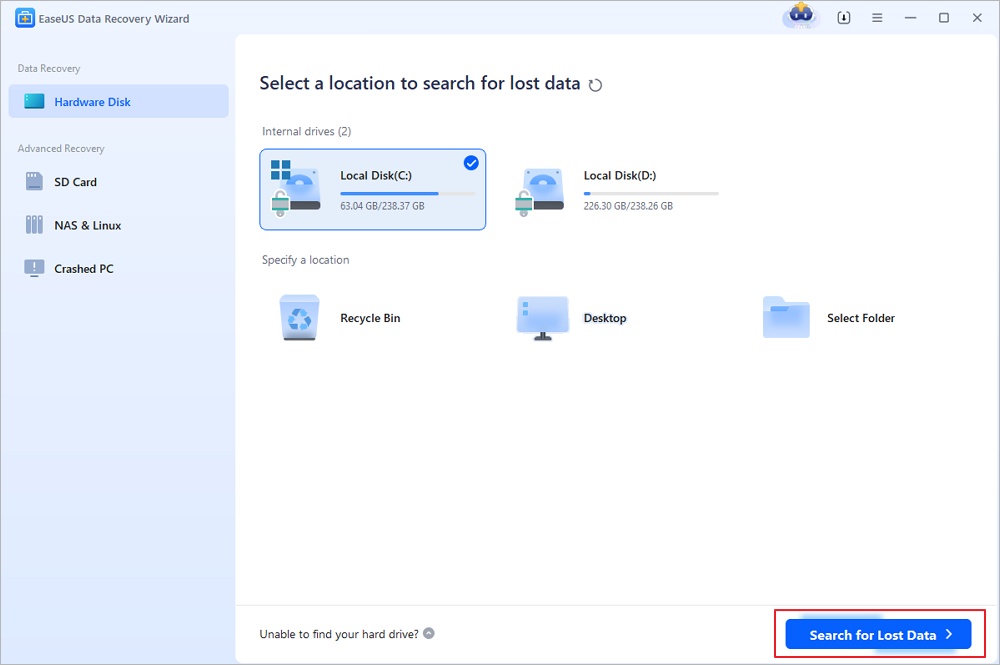
Step 1. Choose the original location and scan for lost data
Open EaseUS Data Recovery Wizard and locate the partition or drive where you accidentally deleted your files. Hover over the location and click "Search for Lost Data" to find recoverable files.
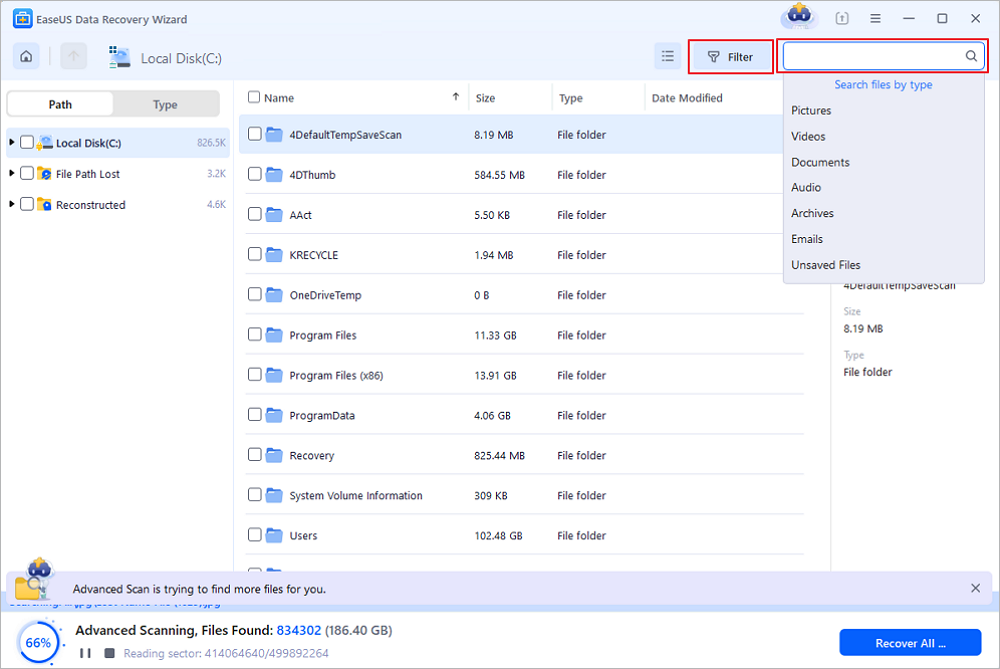
Step 2. Locate the files you want to restore
After scanning, review the results and select the accidentally deleted files you need. You can filter the results by file type, such as documents, photos, videos, or audio files. If you remember the file name, use the search box to find it more quickly.
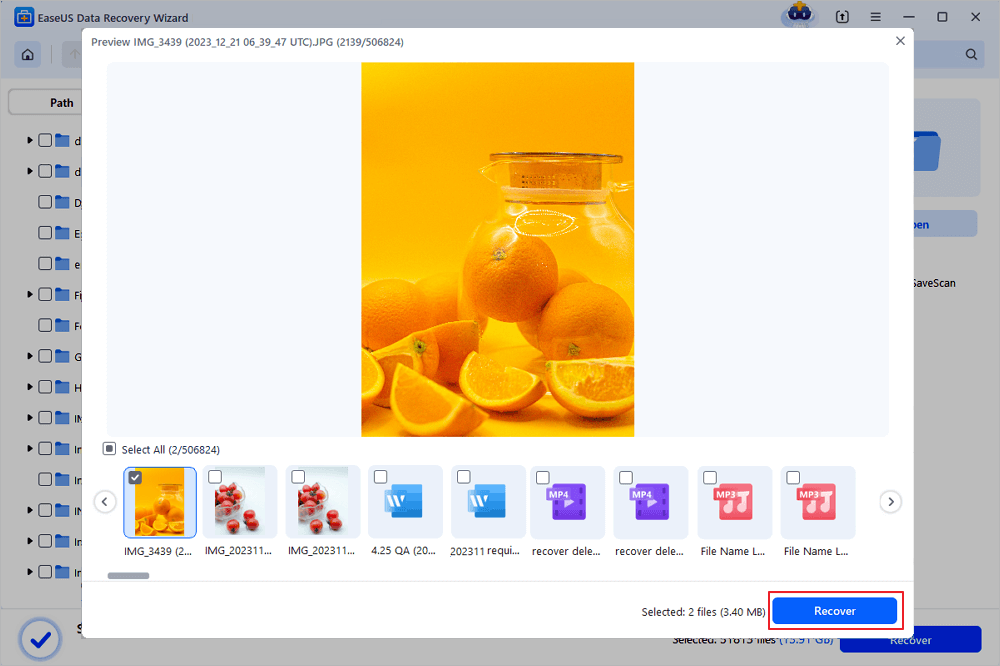
Step 3. Preview and restore your deleted files
Preview the selected files to verify that they are the ones you want to recover. Click "Recover" and choose a safe destination different from the original storage location. You can save the restored files to another partition, an external drive, or cloud storage, then click "Save".
(Note: The free version allows up to 2GB of data recovery. For everyday deleted files within this limit, you can recover your data without purchasing a license. Always save recovered files to a different location to avoid overwriting the original data.)
EaseUS Data Recovery Wizard is one of the top-rank data recovery tools on Windows or macOS computers. If you need to recover iPhone screenshots, you can resort to EaseUS iOS data recovery software for help.
Was this page helpful?
-
Daisy is the Senior editor of the writing team for EaseUS. She has been working at EaseUS for over ten years, starting as a technical writer and moving on to being a team leader of the content group. As a professional author for over ten years, she writes a lot to help people overcome their tech troubles.…
 Why Trust EaseUS
 Editor Reviews

20+
Years of experience

160+
Countries and regions

72 Million+
Downloads

4.9 +
Trustpilot Score