





-
![]() [SOLVED] Repair Corrupted Photos: JPG/JPEG Repair on Windows
[SOLVED] Repair Corrupted Photos: JPG/JPEG Repair on Windows October 14,2026
 6 min read
 -
![]()
-
![]() Restarted My Computer and Everything Is Gone Windows 11/10/8/7October 14,20266 min read
Restarted My Computer and Everything Is Gone Windows 11/10/8/7October 14,20266 min read -
![]()
-
![]()
-
![]()
-
![]() 2026 HGST Hard Drive Recovery: How Do I Recover Data from HGST Hard DriveOctober 14,20266 min read
2026 HGST Hard Drive Recovery: How Do I Recover Data from HGST Hard DriveOctober 14,20266 min read -
![]()
-
![]()
-
![]()
Page Table of Contents
PAGE CONTENT:
DOCX/DOC Word Files Loss Trouble
There are a lot of unavoidable disasters that can lead to the loss of Word document - a hacker or virus attack, HDD corruption or power failure. An accident can also happen when you did not close the application properly. Word files may corrupt while transferring to file server or other places. Articles, reports, and graphics, which you spend hours with hard works can be very easy to lose.
Have you ever think that you lose your .docx or .doc documents by deletion or format? And do you know how to perform .docx/.doc file recovery to restore all lost Word files? Here are the methods to recover deleted and unsaved DOC/DOCX files.
Part 1. Recover Deleted DOC/DOCX Files (Free)
If your .docx or .doc files get lost due to accident deletion, format, or virus attack, you should recover your lost DOC/DOCX world files. EaseUS data recovery software is one of the most popular tools for lost DOCX/DOC recovery. It recovers lost files easily and quickly with simple clicks. Download this free data recovery software and restore lost Word files now:
EaseUS Data Recovery Wizard Free offers up to 2 GB of free data recovery, including 500 MB available by default and an extra 1.5 GB unlocked after sharing on Facebook and X.
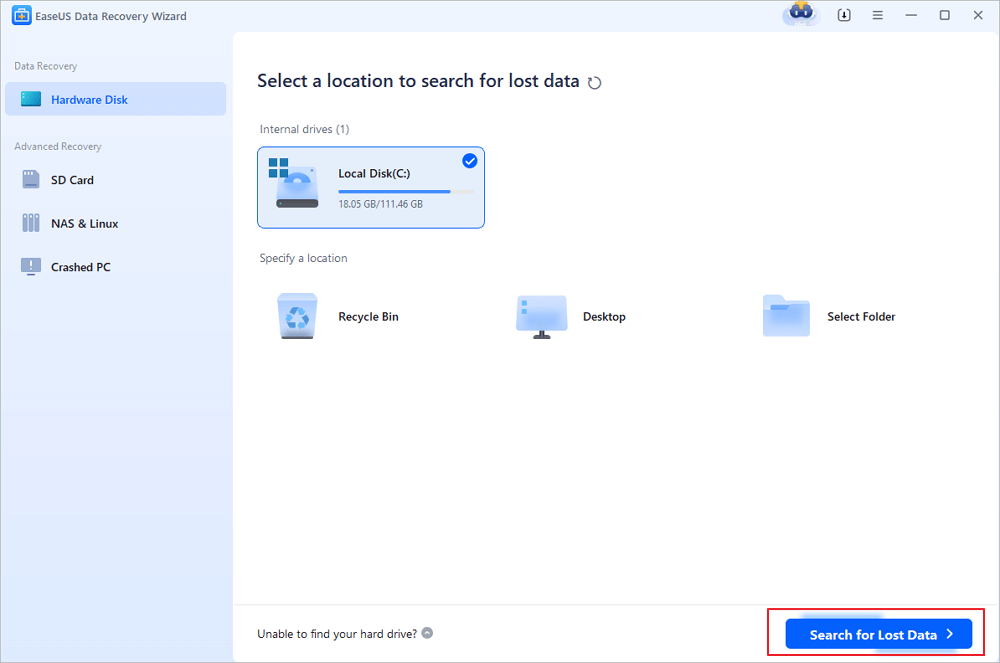
Step 1. Choose the Word file location
Choose the drive or a specific folder where you lost Word documents and click the "Search for Lost Data" button.
Step 2. Locate your Word documents
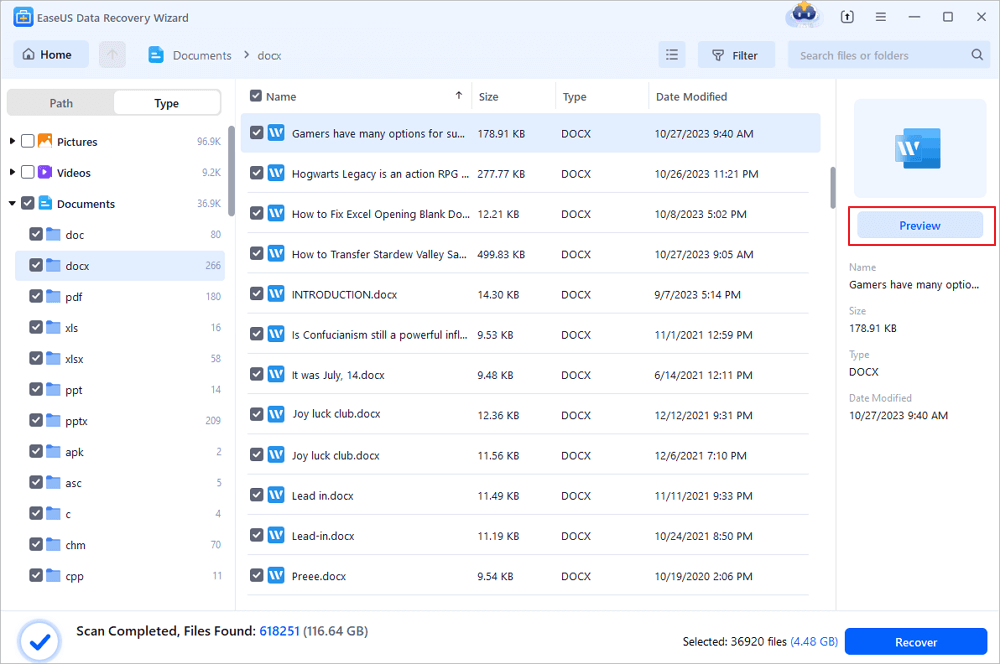
The software will start immediately scanning all lost data on the selected drive. After the scan, click the "Documents" option in the left panel. Choose the target Word file from the scan results. Then, click "Preview".
Step 3. Recover the deleted Word documents
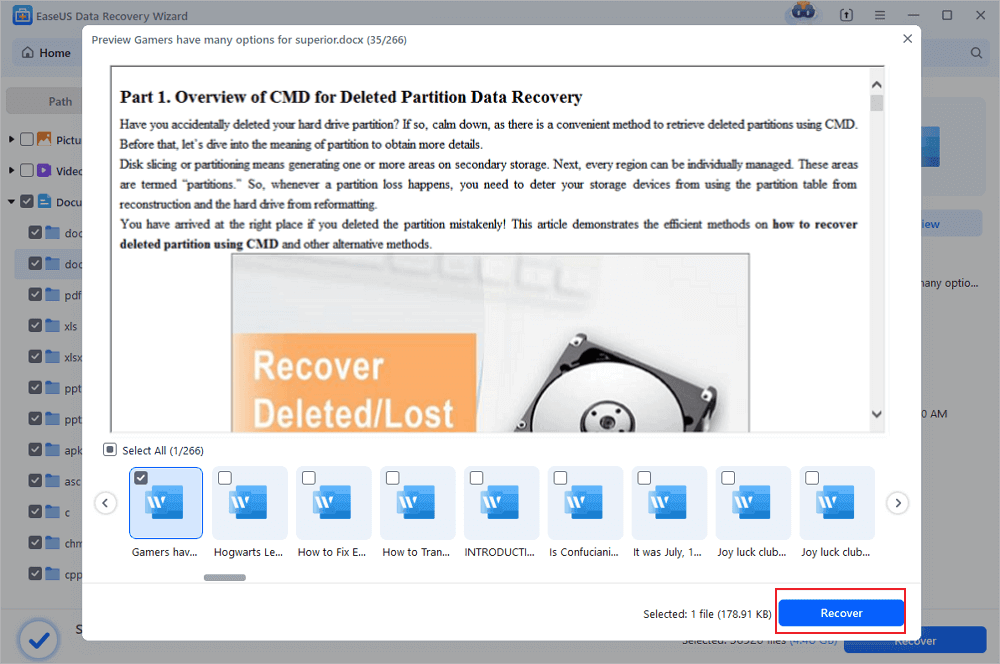
After previewing, select the desired Word files and click "Recover". Remember, save the recovered documents in another location rather than original place. It is a great choice saving the recovered documents to cloud storage like OneDrive or Dropbox.
Part 2. Recover Unsaved DOCX/DOC Files (3 Solutions)
If you forget to save your days of hard work, it is very unpleasant and sad. But there are three possible ways to bring back these files in Word 2019/2016/2013/2010/2007.
Note: The following operations are performed on Word 2016 edition, if you have other questions, contact our support team.
Solution 1. Recover Unsaved DOCX/DOC from AutoRecover
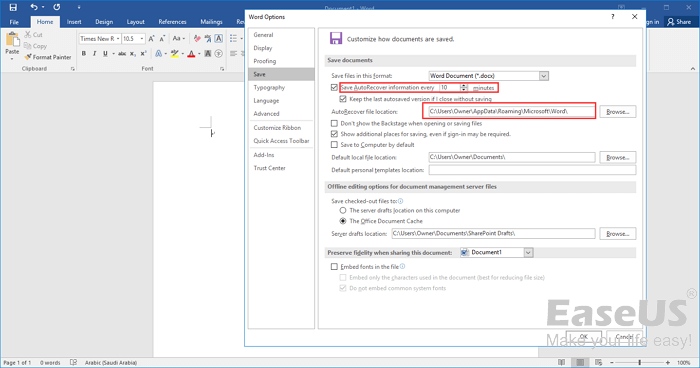
1. Open the Word program, and click "File” > "Options".
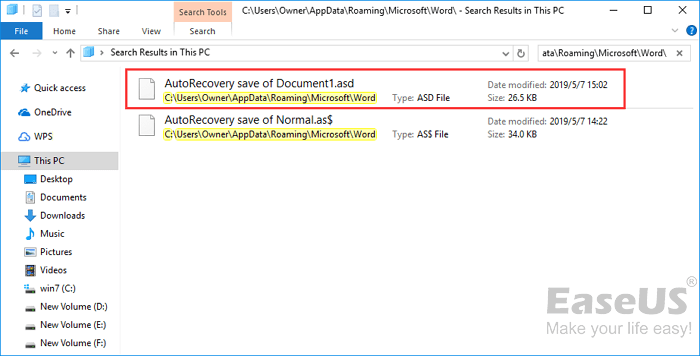
On the left navigation pane, click "Save". Copy the AutoRecover file location path and paste it into File Explorer.
2. Scroll to the end of all recent documents and copy the .asd file.
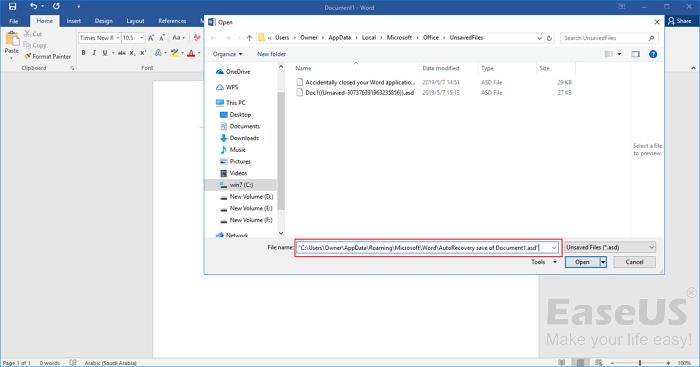
3. Go to your Word app, click "File" > "Open" > "Recover Unsaved Documents" at the bottom.
4. Paste the copied .asd file into the File Name box popping up. Open the Word file recover it.
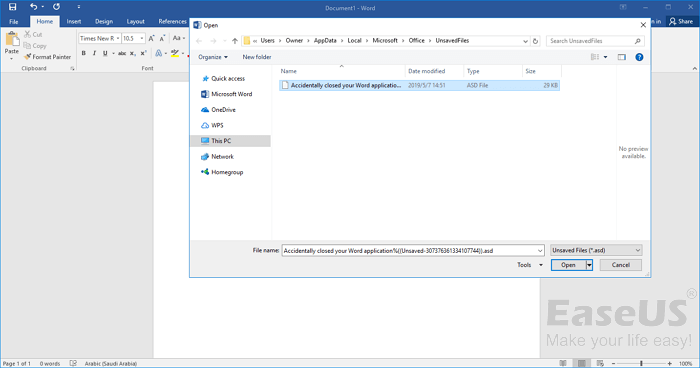
Solution 2. Recover from Temporary Files
You can find the unsaved DOCX/DOC files directly through the following path:
- For Windows 7 users: C:\Users\name\AppData\Roaming\Microsoft\Word\
- For Windows 8/10 users: C:\Users\\AppData\Local\Microsoft\Office\UnsavedFiles\
Or you can follow the steps below to find them:
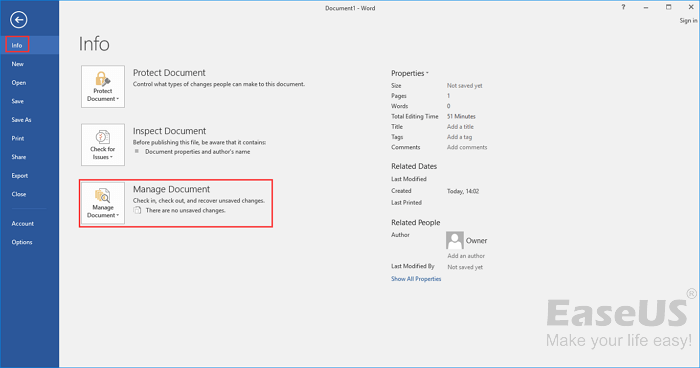
1. Open the Word program, and click the "File" tab; then, click "Info" > "Manage Document".
2. Click "Recover Unsaved Documents" from the drop-down menu.
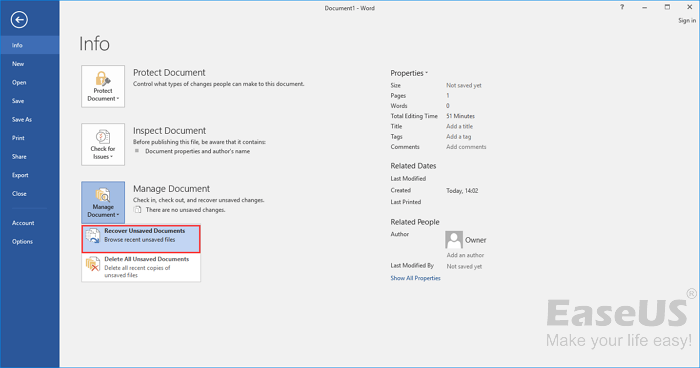
3. Select the unsaved file and click the "Open" button. Then, on the pop-up window, choose "Save As" to store it to any place you like.
Solution 3. Recover DOCX/DOC from Document Recovery
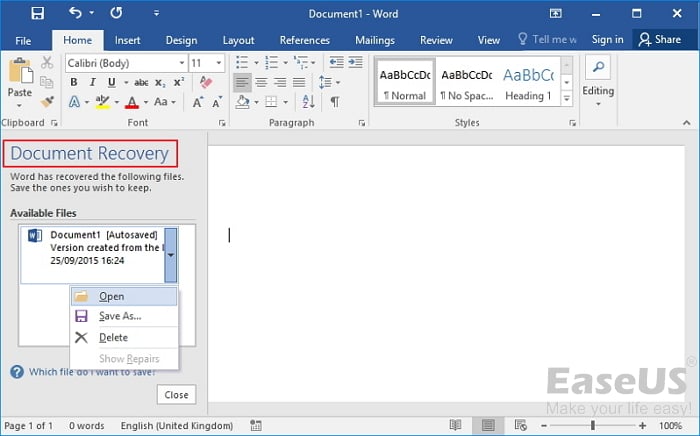
If the Word or your computer suddenly crashes and the Word document is unsaved, you can recover the file from the Document Recovery feature of Word.
Also read: how to recover unsaved Word document on Mac.
Was this page helpful?
-
Dany is an editor of EaseUS who lives and works in Chengdu, China. She focuses on writing articles about data recovery on Mac devices and PCs. She is devoted to improving her writing skills and enriching her professional knowledge. Dany also enjoys reading detective novels in her spare time. …


 Why Trust EaseUS
 Editor Reviews

20+
Years of experience

160+
Countries and regions

72 Million+
Downloads

4.9 +
Trustpilot Score





