Data Recovery
Backup
Partition Manager
System Utility
Data Recovery
System UtilityFreeware

EaseUS Disk Copy Home is only free for home users. Any use for commercial purpose should contact us via reseller@easeus.com
A perfect free disk/partition clone software for disaster recovery
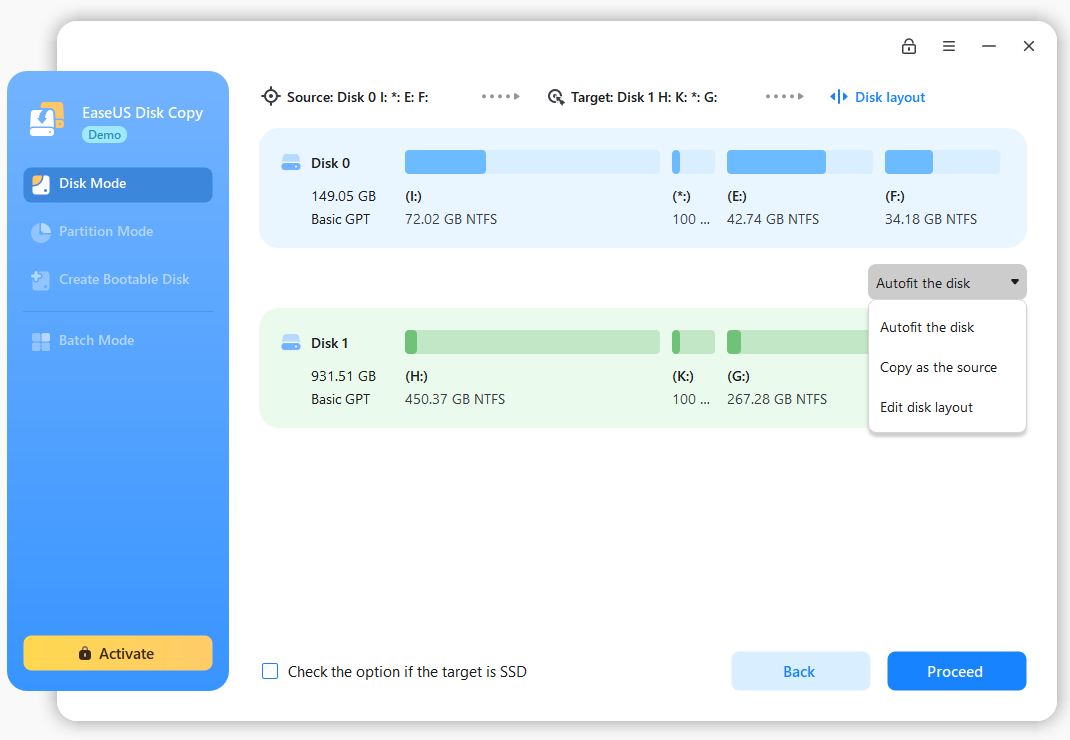
EaseUS Disk Copy Home is a free disk/partition clone software for home users only. Regardless of your operating system, file system and partition scheme, through creating a bootable CD it can sector-by-sector copy your disk to assure you a 100% identical copy of the original one. It is a perfect free tool for Data Recovery Wizard to recover files from a backup disk.
Reliable disk/partition clone software for business users, Disk Copy Technician
EaseUS Disk Copy Home help me copy my whole disk easily. I love it! 

EaseUS Disk Copy Home is a potent freeware providing sector by sector disk/partition clone regardless of your operating system, file systems and partition scheme. The sector by sector method assures you a copy 100% identity to original. EaseUS Disk Copy can be used for copy, cloning, or upgrading your original small hard drive to a new larger drive. Simply speaking, it can copy anything from old hard drive including deleted, lost files and inaccessible data. So, the freeware is a perfect tool for Data Recovery Wizard to recover files from a backup disk. However, it cannot backup single file or folder, so reliable backup software - EaseUS Todo Backup with advanced features is recommended.
By creating a bootable CD/DVD, it allows you to copy entire disk in case of unknown/proprietary file systems.
Copy one partition to another sector by sector with a bootable CD.
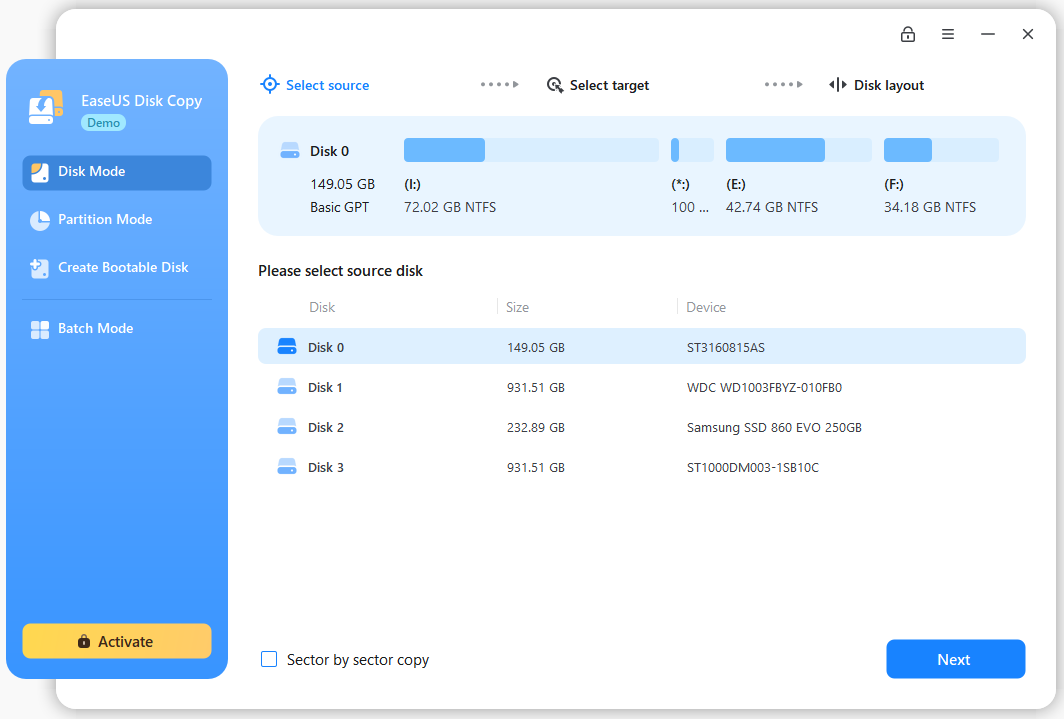
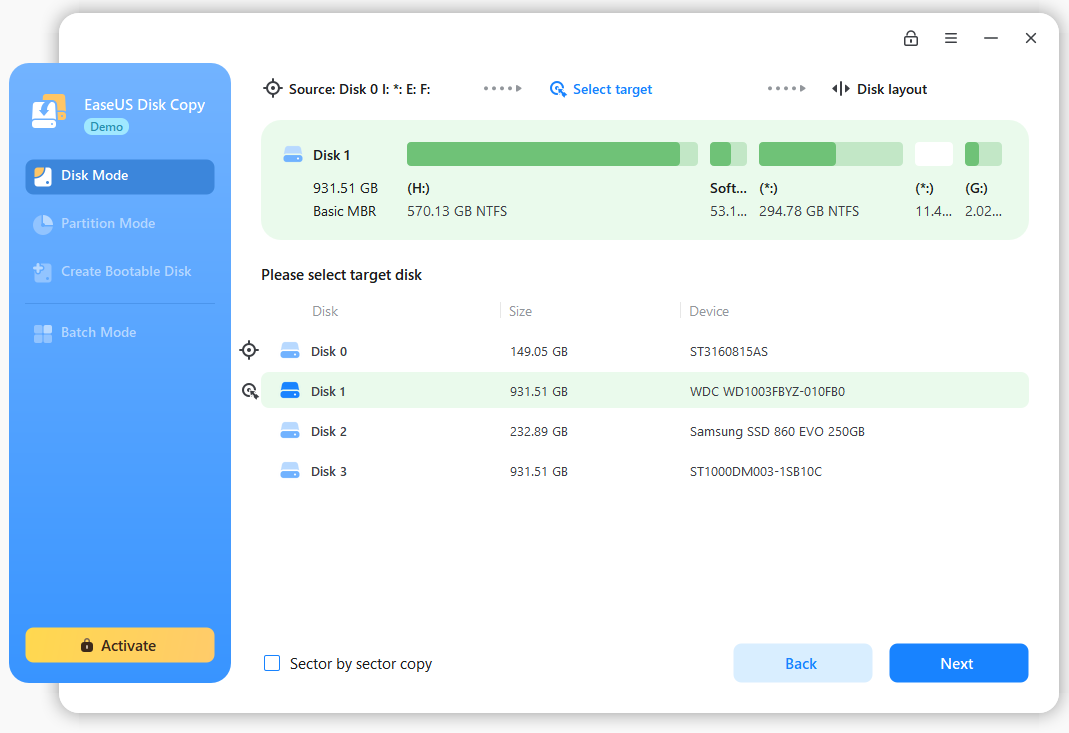
Clone one disk to another sector by sector with a bootable CD.
Makes physical 1:1 copies (clones) of hard disks and partitions which ensure 100% identity to the original.
EaseUS Disk Copy Home help me copy my whole disk easily. I love it! 

| Functions | EaseUS Disk Copy | EaseUS Todo Backup | |||||
| Home | Technician | Home | Workstation | Server | Advanced Server | Technician | |
| File backup | - | - | ![]() |
![]() |
![]() |
![]() |
![]() |
| Disk and partition backup | ![]() |
![]() |
![]() |
![]() |
![]() |
![]() |
![]() |
| Backup SQL Server | - | - | - | - | - | ![]() |
![]() |
| Backup Exchange Server & individual mailbox | - | - | - | - | - | ![]() |
![]() |
| Hot! Outlook backup and restore | - | - | ![]() |
![]() |
![]() |
![]() |
![]() |
| Hot! Windows 7 Libraries backup/restore | - | - | ![]() |
![]() |
![]() |
![]() |
![]() |
| Copy to cloud | - | - | ![]() |
![]() |
![]() |
![]() |
![]() |
| PXE network boot to restore | - | - | - | - | ![]() |
![]() |
![]() |
| Incremental backup | - | - | ![]() |
![]() |
![]() |
![]() |
![]() |
| Differential backup | - | - | ![]() |
![]() |
![]() |
![]() |
![]() |
| One-click system backup | - | - | ![]() |
![]() |
![]() |
![]() |
![]() |
| One-click restore to dissimilar hardware | - | - | - | ![]() |
![]() |
![]() |
![]() |
| Schedule backup | - | - | ![]() |
![]() |
![]() |
![]() |
![]() |
| Remotely controlled by Central Management Console | - | - | - | ![]() |
![]() |
![]() |
![]() |
| Hot! Backup certain file type in specified folder | - | - | ![]() |
![]() |
![]() |
![]() |
![]() |
| Event-based backup | - | - | ![]() |
![]() |
![]() |
![]() |
![]() |
| File-by-file copy | - | - | ![]() |
![]() |
![]() |
![]() |
![]() |
| Backup to CD/DVD, Network, NAS | - | - | ![]() |
![]() |
![]() |
![]() |
![]() |
| Add NAS as destination | - | - | ![]() |
![]() |
![]() |
![]() |
![]() |
| Backup to Tape | - | - | - | ![]() |
![]() |
![]() |
![]() |
| Edit, View, Delete backup task/plan | - | - | ![]() |
![]() |
![]() |
![]() |
![]() |
| Backup tasks and plans can be interconverted | - | - | ![]() |
![]() |
![]() |
![]() |
![]() |
| Convert image format (P2V) | - | - | - | ![]() |
![]() |
![]() |
![]() |
| Image compression | - | - | ![]() |
![]() |
![]() |
![]() |
![]() |
| Password protection | - | - | ![]() |
![]() |
![]() |
![]() |
![]() |
| Image splitting | - | - | ![]() |
![]() |
![]() |
![]() |
![]() |
| Backup priority | - | - | ![]() |
![]() |
![]() |
![]() |
![]() |
| New! P2V copy and P2V recovery | - | - | - | ![]() |
![]() |
![]() |
![]() |
| Pre/Post commands | - | - | ![]() |
![]() |
![]() |
![]() |
![]() |
| Check image integrity | - | - | ![]() |
![]() |
![]() |
![]() |
![]() |
| Disk/Partition clone | ![]() |
![]() |
![]() |
![]() |
![]() |
![]() |
![]() |
| Wipe disk/partition | - | - | ![]() |
![]() |
![]() |
![]() |
![]() |
| Mount/Unmount image | - | - | ![]() |
![]() |
![]() |
![]() |
![]() |
| System snapshot | - | - | ![]() |
![]() |
- | - | - |
| Support hardware RAID (GPT boot supports 32 bit Windows PE) | - | - | ![]() |
![]() |
![]() |
![]() |
![]() |
| Full support dynamic volume (backup/restore/clone) | - | - | - | ![]() |
![]() |
![]() |
![]() |
| Linux based bootable disk | ![]() |
![]() |
- | - | - | - | - |
| WinPE based bootable disk | - | - | ![]() |
![]() |
![]() |
![]() |
![]() |
| Pre-OS recovery environment | - | - | ![]() |
![]() |
![]() |
![]() |
![]() |
| Built-in burning feature | ![]() |
![]() |
![]() |
![]() |
![]() |
![]() |
![]() |
| Brand-new interface for easy backup/recovery process | - | - | ![]() |
![]() |
![]() |
![]() |
![]() |
| Support Windows XP/Vista/7/8 | ![]() |
![]() |
![]() |
![]() |
![]() |
![]() |
![]() |
| Support Windows Server 2003/2008/2012 | ![]() |
![]() |
- | - | ![]() |
![]() |
![]() |
| Hot! Hard disk capacity | 1 TB | 1 TB | 2 TB+ | 2 TB+ | 2 TB+ | 2 TB+ | 2 TB+ |
| Business usage | - | ![]() |
- | ![]() |
![]() |
![]() |
![]() |
| Unlimited usage within a company | - | ![]() |
- | - | - | - | - |
| Provide technical services to clients | - | ![]() |
- | - | - | - | ![]() |
| Free Tech Support Service | - | ![]() |
![]() |
![]() |
![]() |
![]() |
![]() |
| Price | Free | $99.00 | $29.00 | $39.00 | $199.00 | $299.00 | $999.00 |
| Read More | Read More | Read More | Read More | Read More | Read More | Read More | |
| Download | Buy Now | Free Trial | Free Trial | Free Trial | Free Trial | Buy Now | |
Create Bootable Disk

Export ISO

Disk Copy Wizard

Select Copy Mode

Select Source Disk

Select Destination Disk

Task Preview

Partition Copy

Select Source Partition

Select Destination Disk

Select Destination Location

Task Preview

EaseUS Disk Copy Home help me copy my whole disk easily. I love it! 

Please turn off all download managers before selecting your product. Some download managers will cause this operation to work incorrectly.
| Disk Copy Software | Version | Platform |
| Disk Copy Home Edition Free For Home Users Only - Language: ![]() - Download |
2.3.1 Free Version | All operating systems |
How to create a bootable CD/DVD?
Note: EaseUS Disk Copy Home is just free for home users and it can not be used to provide service to clients. Click here to find the right version.
Caution: Don't download and install the software on the drive that contains lost data. This may cause disk overwritten and permanent data loss!
Copyright © 2005-2013 CHENGDU Yiwo® Tech Development Co., Ltd. ALL RIGHTS RESERVED.