
What Does RAW File System Mean?
When an (external) hard drive, USB flash drive, or partition becomes the RAW format, it indicates three kinds of possibilities:
- Your computer's operating system can't recognize the file system of the disk.
- There is no file system on your disk
- The file system of your hard drive or partition is damaged
Windows supports FAT, NTFS, exFAT, Live File System, and ReFS file systems. If you connect an external hard drive that uses the AFPS file system to your Windows computer, your computer will show the drive as RAW.
Notifications of Hard Drive/Partition Becoming RAW
You can use the properties or Disk Management to see if the file system is RAW. However, you only get to know if your external hard drive or USB flash drive may become RAW when you see one of the following notifications on your computer:
"You need to format the disk in drive X before you can use it."
"The disk in drive X is not formatted. Do you want to format it?"
"There was an error accessing drive X: The disk is not formatted."
"The type of the file system is RAW. CHKDSK is not available for RAW drives."
Why Do You Need to Convert RAW to NTFS?
When your hard drive or partition becomes RAW, you cannot access the files on it. Besides, you are not able to use it for data storage until you convert the RAW hard drive to NTFS by formatting it. But the question is, how can you repair the RAW disk and convert RAW to NTFS without losing your data?
As you may already know, converting your drive removes all the files stored on the drive. And, since your RAW drive is inaccessible, you can't even open the folders on it to copy your files. This almost makes it impossible for you to back up your data.
Luckily, all hope is not lost. There's a way to back up the files from your inaccessible RAW drive before you format it.
How to Convert RAW to NTFS Without Losing Data
In simple words, you can convert RAW to NTFS without losing data by first making RAW file recovery and then formatting the RAW drive to NTFS.
# 1. Restore Data from the RAW Hard Drive/Partition
You can use a tool like EaseUS Data Recovery Wizard to recover files from your RAW drive. This tool fully supports RAW file recovery on local hard drives, external hard drives, disk partitions, USB flash drives, and even SD cards.
The tool works on Windows 10/8/7/Vista.
Video Tutorial for RAW to NTFS Conversion:
To perform RAW disk/partition recovery:
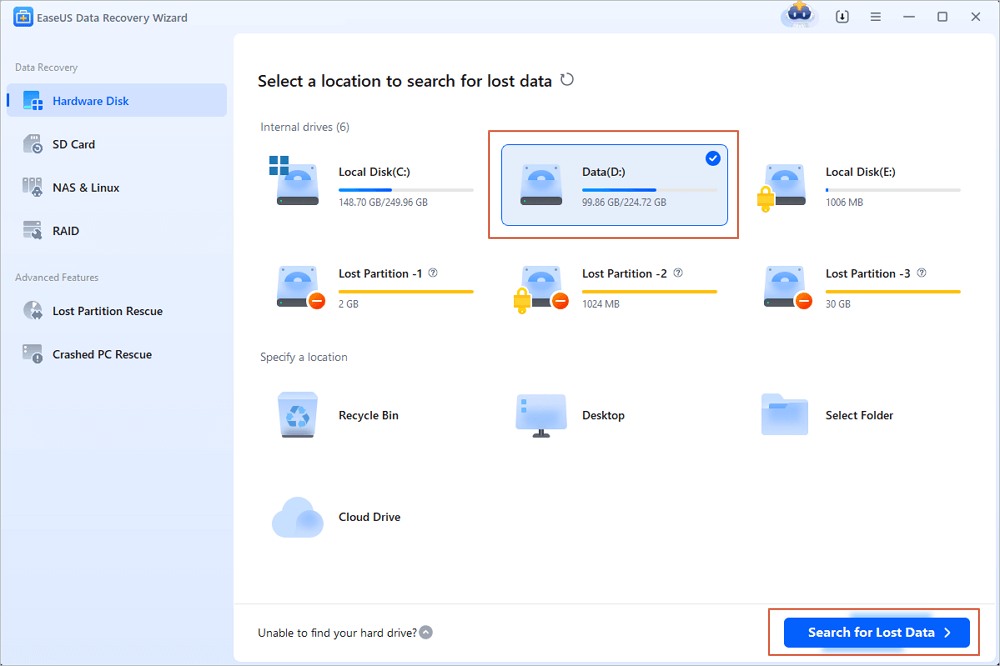
Step 1. Select and scan the RAW partition
If the RAW partition contains a partition label, you can directly select it from drives list and click "Search for Lost Data" to look for the lost files. If the RAW partition lost its label, it will be recognized as "Lost Partition", just select the "Lost Partition" and initiate an overall scan on the RAW drive.
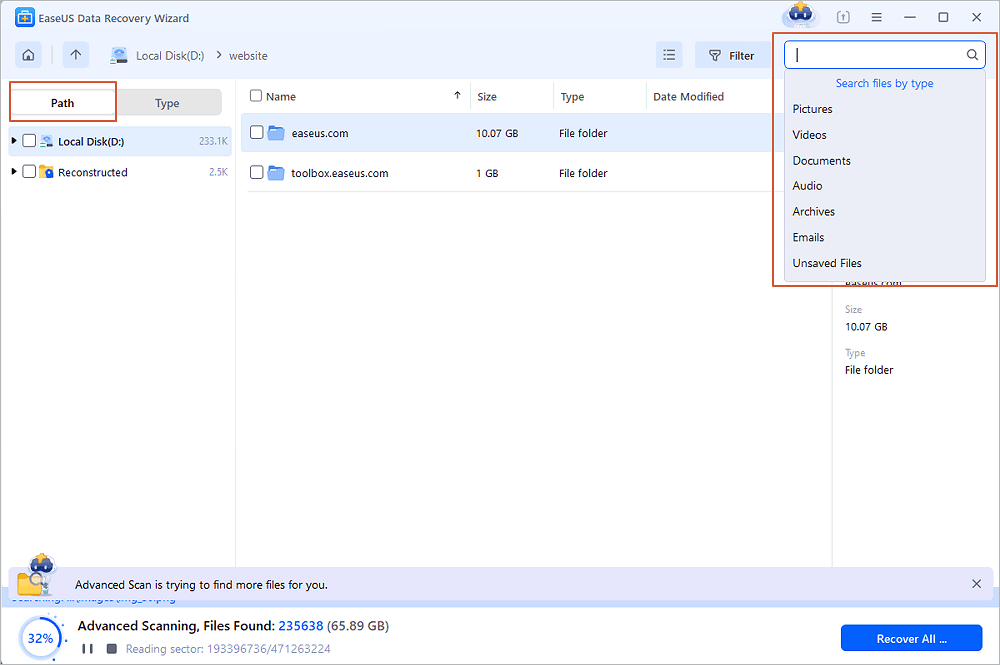
Step 2. Preview found data from the scan result
After the scan is completed, all available files in the RAW hard drive will be displayed. View these files and find the files you want to recover. You can sort the scanned data by file format or search directly in the "Search files or folders" box.
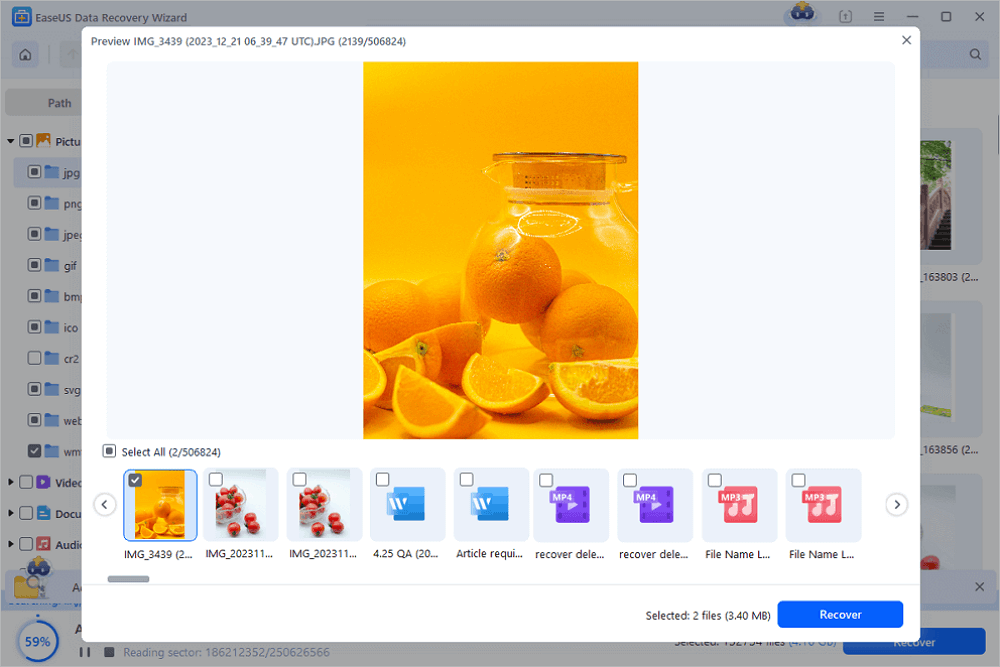
Step 3. Recover data from RAW partition
Select all files and click "Recover" to get all the data back. Select another internal/external hard drive or Cloud drive to save the recovered data and click "OK" to start RAW drive recovery.
In addition to RAW file recovery, EaseUS helps recover data from nearly all data loss scenarios, including virus infection, formatted file recovery, lost partition, and so on. You can also use our manual data recovery services for complex RAW data recovery.

Consult with EaseUS data recovery experts for one-on-one manual RAW recovery service. We could offer the following services after FREE diagnosis:
- Repair damaged RAW drive without formatting
- Recover data from RAW drive, including BitLocker encrypted drives
- Recover RAW partition, RAW USB, RAW flash drive, RAW external hard drive, etc.
Let's get to formatting your RAW drive. There are multiple ways to do this, and select anyone you'd like to use.
# 2-1. Convert RAW to NTFS by Formatting
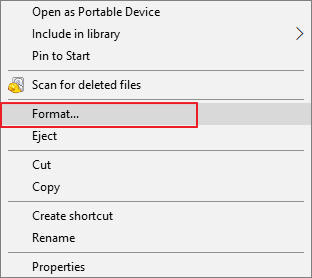
Step 1. Open This PC (Windows 10), right-click the RAW disk/partition, and choose Format.
Step 2. Select the NTFS file system and configure other options.
Step 3. Select Start followed by OK.
When the process is done, your hard drive or partition is usable again. You can copy the files recovered in the first step back to the disk according to your needs.
# 2-2. Convert RAW to NTFS via CMD
If you prefer commands, you can use a command with Command Prompt to convert your RAW hard disk/partition to NTFS. Here's how you do that:
Step 1. Open the Start menu, search for Command Prompt, and choose Run as administrator.
Step 2. Type convert X(driver letter): /fs:ntfs and hit Enter.
Step 3. Type the name of the partition or disk you want to convert to NTFS and press Enter.
Wait for the process to finish. When it's done, your RAW disk/partition should now be using the NTFS file system.
Bottom Line
Just so you know, it's not possible to access a RAW drive and copy files from it for data recovery. You must use a data recovery program to back up your files, and then use one of the many ways to turn your RAW drive into NTFS.
Converting RAW to NTFS FAQs
If you have further questions about the RAW to NTFS conversion, the following series of questions and answers might be helpful to you.
How do I recover data from a RAWC external hard drive?
When a hard drive becomes RAW, you cannot simply do a RAW external hard drive recovery and RAW drive fix by simply double-clicking it in File Explorer. This is because the Windows system doesn't support this file system.
But since your computer detects the RAW drive, there's a good chance you can recover your data from the drive. Using a tool like EaseUS, you may be able to recover all of the files stored on your RAW drive.
How can I convert my RAW hard drive to NTFS without losing data?
To convert a RAW hard drive to NTFS without losing data, first, use a data recovery tool like EaseUS Data Recovery Wizard to recover your data. Then, use one of the methods outlined in this guide to format your drive to the NTFS file system.
How can I convert RAW to NTFS?
To convert a RAW drive to NTFS, you can either use a CMD command or format the drive in Disk Management/File Explorer.
Here's how to use Disk Management to format the drive:
- 1. Open Disk Management and find your RAW storage devices (SD memory card, hard disk, USB flash drive, etc.)
- 2. Among the volumes, right-click on your device. Select the format and the file system (NTFS).
- 3. Click OK.
How do I fix a raw external hard drive without formatting?
If you don't want to format a RAW external hard drive, you will need to convert the RAW external hard drive with CMD. Here are the steps:
- 1. Connect the RAW external hard drive to your PC.
- 2. Click Start and search command, then right-click on it and afterward click Run as Administrator.
- 3. Type in Diskpart and then press Enter.
- 4. Type the following command and hit Enter each time: list disk, select disk * ( replace * with the drive letter of the RAW device), clean, create partition primary, format fs=ntfs (or format fs=FAT32), assign letter=* (replace * with a new drive letter)
Was This Page Helpful?

Cedric Grantham is a senior editor and data recovery specialist of EaseUS. He mainly writes articles and how-to tips about data recovery on PC and Mac. He has handled 10,000+ data recovery cases and is good at data recovery of NTFS, FAT (FAT32 and ExFAT) file systems, and RAID structure reorganization.

Approved by Mahesh Makvana
Mahesh is an experienced computer tech writer. He's been writing tech how-to guides for about 8 years now and has covered many topics. He loves to teach people how they can get the most out of their devices.
Related Articles
-
Disk Not Initialized and Shows Unknown, How to Fix in Windows?
![author icon]() Tracy King/Jun 09, 2026
Tracy King/Jun 09, 2026 -
How to Fix [Please Wait for the GPSVC] for Long Time
![author icon]() Jaden/Jun 09, 2026
Jaden/Jun 09, 2026 -
[2026] How to Fix Windows 10 Installation Has Failed
![author icon]() Brithny/Jun 09, 2026
Brithny/Jun 09, 2026 -
How to Recover Deleted DCIM Folder from Android
![author icon]() Tracy King/Jun 09, 2026
Tracy King/Jun 09, 2026
 Tracy King/Jun 09, 2026
  Jaden/Jun 09, 2026
  Brithny/Jun 09, 2026

