






-
![]() Windows 11 Freezing on Startup? Fix with 8 Solutions
Windows 11 Freezing on Startup? Fix with 8 Solutions October 22,2026
 6 min read
 -
![]() Aptio Setup Utility Ultimate Guide | How to Access/Fix ItOctober 22,20266 min read
Aptio Setup Utility Ultimate Guide | How to Access/Fix ItOctober 22,20266 min read -
![]()
-
![]() How to Fix Bootrec /fixboot Element Not Found Issue on Windows 11/10/7October 22,20266 min read
How to Fix Bootrec /fixboot Element Not Found Issue on Windows 11/10/7October 22,20266 min read -
![]() How to Fix Windows Copy Error 0x8007045d in Windows 10/11October 22,20266 min read
How to Fix Windows Copy Error 0x8007045d in Windows 10/11October 22,20266 min read -
![]() How Do I Repair Docx File? [6 Fixes for Microsoft Word]October 26,20266 min read
How Do I Repair Docx File? [6 Fixes for Microsoft Word]October 26,20266 min read -
![]() How to Work on Large Excel Files Without Crashing (5-Step Guide)October 22,20266 min read
How to Work on Large Excel Files Without Crashing (5-Step Guide)October 22,20266 min read -
![]()
-
![]() RAID Recovery Full Guide: Recover Data from RAID 0/1/5/6October 25,20266 min read
RAID Recovery Full Guide: Recover Data from RAID 0/1/5/6October 25,20266 min read -
![]() Fix GoPro Video Won't Play: Reapir Corrupted GoPro VideosOctober 22,20266 min read
Fix GoPro Video Won't Play: Reapir Corrupted GoPro VideosOctober 22,20266 min read
Page Table of Contents

Updated By
Larissa
Updated on
26 October 2026

Min Reading
9 Min

Due to virus attacks, improper shutdowns, or formatting failures, the type of file system is RAW, which often occurs when the file system of your drive is missing, corrupted, or unreadable by the operating system, and your drive will then show as inaccessible.
You may get the "The type of the file system is RAW. CHKDSK is not available for RAW drives." error when you attempt to use the CHKDSK command to check and repair disk errors, like file system errors and bad sectors.
PAGE CONTENT:
Feel familiar with the error message shown in the image above? This message means you failed to run CHKDSK on your drive due to a problem with the file system of your device.
What Does the Type System Is RAW Mean
The RAW file system is a file system that your computer can't recognize. The following are the reasons your hard drive or storage device, like a USB flash drive or memory card, file system goes RAW:
- The file system is missing or damaged
- The RAW drive has not been formatted with a file system
- The computer can't recognize the current file system of the drive

When your hard drive or storage medium becomes RAW, running CHKDSK will fail, and you will get a message that says "The type of the file system is RAW. CHKDSK is not available for RAW drives." If you try to open the drive, you may get the notification "You need to format the disk in drive before you can use it. Do you want to format it?" Also, you cannot open your drive and access files stored on the device.
How to Fix the Type of the File System Is RAW Error
When the file system of your drive or external storage device goes RAW, it becomes inaccessible and unusable. To make it ready for data storage again, you need to convert RAW to NTFS or other Windows-compatible file systems by formatting. When you format your drive, you can assign a new file system to it, making it usable. However, as you may know, formatting erases the existing files on the storage medium. Thus, the procedures to fix the error "the type of the file system is RAW" are:
- 1️⃣Recover data from the RAW drive.
- 2️⃣Format the drive in a secure way
You can directly format your hard drive if it is empty or if you don't need the files stored on it. You can first read the procedure according to this infographic:

1️⃣Procedure 1. Recover Data from the RAW Drive
Although you can't access the existing files on a RAW drive, a data recovery tool like EaseUS Data Recovery Wizard can. Not only does this software help recover deleted data, formatted data, and lost partitions, but it also helps recover files from drives that have become RAW and are thus inaccessible.
To recover data from your drive or storage device that reports RAW and perform RAW recovery:
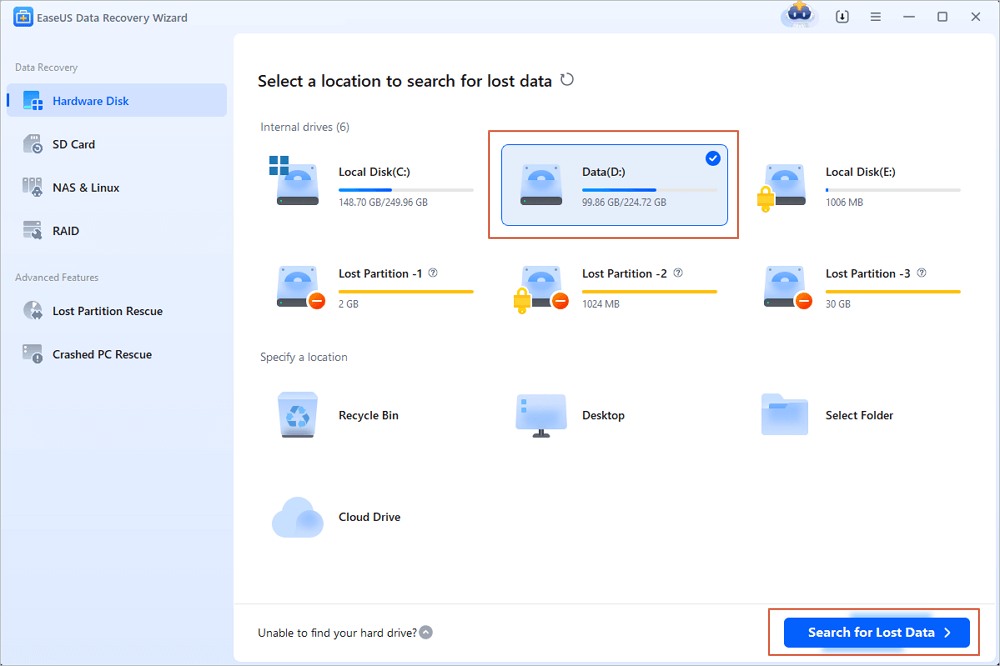
Step 1. Select and scan the RAW partition
If the RAW partition contains a partition label, you can directly select it from drives list and click "Search for Lost Data" to look for the lost files. If the RAW partition lost its label, it will be recognized as "Lost Partition", just select the "Lost Partition" and initiate an overall scan on the RAW drive.
Step 2. Preview found data from the scan result
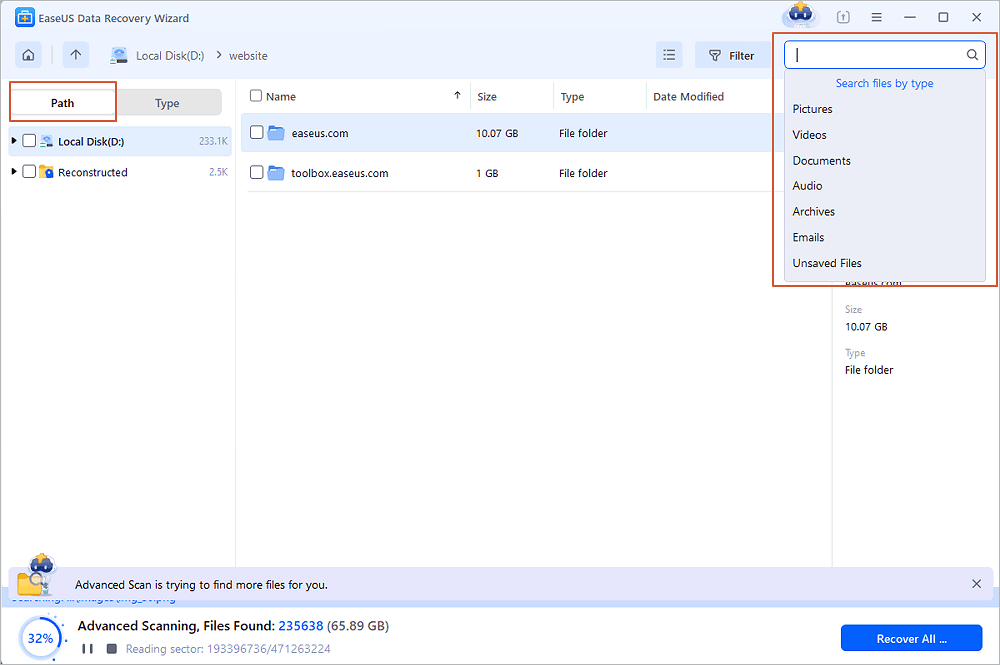
After the scan is completed, all available files in the RAW hard drive will be displayed. View these files and find the files you want to recover. You can sort the scanned data by file format or search directly in the "Search files or folders" box.
Step 3. Recover data from RAW partition
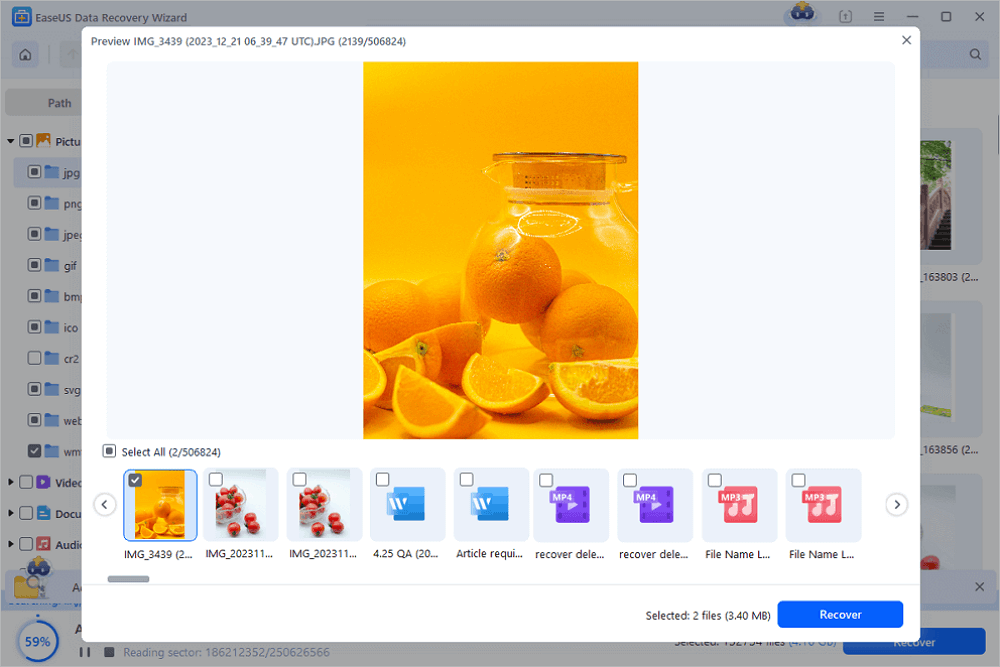
Select all files and click "Recover" to get all the data back. Select another internal/external hard drive or Cloud drive to save the recovered data and click "OK" to start RAW drive recovery.
⭐User's Review: The whole process does take some time, but it found all my existing data on the RAW drive, as well as lost items and deleted items. It even recovered whole & partial files, I had deleted years ago, and I used that drive quite a lot! - from Trustpilot
🗝️User's Review: I had a great experience using EaseUS. I recovered my hard disk, which was not functioning; I'm not sure why. It was showing a RAW disk format. I recovered all my data to my new hard disk. So, I will recommend using EaseUS to everyone. - from Trustpilot
If you found this guide useful, we'd appreciate it if you could share it with those who need it.

You can still perform RAW data recovery with EaseUS manual data recovery services.
Consult with EaseUS data recovery experts for one-on-one manual RAW recovery service. We could offer the following services after FREE diagnosis:
- Repair damaged RAW drive without formatting
- Recover data from RAW drive, including BitLocker encrypted drives
- Recover RAW partition, RAW USB, RAW flash drive, RAW external hard drive, etc.
2️⃣Procedure 2. Convert RAW to NTFS/FAT32 by Formatting
🟨Note: Make sure you have backup of your cirtical files before the quick formmating because it will erase all your data on the drive.
After retrieving all the files saved on the RAW drive, you may now format the drive with the easiest method below:
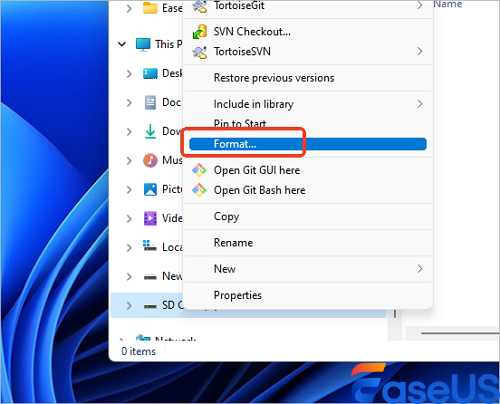
Step 1. Open This PC, right-click the RAW partition, and select Format.
Step 2. Select a file system (NTFS, FAT32, or exFAT) for your drive and click Start.
Step 3. Select Yes in the prompt to start formatting your drive.
3️⃣Procedure 3. Repair RAW to NTFS/FAT32 Using Diskpart
Diskpart is a command-line utility that allows you to create, delete, and modify a computer's disk partitions, including formatting partitions.
Step 1. Press Windows + R, type diskpart, and hit Enter.
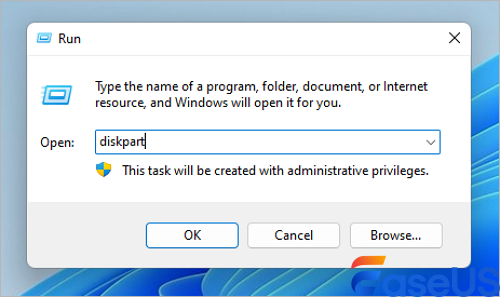
Step 2. Enter the following commands hitting Enter after each line:
list volume
select volume X ("X" means the volume number of the RAW drive)
format fs=ntfs quick (or format fs=fat32 quick)
exit
select volume X ("X" means the volume number of the RAW drive)
format fs=ntfs quick (or format fs=fat32 quick)
exit

The Bottom Line
There are several reasons why the "The type of the file system is RAW. CHKDSK is not available for RAW drives" error occurs. Your PC might be infected with a virus, there may be a format failure, you may have accidentally shut down your PC, or power outages may be responsible for this error, among other factors. Luckily, you can recover files from your RAW inaccessible drives and then format the drives to make them reusable with data recovery tool.
The Type of File System Is RAW FAQs
Here are the frequently asked questions related to file system is RAW. You can find the methods here if you also have any of these problems.
1. How do I fix a RAW file system?
Formatting the hard drive to a different file system is the simplest and quickest technique to resolve the RAW issue. All data on the hard drive will be erased during the formatting process. Be careful if you have important files on the disk; don't use this procedure.
2. How do I restore the disk's file system is RAW?
Three steps can be followed to restore RAW disk using EaseUS Data Recovery Wizard for Mac:
Step 1. Choose the RAW hard drive on which you lost your files and data. Select Scan from the menu.
Step 2. The EaseUS Mac RAW recovery program will scan the volume of your choice right away and provide the results on the left pane.
Step 3. Choose the file(s) you want to recover from the scan results and click the Recover Now button.
3. How do I convert RAW files to normal?
- Right-click on the RAW partition or drive in This PC or Disk Management and choose "Format."
- Set the Allocation unit size, File System, and Volume Label.
- You can use the RAW file system partition or disk normally after formatting.
Was this page helpful?
-
![]()
Updated by
Larissa
Larissa has rich experience in writing technical articles and is now a professional editor at EaseUS. She is good at writing articles about data recovery, disk cloning, disk partitioning, data backup, and other related knowledge. Her detailed and ultimate guides help users find effective solutions to their problems. She is fond of traveling, reading, and riding in her spare time.…


 Why Trust EaseUS
 Editor Reviews

20+
Years of experience

160+
Countries and regions

72 Million+
Downloads

4.9 +
Trustpilot Score





