





-
![]() How to Recover Deleted R3D Files [Even Empty the Recycle Bin]
How to Recover Deleted R3D Files [Even Empty the Recycle Bin] October 20,2026
 6 min read
 -
![]()
-
![]()
-
![]() I Can View Videos on My SD Card on the Camera but Not on the PC | 2026October 20,20266 min read
I Can View Videos on My SD Card on the Camera but Not on the PC | 2026October 20,20266 min read -
![]()
-
![]()
-
![]()
-
![]()
-
![]()
-
![]()
Page Table of Contents
PAGE CONTENT:
To fix a corrupted SD card, you can try connecting it to a computer, using built-in repair tools like CHKDSK, or formatting the card. You can use data recovery software like EaseUS Data Recovery Wizard or Windows File Recovery before formatting in case of data loss. If the card is still not recognized, you may need to reinstall the SD card drivers or try a different card reader.
| ✅ | Suppose the SD card files are so essential that you have no time to try all the methods in this post; Go straight to install EaseUS Data Recovery Wizard, which supports a wide range of file types to recover an SD card, USB flash drive, HDD, SSD, etc., and provides a user-friendly interface to ensure a computer novice can quickly restore deleted and lost files. |
This post will discuss the common signs indicating an SD card is corrupted, how to fix a corrupted SD card, and how to recover data from a corrupted SD card using data recovery tools. Additionally, we provide guidance on preventing SD card corruption in the future. Read on to learn detailed information!
Can You Fix a Corrupted SD Card Without Losing Data
As the SD card is frequently plugged in and out with SD card readers, especially without safe ejection, it is likely to cause file system corruption or bad sectors on the card. Don't worry if your SD memory card becomes inaccessible or is corrupted and unreadable. Apart from improper handling of the SD card, several common factors can also cause an SD card to malfunction.
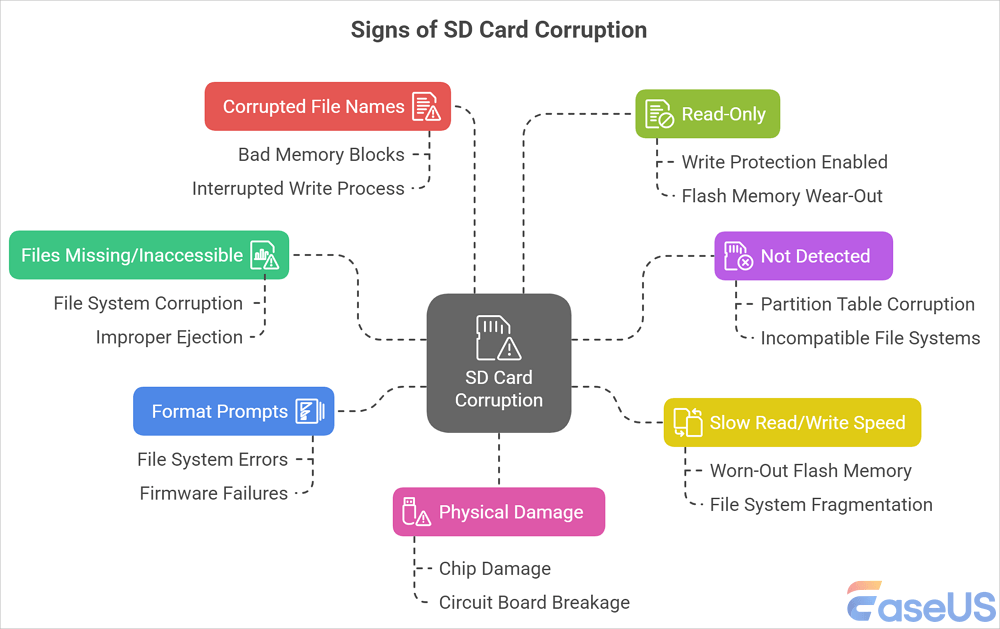
Here are the main signs indicating your SD card is corrupted:
| Symptoms | Explanations |
|
📂SD Card Files Missing/Inaccessible |
The SD card files suddenly disappear or show 0 bytes, "File is corrupted" error messages when opening, or some folders fail to open. File system corruption, improper ejection, hidden files, or virus/malware infection can make files on the SD card inaccessible. |
| ⛔SD Card Not Detected |
The computer/phone/camera does not recognize or gives no response after the SD card is inserted, and common error messages include: "SD card not formatted" or "Cannot read". Partition table corruption, dirty or oxidized metal contacts, and incompatible file systems are the common causes. |
| 🌩️Extremely Slow Read/Write Speed |
Your SD card runs very slowly during file transfers or freezes, device lag (e.g., camera takes too long to save photos), etc. This may be due to a worn-out flash memory, severe file system fragmentation, a counterfeit, or a low-quality SD card. |
| ⚠️Frequent "Format SD Card" Prompts | The device asks to format the SD card before use, and this problem persists even after formatting. File system errors and firmware failures can cause SD card format errors. |
| 💾Corrupted File Names or Gibberish Data | Files show random characters or strange symbols, or corrupted content (e.g., broken images/videos), which may be due to bad memory blocks or an interrupted write process (e.g., sudden power loss). |
| 🔒SD Card Read-Only |
The SD card can't delete or modify files, formatting fails with errors, etc., when write protection is enabled (physical lock or firmware setting), or Flash memory wear-out. |
| 😰Visible Physical Damage | Unable to recognize and accompanied by signs of physical damage, such as bent, cracked, or burnt SD card. Hardware failure of the SD card, such as chip damage, circuit board breakage, etc., which cannot be repaired by software. |
Do not repeatedly insert or repair the card if:
- The SD card is physically cracked, bent, burned, or severely damaged.
- Windows reports "No Media" rather than a normal capacity.
- The card repeatedly disconnects during scanning.
- The card makes unusual electrical noises through an adapter.
- Your most important files are irreplaceable.
- Recovery software cannot read the card consistently.
In these cases, continued attempts can make a difficult recovery more complicated.
If you need to fix a corrupted SD card without losing data, you should rescue data from your corrupted SD card first with professional SD card recovery software. However, you can go straight to 👉fix the corrupted SD card if the data is backed up in advance.
How to Fix Corrupted SD Card in 11 Ways
After making sure the safety of your SD card files using SD card recovery tools, follow the 11 fixes, which are applicable to solve different levels of SD card corruption. It's advised for SD card owners to try each method one by one, from simple to complex.
Altogether, the 11 ways of SD card repair solutions also work to fix corrupted memory cards, USBs, and external or internal hard drives. Now, let's start.
- #1. Basic Check on the SD Card
- #2. Repair Corrupted SD Card with Software
- #3. Show Hidden Files on SD Card
- #4. Assign a New Drive Letter to SD Card
- #5. Fix Corrupted SD Card File System with CHDKSK Command
- #6. Repair Corrupted SD Card With Error Checking
- #7. Run Windows Troubleshooter
- #8. Reinstall or Update SD Card Driver
- #9. Run the DiskPart Attributes Command
- #10. Format the SD Card
- #11. Turn to the Manufacturer
Fix 1. Reconnect SD Card - Change SD Card Reader, USB Port, or New Computer
| ✅Applies to | The SD card is not detected/recognized, or no response after the SD card is inserted. |
Sometimes, connection or power issues can cause the unreadable SD card. First of all, it's better to exclude exterior factors that can be fixed with a few tricks.
Step 1. Unplug and reconnect your SD card to the PC.
Step 2. If your SD card fails to show up, try the following 3 tips:
- 1. Change a new SD card reader, insert the SD card to it, and connect it to the PC.
- 2. Switch the USB port and reconnect the SD card to your computer.
- 3. Connect your SD card to another new computer.
After this, check if your SD card shows up or is readable. If yes, jump to the 👉corrupted or damaged SD card recovery section to bring back all your important files immediately. If nothing shows up, continue with the following fixes.
If you think this post is informative, share it with your friends on SNS and help more people learn how to fix a corrupted SD card without losing data.

How to Repair Corrupted SD Card (RAW Partition, Unreadable, Inaccessible)
When an SD card becomes inaccessible, shows as RAW, or a partition can no longer be opened, EaseUS Data Recovery Wizard can be used as an initial option to determine whether the partition is still recoverable. Rather than immediately formatting the card, the software's developed SDR (SD Card Rescue) technology can attempt to repair an inaccessible or RAW partition while preserving the existing data whenever possible.
If the partition can be successfully repaired, you may be able to regain normal access to the SD card and its files without formatting. This makes partition repair a useful option when Windows detects the card but cannot properly open the volume.
However, not every corrupted partition can be repaired. If the SD card's partition structure or file system is too severely damaged to restore, EaseUS SD card data recovery software can instead scan the affected SD card and attempt to recover the files directly. This is particularly useful when the card appears as RAW, the partition is inaccessible, files have disappeared, or Windows repeatedly asks you to format the card.
The recommended approach is therefore to try repairing the inaccessible or RAW partition first when appropriate and switch to data recovery if the partition cannot be restored. Any recovered files should be saved to another healthy drive rather than back to the corrupted SD card to avoid overwriting potentially recoverable data.
💡Note: If the SD card is not showing up, shows signs of physical damage, or is not detected at all, software-based repair and recovery may have limited effectiveness. In such cases, consider professional data recovery services before performing further operations on the card.
Check the following guide to rescue your corrupted SD card partition and recover data:
🏆EaseUS SD card recovery leverages patented video fragment reconstruction technology to deeply repair video files lost due to accidental deletion, formatting, or corruption. Explicitly designed for cameras, action cameras, drones, and dashcams, it accurately restores complete and playable precious footage.
Step 1. Select the SD card to scan
- Download and install EaseUS Data Recovery Wizard on your Windows PC.
- Use the proper way to connect your SanDisk/Lexar/Transcend SD card to the computer.
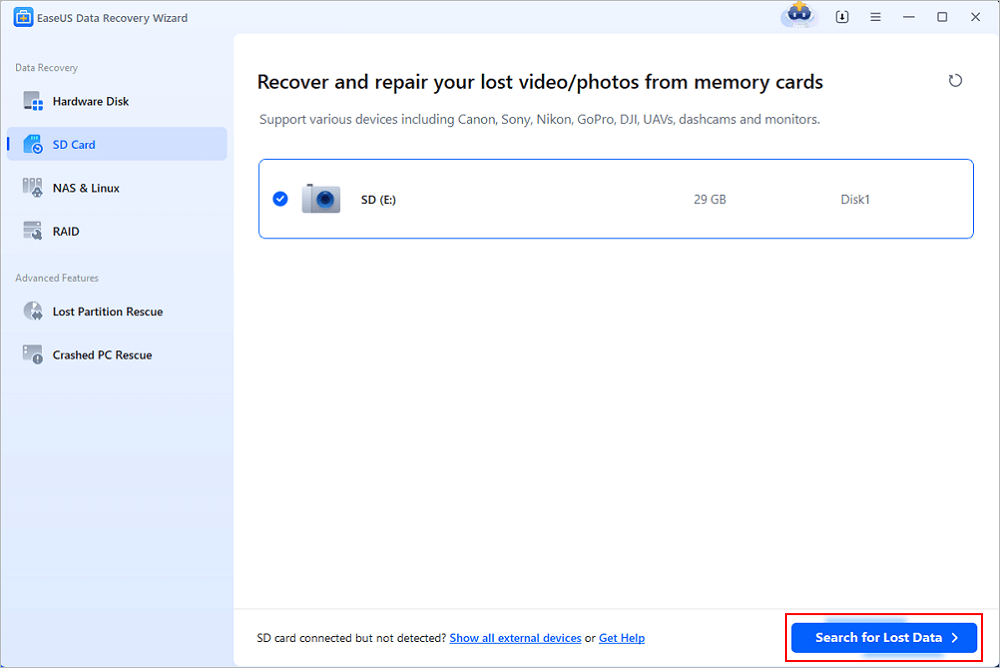
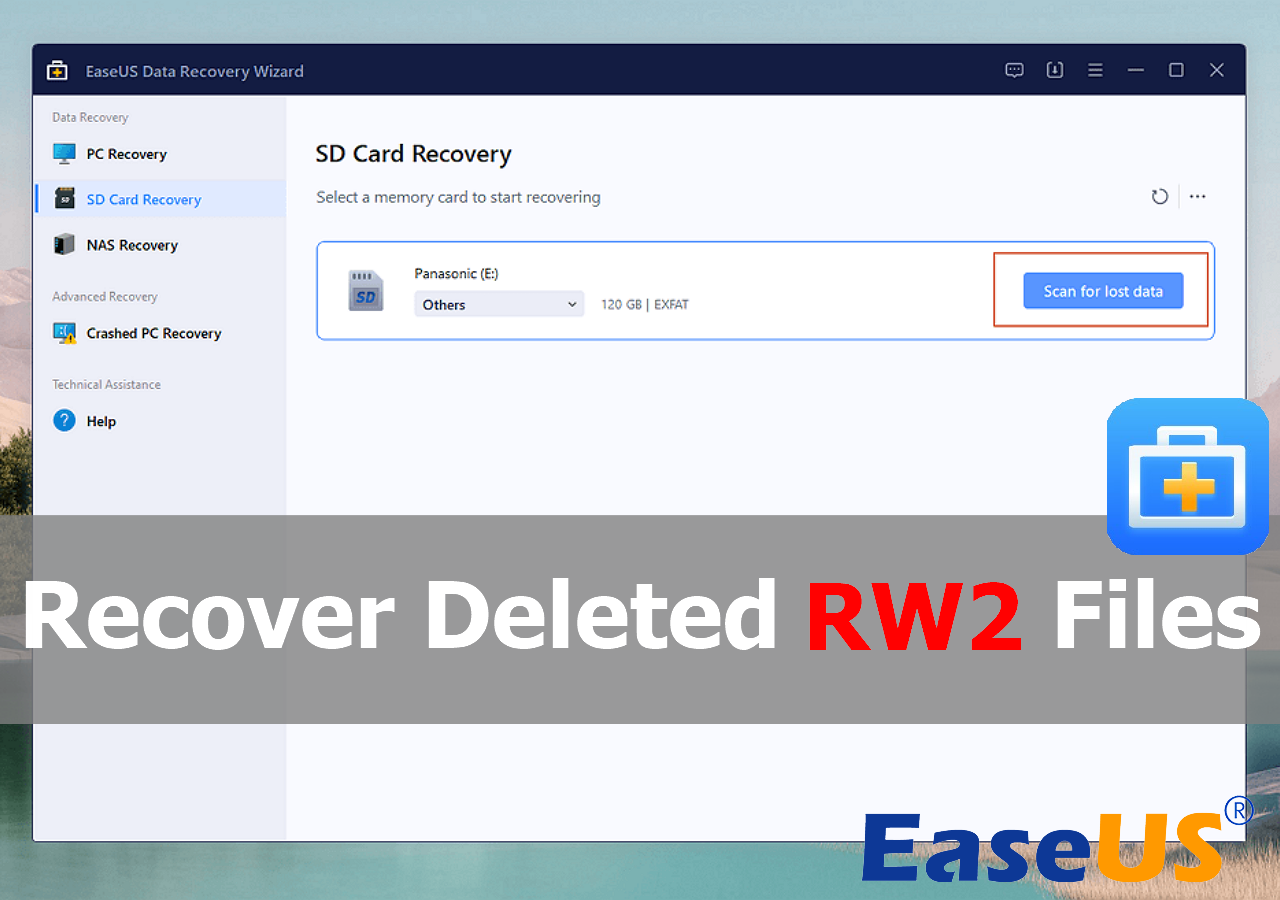
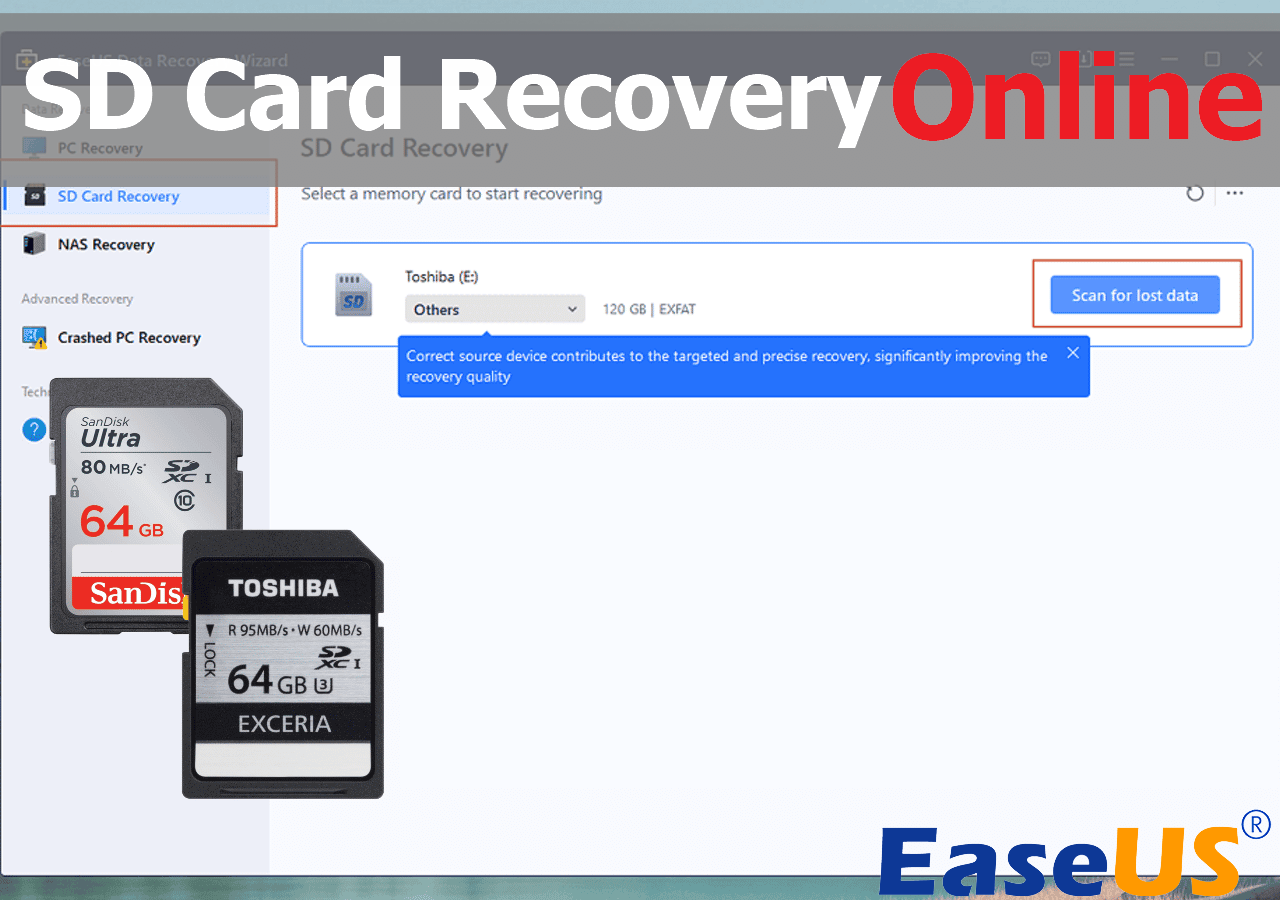
- Open EaseUS SD card recovery software and choose SD Card Recovery on the left panel. All connected drives will display here. Select your SD card and click "Scan for lost data".
Step 2. Check for scan results
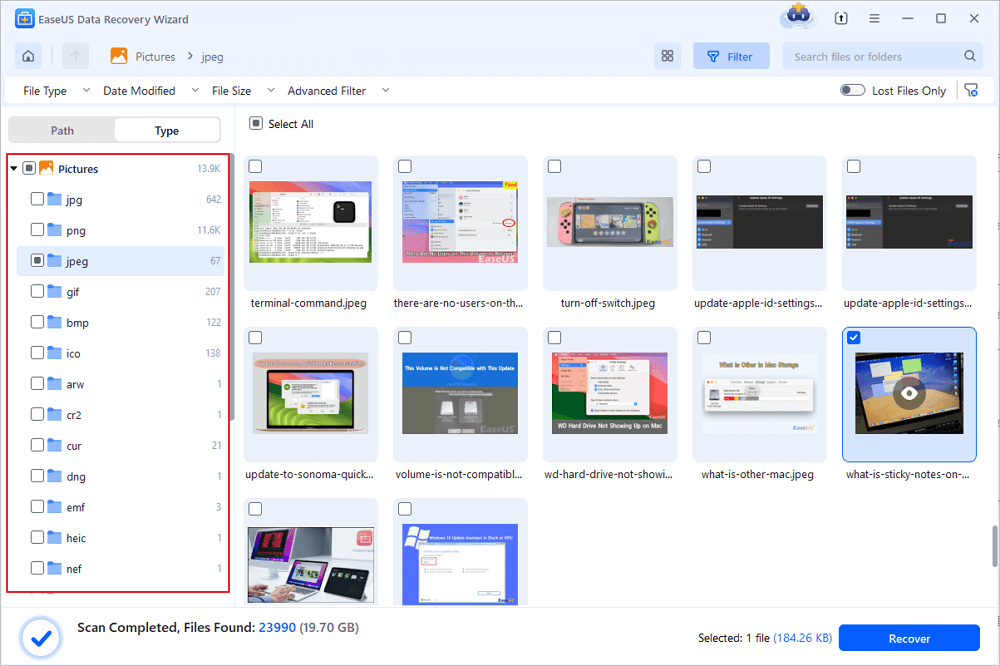
- Wait for the scanning process to complete.
- Specify one or several file types to show up, like Pictures or Videos.
- Click "Preview" to check if they are the wanted files.
Step 3. Recover SD card data
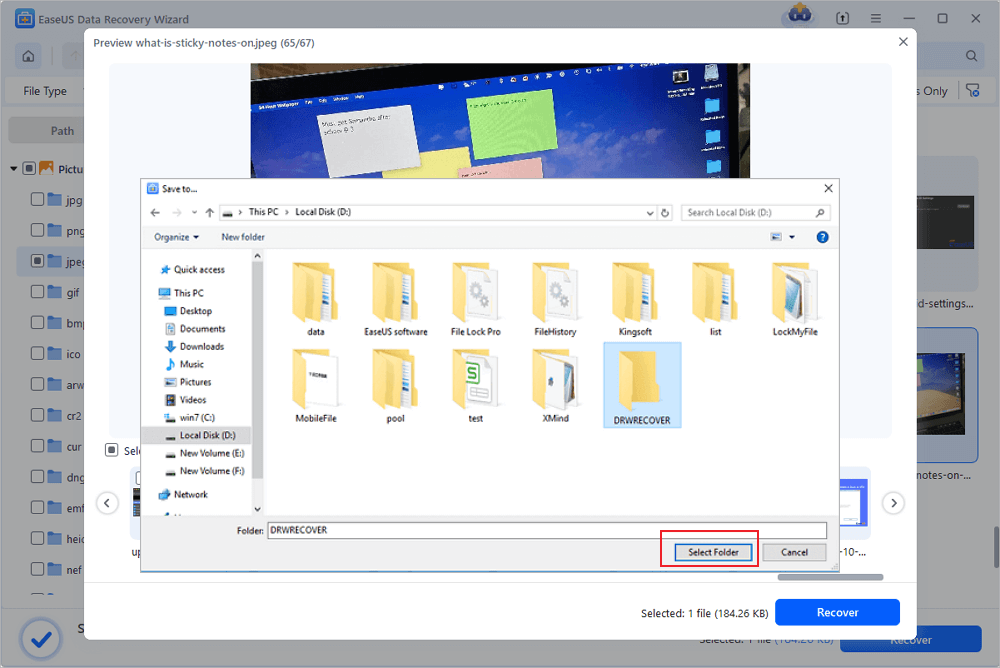
- Preview the recovered files and click "Recover".
- Choose a different location to save the recovered files instead of the original SD card.
💡Want to know more about SD card data recovery? For example, what is the best SD card data recovery software? How to recover a damaged SD card? How to recover data from an unreadable SD card...Go for SD Card Data Recovery FAQs and restore your precious lost files.
With the help of the EaseUS SD card recovery tool, you can recover deleted or missing photos, videos, and documents from a corrupted SD card. Besides SD cards, it also supports memory card data recovery, such as microSD cards, CF cards, etc. We also provide a video to help you learn more about the EaseUS SD card recovery tool. Take a look if needed!
If the SD card recovery software fails to scan or the data loss scenario is too complex for using a tool, don't worry! You still have the option to try turning to EaseUS data recovery services.
Fix 3. Show Hidden Files on SD Card
| ✅Applies to | The SD card files suddenly disappear or show 0 bytes. |
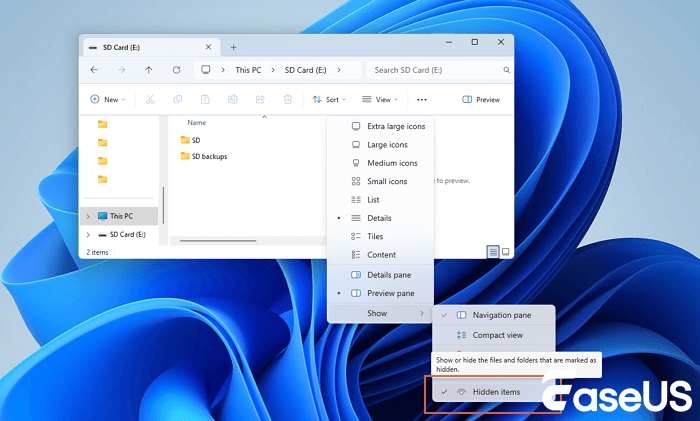
If your SD card suddenly shows empty or the SD card only displays partial data after fixing the corruption error, the data might be hidden. The other way is to find hidden files on SD card:
Step 1. Connect the SD card to the PC and press "Windows + E" to bring up Windows Explorer.
Step 2. Open "This PC" and double-click your SD card.
Step 3. Go to the View tab in File Explorer, and choose "Show" >"Hidden items".
Fix 4. Change or Assign a New Drive Letter to SD Card
| ✅Applies to | The SD card is not readable, or it is not showing up. |
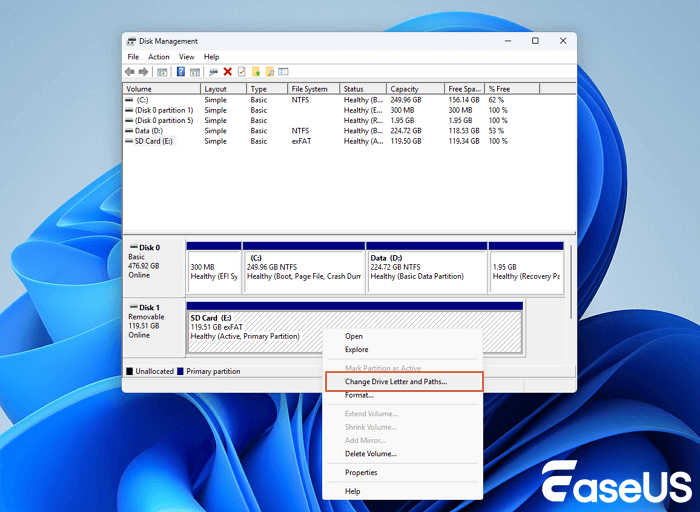
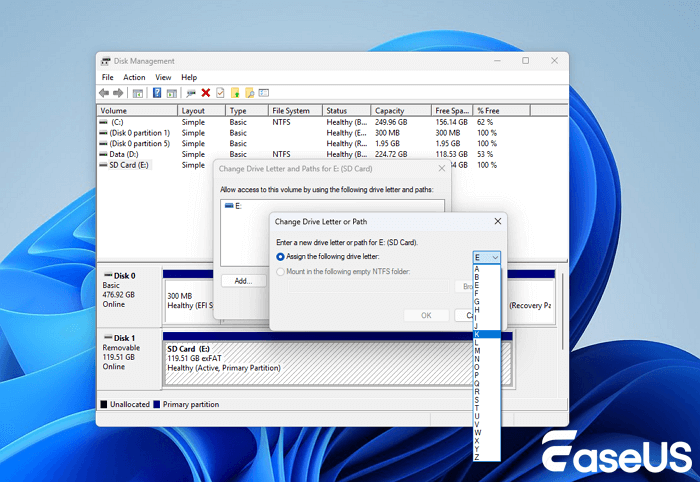
Connect your SD card to your computer. If you didn't see the drive letter of your SD card in Disk Management, it's because its drive letter conflicts with other drives. In this case, the computer will not detect the SD card, and the SD card will appear to be corrupted or unreadable. Changing or assigning a new drive letter to the SD card in Disk Management will resolve this error. Add a new drive letter to your card with the following steps:
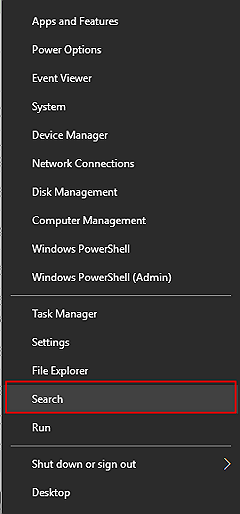
Step 1. Press the Win + X keys and click "Disk Management".
Step 2. Right-click on your SD card and select "Change Drive Letter and Paths...".
Step 3. Click "Add" or "Change" and select a new drive letter for the SD card. Click "OK" to confirm.
Fix 5. Run CHKDSK to Fix and Repair Corrupted SD Card File System
| ✅Applies to | The SD card file system corruption or bad sectors issue. |
SD card has a limited lifespan, like other removable storage devices. It will grow bad sectors, or the file system may corrupt after a long period of use.
The CHKDSK command will find SD card file system corruption errors and remove bad sectors. This is also the most applicable way to repair a corrupted SD card without formatting.
- Warning
- Running chkdsk can hopefully fix the corrupted file system, however, it can also result in total data loss. So, perform data recovery in advance, and then continue with the CMD method.
Step 1. Plug your SD card into your computer with a card reader.
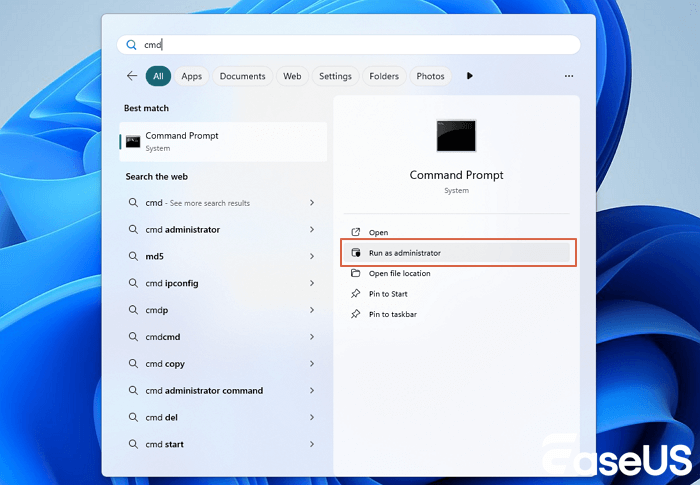
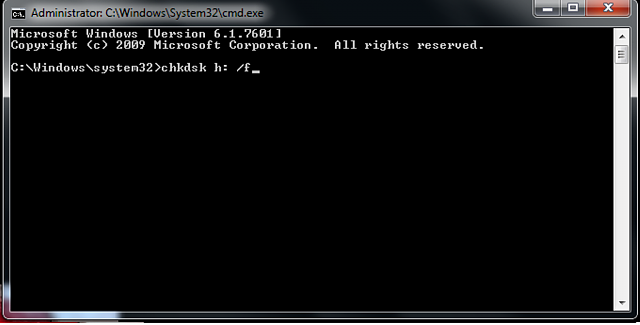
Step 2. Type cmd in the search box, right-click Command Prompt and select "Run as Administrator".
Step 3. Type chkdsk C: /f /r /x and hit Enter.
- "C:" means the drive letter of the corrupted SD card you want to repair.
- "/f" is to fix any found errors.
- "/r" is to locate bad sectors and recover any readable information.
- "/x" is to force the volume you're about to check to be dismounted before the utility begins a scan.
Step 4. Type exit when the checking and fixing process completes.
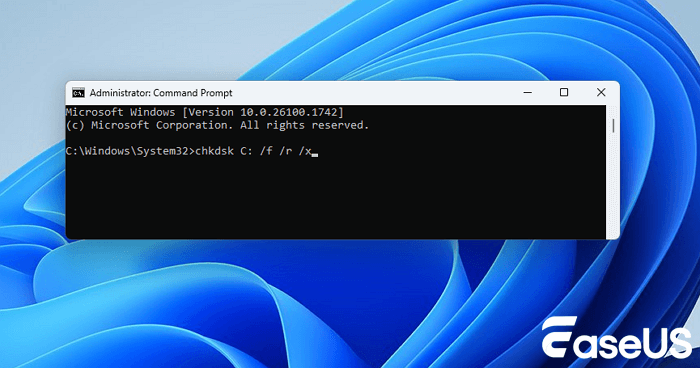
After finishing all these steps, if you see "Windows has made corrections to the file system" in the command window, congratulations. The corrupted SD card is successfully fixed, you can view and use your data again.
Fix 6. Repair Corrupted SD Card With Error Checking
| ✅Applies to | The SD card can't be opened or is inaccessible due to a device error. |
Another practical way to fix SD card corruption errors is to run Windows Error Checking. Follow the steps below to repair a corrupted SD card on your own:
Step 1. Connect the SD card to your PC.
Step 2. Press Windows + E to open Windows Explorer.
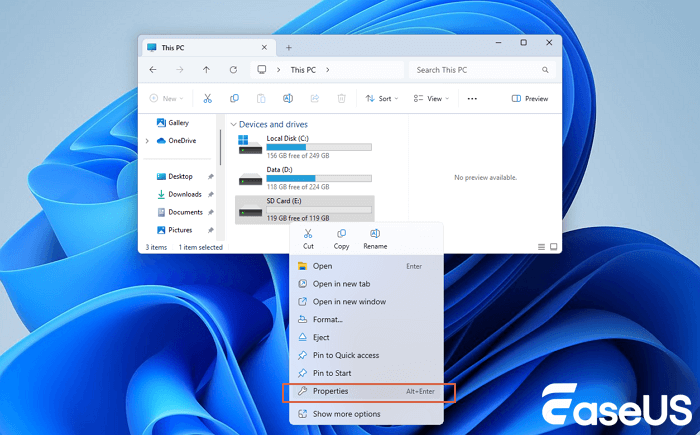
Step 3. Right-click the SD card and open its Properties.
Step 4. Go to the Tools tab, and click the Check button.
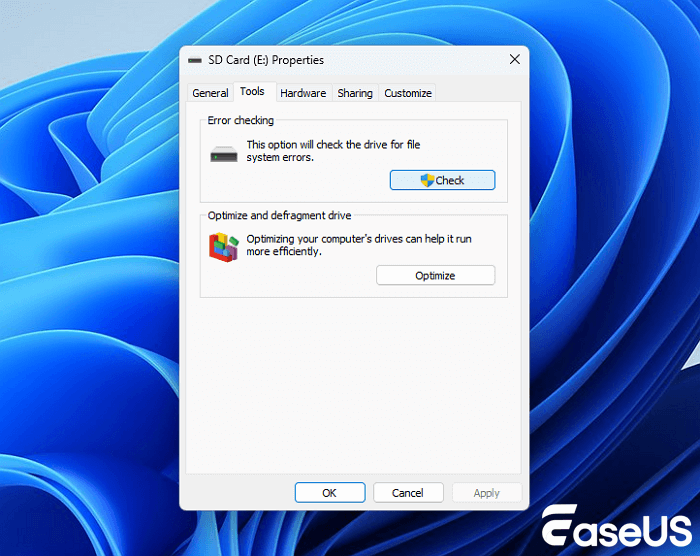
Let the scan process complete and close the scan window once it finishes.
After this, you may be able to open and view your SD card files again. If you have fixed SD card corruption issues, please share this method with more users.
Fix 7. Run Windows Troubleshooter
| ✅Applies to | The issues that are related to hardware and drivers on the SD memory card. |
Windows Troubleshooter can find and fix problems that are related to hardware and drivers. If the SD card contains a similar problem, Windows Troubleshooter will do:
Step 1. Connect the SD card to your PC.
Step 2. Go to Windows Settings > Update & Security > Troubleshoot.
Step 3. Under the Hardware and Devices section, click "Run the troubleshooter".
Wait for the troubleshooting to complete, and then restart the PC. The SD card not openable or unreadable error shall be resolved.
Fix 8. Reinstall the SD Card Driver and Make SD Card Detectable
| ✅Applies to | The SD card is not detected or recognized error due to an outdated driver. |
When the SD card is not recognized by Windows at all, you can neither see it in Windows Explorer nor Windows Disk Management. A highly possible reason is that the SD card driver is outdated.
You can try to reinstall the driver or update drivers on Windows 11/10 to make it appear again in the Windows Device Manager:
Step 1. Press Windows + X keys and click "Device Manager".
Step 2. Expand Disk Drives, right-click on the name of your SD card, and click "Uninstall".
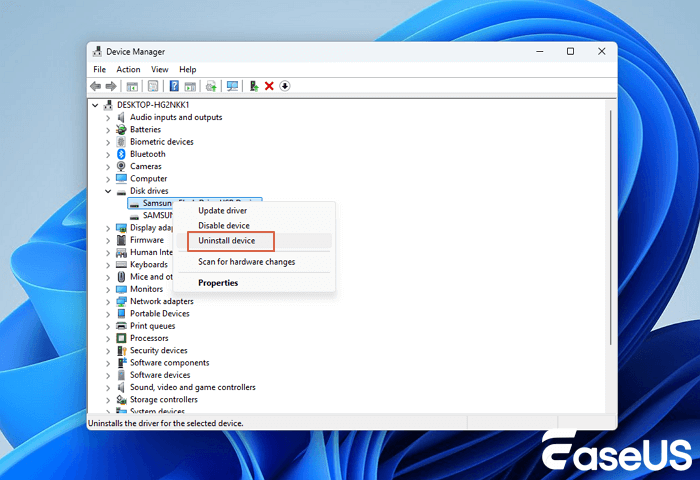
Step 3. Click "OK". Restart your computer.
Step 4. Disconnect and reconnect the SD card to your computer.
After this, Windows will install the latest driver automatically and make the SD card detectable again.
Fix 9. Run DiskPart Attributes Disk Clear Read-Only Command to Unlock SD Card
| ✅Applies to | The SD card is locked, read-only, or write-protected. |
Sometimes, your SD card may get locked, or become read-only, write-protected/encrypted by third-party encryption software.
A fast way out is to run DiskPart clear read-only command. Here are the steps:
Step 1. Connect the SD card to your PC. Press Windows + X, then click "Command Prompt (Admin)".
Step 2. Type diskpart and hit Enter in the command prompt window.
Step 3. Type the following command lines and hit Enter each time:
- list disk
- select disk 1
- attributes disk clear readonly
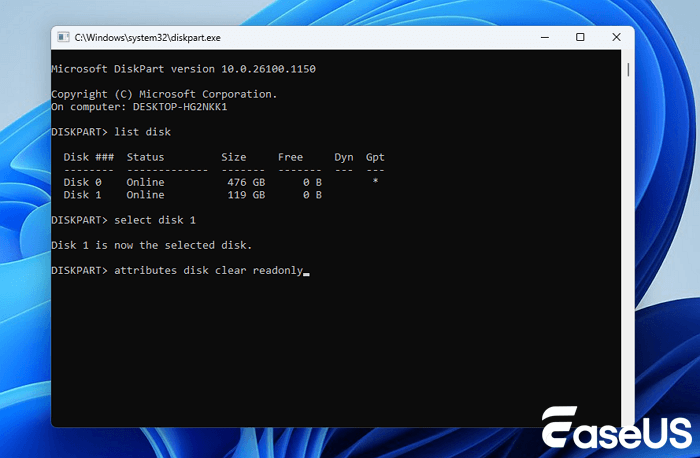
You should replace 1 with the disk number of your SD card.
Step 4. Type exit to close the DiskPart window when the process completes.
After this, you should be able to open your SD card and access the saved files again.
Fix 10. Format SD Card to FAT32 or exFAT
| ✅Applies to | Reset the SD card file system to FAT32 or exFAT, and repair the raw SD card. |
If the card displays as RAW in Windows Disk Management, or the file system of your SD card is not supported by the Windows computer or camera devices, you need to change the file system of the SD card to a supported one.
Formatting the SD card to NTFS, FAT32, or exFAT can be the best way out. This method also works to restore SD card's full capacity if the SD card only shows partial or half capacity.
You can use File Explorer to format the SD card as shown below or apply an SD card formatter for help:
Step 1. Connect the SD card to the PC and open File Explorer.
Step 2. Right-click on the corrupted SD card and select "Format".
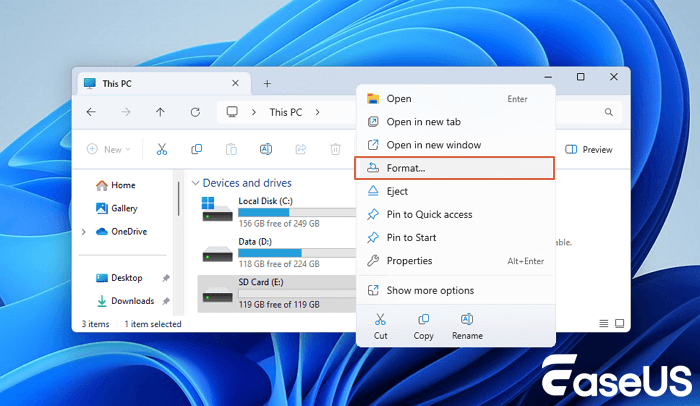
Step 3. Select a proper file system among NTFS, FAT32, or exFAT. Tick "Quick Format" and click "Start".
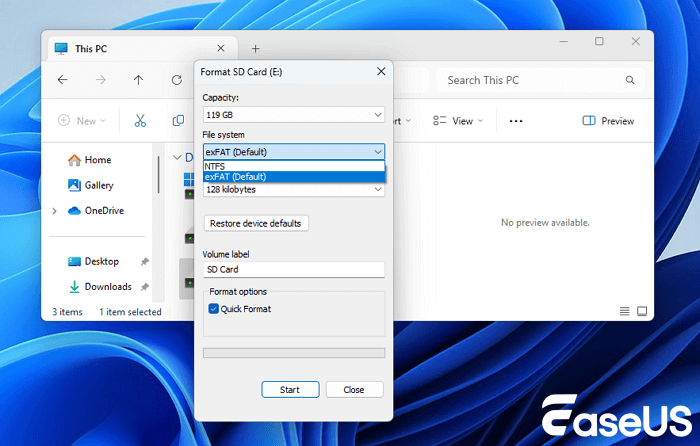
Note that formatting data will result in data loss. You can turn to SD card recovery software - EaseUS Data Recovery Wizard to recover lost files after formatting.
Fix 11. Turn to SD Card Manufacturer for Help
| ✅Applies to | The SD card malfunction error. |
Powerful SD card manufacturers like Seagate, WD, Sony, Samsung, etc., also provide services to help users fix SD card corruption or malfunction errors. If your SD card has a similar error, and you can't fix the error with the former 9 fixes, turning to the SD card manufacturer can be your last chance.
Share these useful methods on social media to let more users know!
Why Does an SD Card Become Corrupted
Understanding the cause can help you avoid another failure.
⚠️Improper Removal
Removing a card while files are being written can interrupt file-system updates.
⚠️Sudden Power Loss
A camera, phone, drone, or other device losing power during recording can leave incomplete file-system information.
⚠️Bad Sectors and Flash Wear
Flash storage has a finite endurance. Aging or failing memory can produce read/write errors.
⚠️Faulty Card Readers
A defective reader or adapter can interrupt communication and make a healthy card appear defective.
⚠️File-System Compatibility Problems
Using the card between devices with different formatting requirements can create compatibility issues.
⚠️Malware
Some malware can hide files, alter directory information, or otherwise interfere with normal access.
⚠️Counterfeit or Low-Quality Cards
A counterfeit card may report a capacity larger than its actual physical storage. Once the real capacity is exceeded, files can become corrupted or disappear.
Tips to Avoid SD Card Corruption
To prevent SD card corruption and data loss, follow these best practices:
1. Safely Eject the SD Card
- ✅Always use "Safely Remove Hardware" (Windows) or "Eject" (Mac) before unplugging.
- ❌Removing the card while data is being written can corrupt files.
2. Avoid Frequent Overwriting
- ✅Use high-endurance cards for frequent writes (e.g., dashcams, security cameras). Avoid constantly deleting and rewriting large files.
- ❌SD cards have limited write cycles; excessive use can wear them out.
3. Use Reliable Devices & Card Readers
- ✅Buy SD cards from a trusted brand (SanDisk, Samsung, Sony, etc.).
- ❌Faulty readers or unstable power can damage the card.
4. Format the SD Card Properly
- ✅Format the SD card in the device you'll use it in (e.g., camera, phone). Use FAT32 for cards ≤32GB, exFAT for larger cards.
- ❌Wrong formatting can cause compatibility issues.
5. Regularly Back Up Important Data
- ✅Copy files to a computer, cloud, or external drive.
- ❌Even the best SD cards can fail unexpectedly.
Conclusion
On this page, we have listed some common symptoms that help you define whether the SD card is corrupted. And you don't need to worry about losing data on the corrupted SD card.
We collected 10 methods to fix the corrupted SD card and also presented reliable SD card data recovery solutions to help you recover lost data after SD card repair. For a fast and secure data recovery process, take EaseUS Data Recovery Wizard as your best try. Don't worry about losing your data. Take action to bring your corrupted SD card back to life.
Corrupted SD Card Repair FAQs
This is the last part of this passage, and we hope you can learn more about damaged SD card recovery in this part:
1. Can I recover data from a corrupted SD card?
Yes, the best solution for corrupted SD card data recovery is by applying a data recovery utility. You will only need three steps to recover a corrupted SD card with EaseUS Data Recovery Wizard, and it can also recover data from a corrupted hard drive.
- 1. Connect your corrupted SD card to a PC, and run EaseUS Data Recovery Wizard to scan it.
- 2. The software will start scanning immediately after clicking the Scan button. You can choose files during the scanning process.
- 3. The last step is recovering your files once and for all.
2. How do I know if my SD card is damaged or not?
Usually, there are some signs that you can know your SD card is damaged:
- 1. Digital cameras or other suitable devices do not recognize the SD card.
- 2. Desktops and card readers do not display the card as a read-only folder.
- 3. When opened, files on the SD card have distortions or show errors.
- 4. Although the card can be seen as a folder, not all of its files are shown.
3. How to perform an SD card repair?
You can repair your SD card with the following methods:
- 1. Reconnect the SD card.
- 2. Create a new drive letter for the SD card.
- 3. Fix the corrupted SD card file system in CMD.
- 4. Repair the corrupted SD card with error checking.
- 5. Run Windows Troubleshooter.
- 6. Reinstall or update the SD card driver.
- 7. Run the DiskPart Attributes command.
- 8. Format the SD card.
- 9. Turn to the Manufacturer.
4. Can you format a corrupted SD card to fix it?
It is one of the available solutions to fix a corrupted SD card. If the SD card is damaged physically, formatting it will not be very helpful.
5. Why does my SD card say it needs to be formatted?
Windows may display a format prompt when it cannot recognize the SD card's file system. Common causes include file-system corruption, damaged partition information, interrupted writes, incompatible formatting, or storage failure.
6. How do I repair a RAW SD card?
A RAW SD card usually indicates that Windows cannot recognize its current file system. If the card contains important files, recover the data before formatting it. After recovery, you can use Disk Management to delete the damaged volume and create a new partition, then format it with a compatible file system such as FAT32 or exFAT. If the card continues to become RAW after formatting, it may be failing and should be replaced.
Was this page helpful?
-
Dany is an editor of EaseUS who lives and works in Chengdu, China. She focuses on writing articles about data recovery on Mac devices and PCs. She is devoted to improving her writing skills and enriching her professional knowledge. Dany also enjoys reading detective novels in her spare time. …
-
![]()
Written by
Tracy became a member of the EaseUS content team in 2013. Being a technical writer for over 10 years, she is enthusiastic about sharing tips to assist readers in resolving complex issues in disk management, file transfer, PC & Mac performance optimization, etc., like an expert.…
 Why Trust EaseUS
 Editor Reviews

20+
Years of experience

160+
Countries and regions

72 Million+
Downloads

4.9 +
Trustpilot Score





