30-Day Money Back
 100% secure
 Free tech support
 G2 Award Winner
USB Flash Drives
USB Flash Drive,Pen Drive, Thumb Drive,Flash Memory Stick.
Memory Cards
SD/CF card,MicroSD,MiniSD,Sandisk,Memory card/stick, CFast card, MultiMediaCard, SmartMedia card.
Cameras
Digital Camera,Action Camera,Dashboard Camera, Camcorder,Dji/Gopro Drone Camera.
SD Cards
SanDisk recovery, Kingston sd card recovery, Lexar, PNY, Transcend, etc.
Computer/Laptop
Recycle Bin,Computer Disk,Partion,Windows/Mac Operation Systems, Perpetual Deleted Files
External Hard Drive
HDD (hard disk drive), SSD (solid-state drive) and SSHD (solid-state hybrid drive), Camera,Music/Video Player, Floppy Drive,Zip Drive.
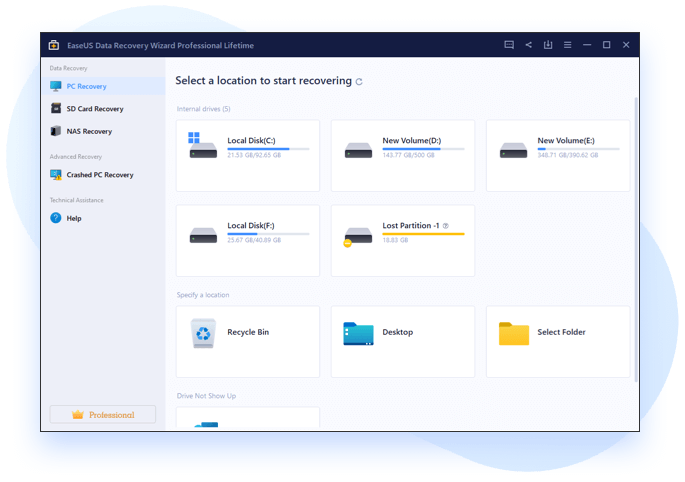
EaseUS Data Recovery Wizard has been endowed with a straightforward interface to ensure an efficient and smooth use. This guide includes a detailed instruction of how to use the program and all the features in this product.
Select the disk to initiate scan
Tips:
a. If the related partition or hard drive cannot be found in this step, please go to WindowsDiskManagement to see if Windows fails to recognize it too.
b. Make sure the connection of the target partition or hard drive is stable, or the process may hang up or the files found will be 0KB in size.
c. If the lost data is on the System partition, you are strongly suggested to disconnect the system hard drive and connect it to another computer to recover lost files.
Scan for lost data
Once a file is confirmed in the scan, our product update it in the scan result panel inreal time, and the file can be saved even the scan is still processing.
A Pause button can help you temporarily suspend the scan process if you have some other more important job to do, or you think all the files you want are already found and no further scan is required.
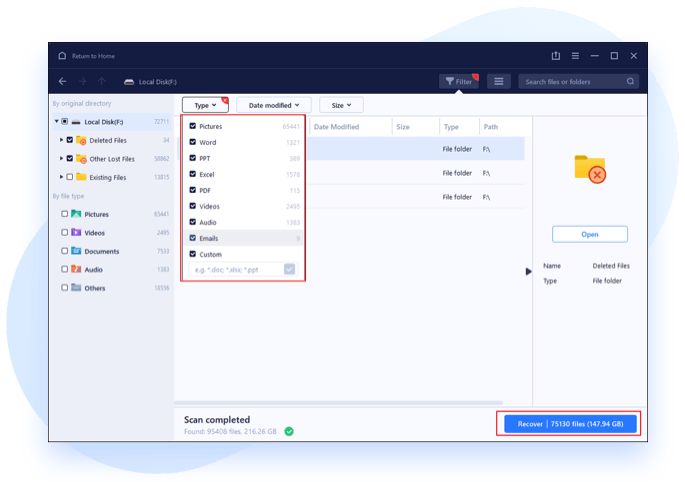
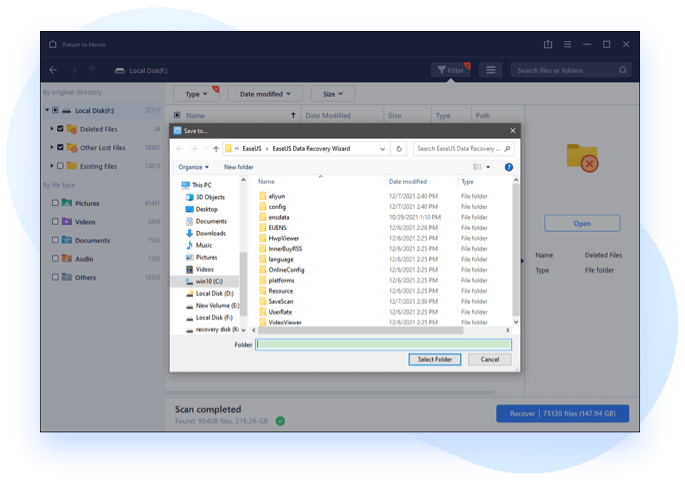
Preview and save files to a safe place.
Filter the scan result by file type, size, data and the initial letter of the file name to locate the files you want.
Most files can be previewed before you save them, including doc, docx, xls, xlsx, txt, bmp,jeg,jpeg.
Flexible Scan
Recover data from internal and external hard drive
Preview Files
Preview recovered files before you perform final restore
Recover Data
Recover and get your precious data back!
Tech Specification
Operating System Supported
Files System Supported
Hardware Requirements
What's New?
Versions Features
Copyright © EaseUS. All rights reserved.