





-
![]() How to Recover Files From SD Card That Was Partially Overwritten
How to Recover Files From SD Card That Was Partially Overwritten October 14,2026
 6 min read
 -
![]()
-
![]() How to Recover Files From SD Card After Power Outage [Easy]October 14,20266 min read
How to Recover Files From SD Card After Power Outage [Easy]October 14,20266 min read -
![]() SD Card Video Recovery: Recover Videos from SD Card (Fixed)October 14,20266 min read
SD Card Video Recovery: Recover Videos from SD Card (Fixed)October 14,20266 min read -
![]() How to Recover Lost Videos from Insta360: A Complete GuideOctober 14,20266 min read
How to Recover Lost Videos from Insta360: A Complete GuideOctober 14,20266 min read -
![]()
-
![]() How to Recover Deleted/Lost Screenshots from Nintendo Switch 2October 14,20266 min read
How to Recover Deleted/Lost Screenshots from Nintendo Switch 2October 14,20266 min read -
![]()
-
![]()
-
![]()
Page Table of Contents
PAGE CONTENT:
Free CF card recovery software includes PhotoRec, a powerful, open-source tool for various operating systems, but it lacks a user-friendly interface and recovers files by type, not name; Recuva is a Windows-only option that is easier to use but may not be as thorough as paid software.
More effective options include free/trial versions of professional software like EaseUS Data Recovery Wizard, which offer limited free recovery (e.g., 2GB) or full preview capabilities. In this post, we will discuss how to perform CF card recovery using EaseUS software.
Why You Need CF Card Recovery
What is a CF Card? A CompactFlash (CF) Card is a mass storage device first specified and produced by SanDisk in 1994. It typically uses flash memory in a standardized enclosure and is one of the standard memory card formats (others include SD cards). Given its physical size, capacity, and speed, it is used for a variety of portable electronic devices, such as cameras, DSLRs, camcorders, music players, and game devices.
However, given its popularity, data loss on CF cards due to various reasons is becoming increasingly common. The causes of data loss on a CF card include accidental deletion, card formatting, file system corruption (the CF card shows a RAW file system), virus attack, or data loss due to sudden power supply issue.
The general capacity of a CF card ranges from 2MB to 512GB, which could mean a lot of photos (since CF cards are mainly used in digital cameras). To retrieve all the lost items from a CF card, all you need is the free data recovery software - EaseUS Data Recovery Wizard.
EaseUS Data Recovery Wizard Free offers up to 2 GB of free data recovery, including 500 MB available by default and an extra 1.5 GB unlocked after sharing on Facebook and X.
How to Use EaseUS CF Card Recovery Software (Free)
EaseUS Data Recovery Wizard is not exclusively for CF card data recovery and can do more than that. In addition to recovering data from CF cards in various brands, like SanDisk, Lexar, Toshiba, Kingston, and PNY, it also helps to recover permanently deleted files, unformat an SD card, and restore lost files from a computer hard drive or other external storage devices.
❗Note: Once the lost data is overwritten by new content, it becomes unrecoverable. Therefore, stop using the storage device when data loss occurs and perform data recovery as soon as possible.
This free CF card recovery software allows you to retrieve 2GB files at no cost. Thus, if the files you want to get back are under 2GB, this data recovery tool can fulfill your needs perfectly. Besides, this software supports CF card recovery on both Windows and Mac. Get the correct version to recover data from the CF card right now.
Here's a video tutorial for data recovery using EaseUS Data Recovery Wizard:
Install this professional and trusted SD card recovery software for free, and refer to the following steps to recover lost data on your CF card (or other kinds of memory card):
🏆 EaseUS SD card recovery leverages patented video fragment reconstruction technology to deeply repair video files lost due to accidental deletion, formatting, or corruption. Explicitly designed for cameras, action cameras, drones, and dashcams, it accurately restores complete and playable precious footage.
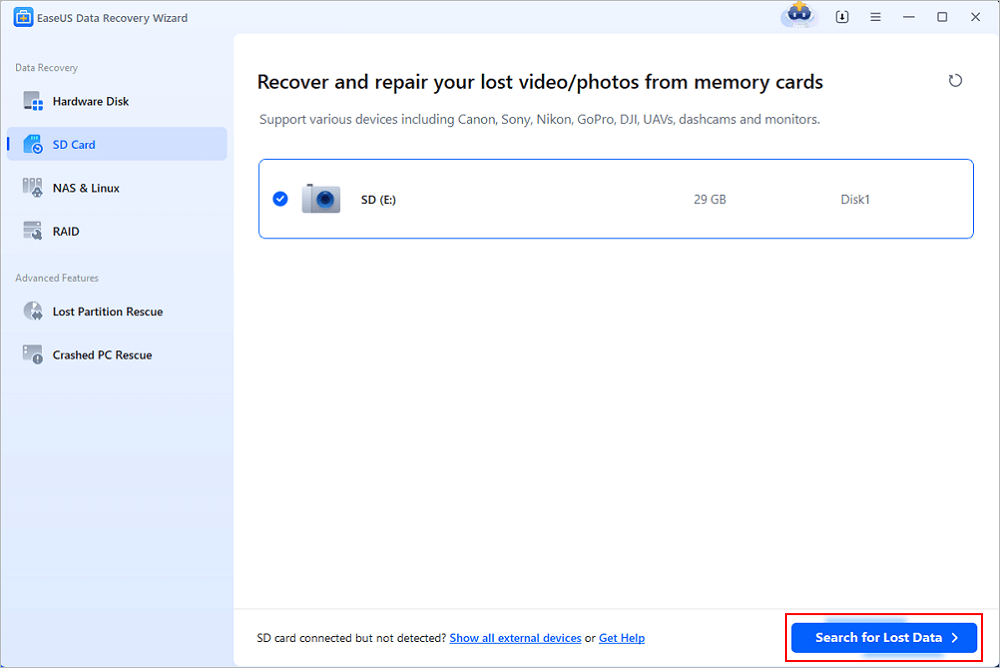
Step 1. Connect the SD card, memory card, or CF Card to your computer and launch EaseUS memory card recovery software on your PC. The SD card will be listed under the Devices section. Choose the SD card and click "Scan for lost data" to start looking for your lost data.
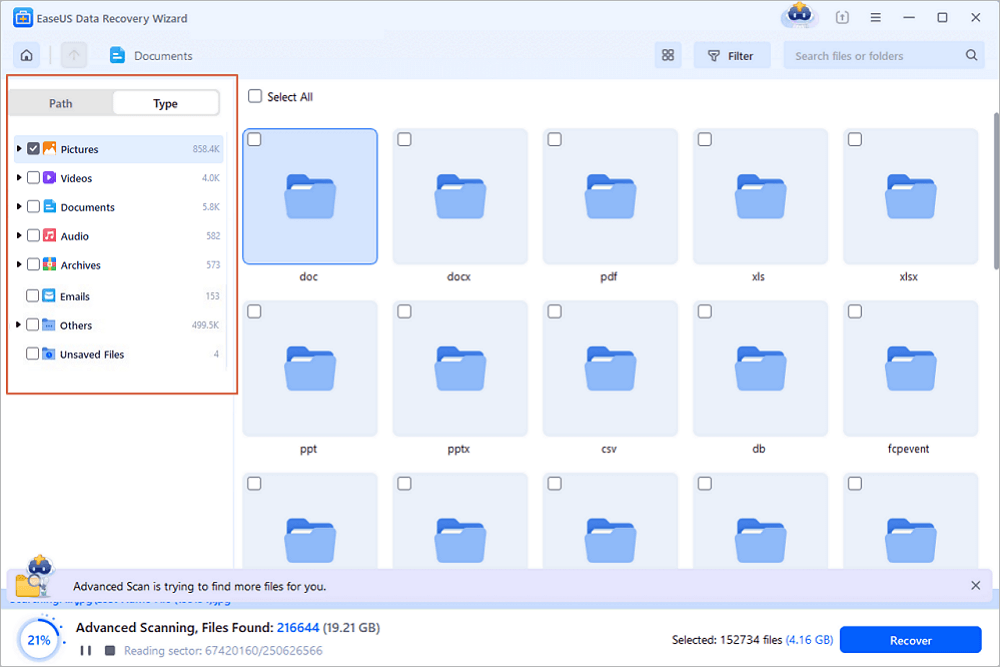
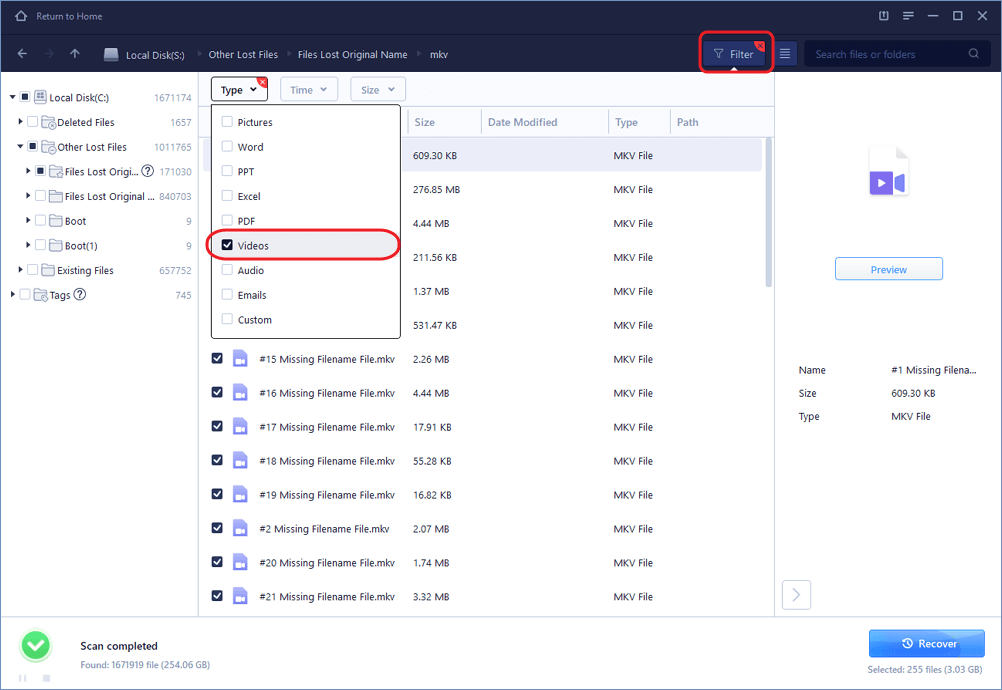
Step 2. The software will start a scan automatically. The scan is powerful enough to find all lost files that even lost file names. After the scanning process, you can find deleted items from the tree-view panel on the left. Then, click "Filter" if you are looking for a specific file type, like photos, documents, videos or emails.
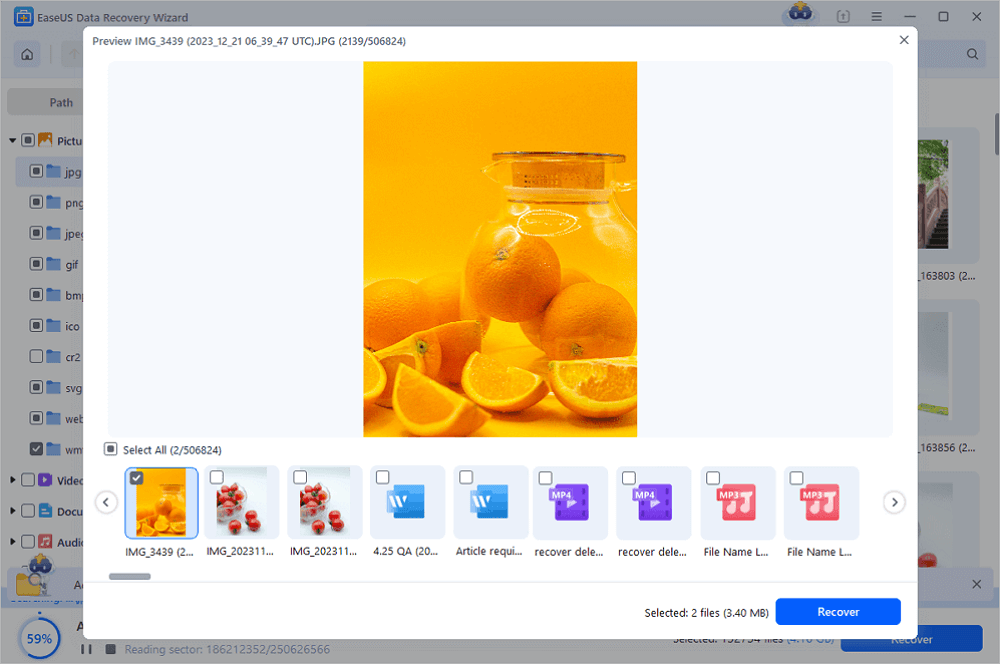
Step 3. You can directly double-click the files to preview the content. After this, you can choose wanted files and click "Recover" to restore them to a secure location on your PC or other external storage devices.
Tip: You can restore data on the local disks, external hard drives, and also the cloud storage.
💡Want to know more about SD card data recovery? For example, what is the best SD card data recovery software? How to recover a damaged SD card? How to recover data from an unreadable SD card...Go for SD Card Data Recovery FAQs and restore your precious lost files.
Don't forget to share this practical CF card recovery guide with your friends to help them restore their lost photos and videos from a CF card.

As you may know, when you use data recovery software to recover photos, some of the items may get corrupted. That means even if you can retrieve the lost photos, you won't be able to open them and view their content. That won't happen if you choose EaseUS Data Recovery Wizard. The software will repair the corrupted photos (.jpg or .jpeg) during the recovery process, which goes unnoticedly but works well. While finding the corrupted pictures, EaseUS CF card recovery software will repair them automatically and present you with intact images.
3 Tested Tips to Prevent Data Loss on CF Card
Although the lost photos or files can be retrieved in most cases using data recovery software, it's always better to minimize the chances of data loss on the CF card or other storage devices. There are some tips for data loss prevention on CF cards.
#1️⃣. Double Check Before Deleting Items
Unlike files deleted on a computer, the deleted data on a CF card won't go to the Recycle Bin or Trash Bin, which will give you the chance to restore the accidentally removed items. Thus, be careful when you attempt to delete files from a CF card.
#2️⃣. Be Prudent when Formatting the Device
I know in some cases you will need to format the CF card to fix the errors on the device, like virus attacks and the device becoming RAW. However, given that formatting the device will erase all the existing photos on it, you should perform data recovery from the infected or inaccessible CF card first using a tool like EaseUS Data Recovery Wizard to keep the data safe. Even though the tool allows you to recover a formatted CF card, performing data recovery first is recommended to minimize the risks.
#3️⃣. Back Up Important Files Elsewhere
Growing a good habit of backing up important files is of great help to prevent data loss. Even if the original files are missing, you still have the backup files available. As for backup options, you can manually copy and paste files from the CF card to another device, use free backup software, or sync them to cloud storage. Carry out the one best suited to your needs.
The Bottom Line
As long as the lost data is not overwritten, you can apply EaseUS Data Recovery Wizard to perform CF card recovery successfully. Other than knowing how to retrieve data when it's lost, it's equally important to learn how to prevent data loss on devices like CF cards. Hope this guide can help you get your desired files back.
Was this page helpful?

 Why Trust EaseUS
 Editor Reviews








