




-
![]()
-
![]()
-
![]()
-
![]()
-
![]()
-
![]()
-
![]()
-
![]()
-
![]() Lost Partition Recovery | Free Download Partition Recovery Software
Lost Partition Recovery | Free Download Partition Recovery Software June 16,2026
 6 min read
 -
![]()
Page Table of Contents
PAGE CONTENT:
Microsoft Word documents can be lost in certain situations. For example, accidental deletion, format, or partition losing. The document may be lost if an error occurs that forces Word to quit. Fortunately, there are dependable ways to solve Word problems. Whether your work was accidentally deleted, lost in a Microsoft Word crash, or simply disappeared, here’s a simple guide on how to solve your problem easily and quickly.
Part 1. Three Methods to Recover Deleted Word Files
If you just deleted your Word documents and want to get it back immediately, it a piece of cake. Knowing how to recover deleted Word documents will make you seem like an expert among many of the people in your office, but it’s not complicated at all. There are three effective ways to restore lost Word Documents, read on, and bring back your Word files.
Method 1. Restore Word Documents from Recycle Bin
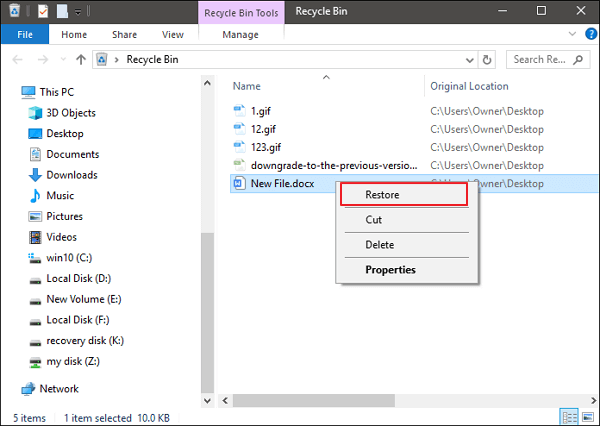
When you deleted a Word file from your hard drive, you can go to Recycle Bin first to restore it. Recycle Bin in Windows is a folder that stores the deleted files. You can restore the deleted data to the original location when you need it.
Step 1. Go to "Recycle Bin". Check if the deleted word file is still there.
Step 2. Select the Word file and click "Restore" to restore it to the original location.
Method 2. Undo Word Deletion Using "Ctrl+Z"
If you deleted a Word file, you still can undelete your Word file by clicking "Ctrl+Z" to undo the delete. After you deleted a Word file, you should perform no further action on the computer. Then, follow the details below:
Step 1. Right-click your mouse after your deletion.
Step 2. Select "Undo Delete". Your deleted Word document will get back soon.
Also, you can directly hit "Ctrl+Z" to undelete your Word document. The Word file will go back to the computer hard drive location.

Method 3. Use Word File Recovery Software to Recover It
Let’s say you’ve accidentally deleted a lot of important Word documents and emptied the Recycle Bin. Most people don't know how to deal with it. Only some users know that EaseUS Data Recovery Wizard can recover all deleted Word documents. It is an advanced Microsoft Word document recovery tool. It can do office file recovery, format recovery, and other data recovery due to partition loss or damage, software crash, virus infection, unexpected shutdown, or any other unknown reasons in Windows. Read on and get to know more details:
| Word Recovery Tool Features | Details |
|---|---|
| Supported Word Versions | Almost all Word versions (2016, 2013, 2010,2007,2003,2000,97...) |
| Supported Windows Versions | Windows XP - Windows 10 and Windows Server 2000 - 2016 |
| Supported File System | FAT (12/16/32), exFAT, NTFS, NTFS5, ext2/3, HFS+, ReFS |
| Supported File Types | Almost all common files types (250+) |
EaseUS Word recovery software makes Word document recovery as simple as it can be. Follow the simple steps below and retrieve lost Word documents as soon as possible.
Steps to recover Word file with Word recovery software:
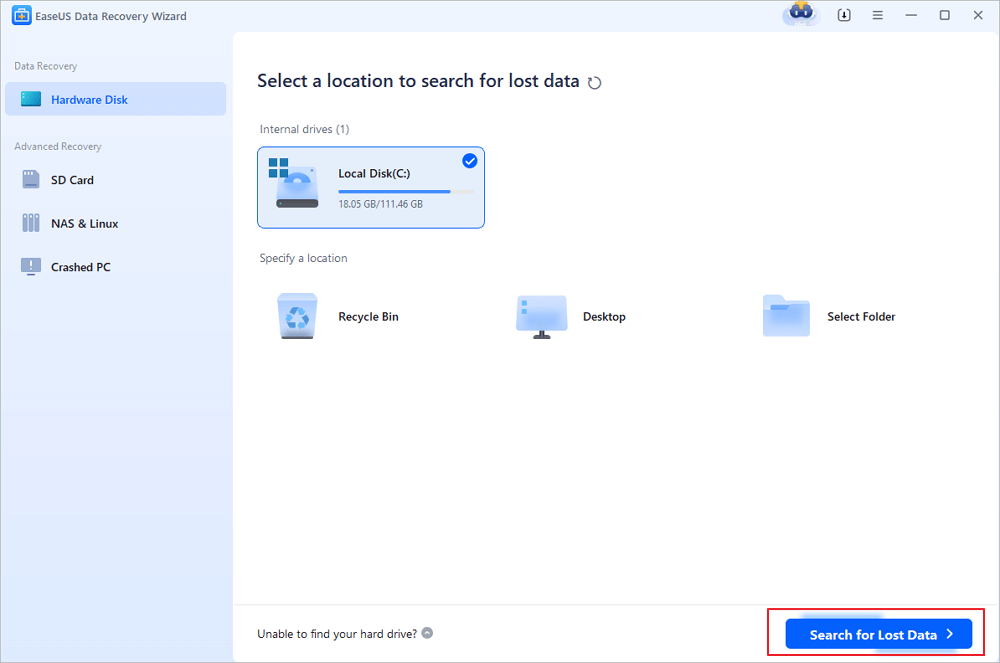
Step 1. Choose the Word file location
Choose the drive or a specific folder where you lost Word documents and click the "Search for Lost Data" button.
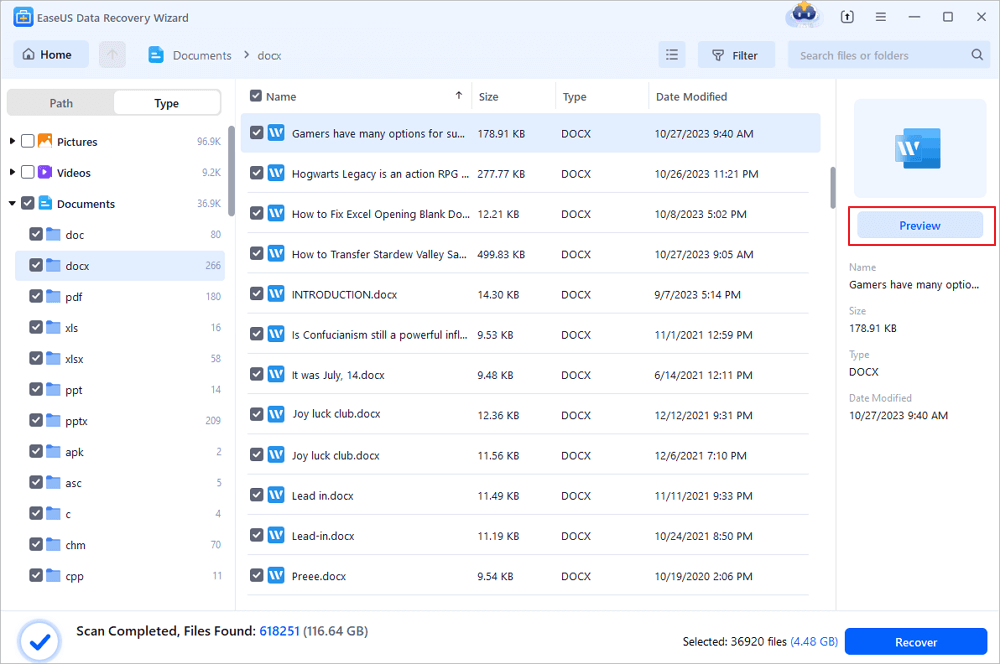
Step 2. Locate your Word documents
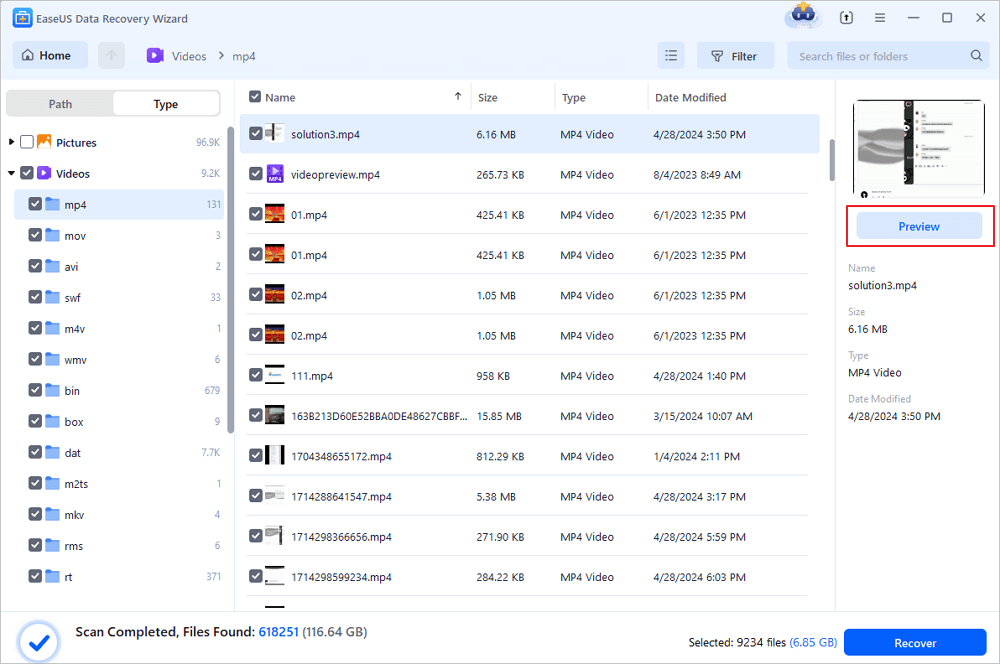
The software will start immediately scanning all lost data on the selected drive. After the scan, click the "Documents" option in the left panel. Choose the target Word file from the scan results. Then, click "Preview".
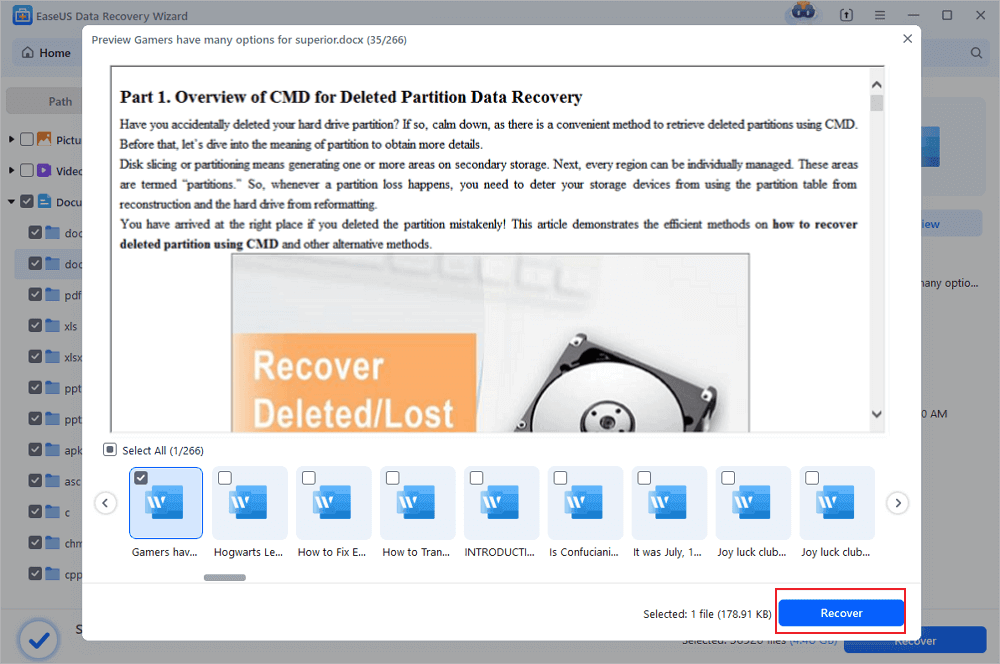
Step 3. Recover the deleted Word documents
After previewing, select the desired Word files and click "Recover". Remember, save the recovered documents in another location rather than original place. It is a great choice saving the recovered documents to cloud storage like OneDrive or Dropbox.
Video tutorial of restoring deleted or unsaved Word documents.
Part 2. How to Restore Unsaved Word Documents (2 Methods)
It's pretty easy to recover deleted Word files. But things could be a little bit difficult if you want to get back unsaved Word files. There are two methods that you can use to get your Word documents back. Either the AutoRecover option or the Recent Documents could do you a favor.
Method 1. Restore Unsaved Word from AutoRecover
We rely heavily on autosaves because documents can be lost when we don’t manually save our work. The good news is, if you have turned on the AutoSave feature, Word will automatically save the files that you are editing every 5 or set minutes. So, you can easily recover unsaved Word documents:
Step 1. Locate the AutoRecover folder on your PC. Open Word, go to "File > Options > Save", find the AutoRecover file location.
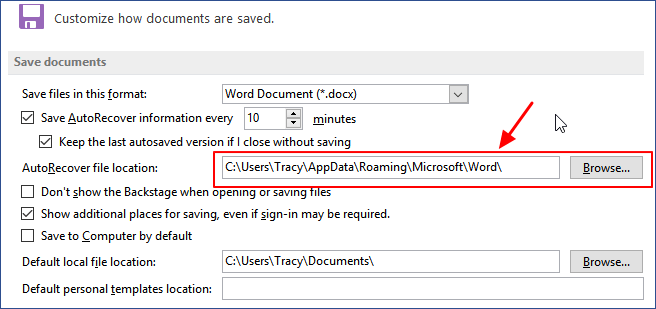
Step 2. Copy the file location path in File Explorer and open the AutoRecover folder. Find and copy the unsaved Word document which is saved with .asd extension.
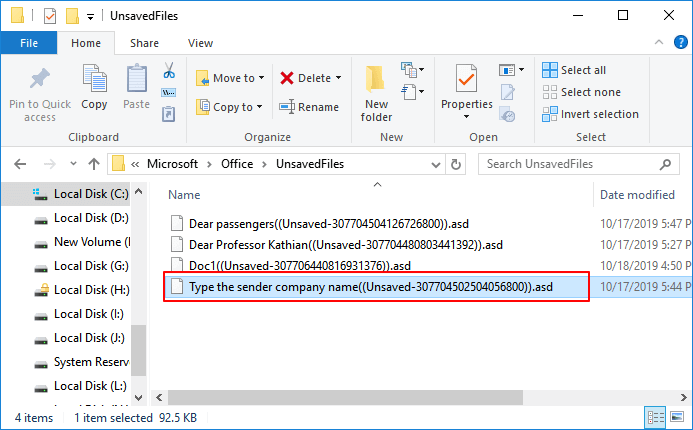
Step 3. Open Word again, click "File > Open > Recover Unsaved Documents ". Paste the .asd file at the file name column and click "Open". Check the file content and save the file to a new place.
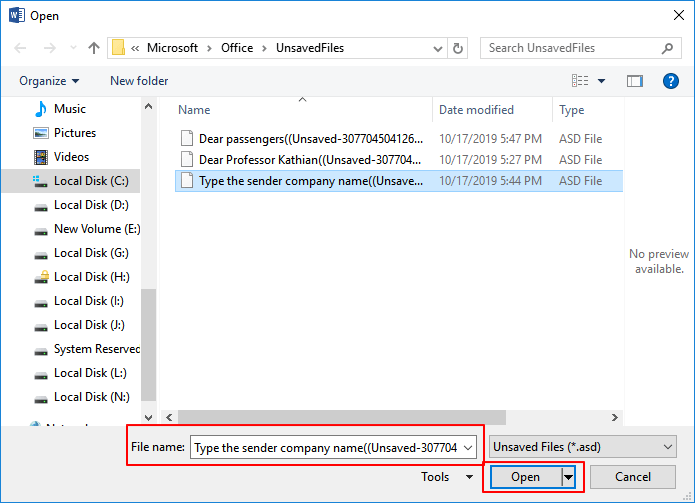
If Word warns that "Word experienced an error...", repeat the steps and click "Open and Repair" at the open Unsaved Document window.
Method 2. Restore Unsaved Word from Recent Documents
If your computer shuts down unexpectedly and you forget to save your Word file, go through this process to bring back the Word document.
Step 1. Open Word and go to "File > Open > Recent Documents > Recover Unsaved Documents".
If you don't see the "Recover Unsaved Document" option, go to "Files > Info > Manage Versions > Recover Unsaved Documents".
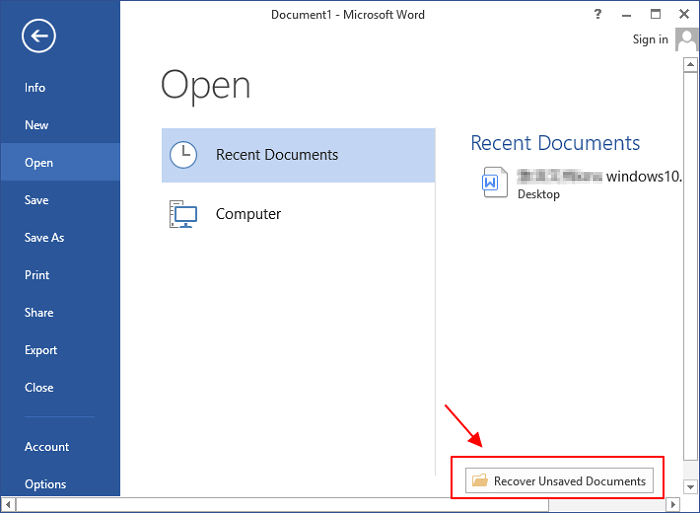
Step 2. Select the listed unsaved document and click "Open" to check the content on a new window in Word.
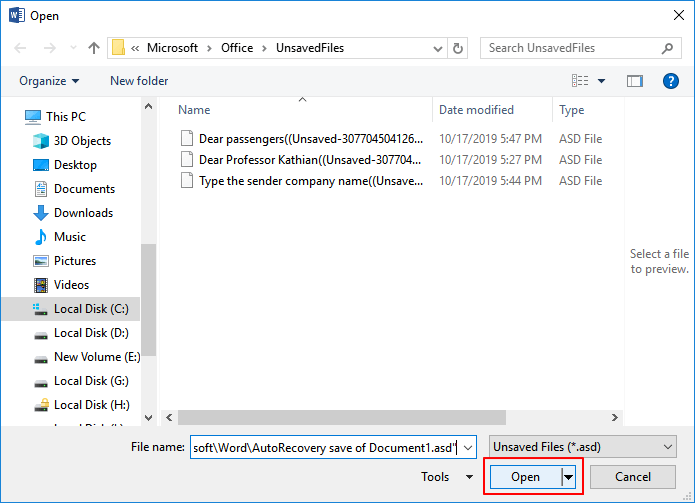
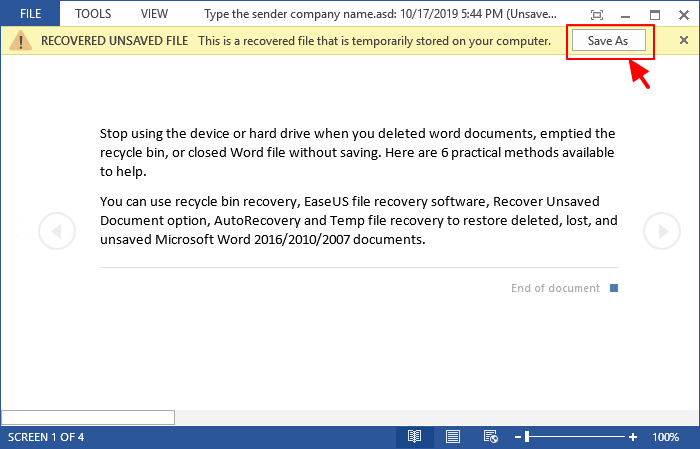
Step 3. Click the "Save As" button in the top banner.
Also read: Recover unsaved word document on Mac.
Part 3. How to Repair Corrupted Word File
What if your Word file gets corrupted or the program itself goes wrong? Whether your system unexpectedly went down or Microsoft Word crashed, you will always suffer from the great inconvenience. Nothing is more frustrating than working on a Word document only to find it get corrupted. But there’s no reason to lose hope. You still get two useful suggestions.
1. Find Reliable Word Repair Tool
You can search the internet and look for a reliable Word repair too instead of a Word data recovery tool. Here are 5 recommendations from Windows Report. You can try them and find a suitable one.
- Stellar Phoenix Word Repair
- Repair My Word
- Recovery for Word
- DocRepair
- Kernel for Word
2. Reinstall the Application to Fix Word Corruption Issue
If your Word application gets corrupted, the easiest way to solve it is to reinstall Microsoft Office on your computer. After the reinstallation, you can try EaseUS EaseUS Data Recovery Wizard to restore lost files if you lost files after reinstallation.
Conclusion
The best way to ensure that you will not get into this kind of issue is to have a backup file. Always have a backup copy. You can create a copy of your Word document and upload it to a cloud service like Dropbox or Google Drive. As an added bonus, you can edit the uploaded Word files and edit them anytime as long as you have a stable internet connection.
Frequently Asked Question - Word Recovery Problems
If you still have questions, read these answers and questions below to get additional help.
How do I recover Microsoft Word?
To recover Word file with Word recovery software:
Step 1. Install EaseUS data recovery software. Choose the Word file location.
Step 2. Scan all lost data by clicking Scan.
Step 3. Select Word files and recover.
How do I repair a corrupted Word document 2016?
To repair a corrupted Word document 2016:
Step 1. Click File on the top menu.
Step 2. Select Open on the vertical menu.
Step 3. Click the Browse button and select a document. Tap the little arrow on the Open button, and select Open and Repair from the drop-down menu.
The Word document is now launching the auto-repair function.
Does Microsoft Word backup files?
By default, Word 2013 does not automatically save backup copies of your documents, but you can easily enable this feature by clicking AutoRecover.
How do I recover files from a corrupted hard drive?
Steps to Recover Data from a Corrupted or Crashed Hard Drive:
Step 1. Download and Install EaseUS data recovery software.
Step 2. Select the crashed hard disk and click Scan
Step 3. Preview the files you found. Click Recover to recover your lost data.
Was this page helpful?
-
Dany is an editor of EaseUS who lives and works in Chengdu, China. She focuses on writing articles about data recovery on Mac devices and PCs. She is devoted to improving her writing skills and enriching her professional knowledge. Dany also enjoys reading detective novels in her spare time. …
-
![]()
Approved by
Evan Galasso is a digital forensics and data recovery engineer with over 10 years of experience in the field. He presents opinions on the current state of storage media, reverse engineering of storage systems and firmware, and electro-mechanical systems of SSDs and HDDs.…





 Why Trust EaseUS
 Editor Reviews

20+
Years of experience

160+
Countries and regions

72 Million+
Downloads

4.9 +
Trustpilot Score






