






-
![]() Files/Folders Keep Reappearing After Deletion in Windows 10/8/7
Files/Folders Keep Reappearing After Deletion in Windows 10/8/7 October 14,2026
 6 min read
 -
![]() Discord RTC Connecting Stuck? Troubleshoot This Error Now (7 Ways)October 14,20266 min read
Discord RTC Connecting Stuck? Troubleshoot This Error Now (7 Ways)October 14,20266 min read -
![]()
-
![]() How to Fix Windows Copy Error 0x8007045d in Windows 10/11October 14,20266 min read
How to Fix Windows Copy Error 0x8007045d in Windows 10/11October 14,20266 min read -
![]() How to Recover Permanently Deleted Photos from Hard Disk | 4 WaysOctober 14,20266 min read
How to Recover Permanently Deleted Photos from Hard Disk | 4 WaysOctober 14,20266 min read -
![]() Solved: Windows 11 Safe Mode Not Working | 5 SolutionsOctober 14,20266 min read
Solved: Windows 11 Safe Mode Not Working | 5 SolutionsOctober 14,20266 min read -
![]() How to Recover Corrupted Macro Enabled Excel File with Top 5 WaysOctober 14,20266 min read
How to Recover Corrupted Macro Enabled Excel File with Top 5 WaysOctober 14,20266 min read -
![]() 10 Quick Fixes for Windows 11 Randomly Restarts (2026)October 14,20266 min read
10 Quick Fixes for Windows 11 Randomly Restarts (2026)October 14,20266 min read -
![]() Windows Cannot Find GPEDIT.MSC on Windows 11/10, Fixed Now!October 14,20266 min read
Windows Cannot Find GPEDIT.MSC on Windows 11/10, Fixed Now!October 14,20266 min read -
![]()
Page Table of Contents
Can I Recover Deleted Files from Hard Disks
How you get your files deleted from a hard drive varies. Generally, if you delete files from your computer hard drive using the "Delete" key, the files deleted will go to the Recycle Bin, and you can recover deleted files from Recycle Bin. However, in most cases, you need the help of EaseUS data recovery software to recover deleted files from the hard drive. For example:
- You deleted files from your computer's hard drive and emptied the recycle bin.
- You permanently deleted data from your hard drive using "Shift + Delete".
- You deleted files from an external hard drive (the files removed from an external hard drive will bypass the Recycle Bin).
- You want to access an old hard drive on a new computer and find the hard drive cannot be accessed because of the corrupted file system.
Anyway, we will introduce five methods to help you recover data from a hard disk. You can gather information from the following table quickly:
| Recovery Methods | Editor's Review |
| This professional hard drive recovery software can help you solve most data loss issues, and you can recover accidentally deleted files from different storage devices. | |
| This method can help you recover deleted files without software, but it only works for internal hard drives, and you should make sure that the Recycle Bin has not been emptied. | |
| File History can help you recover permanently deleted files, and you'll need to enable File History by connecting an external hard drive to your computer. This utility cannot restore programs on the PC. | |
| After deleting files, this powerful built-in utility can even help you recover system image backups and other system files. | |
| When you encounter issues that cannot be fixed, you can contact local data recovery labs to help you solve the problem and avoid data loss. |
- Important
- Stop using your hard drive from which you want to recover the deleted files. Once the deleted data is overwritten by new content, there will be no way to get it back.
Method 1. How to Recover Deleted Data from Hard Drive with Data Recovery Software
To retrieve data from your hard disk, you can either apply the EaseUS Data Recovery Wizard or send your hard drive for manual data recovery services. But given the hard drive recovery cost, you are recommended to try the reliable data recovery software, which is much cheaper and faster than manual recovery services. In addition to deleted file recovery from hard drives, EaseUS Data Recovery Wizard also supports the following:
- 💽Recover formatted hard drives, recover data from deleted partitions, support OS crash recovery, virus attack recovery, and RAW partition recovery.
- 📸Lost data recovery from hard drives, USB flash drives, SD cards, memory cards, and digital cameras.
- 📃Recovery of almost all existing file types, including images, audio, videos, emails, Microsoft files, and Adobe files.
Steps to recover deleted files from hard drives with EaseUS hard drive data recovery software:
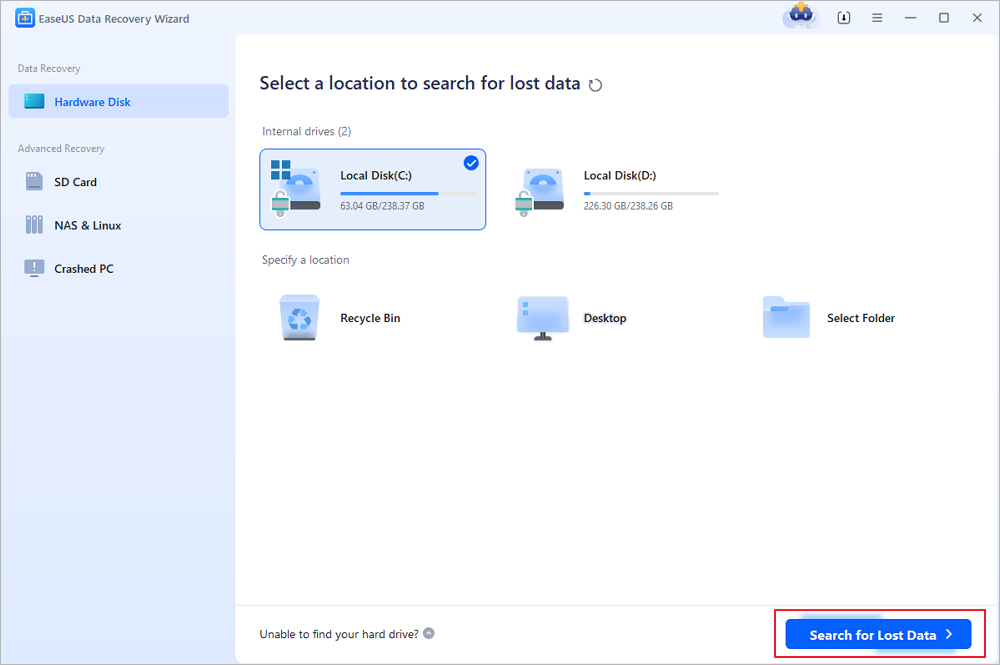
Step 1. Select a hard drive (both HDD and SSD are supported) and start scanning after launching the EaseUS Data Recovery Wizard. You can choose both local C drive data recovery and external hard drive recovery. (If you want to recover files from SSDs, make sure you haven't enabled Trim.)
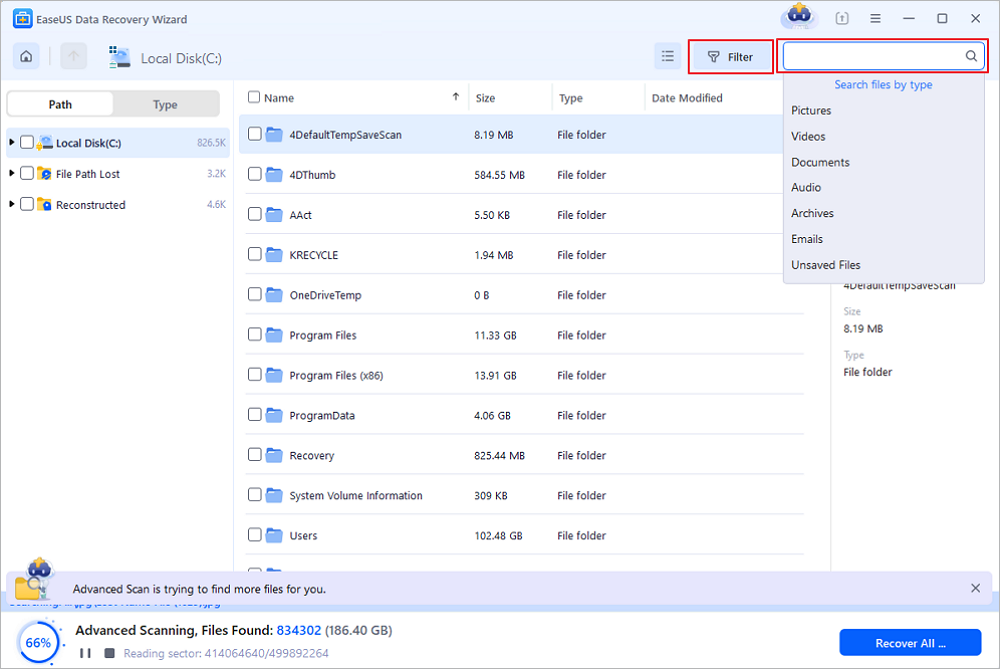
Step 2. If you don't know the location of data stored in the hard disk, just select the file type to find deleted files on the hard drive faster. If you want to recover deleted photos from a hard drive, choose "Pictures". Select files or folders and click "Recover".
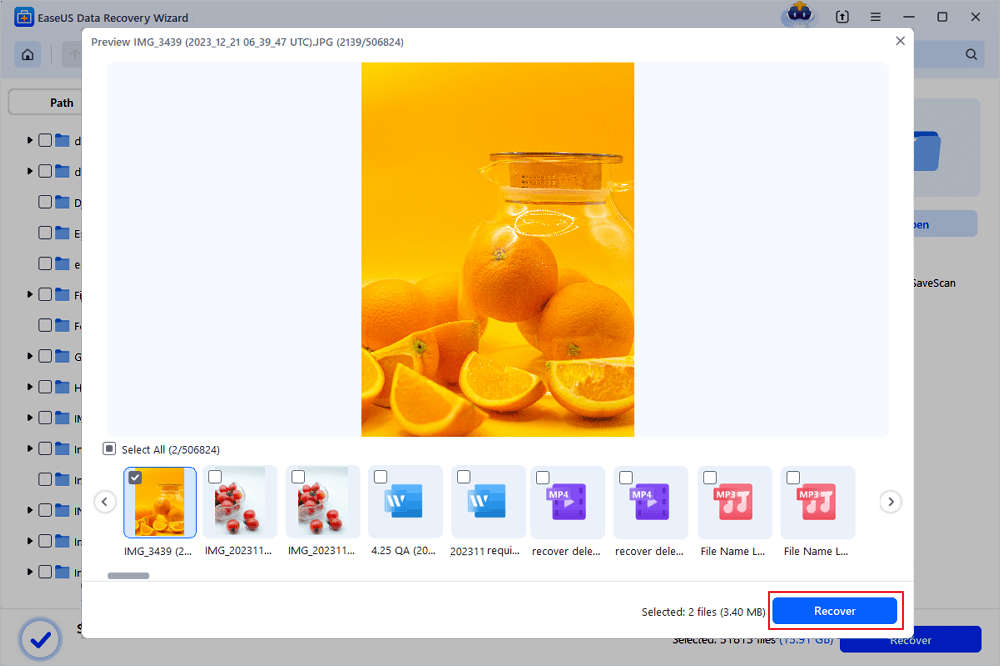
Step 3. Do not save the files on the same hard drive. To avoid data being overwritten during the recovery process, you should choose a new location to save recovered files.
After studying on recovering files on a Windows PC, you can check the following passage to learn how to recover the hard drive on a Mac:

Mac Hard Drive Recovery: Recover Mac Disks
EaseUS Data Recovery Wizard for Mac, one of the best Mac hard drive data recovery software, helps to recover deleted and lost files from Mac internal and external hard drives in a high recovery rate. Read more >>
Here's a video about hard drive recovery that may help you learn more. You can download the software mentioned in this video, and the product is totally safe and free to download.
- 00:23 What causes data loss
- 01:28 Launch EaseUS Data Recovery Wizard
- 01:37 Wait for the scanning process
- 02:16 Preview before recovering deleted files
If you have successfully found and recovered deleted files from hard drives with EaseUS, don't hesitate to share this page on social media! By the way, this software can also recover deleted files from network-shared folders easily.
Method 2. Restore Files Deleted from Hard Drives in Recycle Bin
If you deleted files with the delete shortcut, right-click, or just move the files to Recycle Bin. You'll find these deleted files easily in the Recycle Bin folder. It can keep files for 30 days by default, and you can change the settings to adjust the time. If you don't want deleted files to take up storage space, you can empty the Recycle Bin to erase them.
Let us check how to recover files deleted from hard drives in the Recycle Bin:
Step 1. Recycle Bin can be easily found on the desktop. You can find it with the help of the following picture and recover files from the Recycle bin.
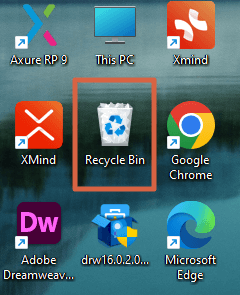
Step 2. Open the folder in File Explorer by double-clicking the icon. Find files deleted from your hard drive in the Recycle Bin.
Step 3. Select these files, right-click them, and choose "Restore".
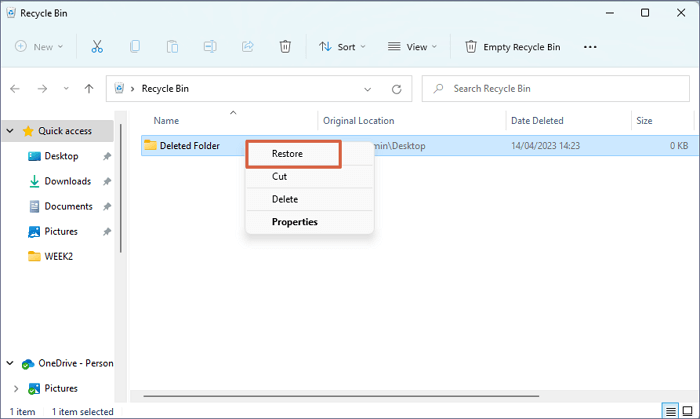
If you accidentally click the "Empty Recycle Bin" button, you can read the following passage to undelete files from an emptied Recycle Bin:

How to Recover Deleted Files from Recycle Bin After Empty Windows 11/10
Can I recover deleted files from Recycle Bin after empty? You'll learn three ways to recover deleted files from Recycle Bin after empty. Read more >>
Method 3. Retrieve Deleted Files from Hard Drives with File History
If you have enabled File History to back up your personal files on the hard drive, you can recover deleted files on Windows 10 with this built-in utility, and it can help you restore previous versions of the files and folders. If you haven't turned on File History in Windows, returning to Method 1 to recover deleted data with a professional recovery program is better.
Step 1. Windows File History can be found in the Control Panel, or you can search in the Windows search box.
Step 2. After entering the File History window, click "Restore personal files" to restore deleted data from the hard drive. You'll find the previous version of the deleted files here.
Step 3. After finding the previous version of the files, you can choose to restore these files to their original place, but we do not recommend that. It is better to save these recovered files to a new location.
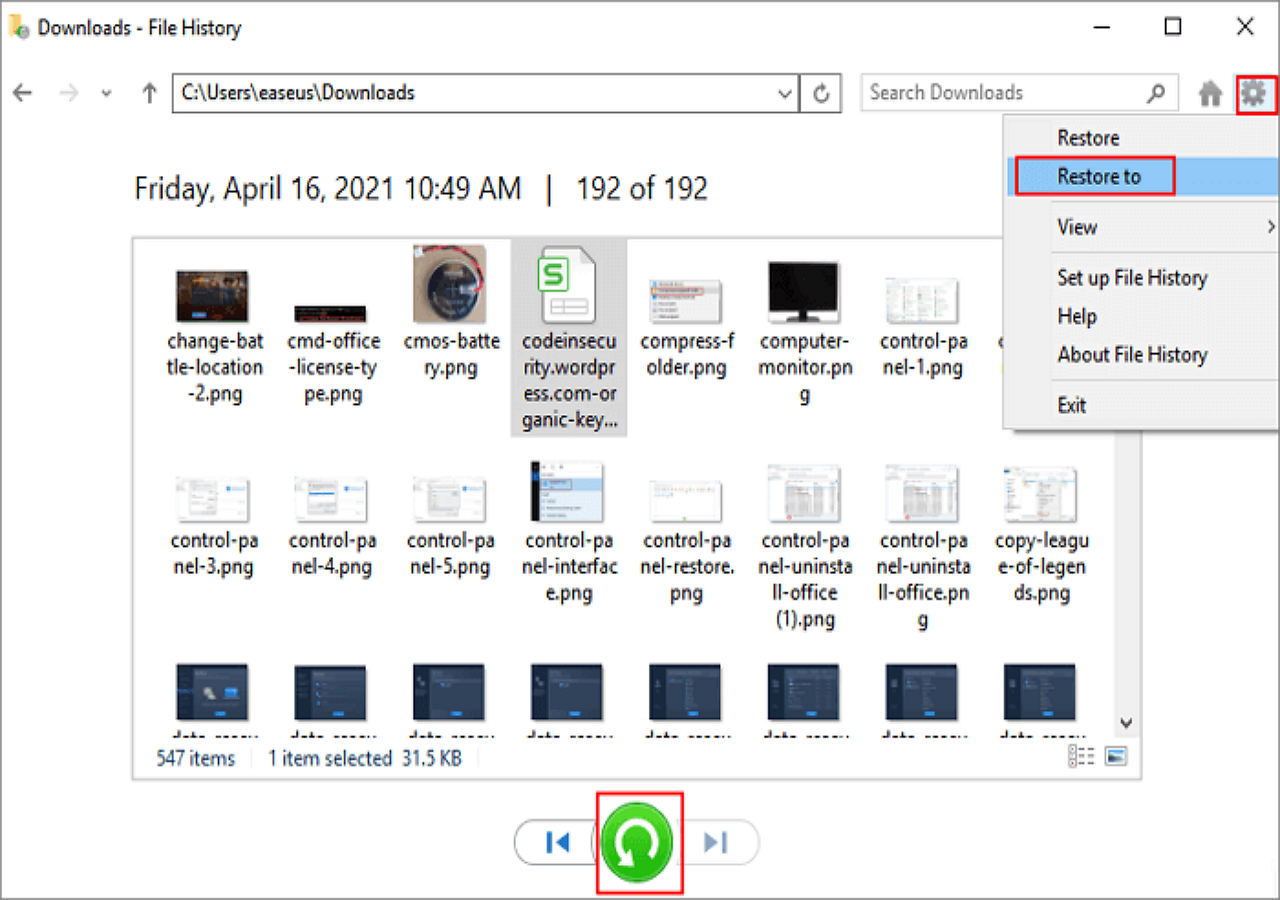
Method 4. Recover Deleted Files from HDD with Back Up and Restore
After learning how to recover deleted data from HDD with File History, you'll learn another Windows built-in utility called Back Up and Restore (Windows 7). With this utility, you can even recover system files like system images. Let's find out the detailed information from the following tutorial:
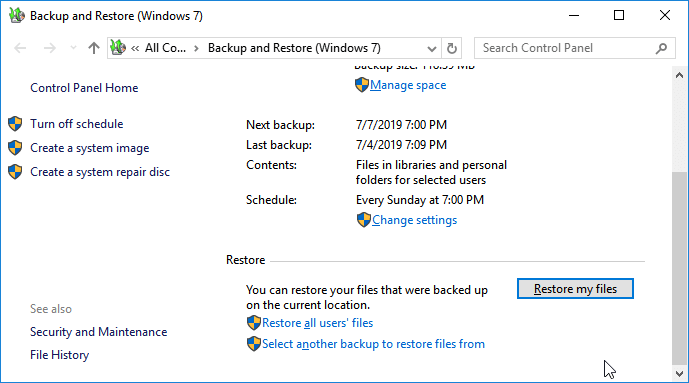
Step 1. Open the Control Panel first. (You cannot find the Backup and Restore option in the search box.)
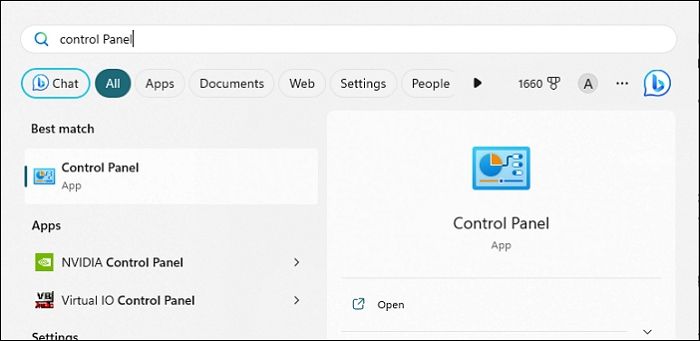
Step 2. You can directly click "Back Up and Restore" under the "System and Security" tab.
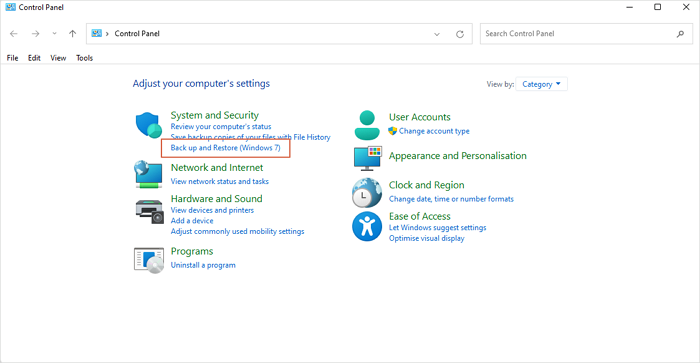
Step 3. You'll see a "Restore my files" button under the Restore tab. Click the button to restore your hard drive data.
Step 4. You should choose a new location to save these recovered hard drive files. It is better to use a new HDD to save these recovered data, or it is possible to cause further data loss because of overwriting.
All four methods we have introduced can be used to recover deleted data from the hard drive by yourself. You can also use the Windows File Recovery Tool, but this tool needs command line knowledge, and you can enter Windows File Recovery to experience it.
We hope you can share these simple methods on social media to help more users recover important files from hard disks.
Method 5. How to Recover Deleted Files from Hard Disk with Data Recovery Services
The final method should be your last choice if you cannot recover deleted data from the hard disk by yourself. Especially when you don't have any backups and data recovery software cannot work. If you have any questions about the hard disk, such as data loss, disk failure, OS crashes, malware, computer viruses, or bad sectors, you can contact EaseUS data recovery services, and our professional data recovery experts can help you recover data from a dead hard drive.
Consult with EaseUS hard drive data recovery services offered for one-on-one manual recovery service. We could offer the following services after a FREE diagnosis
- Create RAID without losing data, fix unbootable Windows OS and corrupted virtual disk file
- Recover/repair lost partition and re-partitioned drive
- Unformat the hard drive and repair the RAW drive (BitLocker encrypted drive)
- Recover files from corrupted hard drives, external hard drives, SD cards, USB drives
⭐Knowledge Base - Why Can We Recover Deleted Files
There is a common misconception that files are completely removed from computer hard drives when we delete files. The fact is that any time a file is deleted on a hard drive, it's not erased. Instead, only the tiny bit of information pointing to the file's location (the entry) on the hard drive is erased. This pointer, along with other pointers for every folder and file on the hard drive, is saved in a section near the beginning of the hard drive and is used by the operating system to compile the directory tree structure. By erasing the pointer file, the actual file becomes invisible to the operating system. And that means you can write new data over the area where the old file is located.
Thus, only if other files do not overwrite the deleted files on your hard drive, there are still chances to recover deleted files hard drive, which is the reason why we could recover deleted files, formatted data, and lost files...
The Bottom Line
Honestly speaking, recovering deleted files from hard drives is one of the basic features of almost all reliable data recovery software tools. You can compare and select the one you prefer. Besides, to avoid future data loss, it's a good choice for you to back up your important files to another hard drive or storage device. Although data recovery is helpful in most cases, it's always better to prevent data loss from happening.
Find Deleted Files on Hard Drive FAQs
If you have more questions about hard drive deleted recovery, you can gather more information from the following Q&As:
1. Can deleted files be recovered from an external hard drive?
Yes, you can recover deleted files from external hard drives with multiple methods:
- 1. EaseUS Data Recovery Wizard.
- 2. Windows built-in backup and restore utilities.
- 3. Windows Recycle Bin.
- 4. Cloud backups.
- 5. Local data recovery services.
2. How to recover deleted data from a hard drive without backup?
The best choice to recover deleted data from a hard drive without backups is by applying EaseUS Data Recovery Wizard:
- 1. After launching the program, select the target hard disk to scan.
- 2. Find deleted files on the hard drive with the Filter option.
- 3. Preview and restore files deleted from the hard drive.
3. Is deleted data still remain on a hard drive?
It depends. If you keep writing new data on this hard drive, the old data may be replaced by the new one. You should know that the data will not be erased from your hard drive immediately once you delete them. However, until new data is written to that space, the deleted data remains physically intact on the drive.
Was this page helpful?



 Why Trust EaseUS
 Editor Reviews

20+
Years of experience

160+
Countries and regions

72 Million+
Downloads

4.9 +
Trustpilot Score





