






-
![]() How to Fix 'Class Not Registered' Error | 7 Solutions
How to Fix 'Class Not Registered' Error | 7 Solutions October 20,2026
 6 min read
 -
![]() Undo Quick Format: Recover Quick Formatted Drive in 3 WaysOctober 20,20266 min read
Undo Quick Format: Recover Quick Formatted Drive in 3 WaysOctober 20,20266 min read -
![]() Solved: Windows 11 Safe Mode Not Working | 5 SolutionsOctober 20,20266 min read
Solved: Windows 11 Safe Mode Not Working | 5 SolutionsOctober 20,20266 min read -
![]() Disk Not Initialized and Shows Unknown, How to Fix in Windows?October 20,20266 min read
Disk Not Initialized and Shows Unknown, How to Fix in Windows?October 20,20266 min read -
![]() Windows Has Problem Ejecting USB Mass Storage Device | 6 WaysOctober 20,20266 min read
Windows Has Problem Ejecting USB Mass Storage Device | 6 WaysOctober 20,20266 min read -
![]() League of Legends Account Recovery: How to Get Riot Account BackOctober 20,20266 min read
League of Legends Account Recovery: How to Get Riot Account BackOctober 20,20266 min read -
![]()
-
![]()
-
![]()
-
![]() Exception Processing Message 0xc0000005 - Unexpected Parameters [Fixes]October 20,20266 min read
Exception Processing Message 0xc0000005 - Unexpected Parameters [Fixes]October 20,20266 min read
Page Table of Contents
Can You Unformat a Disk?
Yes, you can unformat a disk – but only if you performed a quick format and have not written new data to the drive afterward. The data still exists on the storage medium; only the file system index was erased. Using reliable data recovery software like EaseUS Data Recovery Wizard, R-Studio, or TestDisk, you can recover most or all of your files.
What Is the Meaning of an Unformatted Disk
Unformatting a disk refers to recovering data from a formatted storage device, such as a hard drive. Formatting a disk erases data and sets up a new file system, but the original data may still be recoverable with data recovery software.
| Format a disk | It is the process of preparing a partition for data storage by deleting all the data on it and setting up a file system for the drive. You will need to format a hard drive in specific situations, such as a RAW file system disk, Windows reports "You need to format the disk," etc. |
| Unformat a disk | It is the process of reversing the data loss caused by formatting. Instead of rewriting the original partition layout, an expert unformat workflow deep-scans underlying storage sectors to extract and reconstruct original file parameters. This makes it possible to safely recover data from formatted external hard drive configurations. |
When users look for an unformat SD card online solution, they often have a misconception that web-based tools can process local sector allocations. In reality, safe storage sector operations require local execution environment privileges. To reliably recover data from formatted external hard drive setups or internal volumes, deploying an authentic installer is mandatory.
Is it possible to unformat a hard drive? Yes, you can unformat a hard drive and recover most of your data using the right recovery methods and tools. We will introduce 4 practical solutions to unformat a disk in this post, offering detailed steps and a video tutorial to make sure you can unformat your HDD and restore a formatted hard drive safely.
- Solution 1. Use EaseUS Data Recovery to Unformat a Hard Drive
- Solution 2. Use R-Studio to Unformat a Hard Drive
- Solution 3. Use TestDisk to Unformat a Disk
- Solution 4. Use Data Recovery Services to Unformat a Disk
How to Unformat a Disk with Data Recovery Software (4 Options)
You may accidentally format your hard drive or external storage devices, which happens frequently among users.
My PC has two operating systems on the C and E drives. I formatted my E drive by mistake when I was trying to format a flash drive. A friend told me there's a way to unformat it. How do I do it? Both drives have Windows 10 Pro. - Learn.Microsoft.com
⚠️Note: To avoid any chance of data overwriting, don't put files into your hard drive after the format. Although putting data on the disk won't necessarily cause data overwriting, once data is overwritten, it cannot be recovered.
Solution 1. Use EaseUS Data Recovery Wizard to Unformat a Hard Drive
To unformat a disk, in other words, users need to recover all data that was wiped from the hard drive. As mentioned before, you have to pick up a data recovery service to execute the recovery process. EaseUS Data Recovery Wizard helps you unformat the HDD and get your files back in simple steps.
- Supports recovering deleted files or data lost due to disk format, partition loss, software crash, virus infection, boot-up problem, or other reasons.
- It can also perform data recovery in all storage devices, including restoring formatted hard drives, USB flash drives, memory cards, digital cameras, and other conventional storage devices.
- EaseUS hard drive recovery software supports a wide range of file types, including images, videos, audio, documents, and more.
Free download EaseUS Data Recovery Wizard and follow the guide below to unformat the HDD.
- 0:06 3 ways to format a hard drive
- 1:50 Reasons to format the hard drive
- 2:30 Recover formatted hard drive
Follow the steps below to unformat a hard drive with EaseUS Data Recovery Wizard:
Note: To guarantee a high data recovery chance, install EaseUS data recovery software on another disk instead of the formatted disk.
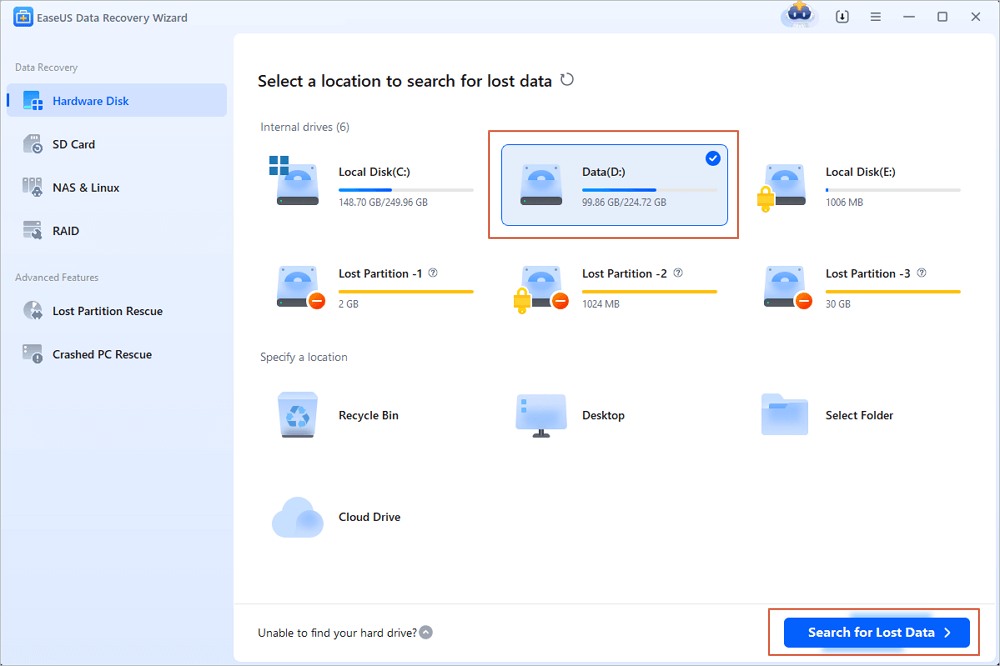
Step 1. Launch EaseUS Data Recovery Wizard. Choose the hard drive partition which you've accidentally formatted and click "Search for Lost Data".
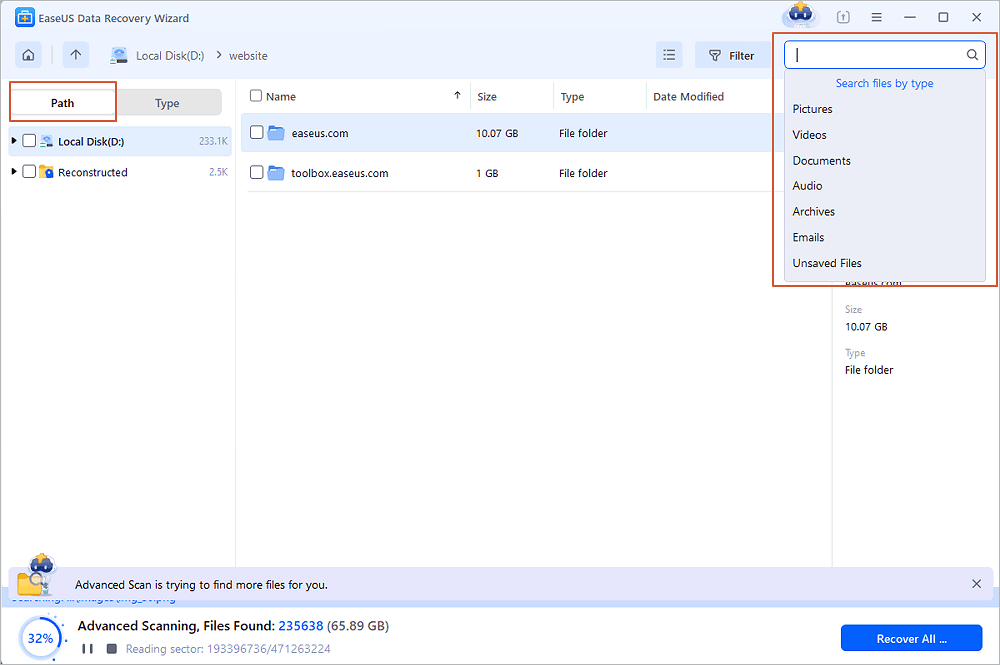
Step 2. This formatted hard drive recovery software will start scanning for all the lost data and files. After scanning, you can click "Filter" to filter a specific file type to quickly find files you need. Or search the file's name in the search box to select data that you want to recover.
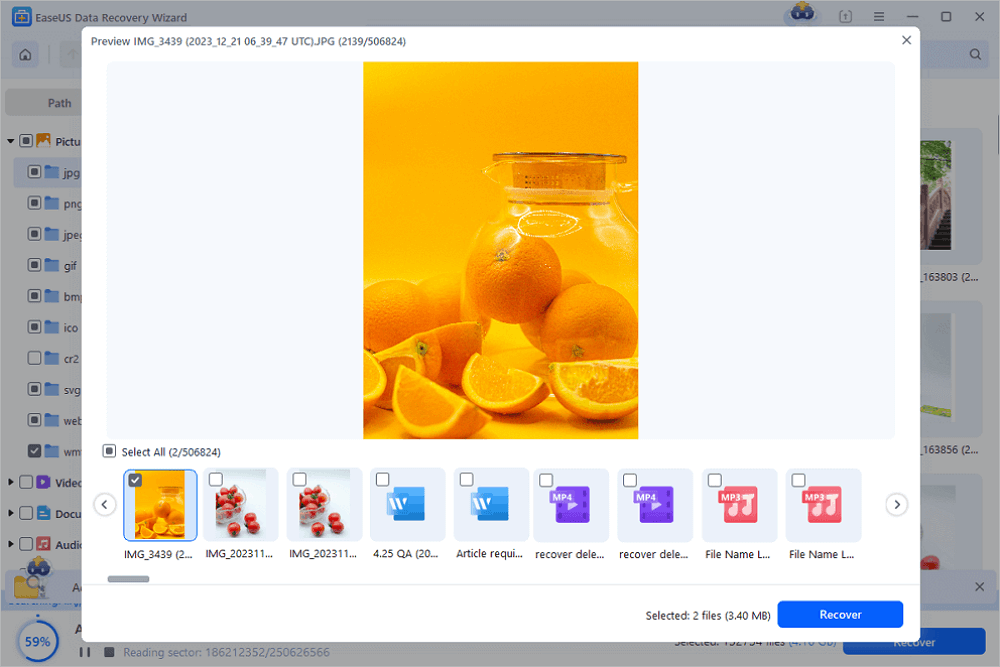
Step 3. Preview the scanned files. Then, select the ones that you wish to recover and click "Recover". Choose a new location or Cloud drive to store the files and click "OK".
Don't forget to share this guide with your friends to help them learn how to unformat a hard drive and restore all essential data.

Solution 2. Unformat a Hard Drive Using R-Studio
Accidentally formatting a hard drive can be stressful, but data recovery software like R-Studio can often help restore your lost files. Here's a basic guide to using R-Studio for unformatting a hard drive.
Step 1. Download and install R-Studio on a different drive or computer, not on the formatted one.
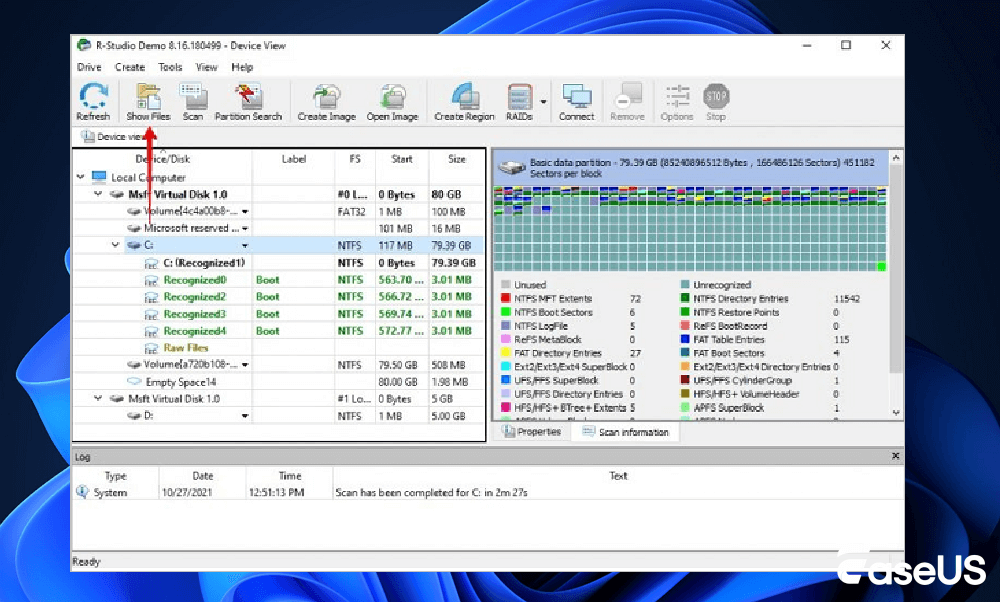
Step 2. Open R-Studio and select the formatted drive. Right-click it and choose "Scan".

For formatted drives, a "Deep Scan" or a full drive scan (e.g., from 0 to its full capacity) is often necessary, as it performs a more thorough search based on file signatures, which is crucial for recovering data from a formatted drive.
Step 3. Once the scan is complete, R-Studio will display found files and partitions, often color-coded (e.g., green for high recovery probability). You can preview files like documents or images to check their integrity before recovery.
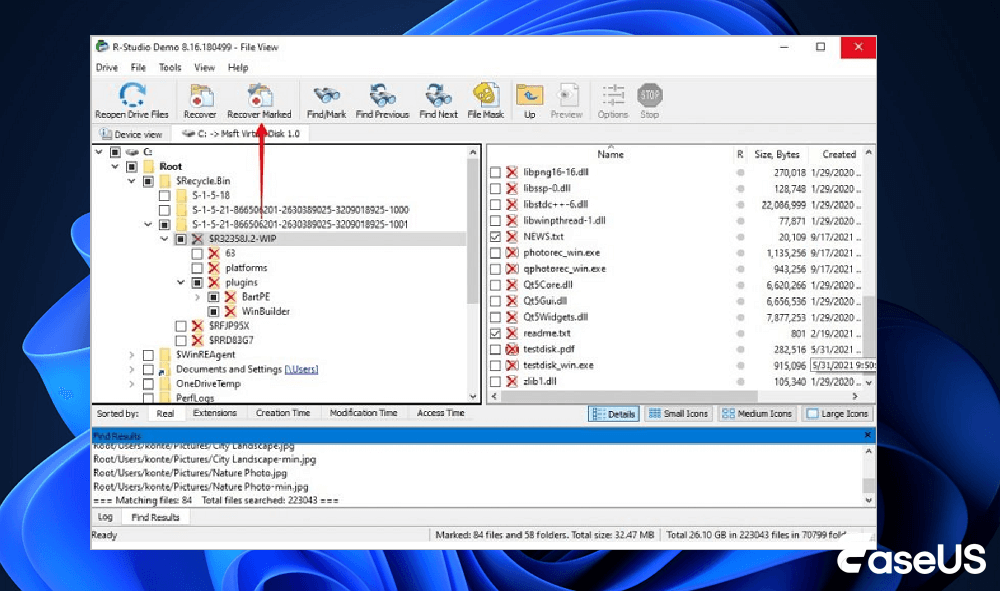
Step 4. Select the files or folders you want to restore. Right-click and choose "Recover Marked Files". Crucially, save these recovered files to a different physical drive or storage device to avoid overwriting any remaining data on the formatted drive.
Solution 3. How to Unformat a Hard Drive Using TestDisk
Accidentally formatting a hard drive can be a stressful experience, but tools like TestDisk, a powerful free and open-source data recovery utility, can often help recover lost data. Here's a concise guide to using TestDisk for unformatting a drive.
Step 1. Obtain TestDisk from the TestDisk official website and install it on a different drive or computer, not the formatted one.
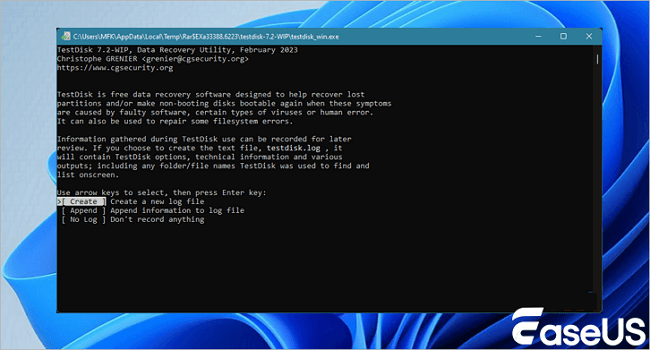
Step 2. Run TestDisk as administrator on Windows. Choose "Create" to start a new log file, select the formatted drive from the list, and confirm its partition table type, which is usually detected correctly by TestDisk, e.g., Intel/PC for MBR or EFI GPT for GPT.
Step 3. Select "Analyse" and then "Quick Search" to locate lost partitions. If quick results are insufficient, proceed with a "Deeper Search" for a thorough scan. This can be time-consuming.
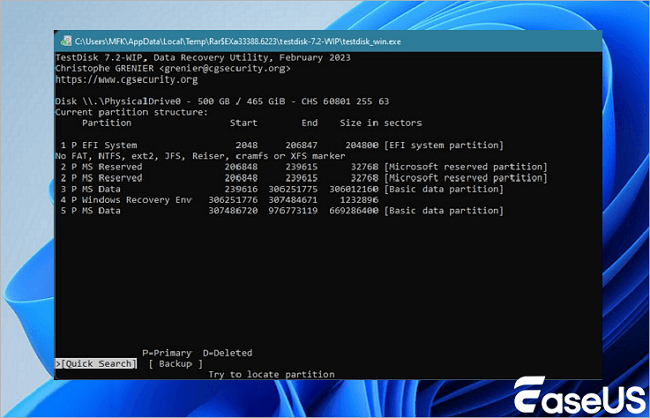
Step 4. After scanning, TestDisk displays the found partitions. Highlight a partition and press "P" to list files (deleted items often appear in red). This helps verify the data before recovery.
Step 5. Once the correct partition is identified, select "Write" to save the partition table. To recover individual files, press "C" while files are listed and choose a safe destination (a different physical drive) to copy them.
Unlike other disk recovery tools with a user-friendly interface, such as EaseUS Data Recovery Wizard, using TestDisk to restore data requires some knowledge and skill in using command lines.
Solution 4. Data Recovery Services
As long as your formatted files are not overwritten by new content, EaseUS Data Recovery Wizard will help you get back all your lost files from the hard drive. If the software cannot solve your problem, try contacting EaseUS data recovery services.
Consult with EaseUS Data Recovery Experts for one-on-one manual recovery service. We could offer the following services after FREE diagnosis:
- Repair corrupted RAID structure, unbootable Windows OS, and corrupted virtual disk file (.vmdk, .vhd, .vhdx, etc.)
- Recover/repair the lost partition and re-partition the drive
- Unformat the hard drive and repair the raw drive (BitLocker-encrypted drive)
- Fix disks that become GPT-protected partitions
Why Can We Unformat a Disk
In this part, we will demonstrate the theory behind unformatting a hard drive and explain why a formatted hard drive can be recovered. Keep reading and check more details. For all the storage devices, there are two types of formats: quick format and full format.
A quick format only writes the blocks that contain the file system structure and deletes all files from the device, while a full format writes zeroes to all data sectors. After a quick format, the data remain on the hard drive, and you just don't have access to them. By rebuilding the volume, you can access and recover the formatted files.
However, as mentioned, overwritten data cannot be recovered, which means the data lost after a full format cannot be retrieved. Luckily, in Windows, a quick format is the default format option. Thus, if you accidentally formatted a hard drive, it is a quick format, and you can unformat it using EaseUS Data Recovery Wizard.
The Bottom Line
When you accidentally format a hard drive, USB flash drive, memory card, or other storage device, don't worry. Stop using your device and apply data recovery software to unformat your hard drive. Then you will get all your files back. Here are some advanced tips:
1. Unformat USB Drive Free Solutions
If you need a free strategy to unformat a USB drive, you can use the basic version of EaseUS Data Recovery Wizard, which offers a complimentary scan to retrieve vital business files, media assets, or compressed archives from formatted flash drives without upfront investment.
2. Critical SSD Tracking Considerations (TRIM Command)
While you can easily unformat a disk after a quick format on traditional magnetic platters (HDDs), solid-state drives (SSDs) utilize a specialized optimization routine called the TRIM command. When an SSD format command is issued, the TRIM function immediately instructs flash controllers to clear residual page allocations during idle cycles. Therefore, running a recovery tool immediately after data loss offers the highest chance of success before the automatic purging sequence concludes.
Unformat Disk FAQs
Still unsure about how to unformat a disk after quick format? Below we answer the most common questions users have when they accidentally format their drives.
These answers will help you understand the risks, limitations, and best practices for recovering your data safely.
1. How do I fix a disk that is not formatted?
Follow these steps below to fix the external hard drive not formatting:
- Remove the Virus
- Update Hardware Driver
- Run System File Checker Tool
- Run CHKDSK
- Format External Hard Drive via DiskPart
- Delete the Partition and Recreate a New Volume
2. Can you reverse an HDD format?
No. You can't undo a quick format. But you could recover the lost data with the help of third-party software.
3. Does formatting permanently erase data?
Formatting a hard drive using the quick format option will not actually erase all of its stored data. The data can still be found and recovered with data recovery software.
4. Is there any way to unformat a drive?
You can't truly "unformat" a drive, as a format writes new information. Still, you can often recover the data using data recovery software or by using a backup if you have one. Stop using the drive immediately to prevent data overwriting, then use tools like EaseUS Data Recovery Wizard, Recuva, or R-Studio to scan the drive and recover your files to a different location. For best results, especially after a full format, professional data recovery services are a possibility.
5. Can I unformat an SSD?
You can't reverse a format on an SSD and get its exact original state back, but you can recover your data from an SSD using a specialized data recovery tool. To do this, you must stop using the SSD immediately to prevent new data from overwriting your lost files, then use software like EaseUS Data Recovery Wizard to scan the formatted drive and restore your data to a different location.
6. Can I unformat a USB drive for free?
Yes. Tools like TestDisk (open-source) and Recuva (free version) can recover files from USB drives at no cost. However, free tools often have limited file-type support or recovery quotas. For better results, consider trial versions of commercial software.
Was this page helpful?
-
Sherly joined EaseUS in 2022 and she has always loved writing articles and enjoys the fun they bring. She receives professional training here, focusing on product performance and other relative knowledge. She has written over 200 articles to help people overcome computing issues.…
 Why Trust EaseUS
 Editor Reviews

20+
Years of experience

160+
Countries and regions

72 Million+
Downloads

4.9 +
Trustpilot Score





