





-
![]() Picture Contains Invalid Image File Header, How Do I Fix It? [5 Ways]
Picture Contains Invalid Image File Header, How Do I Fix It? [5 Ways] July 23,2026
 6 min read
 -
![]()
-
![]()
-
![]() Fix Windows Update Error 0x8007000d in Windows 10 [Easy & Secure]July 23,20266 min read
Fix Windows Update Error 0x8007000d in Windows 10 [Easy & Secure]July 23,20266 min read -
![]() Fix Unspecified Error When Copying File or Folder on Windows 10July 23,20266 min read
Fix Unspecified Error When Copying File or Folder on Windows 10July 23,20266 min read -
![]()
-
![]() Fix GoPro Video Won't Play: Reapir Corrupted GoPro VideosJuly 23,20266 min read
Fix GoPro Video Won't Play: Reapir Corrupted GoPro VideosJuly 23,20266 min read -
![]()
-
![]() Undo Quick Format: Recover Quick Formatted Drive in 3 WaysJuly 23,20266 min read
Undo Quick Format: Recover Quick Formatted Drive in 3 WaysJuly 23,20266 min read -
![]() Solved: Windows 11 Safe Mode Not Working | 5 SolutionsJuly 23,20266 min read
Solved: Windows 11 Safe Mode Not Working | 5 SolutionsJuly 23,20266 min read
Page Table of Contents
PAGE CONTENT:
Notice: Once you get the MP3 files lost from your hard drive, SD card, USB flash drive, iPod, music player or other devices, stop using the device immediately to eliminate the chances of data overwriting and apply the data recovery software to retrieve the music files as soon as possible.
Loss of MP3 Files
MP3, short for MPEG-1 Audio Layer III or MPEG-2 Audio Layer III, is the commonest digital audio format that is widely used in music, recordings, audiobooks, and more. Just like other files such as pictures, videos, emails, documents, etc, your cherished MP3 files may get lost by deletion, format, virus attack, system crash, and other reasons. Among the various data loss causes, accidental or intentional delete is probably the main reason why you get your MP3 files lost. Fortunately, with the help of the free data recovery software - EaseUS Data Recovery Wizard, you are able to perform MP3 recovery easily and quickly.
- If you have deleted the MP3 files from your computer hard drive, you can try to recover files from Recycle Bin.
- If you have backed up the files before, you can restore the lost files from the backup.
- If not, using data recovery software is your only choice.
Free MP3 Recovery Software Free Download
EaseUS Data Recovery Wizard perfectly supports to recover MP3 files from various storage devices:
EaseUS Data Recovery Wizard Free offers up to 2 GB of free data recovery, including 500 MB available by default and an extra 1.5 GB unlocked after sharing on Facebook and X.
- Recovers MP3 or other audio files from hard drives, SD cards, USB flash drives, iPods, music players, etc.
- Recover audio files including MP3, AIF/AIFF, M4A, WAV, WMA, APE, MID/MIDI, RealAudio. etc.
- Recover MP3 files lost due to deletion, format, virus attack, or other reasons.
In addition to audio files, EaseUS Data Recovery Wizard also enables you to recover files like videos, photos, documents, emails, and other existing file types. Get the free MP3 recovery software now and recover the music files instantly using the tool.
How to Recover Lost MP3 Files
With EaseUS Data Recovery Wizard, MP3 recovery becomes easy. Let's get started:
Video Tutorial to Recover MP3 Files
Detailed Steps to Recover Deleted MP3 Files:
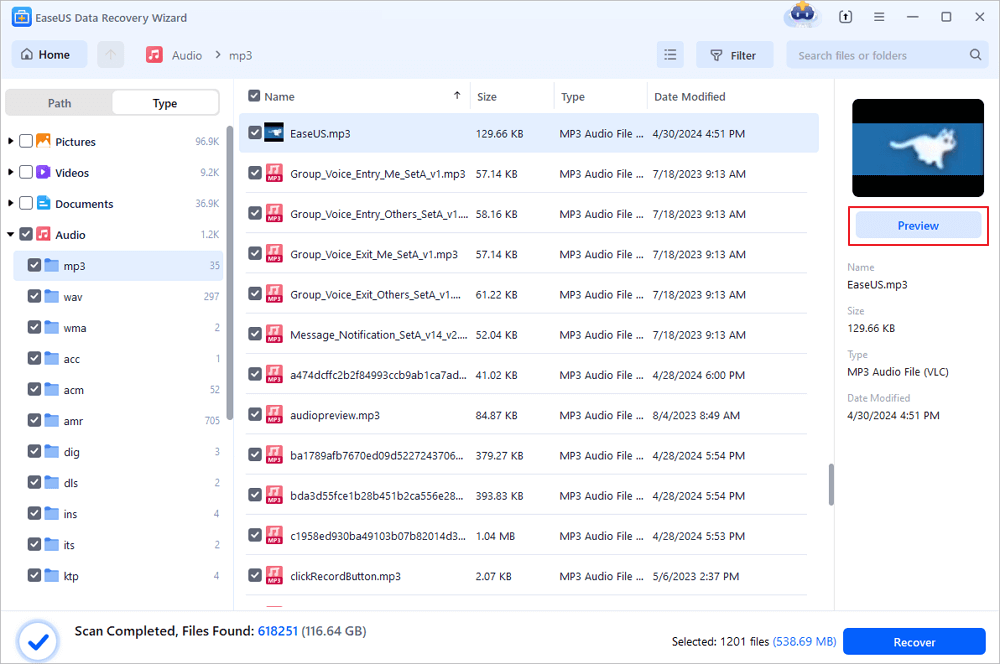
To help you recover the lost MP3 files quicker, you can use the filter to locate the specific file type, namely audio, or search for files with the .mp3 extension in the search bar.
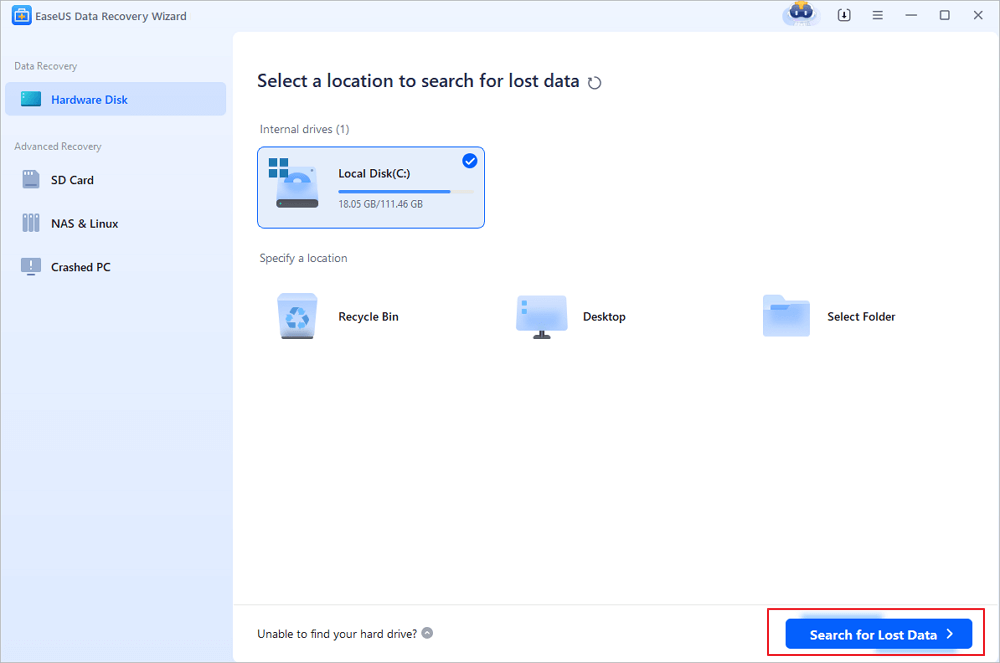
Step 1. Select the location
Select the location where you lost music, voice recordings, and other audio files and click "Search for Lost Data".
Step 2. Preview the audio files
The time required for the scanning process depends on the size of the disk. You can recover files during the scanning process. Click "Audio" in the left panel. Preview found audio files by clicking the "Preview" button.
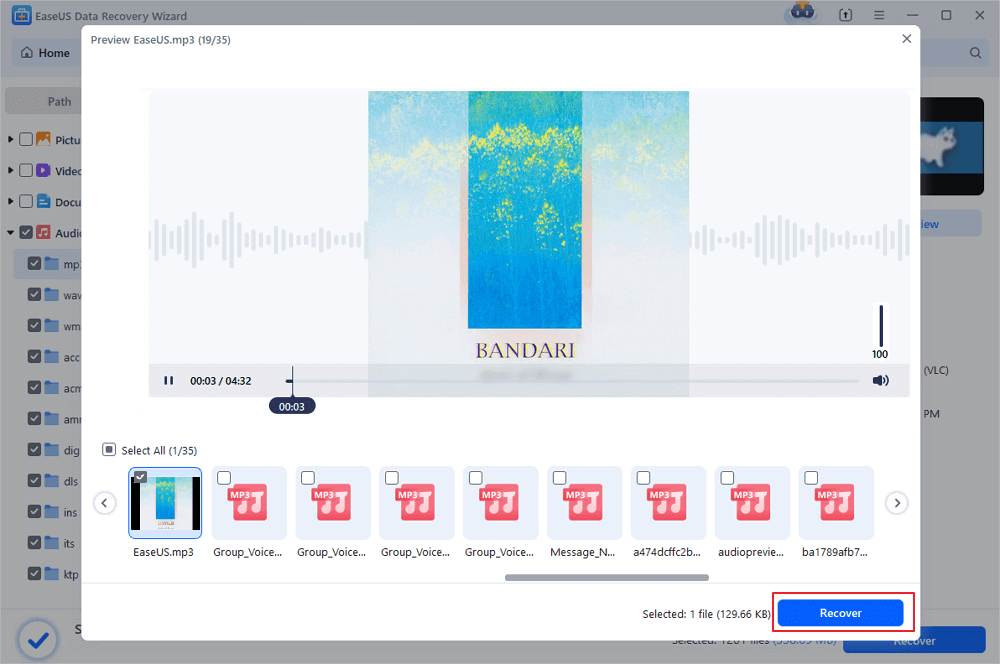
Step 3. Restore lost audio files
Select all found audio files and click "Recover". Choose a safe location on your PC or an external storage device to save these files and click "Save" to confirm. You can also save your files to cloud storage like OneDrive, Google Drive or Dropbox.
The free data recovery software allows you to recover 2GB of files at no cost. It's enough for most of the MP3 recovery cases. If you have more than 2GB of music files to recover, you will need to upgrade the free version to the pro version.
How to Prevent the Data Loss of MP3 Files
The best way to avoid complete loss of any files is to back them up somewhere else. Speaking of backup, you can manually copy the MP3 files from one place to another, use free backup software, or sync them to cloud storage. Whether you want to back up music files or other content, these three ways are universal. If you don't have too many files, manually copying files could help. If you have a bulk of files and look for a time-saving way, apply the professional data backup software instead. While if you have a stable and fast network connection and large enough cloud storage, you can choose to back up the MP3 files to the cloud.
The Bottom Line
The only precondition for success MP3 recovery is that the lost music files are not overwritten by new content. Thus I'd like to stress that stop using the device where you have lost the MP3 files since merely listening to music may also cause data overwriting. Hope you can recover the deleted or lost MP3 files successfully with EaseUS Data Recovery Wizard.
Was this page helpful?



 Why Trust EaseUS
 Editor Reviews









