





-
![]() League of Legends Replays & Highlights, Where to Find and How to Recover
League of Legends Replays & Highlights, Where to Find and How to Recover October 13,2026
 6 min read
 -
![]() How to Fix Windows Keeps Booting into Recovery ModeOctober 13,20266 min read
How to Fix Windows Keeps Booting into Recovery ModeOctober 13,20266 min read -
![]() Aptio Setup Utility Ultimate Guide | How to Access/Fix ItOctober 13,20266 min read
Aptio Setup Utility Ultimate Guide | How to Access/Fix ItOctober 13,20266 min read -
![]() How to Recover Corrupted Macro Enabled Excel File with Top 5 WaysOctober 13,20266 min read
How to Recover Corrupted Macro Enabled Excel File with Top 5 WaysOctober 13,20266 min read -
![]() FAT32 Structure Information - MBR, FAT32 Boot SectorOctober 13,20266 min read
FAT32 Structure Information - MBR, FAT32 Boot SectorOctober 13,20266 min read -
![]() Command Cannot Be Performed Because a Dialog Box is Open | How to FixOctober 13,20266 min read
Command Cannot Be Performed Because a Dialog Box is Open | How to FixOctober 13,20266 min read -
![]() RAID Recovery Full Guide: Recover Data from RAID 0/1/5/6October 13,20266 min read
RAID Recovery Full Guide: Recover Data from RAID 0/1/5/6October 13,20266 min read -
![]()
-
![]() How to Fix Download Error - 0x80248007 Windows 10/11October 13,20266 min read
How to Fix Download Error - 0x80248007 Windows 10/11October 13,20266 min read -
![]() CR2 Files Not Opening, How Do I Open Canon RAW PhotosOctober 13,20266 min read
CR2 Files Not Opening, How Do I Open Canon RAW PhotosOctober 13,20266 min read
Page Table of Contents
PAGE CONTENT:
JPG or JPEG, short for Joint Photographic Experts Group, is a compression standard form digital images. JPG/JPEG has the benefits of high resolution, small file size, and adjustable compression. It is one of the most popular digital photo formats that is widely used on digital cameras, mobile phones, and the internet. When you take photos using a digital camera or mobile device, the images will be saved with the .jpg or .jpeg file extension by default or you can set it to save the pictures as JPG/JPEG files. Besides, as the commonest format for photos, JPG/JPEG files are compatible with most of the sites and services.
Overview of JPG Recovery
Speaking of JPG recovery, what users care about most is how can I recover JPG/JPEG files? The key to recovering JPG files is whether there is data overwriting after deleting the photos. If there's not, you can get back the lost files from the recycle bin or take advantage of data recovery software. If data overwriting occurs, the possibility of recovering your lost data is pretty low.
What Causes The Loss of JPG/JPEG Files
Given the widespread application of JPG/JPEG, the loss of JPG or JPEG files is almost inevitable. Whether your JPG/JPEG files are stored on digital cameras, mobile phones, and other devices, or on storage media such as computer hard drives, USB, and memory cards, these photos may be lost due to the following reasons:
- Accidental deletion
- Storage device formating
- Virus attacks or malware infection
- Other accidents like a power failure or system crash
The good news is that you can perform JPG/JPEG recovery with the EaseUS Data Recovery Wizard.
How to Recover JPG or JPEG Files
Whether you want to recover photos from cameras, computer hard drives, or external storage devices, you can use EaseUS Data Recovery Wizard to retrieve the lost JPG/JPEG files. In addition to JPG/PNG, the EaseUS JPG recovery tool also helps to recover photos in other formats, including PNG, BMP, GIF, MRW, DCR, WMF, RAW, SWF, SVG, DNG, etc. It also supports users to repair corrupted photos, the corrupted JPG/JPEG files will be repaired automatically during the recovery process.
EaseUS Data Recovery Wizard is a powerful tool that can do much more than JPG recovery. It can:
- Recover almost all existing file types, including photos, videos, audio files, documents, Adobe files, etc.
- Recover lost data from computer hard drives, external hard drives, USBs, memory cards, camcorders, digital cameras, video players...
- Recover deleted files, formatting, emptying Recycle Bin, partition loss, hard disk damage, and other tough data loss situations
Now please download the software on your computer and follow the detailed guide below to start.
🏆 EaseUS SD card recovery leverages patented video fragment reconstruction technology to deeply repair video files lost due to accidental deletion, formatting, or corruption. Explicitly designed for cameras, action cameras, drones, and dashcams, it accurately restores complete and playable precious footage.
Step 1. Choose the location and start scanning
Hover on the SD card, camera, or hard drive partition where you deleted/lost pictures, then click "Scan for Lost Data".
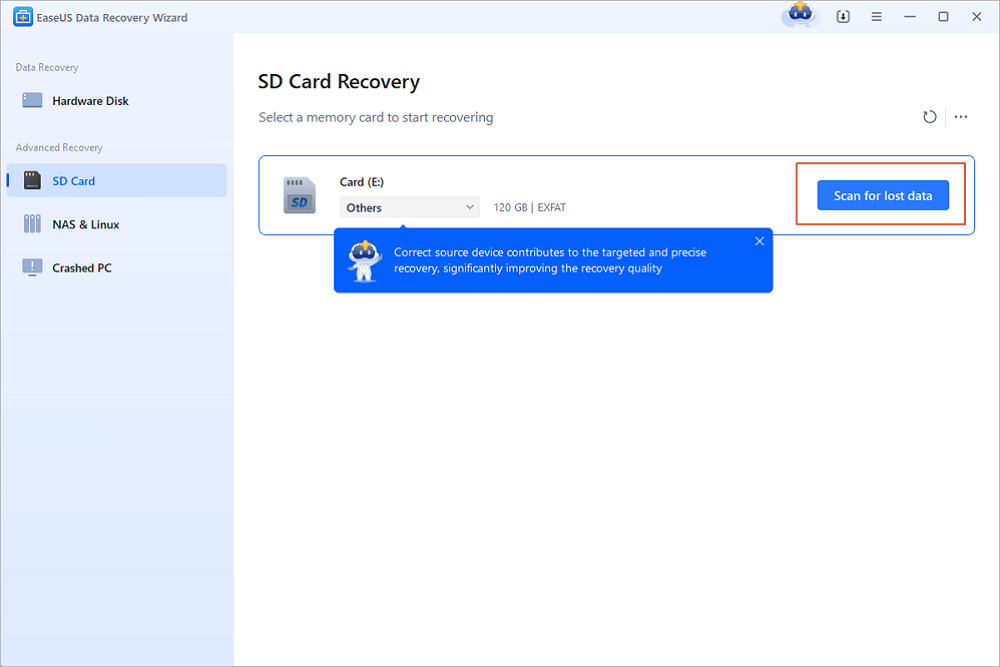
Step 2. Select the pictures you want to recover
Once the scanning completes, select "Pictures" in the left panel. If you want to locate the lost photos, click "Lost Files Only" on the top-right side. Then, you can find photos according to the devices, types, and dates.
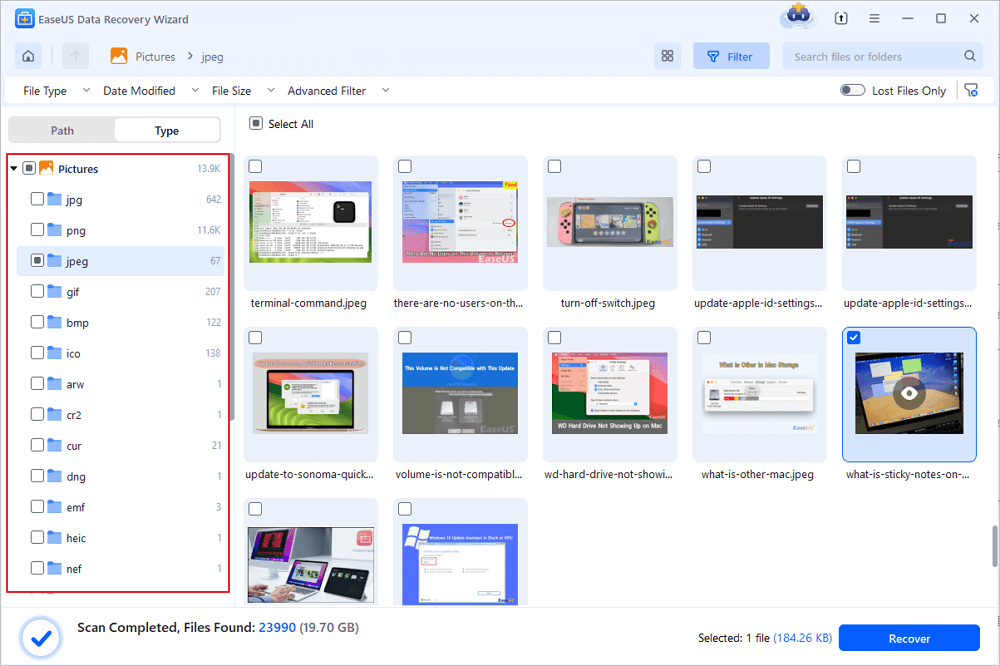
Step 3. Recover lost photos
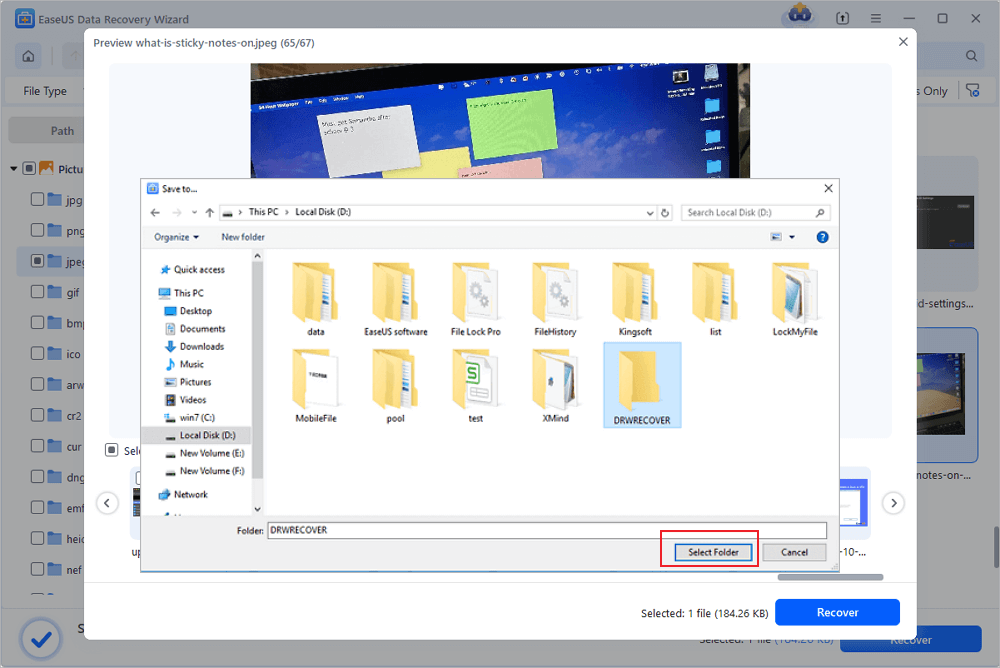
After the preview, click "Recover" and choose another location to save the desired pictures. You can save the recovered photos your local drive, external storage device or cloud storage.
💡Want to know more about SD card data recovery? For example, what is the best SD card data recovery software? How to recover a damaged SD card? How to recover data from an unreadable SD card...Go for SD Card Data Recovery FAQs and restore your precious lost files.
You can also watch this video tutorial to check how to recover and repair images with EaseUS.
Recover JPG/JPEG from Recycle Bin
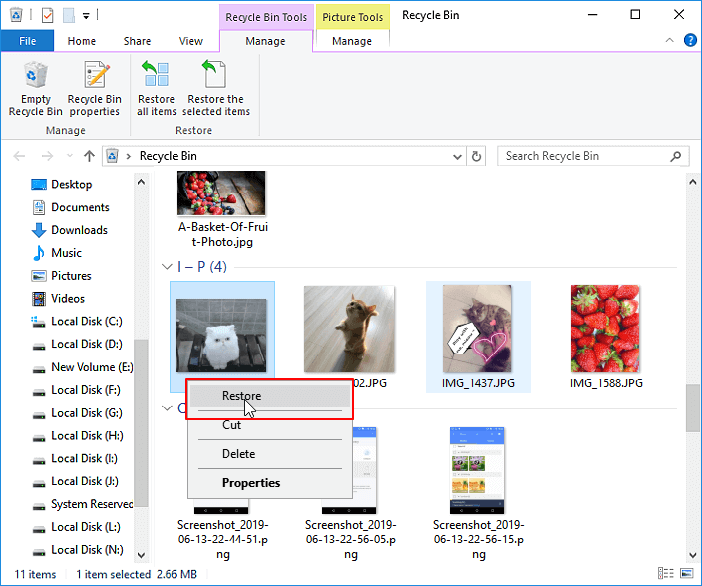
If you lost the JPG files on your computer due to accidental deletion, and you don't empty the recycle bin after deleting, you can get back your photos from the recycle bin. Here are the detailed steps:
Step 1. Enter the recycle bin on your computer.
Step 2. Find the picture that you want to recover.
Step 3. Right-click the picture and choose "Restore".
The Bottom Line
When unexpected photo loss happens, what you should do first is stop using the storage device to avoid data overwriting and apply data recovery software to perform JPG/JPEG/PNG recovery immediately, which ensures a high success rate. It's worth mentioning that EaseUS Data Recovery Wizard can also help to restore corrupted JPG/JPEG files during the recovery. It works unnoticedly but helps you greatly. Get the software and retrieve your photos within minutes.
JPG Recovery FAQs
1. What is a JPG file? JPG or JPEG, short for Joint Photographic Experts Group, is a compression standard form digital images. 2. Can I recover deleted JPG images? If there's not data overwriting after deleting the photos, you can get back the lost files from the recycle bin or take advantage of data recovery software; if data overwriting occurs, the possibility of recovering your lost data is pretty low. 3. What are the differences between JPG and JPEG? JPG or JPEG, short for Joint Photographic Experts Group, is a compression standard form digital images.Was this page helpful?
-
Dany is an editor of EaseUS who lives and works in Chengdu, China. She focuses on writing articles about data recovery on Mac devices and PCs. She is devoted to improving her writing skills and enriching her professional knowledge. Dany also enjoys reading detective novels in her spare time. …





 Why Trust EaseUS
 Editor Reviews

20+
Years of experience

160+
Countries and regions

72 Million+
Downloads

4.9 +
Trustpilot Score






