





-
![]()
-
![]()
-
![]()
-
![]()
-
![]() How to Recover Files After Factory Reset Laptop/PC [Solved]
How to Recover Files After Factory Reset Laptop/PC [Solved] September 20,2026
 6 min read
 -
![]() How to Recover Hogwarts Legacy Lost Progress on PC/Steam/XboxSeptember 20,20266 min read
How to Recover Hogwarts Legacy Lost Progress on PC/Steam/XboxSeptember 20,20266 min read -
![]()
-
![]()
-
![]()
-
![]()
Page Table of Contents
PAGE CONTENT:
Lost partition recovery is possible in most cases, provided you stop using the affected drive immediately and use professional recovery software before new data overwrites the missing partition. Whether your partition disappeared after accidental deletion, disk corruption, Windows update, power failure, or partition table damage, you still have a high chance of recovering both the partition and your files.
For most users, the safest solution is to recover important files first with EaseUS Data Recovery Wizard, then restore the partition if necessary. This approach minimizes the risk of permanent data loss and works for internal HDDs, SSDs, external hard drives, USB flash drives, SD cards, and other storage devices.
In this guide, you'll learn:
- What a lost partition is and why it happens
- Whether deleted partitions can be recovered
- How to recover files from a lost partition safely
- How to restore a deleted partition
- Common causes of partition loss
- How to prevent partition loss in the future
What Is a Lost Partition
A lost partition is a storage partition that no longer appears in Windows File Explorer or Disk Management because its partition information has been deleted, corrupted, or has become inaccessible, while the original data often still exists on the physical drive.
Unlike permanently erased data, a lost partition frequently remains intact until new information overwrites the disk sectors. That's why recovery success largely depends on what you do immediately after noticing the problem.
Signs Your Partition Is Lost
- A drive letter suddenly disappears.
- Disk Management shows "Unallocated Space".
- The partition becomes RAW.
- Windows asks you to format the drive.
- The drive appears with 0 bytes.
- The volume becomes inaccessible.
- Files suddenly disappear.
Can You Recover a Lost Partition
Yes. As long as the original sectors haven't been overwritten, both the deleted partition and the files stored inside it can often be recovered. Your recovery chances depend on several factors:
| Situation | Recovery Chance | Recommendation |
|---|---|---|
| Accidentally deleted partition | ★★★★★ Very High | Recover immediately before creating new partitions. |
| Partition becomes RAW | ★★★★★ Very High | Recover data from RAW partitions. |
| Corrupted partition table | ★★★★☆ High | Use professional partition recovery software. |
| Power outage | ★★★★☆ High | Stop using the disk immediately. |
| Formatted partition | ★★★★☆ High | Recover files before writing new data. |
| Drive overwritten with new files | ★☆☆☆☆ Low | Recovery becomes much more difficult. |
What You Should Do First
- Stop using the affected drive immediately.
- Do not format the partition.
- Avoid copying new files onto the drive.
- Don't rebuild partitions until recovering important files.
- Use reliable recovery software as soon as possible.
Why Does a Partition Disappear
Understanding the cause helps determine the safest recovery method.
| Cause | Description |
|---|---|
| Accidental deletion | The partition is mistakenly removed in Disk Management or DiskPart. |
| Partition table corruption | MBR or GPT information becomes damaged. |
| Virus or malware | Malicious software modifies partition structures. |
| Power failure | Unexpected shutdown interrupts disk operations. |
| Windows update failure | Operating system errors affect disk configuration. |
| Bad sectors | Physical damage makes partition metadata unreadable. |
| Incorrect repartitioning | Creating new partitions overwrites existing ones. |
| File system corruption | NTFS, FAT32, exFAT, or ReFS becomes damaged. |
Regardless of the cause, your first priority should always be recovering valuable files before attempting repairs.
How to Recover Files from a Lost Partition
The safest and most effective approach is to recover your files first. After your important data has been restored to another location, you can repair or recreate the lost partition without worrying about permanent data loss.
EaseUS Data Recovery Wizard is designed specifically for recovering data from deleted partitions, lost partitions, RAW drives, formatted partitions, inaccessible disks, SSDs, HDDs, USB drives, memory cards, and external hard drives.
Why Choose EaseUS Data Recovery Wizard
- Recover deleted partitions without rebuilding the partition table first.
- Recover lost files from RAW partitions.
- Support NTFS, FAT32, exFAT, ReFS, EXT2/3/4 and more.
- Recover over 1000 file formats.
- Preview files before recovery.
- Recover photos, videos, Office documents, archives, emails and more.
- Compatible with Windows 11, Windows 10, Windows 8, Windows 7, and Windows Server.
Follow these steps to recover your RAW partition and rescue important data:
Notice: It supports NTFS/exFAT/FAT32/BitLocker recovery of lost partitions, such as partition deletion, uninitialized disk, and unallocated space, as well as recovery of partitions that become RAW.
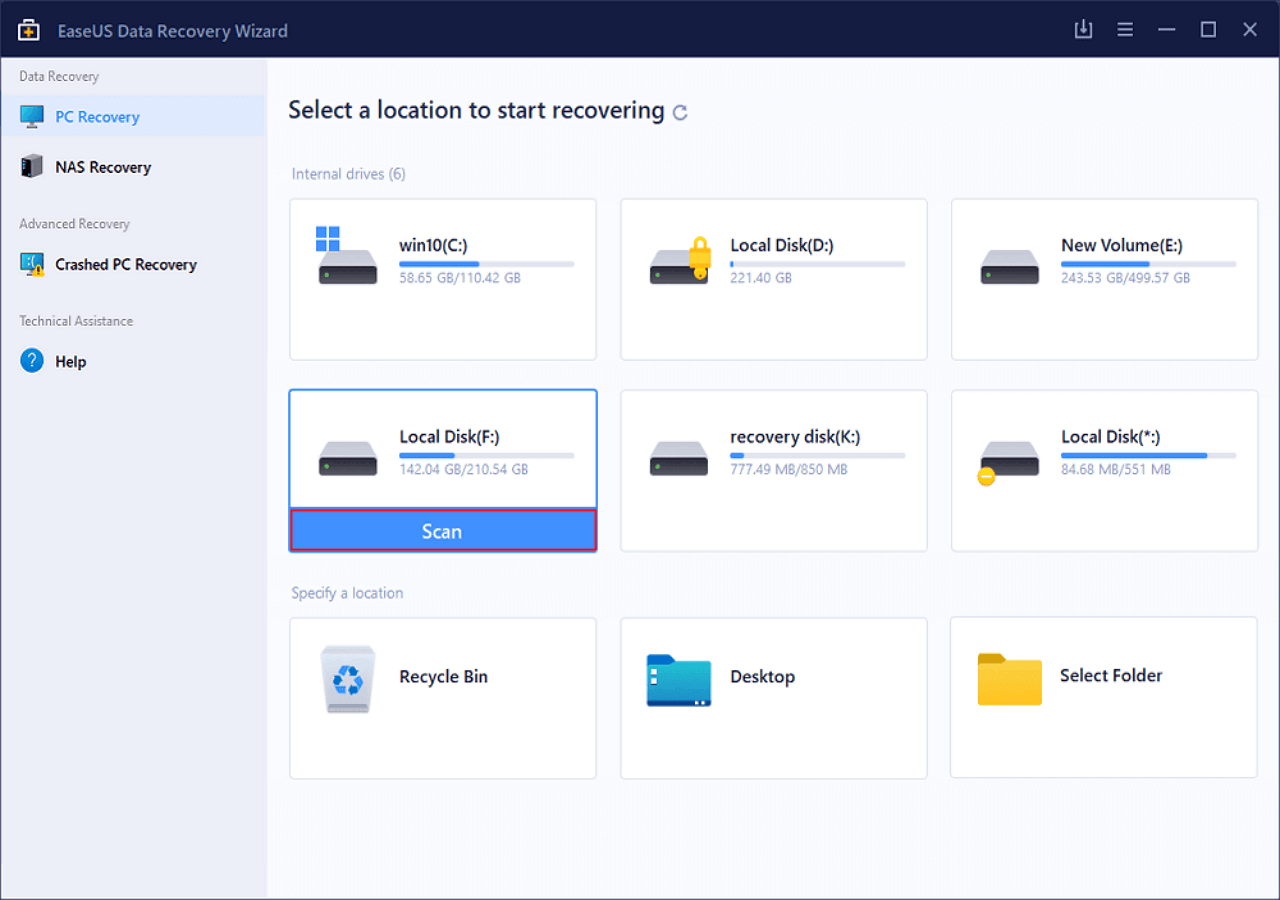
Step 1. Search for Lost Partitions
First, choose "Lost Partition Rescue" on the left and click "Start" to initiate the partition scan. Your disk will be displayed, including existing and lost partitions (marked as unallocated). Then click "Search for Lost Partition" to begin the scan.
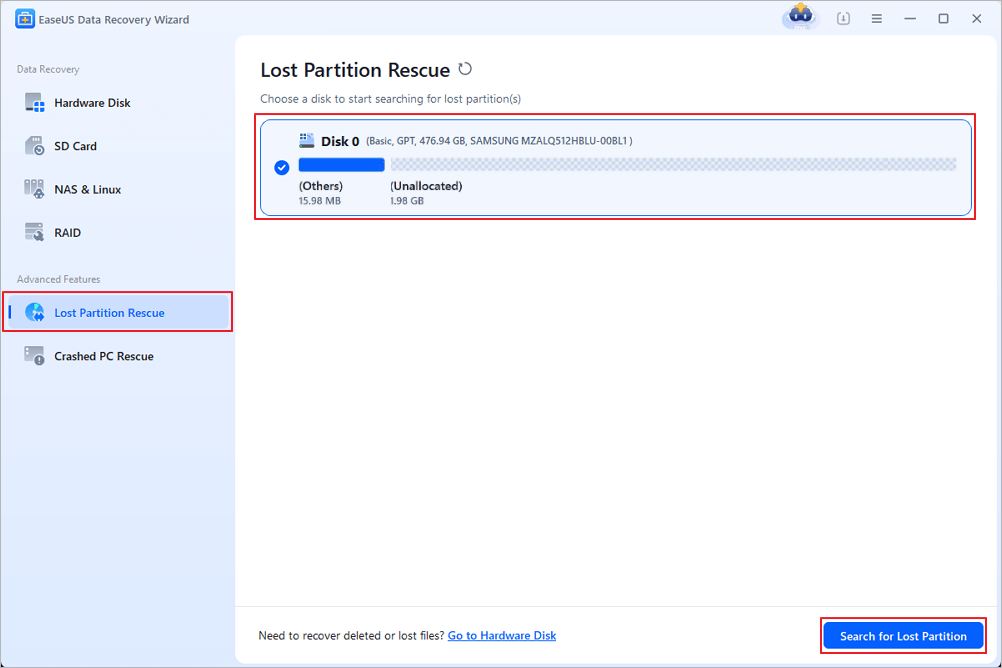
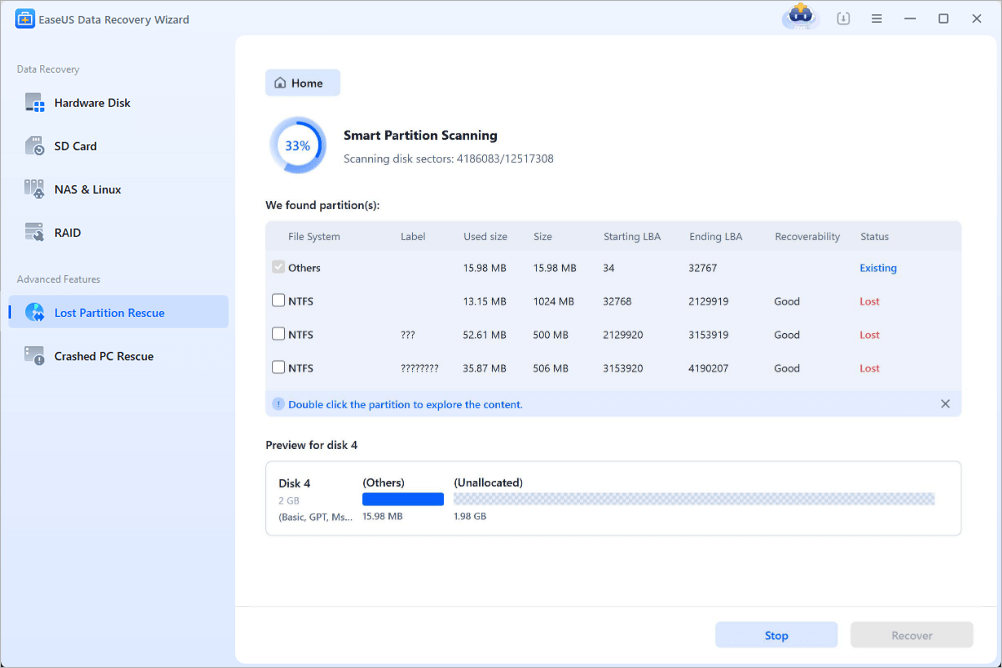
Step 2. Check Files in the Partition
Wait for the smart partition scanning. This process may take several minutes, depending on the severity of the partition loss. While waiting, you can move the cursor to the partition you want to view the files and data in it.
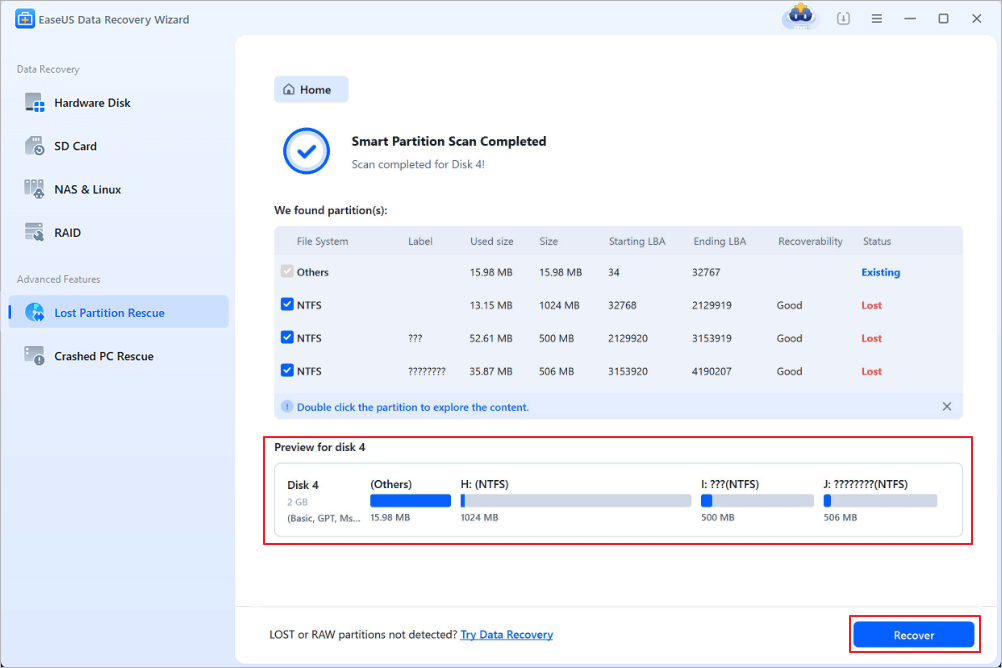
Step 3. Select and Restore the Partition
Select the partitions you want to recover from the list of lost partitions that have been scanned. Their corresponding information will also be displayed below. After selecting, click "Recover" to restore your disk partition settings.
Many people who need HDD partition recovery will choose EaseUS recovery software because it's safe and trustworthy. You can check the following reviews:
| 🔍Reviews |
|
Here's a helpful video that introduces how to perform lost partition recovery and restore missing data:
- 00:45 Run Chkdsk Command to Recover Lost Partition
- 02:01 Recover Data from Lost Partition Using Data Recovery Tool
- 03:03 Allocate New Partition to Store Files
If this article helps, share it on your SNS to help people facing a lost partition issue and perform lost partition data recovery!

How to Recover a Deleted Partition
If your goal is to restore the partition itself instead of only recovering the files, you can use dedicated partition recovery software. This method rebuilds the lost partition entry so the partition becomes accessible again without recreating it manually.
EaseUS lost partition recovery software offers you the simplest way to recover files from a lost or deleted partition in Windows 11, 10, and older versions.
Follow the step-by-step guides below to recover data from missing partitions:
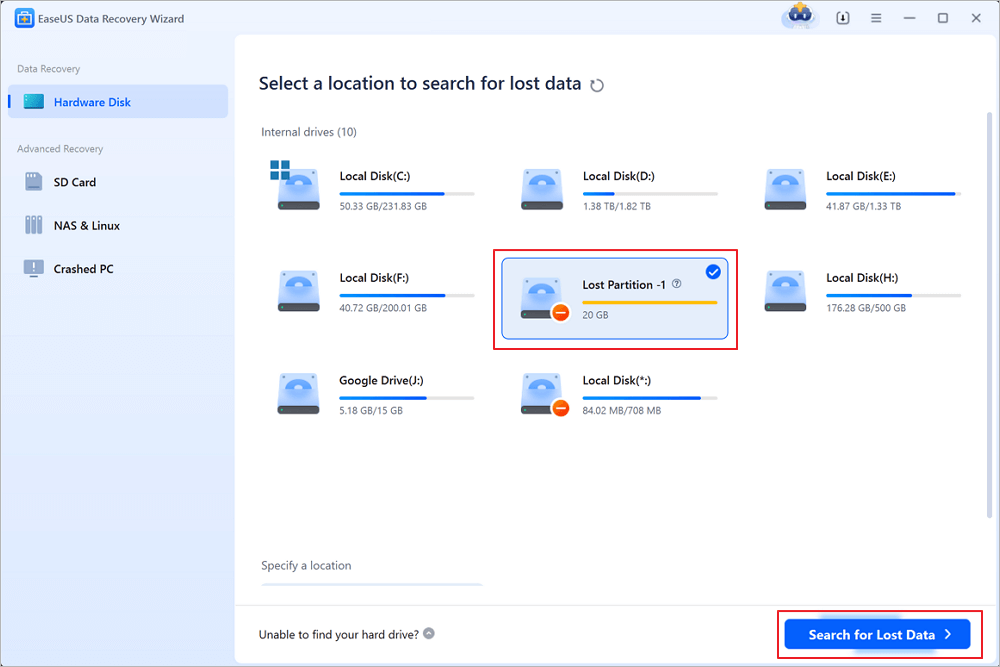
Step 1. Select and scan the lost partition
Launch EaseUS Data Recovery Wizard, select "Lost Partition" and click "Search for Lost Data" to search for all the lost data from your lost or deleted partition. If there are many lost partitions, you can identify them through its partition size.
Note: Since the Windows system doesn't support the Linux file system, the Ext2 or Ext3 partition will be recognized as lost partition with no drive letter in the software. If you want to recover data from Ext2/Ext3 partition, you can follow these steps.
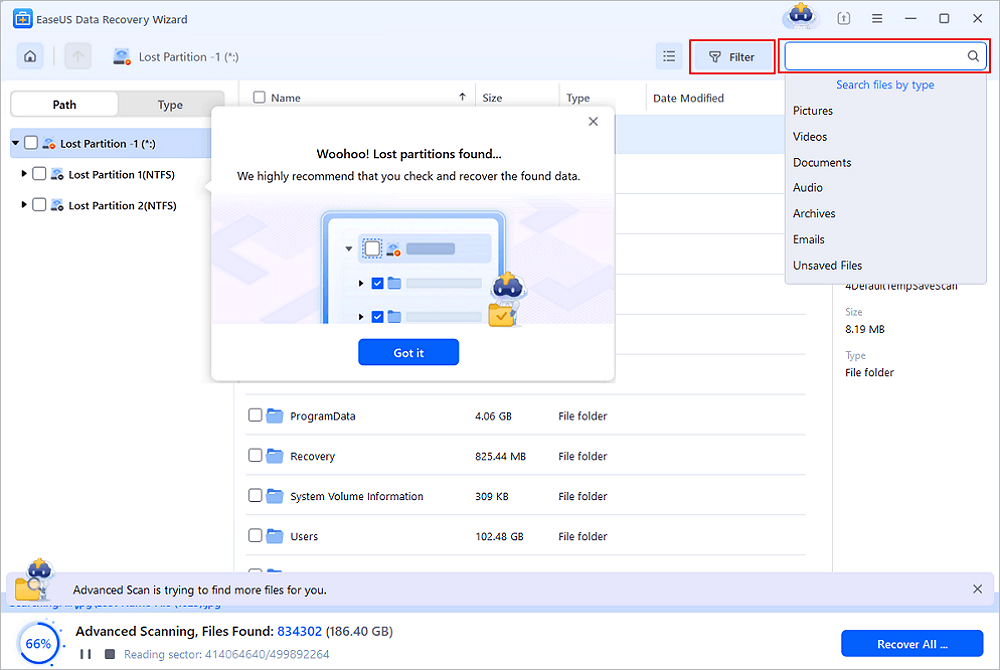
Step 2. Filter the scanned results
Because there will be a lot of scanned files, you can choose a file category for quick filtering, such as Pictures, Videos, Documents, Audio, and Others. Or if you remember the file name, you can just look it up in the search box in the upper right corner.
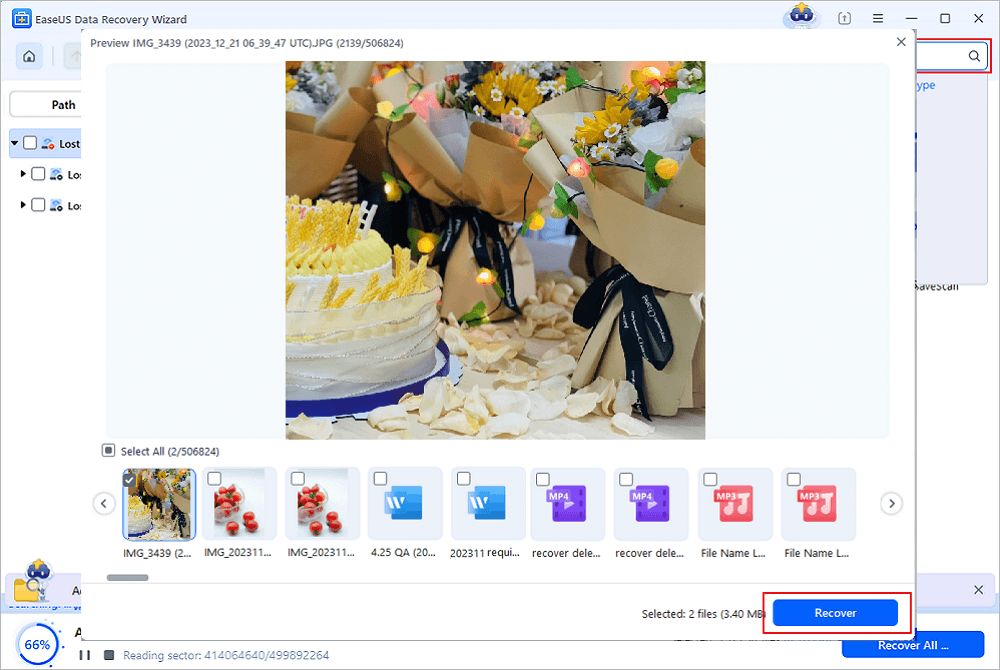
Step 3. Preview and recover data from the lost partition
Before recovery, you can preview the file to make sure it is the data you need. Choose all the files you need and click "Recover" to restore them. Choose a storage location (including cloud storage, such as OneDrive, Google Drive, etc.), and click "Save" to save your recovered files.
What If the Partition Becomes RAW
A RAW partition means Windows can no longer recognize the file system. This often happens because the partition boot sector, file system metadata, or partition table has become corrupted.
When Windows displays messages such as:
- "You need to format the disk before you can use it."
- "The file or directory is corrupted."
- "Drive is not accessible."
Do not format the drive directly, and formatting only rebuilds the file system and may overwrite valuable metadata, making recovery more difficult. Instead:
- Stop using the drive.
- Recover RAW partition with EaseUS Data Recovery Wizard.
- Format the partition only after your files are safely recovered.
- Copy recovered files back to the repaired drive if needed.
Common Mistakes That Reduce Recovery Success
Many users unknowingly reduce the chances of successful partition recovery by taking the wrong actions immediately after discovering the problem.
- Formatting the drive before attempting recovery.
- Creating a new partition in the same location.
- Installing recovery software on the affected drive.
- Copying new files onto the damaged disk.
- Running disk repair tools before recovering important files.
- Ignoring clicking or grinding noises from a failing hard drive.
- Continuing to use a drive showing signs of physical failure.
If the drive produces unusual noises, disconnect it immediately. Physical damage requires professional recovery services rather than software solutions.
How to Prevent Partition Loss
Although lost partition recovery is often possible, prevention is always better than recovery. Following a few best practices can significantly reduce the risk of losing an entire partition.
1. Back Up Important Files Regularly
Maintain at least one local backup and one cloud backup for critical data.
2. Monitor Drive Health
Check SMART information periodically to detect failing drives before they become unreadable.
3. Shut Down Windows Properly
Avoid forced shutdowns or unplugging external drives while data is being written.
4. Remove External Drives Safely
Always use "Safely Remove Hardware" before disconnecting USB drives or external HDDs.
5. Keep Antivirus Software Updated
Malware can corrupt partition tables and damage file systems.
6. Create Regular Disk Images
A full disk image allows you to restore an entire drive quickly if partitions become damaged.
Conclusion
Losing a partition doesn't always mean losing your data forever. In most situations, deleted or missing partitions can still be recovered if you avoid writing new data and act quickly.
For users whose priority is protecting valuable documents, photos, videos, and other files, recovering data first is the safest approach. EaseUS Data Recovery Wizard can scan lost, deleted, RAW, or inaccessible partitions and recover files with just a few clicks. If your goal is to restore the partition itself, EaseUS Partition Recovery can rebuild the missing partition and make it accessible again.
The sooner you begin recovery, the greater your chances of restoring both your partition and your important files successfully.
Frequently Asked Questions
1. Can a deleted partition be recovered?
Yes. If the deleted partition has not been overwritten by new data, professional partition recovery software can often restore both the partition and its files.
2. Can I recover files after deleting a partition?
Yes. File recovery software scans the physical disk directly and can recover files even if the partition itself no longer exists.
3. Is lost partition recovery free?
Some recovery tools offer free scanning and limited recovery. If the lost partition contains valuable files, professional software generally provides higher recovery rates and better support for damaged file systems.
4. Can SSD partitions be recovered?
Yes, but recovery success depends on whether the SSD's TRIM function has erased the deleted blocks. Recover the data as soon as possible for the best chance of success.
5. How long does partition recovery take?
A quick scan usually finishes within minutes, while a deep scan on large HDDs may require several hours depending on disk capacity and health.
6. Can Windows recover a lost partition?
Windows Disk Management can detect disks but cannot recover deleted partitions. Dedicated partition recovery software is typically required.
7. Should I use CHKDSK?
Not before recovering your files. CHKDSK repairs logical file system errors but may modify metadata, making some deleted files harder to recover.
8. Can I recover a partition from an external hard drive?
Yes. Lost partition recovery works on external HDDs, SSDs, USB flash drives, memory cards, and other removable storage devices.
9. Will formatting erase everything permanently?
Not necessarily. A quick format usually removes file system information instead of erasing every sector. Data may still be recoverable until overwritten.
What is the safest recovery workflow?
Stop using the drive, recover important files with EaseUS Data Recovery Wizard, save them to another device, and only then repair or recreate the lost partition if necessary.
Was this page helpful?
-
Dany is an editor of EaseUS who lives and works in Chengdu, China. She focuses on writing articles about data recovery on Mac devices and PCs. She is devoted to improving her writing skills and enriching her professional knowledge. Dany also enjoys reading detective novels in her spare time. …

 Why Trust EaseUS
 Editor Reviews

20+
Years of experience

160+
Countries and regions

72 Million+
Downloads

4.9 +
Trustpilot Score






