
Quick Answer: Yes, deleted data can often be recovered from an external hard drive if the storage space containing the files has not been overwritten. The most important step is to stop using the drive immediately and use a reliable recovery method before new data replaces the deleted files.
Whether you accidentally deleted important documents, emptied the Recycle Bin, formatted an external hard drive, or lost files due to corruption, this guide explains how to recover deleted data from an external hard drive safely and effectively.
Can Deleted Data Be Recovered from an External Hard Drive
In most cases, yes. When you delete a file from an external hard drive, Windows or macOS typically removes the file's reference from the file system rather than immediately erasing the actual data stored on the disk. The deleted data remains physically present until new information overwrites the same storage sectors.
Recovery Is Usually Possible When:
-
Files were recently deleted
-
The Recycle Bin was emptied
-
The drive was accidentally formatted
-
The partition became inaccessible
-
The file system turned RAW
-
The drive is recognized by the computer
Recovery Becomes More Difficult When:
-
New files have been saved to the drive
-
The drive has severe physical damage
-
The storage sectors have been overwritten
-
The drive is making clicking or grinding noises
What to Do Immediately After Deleting Files
The actions you take after data loss can significantly impact recovery success.
1. Stop Using the External Hard Drive
Every write operation increases the risk of overwriting deleted files permanently.
Avoid:
-
Copying files
-
Installing software onto the drive
-
Creating folders
-
Editing documents
2. Disconnect the Drive Safely
Remove the drive from active use until recovery begins.
3. Do Not Format the Drive
If Windows prompts:
"You need to format the disk before you can use it."
Select Cancel.
Formatting can reduce recovery chances.
4. Use Recovery Software as Soon as Possible
The sooner you scan the drive, the higher the probability of recovering intact files.
How to Recover Deleted Data from an External Hard Drive
Method 1. Recover Deleted Data from an External Hard Drive with EaseUS Data Recovery Wizard
Recommended Tools for External Hard Drive Recovery (Decision Support):
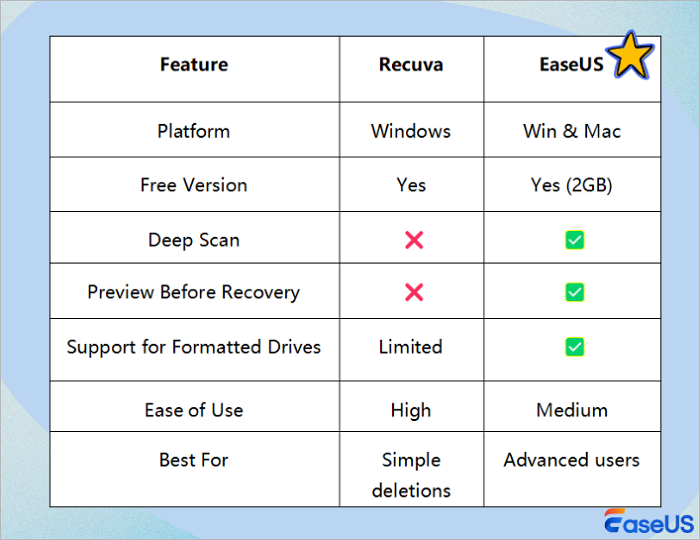
EaseUS Data Recovery Wizard can recover deleted files from external hard drives, USB flash drives, pen drives, SD cards, SSDs, HDDs, and other storage devices in various cases. Download this powerful external hard drive file recovery software and restore deleted data!
- ⭐Access the Recycle bin on an external hard drive on Windows 10 and Windows 11.
- ⭐Recover data from corrupted external hard drives.
- ⭐Recover lost data from external drives of various brands, including Western Digital, Seagate, Toshiba, Sandisk, etc.
Download and install EaseUS data recovery software on your computer and take the simple steps to recover deleted files from your external hard drive.
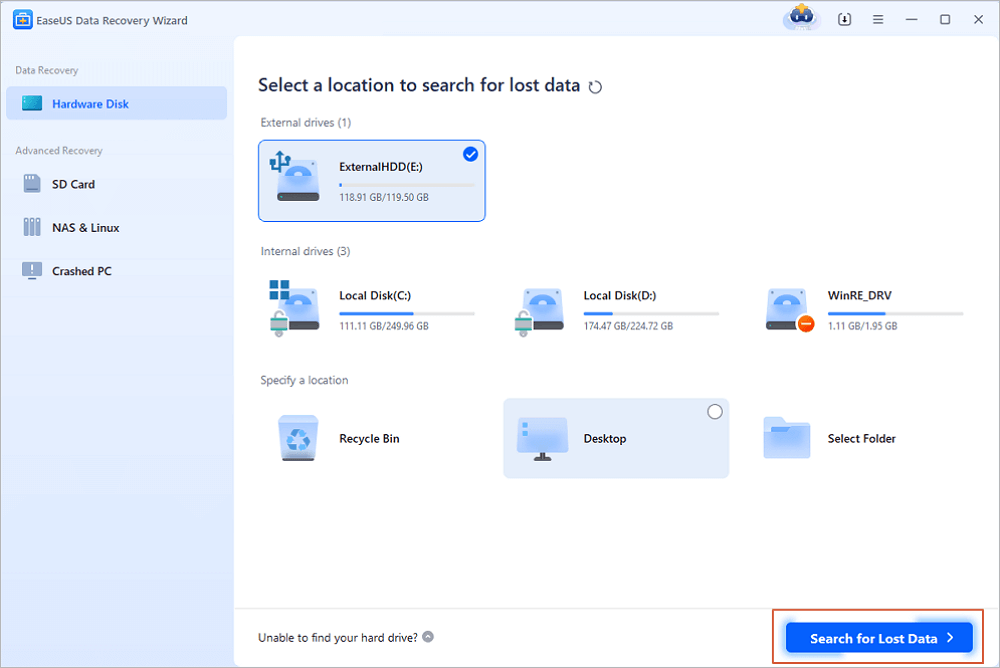
Step 1. Use a correct USB cable to connect your external hard drive to your computer. Run EaseUS Data Recovery Wizard and you will see your external disk under External drives. This software supports all the popular external disk brands, including WD, Seagate, Toshiba, LaCie, SanDisk, Samsung, etc.
Select the external hard drive and then click the "Search for Lost Data" button.
Step 2. As soon as the scan process starts, the software will find more and more lost and deleted data and display the data in the scan results. The recovered data will be nicely organized. You can quickly find the target files/folders by file type or search in the search box with exact file name.
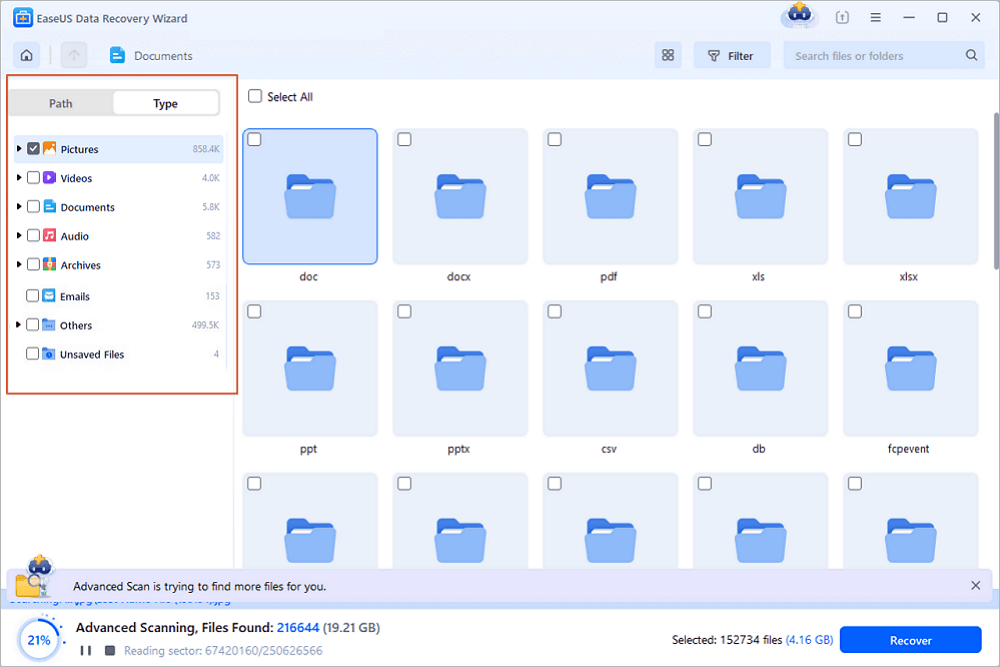
Step 3. You can preview the files found by EaseUS Data Recovery Wizard's scanning algorithms. Then, select files and click "Recover". To avoid data overwriting, we recommend that you save the recovered data to a different drive than the original Seagate drive.
💡Tip: You can restore data on the local disks, external hard drives, and also the cloud storage.

Many users have chosen EaseUS external HDD recovery software to restore lost files. You can check the following reviews to learn more about this handy tool.
| 🔍Reviews |
|
The following video guide shows you how to use the EaseUS file recovery tool for external hard drive recovery.
- 00:34 Why Can Recover Deleted Files
- 01:13 Delete Files from External Hard Drive
- 03:06 Try Data Recovery Service
Share this article with your network and help others avoid data loss on external disks.

Method 2. Recover Deleted Data from an External Hard Drive with Recycle Bin
Where do deleted files go on an external hard drive? The external hard drive has an in-built recycle bin folder where the deleted files from it are stored. However, like system files, the recycle bin folder is by default hidden at the disk's root directory. You can check the recycle bin folder of your external hard drive to find lost data.
How do you access the recycle bin on an external hard drive to recover deleted files from an external hard drive for free? Take these steps:
Step 1. Open File Explorer on your computer.
Step 2. Click the three-dot option, and select "Options".
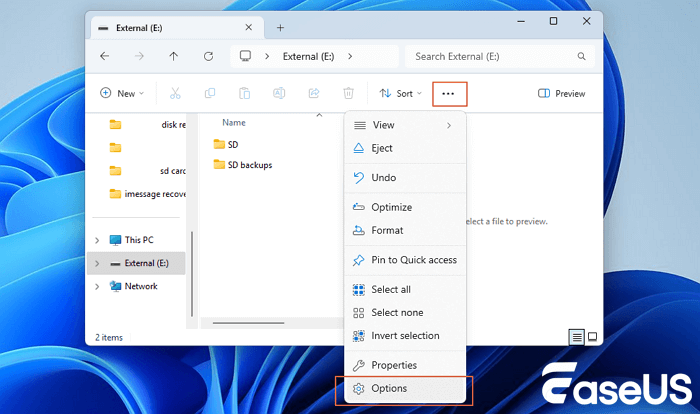
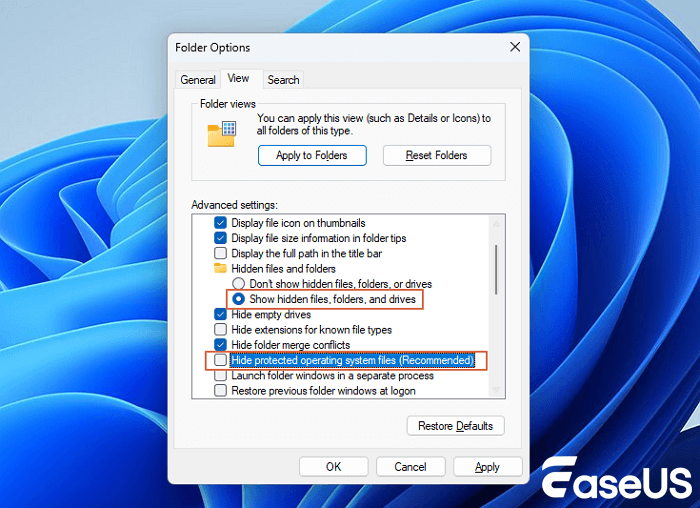
Step 3. Click "View", then select "Show hidden files, folders, and drives" and disable "Hide protected operating system files". Apply these settings.
Step 4. Open your external hard drive. Now, you can see the $RECYCLE.BIN folder.
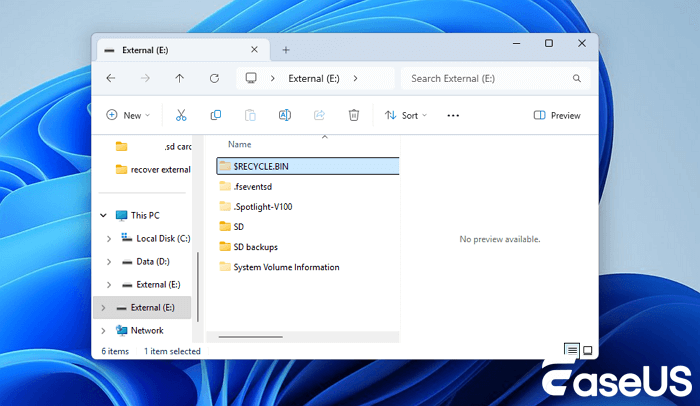
Step 5. Open the recycle bin folder and find the lost files to restore. If this folder is empty, it's better to apply the EaseUS external hard drive recovery tool to retrieve deleted files from the drive.
Method 3. Recover Deleted Data from an External Hard Drive
Another way to find deleted files on the external hard drive is to apply the Previous Version feature in Windows. Previous versions were either copies of files and folders created by Windows backup or copies of files and folders automatically saved by Windows File History as part of the restore point. You can use this feature to restore previous versions of files or folders that were accidentally modified, deleted, or damaged on external disks.
💡Note: The premise of using this solution is that you have to back up your data in advance. Otherwise, you need to use data recovery software to recover permanently deleted files on an external drive.
Step 1. Connect your external disk to your computer. Go to find the folder where your lost files were stored.
Step 2. Right-click inside the folder and select "Properties".
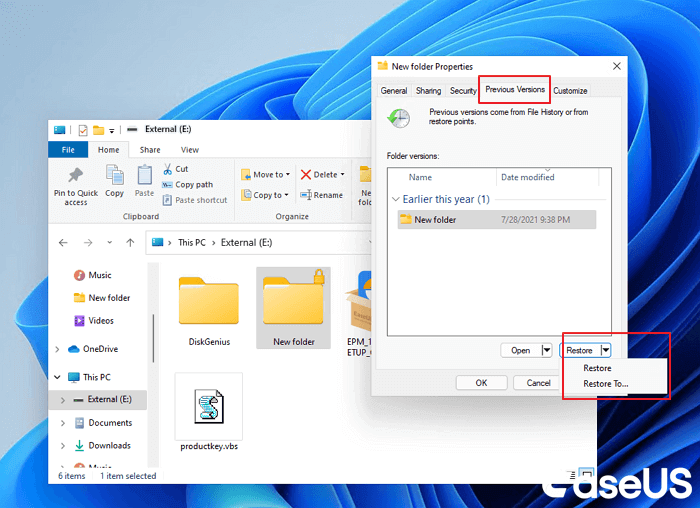
Step 3. Click the "Previous Versions" tab.
Step 4. Select the versions you need to restore.
Method 4. Recover Deleted Data from an External Hard Drive with Data Recovery Service
While external hard disk recovery software can handle most common deletion scenarios, some cases require more advanced intervention. If your external hard drive has suffered physical damage, is not being recognized by your computer, or contains critical files that were not recovered using software, turning to a professional data recovery service is your safest option.
You might want to give EaseUS data recovery services a try if your data loss is due to water damage, hardware failure, or logical corruption, or recover deleted files from an external hard drive after formatting.

Consult with EaseUS data recovery experts for one-on-one manual recovery service. We could offer the following services after a FREE diagnosis
- Repair corrupted RAID structure, unbootable Windows OS, and corrupted virtual disk files
- Recover/repair lost partitions and re-partitioned drives
- Unformat hard drives and repair RAW drives(Bitlocker encrypted drives)
- Fix disks that become GPT-protected partitions
How to Recover Data from a RAW External Hard Drive
A RAW drive is a storage device whose file system has become unreadable.
Typical symptoms:
-
"Drive is not accessible"
-
"You need to format the disk"
-
Missing files
Recovery Steps
-
Do not format the drive.
-
Run a recovery scan.
-
Recover important files first.
-
Rebuild or reformat the drive after data recovery.
Recovering files before repairing the file system minimizes data loss risk.
How to Avoid External Hard Drive Data Loss
Preventing data loss on the external hard drive in advance is better than recovering files from an external hard drive. Here are some expert tips that you should follow to avoid data loss on the external disk in the future:
1️⃣ Regular Backups
Use another backup disk or cloud services to create a backup of your external hard drives, just back up essential files is enough. Follow the 3-2-1 rule: 3 copies, 2 different storage types, 1 off-site.
2️⃣ Avoid Formatting
If Windows or macOS prompts to format the external hard drive, don't proceed immediately. Try recovery tools first - it may indicate a file system error.
3️⃣ Run Antivirus
Computer viruses and malware can corrupt, hide, encrypt or delete files. Keep your system and external drive protected with up-to-date antivirus software.
4️⃣Proper Ejection
Always use the "Safely Remove Hardware" option on Windows or macOS before unplugging your external hard drive to avoid data corruption.
5️⃣Avoid Physical Damage
Keep your external drive in a safe, dry place. Avoid drops, shocks, and exposure to water or high temperatures.
If you found these tips helpful, share it with your friends on X, Facebook, or Instagram!
Conclusions
Deleted files on an external hard drive are not always gone forever. In many cases, recovery remains possible because the underlying data still exists until overwritten.
If you've accidentally deleted files, formatted a drive, or encountered corruption, stop using the drive immediately and begin recovery as soon as possible. Early action significantly increases the likelihood of restoring documents, photos, videos, and other valuable files.
For most deletion and formatting scenarios, a professional recovery tool such as EaseUS Data Recovery Wizard provides the fastest path to recovering lost data while minimizing the risk of further loss.
How to Recover Files Deleted from External Hard Drives FAQs
Get more guides on retrieving deleted files from external hard drives.
1. Can permanently deleted files be recovered from an external hard drive?
Yes. Permanently deleted files can often be recovered if their storage sectors have not yet been overwritten.
2. Where do deleted files go on an external hard drive?
Deleted files typically remain on the drive physically. The operating system simply marks their storage space as available for future use.
3. Can I recover files after formatting an external hard drive?
Yes. Many formatted drives still contain recoverable data until new information overwrites the original files.
4. What is the best software to recover data from an external hard drive?
The best choice depends on your situation. Recovery tools that support deleted files, formatted drives, RAW partitions, and preview functionality generally offer the highest success rates.
Was This Page Helpful?

Finley is interested in reading and writing articles about technical knowledge. Her articles mainly focus on file repair and data recovery.

Approved by Evan Galasso
Evan Galasso is a digital forensics and data recovery engineer with over 10 years of experience in the field. He presents opinions on the current state of storage media, reverse engineering of storage systems and firmware, and electro-mechanical systems of SSDs and HDDs.
Related Articles
-
Disk Drill vs EaseUS: Features, and Recovery Performance Compared
![author icon]() Cedric/Apr 12, 2026
Cedric/Apr 12, 2026 -
Disk Cloning Scenarios #4: Digital Forensic Data Recovery
![author icon]() Jean/Jan 21, 2026
Jean/Jan 21, 2026 -
Recover Lost Data After Migration Assistant Interruption on Mac
![author icon]() Brithny/May 19, 2026
Brithny/May 19, 2026 -
Külső merevlemez adatainak helyreállítása [Windows és Mac]
![author icon]() Cedric/Feb 12, 2026
Cedric/Feb 12, 2026
 Cedric/Apr 12, 2026
  Jean/Jan 21, 2026
  Brithny/May 19, 2026

