






-
![]()
-
![]()
-
![]()
-
![]() Btrfs Recovery Software: Recover Deleted/Lost Files from Btrfs Drives Synology/QNAP
Btrfs Recovery Software: Recover Deleted/Lost Files from Btrfs Drives Synology/QNAP October 23,2026
 6 min read
 -
![]()
-
![]() Recycle Bin Recovery Software: 10 Best Tools to Recover Deleted FilesOctober 22,20266 min read
Recycle Bin Recovery Software: 10 Best Tools to Recover Deleted FilesOctober 22,20266 min read -
![]() EFS Decryption Guide: How to Recover Encrypted Files on NTFS Drive Without EffortOctober 22,20266 min read
EFS Decryption Guide: How to Recover Encrypted Files on NTFS Drive Without EffortOctober 22,20266 min read -
![]()
-
![]() Cerber Ransomware Decrption Tool: Decrypt/Restore .cerber Encrypted FilesOctober 22,20266 min read
Cerber Ransomware Decrption Tool: Decrypt/Restore .cerber Encrypted FilesOctober 22,20266 min read -
![]() [Fixed] Laptop Screen Black but Still Running of HP, Lenovo, Asus, DellOctober 23,20266 min read
[Fixed] Laptop Screen Black but Still Running of HP, Lenovo, Asus, DellOctober 23,20266 min read
Page Table of Contents
How to Recover Data from a Dead Hard Drive:
- 1. Download and install the EaseUS Data Recovery Wizard on your computer.
- 2. Select your hard drive & click the Scan button.
- 3. Preview files and click Recover. More Items...
PAGE CONTENT:
A "dead" or "damaged" hard drive frequently evokes thoughts of permanently lost data. However, this dire prognosis isn't always as conclusive as expected. Hard drives fail when the power supply is unstable, inadequate ventilation, the operating system is incorrectly installed, etc. There are innumerable causes, and none of them are preventable.
Causes and Signs of a Dead Hard Drive
Many users claim that their external hard drives are damaged for various reasons, such as dead read/write heads, bad sectors, etc. Identifying the telltale symptoms of hard disk failure is critical.
- Electric failure: If your drive is turning on but not spinning, your spindle motor may be burned out. Consider swapping it out for a motor from a functional drive of the same make and model.
- Physical damage: When your disk is plugged in, it probably clicks, grinds, or screeches. The read/write heads and platters are likely rubbing against one another, escalating the harm.
- System infection: System failure can occur when something modifies the OS files. Examples of such events include malware attacks, failed update files, physical hard disk failure that is getting closer to happening and overheating computers. Some viruses infect the boot sector of your hard drive, making a disk unable to boot.
Other typical signs of a dead hard drive include:
- Absent directories and files
- Sluggish folder and file opening
- Freezing of the system
- Monitoring mistakes with S.M.A.R.T.
- Strange clicking sounds emanating from the drive
- Blue or black screen of death
You don't have to panic when you find the hard drive dead. Follow the tips below to learn how to recover data from the dead hard drive.
General Steps for Dead Hard Disk Data Recovery
Here is a comprеhеnsivе guide that offers solutions to rеcover data from a dead hard drive. Hard disk failures can be classified as either logical or physical. You can choose methods from using data recovery software to professional rеcovеry sеrvicеs due to the causes of the dead HDD. The general steps for data recovery are:
1️⃣To select the best recovery strategy, ascertain whether the damage was logical, electrical, or physical.
2️⃣Logical Damage Recovery - Using HDD Data Recovery Software
Software faults are the root cause of logical damage. The hard drive's internal components do not sustain physical harm after a logical failure. However, the failing hard disk cannot locate its data due to various factors, including incorrect formatting, faulty files, malware/virus infection, etc.
Thus, you can attempt to recover data from hard disk which is not detected from a logically failed hard drive by utilizing data recovery software like EaseUS Data Recovery Wizard . This is because the data remains on the drive and only needs to be retrieved with the appropriate method.
Just download and launch the software, then scan the dead hard disk to recover the deleted data.
3️⃣Physical Damage Hard Drive Recovery - Using Data Recovery Services
Hardware damage is the root cause of physical failures. If software cannot recover data from a logically damaged hard disk, you'll consider getting data recovery services from expert assistance and professional help. That's because recovering files from a dead hard drive would be challenging if it sustains significant mechanical damage.
Then, to repair a damaged disk and restore data efficiently, try EaseUS data recovery services. The service can recover data from any kind or brand of external hard disk. Our data recovery specialists can perform this without voiding your device's warranty from Western Digital, Fujitsu, Seagate, Samsung, and Toshiba.
Consult with EaseUS data recovery experts for one-on-one manual recovery service. We could offer the following services after a FREE diagnosis on a damaged hard drive
- Repair a dead virtual disk file (.vmdk,.vhd,.vhdx, etc.) or a damaged hard drive structure
- Optimize your disk to ensure optimal performance.
- Reformat the hard drive and fix the RAW drive (including the encrypted BitLocker hard drive)
- Fix hard drive that can't be accessed
The steps are quite easy: you only need to contact the data recovery specialist by clicking the button and then get a free consultation. After the diagnosis and value, you can acquire personalized help for dead hard drive recovery.
How to Recover Data from a Dead Hard Drive with Software
EaseUS Data Recovery Wizard can create a bootable disk of data recovery software to help you recover data after a system crash and boot problem. Follow the steps below to recover data from a dead HDD.
You Can Trust EaseUS Data Recovery Software
EaseUS Data Recovery Wizard has acquired an extensive technical base in broken HDD data recovery and trusted by billions of users since 2005. Check out reviews on Trustpilot.
Apart from recovering lost files from a dead hard drive, EaseUS Data Recovery Wizard also supports recovering data from RAID, external hard drives, dynamic disks, memory cards, etc. Also, it can recover deleted photos/documents/media files, unformat files, recover data from lost partitions, etc.
We'll provide a detailed guide to help you recover files from a dead laptop or PC hard drive:
Step 1. Create a bootable disk
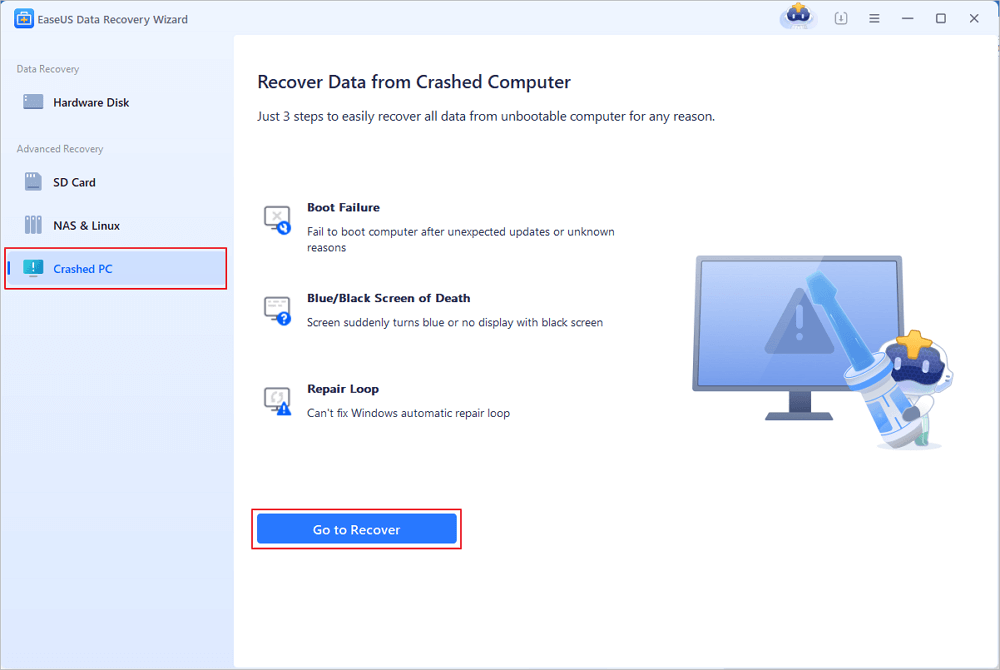
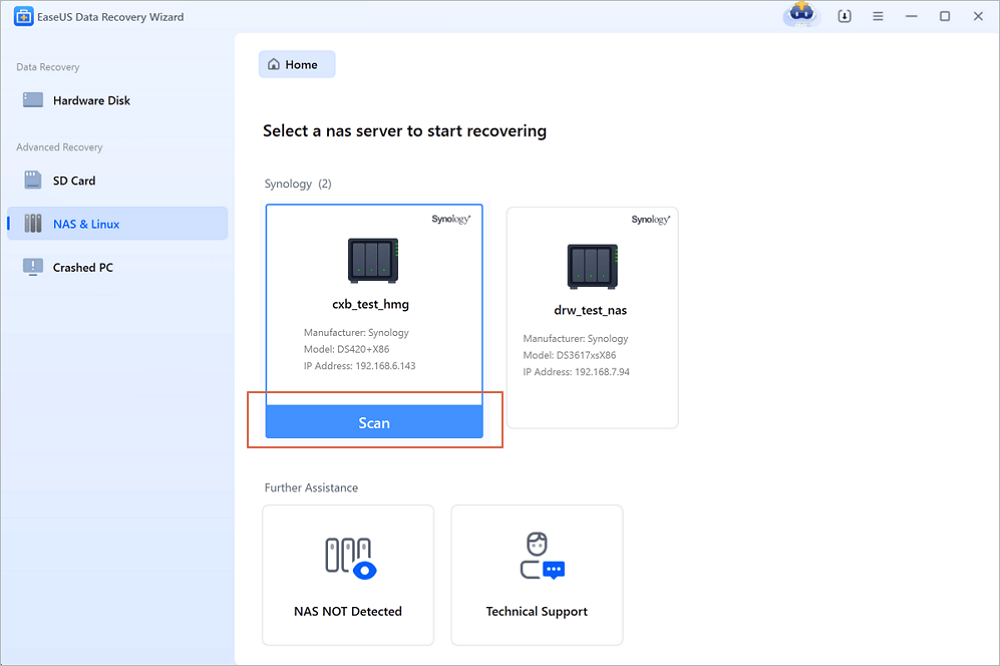
Launch EaseUS Data Recovery Wizard, choose "Crashed PC" and click "Go to Recover".
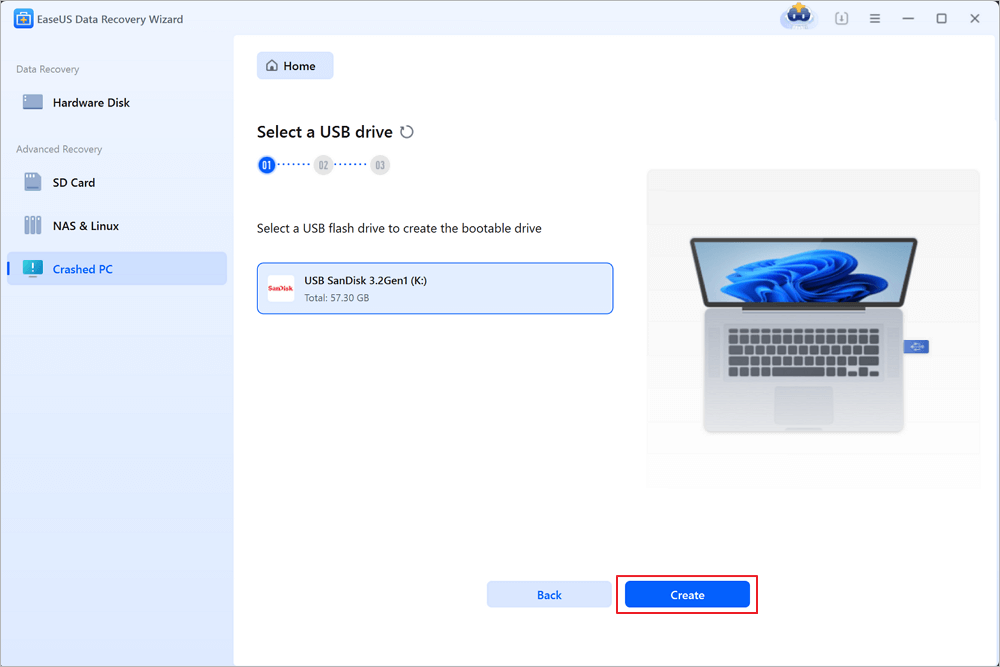
Select an empty USB to create the bootable drive and click "Create".
⚠️Warning: When you create a bootable disk, EaseUS Data Recovery Wizard will erase all data saved in the USB drive. Back up important data beforehand.
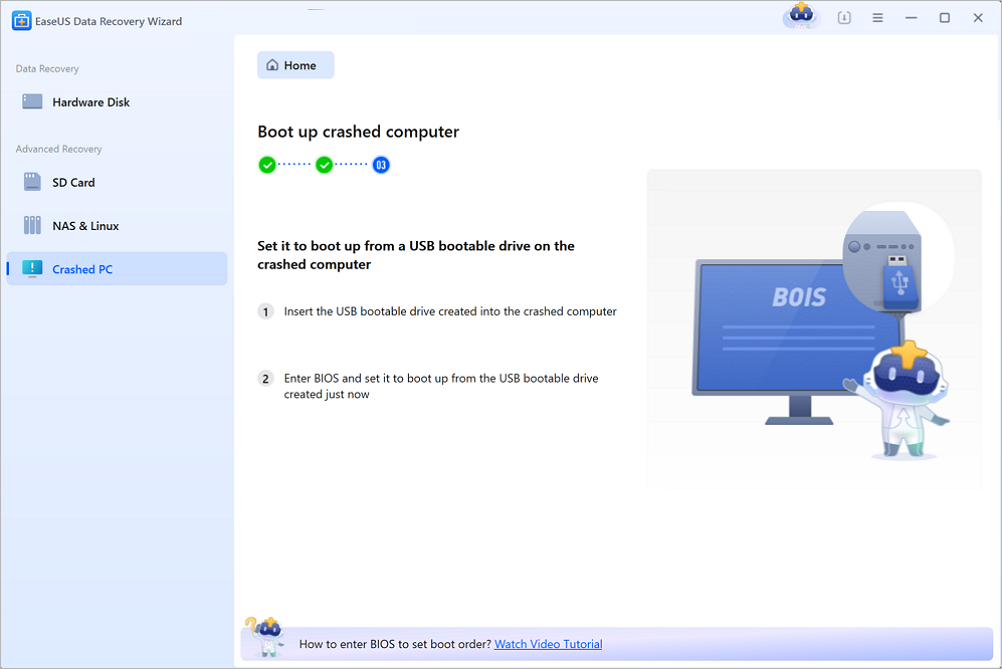
Step 2. Boot your computer from the bootable USB
Connect the bootable disk to the PC that won't boot and change your computer boot sequence in BIOS. For most users, it works well when they restart their computer and press F2 simultaneously to enter BIOS.
Set to boot the PC from "Removable Devices" (bootable USB disk) beyond Hard Drive. Press "F10" to save and exit.
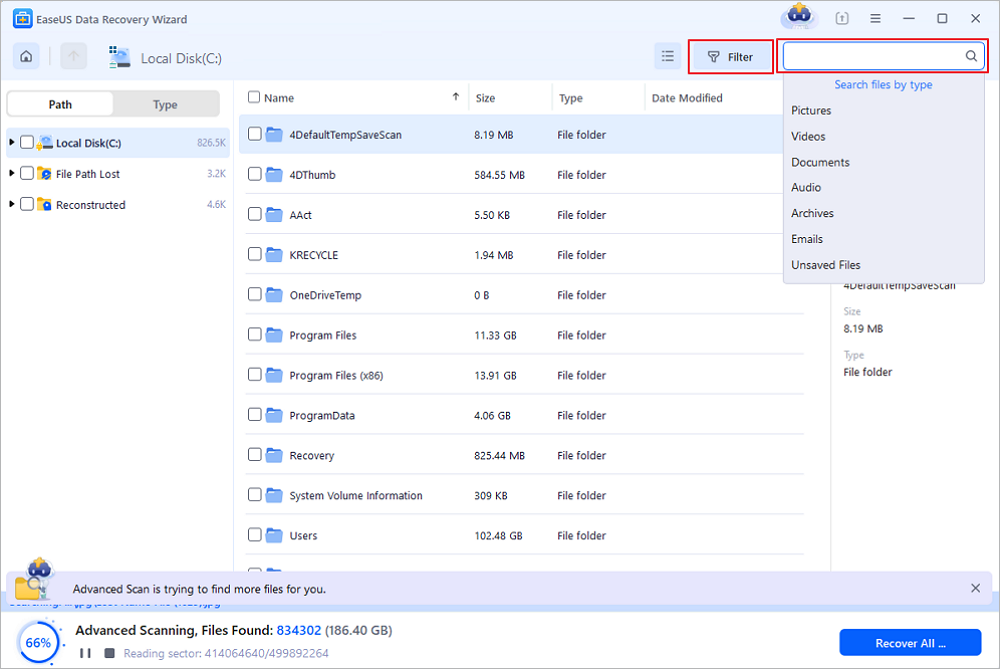
Step 3. Recover data from a crashed system/PC
After booting from EaseUS Data Recovery Wizard bootable disk, select the drive you want to scan to find all your lost files. Preview and recover the files you need to a safe location.
💡Tip: You can restore data on the local disks, external hard drives, and also the cloud storage.
Don't hesitate to share this function hard drive recovery tool and recovery tip with more friends on social media!
Recover Data from Dead Hard Disk with Backups
This method may not be very helpful for some users who don't back up hard disks. If you are sure there are no local backups, you should go to the Windows Recycle Bin to check if there are some files that are needed. It's easy to click "Restore" to recover deleted files from the Recycle Bin.
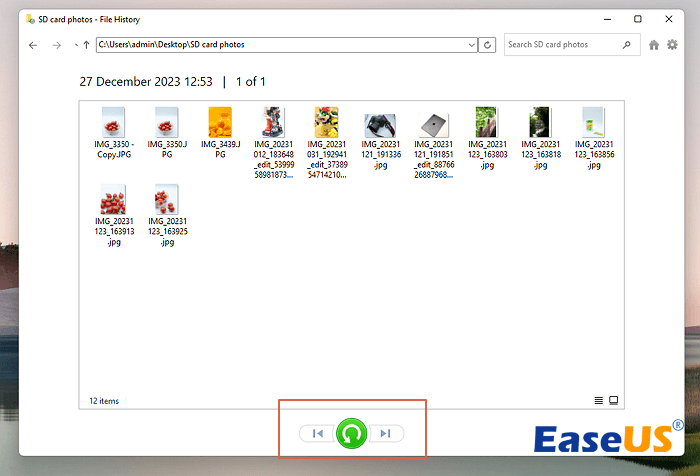
Follow the steps below to recover data from a dead hard drive via File History backups:
Step 1. Quickly locate File History with the Windows search box. Just type in restore your files with file history and launch it.

Step 2. Now, you can view File History backups. Select the files you want to recover and click the Restore button.
|
💡When you don't have any backup, it is better to apply EaseUS dead hard drive recovery software to restore lost data. |
Bonus Tip: How to Fix Damaged Hard Drive
If your dead HDD is not showing as "Online", follow the steps to fix it.
💡1. How to Fix HDD Shows "ONLINE (ERRORS)"
When a dynamic disk detects an I/O error, an "online (error)" status occurs. Usually, all volumes on the disk will show "At Risk" status.

Step 1. Reactivate the disk if the I/O error is temporary (like cable slack).
Step 2. If the "Healthy (At Risk)" status is still displayed, disk failure may occur. Back up data and replace the disk as soon as possible.
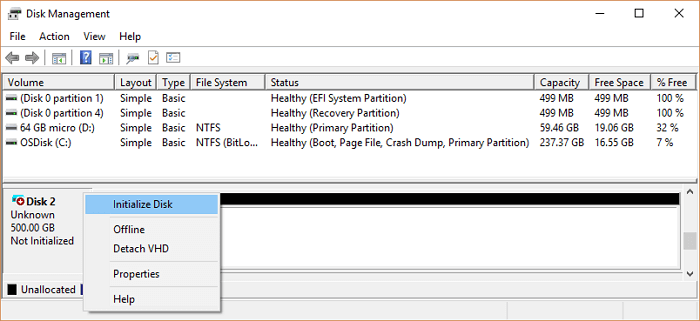
💡2. How to Fix HDD Shows "Not initialized"
The disk not initialized state occurs when the disk does not have a valid signature or when there is virus infection.
Step 1. Connect the hard disk to other computers to see if it is normal. If it is still uninitialized, you can initialize it first.
Step 2. Right-click the disk and click "Initialize Disk". The disk status is temporarily changed to "initializing" and then to "Online" status.
💡3. How to Fix Hard Drive Shows "Missing"
A "Missing" state occurs when a disk is destroyed, closed, or disconnected.

Open "Disk Management", right-click the missing disk, and then click "Reactivate Disk". If there are multiple missing disks, Disk Management will attempt to reactivate all of them.

💡4. How to Fix Disk Is Showing as "Foreign"
When the dynamic disk is transferred from another computer to the local computer, the "Foreign" status is displayed. The "Foreign" status is also displayed when a Windows XP Home Edition computer is configured to pass dual boot mode of another operating system (using dynamic disks). Importing a Foreign disk would solve it.

- Right-click the disk.
- Click "Import Foreign Disks". The data will not get lost.

💡5. How to Fix Device is Unreadable or No Media
An "unreadable" state occurs when a basic or dynamic disk is inaccessible. The disk may have a hardware failure or an I/O error. You can solve this error by following the steps below:
Rescan the disk. Click "Action" > "Rescan Disks") or restart your computer to see if the disk status has changed.

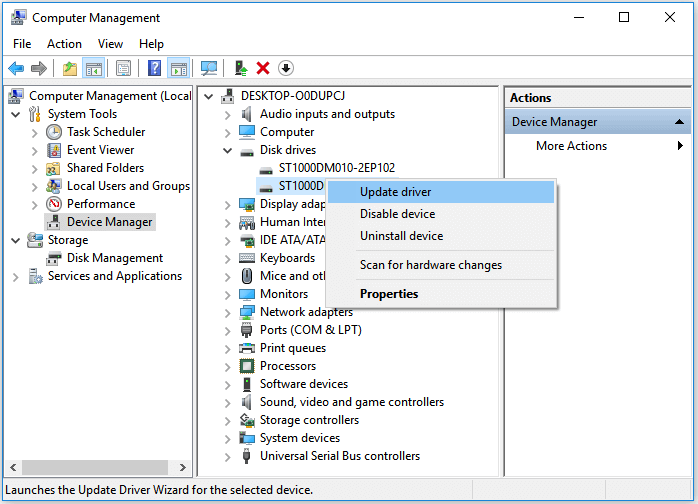
Update the driver in Device Manager:
Step 1. In the Device Manager, double-click the device (where there is usually a yellow triangle exclamation icon beside it) and open the driver Properties window.
Step 2. Go to the Driver tab and click "Update Driver".
Step 3. Click "Search automatically for updated driver software".
When your external hard drive fails, you can try the solutions below to fix it. If you can see obvious damage, such as strange sounds, obvious cracks, or a broken printed circuit board, send the HDD to a specialist in time. The following methods are more suitable for repairing non-physical damage.
Before that, you can share these functional tips on social media to help other readers!
💡6. Fix the File System Error to Solve Disk Errors
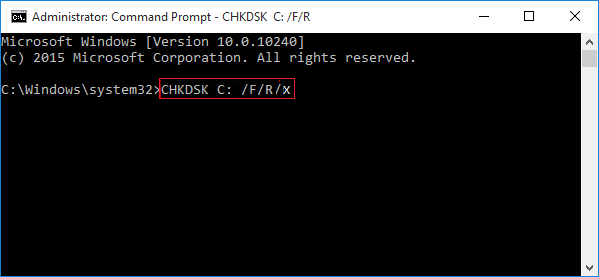
If the disk has bad sectors or internal errors, the hard disk can be damaged very easily. And if you know how to run the CHKDSK command on your PC, it will be effortless for you to fix the hard disk issue.
- Press Win + X, and select "Command Prompt (Admin)".
- Click "Yes" to launch Command Prompt as Administrator.
- Type: chkdsk and hit "Enter" to check errors in the dead hard drive.
- Type: chkdsk c: /f /r/x to let CHKDSK fix the drive. (C is the drive letter of your damaged hard drive)
💡7. Use File Manager to Fix Non-System Drive
- Press "Win + E" to open File Manager, and right-click the appropriate drive from the left pane.
- Select "Properties" and click "Tools" > "Check under Error Checking".
- Click "Repair This Drive" when the scan is complete to fix the drive errors.
💡8. Run a Thorough Disk Check
- Open "This PC", right-click the hard drive, and select "Properties".
- Click "Tools > Error checking > Check".
- Select "Check local disk" and click "Start". Close all running and open programs, and select the option to let the system check upon the next boot. After this, restart the PC.

If it reports that your drive has 'bad sectors or clusters', don't worry. CHKDSK command can fix this issue.
✨Tip: Dead Hard Disk Data Recovery Chance
The dead hard drive eventually affects all computer users. Frustration soon kicks in due to the loss of pictures, music, documents, and other files you can't always replace.
Most of the time, the data is intact. It is good if you have a backup of your important data. However, if you do not make a backup in advance and find the components in your drive are still functioning, you can recover data from the dead hard drive with a bootable CD/DVD of dead hard drive recovery software.
Tip: Ensure that the Disk is recognized as an Online Disk and that the partition or disk space is displayed properly. Then you can use this software. If the disk is not recognized as an Online Disk, you can refer to fix the HDD not online and other issues.

Conclusion
Diagnosing and fixing a broken hard drive is difficult. Do take it seriously, but also try to exclude some of the more simple-to-fix culprits before you spend hundreds of dollars on a specialist. Even if you managed to repair your drive and get all your data back, replace the HDD with a new drive as soon as possible.
Don't forget to try the following software to recover data from the damaged hard drive.
Recover Data from Dead Hard Drive FAQs
You have learned how to recover data from a dead/damaged/crashed hard drive. It's time to get additional help.
1. How do I revive a dying hard drive?
You can try these steps to revive a dying HDD:
- Put the drive in a waterproof sealed bag
- Put the bag in the fridge for an hour or so
- If this drive isn't spinning up, put it in the freezer for about an hour
2. Can a failing hard drive be repaired?
If the hard drive is inaccessible, you can fix it using Disk Management. Or, try to contact data recovery services to fix a failing hard drive.
3. What can I do to deal with a dying hard drive?
HDD dying? A dying hard drive is not dead yet. It's facing imminent failure. So, take care of the data. This should be the first thing to do:
- Recover hard drive data
- back up hard drive data
- Revive a hard drive
Was this page helpful?


 Why Trust EaseUS
 Editor Reviews

20+
Years of experience

160+
Countries and regions

72 Million+
Downloads

4.9 +
Trustpilot Score





