
Featured Articles
- 01 What Is NTFS File System
- 02 What Is exFAT Format
- 03 What Is FAT File System Format (FAT, FAT16, FAT32)
- 04 What Is EXT2/3/4 File System (Linux) Format
- 05 NTFS VS exFAT VS FAT32, What's the Difference
- 06 How to Change File System to NTFS, FAT32, EXT
- 07 How to Convert File System - NTFS to FAT32
- 08 Best FAT32 Converter Free Download
- 09 Troubleshoot File System Errors
- 10 Fix File Is Too Large for Destination File System
- 11 Fix Volume Does Not Contain A Recognized File System
When setting up a new hard drive or an external hard drive or USB drive, you'll always come up with this question: Which file system should I set to my drive, right? And NTFS is always seen, recommended, and used on multiple types of storage devices in many cases.
However, do you know what is NTFS file system? What are the pros, cons, and when to use NTFS on your drives? Follow this page, and we'll present you with a full guide to learning everything about the NTFS file system. So let's get started here.
In this article, you'll learn:
- What is NTFS File System - Definition
- NTFS (New Technology File System) File System Structure - How NTFS Stores Data
- Do I Need NTFS File System for Windows - Advantages of NTFS
- Which Is Better? NTFS or FAT
- Tutorial: How to Create an NTFS File System Partition on Windows 11/10
- Troubleshoot 1: NTFS Stop Code Error - NTFS_FILE_SYSTEM BSOD in Windows
- Troubleshoot 2: Repair NTFS File System Corruption
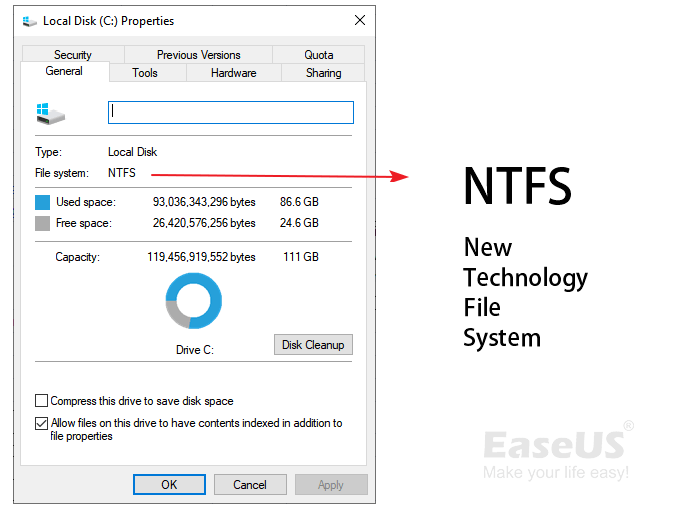
What is NTFS File System - Definition
- by Wikipedia
Definition: According to Wikipedia, NTFS is a file system developed by Microsoft in July 1993, and it's widely supported by many platforms, including Windows, Linux, BSD, etc. Compared to the FAT file system format, the NTFS file system surpasses FAT, and it gets a better reading and writing support. Users can also apply some converting commands to change the NTFS file system to other formats, such as converting NTFS to FAT32 or vice versa.
Here is a table that lists more detailed information about the NTFS file system. Follow to check the details:
| Features | NTFS File System |
|---|---|
| Versions |
|
| File Location | Bitmap |
| Max File Size |
|
| Max Partition Size |
|
| Supported Operating Systems |
|
So how does an NTFS file system partition stores its data, allowing Windows or other platforms to access data saved on the drive? In the next part, we'll be showing you the NTFS file system structure and how an NTFS drive stores data.
NTFS (New Technology File System) File System Structure - How NTFS Stores Data
In this part, you'll learn the structure of the NTFS file system and how the NTFS partition stores and saves data. First, let's learn how does NTFS file system structure and organize data.
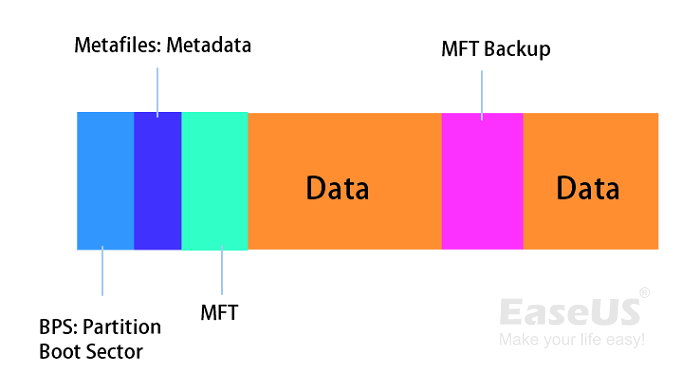
NTFS Structure: NTFS file system consists of 5 components, including O.S Boot Record, MFT 1, MFT Metadata, MFT2, and Data Area.
See how each part works:
- Partition Boot Sector: Also known as PBS, it holds the boot information.
- Master File Table: Short for MFT, is a directory that stores metafile data (or metadata), including file name, creation date, access permissions, size, etc.
- Metafiles: It helps to define and organize the file system, backup critical file system data, buffer file system changes, manage free space allocation, and helps structure metadata more efficiently.
- Data Area: The unit that stores files and data in a partition or external drive.
You can also refer to the image of the NTFS file system structure to learn the details:
Do I need an NTFS file system on Windows or storage devices? Check the next part, and you'll get the answer.
Do I Need NTFS File System for Windows - Advantages of NTFS
So do I need NTFS file system on my computer or external storage devices? When should I use NTFS? These two questions are we'll discuss here, and let's see the details:
Advantages & Benefits of NTFS:
- Fault Tolerance: The NTFS file system can automatically repair files and folders from power failure or other errors.
- Security: NTFS file system enables you to set access permission to some local files and folders. In other words, you can set a confidential file inaccessible to some other users.
- Compression: NTFS supports file compression so that you can compress files and folders so to speed up the system.
- Compatibility: The NTFS file system format is widely compatible with many operating systems, including Windows 11/10/8.1/8/7/XP, Linux, and even macOS.
Note that the NTFS file system is read-only on Mac. You'll need to enable NTFS on Mac to make it accessible.
- Large File Transfer: NTFS supports saving big files. And you can use it to transfer and store super large video files on an NTFS drive.
When Do I Need NTFS and What Can NTFS Be Used For:
- Create a new partition on a Windows disk - NTFS (by default).
- Format USBs, micro SD cards, HDDs, and SSDs.
- Store and transfer large files, like games, videos, movies, etc.
- Install Windows operating systems, programs, and games on an NTFS partition with MBR or GPT disk type.
- NTFS keeps a log of files added, modified, or deleted on a drive.
Which Is Better? NTFS or FAT
Some of you may want to understand the differences between NTFS and FAT further or don't know how to select one of them as your hard drive or USB format, right?
In the beginning, we've introduced you to the definition of the NTFS file system. To learn the differences, let's first get a basic idea about FAT32 first. FAT32, known as an older standard file system format before the NTFS file system, is compatible with all operating systems.
So which is better, NTFS or FAT32? Here is an image that compares NTFS and FAT32. You can follow to learn the differences:

According to this image, you can clearly see that:
- NTFS supports a bigger volume size and file size than FAT32.
- Also, NTFS is fault tolerant with sudden errors.
- NTFS allows file compression.
- FAT32 is more compatible with different operating systems while NTFS is not. (Note that NTFS is read-only on MacOS X and macOS.)
So when should I use NTFS, and when to use FAT32? Here are the tips:
- Use FAT32 on a USB flash drive or SD card with a small capacity - 32GB or smaller.
- Use FAT32 on external hard drives for both Windows and Mac computers.
- Use NTFS in Windows internal hard drive partitions.
- Use NTFS for large file transfers.
Tutorial: How to Create an NTFS File System Partition on Windows 11/10
So how do I create an NTFS file system partition on my computer? Here is a guide that you can follow:
Step 1. Right-click the Windows icon and click "Disk Management".
Step 2. Right-click the unallocated space on your hard drive, and click "New Simple Volume...".
Step 3. Set the file system of the new partition as NTFS, set the volume size, and click "Next" to continue.
Step 4. Set partition drive number, label, etc., click "Next" and "Finish".
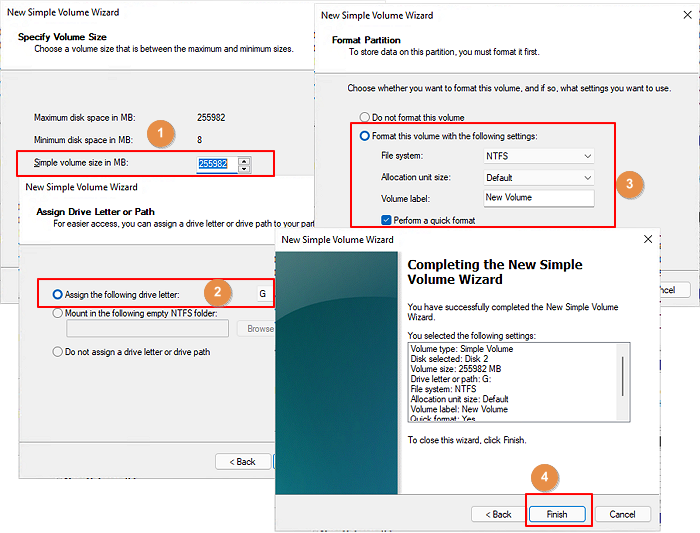
Windows beginners can also turn to reliable partition manager software for help. For example, EaseUS Partition Master enables you to create a new NTFS partition in only a few clicks:
Step 1. Launch EaseUS Partition Master. To to Partition Manager, right-click on the unallocated space on your hard drive or external storage device and select "Create".
Step 2. Adjust the partition size, file system (Choose the file system based on your need), label, etc. for the new partition and click "OK" to continue.
Step 3. Click on the "Execute 1 Task(s)" button and create a new partition by clicking "Apply".
Watch the following video tutorial and learn how to create a partition in NTFS, FAT, or EXT file system.
After this, you can use the NTFS file system format partition to store files, install programs, and even Windows operating system.
Sometimes, you may also need to change or switch the file system between NTFS and FAT32. Here are some tips for you to try:
Alongside setting the NTFS file system as the hard drive partition format, some of you may also encounter unexpected NTFS file system errors, such as BSOD or NTFS file system errors. In the next two guides, we'll show you how to troubleshoot these two errors on your own successfully.
Troubleshoot 1: NTFS Stop Code Error - NTFS_FILE_SYSTEM BSOD in Windows
The NTFS file system stop code error is also known as "NTFS_FILE_SYSTEM" error or BSOD error. It often comes with a blue screen of death error with an error message:
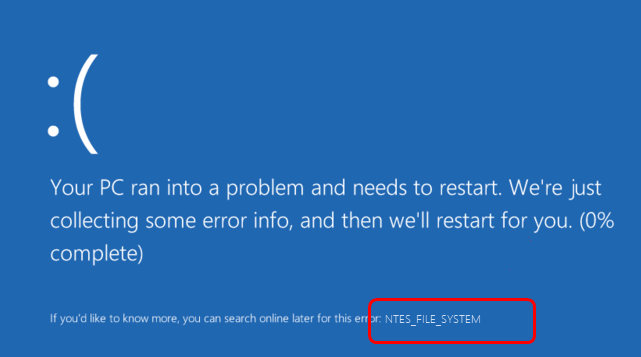
When this error comes, you may also notice a sentence below the notice message that states:
"If you'd like to know more, you can search online later for this error: NTFS_FILE_SYSTEM".
So how do you quickly fix this issue? Here are two resolutions for you:
1. Wait for the PC to complete the error collection process and see if it restarts.
2. If the computer doesn't restart, try to force the PC to reboot by pressing its power button.
After the computer reboots, if it is still stuck with the BSOD error, try to restart your PC into Safe Mode:
- Hold the power button for 10 seconds to turn off the PC.
- Press the power button to turn on the computer and hold the power button for 10 seconds to turn it off.
- Press the power button again to turn on the PC, and when Windows restarts, hold the power button for 10 seconds to turn it off.
- Press the power button again to turn on the PC and allow it to restart, then enter winRE fully.
- Select "Troubleshoot" > "Advanced options" > "Startup settings" > "Restart".
- After the computer restarts, press F5 to enter Safe Mode.
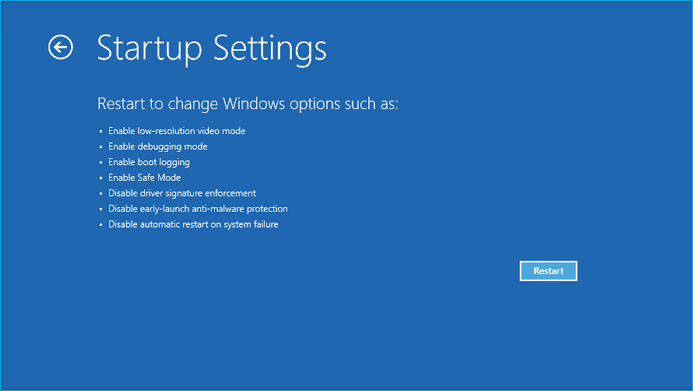
After the computer reboots into Safe mode, then follow the detailed fixes introduced in this guide for help:

Fix NTFS_FILE_SYSTEM BSOD Error in Windows
Follow this page if your computer gets stuck with an NTFS_FILE_SYSTEM blue screen of death error. You can find reliable methods to fix and remove the Windows 10/8 NTFS_FILE_SYSTEM BSOD error on your own.
Troubleshoot 2: Repair NTFS File System Corruption
Sometimes, your NTFS file system hard drive partition or external hard drive may encounter device data access error or file system corruption issue, like RAW or other errors.
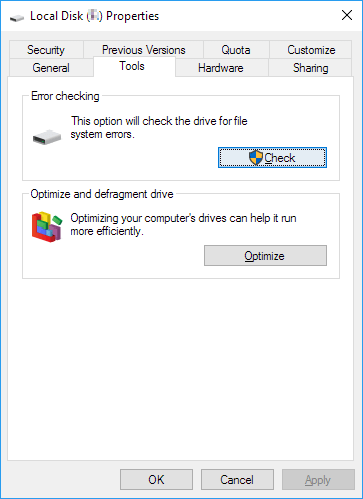
To repair the NTFS file system corruption error, you can first try Windows built-in NTFS repair tool:
Step 1. Right-click the corrupted NTFS partition
Step 2. Go to "Properties" > "Tools", click "Check" under "Error Checking".
NTFS File System Is Perfect for Windows OS and Huge File Storage
On this page, we introduced the NTFS file system, its pros and cons, and the NTFS file system structure. According to this page, it's clear that the NTFS file system is a perfect file system format for Windows hard drives and huge file storage and transfer.
If you are ready to get this file system on your drive, go and set up your hard drive with NTFS by creating and formatting a hard drive partition or converting FAT32/exFAT device to NTFS right now. EaseUS Partition Master will assist you in completing all these tasks with only a few simple clicks.
Was This Page Helpful?

Sherly joined EaseUS in 2022 and she has always loved writing articles and enjoys the fun they bring. She receives professional training here, focusing on product performance and other relative knowledge. She has written over 200 articles to help people overcome computing issues.

Written by Tracy King
Tracy became a member of the EaseUS content team in 2013. Being a technical writer for over 10 years, she is enthusiastic about sharing tips to assist readers in resolving complex issues in disk management, file transfer, PC & Mac performance optimization, etc., like an expert.
Related Articles
-
How to Disable Windows Hello PIN in Windows 10
![author icon]() Cici/Mar 12, 2026
Cici/Mar 12, 2026 -
Lenovo VS Dell: Which Is Better [New Details]
![author icon]() Tracy King/Jan 29, 2026
Tracy King/Jan 29, 2026 -
Effective Fixes for Windows Was Unable to Complete the Format SD Card and USB Drive
![author icon]() Jean/Jan 29, 2026
Jean/Jan 29, 2026 -
How to Wipe a USB Drive and Permanently Delete Files from USB Flash Drive
![author icon]() Tracy King/Feb 12, 2026
Tracy King/Feb 12, 2026
 Cici/Mar 12, 2026
  Jean/Jan 29, 2026

