





-
![]()
-
![]() SD Card Video Recovery: Recover Videos from SD Card (Fixed)
SD Card Video Recovery: Recover Videos from SD Card (Fixed) September 17,2026
 6 min read
 -
![]()
-
![]()
-
![]() Unreadable SD Card: Ultimate Guide to Fix & Recover DataSeptember 20,20266 min read
Unreadable SD Card: Ultimate Guide to Fix & Recover DataSeptember 20,20266 min read -
![]()
-
![]()
-
![]()
-
![]()
-
![]()
Page Table of Contents
| Workable Solutions | Step-by-step Troubleshooting |
|---|---|
| Part 1. Format SD Card on Windows 10 | Method 1. Format Using Windows Explorer...Full steps Method 2. Format Using Disk Management...Full steps |
| Part 2. Format SD card on the Camera | Press the camera Menu button...Full steps |
| Part 3. Format SD Card on Android Phone | Go to Settings on your phone, find Device Care...Full steps |
What Does 'Format SD Card' Mean
Generally, formatting an SD card means to destroy the entries of all the existing data, disallowing you to find and use any files on the card. The existing files on the device will all get lost. It will assign a new file system - FAT32, exFAT, or NTFS to the SD card, preparing the device reusable to store data. In most cases, when you get a new SD card, it is pre-formatted and you can use it to store files directly.
Part 1. How to Format SD Card on Windows 10
This part is mainly about detailed steps of formatting SD card on the Windows computer. Before introducing the steps, we strongly suggest you back up your SD card ahead to prevent data loss.
Preparations:
- USB card reader: To insert the SD card to your computer's USB port.
- Micro SD card adapter: To insert the micro SD card to the SD card port on your computer.
- USB micro SD card reader: To enables you to insert the micro SD card to the USB port directly.
Method 1. Format SD Card Use Windows Explorer
Step 1. Connect the SD card to your computer with the SD card reader.
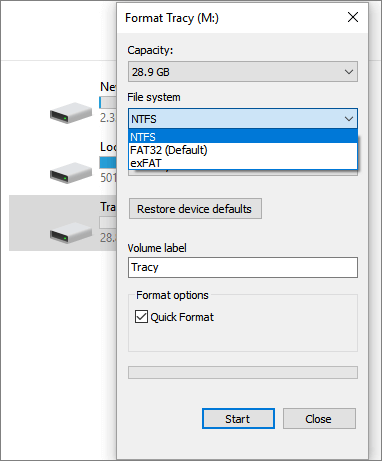
Step 2. Go to "This PC" and open Windows Explorer, right-click your SD card, and then choose "Format".
Step 3. Specify the file system and set a new label to your SD card. Click "Start" and "OK" to confirm the formatting.
Note: FAT32 for SD card within 64GB, exFAT for SD card over 64GB.
Method 2. Format SD Card Use Disk Management
Step 1. Insert your SD card into a card reader and connect it to your computer.
Step 2. Right-click "This PC", choose "Manage", enter "Disk Management".
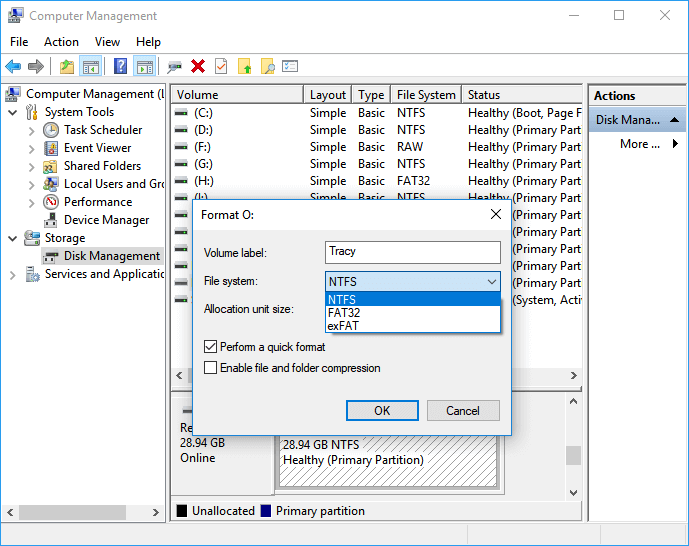
Step 3. Locate and right-click on your SD card, choose "Format".
Step 4. Click "Yes" to continue, set a new label, file system - exFAT, FAT32, or NTFS to the card. Then click "OK" to format your SD card.
Part 2. How to Format SD card on the Camera
If your SD card is for the camera, you can directly format it inside your camera. Here we take the Canon camera as an example, but the settings on other camera brands will be very similar.
Step 1. Press the camera Menu button.
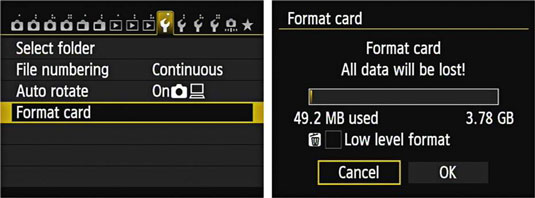
Step 2. Press multi-controller and head to Camera Settings 1.
Step 3. With the multi-controller, choose the "Format Card" option.
Step 4. Select "OK" to start the format.
Part 3. How to Format SD Card on Android Phone
If the SD card is used on an Android phone, you can actually format it with your phone. But before you start, please make sure your phone is configured with this feature. Here we take the Samsung phone as an example.
Step 1. Go to the Settings app on your phone, find Device Care.
Step 2. Select Storage and tap the Advanced option.
Step 3. Under Portable storage select SD Card.
Step 4. Tap "Format", and tap "Format SD Card" to confirm.
Different models of mobile phones might require different operations. The core of this method is to find the SD card on your mobile phone's Settings app.
How to Unformat an SD Card and Restore Data
In case you misformat the SD card and want to restore the data on it. In this part, we will tell you how to unformat an SD card.
First, you should know that formatting a memory card does not really erase the data on it. If the data area is not overwritten by new content, you can successfully bring them back. Thus, to ensure the maximum chance of recovering your files, stop using the device, and perform data recovery immediately with either way below.
Method 1. Run Format Data Recovery Software
An effective way is to use professional data recovery software, such as EaseUS Data Recovery Wizard to undo formatting. It can scan your formatted device thoroughly and recover lost files according to your needs.
In addition to performing formatted file recovery, EaseUS Data Recovery Wizard also enables you to:
- Recover files after reinstalling Windows, OS crash, virus attack, and many other tough data loss situations
- Recover deleted files in Windows 10 by using Shift-Delete or emptying the recycle bin
- Retrieve lost photos, videos, audio files, Microsoft Office files, Adobe files, emails, and more (200+)
Download the software and restore files from your formatted SD card immediately.
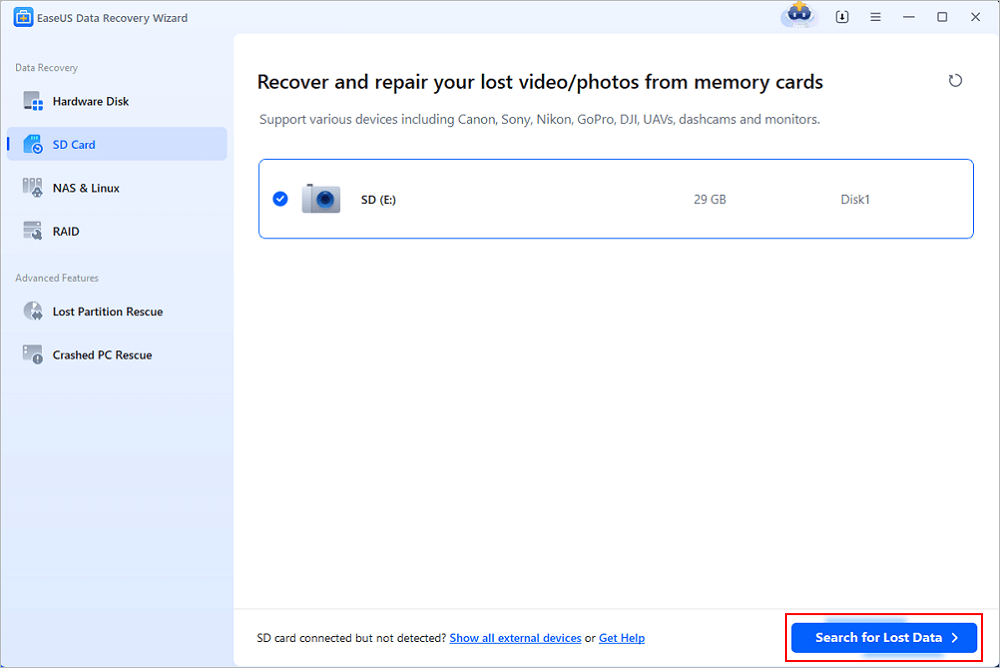
Step 1. Connect the USB drive to your computer. Launch EaseUS Data Recovery Wizard. Select the formatted SD card, USB flash drive, or Pen drive from which you what to restore lost files and then click "Search for Lost Data".
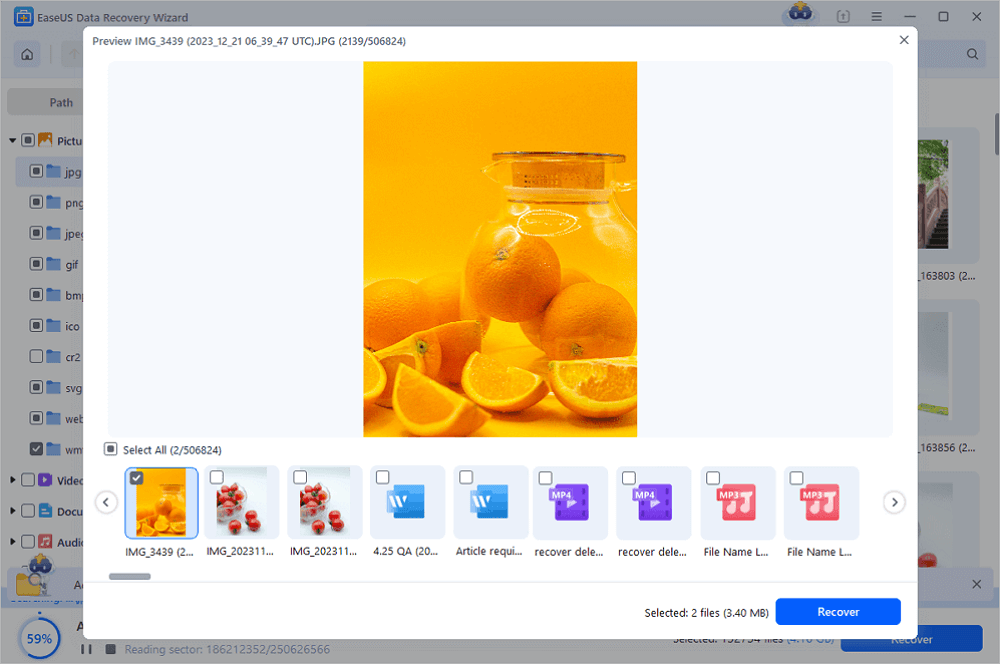
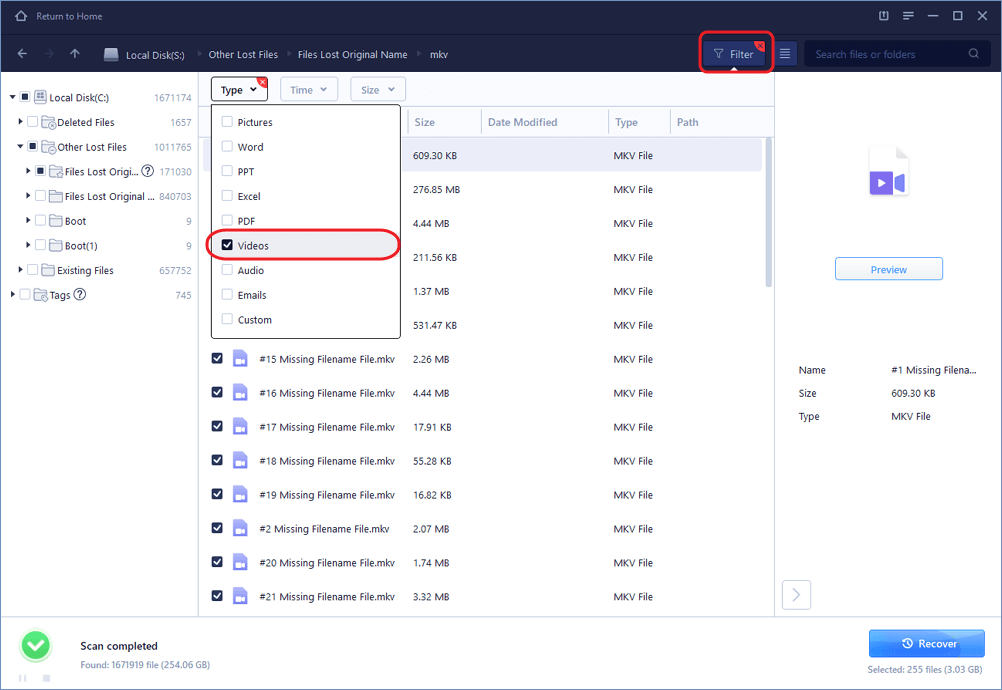
Step 2. After the scan completed, all scan results will be displayed on the screen. Use the "Filter" or "File Type" feature to find your target files. If you remember the file name, you can also search in the search box, which is the fastest way to find the target file.
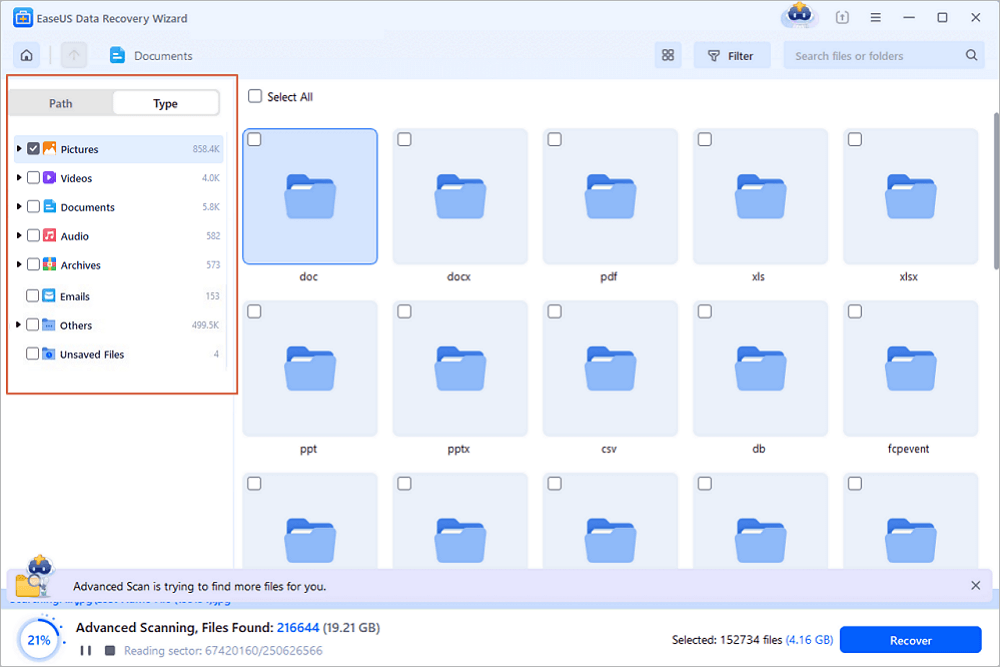
Step 3. Choose the files you want to recover from your formatted external drive and click "Recover". A new window will appear, you need to choose a local storage or Cloud drive to store the files. Then, click "OK" to confirm.
💡Want to know more about SD card data recovery? For example, what is the best SD card data recovery software? How to recover a damaged SD card? How to recover data from an unreadable SD card...Go for SD Card Data Recovery FAQs and restore your precious lost files.
Watch the video tutorial below, unformat your SD card with EaseUS Data Recovery Wizard.
Bonus Tips: SD Card Best Practices
Besides knowing what does 'format an SD card' means, how to format an SD card, and how to unformat the SD card to recover your data. It's also important to know what to do to make your SD card performs better.
1. Format instead of Erase
If you want to clean your old SD card data to make it fresh new again, please always choose the method of formatting the SD card. Because erasing, or deleting content on your SD cards doesn't fully clear the cards of leftover data.
2. Format New Cards Before Using
When you buy a new SD card, it's always good to reformat the card before using it. This ensures the card is ready for your device.
3. Make Regular Backups
Backing up your important content regularly with professional file backup software.
With the provided methods and tips on this page, you should be able to effectively format SD card, unformat, and how to make your SD card works well.
Was this page helpful?
-
Dany is an editor of EaseUS who lives and works in Chengdu, China. She focuses on writing articles about data recovery on Mac devices and PCs. She is devoted to improving her writing skills and enriching her professional knowledge. Dany also enjoys reading detective novels in her spare time. …


 Why Trust EaseUS
 Editor Reviews

20+
Years of experience

160+
Countries and regions

72 Million+
Downloads

4.9 +
Trustpilot Score






