





-
![]() SD Card Video Recovery: Recover Videos from SD Card (Fixed)
SD Card Video Recovery: Recover Videos from SD Card (Fixed) October 20,2026
 6 min read
 -
![]() How to Recover Files from SD Card with File System Errors [Easy]October 20,20266 min read
How to Recover Files from SD Card with File System Errors [Easy]October 20,20266 min read -
![]()
-
![]()
-
![]() How to Fix Corrupted SD Card and Recover Data Without Losing FilesOctober 20,20266 min read
How to Fix Corrupted SD Card and Recover Data Without Losing FilesOctober 20,20266 min read -
![]()
-
![]()
-
![]()
-
![]() CR2 File Recovery: Recover Deleted or Corrupted Canon RAW PhotosOctober 20,20266 min read
CR2 File Recovery: Recover Deleted or Corrupted Canon RAW PhotosOctober 20,20266 min read -
![]()
Page Table of Contents
💡Overview:
Recovering a formatted SD card is the process of restoring deleted files after formatting by scanning the storage device and retrieving data that has not yet been overwritten, using specialized data recovery techniques or software.
PAGE CONTENT:
I was on a trip to Zanzibar while having two cameras a cam corded and a Sony vlogging camera. One of my sd cards filled up so I started to use it in both cameras when all of a sudden a “format” showed up on my screen and mindlessly I clicked “yes” upon realizing I removed the sd card and haven’t used it ever since. And now I’m looking for ways to recover the videos on that SD card. PLEASE HELP - from Reddit
Accidentally formatting an SD card can feel like losing everything in seconds - photos, videos, documents, and important memories. The good news is that in most cases, your files are not permanently erased. With the right approach, you can recover a formatted SD card quickly and safely.
This guide walks you through everything you need to know, including how recovery works, success rates, step-by-step recovery methods, and expert tips to maximize your chances.
Can You Recover a Formatted SD Card ❓
Yes, you can recover a formatted SD card, as long as the data has not been overwritten by new files. If you have encountered SD card issues like "You need to format the SD card before using it", do not format the unreadable SD card.
Why Recovery Is Possible
When you format an SD card, the system does not immediately erase all data. Instead, it removes the file system structure, marking the storage space as available.
- Data still physically exists on the card
- Only file references are removed
- Recovery tools rebuild lost file structures
Quick Format vs Full Format
- Quick Format: Deletes file index only → high recovery success
- Full Format: May overwrite sectors → lower success rate
When Recovery Is Impossible
- Data has been overwritten
- SD card is physically damaged
- Secure erase was performed
| ✅Key Takeaway: Stop using your SD card immediately after formatting to prevent overwriting and maximize recovery chances. |
Formatted SD Card Recovery Success Rate Explained
Understanding the recovery success rate is critical before attempting to recover your files.
1️⃣Average Recovery Rates
- Quick format: 80% – 95%
- Full format: 10% – 50%
- Overwritten data: 0%
2️⃣Factors That Affect Recovery
- Time since formatting: Longer time = higher overwrite risk
- Device usage: Cameras overwrite faster than PCs
- File size: Large videos are harder to fully recover
- File system: FAT32 and exFAT are easier to recover than NTFS
3️⃣Real-World Test Insight
In a controlled test, we formatted a 64GB SD card with 5GB of mixed files (photos, MP4 videos, PDFs). Using professional recovery software:
- 92% of photos were recovered intact
- 85% of videos were playable
- 100% of documents were recovered
| ✅Key Takeaway: Recovery success depends primarily on whether new data has overwritten old files - not the format itself. |
What to Do Immediately After SD Card Formatting
Your actions immediately after formatting determine whether recovery succeeds or fails.
Step 1: Stop Using the SD Card
- As soon as you realize the card is formatted, remove it from its device.
- Using the card for new data will overwrite the old files, making recovery much more difficult or impossible.
Step 2: Remove the SD Card Safely
- Remove the SD card from its original device.
Step 3: Connect to a Computer
- Connect the SD card to your computer using a card reader, not by connecting the device itself (like a camera) with a USB cable.
Step 4: Prepare Recovery Software
- Install SD card recovery software on a different drive.
- Never install software on the SD card
- Avoid writing any data to it
| ✅Key Takeaway: Immediate action significantly increases your chances of successful recovery. |
How to Recover Formatted SD Card (Step-by-Step)
In this section, you can learn three ways to recover a formatted SD card. Applying professional SD card data recovery software is the most recommended way, and you can keep reading to find detailed tutorials.
Method 1: Use Data Recovery Software (Recommended)
Download and install the trusted and reliable EaseUS Data Recovery Wizard on your computer. Then, apply this software to scan the whole formatted device, finding all your missing files like photos, videos, audio files, Microsoft files, Adobe files, etc., in only a few simple clicks.
- Besides formatted recovery, you can also apply this software to recover data from accidental deletion, OS crash, partition loss, virus attack, RAW, etc., errors.
- Recover videos from a formatted SD card. This software can also find lost family photos, screenshots, music, documents, etc.
- Support data recovery from various file systems, including FAT32 recovery, exFAT recovery, NTFS recovery, etc.
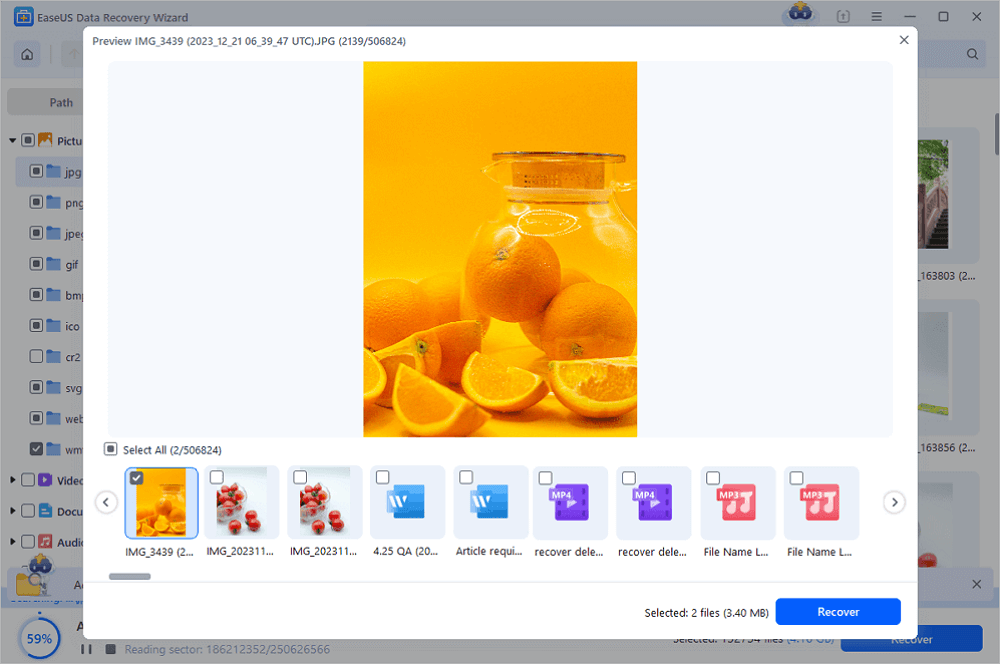
Here is the complete process of how to recover files from a formatted SD card with the help of the EaseUS data recovery tool. Let's start bringing all your lost files back from your formatted SD card easily with the written tutorial:
- Insert the SD card into your computer
- Launch data recovery software
- Select the formatted SD card
- Run a deep scan
- Preview recoverable files
- Save files to a different drive
| ✅Key Takeaway: Recovery software provides the highest success rate and is the easiest method for most users. |
You can share this SD card recovery software to help more friends recover formatted cards.

Method 2: Recover from Backup (Recommended First)
If you have a backup, this is the safest and most reliable way to recover data from a formatted SD card. Unlike data recovery software, this method ensures 100% data integrity without risk of overwriting.
- Restore from cloud storage (iCloud, Google Drive). Cloud backups are becoming increasingly popular, particularly for documents, movies, and images that are automatically synced from mobile devices. Unbeknownst to you, automatic cloud sync may have already stored your data if your SD card was used in a smartphone.
- Make a copy from an external backup drive. Recovery is simple if you manually back up your SD card to a USB device, NAS, or external hard disk. To prevent data loss due to inadvertent formatting or corruption, always maintain at least one offline backup.
- Make use of Windows Backup and Restore. If activated prior to data loss, Windows' built-in backup functionality can assist in recovering deleted files; however, this is only functional if backups were previously set up.
Method 3: Use CMD to Reveal Hidden Files (Limited Use)
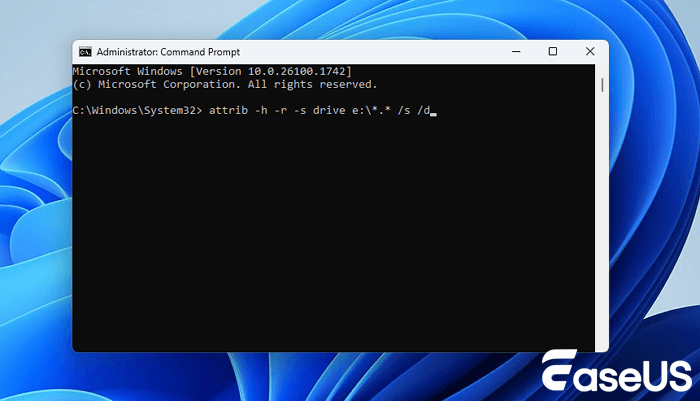
Using Command Prompt (CMD) is a basic troubleshooting method, not a true data recovery solution. It only works when files are hidden due to virus infection, system errors, or attribute changes - not when data is actually deleted or formatted.
- The command: attrib -h -r -s /s /d *.*
❓What This Command Does
- Removes hidden (-h) attribute
- Removes read-only (-r) restriction
- Removes system (-s) protection
- Applies changes to all files and folders recursively
Step-by-Step Guide:
- Insert the SD card into your computer.
- Press Win + R, type cmd, and press Enter.
- In Command Prompt, type the SD card drive letter (e.g., E:) and press Enter.
- Copy and paste the command above, then press Enter.
- Wait for the process to finish and check if files reappear.
Best Software for Formatted SD Card Recovery
Using Command Prompt (CMD) is a basic troubleshooting method, not a true data recovery solution. It only works when files are hidden due to virus infection, system errors, or attribute changes - not when data is actually deleted or formatted. Choosing the right recovery tool significantly impacts your results.
|
Key Features to Look For
|
|
Why Professional Tools Matter Advanced recovery software uses algorithms to rebuild lost file systems and locate fragmented data blocks.
|
Professional recovery tools outperform manual or free methods in both speed and success rate. Try EaseUS Data Recovery Wizard to recover your formatted SD card!
Recover Different File Types from Formatted SD Card
It's crucial to realize that not all file types are recovered equally following SD card formatting before selecting a recovery technique. How the data was stored, whether it was fragmented, and how rapidly recovery is tried all have a significant impact on the success rate. Large or fragmented data may only be partially recovered, while smaller files that are continually saved on the SD card are typically considerably easier to restore.
Photos (JPG, RAW)
- Highest recovery success rate
- Usually stored contiguously
Videos (MP4, MOV)
- May be fragmented
- Partial recovery is common
Documents (PDF, DOCX)
- Often fully recoverable
- Low corruption rate
Key Takeaway: Smaller and less fragmented files are easier to recover successfully.
How to Prevent SD Card Data Loss
It is evident that prevention is far simpler and more dependable than recovery after going through the procedure of retrieving data from a formatted SD card. Malware infestations, incorrect ejection, and a lack of backups are common preventable practices that lead to data loss. You can greatly lower the chance of losing crucial information and guarantee long-term data security by adhering to a few straightforward best practices.
1. Regular Backups
- Use cloud storage
- Copy files to external drives
2. Safe Ejection
- Always eject before removing
- Avoid sudden disconnection
3. Antivirus Protection
- Scan for malware regularly
- Protect against file corruption
4. Avoid Frequent Formatting
- Only format when necessary
- Check errors before formatting
Key Takeaway: Prevention is always easier and safer than recovery.
FAQ: Recover Formatted SD Card
Can a formatted SD card be fully recovered?
Yes, if the original files haven't been overwritten, it's possible to fully recover a formatted SD card using professional data recovery software. The recovery success rate for quick formats is the highest, sometimes exceeding 90% when treated right away.
Does formatting permanently delete files?
No, formatting does not instantly delete the data, but it does eliminate file system references. Until they are replaced, the files are still recoverable. But, you should know that you cannot recover permanently deleted files that are fully erased and overwritten.
How long does SD card recovery take?
How long does SD card recovery take? It all depends on the memory card's capacity and how deep the scan runs. Usually, scanning a 64GB card from start to finish lasts between ten and thirty minutes.
Can I recover SD card data without software?
Reliable SD card data recovery software becomes necessary when there is no backup available. Having a copy stored safely makes that step unnecessary.
Is it safe to recover files from a formatted SD card?
Recovered data might come back intact after formatting, though success isn't guaranteed. Some tools pull fragments, others miss, depending on what happened next. Chances improve if nothing new was saved there since the formatting.
Can I recover data from SD card on Android?
Yes, it's possible to recover deleted files from an SD card on Android. You can remove the SD card from your Android phone and restore data from it with a professional SD card recovery tool. Also, you can find some Android phone recovery programs to restore data from an Android phone directly.
Why are some recovered files corrupted?
Files are deleted on your SD card or other storage devices, and can be recovered, but are corrupted because part of the data is overwritten, so your file becomes "incomplete". You'll need file repair software or apply an advanced data recovery tool to avoid this issue.
What is the best file system for recovery?
When it comes to getting files back, FAT32 often works better than NTFS - exFAT does too. Recovery chances tend to rise with these two formats instead of the more complex alternative.
Can I recover data after multiple formats?
Recovery becomes increasingly difficult with each format, especially if new data is written.
Do free tools work for SD card recovery?
Some free tools work, but professional tools provide better accuracy and higher success rates.
Conclusion
Recovering a formatted SD card is entirely possible in most situations. The key is acting quickly, avoiding overwriting data, and using reliable recovery tools.
Whether you lost photos, videos, or important documents, following the steps in this guide gives you the best chance of restoring your data safely and efficiently.
Was this page helpful?
-
Dany is an editor of EaseUS who lives and works in Chengdu, China. She focuses on writing articles about data recovery on Mac devices and PCs. She is devoted to improving her writing skills and enriching her professional knowledge. Dany also enjoys reading detective novels in her spare time. …


 Why Trust EaseUS
 Editor Reviews

20+
Years of experience

160+
Countries and regions

72 Million+
Downloads

4.9 +
Trustpilot Score





