





-
![]() Fix Error Code 43 USB Error | Recover Data from USB Drive
Fix Error Code 43 USB Error | Recover Data from USB Drive October 20,2026
 6 min read
 -
![]()
-
![]()
-
![]()
-
![]() The Disk Is Write Protected: How to Remove Write Protection HDDOctober 20,20266 min read
The Disk Is Write Protected: How to Remove Write Protection HDDOctober 20,20266 min read -
![]()
-
![]() RAW USB Recovery | How to Recover Data from RAW USB DriveOctober 20,20266 min read
RAW USB Recovery | How to Recover Data from RAW USB DriveOctober 20,20266 min read -
![]()
-
![]()
-
![]()
Page Table of Contents
How to recover deleted files from a pen drive? You can recover deleted files and photos by first checking the Recycle Bin or hidden files. Or if it fails, use data recovery software or restore your files from backups. If you are familiar with the command line, you can then run the CMD command.
How can I recover deleted files from my pen drive? Don't worry if you lost or deleted files from a pen drive. Here, on this page, you'll get a complete guide to recovering data from a pen drive in 6 efficient ways:
| Method | Success Rate | Time Required | Skill Level |
| 1️⃣Data Recovery Tool | 99.7% | 2 mins | Beginner |
| 2️⃣Recycle Bin Check | 3–5% | 2 mins | Beginner |
| 3️⃣Commands Prompt | 25–40% | 20–45 mins | Expert |
| 4️⃣Data Recovery Service | 70–90% | 10–15 mins | Beginner |
| 5️⃣File History | 25–40% | 15–30 mins | Intermediate |
👍Your Reliable Tips: If your pen drive data gets lost due to deletion or a virus attack, professional data recovery software in Method 1 is a better choice. To recover hidden files, the CMD in Method 2 can help. If your drive is damaged, you can turn to experts in Method 3.
Causes of File Corruption/Loss on USB/Pen Drives
Pen drives, being small, portable, and lightweight, are widely used to store files and transfer data between devices. However, there's also significant data loss on pen drives quite frequently. To recover deleted files from the pen drive, you may want to find the causes of the pen drive file loss:
- 🟢Human Errors: Your files on a pen drive may get lost due to accidental deletion, improper ejection, and more.
- 🟡Hardware and Physical Issues: Physical damage due to wear and tear, hardware failure caused by improper handling may also be the culprit of pen drive data loss.
- 🟠Malware and viruses: If the device is a public computer, it is easily infected by malware, and a virus attack may significantly contribute to pen drive data loss.

Luckily, with the help of advanced pen drive data recovery software and CMD, you can recover data from a pen drive on your own.
Method 1. How to Recover Files from a Pen Drive with Software for Free
It is simple, reliable, and efficient to recover pen drive data lost due to deletion, formatting, virus attack, etc. with third-party pen drive recovery software. EaseUS free data recovery software is reliable in pen drive data recovery. Check what EaseUS pen/USB drive recovery software can do for you:
EaseUS Data Recovery Wizard Free offers up to 2 GB of free data recovery, including 500 MB available by default and an extra 1.5 GB unlocked after sharing on Facebook and X.
- Recover deleted pen drive files, documents, photos, audio, music, emails, etc.
- Recover deleted files from the recycle bin, pen drive/flash drive, memory card, digital camera, and more.
- Recover pen drive data lost due to deletion, formatting, drive corruption, virus attack, OS crash, etc.
⚡Here are some real reviews of this USB data recovery tool from EaseUS:
- 🟠The Company helped me recover some files from a damaged pen drive. All was done with exemplary professionalism. - Luigi Pastena
- 🟡I can recover most of my lost data from a corrupted hard drive. I have used another data recovery product from another company, but none of the "recovered files, photos, and video clips " were readable or playable.- Simon Ng
Download it now and follow the steps below to recover deleted files from your pen drive in minutes:
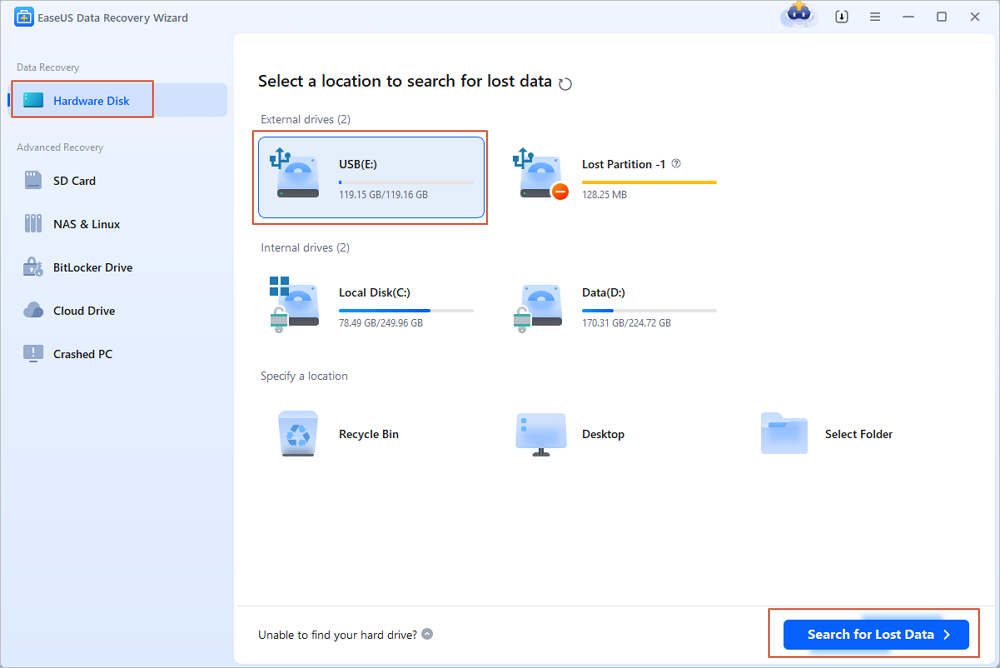
Step 1. Run USB Data Recovery Software
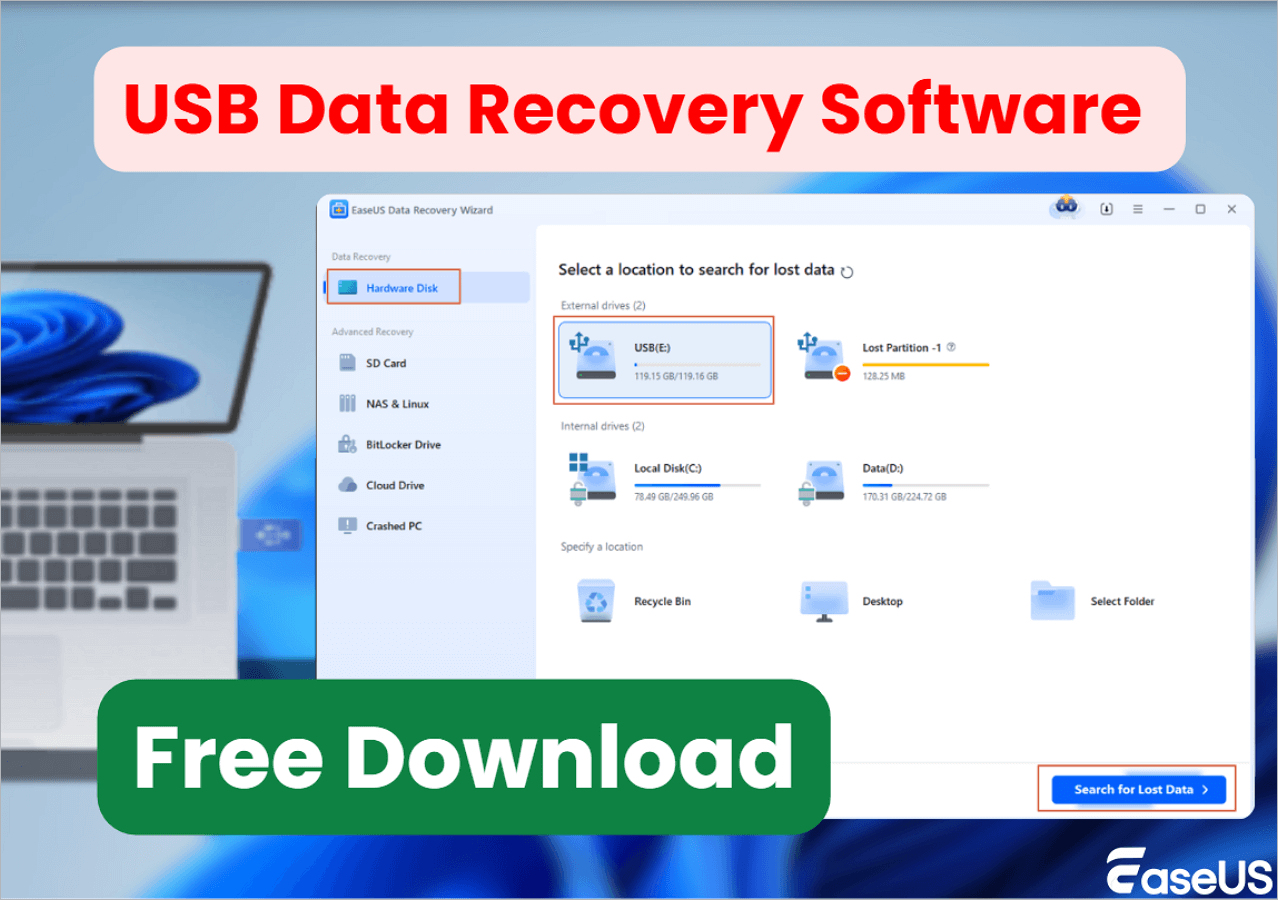
Connect the USB drive or pen drive to your computer and launch EaseUS USB data recovery software on your PC. Select the drive which is labeled as a External drives, and click "Scan for lost data" to start looking for lost files.
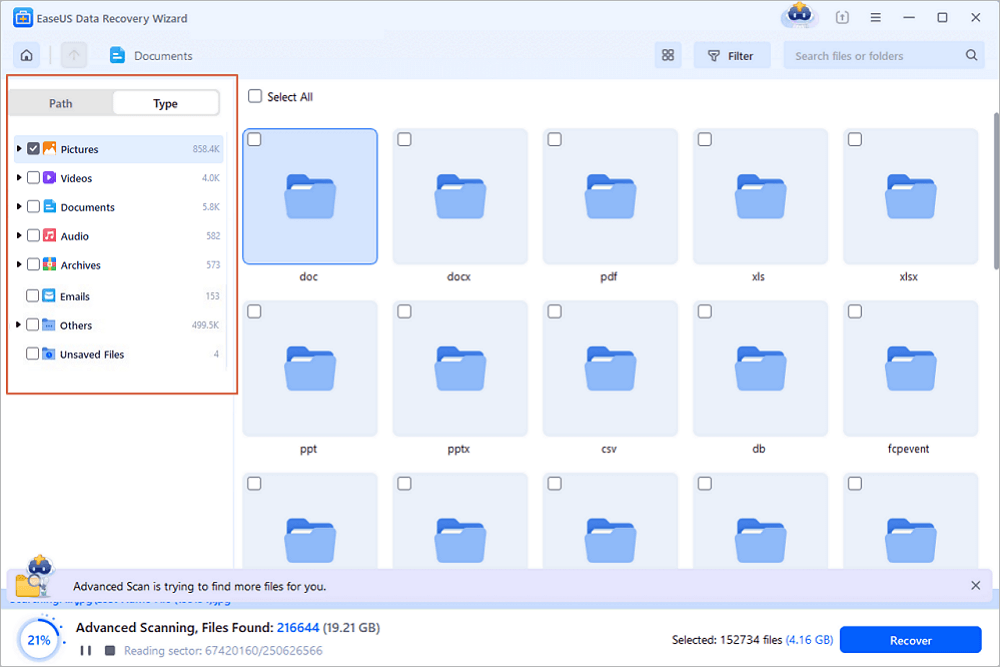
Step 2. Scan and Search Lost Files on a USB Drive
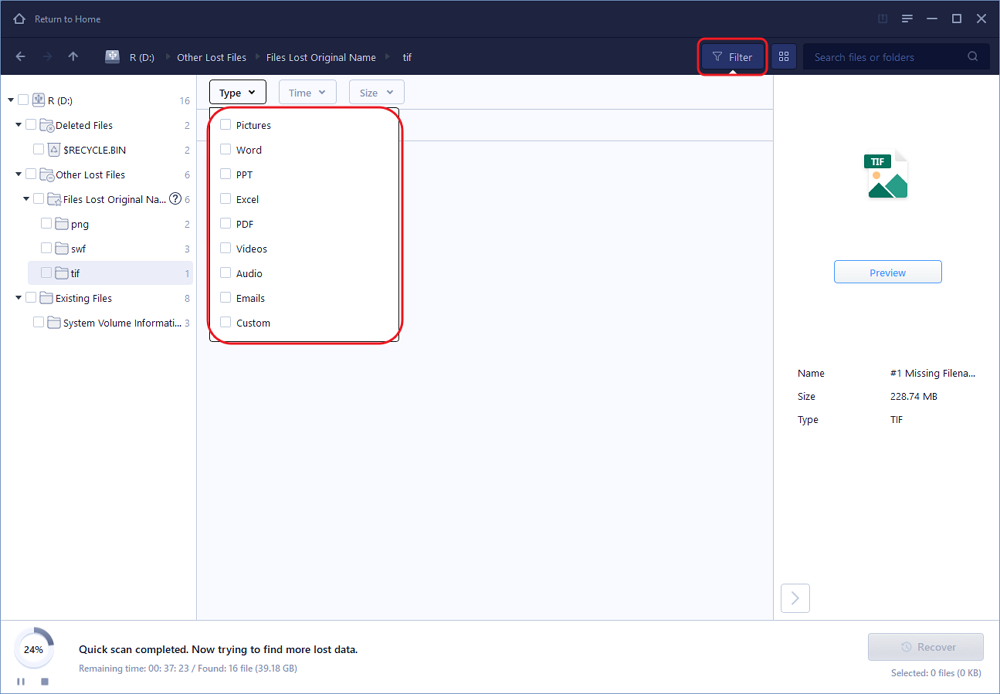
EaseUS Data Recovery Wizard will thoroughly scan your USB flash drive/pen drive and find all your lost data on it. When the scan process completes, use the Filter feature to find wanted files.
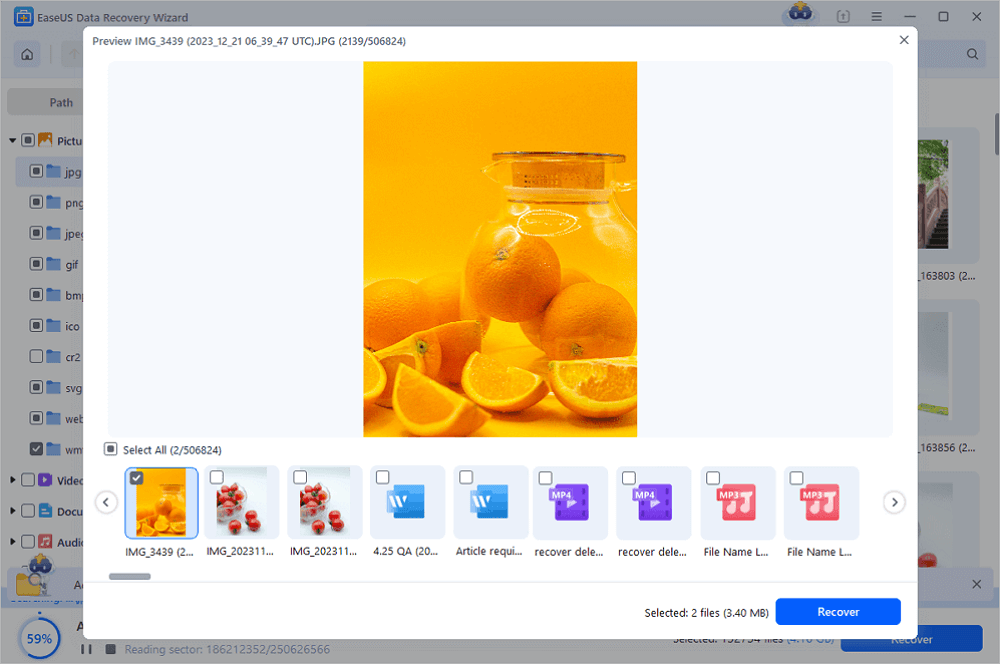
Step 3. Restore All Lost Files from USB
A double-click will allow you to preview the files. Select the target files to restore and click "Recover" to save them to a secure location on your PC or other external storage devices.
Here is a video tutorial showing you how to use EaseUS Data Recovery to recover lost files. You can also follow it to undelete your pen drive data.
⌛Time Stamps:
- 00:20 Method 1. EaseUS Data Recovery Wizard
- 01:26 Method 2. Windows Disk Check
- 01:59 Method 3. CHKDSK Command
- 02:56 Method 4. EaseUS Clean Genius

Share this post with users who have lost data on the pen drive and have no idea how to get it back:

Method 2. How to Recover Data from Pen Drive Using the Recycle Bin
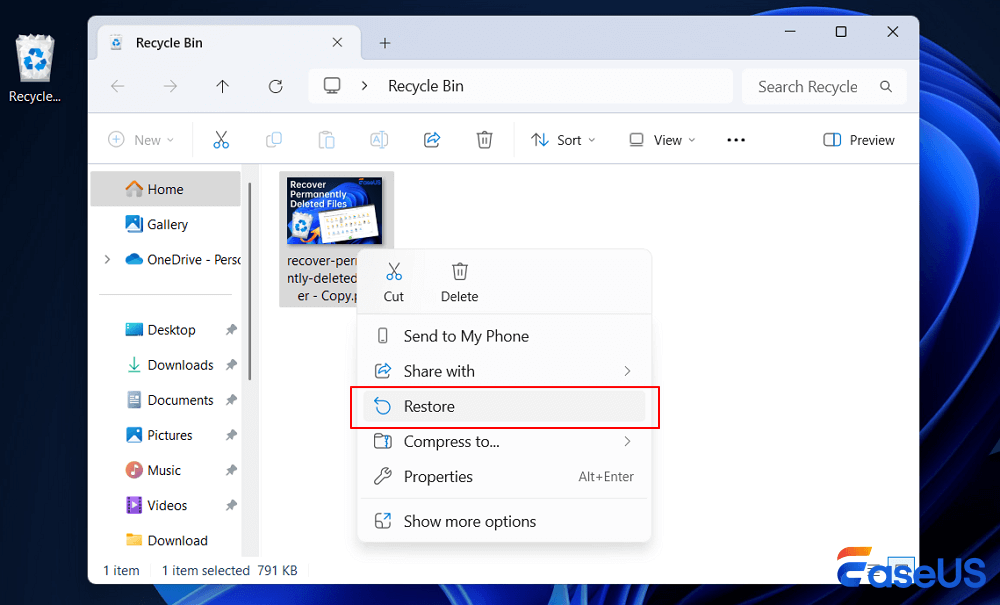
One simple but often neglected method is to check your Recycle Bin. If you have never emptied your Trash before, you can do as follows to restore a file deleted from a pen drive using the Recycle Bin:
Step 1. Open the Recycle Bin by clicking its icon.
Step 2. Scroll to locate the files you want to restore, then right-click them.
Step 3. Choose "Restore" from the drop-down menu and go check the files in the original location.
Method 3. How to Recover Data from Pen Drive Using CMD
Sometimes, when your pen drive is corrupted or runs out of space, files can disappear. These missing files are hidden, not lost. CMD can help to recover data from a pen drive when the files are hidden from your device.
Here are the detailed steps of using CMD to recover hidden data from your pen drive:
Step 1. Connect the pen drive to your computer.
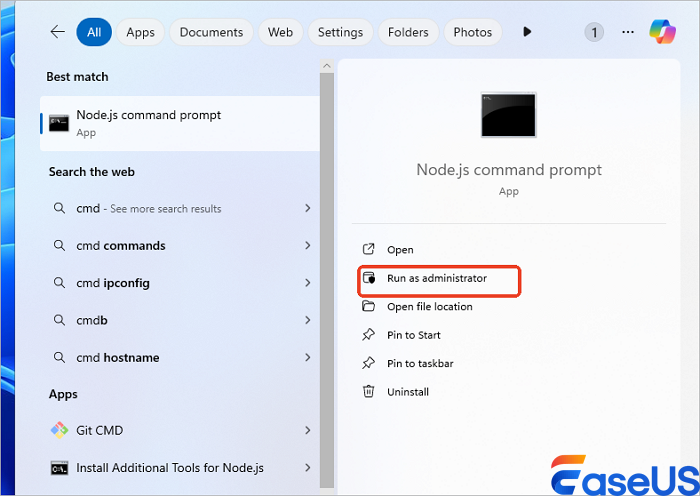
Step 2. Click "Start", select "Search", and enter cmd.
Step 3. Right-click "Command Prompt" and choose "Run as administrator".
Step 4. In Command Prompt, type attrib –h –r –s /s /d e:*.* and hit "Enter".
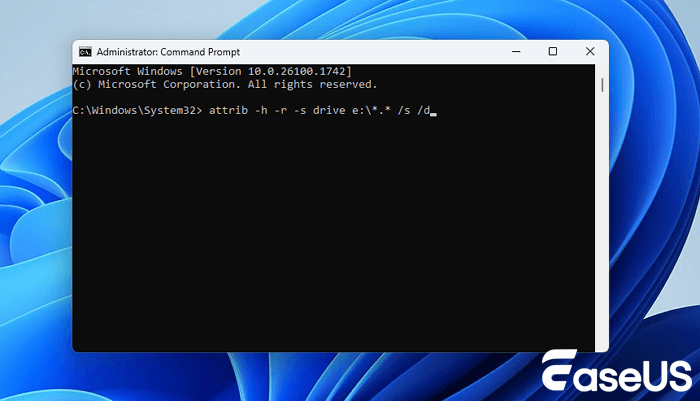
Step 5. Wait patiently. When the process completes, type exit and hit "Enter".
After this, your pen drive data will show up in its original location on your drive. And you can make use of them again.
Method 4. Use a Data Recovery Service to Recover Data from Corrupted Pen Drive
If your USB flash drive or pen drive is physically damaged, you cannot recover data with data recovery software. Instead, you can turn to data recovery experts. EaseUS has partnered with the most reliable data recovery lab in the US. For more than 17 years, we've been providing DIY data recovery solutions. Now you have a chance to get your data back even from previously "unrecoverable" devices.
EaseUS Pen Drive Repair and Recovery Services
Click here to contact our experts for a free evaluation
Consult with EaseUS data recovery experts for one-on-one manual recovery service. We could offer the following services after a FREE diagnosis.
- Fix HDD, SSD, external hard drive, USB flash drive errors, and restore data from all RAID levels
- Recover lost partitions that cannot be restored by data recovery software
- Fix disks that cannot be read or accessed because of bad sectors
- Fix disks that become GPT-protected partitions
- Wipe data, unformat hard drive, install/uninstall software or driver, etc.
Method 5. How to Recover Data from a Pen Drive with File History
If you have enabled File History before, you can try restoring files from it. But the process may take a while, so you'd better prepare. Here is how you can do this:
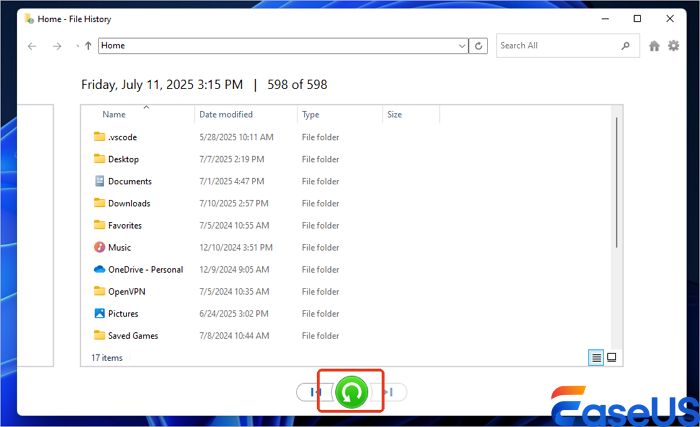
Step 1. Type File History in the search bar and click to open it.
Step 2. Choose "Restore personal files" from the left panel.

Step 3. Now, you can look for the files you want to recover and choose them, click the Recover button in green to restore them to the original location.
Conclusion
On this page, we explained the causes of your pen drive loss issue and collected two reliable ways for pen drive data recovery - using third-party software or CMD. Note that as long as your pen drive files matter, take action and recover deleted files from your pen drive immediately.
How to Recover Data from Pen Drive FAQs
Keep calm if you still have problems on how to recover data from a pen drive. Here are some related questions, read on to get additional help.
1. Can I recover data from a formatted pen drive?
Yes, you can recover a formatted USB drive with these steps:
- Connect the USB drive to your computer
- Launch EaseUS Data Recovery Wizard
- Select the formatted drive and click Scan
- Choose the files you want to recover from your formatted pen drive
- Click Recover to get back lost USB files
2. How do I fix a pen drive that is not detected?
Don't worry if your pen drive is not detected, here are the solutions to fix your pen drive:
- Update the Unallocated USB Driver and Create New Partition
- Change USB Driver Letter to Make It Detectable
- Check USB Port and Change Connection to Make the USB Recognizable
3. How much does it cost to recover a USB?
USB flash drive data recovery prices:
- Less than 2GB USB flash drive - $0
- 2GB USB flash drive to unlimited capacity - $69.95
4. How many years do USB drives last?
About 10 years. Most flash drive manufacturers estimate that their devices will last 10 years, but they could feasibly last longer if you use them sparingly and keep them safe.
Was this page helpful?
-
Dany is an editor of EaseUS who lives and works in Chengdu, China. She focuses on writing articles about data recovery on Mac devices and PCs. She is devoted to improving her writing skills and enriching her professional knowledge. Dany also enjoys reading detective novels in her spare time. …


 Why Trust EaseUS
 Editor Reviews

20+
Years of experience

160+
Countries and regions

72 Million+
Downloads

4.9 +
Trustpilot Score





