





 About the Author
 Reviews and Awards
 Mac SD Card Recovery
Recovering deleted files from a USB drive on Mac is possible in many cases, even after permanent deletion, formatting, or corruption. If the deleted data has not been overwritten, you can restore files using USB recovery software, Mac Trash, or Time Machine backups.
Deleted files from a USB drive can often be recovered on a Mac because macOS usually removes the file reference instead of immediately erasing the actual file data.
I've apparently lost a bunch of '.pages' files on a 16GB Lexar flash drive that was present yesterday. The '.pages' files were contained in a sub-folder. The main folder is still there and apparently okay. I am at a total loss as to where the files (and their sub-folder) have gone to. Any suggestions on a program or procedure to try to see if they're still there and recoverable? Any guidance will be GREATLY appreciated...from discussions.apple.com
When files are deleted from a USB flash drive, the storage sectors containing the data remain intact until new files overwrite them. This means recovery software can scan the USB device and restore deleted files before permanent overwriting occurs.
Your recovery success rate depends on several factors:
- Whether the USB drive has been reused after deletion
- Whether the USB was formatted
- The file system type (APFS, HFS+, exFAT, FAT32, NTFS)
- Whether the USB drive is physically damaged
- How long ago the files were deleted
- Important Recovery Warning
- Stop using the USB flash drive immediately after noticing data loss. Copying new files onto the drive may overwrite deleted data and permanently reduce recovery success rates.
Common Causes of USB Data Loss on Mac
Understanding why files disappear from a USB drive can help you choose the best recovery method and avoid future data loss.
1. Accidental File Deletion
One of the most common reasons for USB data loss is accidental deletion. Many users mistakenly delete folders or empty the Trash without realizing important USB files were included.
2. USB Drive Formatting
Formatting a USB drive removes the file system structure. Quick formatting does not instantly erase the actual data, which is why formatted USB recovery is often possible on Mac.
3. Unsafe USB Ejection
Removing a USB drive without safely ejecting it can interrupt active file operations and corrupt the file system.
4. File System Corruption
USB flash drives formatted in APFS, HFS+, FAT32, exFAT, or NTFS may become corrupted because of power surge, malware, computer virus, system crashes, etc.
5. macOS Compatibility Problems
Some Windows-formatted USB drives using NTFS may experience the USB not showing up on a Mac without additional drivers.
6. Physical USB Damage
Physical damage, overheating, water damage, or flash memory wear can also make files inaccessible or cause the "USB drive not mounting on Mac".
Method 1. Recover Deleted Files from USB on Mac with Recovery Software 🏅
If your USB files were permanently deleted, the Trash was emptied, or the USB drive became corrupted or formatted, professional recovery software offers the best chance of successful recovery.
EaseUS Data Recovery Wizard for Mac is designed to recover deleted, lost, formatted, and inaccessible files from USB flash drives, external hard drives, SD cards, and other storage devices.
The software supports recovery for:
- Photos and RAW images
- Videos and audio files
- Word, Excel, PPT, and PDF documents
- ZIP and RAR archives
- Deleted Pages and Keynote files
- Formatted or corrupted USB drives
Supported File Systems:
| File System | Supported | Common Usage |
| APFS | Yes | Modern macOS drives |
| HFS+ | Yes | Older Mac systems |
| exFAT | Yes | Cross-platform USB drives |
| FAT32 | Yes | Legacy flash drives |
| NTFS | Read-supported | Windows USB drives |
Below is the complete step-by-step tutorial to recover deleted files from a USB drive on Mac.
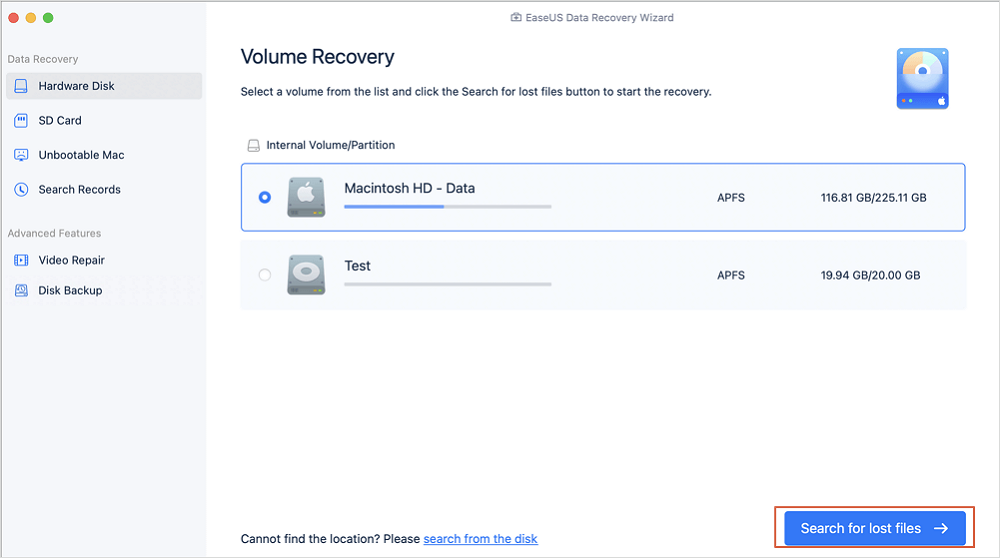
Step 1. Connect your USB drive to your Mac
Correctly connect your USB flash drive to your Mac. Launch EaseUS Data Recovery Wizard for Mac. Start selecting the flash drive and click "Search for lost files" to let the software scan for lost files on it.
Step 2. Find lost data on the USB drive
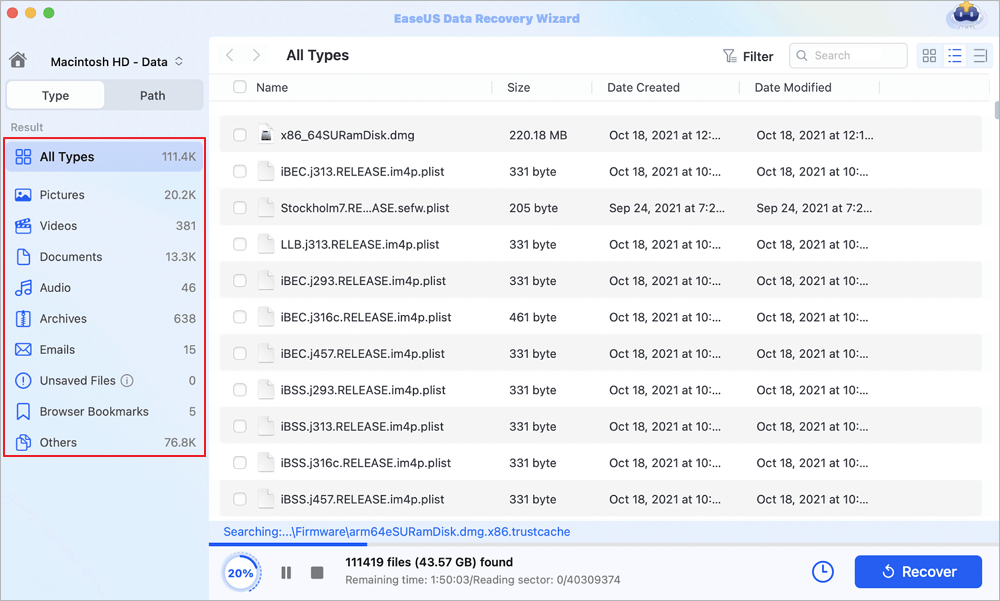
After the scan, all files will be presented in the left panel in the scan results.
Step 3. Recover data from flash drive
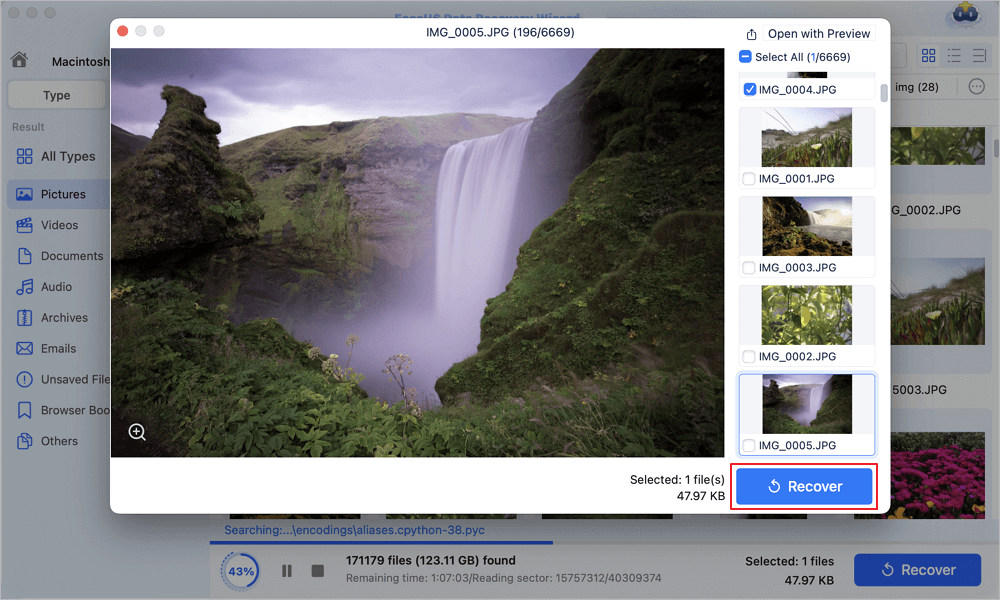
Select the files you want to recover and click the "Recover" button. Don't save the recoverable files to the USB drive itself in case of data overwriting.
| Editor's Review | |
| 👍 Pros | 🙁 Cons |
|
|
To help you learn more about Mac USB data recovery, here's a video guide:
Method 2. Restore Deleted USB Files from Mac Trash
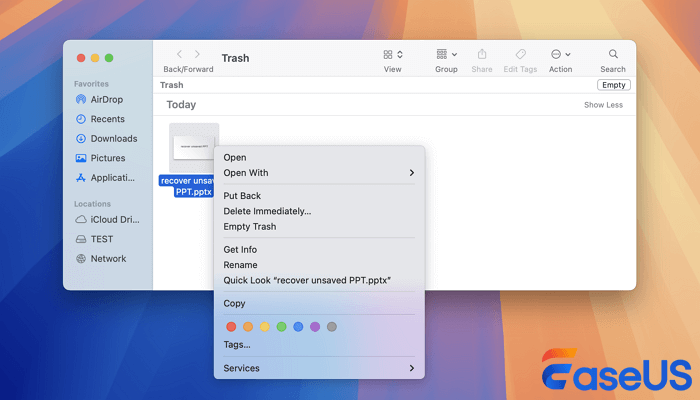
In some situations, deleted USB files are temporarily stored in the Mac Trash folder, making restoration quick and easy.
This method works best for recently deleted files that have not been permanently removed.
How to Recover USB Files from Trash on Mac
Step 1. Open the Trash folder from the Dock.
Step 2. Browse the recently deleted files and folders.
Step 3. Locate the deleted USB file you want to restore.
Step 4. Right-click the file and select "Put Back".
Step 5. The file will return to its original USB folder automatically.
Limitations of Mac Trash Recovery
- Emptied Trash files cannot be restored normally
- Some external drives bypass Trash entirely
- Recover emptied Trash requires recovery software
- Corrupted USB drives may not appear in Finder
| Editor's Review | |
| 👍 Pros | 🙁 Cons |
|
|
Method 3. Recover USB Files on Mac from Time Machine Backup
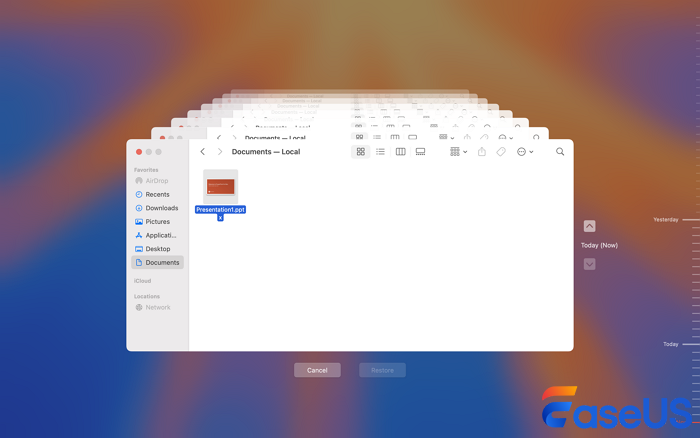
If you enabled Time Machine backups before losing data, you may be able to restore deleted USB files from previous backups.
How to Recover Deleted USB Files Using Time Machine
Step 1. Connect your Time Machine backup drive to the Mac.
Step 2. Open the Applications folder and launch Time Machine.
Step 3. Click "Enter Time Machine".

Step 4. Navigate through previous backup snapshots.
Step 5. Locate the deleted USB files or folders.
Step 6. Select the target files and click "Restore".
When Time Machine Recovery Works Best
- You created backups before deletion
- The USB drive was included in backups
- The backup drive is accessible
- The deleted files existed in previous snapshots
| Editor's Review | |
| 👍 Pros | 🙁 Cons |
|
|
How to Recover Files from a Formatted or Corrupted USB on Mac
Many users believe formatting permanently erases all data, but quick formatting usually removes only the file system structure. The actual data may still exist until overwritten.
Signs of USB Corruption on Mac
- USB drive not mounting
- "Disk not readable" errors
- Missing folders or files
- Slow file transfers
- USB disconnecting randomly
- Finder freezes when opening the drive
Best Recovery Workflow for Corrupted USB Drives
Step 1. Stop using the USB drive immediately.
Step 2. Open Disk Utility and check whether the USB appears in the sidebar.
Step 3. Avoid formatting the drive before recovery.
Step 4. Scan the USB using professional recovery software.
Step 5. Recover important files to another storage location.
Step 6. Run First Aid after data recovery is complete.
Can You Recover Files from a Formatted USB Drive
Yes. Recovery is often possible after:
- Quick formatting
- Accidental reformatting
- Partition corruption
- File system errors
However, recovery becomes difficult if the drive has been fully overwritten with new data.
Tips to Increase USB Recovery Success Rate on Mac
Following proper recovery practices can significantly improve your chances of restoring deleted USB files successfully.
⭐Tip 1. Stop Using the USB Drive Immediately
Continuing to use the USB drive increases the risk of overwriting deleted sectors.
⭐Tip 2. Avoid Saving Recovered Files to the Same USB
Always save recovered data to another drive to prevent overwriting recoverable files.
⭐Tip 3. Use Reliable USB Recovery Software
Professional recovery tools support advanced scanning algorithms for APFS, HFS+, FAT32, and exFAT file systems.
⭐Tip 4. Avoid Formatting Before Recovery
Formatting can reduce recovery success if new file structures overwrite deleted records.
⭐Tip 5. Keep the USB Drive Stable During Recovery
Use a direct USB connection and avoid disconnecting the drive during scanning.
How to Prevent USB Data Loss on Mac
Preventing USB data loss is much easier than recovering lost files.
⭐ Tip 1. Back Up Important Files Regularly
Create regular backups using:
- Time Machine
- iCloud Drive
- External hard drives
- Cloud backup services
⭐ Tip 2. Safely Eject USB Drives
Always eject your USB flash drive before unplugging it.
Step 1. Right-click the USB drive in Finder.
Step 2. Select "Eject".
Step 3. Wait until the drive disappears safely.
⭐ Tip 3. Monitor USB Drive Health
Replace USB drives showing signs of:
- Frequent disconnections
- Overheating
- Read/write failures
- Corruption errors
⭐ Tip 4. Avoid Cheap or Unreliable USB Drives
Low-quality flash drives often fail sooner and are more prone to corruption.
Conclusion
Recovering deleted files from a USB drive on Mac is often possible if you act quickly and use the correct recovery method. Whether your files were accidentally deleted, permanently removed, formatted, or lost because of corruption, professional USB recovery software offers the highest recovery success rate.
Mac Trash and Time Machine are useful for recently deleted files and backups, while recovery software is the best option for permanent deletion, corrupted USB drives, and formatted storage devices.
If your deleted USB files are important, stop using the drive immediately and start the recovery process before the deleted data gets overwritten permanently.
FAQs About USB Data Recovery on Mac
1. Can permanently deleted USB files be recovered on Mac?
Yes. Permanently deleted USB files can often be recovered if the storage sectors containing the deleted data have not been overwritten. Professional USB recovery software scans the drive directly and rebuilds deleted file records.
2. Where do deleted USB files go on Mac?
Some deleted USB files temporarily move to the Trash folder, while others bypass Trash completely depending on the file system and deletion method.
3. Can I recover files from a formatted USB drive on Mac?
Yes. Quick formatting usually removes only the file system structure instead of permanently erasing data. Recovery software can often restore files before overwritten sectors replace the deleted content.
4. What is the best USB recovery software for Mac?
Professional recovery software like EaseUS Data Recovery Wizard for Mac is widely used because it supports APFS, HFS+, FAT32, exFAT, formatted USB recovery, and corrupted external drives.
5. Can Mac Disk Utility recover deleted files?
No. Disk Utility can repair certain file system issues but cannot restore permanently deleted files from a USB flash drive.
6. Can I recover deleted files from an unreadable USB drive?
Yes. If the USB drive still appears in Disk Utility, recovery software may still scan the drive and recover inaccessible files before repair attempts.
7. Does formatting a USB drive erase everything permanently?
Not always. Quick formatting usually leaves recoverable data behind until new files overwrite the storage sectors.
8. How long does USB recovery take on Mac?
Recovery time depends on USB size, corruption level, and scan type. Deep scans for large USB drives may take several hours.
9. Can I recover deleted Pages or Keynote files from a USB drive?
Yes. USB recovery software can recover Pages, Keynote, Numbers, Word, Excel, PDF, and many other document formats.
10. What should I do immediately after USB data loss?
Stop using the USB drive immediately, avoid formatting it, and begin recovery as soon as possible to maximize recovery success.
Was This Page Helpful?

Dany is an editor of EaseUS who lives and works in Chengdu, China. She focuses on writing articles about data recovery on Mac devices and PCs. She is devoted to improving her writing skills and enriching her professional knowledge. Dany also enjoys reading detective novels in her spare time.

Daisy is the Senior editor of the writing team for EaseUS. She has been working at EaseUS for over ten years, starting as a technical writer and moving on to being a team leader of the content group. As a professional author for over ten years, she writes a lot to help people overcome their tech troubles.
-
EaseUS Data Recovery Wizard is a powerful system recovery software, designed to enable you to recover files you’ve deleted accidentally, potentially lost to malware or an entire hard drive partition.
Read More -
EaseUS Data Recovery Wizard is the best we have seen. It's far from perfect, partly because today's advanced disk technology makes data-recovery more difficult than it was with the simpler technology of the past.
Read More -
EaseUS Data Recovery Wizard Pro has a reputation as one of the best data recovery software programs on the market. It comes with a selection of advanced features, including partition recovery, formatted drive restoration, and corrupted file repair.
Read More
Related Articles
-
Mac Hard Drive Recovery: Recover Mac Disks [6 Methods]
![author icon]() Daisy/Aug 14, 2026
Daisy/Aug 14, 2026 -
4 Fixes to Recover Unsaved Photoshop Files Mac Now!
![author icon]() Tracy King/Sep 20, 2026
Tracy King/Sep 20, 2026 -
Data Recovery from Long-Term Used Device [Full Guide]
![author icon]() Jaden/Sep 15, 2026
Jaden/Sep 15, 2026 -
How to Recover Files from USB: Real-World USB Recovery Guide
![author icon]() Tracy King/Sep 15, 2026
Tracy King/Sep 15, 2026
 Tracy King/Sep 20, 2026
  Jaden/Sep 15, 2026

