





-
![]() How to Recover Image DB on Sony Camera [Sony Alpha 7 III, Alpha 7 IV...]
How to Recover Image DB on Sony Camera [Sony Alpha 7 III, Alpha 7 IV...] October 14,2026
 6 min read
 -
![]()
-
![]() PNY Recovery Tool: Recover Data from PNY SD Card/USB Flash DriveOctober 14,20266 min read
PNY Recovery Tool: Recover Data from PNY SD Card/USB Flash DriveOctober 14,20266 min read -
![]()
-
![]() How to Recover Deleted Dashcam Footage [Dashcam Recovery Guide]October 14,20266 min read
How to Recover Deleted Dashcam Footage [Dashcam Recovery Guide]October 14,20266 min read -
![]() Why Does My Camera Say Memory Card Full When It's Not [Fixed]October 14,20266 min read
Why Does My Camera Say Memory Card Full When It's Not [Fixed]October 14,20266 min read -
![]()
-
![]() How to Recover Photos from a Sony Alpha 7 IV [Deleted/Lost/Formatted Photo Recovery]October 14,20266 min read
How to Recover Photos from a Sony Alpha 7 IV [Deleted/Lost/Formatted Photo Recovery]October 14,20266 min read -
![]()
-
![]() How to Fix: SD Card Command Volume Partition Disk Failed with NullOctober 14,20266 min read
How to Fix: SD Card Command Volume Partition Disk Failed with NullOctober 14,20266 min read
Page Table of Contents
PAGE CONTENT:
An SD card is a popular data storage device widely used on digital cameras, handheld devices, telephones, music players, and more. It can store many types of personal files, such as pictures, videos, music files, documents, and more. However, the important data might get lost for various reasons, such as accidental deletion, formatting, a virus attack, etc. When facing an unexpected data loss disaster, you need reliable free memory card recovery software to rescue your data.
To recover data from a memory card, such as an SD card, you can use SD data recovery software, such as EaseUS memory card recovery tool. This post will discuss the best memory card recovery software for PC in 2025. Read on to learn how to restore your essential files from a memory card!
Memory Card Recovery Software Free Download
The EaseUS Data Recovery Wizard is one of the best SD card free recovery software for recovering lost data. This free recovery software specializes in restoring files that are lost, hidden, or deleted. If your files are lost, there's no need to panic. You can easily get data back with the help of this easy-to-use software. Click the following button to get the free version now!
EaseUS Data Recovery Wizard Free offers up to 2 GB of free data recovery, including 500 MB available by default and an extra 1.5 GB unlocked after sharing on Facebook and X.
You Can Trust EaseUS Data Recovery Software
EaseUS Data Recovery Wizard has acquired an extensive technical base in data recovery and has been trusted by billions of users since 2005. Check out reviews on Trustpilot.
A powerful SD card data recovery tool can restore deleted files on virtually any memory card connected to a Windows computer. It should support Windows 7, Windows 8, Windows 10, Windows 11, and other versions of Windows.
If your SD card suddenly goes blank or is damaged, EaseUS SD card recovery software can scan and recover lost data easily from a mobile memory card, camera memory card, or SD card for other entertainment devices, including photos, videos, documents, etc.
01
Accidental File Deletion:
When files are inadvertently deleted from an SD card, whether via a computer or in-camera, they often remain recoverable as long as the original storage sectors have not been overwritten. EaseUS' specialized recovery tool helps reconstruct file tables and restore lost data with high integrity.
02
SD Card Formatting:
Formatting erases file system metadata but typically does not immediately destroy the underlying data. Using advanced format recovery algorithms, we can unformat an SD card and reassemble original files and directories - even when the file system has been altered or damaged.
03
Corrupted SD Card:
Logical corruption, such as I/O device errors, file system degradation, or unrecognized partitions, can often be resolved without data loss. EaseUS software fixes a corrupted SD card by repairing corrupted structures and extracts data through low-level reading and automated file system reconstruction.
04
RAW File System:
An SD card displaying a RAW file system indicates severe metadata damage. While utilities like CHKDSK may attempt repair, EaseUS software bypasses damaged structures entirely, performing RAW SD card recovery based on file signatures to salvage data without further altering the card.
05
SD Card Not Detected:
If a camera or computer does not recognize a card, it may be due to an incompatible or damaged file system. We recommend first recovering data from the SD card not detected using sector-level imaging tools before attempting reformatting, especially to universal file systems like FAT32 or exFAT.
06
SD Card Uninitialized:
This error often points to partition or boot sector damage. Before initializing or reformatting, which risks permanent data loss, EaseUS software can read raw data from the card and reconstruct partitions to recover stored files safely.
If you have no idea about memory card recovery, install the reliable EaseUS memory card recovery software! Here are more real customer reviews from G2 or Trustpilot:
| Real Reviews on Trustpilot & G2 |
| 🙋♂️Alex: It's a super intuitive software, very easy to use, and you can recover data fast from almost any situation and device. I've used it before with SD and MicroSD. Very effective. |
| 🙋♂️Dev: Prompt reply to my query, accurate answers, and spot-on advice. My issue was solved in 2 emails, very happy, good work. Thx a million. |
| 🙋♀️Jason: The software is fantastic. I own several apps, and each one performs exactly as advertised. They all have a logical, easy-to-find things interface. |
| 🙋Gopi: The most helpful feature is that it's very user-friendly and super easy to use. The fact that it recovers almost everything from your device. |
You can share this professional and free memory card recovery software with your friends on social media and ask for more advice!

Memory Card Recovery Tutorial [Step-by-Step Guide]
EaseUS memory card recovery software is useful in all data loss cases. It can help you recover deleted photos from SD cards and other important files easily and quickly. Once you have downloaded and installed this free data recovery software, you can immediately begin the recovery process. If you haven't installed this free tool, click the following button to start a free SD card recovery experience.
Recovering deleted videos from a digital camera memory card or recovering data from any other devices - the same rule applies. Do not make any changes to the storage card from which you want to recover files. You might end up writing new data to the device, which will damage or overwrite the old or deleted files and result in permanent data loss.
In addition, don't use any free SD card recovery software you find online, especially the one that doesn't keep the safety and security of your important files. Use the best SD card recovery software, EaseUS Data Recovery Wizard, which makes the card recovery as easy as a few clicks. By the way, SD card recovery on Mac is also supported; you just need to download the Mac version instead.
Here are the easy steps to recover deleted files from an SD card or memory card:
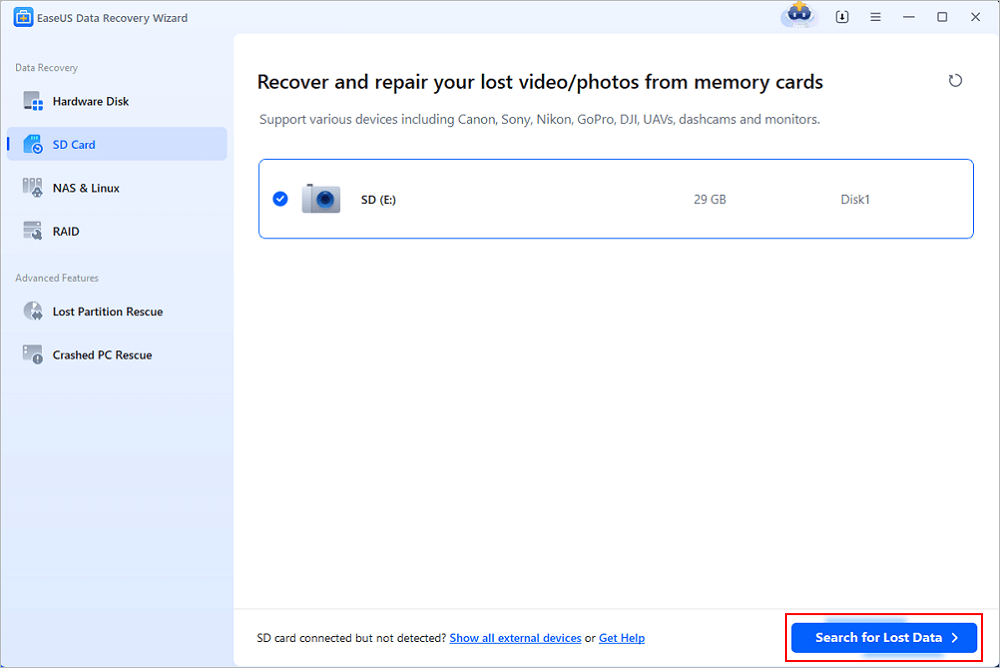
Step 1. Run the EaseUS SD card recovery tool after connecting the SD card to the computer. "SD Card Recovery" should be selected, then "Scan for lost data". If you run the program first and then connect the card, you may encounter the SD card not showing up issue.
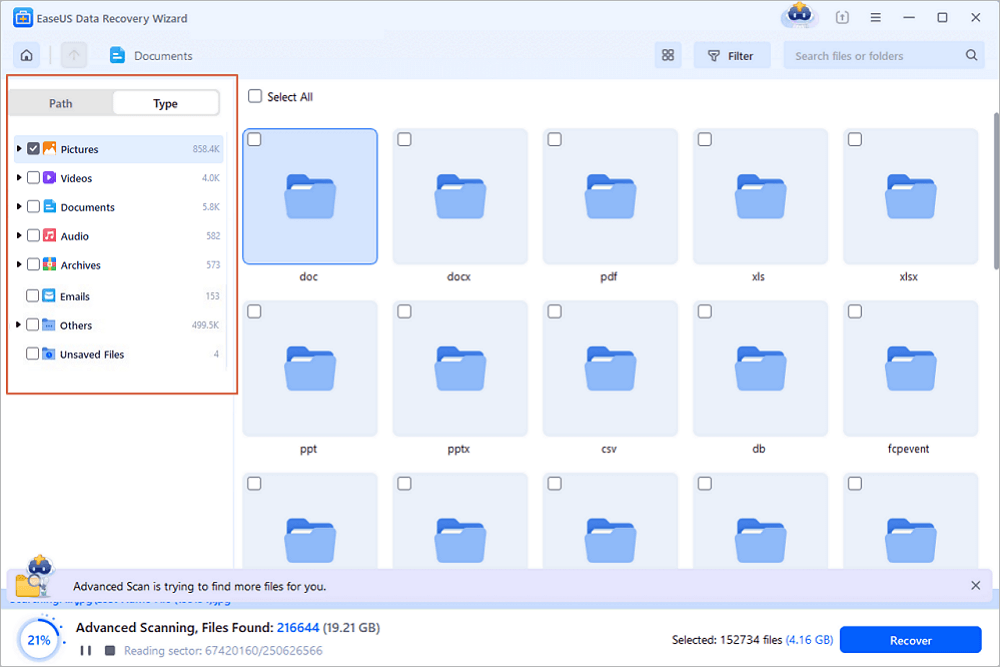
Step 2. EaseUS's filter tab will help you find deleted files on the SD card quickly. You can choose "Pictures/Videos/Documents..." to see all the missing files.
Usually, when a file gets removed from the SD card, the file is, in fact, still there, and it's just the name that is deleted or altered by the system. As long as new data haven't overwritten the lost files, the EaseUS data recovery program provides you a great option to restore lost files with a Quick Scan!
In case you didn't make it with the Quick Scan, Deep Scan is the way to go. It can scan and find RAW files or files that have lost the file name and path.
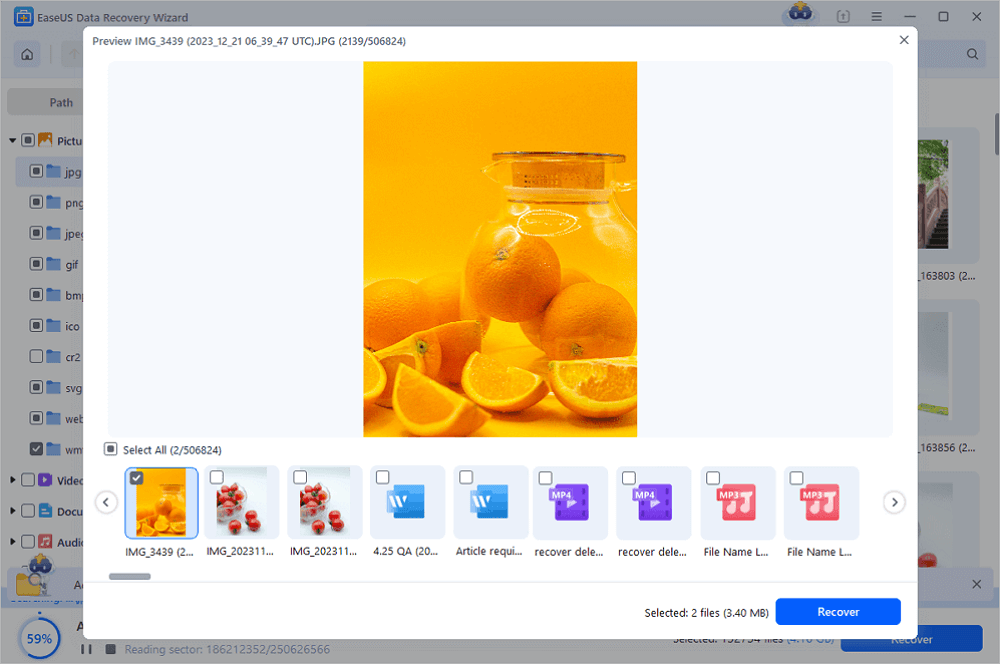
Step 3. In the preview window, you can use the arrow buttons to examine each file individually if you wish to recover more than one file from the SD card. Once the files have been chosen, click "Recover" to save them all.
🔺Note: EaseUS free data recovery software can recover files up to 2GB in size. EaseUS promises a 30-day money-back guarantee; you don't need to hesitate to upgrade to the pro version.
If you think this SD card recovery tutorial is helpful, please mark it or share it on Facebook or X.
Conclusion
Data loss can happen to anyone at any time for many reasons. You may need a tool to recover a formatted SD card, recover lost data from a corrupted SD card, etc.
EaseUS recovery tool provides an easy-to-understand graphical interface that is suitable for everyone to use without any technical requirements. A free click can help you recover files from the SD card for free.
Don't hesitate to download this free SD card recovery program anymore! If you want to recover deleted files from SD cards without software, you can also contact professional local recovery labs.
Free Memory Card Data Recovery FAQs
If you have further questions, follow along for a question-and-answer section.
1. Can the SD card be recovered?
Yes. The easiest way to perform a memory card recovery or SD card recovery is by using EaseUS free SD card recovery software.
- How can I recover my SD card data for free? To recover deleted files from an SD card for free, follow these steps:
- Download and install EaseUS memory card recovery software for Windows.
- Connect the SD card to your computer and start the app.
- Click Scan for Lost Data to find your files.
- Preview and select the files to be recovered.
- Click Recover and restore up to 2GB of data for free.
2. What is the best free SD card recovery software?
To help you find the best SD card recovery software, we have listed the 10 best free SD card recovery software options for you:
- 1. EaseUS Data Recovery Wizard
- 2. Recuva
- 3. Stellar Data Recovery
- 4. Disk Drill
- 5. R-Studio
- 6. Acronis Revive
- 7. Remo Recover
- 8. Recover My Files
- 9. Puran Data Recovery
- 10. TestDisk
3. How can I recover my deleted pictures from my memory card?
To recover deleted photos from a memory card:
- Connect the SD card and start scanning.
- Select the photos you want to recover.
- Recover photos.
4. How do I fix a corrupted SD card?
You can use the native Windows tools as well as third-party SD card repair tools. As soon as your SD memory card shows signs of corruption, take immediate action to prevent data loss. EaseUS Data Recovery Wizard comes in handy to recover a corrupted SD card when your corrupted SD card is not open or not accessible, or the files are deleted or formatted, etc.
Was this page helpful?
-
Dany is an editor of EaseUS who lives and works in Chengdu, China. She focuses on writing articles about data recovery on Mac devices and PCs. She is devoted to improving her writing skills and enriching her professional knowledge. Dany also enjoys reading detective novels in her spare time. …


 Why Trust EaseUS
 Editor Reviews

20+
Years of experience

160+
Countries and regions

72 Million+
Downloads

4.9 +
Trustpilot Score





