
 About the Author
 Reviews and Awards
 Mac SD Card Recovery
To "restore" an external hard drive on a Mac, you can either recover your files using data recovery software or restore a previous backup using Time Machine. If the drive isn't working, try basic troubleshooting like checking cables or using Disk Utility's First Aid feature.
Can Data Be Recovered from the External Hard Drive on Mac
The straightforward answer is YES. While it is often possible to recover files from an external hard drive, success isn't always certain. The key factors are what caused the data loss and the drive's current state. To clarify what this means for you, we've outlined common scenarios and how they impact the recovery odds. You can see the infographic below to get more detailed external hard drive data loss scenarios and the success rate:

4 Ways to Recover External Hard Drive Data on Mac
Most Mac users have invested in an external hard drive to expand their MacBook or iMac storage space. The most popular brands are usually Western Digital, Buffalo, G-Technology, Samsung, Seagate, and Lacie. Accidental deletion, disk formatting, improper disconnection, or merely the drive itself dying, and many other situations can cause data loss on external hard drives,
Basically, if files disappear from the external hard drive on a Mac, there are four possible ways to recover files from an external hard drive, a USB flash drive, or a memory card on a Mac. Each way is applicable to certain data loss scenarios, and we'll explain it in detail.
| 🏆Use Mac External Data Recovery Software | This solution is the most effective way to recover files from external disks. You can get back permanently lost data without backup. |
| ✅Restore from Trash Bin | After using Command+Delete or the right-click menu to delete files, you can restore data from Mac Trash. |
| 🔁Restore from a Time Machine Backup | This method is only helpful for users who have backed up their data beforehand with Time Machine. Otherwise, it is invalid. |
| 👨💻Try Manual Data Recovery Services | If you don't have a backup and don't want to use software, you can try to retrieve your data through manual data recovery. |
Fix 1. Recover Data from an External Hard Drive Mac with Data Recovery Tool 🏅
When it comes to the situation where you are unable to access or locate files in the Trash or backup, or even if no backups were ever created, the only way to continue is to download a capable Mac external hard drive data recovery program and perform data recovery as soon as possible.
EaseUS Data Recovery Wizard for Mac Pro is reputable in the data recovery field. Regarding the 10+ years of experience, deep scan ability, and all macOS and Mac OS X compatibility, even the latest macOS Sonoma. It's the top choice whenever you're faced with Mac data loss issues and eager to find a simple yet effective data recovery solution.
How does the software work in a variety of data loss scenarios? We give you some examples:
- Recover permanently deleted files on Mac or from the external HDD on Mac, like using Command-Shift-Delete to empty the Trash or Option-Command-Delete, known as "Delete Immediately bypass Trash".
- Recover the formatted hard drive on Mac and also the formatted external hard drives after erasing the disk in Disk Utility.
- Support video, photo, document, and audio recovery when logical errors occur in the external hard drive.
- Recover data from corrupted external hard drives on Mac without any backups and support most file systems.
Here are some users' reviews from Truspilot:
💡I somehow lost the duplicate remover program on my hard drive. After contacting EaseUS, I was put on hold for a very short time to be connected with the correct department. Thanks to Warren's professionalism and technical skill, the problem was resolved within a short period of time. - from Trustpilot
🗝️ Recovery software worked great, and I was able to recover valuable data. And was able to use the free version to see what data was available before purchasing. Only software that was able to help me out. Also had to reach out to support to get a licensing issue taken care of, and they were super helpful and responsive. - from Trustpilot
How to recover data from an external hard drive on Mac with EaseUS Data Recovery Wizard for Mac Pro? Check the following tutorial to learn more:
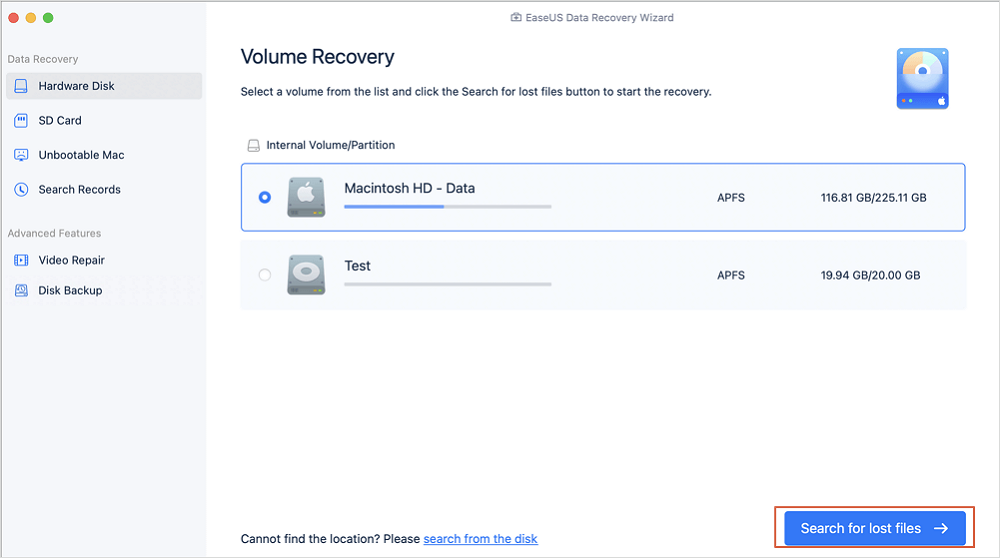
Step 1. Connect your Mac and external hard drive properly. Open the external hard disk in the EaseUS Data Recovery Wizard for Mac (This software supports most file systems.). To locate lost or deleted files on your external devices, click "Search for lost files" after that. This software can even help you perform data recovery on an unmounted external hard drive on a Mac.
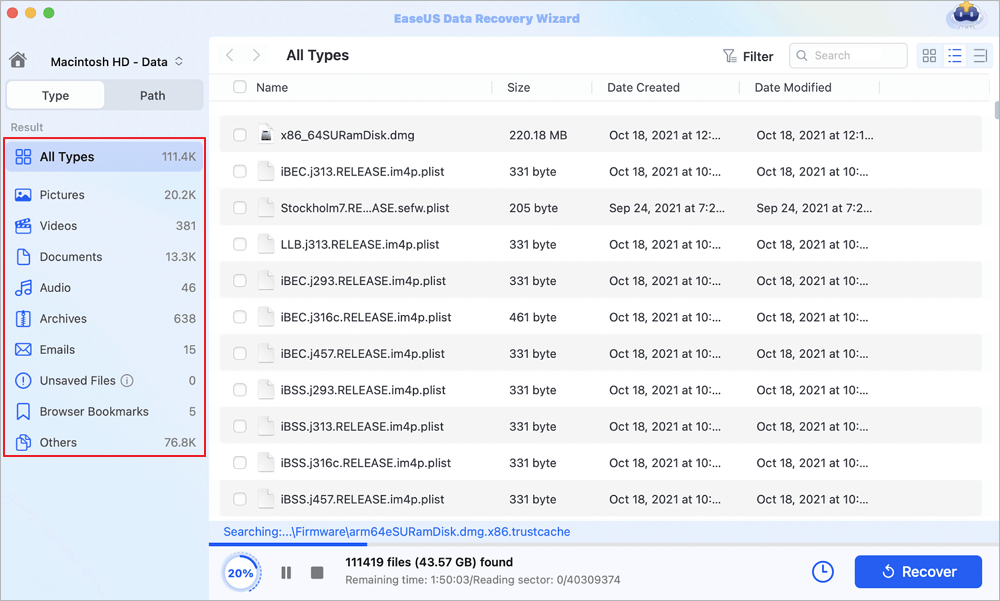
Step 2. The left panel will display all file types during and after the scan. To locate desired files on your external devices, choose the file type.
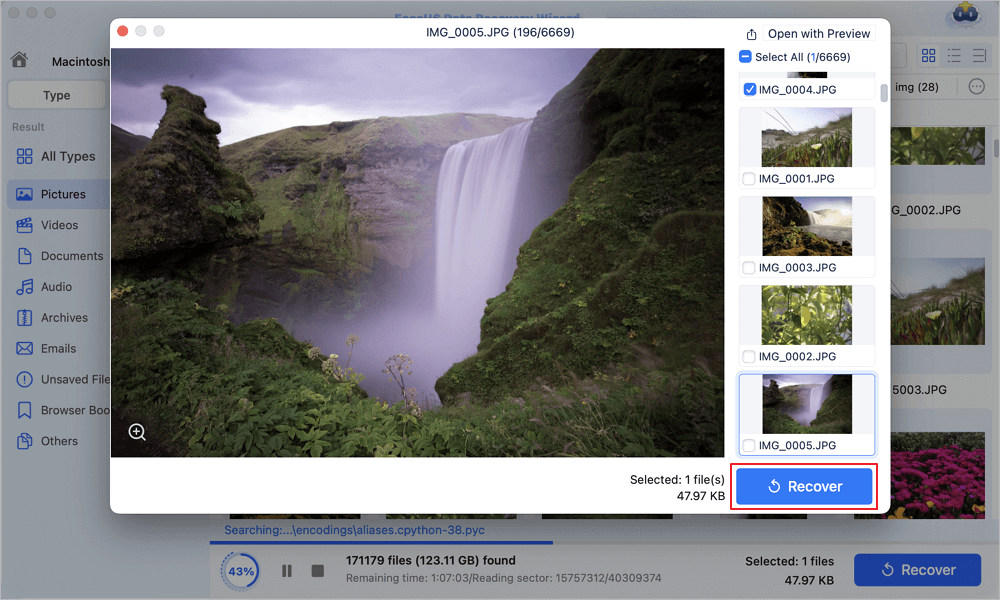
Step 3. To preview a file, click on it. Click the "Recover" button after choosing the files you want to get back (The software can also handle file corruption issues for you.). Data storage options include local and cloud disks, and you'd better save the recovered files to a new location.
You can check the pros and cons of applying recovery software to recover lost data from the external hard drive on Mac:
| Advantages | Disadvantages |
|
✅It can save a lot of time, and it's capable of users who are lack of computer knowledge. It can solve most data loss issues on any storage device. |
❌It is not free when you want to upgrade to the Pro version. |
EaseUS recovery program is well-known in the industry, and you can also perform external hard drive recovery on the Windows operating system with its Windows version. Use it to help you recover lost data from various devices like external hard drives, HDDs, SSDs, USBs, SD cards, etc. Share it with your friends.

Fix 2. Recover Deleted Files from the External Hard Drive from Mac Trash
If you lose data on the external hard drive by dragging it to the Trash or want to recover accidentally deleted files, always check the Trash Bin first. Right-click on the file and select "Move to Trash", or use the Move to Trash shortcut, Command-Delete. Those files were not permanently removed until you emptied Trash on Mac. Here are the steps to recover the deleted file from Trash on Mac.
Step 1. Connect your external hard drive to your Mac and navigate to Trash.
Step 2. Locate the abandoned file in the trash folder, and use "Copy Items" to recover deleted files on Mac and restore them to their original spot. By the way, the "Put Back" command works the same way.
You can check the pros and cons of recovering data stored on the external hard drive with Mac Trash:
| Advantages | Disadvantages |
|
✅This method is straightforward; you can simply find Mac Trash without downloading any software on your Mac computer. |
❌If the Trash bin has emptied after deleting files from your external hard drive, the files cannot be found in the Trash folder. |
Fix 3. Perform Mac External Hard Drive Recovery with Time Machine
Since Mac provides users with a secure protection mechanism by backing up important hard drive files to the Cloud or a backup device via Time Machine, one good way to recover deleted files is from the backup file.
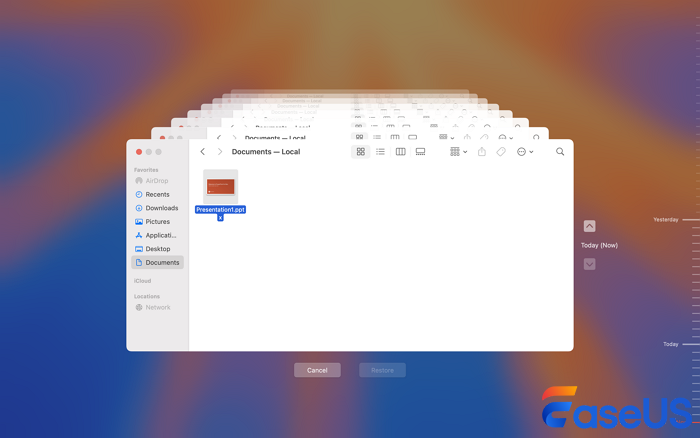
For example, to restore Mac from Time Machine, refer to the video and written steps:
- 00:00 Is It Possible to Recover Deleted Files on Mac
- 00:36 Why EaseUS Mac Data Recovery Software
- 01:06 Using Mac Data Recovery to Restore Files
Step 1. Open Time Machine by clicking on the icon in the menu bar and choosing "Enter Time Machine".
Step 2. Find the specific file in the backup, press Space Bar to preview it, and determine whether it's the one you want.
Step 3. Click on the "Cloud" icon to download a snapshot to view it. When you do this, that snapshot will be available to view even when your external storage device is disconnected from the Mac.
Step 4. Click "Restore" to restore the selected file.
If the Time Machine backup is deleted, you can read the following passage to restore the backups:

Proven Ways | How to Recover Deleted Time Machine Backup
It is not uncommon that you may accidentally delete Time Machine backup from their external hard drive. Read more >>
You can check the pros and cons of recovering data from the external hard drive from Time Machine backups:
| Advantages | Disadvantages |
|
✅You can easily retrieve lost data on an External hard drive with a recent backup. Time Machine can also prevent data loss on your device by creating backups frequently. |
❌If you have not enabled Time Machine before, you cannot find useful backups. |
Fix 4. Restore External Hard Drive Mac with Data Recovery Service
Apart from most of the logical errors that would bring data loss on an external storage device, which EaseUS Mac data recovery software can help recover lost data, there are moments when you cannot simply get data back, especially when severe issues are developed on a disk. For instance, hard drive file system corruption or with too many bad sectors, the hard drive falling apart, heavy clicking/beeping sound, etc.
When you have problems with the external hard disk, you need to repair the external hard drive on the Mac, or it's time to send it to an IT expert who is good at manual recovery/repair (check the average hard drive recovery cost if you're interested). Most of the time, by the local data recovery services, hard drive repair comes before recovery. To make sure that the team is reliable, you must check the following things.
- ⭐Must be an ISO-certified service center
- ⭐Data recovery guarantee after analysis
- ⭐Should have Class 100 Clean Room
- ⭐Service must be secure & reliable
EaseUS is reliable and secure; you can ask our professional team for help if you have physical damage on your external storage devices.

Consult with EaseUS data recovery experts for one-on-one manual recovery service. We could offer the following services after a FREE diagnosis
- Repair corrupted RAID structure, unbootable Windows OS, and corrupted virtual disk file
- Recover/repair lost partition and re-partitioned drive
- Undo the Disk Utility format operation and repair the RAW drive (Bitlocker encrypted drive)
- Fix issues like the external hard drive not showing up on the Mac in the Disk Utility
You can check the pros and cons of recovering data from the external hard drive with Mac Trash:
| Advantages | Disadvantages |
|
✅ Relying on professional experts can be the easiest way when you cannot solve the data loss problem by yourself. |
❌It can be expensive if you lose too many files or the external hard drive is physically damaged. |
Bonus Tip: How to Avoid Data Loss on External Hard Drives
Why not protect your data in advance? External hard drive recovery may cost a lot; a nice choice is protecting your data in advance.
- 😁Think carefully before you are going to delete files or format your external hard drive
- ✅ correctly eject the drive. You may lose data if you eject the external hard drive when in use.
- 💽Avoid physical damage for any reason.
- 🦠Let anti-virus software scan your device to stay away from the virus attack.
- 📒Back up important files using Cloud drive, a professional backup product, or a manual copy.
- ✨Find free data recovery software for Mac.
After learning all the external hard drive recovery methods and bonus tips, don't forget to share this useful information with more readers!
To Sum Up
There are four ways to recover deleted files from an external Mac hard drive. First, check the Trash Bin. If this solution fails, restore external hard drive files from a backup. If you don't have a backup, deploy the best Mac data recovery software - EaseUS Data Recovery Wizard for Mac to scan and recover deleted files from the external storage drive. Finally, if Mac external hard drive data loss is caused by physical damage, consider seeking manual service.
External Hard Drive Data Recovery Mac FAQs
Here are common FAQs that you may be interested in. Check if any of them could help you.
How to recover deleted files from a Mac hard drive?
To recover lost files from an external hard drive on a Mac, follow these steps:
Step 1. Download, install, and launch the EaseUS Data Recovery Wizard for Mac.
Step 2. Connect the external drive to your computer.
Step 3. Select the external drive from the disk list.
Step 4. Click the "Scan" button. Preview the files that can be restored. Click the "Recover" button to recover deleted files from an external hard drive on Mac.
What is the best hard disk recovery software for Mac?
EaseUS Data Recovery Wizard for Mac is the best hard disk recovery software for Mac. Anyone with a Mac can use this powerful recovery technology with an intuitive and easy-to-use interface. For more information, refer to the top 5 free data recovery software for Mac.
How to recover files from an external hard drive on Mac?
To recover lost files from an external hard drive on Mac:
Step 1. Download, install, and launch the EaseUS Data Recovery Wizard for Mac.
Step 2. Connect the external drive to your computer. Select the external drive from the disk list, and click Scan.
Step 3. After the scanning process, select the files and click the Recover Now button to get them back.
What do I do if my external hard drive is not detected on my Mac?
Start with the basics:
- Check whether the drive is properly plugged in
- Run Disk Utility to mount and verify the drive
- Check the cable.
- Reboot Mac
Was This Page Helpful?

Finley is interested in reading and writing articles about technical knowledge. Her articles mainly focus on file repair and data recovery.

Daisy is the Senior editor of the writing team for EaseUS. She has been working at EaseUS for over ten years, starting as a technical writer and moving on to being a team leader of the content group. As a professional author for over ten years, she writes a lot to help people overcome their tech troubles.
-
EaseUS Data Recovery Wizard is a powerful system recovery software, designed to enable you to recover files you’ve deleted accidentally, potentially lost to malware or an entire hard drive partition.
Read More -
EaseUS Data Recovery Wizard is the best we have seen. It's far from perfect, partly because today's advanced disk technology makes data-recovery more difficult than it was with the simpler technology of the past.
Read More -
EaseUS Data Recovery Wizard Pro has a reputation as one of the best data recovery software programs on the market. It comes with a selection of advanced features, including partition recovery, formatted drive restoration, and corrupted file repair.
Read More
Related Articles
-
How to Fix "Volume Hash Mismatch" Error on Mac
![author icon]() Jaden/Jan 19, 2026
Jaden/Jan 19, 2026 -
How to Download macOS Sequoia | Update Now
![author icon]() Dany/Jan 19, 2026
Dany/Jan 19, 2026 -
Repair Photo Library on Mac in 5 Methods [macOS Photo Recovery]
![author icon]() Jaden/Jan 19, 2026
Jaden/Jan 19, 2026 -
[Solved] SD Card Not Mounting on Mac: 6 Fixes
![author icon]() Brithny/Feb 22, 2026
Brithny/Feb 22, 2026
 Jaden/Jan 19, 2026
  Dany/Jan 19, 2026
  Brithny/Feb 22, 2026

