





 About the Author
 Reviews and Awards
 Mac SD Card Recovery
SD cards are widely used in cameras, dash cameras, and drones, primarily to store photos and videos. However, SD card data deletion is very common, whether accidental or intentional. It's totally possible to recover deleted files from an SD card on a Mac.
How to Recover Deleted Files from an SD Card on Mac? I accidentally deleted some important files from my SD card on my Mac, and I'm freaking out a bit. Could anyone walk me through the process or recommend any user-friendly software that can help me out? - from Discussions.Apple.com
💡Quick Answer: To recover deleted files from an SD card on a Mac, use specialized recovery software, such as EaseUS Data Recovery Wizard for Mac, to scan deleted files and perform SD card recovery on a Mac after checking the Mac Trash bin. Before using recovery software, stop using the SD card immediately to prevent data from being overwritten.
Read on to learn how to recover deleted SD card files on Mac with 5 tested SD card recovery methods, including restoring from the Mac Trash bin folder, using reliable Mac SD card recovery software, restoring from Time Machine backups, etc.
What Is SD Card Recovery on Mac
SD card recovery on Mac refers to the process of restoring deleted, formatted, or inaccessible files from an SD card using recovery software or built-in macOS tools. It works by scanning storage sectors to locate recoverable data that has not yet been overwritten.
In most cases, files deleted or lost from an SD card can be recovered on a Mac. The success depends on:
- 💙Whether the SD card has been overwritten
- 💛The type of loss (accidental deletion, formatting, corruption)
- 💚How quickly you attempt recovery
You can try methods such as checking the Trash, using Finder, searching for temporary folders, restoring from Time Machine backups, or, if needed, using reliable data recovery software.
Recover Data from an SD Card on Mac Without Software
Before installing any software, try these built-in Mac methods. They are free, simple, and often effective.
How to Recover Deleted SD Card Files from Mac Trash Folder
| Recommended Rate | Highlights |
| ⭐⭐⭐ |
A fast way to bring back deleted files from SD cards on a Mac, it only needs a few clicks |
The SD card has a hidden Trash folder to keep temporarily deleted files. You can connect the SD card to the Mac and then restore data from the Trash folder. Here are the steps:
Step 1. Open Finder on the Mac and go to the SD card's root folder.
Step 2. Press Command + Shift + Dot to show the hidden .Trashes folder.

Step 3. Open the folder and find your deleted files on the SD card.
Step 4. Right-click the files you want and choose Put Back to restore them.

However, if there are no files in the Trash folder, read on to learn how to recover deleted files from the SD card on a Mac, even emptying the Trash bin folder.
How to Recover Deleted SD Card Files with Finder
| Recommended Rate | Highlights |
| ⭐⭐⭐⭐ |
This method is easy but often neglected; you can have a try and may be surprised. |
If you deleted files from your SD card while it was connected to your Mac, you can use Finder to search for your files. Even if files were not saved or were deleted, Finder can help locate them:
Step 1. Open Finder and hold Command + F to start a search.
Step 2. Type the file extension like jpg, png, or MP4。
Step 3. Then filter the results by their kind.
Step 4. Check the folders where the SD card files were initially stored.
This method is useful for recently deleted files or misplaced files that have not actually been removed from the SD card.
How to Recover Deleted SD Card Files from Temporary or Hidden Mac Folders
| Recommended Rate | Highlights |
| ⭐⭐ |
This method is more advanced and works best for unsaved or system-cached files. |
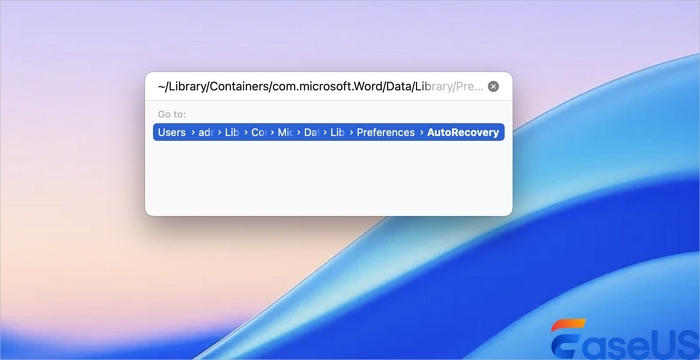
Sometimes, macOS stores temporary versions of files, and you can try restoring them from the Temporary Files folder with the following steps:
Step 1. Open Terminal by holding Command + Space or by directly clicking its icon.
Step 2. Go to the hidden folder that may save your temporary files:
Step 3. Search for modified files corresponding to your SD card data. Once you find the file you want, just drag it to the desired place.
How to Recover SD Card on Mac Using Time Machine
| Recommended Rate | Highlights |
| ⭐⭐⭐⭐ |
Available Time Machine backups can help you recover any files at any time. |
Another useful way to recover deleted files from an SD card for free is to use Time Machine backups. Time Machine is a built-in backup and restore application that works with all the latest macOS versions. When you enable it, it automatically creates backups of all your files, including apps, documents, music, and photos, so you can easily restore them if you need them in the future.
To restore deleted files with Time Machine, follow these steps:
Step 1. Launch Time Machine on your Mac to view Time Machine backups.

Step 2. Select the backup version that contains your lost files.
Step 3. Select the files you want to recover, then click the "Restore" button.

How to Restore SD Card Files from iCloud on Mac
| Recommended Rate | Highlights |
| ⭐⭐⭐ |
Restore deleted photos and videos from iCloud to Mac, iPhone, and iPad |
If you have imported digital camera photos and videos into the iPhone, iPad, or Mac Photos app and enabled iCloud sync, you might find files available in iCloud. This method is particularly effective for photos, videos, and documents that were backed up to iCloud before deletion. Check the following tutorial and have a try:
Step 1. Visit the iCloud website and sign in with your Apple ID.

Step 2. Click the Photos app or iCloud Drive to view more.

Step 3. Check the "Recently Deleted" folder, select the photos or videos you wish to recover, and click "Recover."

⚠️Note: Files remain in "Recently Deleted" for 30 days before permanent deletion. If the files have been permanently deleted from iCloud, it's better to scan the SD card using a professional memory card recovery tool on a Mac.
You can share all five methods on social media and help more SD card users!
| Software | Free Version | Ease of Use | Best For |
| EaseUS Data Recovery Wizard |
Yes |
⭐⭐⭐⭐⭐ |
Beginners & all-around recovery |
| PhotoRec |
Yes |
⭐⭐⭐ |
Advanced users & open-source |
Recover Data from an SD Card on Mac Using Recovery Software
Using professional SD card recovery software is the most effective and reliable way to recover deleted, formatted, or corrupted files from an SD card on a Mac.
Why Use SD Card Recovery Software?
- Supports recovery of deleted, formatted, and lost files
- Higher success rate compared to built-in macOS tools
- Allows file preview before recovery
- Works even when SD card is corrupted or unreadable
How to Recover Data from an SD Card on Mac Using Mac Recovery Software?
Is it possible to recover deleted files from an SD card on your Mac❓
Yes, you can restore deleted files on a Mac from an SD card, USB flash drive, or other devices. Why? When an SD card is formatted or encounters unexpected data loss, the data itself will not be erased from the card immediately. Instead, the file system removes the index pointers (metadata) that link the data to the file system. Professional recovery software, such as EaseUS Data Recovery Wizard for Mac, TestDisk, or PhotoRec, can scan the SD card to locate these "orphaned" data fragments and rebuild the file structure.
| Recommended Rate | Highlights |
| ⭐⭐⭐⭐⭐ |
Support most SD card brands and recover 1000+ file types |
Generally speaking, when you are searching for how to recover data deleted from an SD card on a Mac, you have lost your data and have no available backups. In this case, you need a professional Mac SD card data recovery program, such as EaseUS Memory Card Recovery, to help you out.
This excellent SD card recovery software is a great lifesaver for unintentionally deleted files. It provides a high recovery rate and a user-friendly graphical user interface. With advanced recovery algorithms, this tool can recover data lost to accidental deletion and even recover data from a formatted SD card.
Most users who use an SD or microSD card as a storage device often use digital cameras, action cameras, and other devices. Most files on the SD card are photos and videos, and EaseUS card recovery can recover deleted photos from the SD card on a Mac in a few simple steps.
Free download this SD card data recovery tool for Mac and follow the detailed steps below to retrieve lost data from your SD card:
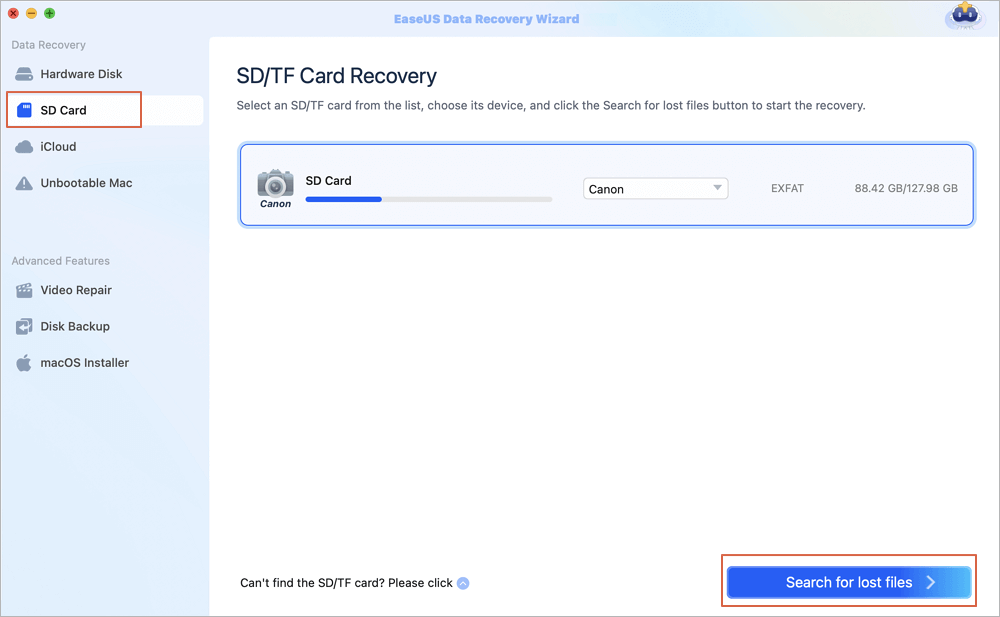
Step 1. Select the SD card
- Correctly connect your memory card to your Mac. Launch EaseUS Data Recovery Wizard for Mac.
- Go to "SD Card Recovery", find your Canon/Nikon/Go Pro/DJI/Sony SD card, and click "Search for lost files".
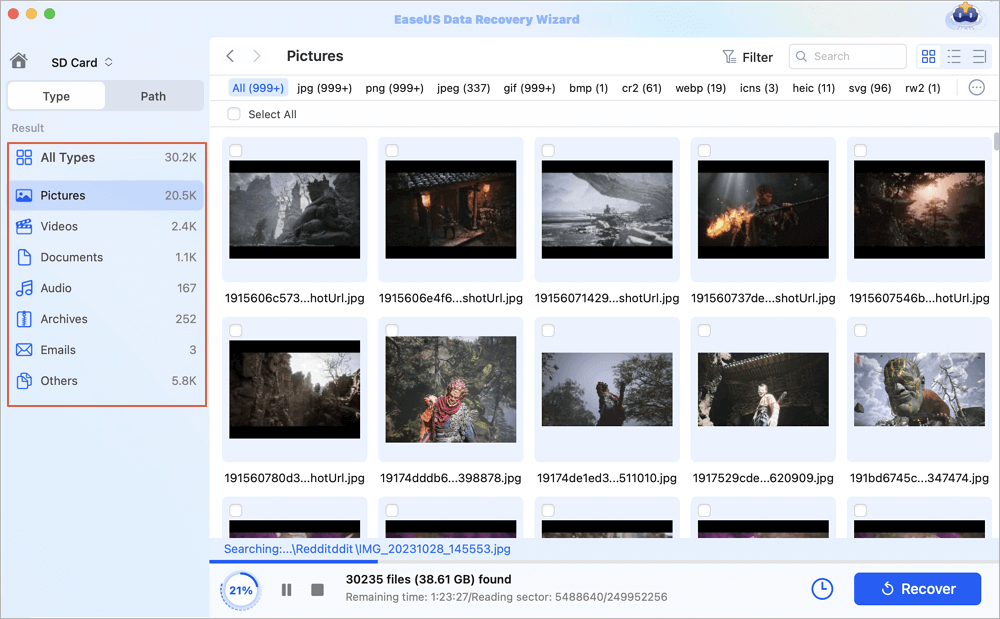
Step 2. Filter lost SD card data
After the scan, all files will be presented in the left panel in the scan results. Find wanted photos, videos, and other files.
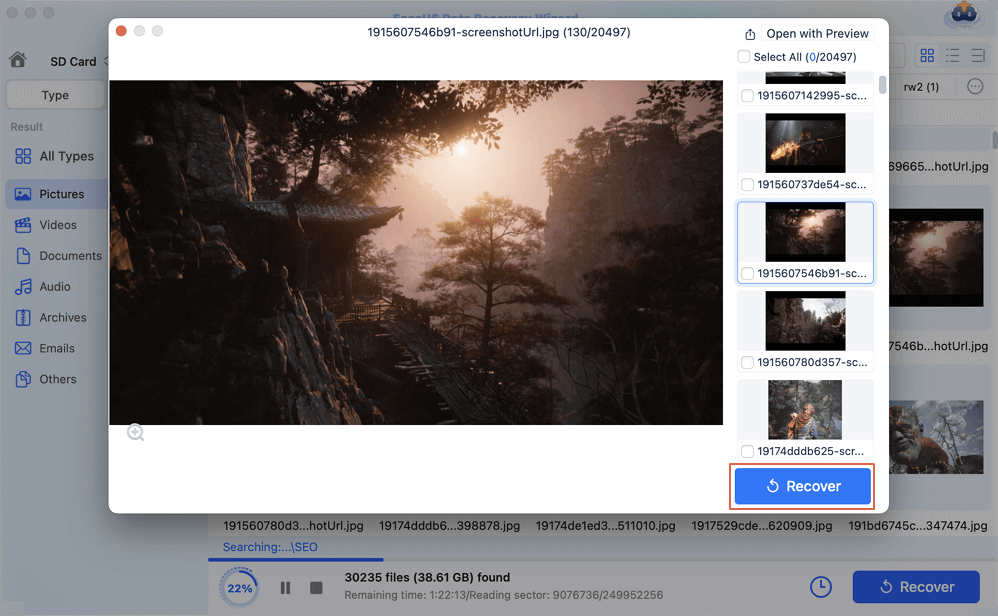
Step 3. Preview and recover data
Preview the SD card data and select the wanted files. Then, click the "Recover" button. Don't save the recoverable files to the SD card itself in case of data overwriting.
You can watch this video tutorial instead and follow suit.
- 00:27 Why Your Files Are Gone on Your SD Card
- 00:58 Powerful SD Card Data Recovery Software Introduction
- 02:40 Step-by-Step Guide on How to Perform SD Card Recovery
EaseUS Mac file recovery software offers a free version that lets users recover up to 2GB of data. If your missing files are small, such as documents, you can use this free data recovery software for Mac to restore them.
Here are some reviews from EaseUS' customers:
| 🗒️Reviews |
|
If you found this Mac SD card recovery tool helpful, share it with your friends on Twitter, Facebook, or Instagram! Continue checking the following methods to recover deleted files from SD cards on a Mac for free.
How to Recover Deleted Files from SD Card Using Open-source Software
| Recommended Rate | Highlights |
| ⭐⭐⭐ | Best for corrupted SD cards, recovers lost partitions, and rebuilds the partition table. |
Besides professional SD card data recovery tools with a graphical user interface, like EaseUS Data Recovery Wizard for Mac, there are also command-line open-source recovery tools, such as TestDisk and PhotoRec.
1️⃣TestDisk: Recover SD Card on Mac for Free
TestDisk is a free and open-source file recovery software application created by Christophe Grenier. Its main purpose is to recover lost partitions and fix boot issues. But it can be used to recover deleted files. Follow the steps here:

Step 1. Open Terminal on your Mac. Type the following command and hit Enter:
Step 2. Choose "No Log" and press Enter.
Step 3. Now, choose the hard disk (SD card) from which you want to recover data and tap on Enter again. You can hit P to select the partition you want to scan.
Step 4. Press "Enter" after selecting "EFI GPT" for a newer Apple Mac model or Mac for an older Mac.
Step 5. Choose "Analyze" and press "Enter" to launch a Quick Scan.
Step 6. Now, you will see a list of missing files. Click "C" to copy, then pick the destination by hitting "Y.
| 👍Pros: | ❎Cons: |
|
|
Using TestDisk can recover your file, but it is a time-consuming process. To restore lost files from an SD card ASAP, try EaseUS Data Recovery Wizard for Mac:
2️⃣Recover Deleted Files from SD Card on Mac with PhotoRec
PhotoRec is a free digital photo recovery tool. It specializes in recovering lost images from hard drives, memory cards, USB flash drives, CD-ROMs, and other storage devices.

You can try this tool to recover a formatted SD card on a Mac for free like this:
Step 1. Open Terminal, type the following command, and hit Enter. PhotoRec will start scanning automatically.
Step 2. Choose the device from which you want to recover lost data. Here, you need to choose your SD card. Next, you need to identify the file structure used by the device.
Step 3. Now, choose a folder where your recovered files will be saved. Then, PhotoRec will start searching for your files. When the scanning is done, you will see all the recovered files stored at the location you chose.
| 👍Pros: | ❎Cons: |
|
|
If you find this post helpful, share it on your Twitter, Facebook, and Instagram to help more friends.
Why SD Card Data Gets Lost? Check Common Causes
SD cards are commonly used in digital cameras, Android phones, dashcams, and video players to store important files. However, despite their portability and ease of use, SD cards are prone to data loss due to a variety of factors, such as accidental deletion, accidentally formatted SD card, file system corruption, SD card turned into RAW, physical damage, etc.
Files can be lost or deleted from your SD card, but in most cases, it 's not impossible to restore the lost files from an SD card. Here are the most common reasons Mac users lose data from SD cards — check the root cause of the issue, as it determines which recovery solutions will be most effective in your case.
| SD Card Data Loss: Common Causes | Explanations | How to Recover SD Card Files | Success Rate |
| Accidental Deletion | SD card files are deleted by mistake. |
1. Restore from the Mac Trash folder |
✨High |
| Hidden or Missing Files | SD card files are hidden by a virus or system error. |
1. Unhide files in Mac Finder (Cmd + Shift + .) |
✨High |
| Corrupted SD Card |
Logical file system errors, bad sectors, abrupt ejection, or electrical damage. |
1. Run First Aid to repair the corrupted SD card |
✨High |
| Formatted SD Card |
Reformatting erases all data and resets the file system- unformatting the SD card only works when it has not been overwritten. |
1. Restore from Time Machine (with backups) |
Medium |
| Physical Damage | The SD card has been bent, cracked, exposed to water, or has worn-out connectors. | 1. Recover from cloud backups 2. Contact data recovery services (no backup) |
❗Low |
Here's an infographic that can help you learn better.
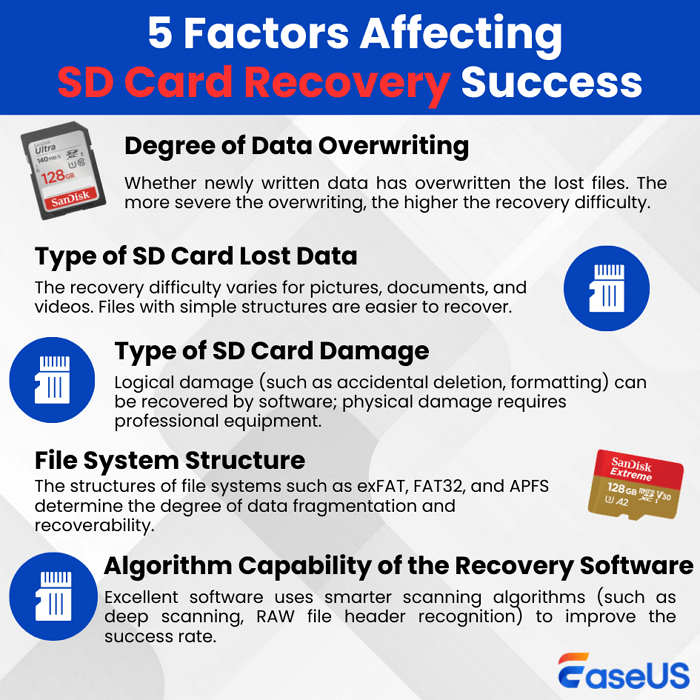
So, it's possible to recover deleted files from the SD card as long as no new data is written to it; the original data remains intact and recoverable. We'll discuss the 5 best SD card recovery methods on Mac in the next part. Don't forget to share this post to help more people learn how to recover deleted files from an SD card on a Mac!
Mac SD Card Data Recovery Tips
If you don't want to completely lose your hundreds or thousands of pictures and raw footage, you need to take the following steps immediately after this problem occurs.
- 🚫Stop using the SD card instantly. If you accidentally delete your SD card while using your digital camera, stop taking photos and videos immediately. This is because newly written data will overwrite the original deleted files, preventing the data from being recovered.
- 💽Remove the SD card from the device. Remove the SD card from your camera or other device to prevent new data from being written. Keep in mind that the less you use the memory card, the higher the chance you get data back from the SD card.
- ✅Recover deleted files from the SD card properly. First, connect the SD card to your Mac with a legitimate card reader. Then, follow the methods in this tutorial to restore lost files. If the data is permanently lost, you should use specialized SD card recovery software for Mac to recover it.
Tips to Prevent Future SD Card Data Loss
There are many reasons for SD card file loss; here are some common causes. Read on.
- 🛠️Accidentally formatted SD card: You may have formatted your SD card by accident because you are using the wrong card.
- 😞Unintentionally deleted files: You may also have dragged your files to the Trash and then emptied the Trash bin.
- 🗃️Physically damaged SD card: Your SD card is damaged due to wear and tear or external forces.
- 🦠 Unpredictable malware infection: Your device may be attacked by a virus or some unknown malware, so your critical files are gone.
SD Card Recovery Principle and Glossary
- Data Storage: SD cards use flash memory, in which cells store binary data. The file system organizes data into directories and files, each with associated metadata. Data is allocated to memory blocks with unique addresses.
- Deletion & Data Retention: Deleting a file marks its space as available; the data remains until it is overwritten. The file system removes the reference, but the actual data remains, enabling recovery.
- Recovery Software: Recovery software scans for deleted data traces and analyzes file system metadata to reconstruct files. Advanced tools use file-type signatures to improve recovery.
Common SD Card Data Loss Scenarios on Mac
- 1. Accidentally Deleted Files: Deleted files can often be recovered if they have not been overwritten.
- 2. Formatted SD Card: Even after formatting, data can still be recovered using professional tools.
- 3. SD Card Not Showing on Mac: Try reconnecting the SD card or using Disk Utility before attempting recovery.
- 4. Corrupted SD Card: Use Disk Utility to repair the card, then perform data recovery.
Utilize the unique SD card data protection feature of EaseUS Data Recovery Wizard for Mac to safeguard your files and ensure their integrity. It keeps your valuable data protected from accidental deletion. EaseUS Data Recovery Wizard for Mac maintains a detailed record of protected files when they are deleted, enabling their recovery later. To retrieve the data, check the 'Protected Files' section in the interface, select the desired file from the list, and then recover it.
SD Card Data Recovery Mac FAQs
If you still have questions about Mac SD card data recovery, you can find the answers below.
1. Can I recover deleted photos from an SD card on Mac?
Yes, of course, it is possible to restore deleted pictures from the SD card on a Mac, but you need to do so immediately to avoid overwriting them. To begin, stop accessing the SD card immediately. Next, connect the SD card to the Mac and use your preferred SD card recovery software, such as EaseUS Data Recovery Wizard. After scanning the SD card, you will find the pictures and save them to the Mac's internal hard drive or an external storage device, not the same SD card again, since it now contains new pictures after the pictures were deleted.
2. How do I recover a formatted SD card on Mac?
The process of recovering files from a formatted SD card using a Mac is much the same as recovering deleted files. The files are generally present on the formatted card until they are replaced with new ones. The first step is to stop using the formatted card immediately. Professional data recovery software will be required for the process. The software may be EaseUS Data Recovery Wizard or PhotoRec. The formatted SD card needs to be connected to the Mac, and the software needs to be opened. The software needs to be directed towards scanning the formatted card 'Deep' or 'Full'. The scan is performed based on possible markers of deleted files. After scanning, the files are viewed, selected, and saved on a different drive or Mac drive. The chances of successfully retrieving the file depend on whether any new data has been written to the drive since it was formatted.
3. What if my Mac cannot read the SD card?
If your Mac does not recognize your SD card, first try basic troubleshooting, such as cleaning the card, using another USB adapter/card reader, or switching cards. If your SD card is not recognized by your Mac, even after trying all these steps, and it also isn't recognized by Disk Utility, there may be something wrong with your SD card, such as a corrupted or damaged file system. In such a scenario, you should not format your SD card.
4. Is it safe to use SD card recovery software on Mac?
Yes, running reputable SD card recovery software on a Mac is normally safe. Make sure to download the application from the developer's official website to avoid malware. All of these tools are read-only during a scan; they do not change or write new data to your SD card, keeping your deleted files safe from overwriting. Most risks arise when you save recovered files back to the same card, permanently erasing other recoverable data.
5. Can I recover files from a corrupted SD card without software?
Recovering files from a corrupted SD card on a Mac using software that doesn't specifically handle corrupted storage devices seems impossible. At the initial level, some remedies, such as using the "First Aid" tool in Disk Utility, may help repair file system errors and make the SD card usable again. Nevertheless, due to serious corruption, the use of professional software seems inevitable. For damaged hardware, the only viable option is to consult the professionals.
6. Where are deleted SD card files stored on Mac?
Deleted files from the SD card are not retained on your Mac until you copy them there. Once you delete or format your card, the deleted files will be retained on that card until it is rewritten with new information. The Trash on your Mac contains deleted files from your Mac or from an external drive connected to it. Thus, it is important that you scan your actual card with data recovery software if you want it back.
7. Can I recover files from an SD card after formatting using Time Machine?
No, you cannot recover files from a formatted SD card using Time Machine unless you had previously backed up its contents to your Time Machine drive before formatting. Time Machine only backs up files from drives you have explicitly included in its settings, which usually do not include removable media such as SD cards by default. Thus, to recover data after formatting, you will need to use dedicated SD card data recovery software that can scan the card itself.
Was This Page Helpful?

Jaden is one of the editors of EaseUS, who focuses on topics concerning PCs and Mac data recovery. Jaden is committed to enhancing professional IT knowledge and writing abilities. She is always keen on new and intelligent products.

Daisy is the Senior editor of the writing team for EaseUS. She has been working at EaseUS for over ten years, starting as a technical writer and moving on to being a team leader of the content group. As a professional author for over ten years, she writes a lot to help people overcome their tech troubles.
-
EaseUS Data Recovery Wizard is a powerful system recovery software, designed to enable you to recover files you’ve deleted accidentally, potentially lost to malware or an entire hard drive partition.
Read More -
EaseUS Data Recovery Wizard is the best we have seen. It's far from perfect, partly because today's advanced disk technology makes data-recovery more difficult than it was with the simpler technology of the past.
Read More -
EaseUS Data Recovery Wizard Pro has a reputation as one of the best data recovery software programs on the market. It comes with a selection of advanced features, including partition recovery, formatted drive restoration, and corrupted file repair.
Read More
Related Articles
-
How to Recover Data from Micro SD Card [Free Software]
![author icon]() Tracy King/Sep 15, 2026
Tracy King/Sep 15, 2026 -
Recover Lost Files After Error 'Card Not Initialized'
![author icon]() Jaden/Sep 15, 2026
Jaden/Sep 15, 2026 -
How to Recover Deleted Files on macOS Golden Gate | NEW
![author icon]() Dany/Sep 20, 2026
Dany/Sep 20, 2026 -
How to Recover ARW Files Mac | Sony RAW Image Recovery
![author icon]() Dany/Sep 20, 2026
Dany/Sep 20, 2026
 Tracy King/Sep 15, 2026
  Dany/Sep 20, 2026

