





-
![]()
-
![]() How to Recover Files Too Large for Recycle Bin in Windows 11/10
How to Recover Files Too Large for Recycle Bin in Windows 11/10 October 14,2026
 6 min read
 -
![]()
-
![]() Top 8 Best Professional Data Recovery Software [2026 Update]October 14,20266 min read
Top 8 Best Professional Data Recovery Software [2026 Update]October 14,20266 min read -
![]()
-
![]() Recycle Bin Recovery Software: 10 Best Tools to Recover Deleted FilesOctober 14,20266 min read
Recycle Bin Recovery Software: 10 Best Tools to Recover Deleted FilesOctober 14,20266 min read -
![]()
-
![]() Free Download MySQL Recovery Tool to Recover MySQL Database | 2026 FreeOctober 14,20266 min read
Free Download MySQL Recovery Tool to Recover MySQL Database | 2026 FreeOctober 14,20266 min read -
![]()
-
![]() Recover Lost Christmas Photos & Videos (2026 Complete Guide)October 14,20266 min read
Recover Lost Christmas Photos & Videos (2026 Complete Guide)October 14,20266 min read
Page Table of Contents
There are times when you want to recover Ext2/Ext3 data in Windows 11/10/8/7. But Windows can't read Linux partitions without third-party software. Then, you need EaseUS Data Recovery Wizard to do you a favor. In this Ext2/Ext3 data recovery guide, we'll walk you through the two parts:
PAGE CONTENT:
Is Ext2/Ext3 Data Recovery Possible❓
Can a deleted folder on a 2TB Linux Ext3 partition be recovered? The drive is a 2TB SATA Western Digital WD20EFRX. And the folder was accidentally deleted. I tried TestDisk, but no luck. Is there any software you guys can recommend for recovering the folder? from Reddit
Here are a couple of commonplace scenarios in which Linux users tend to lose data.
- ⚠️Accidental deletion. It's the most common reason on every file system; users may click the Delete button by mistake and remove some important files.
- ⚠️Disk formatting. Some users don't know that formatting the partition or disk will erase all the data on it.
- ⚠️Emptied the Recycle Bin. On Linux, the Trash is a hidden folder; emptying it doesn't overwrite data but severs the file system's link, making recovery dependent on specialized software.
- ⚠️Virus infection causes drive inaccessibility. Malicious software, especially ransomware, can corrupt a partition table or encrypt files on the Ext2/Ext3 partition.
- ⚠️Hard drive corrupted, with too many bad sectors to open. As a drive fails physically, read/write heads can no longer access data.
I believe that we have all experienced at least one of the data loss situations and eagerly wanted to find a data recovery way to get lost files back. The truth is, with the popularity of Windows 7 and the recent Windows 11, fewer and fewer people are still using the Linux operating system. Some of them are likely to use a dual-boot system, for example, Windows 7 and Linux or Windows 10 and Linux.
Ext2/Ext3 file recovery is often possible because deletion only removes the inode's pointer to the data blocks, marking that disk space as available for reuse. There are dozens of dependable data recovery software in the market, but not every tool supports the Linux operating system. That's why Linux users are so afraid of deleting some critical files by mistake, or what's worse, formatting the disk and erasing all data on it. Is it the end of the day for Linux users who lost files? Not yet. As long as you have a Windows computer nearby, it's possible to recover data from a Linux partition in Windows with the help of EaseUS Data Recovery Wizard.
How to Recover Data from Ext2/Ext3 on Windows
Besides Ext2/Ext3 data recovery, sometimes people tend to mistakenly delete a hard drive partition using Disk Management or third-party partition manager software, turning a partition into empty unallocated space. You can find EaseUS Data Recovery Wizard very helpful for both data recovery and partition recovery.
First, download and install the EaseUS Data Recovery Wizard on your computer or laptop that is running Windows 11/10/8.1/8/7/XP/Vista. Then, safely remove the Linux hard drive from your computer and then correctly connect it to your Windows computer. Neglect this step if it's a dual-boot system. You don't need to take out the Linux hard drive.
Next, run EaseUS Data Recovery Wizard in Windows, and follow the three-step guide to recovering data from the Linux Ext2/Ext3 partition. By the way, it also can help you recover deleted files on Ext4.
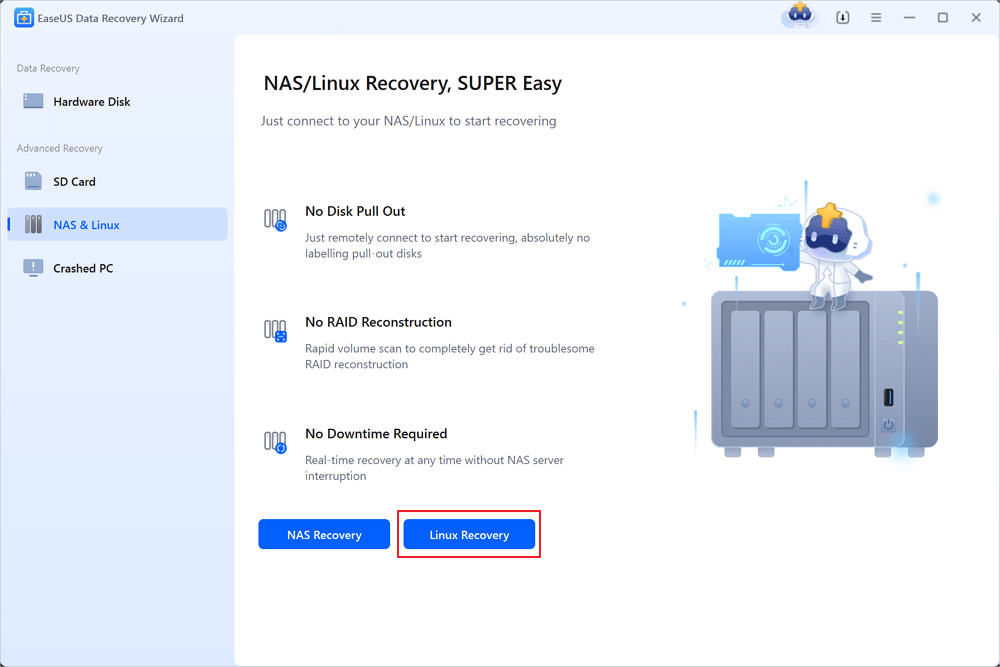
Step 1. Install and Launch EaseUS Data Recovery Wizard on your Windows PC. Choose "NAS & Linux" on the left panel and click "Linux Recovery". This software will detect your IP and Port automatically. You need to input the user name and password. If the IP address or Port is not right, you can correct it manually.
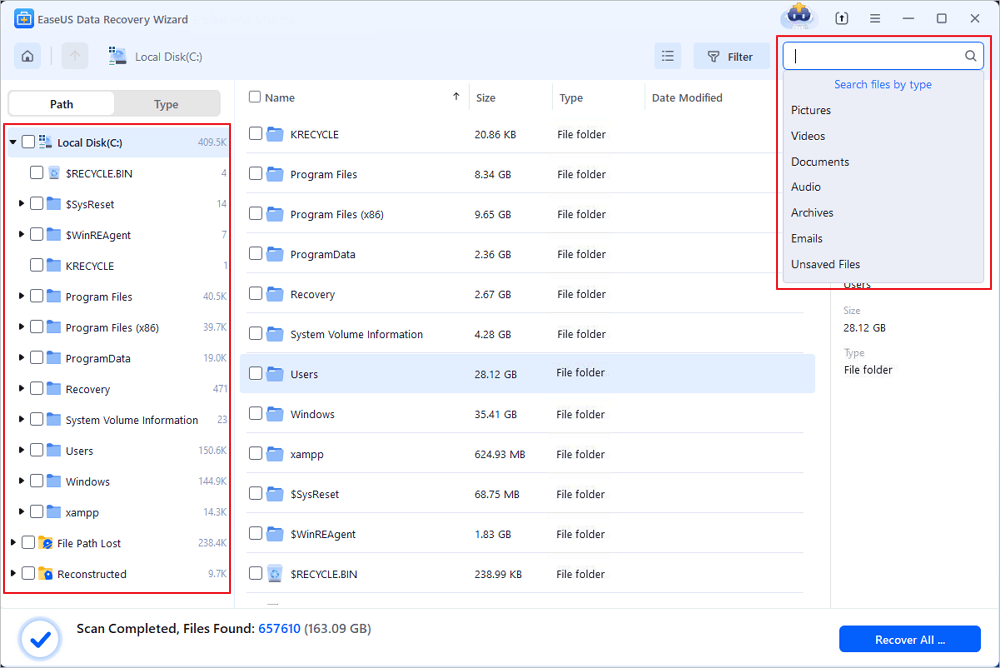
Step 2. After successfully connecting to your Linux device, select the deleted files you want to recover. You can click on the filter to display only the file types you want. If you remember the file name, you can also search in the search box, which is the fastest way to find the target file.
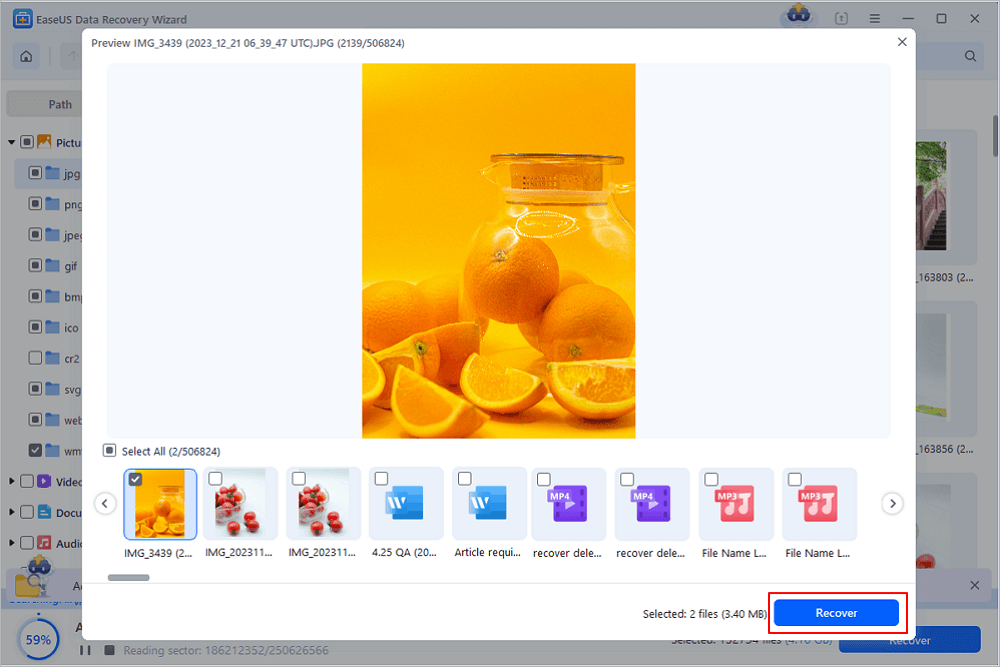
Step 3. You can preview the scanned files first. Then, select the target data and click the "Recover" button to restore lost files in Linux.
⚠️Caution: Saving the file(s) to the partition or drive from where you are recovering data may result in data overwriting, which will result in permanent data loss!
| Criteria | 💡EaseUS Ext2/Ext3 Data Recovery Highlights |
| Supported File Systems | Ext2, Ext3, Ext4, FAT32, NTFS, exFAT |
| Recovery Scenarios | Deleted files, formatted drives, partition loss, corruption, system crash |
| Ease of Use | User-friendly interface with step-by-step recovery wizard |
| Data Security | Read-only recovery, ensuring no damage to original data |
| Performance | Fast scanning speed with advanced algorithms for deep scan |
| Preview Function | Preview recoverable files (documents, photos, videos, etc.) before restoring |
| Cross-Platform | Supports Linux Ext2/Ext3 drives on Windows and Mac environments |
| Free Trial | Free trial version available to scan and preview lost files before purchase |
EaseUS is such a reliable Linux Ext2/3 hard drive recovery tool, and you can check what people say about this fantastic recovery tool:
|
🔍A review from Trustpilot: Solid & Stable. My review in point form:
|
Many PC users have proven the efficacy of the tool. If you are interested in the files recovery, share it on Facebook, Twitter, Instagram, and other social media platforms!

What's Ext2 or Ext3 File System❓
The Ext2 or second extended file system is a file system for the Linux kernel. It is initially designed as a replacement for the extended file system. It is fast enough that it is used as the benchmarking standard. Its main drawback is that it is not a journaling file system. Its successor, Ext3, is a journal file system and is almost completely compatible with Ext2.
The Ext3 or third extended file system is a journal file system that is coming into increasing use among users of the Linux operating system. It is the default file system for the Red Hat, Fedora, and Debian Linux distributions. Why migrate from Ext2 to Ext3? Four main reasons: availability, data integrity, speed, and easy transition.
Although its performance and scalability are less attractive than many of its competitors such as ReiserFS and XFS it does have the significant advantage in that it allows in-place upgrades from the popular Ext2 file system without having to backup and restore data.
The Ext3 file system adds, over its predecessor:
- A journal
- H-tree (hashed tree) directory indexes
- In-directory file types
Without these, any Ext3 file system is also a valid Ext2 file system. This has allowed well-tested and mature file system maintenance utilities (like fsck) for maintaining and repairing Ext2 file systems to also be used with Ext3 without major changes. It also makes conversion between the two file systems (both forward to Ext3 and backward to Ext2) straightforward.
There are three levels of journaling available in the Linux implementation of Ext3:
- Journal, where both metadata and file contents are written before being committed to the main file system. This improves reliability at a performance penalty because all data has to be written twice.
- Writeback, where metadata is journaled but file contents are not. This is faster but introduces the hazard of out-of-order writes where, for example, files being appended to during a crash may gain a tail of garbage on the next mount.
- Ordered, just like writeback, but file contents are forcedly written into the origins files after its associated metadata, which is an acceptable compromise between reliability and performance, so this is the default.
Conclusion
We have rounded up two third-party utilities to perform Linux partition recovery and Ext2/Ext3 data recovery. EaseUS Linux data recovery can recover the files you just accidentally deleted. It's also capable of restoring corrupted files and can recover the information located on an inaccessible drive. You can always retrieve EXT data with ease.
Linux Ext2/Ext3 Recovery FAQs
If you still have questions, you can read the frequently asked questions:
How do I fix a corrupted partition table?
To start the partition table repair process:
Step 1. Right-click on "This PC/My Computer", select "Manage" and enter Disk Management.
Step 2. Right-click on the disk which is showing as "Not Initialized" and select "Initialize Disk".
Step 3. Choose the desired partition style for the selected disk - MBR or GPT, click "OK" to confirm.
Can I recover data from deleted partition?
Typically when a partition is deleted, the system removes its assignment for that location on the hard drive, allowing that section of memory to be overwritten as needed. But as long as that section of the disk remains untouched, you still have the opportunity to restore the partition using a recovery utility.
Download and install the EaseUS hard drive recovery software on your computer and follow the steps below:
Step 1. Launch EaseUS Data Recovery Wizard and scan Ext2 or Ext3 drive.
Step 2. Preview found Ext partition files from the scan result.
Step 3. Recover found data from Ext2 or Ext3 drive.
How can I recover my lost partition for free?
Recovering Linux partition in Windows:
Step 1. Run EaseUS Partition Recovery on your PC. Select the disk or device where you lost partition(s), click "Scan" to continue.
Step 2. Let the program scan the selected disk and find the lost partition(s).
Step 3. Double-click on the partition which is marked as "Lost" with "Good" recoverability.
Step 4. Click "Recover Now" to finish the partition recovery process.
Can Windows 10 read ext4?
Ext4 or Extended Files System version 4 is the file system for Linux. While Linux supports NTFS, Windows 10 doesn't offer any support for Ext4. So the answer to the question can Windows 10 read ext4 is – No! But you can use third-party software to read ext4 on Windows 10.
Was this page helpful?




 Why Trust EaseUS
 Editor Reviews

20+
Years of experience

160+
Countries and regions

72 Million+
Downloads

4.9 +
Trustpilot Score





