





-
![]()
-
![]() How to Recover Permanently Deleted Files in Windows 10 Without Software
How to Recover Permanently Deleted Files in Windows 10 Without Software September 20,2026
 6 min read
 -
![]() Top 3 Ways to Recover Deleted HTML Files on Windows 11/10/8/7September 20,20266 min read
Top 3 Ways to Recover Deleted HTML Files on Windows 11/10/8/7September 20,20266 min read -
![]()
-
![]()
-
![]() How to Recover Deleted YouTube Videos with or Without LinkSeptember 20,20266 min read
How to Recover Deleted YouTube Videos with or Without LinkSeptember 20,20266 min read -
![]() Recover Deleted Files on Kali Linux [Kali Linux Restore]September 20,20266 min read
Recover Deleted Files on Kali Linux [Kali Linux Restore]September 20,20266 min read -
![]() How to Recover Permanently Deleted Files in Windows 11 Using CMD [SOLVED]September 20,20266 min read
How to Recover Permanently Deleted Files in Windows 11 Using CMD [SOLVED]September 20,20266 min read -
![]()
-
![]()
Page Table of Contents
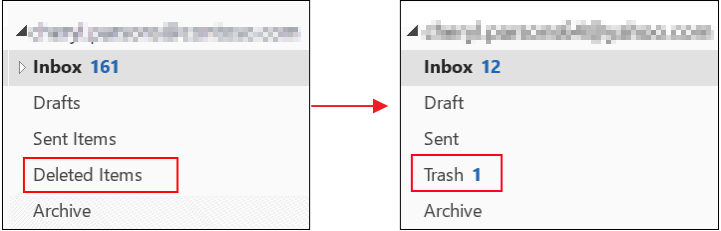
How to recover deleted emails on Windows:
1. Pull up the Trash folder and find the email(s) you're looking for.
2. Right-click the emails and highlight "Move To", then send them to the Inbox or another folder of your choice.
3. You can also use the "Restore" button that appears to automatically send them to your Inbox.
The following table shows the brief outlines on how to retrieve deleted emails from Outlook, Gmail, Yahoo, and Hotmail. Click to see the full guides.
How to Recover Deleted Emails Within/After 30 Days
"Hey there, do you know how to recover deleted emails in Outlook? I happened to clean up the Inbox folder, and all of the received emails were all gone. How can I restore them? Please help me!"
Have you ever accidentally deleted important email messages or cleaned up the whole Inbox folder by mistake? If so, don't worry about losing your emails. A few practical methods are provided in this article to help you retrieve deleted emails or even recover permanently deleted emails from Outlook, Gmail, Hotmail, Yahoo, etc. Follow along to recover your deleted emails.
- Notice:
- Usually, the email trash folder only keeps deleted emails for 30 days. You can find the deleted emails from the trash within this period. After 30 days, all deleted emails will permanently disappear. But, if you have downloaded the .pst or saved the files to a local drive on your PC, you may have a chance to retrieve deleted emails with one of the best data recovery software.
How to Recover Deleted Emails Within 30 Days
Nearly all email apps or programs have a trash folder that works like the Recycle Bin on the PC to save or temporarily save deleted or unwanted email files. Therefore, if you happen to delete emails in Outlook, Gmail, Hotmail, or Yahoo, you can follow the methods below to recover deleted email files from the trash folder:
| Effective Solutions | Step-by-step Troubleshooting |
|---|---|
| 1. Recover Outlook emails | Select "Deleted items" > select "Recover deleted items" > choose emails and recover...Full steps |
| 2. Recover Gmail emails | Sign in to Gmail > click "Settings" > click "Labels" > click "Show trash"...Full steps |
| 3. Recover Yahoo emails | Log in to Yahoo! Mail > click "Trash" > open the messages there > click "Move"...Full steps |
| 4. Recover Hotmail emails | Sign in to hotmail > click "Deleted" > click "Recover deleted messages"...Full steps |
1. How to Recover Deleted Emails from Outlook
When you delete an email message, contact, or calendar item, it's moved to the Deleted Items folder. If you don't see the email in the Deleted Items folder, check the Junk Email folder.
Retrieve emails that are still in the Deleted Items or Junk Email folder
Step 1. Select the "Deleted Items" folder in the left pane of the Outlook.com window.
Step 2. At the top of the window, select "Recover deleted items".
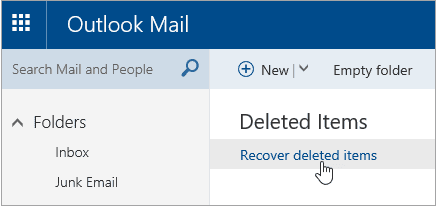
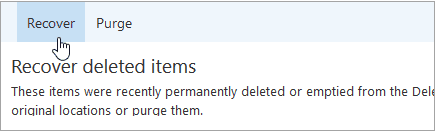
Step 3. A dialog box will open with a list of deleted items. Choose the items or emails that you want to recover and click "Recover" > "OK".
Junk Email folder: Select the message you want to recover and select "Not junk".
Recover emails that have been removed from your Deleted Items folder
If you can't find an item in the Deleted Items folder, the next place to look is the Recoverable Items folder.
Step 1. In the left pane, select the "Deleted Items folder".
Step 2. At the top of the message list, select "Recover items deleted from this folder".

Step 3. Select the items you want to recover and select "Restore". Note: You can only select all if all messages are visible. This is to prevent accidental actions on messages you cannot see.
2. How to Retrieve Deleted Emails from Gmail
Step 1. Open your Gmail account and sign in > click on "Settings" > click on "Labels".
Step 2. Click on "Show trash". This will show your trash folder on the left pane of the Gmail window.
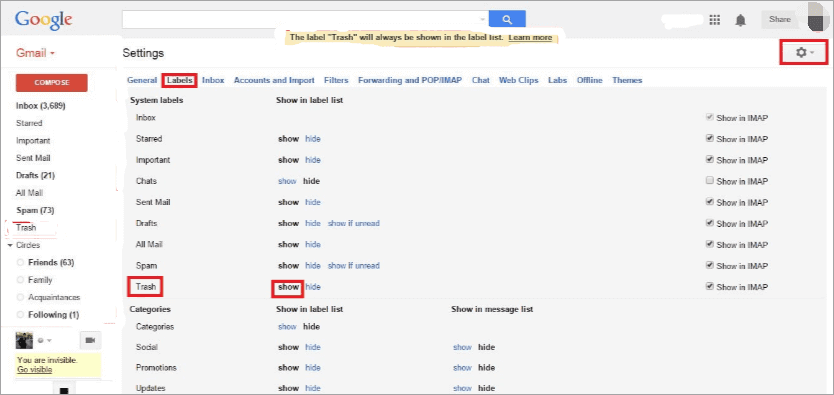
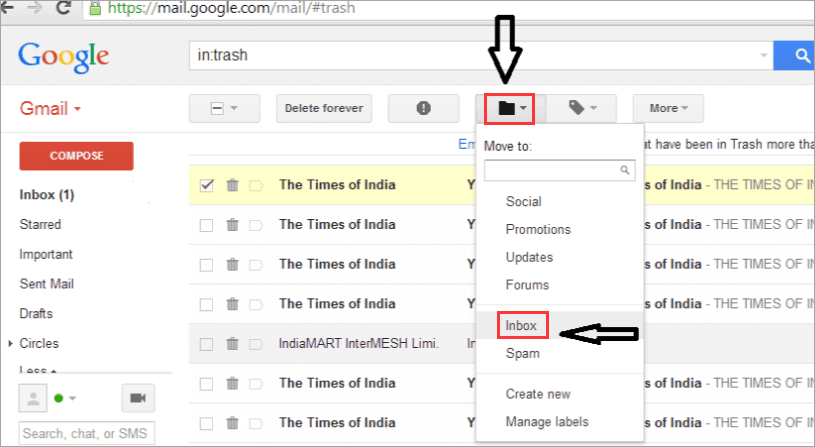
Step 3. Now, you can see all deleted email files in the Trash folder. Select or check the wanted email and files, click on the mail icon at the top of the window with "Move To" words to move your deleted emails to the Inbox.
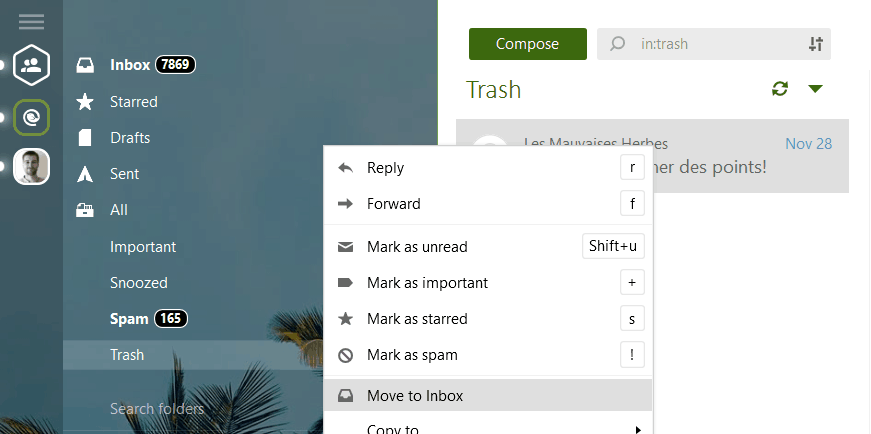
This method also works if you use an email client like Mailbird.
If you can't find the email in the Trash folder, this may be because you have emptied the Trash folder or hit the "Delete Forever" button on a message that was already in the Trash folder. If this has happened, you can send a request to the Gmail Support Team to ask it to recover these deleted messages and emails in your Gmail account. But, don't expect too much; this approach usually fails.
3. How to Retrieve Deleted Emails from Yahoo
Step 1. Log in to Yahoo! Mail and go to the "Trash" folder.

Step 2. Open the desired message. Check any messages you want to undelete in the message list.
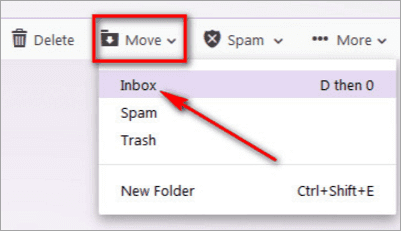
Step 3. Click "Move" in the Yahoo! Mail toolbar and select Inbox or another folder to recover the message.
Step 4. You can also drag and drop the email to any folder by pressing "DO".
It gets difficult if you don't know how to recover deleted emails from Yahoo after 30 days. And, it is impossible to recover permanently deleted Yahoo mails from the account without any backup. Thus, you should make a backup of Yahoo mails to retrieve lost emails when you need them.
4. How to Retrieve Deleted Emails from Hotmail
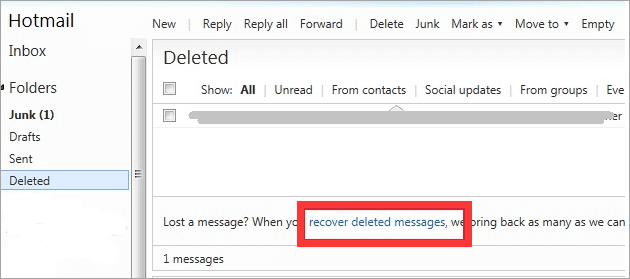
Step 1. Go to the Hotmail website and sign in with your Hotmail account.
Step 2. Click "Deleted" on the left pane of the Hotmail window. If you don't see it, scroll down to find it. The deleted folder is usually listed at the end of the left pane.
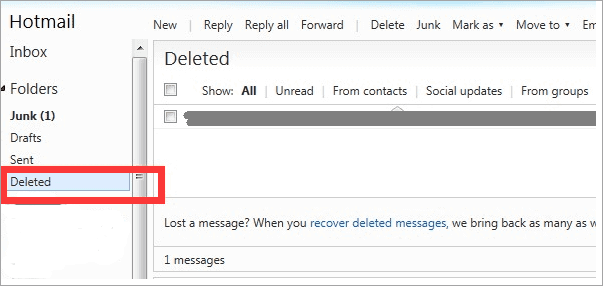
Step 3. Click "Recover deleted messages" to bring back deleted mail messages.
How to Retrieve Deleted Emails After 30 Days
Most email software or programs will only save deleted or temp email files in the trash for 30 days. After 30 days, the emails are permanently removed.
1. How to Recover Deleted Emails from Outlook After 30 Days
However, if you have downloaded the email database (.pst/.ost files) or saved received emails on a local drive of your PC, and then deleted them by mistake, don't worry. You may still have a chance to recover the permanently deleted emails with an email recovery tool.
EaseUS Data Recovery Wizard enables you to recover deleted emails in Outlook after 30 days from your local PC. It can Undelete files Windows 10 on both Windows and Mac due to accidental deletion, hard drive corruption or formatting, virus attack, system crash, OS re-installation/upgrade, and so on.
Note: EaseUS Data Recovery Wizard only supports Outlook email recovery on a local PC. If you are a Gmail, Hotmail, or Yahoo Mail user, you need to contact their customer service team for help.
Learn how to find your lost email files from the local drive of your computer below:
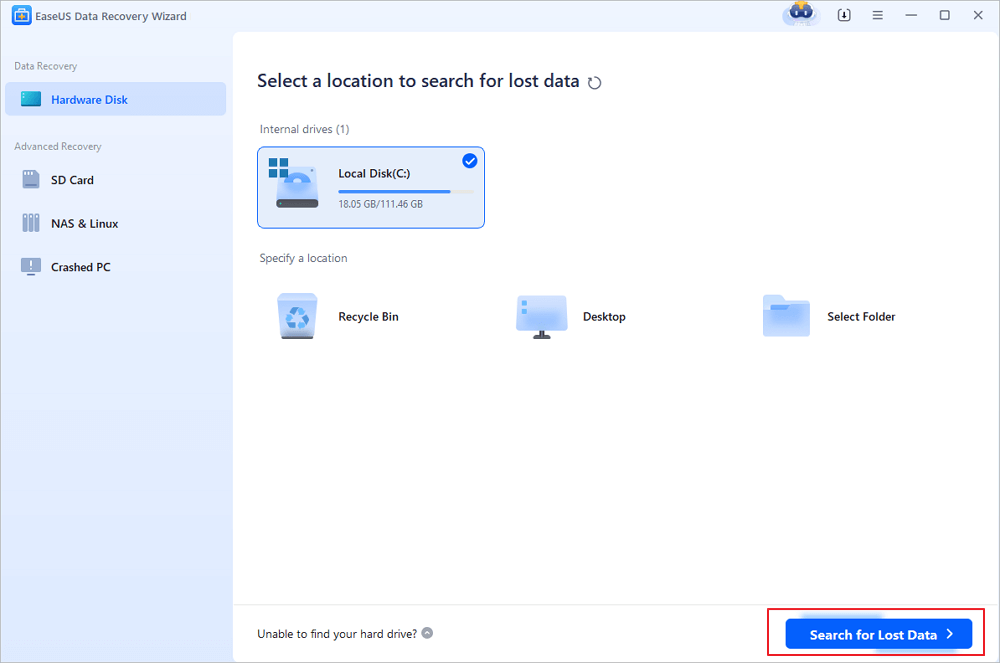
Step 1. Choose the drive or partition where you lost email files, and click "Search for Lost Data".
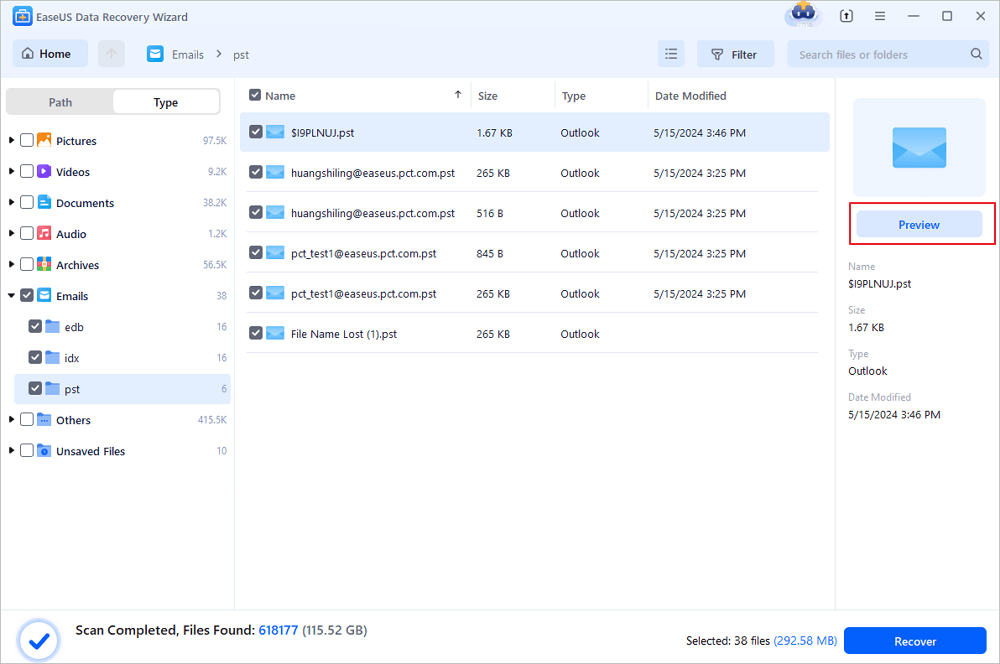
Step 2. The software will initiate a scanning process immediately. Wait patiently until the scanning process completes. To quickly locate the email files, click "Emails" in the left panel. Then, look for PST files or Outlook files in the file type list.
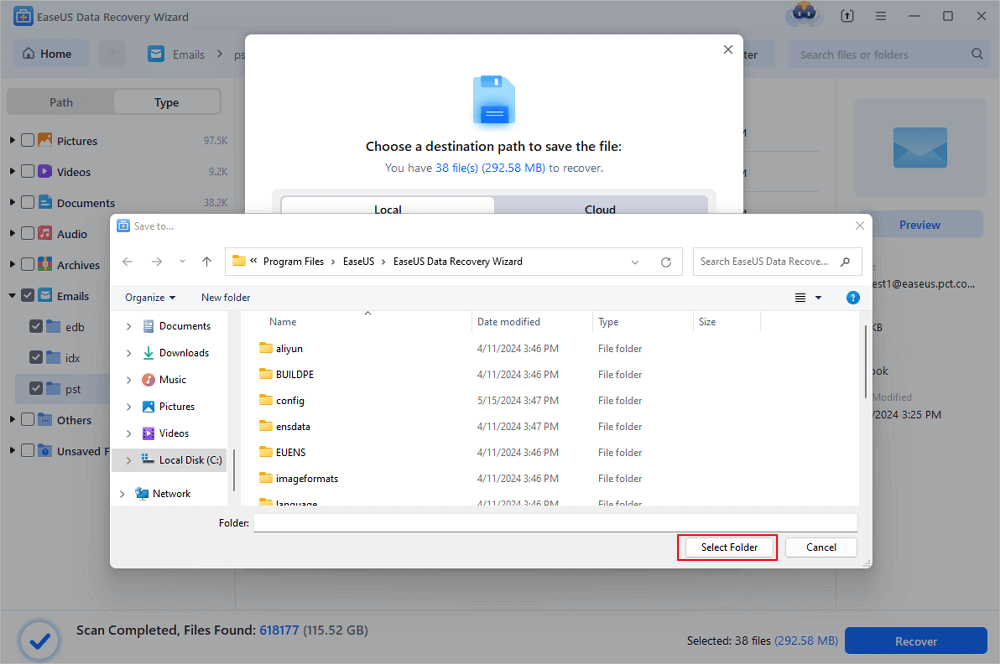
Step 3. Then, choose the desired email files and click "Recover". Save the files to another location instead of the original one. It is also advised to save your files to cloud storage to better avoid data loss.
In addition to email recovery, the EaseUS data recovery program also supports formatted recovery, deleted files recovery, Recycle Bin emptied data recovery, lost partition recovery, OS crash recovery, RAW partition recovery, etc.
2. How to Recover Deleted Emails From Gmail After 30 Days
If you need to recover a permanently deleted Gmail email after the 30-day period, Google offers a Gmail Message Recovery Tool. With it, you can recover emails that were lost due to server issues or other technical problems on Google's end.
Submit a manual request to recover an email you permanently deleted. Follow the steps outlined by Google, and hope for the best.

How to Retrieve Deleted Emails on iPad/iPhone
What if you are a mobile user? Data loss happens every day, and there's no exception of Emails. But you can easily restore deleted or lost emails on your iPhone or iPad with these solutions.
1. Recover Deleted Emails on iPhone/iPad with the Undo Feature
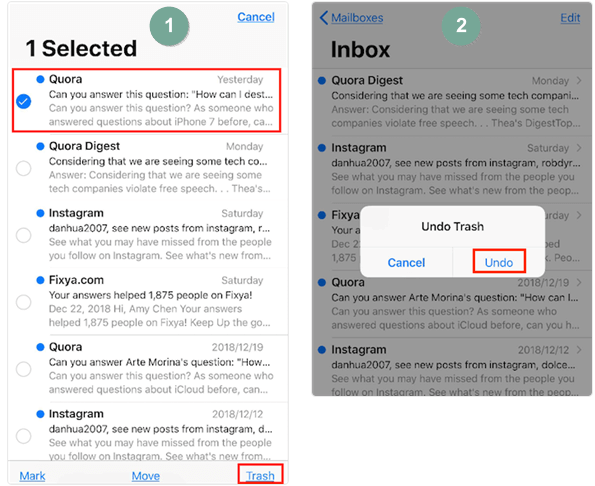
Step 1. On your iPhone or iPad, with running the Mail app, select an email and hit the trash button.
Step 2. Once you realize you deleted the wrong email, give your iPhone or iPad a quick (and gentle) shake immediately. Then you'll see a dialogue box saying like the picture shows. Tap "Undo" to reverse the previous delete action.
Step 3. Then, you'll see the deleted email has been back to the Inbox. But it says "This message has no content".
Step 4. Tap Inbox, or Mailboxes, or close the Mail app and reopen it, you'll see the recovered email right there.
2. Recover Deleted Emails on iPhone/iPad from Trash
If you realized you deleted Emails by accident immediately, then you can follow the steps below to restore deleted emails.
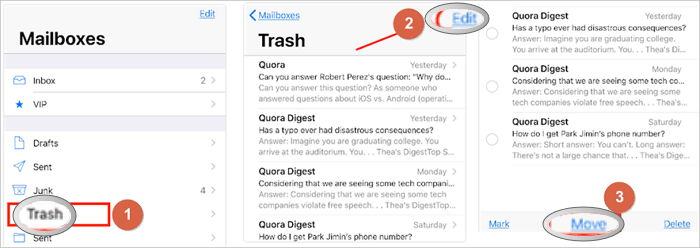
Step 1. On your iPhone or iPad, launch the Mail app.
Step 2. Tap on "Mailboxes".
Step 3. Select the "Trash" icon and tap it.
Step 4. Tap the "Edit" button.
Step 5. Select the Emails you want to recover and hit the "Move" button.
Step 6. Select the folder you want to move it to and check it afterward.
Conclusion
That's all bout recovering deleted emails within 30 days or after 30 days. You can get help from any of the solutions above. If you still have problems, contact us as soon as possible. We are glad to help.
How to Recover Deleted Emails FAQs
This part provides you with additional email recovery help. Read on to recover more emails.
1. Can you recover permanently deleted emails?
Yes. You can recover permanently deleted emails from Gmail with the steps below:
- Choose the drive or partition where you lost email files, and click Scan.
- Then, look for PST files or Outlook files in the file type list.
- Then, choose the desired email files and click Recover.
2. How can I find deleted emails?
- The easiest way to find deleted emails is using Trash.
- Go to your account Inbox or your email.
- Open the Trash folder.
- Select the deleted emails you wish to restore.
- Click the Move button to move the emails to your Inbox or another folder.
3. Can permanently deleted emails be recovered in Outlook?
The answer to this question depends on the email service that you are using. If you are using a web-based email service such as Gmail, then it is possible to recover permanently deleted emails.
However, it is impossible to recover permanently deleted emails if you use a desktop email client such as Microsoft Outlook. This is because when you delete an email in Outlook, it is permanently deleted from your computer's hard drive and cannot be recovered. While this may be frustrating, it is important to remember that you can always contact the sender of the email and ask them to resend it to you.
Was this page helpful?
-
Dany is an editor of EaseUS who lives and works in Chengdu, China. She focuses on writing articles about data recovery on Mac devices and PCs. She is devoted to improving her writing skills and enriching her professional knowledge. Dany also enjoys reading detective novels in her spare time. …

 Why Trust EaseUS
 Editor Reviews

20+
Years of experience

160+
Countries and regions

72 Million+
Downloads

4.9 +
Trustpilot Score






