





Partition recovery is a vital process that enables the restoration of deleted or lost partitions on hard drives and other storage devices. When partitions vanish due to accidents like formatting errors, malware attacks, or system failures, the data they contain seems lost.
Thus, to maximize the chance of recovering all your files, perform HDD partition recovery as soon as possible once you've deleted a partition.
However, even if you have created a new partition and put files in it, you still have the chance to recover your lost files following the paragraphs below.
Method 1. Recover Deleted/Lost Hard Drive Partition with Software
One common approach relies on specialized partition recovery software. Advanced programs support various file systems (FAT, NTFS, exFAT, etc.) and can reconstruct partition structures by tracing file system footprints.
For example, to recover your deleted partition on the external hard drive, EaseUS Data Recovery Wizard is a powerful partition recovery tool that you can use to recover lost or deleted partitions. This software is designed for HDD partition recovery. This partition recovery software has many highlights.
- It fully supports all Windows systems, allowing you to restore any lost data from the hard disk partition.
- It will help you recover NTFS partitions lost due to accidental deletion, corrupted partition table, power failure, and bad sectors.
- You can retrieve your precious files and partition them within minutes.
Download and run this partition recovery software to restore the lost partition.
Notice: It supports NTFS/exFAT/FAT32/BitLocker recovery of lost partitions, such as partition deletion, uninitialized disk, and unallocated space, as well as recovery of partitions that become RAW.
Step 1. Search for Lost Partitions
First, choose "Lost Partition Rescue" on the left and click "Start" to initiate the partition scan. Your disk will be displayed, including existing and lost partitions (marked as unallocated). Then click "Search for Lost Partition" to begin the scan.
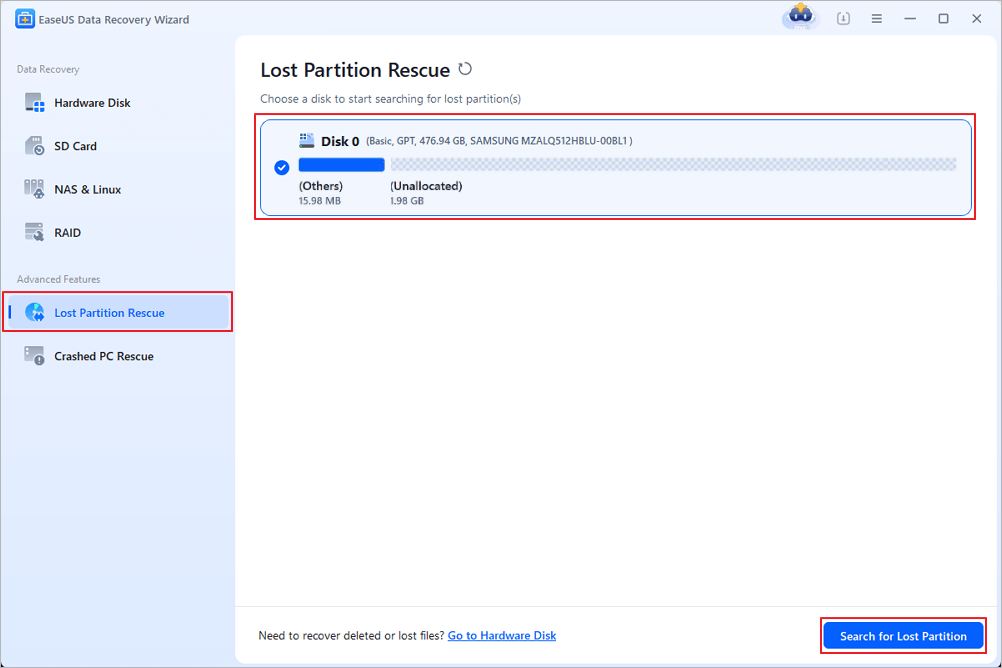
Step 2. Check Files in the Partition
Wait for the smart partition scanning. This process may take several minutes, depending on the severity of the partition loss. While waiting, you can move the cursor to the partition you want to view the files and data in it.
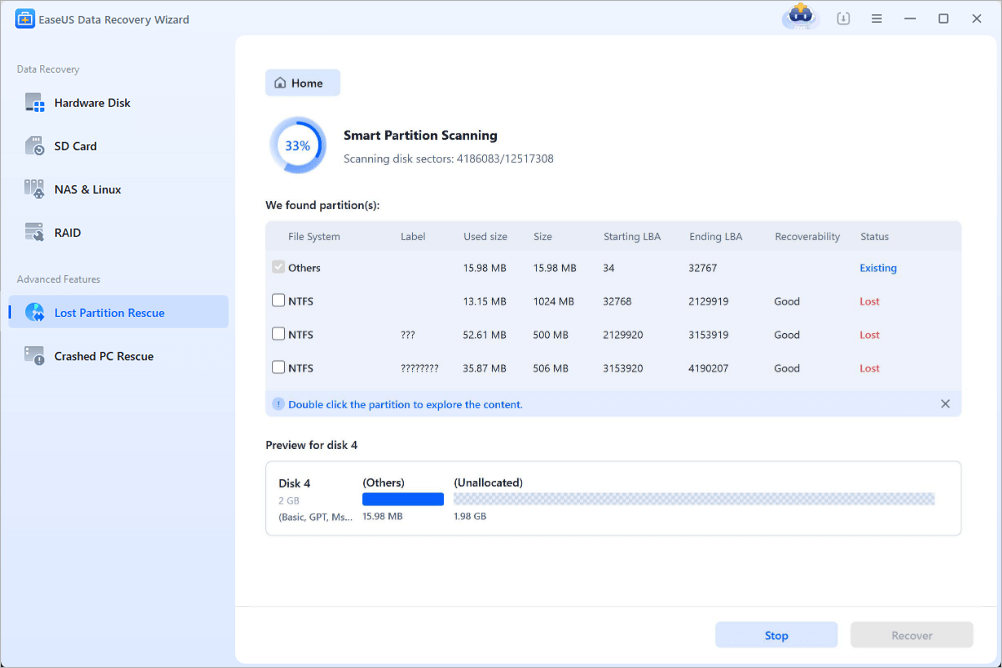
Step 3. Select and Restore the Partition
Select the partitions you want to recover from the list of lost partitions that have been scanned. Their corresponding information will also be displayed below. After selecting, click "Recover" to restore your disk partition settings.
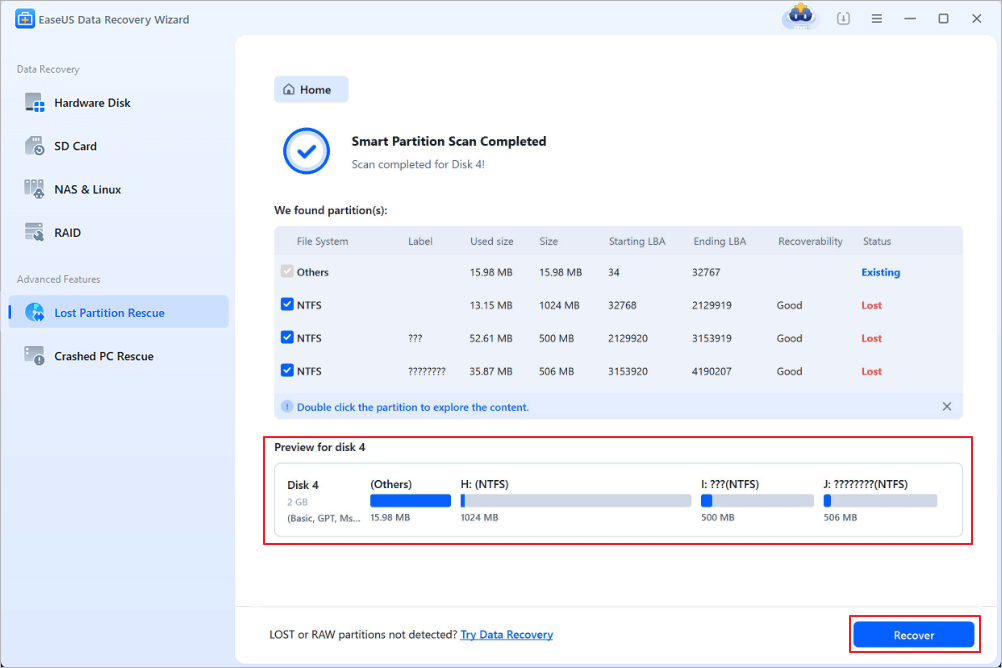
Many Windows 10/11 users have proved the efficacy of the tool. If you are interested in HDD partition recovery, share it on Facebook, Twitter, Instagram, and other social media platforms!
Method 2. How to Recover Deleted Files from Hard Disk Partition
EaseUS data recovery software will help you recover both the partition and the files on it. If you want to recover data from a deleted partition and create a new partition on the unallocated space by yourself, you can try another way to perform data recovery from lost partitions.
This tool will help you recover all the files and folders in the lost partition, namely from the unallocated space. However, unlike EaseUS Partition Recovery, it won't recover the partition for you.
Step 1. Select and scan the lost partition
Launch EaseUS Data Recovery Wizard, select "Lost Partition" and click "Search for Lost Data" to search for all the lost data from your lost or deleted partition. If there are many lost partitions, you can identify them through its partition size.
Note: Since the Windows system doesn't support the Linux file system, the Ext2 or Ext3 partition will be recognized as lost partition with no drive letter in the software. If you want to recover data from Ext2/Ext3 partition, you can follow these steps.
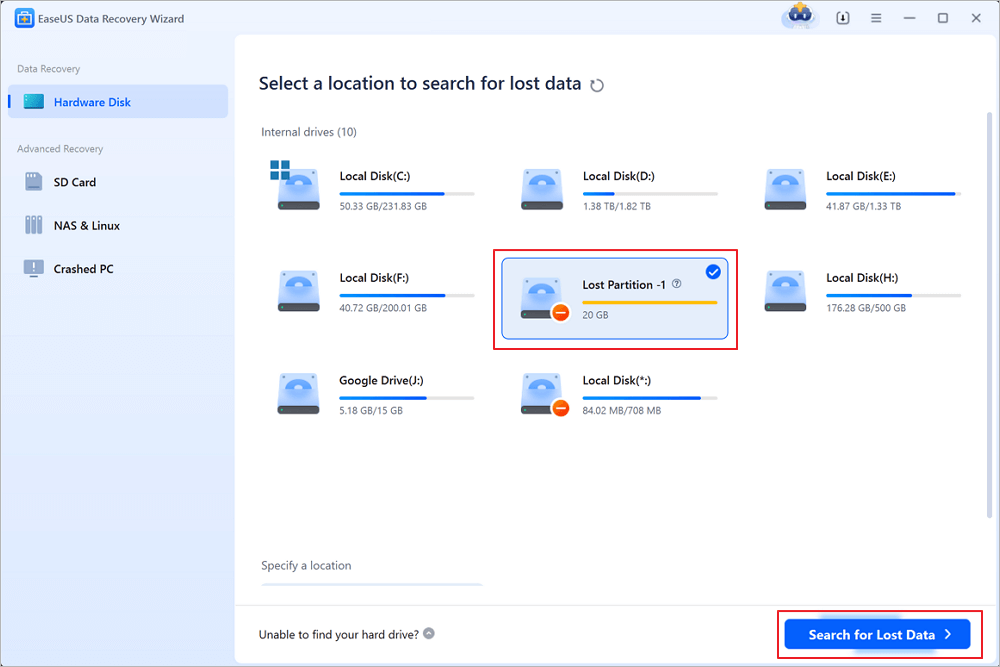
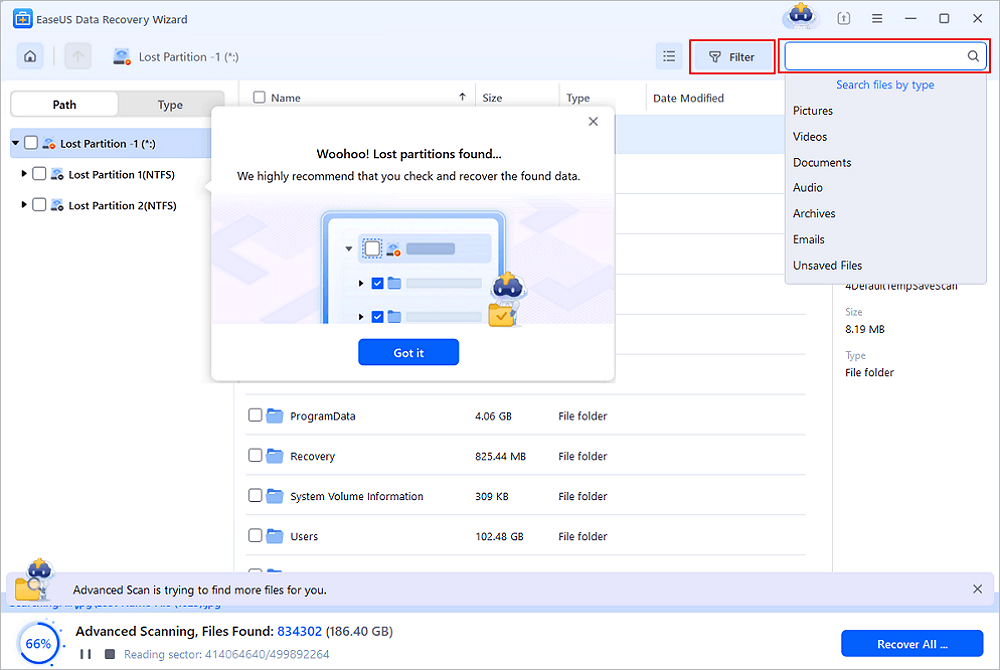
Step 2. Filter the scanned results
Because there will be a lot of scanned files, you can choose a file category for quick filtering, such as Pictures, Videos, Documents, Audio, and Others. Or if you remember the file name, you can just look it up in the search box in the upper right corner.
Step 3. Preview and recover data from the lost partition
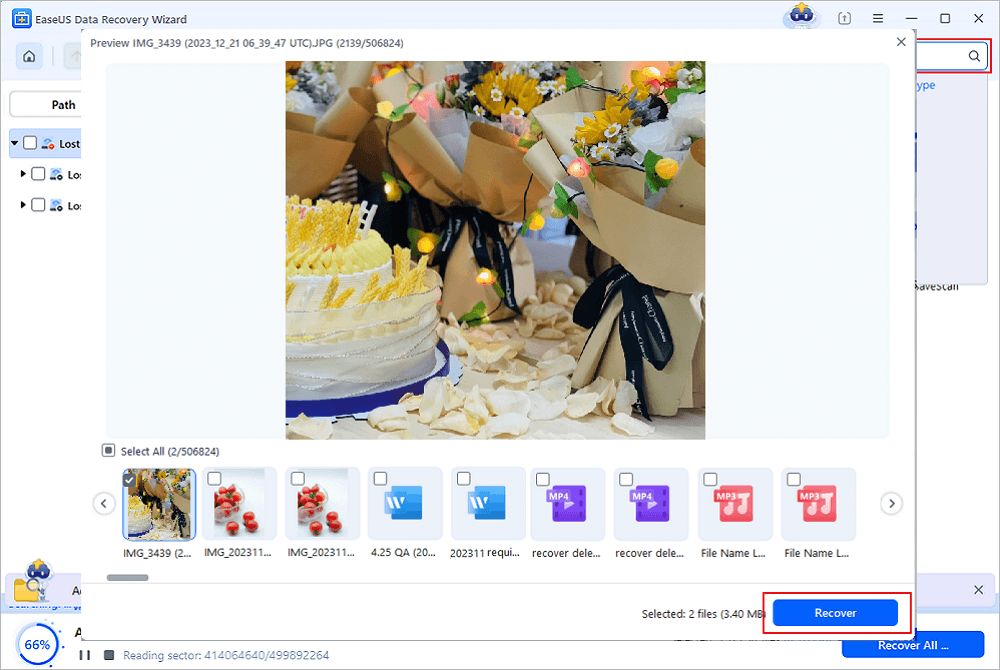
Before recovery, you can preview the file to make sure it is the data you need. Choose all the files you need and click "Recover" to restore them. Choose a storage location (including cloud storage, such as OneDrive, Google Drive, etc.), and click "Save" to save your recovered files.
Method 3. Recover Deleted/Lost Hard Drive Partition with CMD
Another avenue involves command-line utilities like TestDisk and CHKDSK. TestDisk, a versatile open-source tool, excels in repairing damaged partition tables, recovering lost partitions, and resolving boot issues. Its robust features and cross-platform compatibility make it a favorite among experts. Conversely, CHKDSK (Windows-native) primarily checks file system integrity, repairing errors that might indirectly contribute to partition instability. While it doesn't directly recover deleted partitions, it stabilizes drives for subsequent recovery attempts.
If you lose the partition because your volume label is missing, you can recover the external HDD partition by CMD. Try to assign a drive letter to the drive and restore the lost partition.
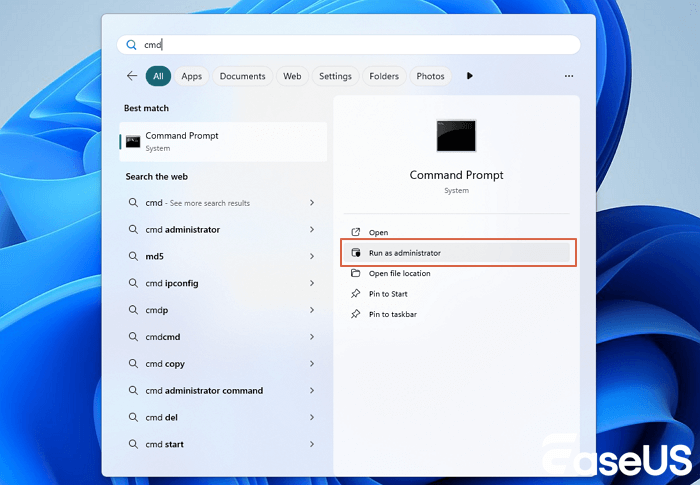
Step 1. Press "Windows" + "S" to run the search box. Type cmd. When the command prompt appears, right-click and select "Run as administrator".
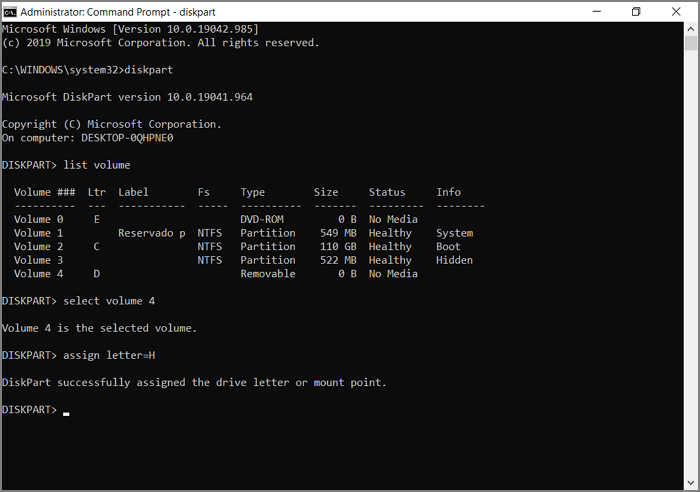
Step 2. Type diskpart at the command prompt. Press "Enter".
Step 3. Type list volume, then press "Enter".
Step 4. Type select volume. Substitute the volume number with the number of the volume inside the <>.
Step 5. Type assign letter. Substitute the new drive letter with a new letter for the drive inside the <>.
Exit this window and see if you can access that partition.
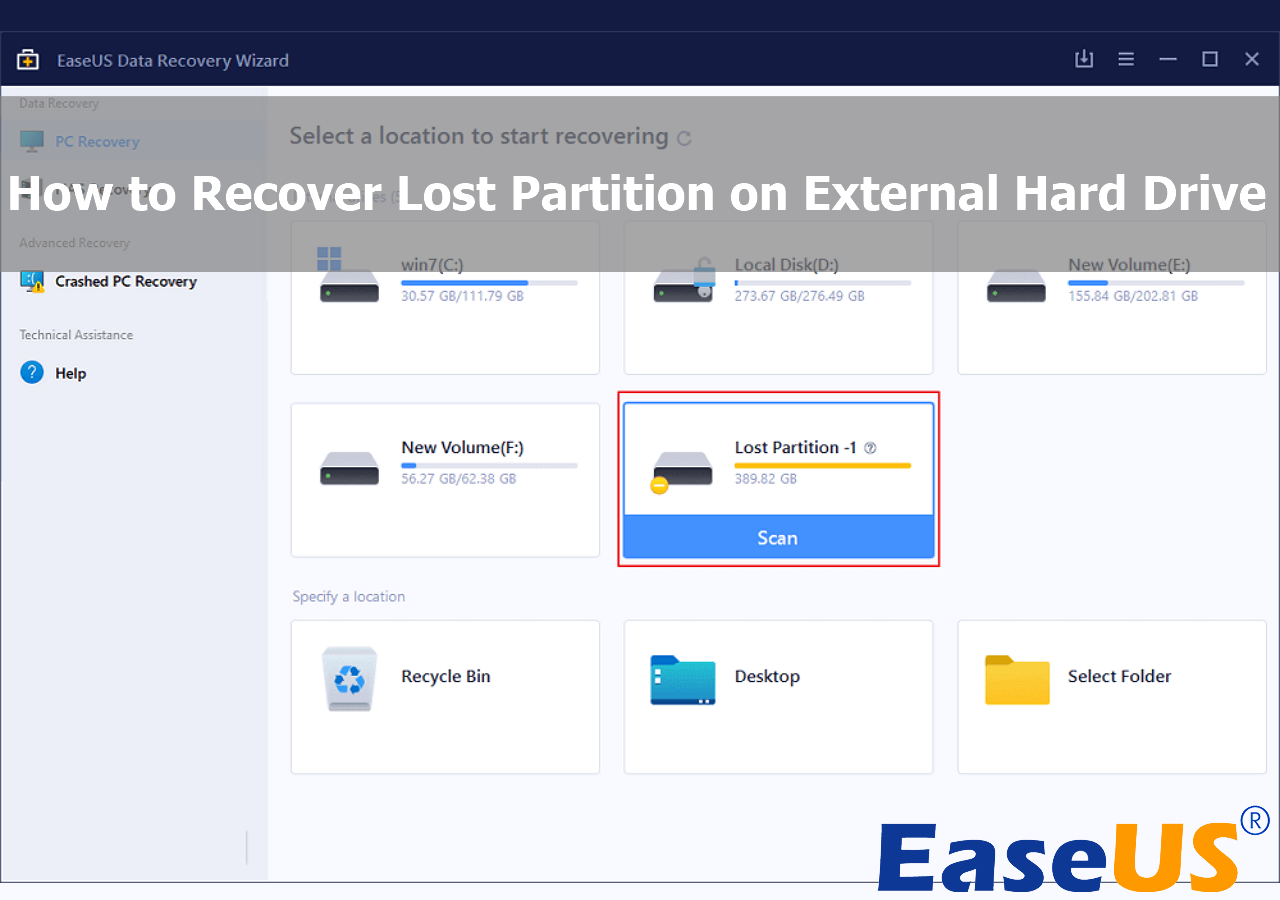
Recover Lost Partition on External Hard Drive | Check Tutorials Here
We'll offer four tested methods with detailed tutorials to help you recover lost partitions and data successfully. Read more >>
You can refer to the article about how to recover data from deleted partitions and then follow the steps below to create a new partition.
Step 1. Right-click on "This PC" and choose "Manage".
Step 2. Go to "Disk Management".
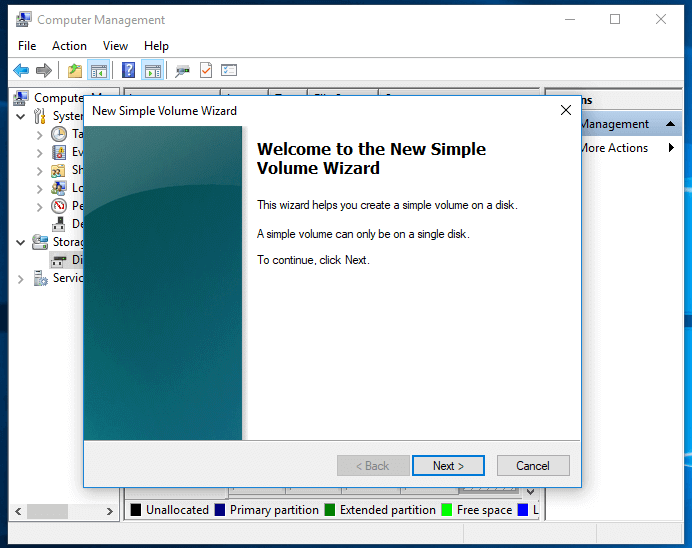
Step 3. Right-click on the unallocated space on your hard drive and choose "New Simple Volume..."
Step 4. Then follow the New Simple Volume Wizard to specify the volume size, assign a drive letter, and format the partition...
After creating a new partition, you can use it for data storage again. Don't forget to mark this passage by sharing it on Facebook, Twitter, or SNS.
Common Causes of Lost/Deleted Partitions
When you are faced with a lost partition, you receive this message: XX partition is missing. Why does this happen? A few factors could cause lost or deleted partitions on your hard disk or SSD.
😨Accidental Deletion
In most cases, users get their hard disk partition lost by accidentally deleting a volume in Disk Management.
🔧Partition Corruption
Another major reason for partition loss is partition table corruption. (The partition table is a system file containing critical information about the hard disk drive partitions, including the start point and endpoint of the hard disk drive partition, file system, name, size, and other important information about the partition.)
🗃️System Reinstallation
Besides, operating system reinstallation, incorrect manipulation, and virus infection may also cause partition loss issues.
When your Windows partition is lost, all your files and folders stored on the partition are lost, and you'll not be able to see any tracks of the hard disk drive partition in Windows Disk Management. Thus, how to restore lost hard disk drive partition becomes urgent.
LEARN MORE
Still curious? Click here to learn about Tips to Recover Lost Partition on Windows 10.
The Bottom Line
Accidentally deleting a volume in Disk Management happens quite often. However, what occurs more frequently is accidentally deleting data on a computer hard drive, external hard drive, USB flash drive, memory card, and other storage devices. That's why you can't miss EaseUS data recovery software, which will help rescue your data whenever you lose it.
Therefore, you can create new partitions on the unallocated space as you like after recovering the deleted files from the lost partition. If a partition is compromised, never write new data to the affected drive. Writing actions (saving files, installing software, running defragmentation) can irreversibly overwrite deleted partition data. Immediately halt all write operations and disconnect the drive if possible. "Data overwritten" means "data unrecoverable" in most cases.
Was This Page Helpful?
Related Articles
-
Recover Data from a RAW Partition and Fix It Safely
![author icon]() Dany/2026-09-20
Dany/2026-09-20 -
EaseUS Partition Recovery: Download Partition Recovery Software
![author icon]() Jean/2026-09-15
Jean/2026-09-15
 Dany/2026-09-20
  Jean/2026-09-15
 -
How to Recover Data from Crashed Hard Drive Mac
![author icon]() Dany/2026-09-20
Dany/2026-09-20 -
What Is RAW Drive Recovery? How to Recover Data?
![author icon]() Jean/2026-09-20
Jean/2026-09-20


