





-
![]()
-
![]()
-
![]()
-
![]()
-
![]()
-
![]() How to Recover Deleted TikTok Videos in Android/iPhone/PC
How to Recover Deleted TikTok Videos in Android/iPhone/PC October 20,2026
 6 min read
 -
![]() Top 3 Ways to Recover Deleted HTML Files on Windows 11/10/8/7October 20,20266 min read
Top 3 Ways to Recover Deleted HTML Files on Windows 11/10/8/7October 20,20266 min read -
![]() How to Recover Deleted Photos from HP Laptop | Advanced Recovery PlansOctober 20,20266 min read
How to Recover Deleted Photos from HP Laptop | Advanced Recovery PlansOctober 20,20266 min read -
![]()
-
![]() [Answered] Where Do Deleted Files Go on PC/Mac/Android/iPhoneOctober 20,20266 min read
[Answered] Where Do Deleted Files Go on PC/Mac/Android/iPhoneOctober 20,20266 min read
Page Table of Contents
If your lost files total less than 2GB (such as a few photos, videos, or Word/PDF documents), you don't need to purchase the paid version.
You can use the free version of EaseUS Data Recovery Wizard to recover and export up to 2GB of data at no cost.
To retrieve a deleted Excel file not in the Recycle Bin, you should check cloud backups like OneDrive or SharePoint if the file was synced there. If that doesn't help, look for unsaved workbooks within Excel or restore previous versions via Windows File History. For permanently deleted files, using reliable data recovery software like EaseUS Data Recovery Wizard offers the best chance to recover lost Excel files quickly and safely, even after emptying the Recycle Bin.
PAGE CONTENT:
I accidentally deleted a file. I wanted to deleted the file above but I missclicked. when I went to look in the recycle bin it said it was empty, as well as the secondaire recycle bin. The only thing I did was click on the three dots on the file and hit delete. I haven't cleared the recycle bin so there is no reason why it shouldn't be in there. is there any way to get my file back? - from Reddit
If you encountered the similar issues, you might want to know why the deeleted Excel files are not in the Recycle Bin. Here are some possible situations:
- 1️⃣ Shift + Delete. If you pressed Shift + Delete, the file was permanently deleted and bypassed the Recycle Bin.
- 2️⃣ Recycle Bin Was Emptied. When you delete Excel files from the computer and empty Recycle Bin or Trash Bin, they would disappear from your computer.
- If you need to recover the deleted Excel files from Recycle Bin now, try EaseUS Data Recovery Wizard, you can scan your PC for free!
- 3️⃣ File Was Stored on an External Drive. Files deleted from USB drives, SD cards, or external hard drives in Windows usually don't go to the Recycle Bin.
- 4️⃣ File Size Was Too Large. If the Excel file exceeded the Recycle Bin's size limit, it may have been deleted directly without being stored there.
After files are permanently removed from the Recycle Bin or Trash, the Excel contents would not be destroyed immediately. Windows or Mac will mark Excel files for deletion and removes them from the file system database when you delete them. So, It's possible to retrieve deleted Excel files not in the Recycle Bin.
With step-by-step guides, this tutorial covers effective ways to recover deleted Excel files in Windows 10, Mac, iPhone, and Android phones. What's more, you can also learn how to recover unsaved Excel files quickly.
How to Restore Deleted Excel File Not in Recycle Bin in Windows 11/10
⭐Important: After deleting an Excel file, you should no longer perform any further action on the computer and don't save new data to the space where you used to store the Excel files to prevent new data from overwriting. Then, how to recover deleted Excel files? Follow the guides below.
Fix 1. Recover Permanently Deleted Excel Files with Excel Recovery Software
When you delete the Excel files on your PC, you should go to the Recycle Bin to restore them at first. Or you can immediately undelete Excel files using the Ctrl+Z buttons. But if you do a permanent deletion or clean out the recycle bin without backups, the most effective way to recover deleted files Windows 10 is using a professional data recovery tool.
EaseUS Data Recovery Wizard is a powerful disk data recovery software that can restore deleted files even if you've emptied the Recycle Bin or format the file.
This professional Excel data recovery software can solve most Excel data loss issues:
- Recover deleted, formatted, corrupted Excel or the Excel files not saved.
- Support most Excel file extensions, including .xlsx/.xls/.csv/.xml, etc.
- Recover deleted Excel from the emptied recycle bin, hard drive, memory card, SD card, and USB flash drive.
Simple steps for deleted Excel file recovery with EaseUS file recovery software.
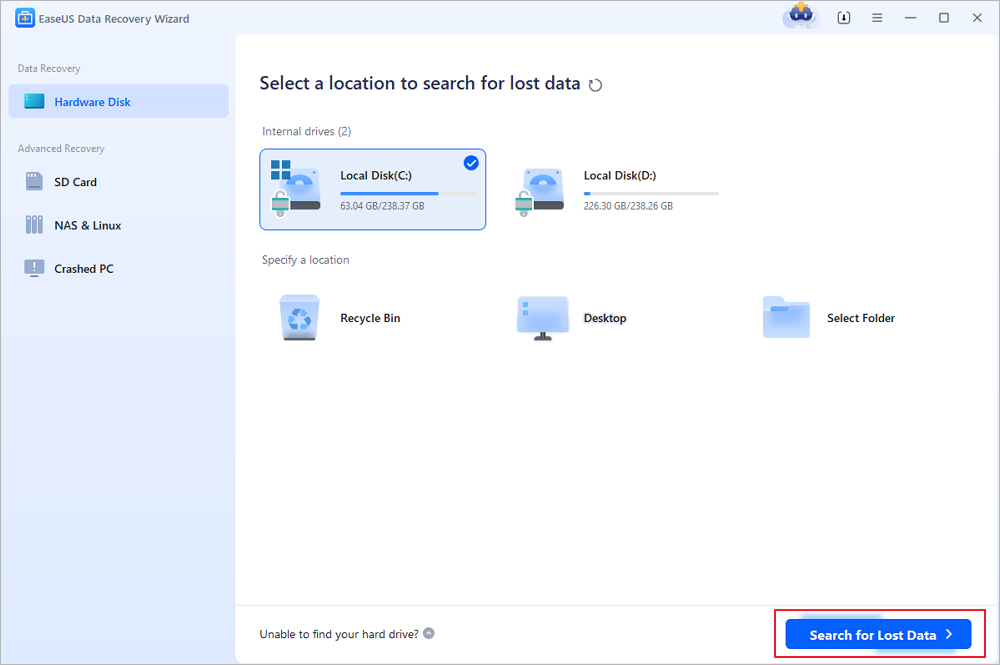
Step 1. Select the drive where files were deleted
Run EaseUS Data Recovery Wizard and hover over the partition or storage drive where the permanently deleted files were stored. Click "Search for Lost Data" to scan the selected location for recoverable data.
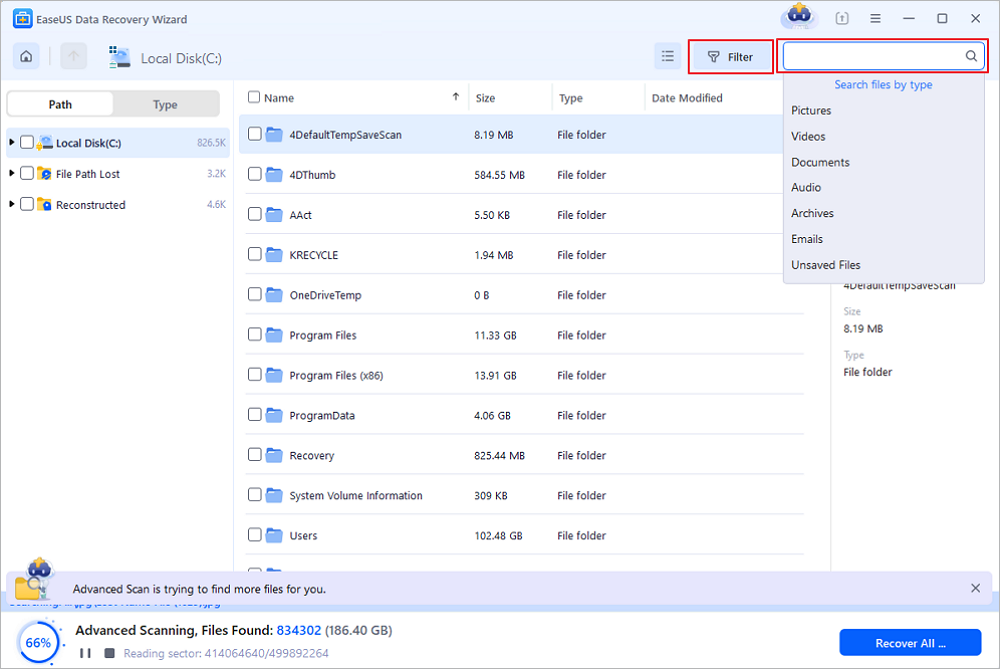
Step 2. Search for permanently deleted files
Once the scan finishes, browse the found files and select the permanently deleted items (DOCX, XLSX, PDF, JPG, PNG, MP4, etc.) you want to restore. Use the file type filter to narrow down the results, or search by file name if you remember it.
Step 3. Preview and recover the selected files
Preview the recoverable files before restoring them. Select the files you need, click "Recover", and choose another drive or storage location to save them. You can also select a cloud storage service, such as OneDrive or Google Drive, and click "Save" to finish.

(Note: The free version comes with a 2GB recovery allowance. If the permanently deleted files you need are within this limit, you can recover them without purchasing anything. Choose a different destination to save your recovered files.)
You can trust EaseUS Excel recovery tool to recover deleted files not in the Recycle Bin, and many users have recovered lost Excel files with EaseUS:
| 📒Review | The recovery software easuse is easy to use and does a great job in finding deleted files including pdf jpeg excel and word. from Trustpilot |
If you want to help more users to restore Excel speadsheets from an emptied Recycle Bin, please share this article on social media!

Fix 2. Restore Excel Files Are Not in the Recycle Bin with File History
If you don't like using a third-party program and deleted Excel files disappeared from Recycle Bin, here is a way to restore deleted Excel files without software through the previous backup versions. This method only works when Windows Backup functionality is enabled.
Step 1. Locate the folder that used to contain the file. Right-click it and choose "Properties".
Step 2. Open the "Previous Version" tab to list all the previously stored versions of the Excel file.
Step 3. Choose the right version and click "Restore" to retrieve the document.

Fix 3. How to Restore Unsaved Excel Not Showing in Recycle Bin
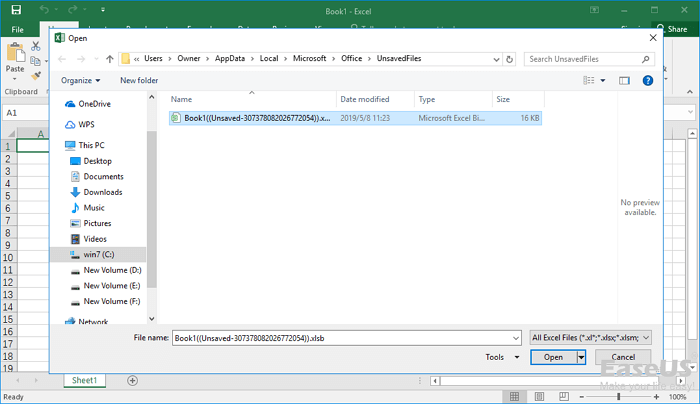
If you forget to save your Excel file and lost it, you can follow the solution below to restore unsaved Excel files in Windows 11/10/8/7.
Step 1. Open a new Excel file. Click "File" > "Info" > "Manage Workbook".
Step 2. Choose "Recover Unsaved Workbooks" from the menu. From the pop-up window, select the unsaved Excel and then click "Open" to load the workbook.
Step 3. Click the "Save As" button on the yellow bar to recover the unsaved worksheet.
How to Recover Deleted Excel Files That Are Not in Recycle Bin Mac
You may permanently remove the deleted Excel files from Mac Recycle Bin by clicking the "Empty Trash" button or delete the Excel files with the shortcut Command + Option+ Delete. Here are two possible ways to help you recover deleted Excel files disappered from Trash.
Fix 1. Retrieve Excel File Permanently Deleted from Recycle Bin with Mac data recovery Software
How to recover deleted Excel files from Mac? You can easily get back deleted Mac files from the Trash bin if you haven't emptied them. But if your Word, Excel, or PPT got lost permanently from your Mac resulted in mistaken deletion, disk formatting, virus attack, partition loss, etc., you can apply EaseUS Data Recovery Wizard for Mac to recover files. You can click the Mac version to download this Excel recovery tool on your Mac.
You can check the nice features below:
- Get lost photos, videos, documents, and emails, etc. back with three steps.
- Support recovery on Mac-based hard drive, fusion drive, SSD, USB drive, memory card, digital camera, and more.
- Support data recovery of more than 1000 file types, covering DOC/XLS, XLSX/PPT/PPTX, JPG/JPEG, TIFF/TIF, PNG, AVI, MOV, MP4, MP3, etc.
Note: You can create a backup by clicking the "Disk Backup" on the left first. The software will recover the document from the backup image. It can prevent further damage to your disk and data, making it safer and more reliable.
Step 1. Scan for lost documents
Select the location where your important Word/Excel/PPT/Numbers/Pages documents were lost and click "Search for lost files".
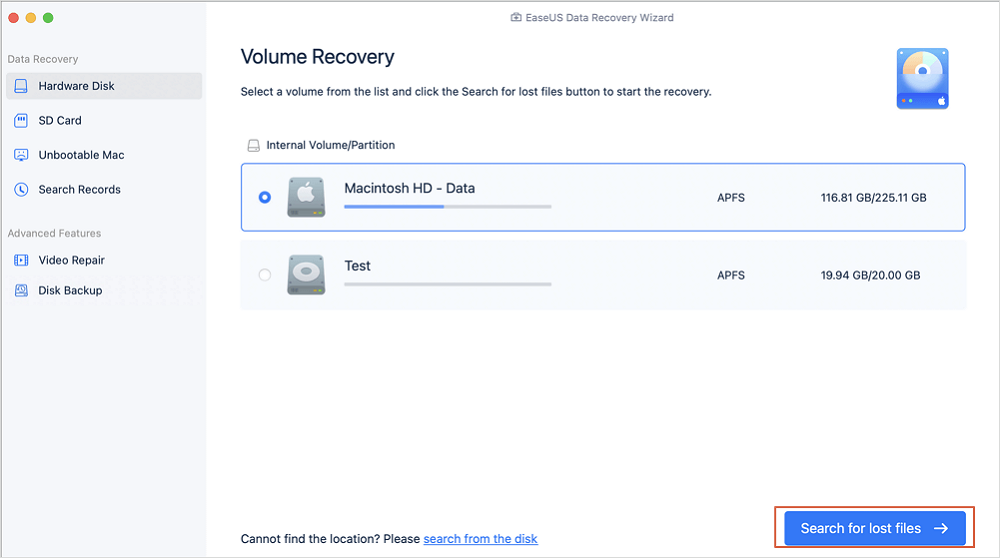
Step 2. Find lost documents on Mac
EaseUS Data Recovery Wizard for Mac will immediately start a scan on your selected disk volume. Meanwhile, the scanning results will be presented in the left pane. Select "Documents" and you can quickly filter the DOC/PDF/PPT/XLS files you've lost earlier.
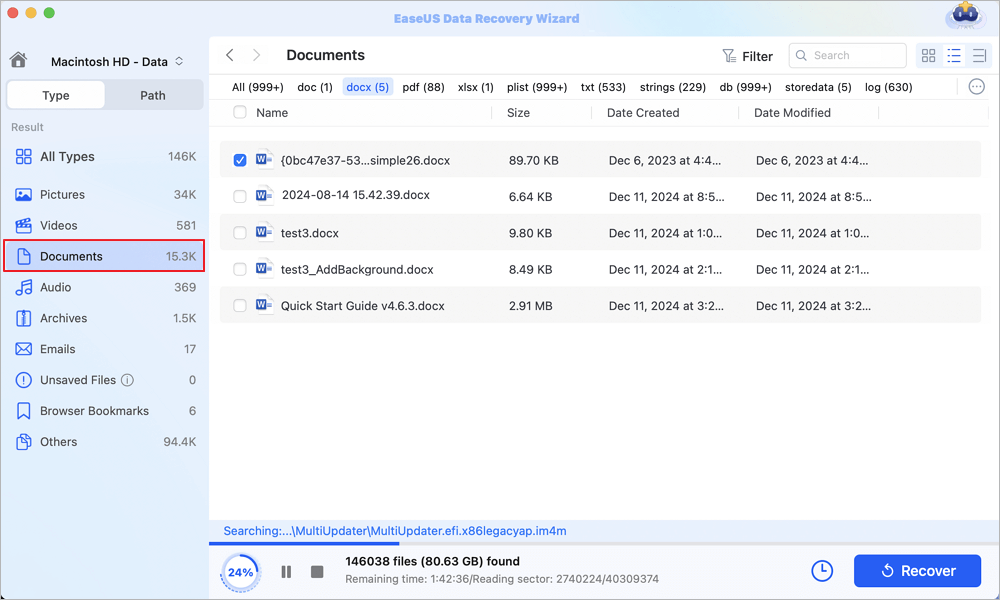
Step 3. Recover lost/deleted documents
Select the target files and preview them by double-clicking them. Then, click "Recover" to get lost documents back at once.
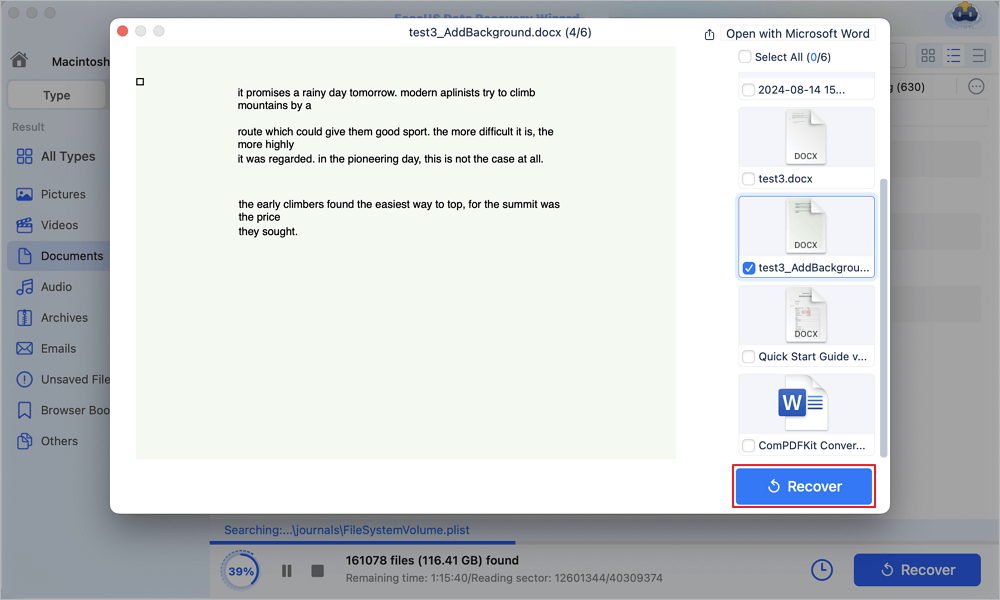
Fix 2. Restore Unsaved Excel File Not in Trash from AutoSave
AutoSave automatically saves a new Excel document that has been created but not saved yet. While AutoRecover can help users retrieve unsaved Excel files on Mac. If the two options are enabled, you can retrieve unsaved files on Mac in Excel 2010 - 2016.
Step 1. Go to "Applications" >" Utilities" > "Terminal".
Type defaults write com.apple.Finder AppleShowAllFiles true into Terminal and hit "Return" to make all the items visible.
Step 2. Click "Finder" > press "Return" on your Mac.
Type /Users/username/Library/Containers/com.microsoft.Excel/Data/Library/Preferences/AutoRecovery and click "Go" to open Excel's AutoRecovery folder.
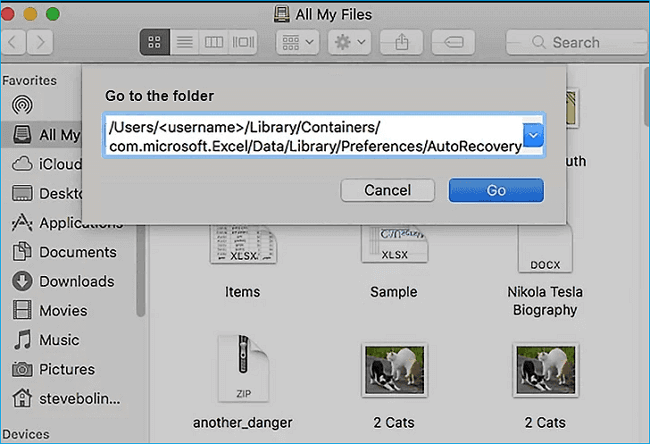
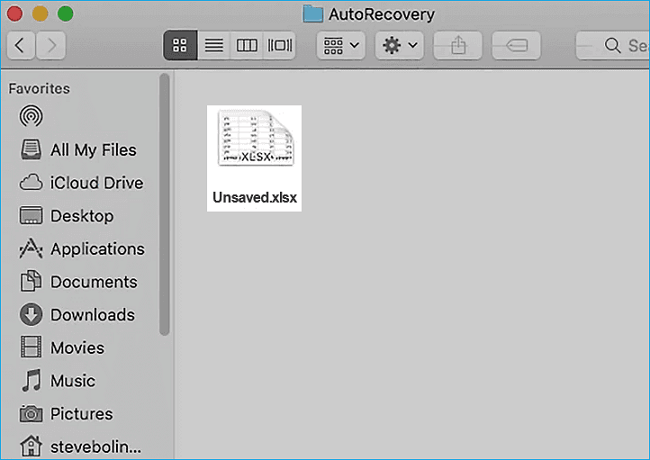
Step 3. Find the unsaved Excel files. Then recover them to another safe location on Mac.
You can check the following video to learn more about Excel recovery on Mac:
- 00:16 What causes Excel files not saved on your Mac
- 00:38 Method 1. Recover TMP Folder
- 01:06 Method 2. Recover from AutoSave
- 02:05 Method 3. Use Recovery Software

Found this Excel recovery plan helpful? You can share this recovery guide on social media to help more users recover permanently deleted Excel files not in the Recycle Bin.
How to Retrieve Deleted Files Not Found in Recycle Bin on iPhone/iPad
If you deleted a file that you need from your iPhone or iPad, is there a way to recover the lost file? You can try EaseUS iPhone data recovery software to recover deleted photos, videos, messages, and more files from your iOS devices.
Step 1. Choose the Recovery Mode
Connect iPhone to your PC and Launch EaseUS MobiSaver. Choose the recovery mode - "Recover from iOS Device" on the left, and click "Start".

Step 2. Scan iPhone and Find Lost Data
EaseUS MobiSaver will automatically scan iPhone 13/12/11/X/XR/XS/8/7/6/5/4, and find present data and even some lost data for you.
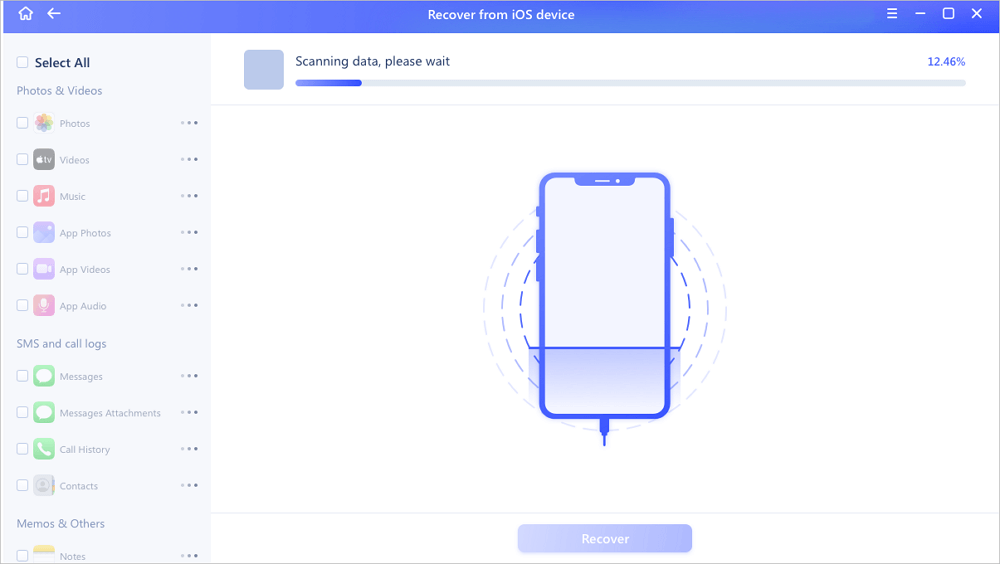
Step 3. Preview and Restore iPhone Data
You can choose the lost data such as your photos, videos, contacts, SMS, notes, voice mails or other files from iPhone 13/12/11/X/XR/XS/8/7/6/5/4. Then, click "Recover" and save those data to another location.

Deleted Excel Files Not in Recycle Bin Recovery on Android
For users who need to recover deleted Excel files or other documents on Android devices, you can turn to professional Android data recovery software - EaseUS MobiSaver for Android for help.
To recover data through this method, you must root your phone before starting the process.
Step 1. Connect your Android phone to the computer. Install and run EaseUS MobilSaver for Android.
Step 2. Scan Android phone to find deleted Excel files.
Step 3. Preview and recover deleted Excel files from Android phone.
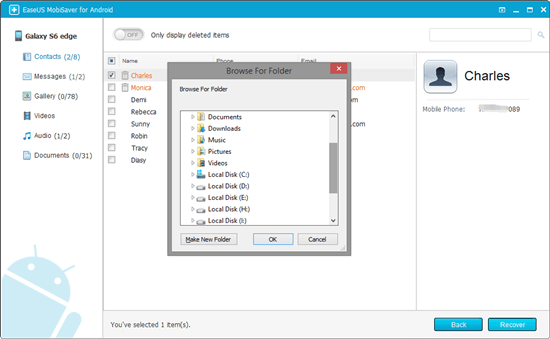
Wrap Things Up
After reading this guide, you must have known how to recover deleted Excel files not found in Recycle Bin in different situations and on different devices. Also, if you forget to save Excel files, you can try the solutions above to get back the unsaved Excel files. By the way, take a regular backup of your Excel files so that you can restore them easily, even you are faced with a system crash or permanent deletion of the files.
EaseUS data recovery tool for Windows and Mac offers the most comprehensive methods to recover deleted or lost files due to accidental deletion, hard drive formatting, emptying Recycle Bin, OS crash, or virus attack. Free download this software to get back and protect data with ease.
Recover Deleted Excel File FAQs
Keep reading the last part to get more information about recovering deleted Excel files:
1. How to recover unsaved Excel files on Windows?
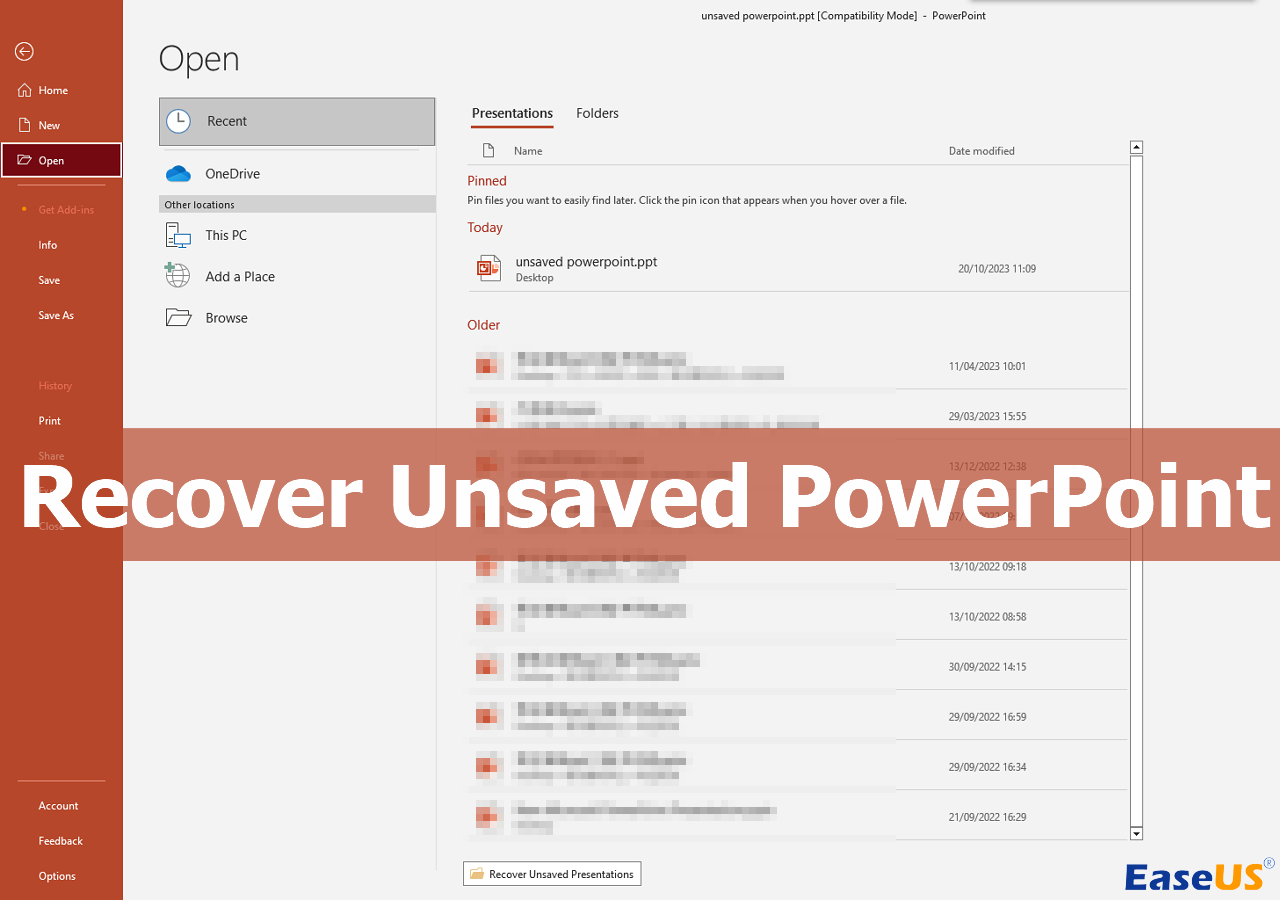
If you are wondering how to recover unsaved Excel files, you can use the Excel Recent option to restore the Excel files.
- 1. Create a new Excel sheet or open an Excel document on your computer.
- 2. Click the File and Open option in the Excel window.
- 3. Click Recent with a clock icon.
- 4. Then, you can see "Recover unsaved Workbooks" at the bottom.
2. Is it possible to restore permanently deleted Excel files?
You can restore the deleted Excel files only if the files have not been overwritten. So it is necessary to know that stop using the hard drive after data loss. The quickest way to restore the deleted Excel files is to apply EaseUS Data Recovery Wizard, and you can scan, filter, preview, and restore all the deleted Excel files.
3. How do I recover a deleted Excel file without the software?
When you accidentally delete some important Excel files, you should go to the Recycle Bin first. In most situations, you can find the wanted Excel files in the Recycle Bin. Right-click the target Excel file and restore it to its original place.
4. Where are Excel recovery files stored on Windows?
If Excel crashes and you lose important files, you can still get them back by recovering unsaved workbooks. Or you can go to the unsaved files folder C:\Users\AppData\Local\Microsoft\Office\UnsavedFiles.
Was this page helpful?
-
Dany is an editor of EaseUS who lives and works in Chengdu, China. She focuses on writing articles about data recovery on Mac devices and PCs. She is devoted to improving her writing skills and enriching her professional knowledge. Dany also enjoys reading detective novels in her spare time. …



 Why Trust EaseUS
 Editor Reviews

20+
Years of experience

160+
Countries and regions

72 Million+
Downloads

4.9 +
Trustpilot Score






