





-
![]()
-
![]()
-
![]()
-
![]()
-
![]()
-
![]() Recover Formatted Hard Drive: How to Recover Data After Accidental Formatting
Recover Formatted Hard Drive: How to Recover Data After Accidental Formatting October 20,2026
 6 min read
 -
![]()
-
![]()
-
![]()
-
![]()
Page Table of Contents
A PST file is a personal folder file in Microsoft Outlook. When functioning as a cache for Outlook's Cached Exchange Mode feature, it may be called an Off-line Storage Table (.ost) or an Off-line Folder (File).
As Microsoft Outlook's popularity grows, PST file data losses sometimes happen. If you have lost PST files, follow this article to become familiar with PST recovery tools. These tools can be essential when facing issues with PST files, which may lead to inaccessible emails, contacts, calendars, and other data stored within Outlook.
Recover Lost PST File for Free (Recommend)
To recover your deleted Outlook PST files effectively, you need an email recovery tool with a strong data recovery capacity. The EaseUS data recovery program is the best way for Outlook users to recover PST files. It can be used for all kinds of PST data loss situations. All Windows systems are supported by this tool, including Windows 11/10/8/7, etc.
In addition, this software can also recover important office files such as documents or Excel spreadsheets if you lose them.
- Retrieve every PST object, including distribution groups, tasks, calendars, contacts, and emails.
- Provide the option to store the recovered PST files' data in various formats.
- successfully extracts data from Outlook PST files that are password-protected and encrypted.
Here are the detailed steps to recover PST files on Windows:
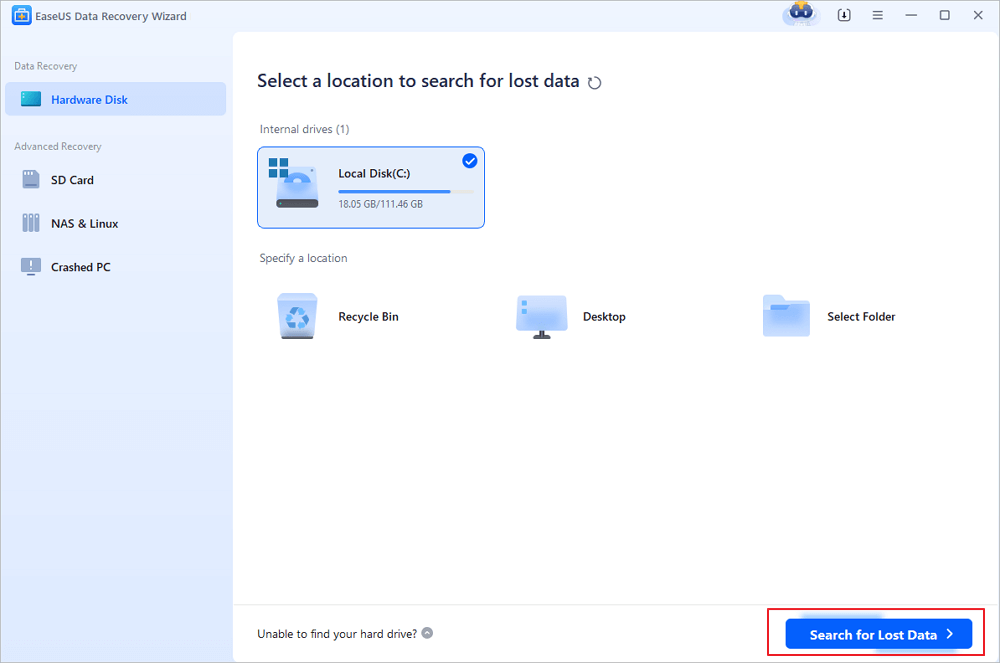
Step 1. Choose the drive or partition where you lost email files, and click "Search for Lost Data".
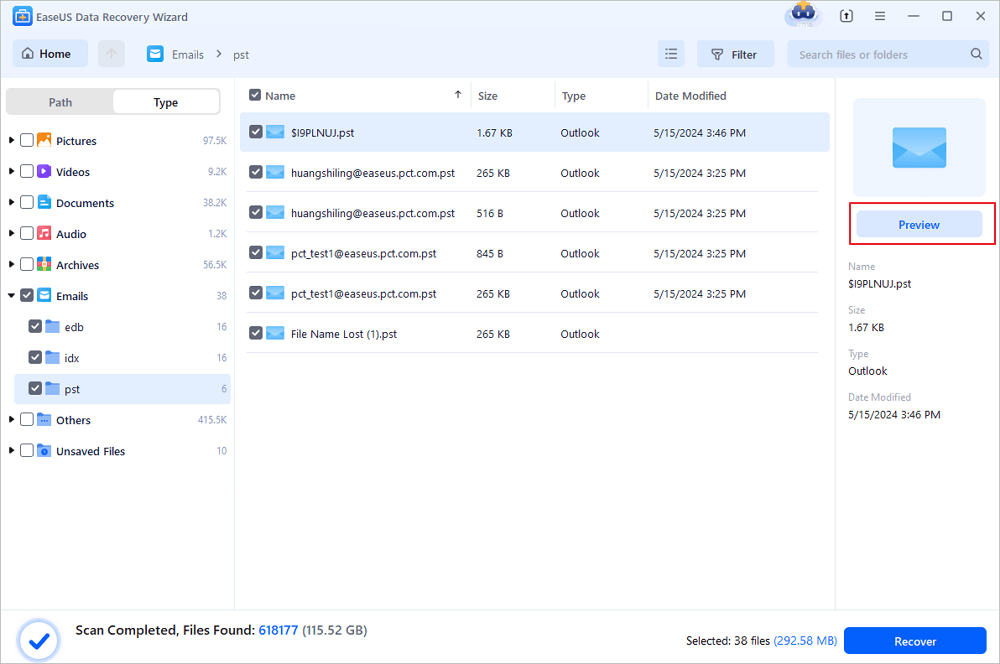
Step 2. The software will initiate a scanning process immediately. Wait patiently until the scanning process completes. To quickly locate the email files, click "Emails" in the left panel. Then, look for PST files or Outlook files in the file type list.
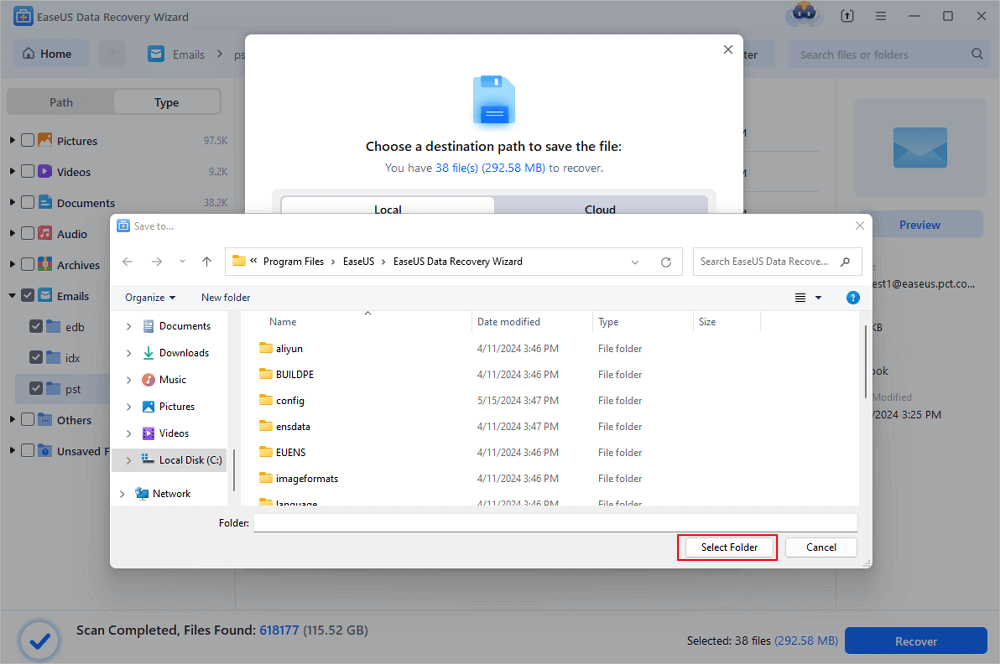
Step 3. Then, choose the desired email files and click "Recover". Save the files to another location instead of the original one. It is also advised to save your files to cloud storage to better avoid data loss.
EaseUS Data Recovery Wizard Free offers up to 2 GB of free data recovery, including 500 MB available by default and an extra 1.5 GB unlocked after sharing on Facebook and X.
If you find this information helpful, please share it with others on social media to help them overcome this common challenge.
Repair Corrupted/Damaged PST Files
If you can't open your Personal Folders file (.pst), or you suspect that your .pst data file is corrupted, follow the method in this section. Corrupted PST files can be fully repaired by professional Outlook repair tool. Corruption or damage in the Outlook PST file results in the inaccessibility of your entire valuable Outlook email. EaseUS Fixo Document Repair can fix your corrupted, damaged, or inaccessible PST files.
Let's see how it repairs Outlook PST files:
✨Step 1. Download, install, and launch EaseUS Fixo Document Repair
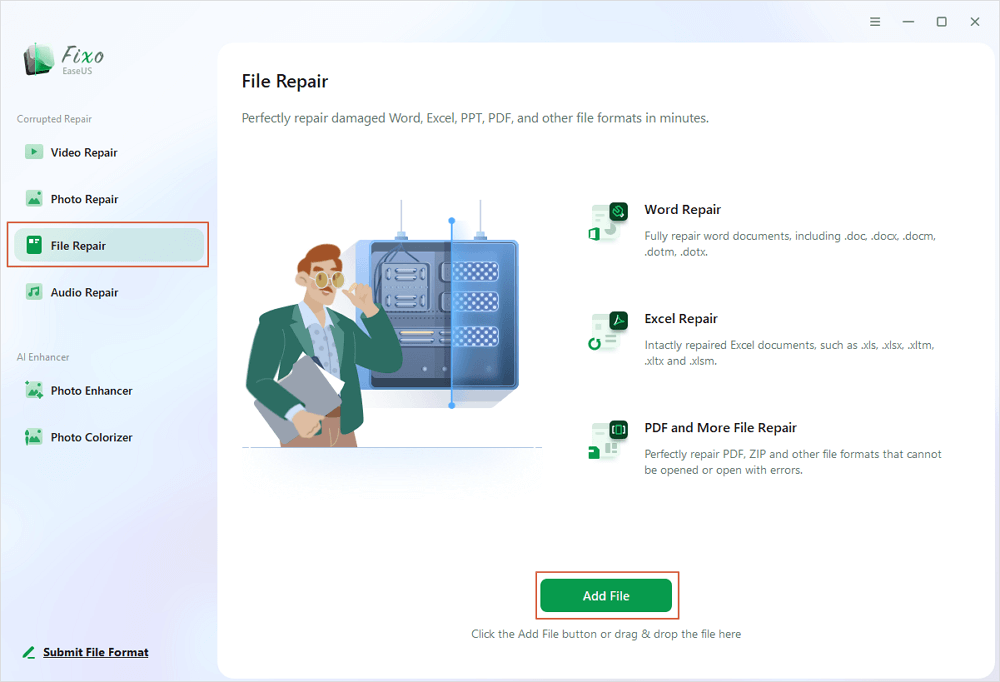
You can download this repair tool with the download button we gave you or other official ways. After the installation, you can double-click the Fixo icon to launch it. Click "File Repair" > "Add Files" to select and repair damaged Word, Excel, PDF, and other documents.
✨Step 2. Repair corrupted documents now
After adding the documents, you can click "Repair" to fix a document specifically or select "Repair All" to repair the whole files in the list altogether.
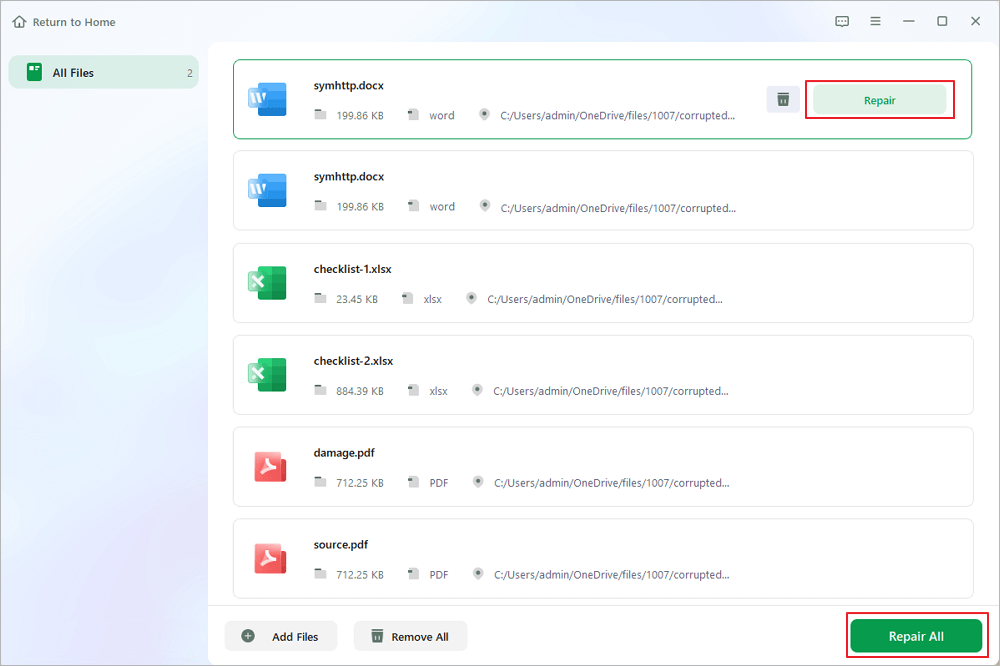
✨Step 3. Preview and save repaired documents
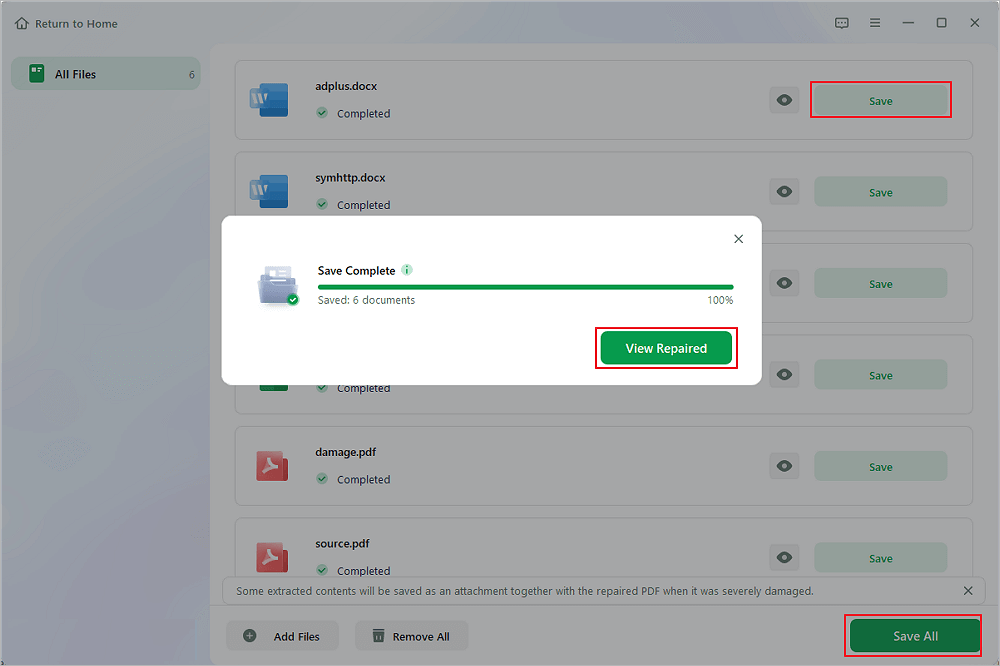
Now, the files are ready to be saved. You can also click the eye icon to preview the documents. After clicking "Save All", select "View Repaired" in the pop-up window to locate these repaired files.
Free PST Recovery Software FAQs
Here are 4 additional questions about PST recovery software. Check here for the answers.
1. Can PST files be recovered?
The device's PST file data is not wiped when you delete it. The operating system cannot access the accompanying data because the entries for those files have been deleted. It classifies these sectors, occupied by prepared data, as free. Over these freshly designated sections, new data is written.
2. How to avoid PST file loss?
- Back up essential files, including the PST file, regularly and save them on an external hard drive.
- Scan your machine for viruses with antivirus software.
- Take care not to erase files by accident.
- Instead of pressing the "Shift+Delete" keys, use the "Delete" key or right-click the mouse with the Delete option.
- Do not shut down Microsoft Outlook abruptly.
3. How do I retrieve PST emails?
EaseUS Data Recovery Wizard is the most practical way to recover a deleted PST file for Outlook. This is one of the best file recovery programs for recovering lost PST or OST files with a high success rate.
4. How can I view PST files without Outlook?
Kernel for Outlook PST Viewer is an automated tool that can open a PST file without launching Outlook. It allows you to inspect healthy and corrupt PST files of any type and size. This program must be installed on your machine to open a PST with this utility.
Was this page helpful?
-
Dany is an editor of EaseUS who lives and works in Chengdu, China. She focuses on writing articles about data recovery on Mac devices and PCs. She is devoted to improving her writing skills and enriching her professional knowledge. Dany also enjoys reading detective novels in her spare time. …






 Why Trust EaseUS
 Editor Reviews

20+
Years of experience

160+
Countries and regions

72 Million+
Downloads

4.9 +
Trustpilot Score





