





-
![]()
-
![]()
-
![]()
-
![]()
-
![]() New EaseUS Report: Majority of SD Card Data Loss Cases (72%) Are Highly Recoverable
New EaseUS Report: Majority of SD Card Data Loss Cases (72%) Are Highly Recoverable August 14,2026
 6 min read
 -
![]()
-
![]() How to Recover Files From SD Card That Was Partially OverwrittenJuly 23,20266 min read
How to Recover Files From SD Card That Was Partially OverwrittenJuly 23,20266 min read -
![]()
-
![]()
-
![]()
Page Table of Contents
PAGE CONTENT:
Losing photos, videos, or other files from an SD card or USB flash drive can result from accidental deletion, formatting, file-system corruption, RAW errors, or fragmentation. To find out which SD card recovery software performs best in these situations, we tested nine popular SD card recovery tools.
Our test focuses on 6 common SD card data loss scenarios, including repeated shooting of camera cards, accidental deletion of high-definition video cards, and damage to FAT, exFAT, and RAW partitions. The five dimensions of recovery integrity rate, file preview experience, original directory reconstruction, scanning efficiency, and underlying repair capability are measured and scored to objectively disassemble the advantages and disadvantages of each tool and offer shopping advice for different users.
How Do We Test SD Card Recovery Software
This comparison is designed around 6 common SD card data recovery problems faced by photographers, drone users, videographers, and everyday users. All nine programs were tested under the same conditions and against the same sample data to make the results as consistent and comparable as possible.
The 5 Evaluation Criteria
This comprehensive comparison moves beyond relying solely on recovery‑quantity benchmarks, instead establishing 5 key evaluation criteria, balancing professional-grade restoration capabilities with a user‑friendly experience for beginners.
- Recovery Quality (weight 40%): Measures the proportion of fully recovered files, assessing the ability to restore intact, usable files such as videos, RAW images, and office documents, with no 0‑KB corrupted files.
- Data Presentation (weight: 25%): The scanning process provides real-time visualization, fully restores files and the original directory structure, avoids excessive duplicate or redundant files, and ensures clear file categorization.
- Preview Experience (weight 15%): Supports multi-format previews for images, videos, documents, and audio; ensures high preview quality, fast loading speeds, and no file size limits.
- Scanning and Compatibility (weight 12%): Support for FAT32, exFAT, and RAW partitions; scan duration; stable operation with large-capacity SD cards; no scan‑related errors or freezes.
- Usability (weight: 8%): Simple, straightforward procedures; no complex or specialized settings; beginners can complete the recovery independently.
6 Common SD Card Data Loss Scenarios
All tests use standardized hardware and a unified file sample library, with controlled variables to ensure a fair comparison:
- Scenario A: Shift + Delete on a FAT-Formatted SD Card (basic scenario | daily slight deletion by mistake)
- Simulate the ideal error deletion scenario where the file system is normal and does not continue to be written after deletion, test the ability of basic file retrieval and original directory reorganization, and use it to observe the upper limit of basic recovery of each product.
- Scenario B: Power Loss During an exFAT File Transfer (exFAT format, basic scenario)
- When exporting footage from the camera or copying large files to a USB drive, unexpected interruptions can leave behind numerous file fragments. This tests the system's ability to reassemble fragmented files and repair incomplete ones.
- Scene C: Repeated Shooting and Deletion on a Camera SD Card (high difficulty | high fragment photo recovery scene)
- Simulate the situation that users mistakenly delete photo material after the SD card goes through several rounds of shooting, deleting, and shooting again. The scene is no longer the ideal state of "just deleted and undisturbed": historical writing will bring coverage, fragmentation, and residual indexes, focusing on testing the software's ability to identify valid photos, filter damaged files, and reorganize original directories.
- Scene D: Deleted HD Video from a Camera SD Card (high difficulty | HD camera video recovery scene)
- Analog cameras continue to shoot high-definition video after the accidental deletion of video material. Continuous recording by the camera will write a large number of data clusters to the SD card, and multiple data segments may be formed due to the camera's segmented recording, multi-file interleaved writing, and space allocation in the card; these segments need to be correctly reorganized during recovery, with emphasis on testing whether the video can be played completely and whether it can be previewed and confirmed before recovery and whether information such as thumbnails and directories can help users quickly locate the target fragment.
- Scenario E: BPB partition parameter is damaged, and the pop-up window prompts "You need to format" (high difficulty | FAT format)
- The underlying parameters of the storage device partition are damaged, and the computer cannot be mounted normally. It is a common high-risk SD card failure for photographers, which tests the ability of underlying sector reading, partition reconstruction, and lost partition recovery.
- Scenario F: FAT Partition Table Damage Causes the SD Card to Become RAW (high difficulty | ultimate difficulty)
- The file system completely crashed, the system could not identify the partition, and it could only rely on the underlying binary file signature of the software to retrieve data, which was the most difficult one in this test.

List of 9 Software Programs Under Review
We tested the following nine popular SD card recovery programs:
- EaseUS Data Recovery Wizard
- Wondershare Recoverit
- R-Studio
- Disk Drill
- Tenorshare 4DDIG
- Stellar Data Recovery
- PhotoRec
- Recuva
- UFS Explorer
These tools cover a broad range of recovery solutions, from beginner-friendly consumer software to professional-grade data recovery utilities and free open-source tools.
Test Results: How the 9 SD Card Recovery Tools Performed
The following results provide a detailed comparison of how the nine SD card recovery tools performed across the six data-loss scenarios described above. Rather than measuring recovery performance based solely on the number of files detected during a scan, we focused on complete and usable file recovery, including whether recovered photos and videos could be opened or played, whether the original folder structure could be preserved, and how effectively each tool handled file-system corruption, fragmentation, and RAW partitions. The results reveal significant differences between basic deleted-file recovery and more complex SD card recovery scenarios, particularly for heavily used camera cards and damaged file systems.
Scenario A: Shift + Delete on a FAT-Formatted SD Card (Basic Scenario | Daily Deletion by Mistake)
Test objective: Successfully recover formatted SD cards, preserve the original folder structure, and ensure smooth and functional previews.
| Product | Number of valid files found | Complete recovery rate | Preview Experience (Data Presentation) | Find Lost Files Experience (Data Rendering) |
| EaseUS | 1001 | 100% | ★★★★★ (1. Common file types support preview 2. Preview content clear) | ★★★★☆ (Clear original directory structure of lost files) |
| Disk Drill | 984 | 98.28% | ★★☆☆☆ (Failed to preview smoothly by double-clicking in this test; limited preview types such as PDF and JPG) | ★★★★☆ (Clear original directory structure of lost files) |
| Recoverit | 1001 | 100% | ★★★★★ (1. Common file types support preview 2. Preview content clear) | ★★★★☆ (Clear original directory structure of lost files) |
| R-Studio | 1000 | 99.89% | ★★★★★ (1. Common file types support preview 2. Preview response speed is very fast) | ★★★★★ (1. Original directory structure is clear 2. Original directory has a delete mark, easy to view) |
| Stellar | 962 | 96.12% | ★★☆☆☆ (The preview of this large-volume picture, video, and audio sample has not been completed) | ★★☆☆☆ (No data is presented during this scan; files are concentrated on the root node, search efficiency is low) |
| Tenorshare 4DDIG | 889 | 88.79% | ★★★☆☆ (Preview pictures and documents are blurred) | ★★★★☆ (The original directory structure of the lost files remains intact) |
| Recuva | 755 | 75.43% | ★☆☆☆☆ (Only picture samples can be previewed this time) | ★☆☆☆☆ (The original directory of the lost file has not been retrieved this time) |
| PhotoRec | 914 | 91.27% | ☆☆☆☆☆ (Preview not supported) | ☆☆☆☆☆ (Data presentation is not supported) |
| UFS Explorer | 264 | 26.35% | ★★☆☆☆ (Office does not support preview content; audio can only be previewed by WinHex) | ★★☆☆☆ (Data presentation is not supported during scanning) |
💡Expert Reviews:
In this basic deleted-file recovery test, EaseUS Data Recovery Wizard and Wondershare Recoverit achieve 100% complete recovery, delivering top‑tier core functionality. EaseUS has the advantages of a clean and regular tree directory, no large number of duplicate garbage files, and a complete preview function. The recovery rate of Disk Drill and R-Studio is close to full marks; however, in this test, the preview interaction efficiency of Disk Drill is low, and it takes longer for ordinary users to filter files.
The shortcomings of free tools stand out: Recuva can only preview picture samples in this test, and no directory is reserved; PhotoRec's main process is partial to the command line. Although the matching PhotoRec graphical interface can be used, the original file name and directory will still be lost after recovery, which is suitable for technical fans, not suitable for daily use by ordinary photographers. UFS Explorer has a recovery rate of less than 30% in slightly mistakenly deleted scenes, and has limited practicability in consumer scenes.
Scenario B: Power Loss During an exFAT File Transfer (Basic Scenario | Fragment File Repair)
Test Objective: To reassemble file fragments resulting from interrupted transmission and fully restore photo and video assets.
| Product | Number of valid files found | Complete recovery rate | Preview Experience (Data Presentation) | Lost File Recovery Experience (Data Presentation) |
| EaseUS | 45 | 100% | ★★★★☆ | ★★★★☆ |
| Disk Drill | 36 | 80% | ★★★★☆ | ★★★★☆ |
| Recoverit | 36 | 80% | ★★★★☆ | ★★★★☆ |
| R-Studio | 36 | 80% | ★★★★☆ | ★★★★☆ |
| Stellar | 25 | 56% | ★★★☆☆ | ★★★☆☆ |
| Tenorshare 4DDIG | 10 | 23% | ★★★☆☆ | ★★★☆☆ |
| Recuva | 2 | 4% | ★★☆☆☆ | ★★☆☆☆ |
| PhotoRec | 14 | 31% | ★★☆☆☆ | ★★☆☆☆ |
| UFS Explorer | - | - | - | Startup stuck |
💡Expert Reviews:
Cutting and power-off will generate fragmented and damaged files, which is a category that requires higher defragmentation capability in basic scenarios. EaseUS Data Recovery Wizard only achieves 100% complete recovery, and 45 interrupted videos and pictures can be opened directly without damage. Disk Drill, Recoverit, and R-Studio each recovered 36 valid files with a recovery rate of 80%. However, there are still some missing video clips. Stellar recovered 25 valid files with a recovery rate of 56%. 4DDIG recovered 10, with a recovery rate of 23%. Free/niche tools are even weaker: Recuva only retrieved 2 valid files, with a recovery rate of 4%; PhotoRec found 14, a recovery rate of 31%; the UFS direct program was stuck.
Scenario C: Repeated Shooting and Deletion on a Camera SD Card (High Difficulty | High Fragmentation Photo Recovery Scene)
This is not an ordinary accidental deletion test but a high fragmentation limit scene after simulating the camera card after multiple rounds of shooting, deletion, and rewriting. The full recovery rate only counts the original photos that can be opened normally and have complete contents, excluding thumbnails, fragments, and damaged files.
Test objective: to retrieve as many photos as possible that can be opened normally from the real camera card after repeated shooting, deletion, and rewriting. At the same time, verify that the software can distinguish between complete photos, thumbnails, and damaged fragments and retain available catalog clues.
| Product | Number of valid files found | Complete recovery rate | Preview Experience (Data Presentation) | Lost File Recovery Experience (Data Presentation) |
| EaseUS | 128 | 61% | ★★★★★ (Common pictures can be previewed for easy confirmation of available materials) | ★★★★☆ (Can be combined with directory and thumbnail positioning to target files) |
| Disk Drill | 48 | 23% | ★★☆☆☆ (Limited preview file types, limited confirmation efficiency) | ★★★☆☆ (Visible results but additional screening required) |
| Recoverit | 43 | 21% | ★★☆☆☆ (There are thumbnails in the scan results, which cannot be directly regarded as the complete original image) | ★★★☆☆ (Need to verify completeness one by one) |
| R-Studio | 61 | 29% | ★★★★☆ (Can be previewed, but the operation is professional) | ★★★★☆ (Catalog clues are clearer) |
| Stellar | 31 | 15% | ★☆☆☆☆ (This sample cannot be previewed) | ★★☆☆☆ (Switching causes lag) |
| Tenorshare 4DDIG | 40 | 19% | ★★★☆☆ (Some picture previews have clarity problems) | ★★★☆☆ (Manual screening is required) |
| Recuva | 0 | 0% | ★☆☆☆☆ (Only limited picture preview is supported; no valid file found this time) | ☆☆☆☆☆ (No valid results) |
| PhotoRec | 0 | 0% | ☆☆☆☆☆ (Preview not supported) | ☆☆☆☆☆ (No available data presentation provided) |
| UFS Explorer | 48 | 23% | ★★☆☆☆ (Limited preview support) | ★★☆☆☆ (Limited data presentation in the scan) |
💡Expert Reviews:
The camera SD card after repeated shooting is closer to the photographer's real loss than the standard accidental deletion of "just deleted but not writing new data": the number of recoverable files cannot be directly equal to the number of deliverable materials, nor can the complete recovery rate of this scene be directly compared with the standard accidental deletion. EaseUS recovered 128 complete original drawings that could be opened normally under high debris limit conditions, with a complete recovery rate of 61%. This is 32 percentage points higher than the 29% in the second R-Studio; This leading margin shows that it has a stronger ability to effectively recognize and reorganize photos in the repeated use of camera cards.
The Recoverit scan results appear to identify some pictures, but actually contain small thumbnails, so "found files" cannot be directly included in the full original image recovery. This scenario should be based on whether it can be opened normally and whether the size and content are complete as the criteria for judging valid files. Recuva and PhotoRec did not find a valid file. This shows that the ability to delete by mistake does not have reference value on camera cards that are used repeatedly and have coverage and debris interference.


Scenario D: Deleted HD Video from a Camera SD Card (High Difficulty | HD Camera Video Recovery Scene)
When the camera continuously records high-definition video, a large number of data clusters will be continuously written to the SD card, and multiple data segments may be formed due to the camera's segmented recording, multi-file interleaved writing, and space allocation in the card. These segments need to be correctly reorganized during recovery, which is a difficult point in the industry.
Test target: completely recover deleted videos and play them normally after recovery; In the scanning phase, the target video can be previewed or confirmed through thumbnails and directories to avoid counting unplayable fragments as effective recovery.
| Product | Number of valid videos found | Complete recovery rate | Preview Experience (Data Presentation) | Lost File Recovery Experience (Data Presentation) |
| EaseUS | 29 | 91% | ★★★★★ (Video can be previewed during the scanning phase) | ★★★★★ (Large icon thumbnails for easy positioning) |
| Disk Drill | 13 | 41% | ★☆☆☆☆ (This video sample cannot be previewed) | ★★☆☆☆ (Results found but difficult to confirm before restoration) |
| Recoverit | 10 | 31% | ★★☆☆☆ (Preview only after repair) | ★★☆☆☆ (Difficult to confirm integrity before restoration) |
| R-Studio | 0 | 0% | ☆☆☆☆☆ (This video sample preview is black and cannot be played) | ☆☆☆☆☆ (No valid results) |
| Stellar | 0 | 0% | ☆☆☆☆☆ (The preview of this HD video sample cannot be completed) | ☆☆☆☆☆ (No valid results) |
| Tenorshare 4DDIG | 0 | 0% | ☆☆☆☆☆ (This video sample preview is black and cannot be played) | ☆☆☆☆☆ (No valid results) |
| Recuva | 0 | 0% | ☆☆☆☆☆ (No valid video found this time) | ☆☆☆☆☆ (No valid results) |
| PhotoRec | 0 | 0% | ☆☆☆☆☆ (Preview not supported) | ☆☆☆☆☆ (Can't find the file) |
| UFS Explorer | 0 | 0% | ☆☆☆☆☆ (This video sample cannot be previewed) | ☆☆☆☆☆ (No valid results) |
💡Expert Reviews:
HD camera video is not successful if you only "found" the files: only videos that can be played completely and have normal pictures and duration have practical value. EaseUS Data Recovery Wizard retrieved 29 effective videos with a complete recovery rate of 91%. It can be previewed during the scanning phase and helps users quickly locate the target segment through large icon thumbnails.
In this test, Disk Drill found 13 videos, but the sample could not be previewed. Recoverit needs to be repaired before it can be previewed. Both of them are difficult to complete the file right confirmation before recovery. R-Studio, Stellar, 4DDIG, Recuva, PhotoRec, and UFS did not find a valid video in this scene or failed to play a preview. For camera video users, preview capability and full playback verification should be as important as recovery rates.


Scenario E: FAT Partition BPB Parameter Is Damaged, SD Card Prompts Formatting (High Difficulty | Watershed Scenario)
Test objectives: the bottom layer repairs the damaged partition table, rebuilds the complete directory, and retrieves all materials; at the same time, verifying whether the lost partition can be identified and the partition recovery can be completed directly is the core scenario to distinguish the strength of the software's bottom engine.
| Product | Number of valid files found | Complete recovery rate | Preview Experience (Data Presentation) | Lost File Recovery Experience (Data Presentation) |
| EaseUS | 13995 | 94.23% | ★★★★★ (1. All common file types are supported for preview. 2. Preview content is clear.) | ★★★★★ (Supports "Lost Partition Rescue", can recover lost partition directly) |
| Disk Drill | 1546 | 10.41% | ★★☆☆☆ (Double-clicking did not enable smooth preview; supported preview formats are limited) | ★★★☆☆ (The directory tree with 768 files is not mounted correctly) |
| Recoverit | 4049 | 27.26% | ★★★★★ (1. All common file types are supported for preview. 2. Preview content is clear.) | ★★★☆☆ (A large number of files have the wrong directory tree, increasing the difficulty of finding lost files) |
| R-Studio | 13407 | 90.27% | ★★★★★ (1. All common file types are supported for preview. 2. Preview content is clear.) | ★★★★☆ (The original directory structure of the lost files remains intact) |
| Stellar | 1254 | 8.44% | ★★☆☆☆ (The preview of this large-volume picture sample cannot be completed) | ★★★★☆ (The original directory structure of the lost files remains intact) |
| Tenorshare 4DDIG | 0 | 0% | ☆☆☆☆☆ (The file system cannot find the file) | ☆☆☆☆☆ (The file system cannot find the file) |
💡Expert Reviews:
EaseUS Data Recovery Wizard produced the strongest result, recovering 13,995 valid files with a 94.23% complete recovery rate. More importantly, its Lost Partition Rescue feature could identify and directly restore the lost partition, allowing users to browse recovered files using the original file-system structure.
R-Studio was close behind, recovering 13,407 valid files with a 90.27% recovery rate. It also retained the original directory structure and provided comprehensive file previews, demonstrating strong low-level recovery capabilities.
The results for the more consumer-oriented tools were significantly weaker. Recoverit recovered 4,049 files, but only 27.26% were considered complete recoveries, and many files were placed under incorrect directory paths. Disk Drill's recovery rate dropped to 10.41%, while Stellar recovered only 8.44%. Tenorshare 4DDIG could not locate the file system in this scenario.
Scenario F: SD Card FAT Table Damaged into RAW Partition (High Difficulty | Ultimate Repair Scenario)
RAW SD card recovery is one of the most challenging logical data-loss scenarios in this evaluation. When an SD card becomes RAW, Windows or other operating systems can no longer recognize its normal file system, even though some or all of the underlying file data may still exist.
The objective of this test was to bypass the damaged file-system structure and use deep scanning and file-signature analysis to locate recoverable files. We also evaluated whether recovered files could be previewed, organized, and verified before being saved.
| Product | Number of valid files found | Complete recovery rate | Preview Experience (Data Presentation) | Lost File Recovery Experience (Data Presentation) |
| EaseUS | 1099 | 96.54% | ★★★★★ | ★★★★★ (Scan results appear clear) |
| Disk Drill | 938 | 82.42% | ★★★★★ | ★★★★☆ |
| Recoverit | 785 | 68.98% | ★★★★★ | ★★★☆☆ |
| R-Studio | 827 | 72.68% | ★★★★★ | ★★★★☆ |
| Stellar | 56 | 4.93% | ★★★★★ | ★☆☆☆☆ (Enumeration time is very long, more than 10 minutes. The data area is not refreshed during the scan) |
| Tenorshare 4DDIG | 856 | 75.25% | ★★★★★ | ★★★★☆ |
| Recuva | No valid data found this time | N/A | ☆☆☆☆☆ | ☆☆☆☆☆ |
| PhotoRec | 944 | 82.98% | ☆☆☆☆☆ (Preview not supported) | ★★★★☆ |
| UFS Explorer | The recovery is 0KB. | N/A | ☆☆☆☆☆ | ☆☆☆☆☆ |
💡Expert Reviews:
A RAW partition represents the most severe form of SD card failure, with the partition table completely corrupted, making it extremely difficult for standard recovery software to extract usable data. This error can cause the SD card not to work in digital cameras. EaseUS Data Recovery Wizard achieves an exceptional recovery rate of 96.54%, fully demonstrating the advantages of its deep, low-level scanning engine. During the scan, files are loaded in real time, allowing you to preview recovered data without waiting for a full disk scan to complete. This scenario is centered on the ability to recover and confirm files effectively after breaking away from a damaged file system and does not include direct recovery of lost partitions.
The recovery rates of Disk Drill and PhotoRec are both about 80%, but PhotoRec lacks preview and loses file names. Stellar only retrieved 56 valid files, with an effective recovery rate of 4.93, and scanning Caton takes a long time. Recuva and UFS Explorer are directly incompatible with RAW partition repair. After the camera's memory card was fully RAW‑ized, it became impossible to recover the footage using either of the two software programs.
Comprehensive Analysis of the 9 SD Card Recovery Tools
The six test scenarios reveal a clear difference between software designed primarily for simple deleted-file recovery and tools capable of handling corrupted file systems, fragmented camera data, RAW partitions, and damaged partition structures.
1. EaseUS Data Recovery Wizard | Top Choice for Photography and Office Users
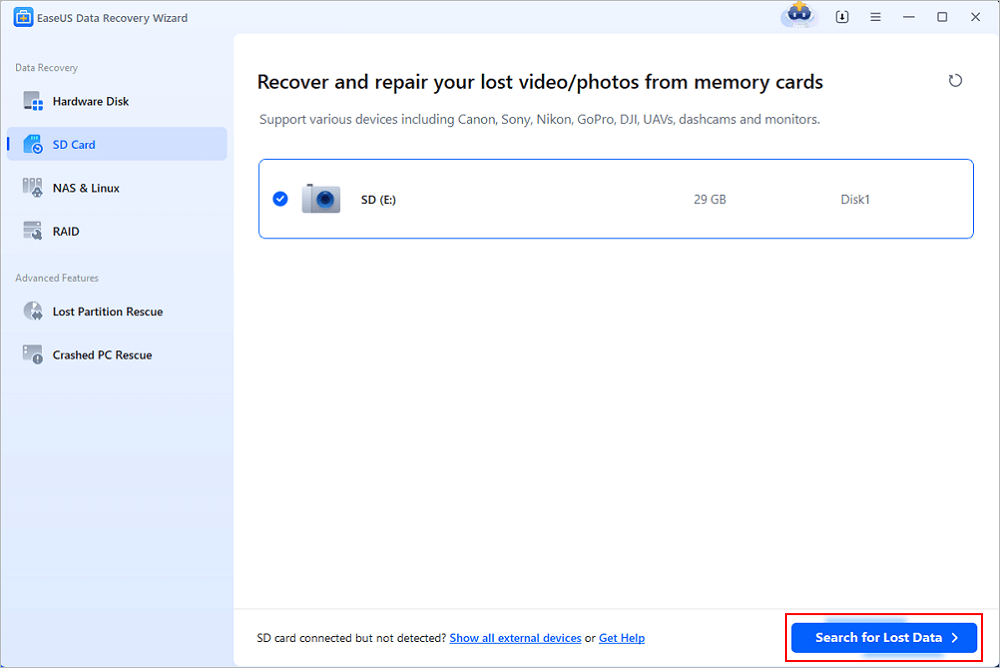
EaseUS Data Recovery Wizard is one of the most widely known data recovery software programs in the consumer market, with more than 10 years of development history and millions of global users. It is especially optimized for SD card data recovery and supports common scenarios such as accidental deletion, formatting, RAW partition recovery, and SD card damage. EaseUS is unique in its balance between high recovery success rate and ease of use. Unlike many technical tools, it offers a guided recovery process that makes it easy for even non-technical users to get started, as well as advanced scanning to recover deleted files from SD cards.
✅Pros:
- The fault lies in the recovery capability of the whole scene: the six major scenes of repeated camera card photo deletion, HD video deletion, standard FAT deletion, BPB parameter damage, power-off debris, and RAW partition all rank first. BPB damaged/lost partition scenes can also directly restore partitions through "Lost Partition Rescue," stable output under extreme faults.
- Bitmap exclusion + depth mining algorithm: precise filtering of duplicate garbage files, extremely low data redundancy, no need to manually filter a large number of duplicate materials;
- Original ecological complete catalog reorganization: EaseUS SD card recovery software applies advanced SSR, SDR, DVR technology for original folder complete restoration of camera SD cards and USB drives; photographers do not need to rummage for materials in massive files.
- Ultra-fast, all-format preview: supports high-definition previews for CR2/NEF camera RAW images, 4K videos, Office documents, and audio, loaded with zero lag.
- Three simple steps: select a disk > perform a deep scan > preview and recover. Even beginners with no technical background can get started right away, and it's compatible with both Windows and macOS.
- The scanning process displays files in real time, so you don't have to wait for a full disk scan to complete; you can filter and select the files you need to recover as the scan progresses, saving significant time.
❌Cons
- In extremely severe BPB partition corruption scenarios, the scan results may include a small number of duplicate files, but this does not affect the retrieval of core assets, and the filtering overhead is minimal.
📌Summary
EaseUS Data Recovery Wizard stands out for its comprehensive approach to SD card rescue and data recovery. Its SDR (SD Card Rescue) feature is designed to provide a complete rescue solution for unreadable SD cards: when conditions allow, SDR attempts to restore access to the card so users can continue using and recovering its contents. Even when the SD card cannot be made accessible again, EaseUS Data Recovery Wizard can continue scanning the underlying storage to recover important photos, videos, documents, and other valuable data.
For SD cards that have been used for a long time, fragmented photos and camera videos can be particularly challenging to recover. EaseUS SD card recovery software combines SSR (SmartSector Rebuild) and DVR (Deep Video Reconstruct) technologies to further improve recovery quality. SSR helps reconstruct fragmented photo data and increase the likelihood that recovered images can be opened normally, while DVR focuses on reconstructing fragmented camera and drone videos to improve their chances of being played back successfully.
Combined with its signature-based deep scan engine, which can identify recoverable data even when file-system metadata is damaged or unavailable, EaseUS provides a more complete recovery workflow for formatted, corrupted, inaccessible, or RAW SD cards. Whether you are a photographer recovering camera photos, a drone user trying to restore video footage, or an everyday user dealing with an inaccessible memory card, EaseUS Data Recovery Wizard offers both SD card rescue and deep data recovery when conventional access is no longer possible. You can share this SD card data recovery tool on social media with more friends!

2. Wondershare Recoverit | A Well-rounded Mid-range Tool
Wondershare Recoverit (Wondershare Recovery Expert) is a data recovery software for public users. It performs more evenly in scenarios such as accidental deletion, formatting, partition loss, and data recovery from external storage devices. Its overall positioning is more for consumer and office users, using a more intuitive graphical interface, which can reduce the data recovery threshold.

✅Pros:
- The recovery rate of standard FAT mild accidental deletion scenes is 100, but it is only 21% and 31% in repeated shooting of camera card photos and high-definition video accidental deletion, and the stability of complex real camera card scenes is limited;
- The UI interface is beautiful, and it is designed with a visual wizard. After selecting the storage device, it can be scanned and restored, and the user does not need to have professional data recovery knowledge;
- The file filtering function is perfect, covering common file types such as photos, videos, audio, Office documents, compressed packages, etc., and is more friendly to Office files and daily photos recovery;
- The preview definition is excellent, and some photos, documents, videos, and other files can be viewed before the formal recovery, which helps to judge whether the files are complete and worth recovering.
❌Cons
- There is an obvious bottleneck in the repair of the underlying partition, and the recovery rate of the formatted scene prompted by the SD card is only 27.26%;
- Large-capacity SD card deep directory scanning is slow, and a large number of files are hung in the wrong directory under complex faults, causing trouble in screening.
- The subscription automatically renews after purchase, so users need to manually cancel the subscription before the renewal date if they do not want to be charged for the next billing period.
📌Summary
The advantage of Wondershare Recoverit is the balance between ease of use, functional integrity, and recovery capabilities for common scenarios. It can provide a relatively complete solution for conventional data recovery tasks such as accidental deletion, accidental formatting, loss of SD card photos, and disappearance of USB files, especially suitable for ordinary office users, home users, and photography enthusiasts.
However, if the SD card has RAW, serious file system damage, or abnormal directory structure, Recoverit can try to retrieve files through deep scanning, but there are still some limitations in directory reconstruction, fragmented file processing, and recovery stability under complex failures.
3. R-Studio | A Professional Tool for Tech Geeks
R-Studio is a professional-grade data recovery software that is widely used by data recovery experts. It provides advanced recovery algorithms and supports complex scenarios such as RAID reconstruction and network recovery.
Unlike entry-level tools, R-Studio provides granular control over the recovery process, making it ideal for dealing with severely damaged or structured storage systems.

✅Pros:
- Outstanding recovery capability from complex failures: It not only supports recovery from accidental deletion and formatting, but also handles complex situations such as damaged or deleted partitions, file system damage, and unknown file systems. The professional recovery capability is significantly higher than that of ordinary consumer-grade tools;
- Strong RAID recovery capability: it supports RAID 0/1/4/5/6 and some nested and non-standard RAID, and supports automatic identification of RAID parameters and custom RAID layout, which is an important advantage different from common data recovery software;
- Complete disk mirroring feature: you can first create a mirror image of the entire disk, logical disk, or designated area, and then scan and restore the mirror image, especially suitable for hard disks with potential hardware failures or important data recovery tasks;
- Professional RAW file recovery capability: when the file system is severely damaged and cannot read the directory structure normally, you can search for data according to file characteristics through known file types and support users to customize file types;
❌Cons
- Media data recovery is unstable: photo recovery can still provide previews, but high-definition video recovery preview shows a black screen and no valid video is found; It is difficult for ordinary users to complete file confirmation before recovery.
- Poor raw-node classification: in our tests, it often dumps all recovered files under the RAW node, leaving ordinary users with no way to get started.
- The interface is old and obscure, and the learning cost is high. Facing the video preview, file positioning, and batch filtering that ordinary users are most concerned about, the interaction path is complex, and the daily camera data recovery cost performance is low.
📌Summary
R-Studio is a necessary tool for data recovery labs. When dealing with complex RAID arrays or storage media that have been repeatedly overwritten, it enables low-level, code‑level operations. Solid low-level disk analysis capabilities, with a recovery success rate exceeding 90% in partition-corruption scenarios, support hexadecimal-level low-level editing and RAID array repair.
Compatible with Linux, macOS, and Windows, ideal for professional data recovery labs. If you are a technology geek, it is impeccable, but for ordinary users who just want to retrieve SLR photos, its learning cost is too high. This is intended for operations and maintenance personnel as well as digital forensics engineers; it is not recommended for everyday data recovery by ordinary photographers or office users.
4. Disk Drill | Attractive Interface but Uneven Recovery Performance
Disk Drill is a data recovery tool with a modern interface that supports a variety of storage devices, including SD cards. Its advantages are a low threshold, an intuitive interface, and rich auxiliary tools. However, this test shows that the recovery ability of its real camera card is not balanced: only 23% of the photo cards are recovered, the HD video card is 41%, the sample cannot be previewed, and the BPB damage scene is even reduced to 10.41%. Therefore, it is more suitable as an alternative tool for mild and recent accidental deletion, rather than a priority scheme for key camera materials.

✅Pros:
- Excellent operating experience: with a modern graphical interface, the disk selection, scanning, file preview, and recovery process is simplified; even users without data recovery experience can quickly get started;
- Comprehensive scanning capability: it provides fast scanning, deep scanning, and recovery capability based on file characteristics, and can cope with different degrees of data loss such as accidental deletion, formatting, partition loss, and serious damage to the file system;
- Wide file type coverage: supports hundreds of file formats, including photos, videos, Office documents, compressed files, and common camera RAW formats such as CR2, NEF, ARW, etc., which is more friendly to photography users;
- Byte-to-Byte disk backup usage: for SD cards or hard disks with unstable and abnormal reading and writing risks, you can create a Byte-by-byte mirror first and then scan and restore from the mirror to reduce the risk of directly and repeatedly reading the original disk;
- Rich auxiliary tools: in addition to data recovery, it also integrates disk health monitoring, data protection, disk cleaning and other functions, making it not only a single data recovery tool, but a more complete storage management toolset.
❌Cons
- Disaster-level data redundancy (file duplication): Our test data show that Disk Drill's data redundancy rate remains persistently high. For the same lost Word document or photo, it may recover more than five duplicate copies for you - interspersed with a large number of corrupted files. This directly results in users facing extremely high secondary screening costs after recovery.
- Directory tree mounting confusion: During deep scans on FAT-formatted drives, Disk Drill will mount some lost files to locations such as System Volume Information. Under such a system's hidden-node configuration, or when the "correctness of the original directory mount is questionable," ordinary users are severely misled, making it nearly impossible to locate the files they need.
- The full recovery rate plummeted to 10.41 percent in the BPB logic damage test. In this test, its double-click preview is not smooth enough, and the types of previews are limited, which slows down the efficiency of the right to retrieve files.
- The subscription automatically renews after purchase, so users need to manually cancel the subscription before the renewal date if they do not want to be charged for the next billing period.
📌Summary
Disk Drill provides auxiliary functions such as disk mirroring, health monitoring, and data protection. The product has a wide range of functions. However, in the real camera card scenario measured this time, the recovery capability, preview capability, and complex fault adaptability are not balanced.
If the main requirement is a normal file system and recently deleted ordinary files, Disk Drill can be used as an alternative. However, this test shows that the complete recovery rate is 23% and 41% respectively in the repeated shooting of camera card photos and high-definition video, and the video sample cannot be previewed in the scanning phase. Photographers and drone users should not judge resilience based solely on interface experience or the number of scans.
5. Tenorshare 4DDIG | Easy to Use but Inconsistent in Difficult Scenarios
Tenorshare 4DDIG is a data recovery software for ordinary consumers. Its overall positioning is close to that of products such as Wondershare Recoverit and Disk Drill. It emphasizes simple operation, wide coverage of file types, and comprehensive support for common data loss scenarios. It uses a more intuitive scanning and recovery process, and ordinary users can operate without understanding complex file systems. However, in this camera card test, the photo recovery rate was 19%, no effective results were found for high-definition video, and the actual performance of preview and recovery capability was not stable.

✅Pros:
- Simple operation and low recovery threshold: a clear graphical interface and a guided process are adopted to start scanning after selecting a storage device, and ordinary users do not need to master complex data recovery knowledge; the overall interaction logic is acceptable, and lost partitions can be effectively separated in power-off scenarios.
- Common data loss scenarios are fully covered: it supports scenarios such as accidental deletion, emptying of the recycle bin, formatting, lost partitions, RAW file systems, virus attacks, and system crashes, and can cover most daily data loss requirements;
- Cover multiple types of photographic devices: support SD/CF cards, digital cameras, video cameras, motion cameras, drones, and other equipment; however, the actual recovery effect of media files such as photos and videos needs to be verified by specific scenes.
❌Cons
- The performance was erratic. In the FAT BPB parameter damage test, it was completely unable to find data from the file system; the recovery rate was directly set to zero, and there was also a problem of blurred pictures for some previews. For scenarios such as severe formatting, complex file system damage, or abnormal disk underlying structure, the actual recovery effect may not be as stable as that of professional tools such as R-Studio.
📌Summary
The overall positioning of Tenorshare 4DDIG can be summarized as an easy-to-use universal recovery tool. It does not emphasize the underlying file system analysis and RAID parameter control as R-Studio, nor does it require users to have a high technical threshold as professional data recovery tools; instead, it focuses on covering the most common scenarios of ordinary users, such as accidental deletion, formatting, SD card data loss, USB file loss, and partition loss.
In the camera card test, the recovery rate of repeated photos taken by mistake was 19%, and no effective video was found by mistake in high-definition video. In extreme scenes (especially when there are many fragmented files written repeatedly), the stability is significantly weaker than that of EaseUS Data Recovery Wizard.
6. Stellar Data Recovery | Broad Feature Set but Weak Results in Severe Failures
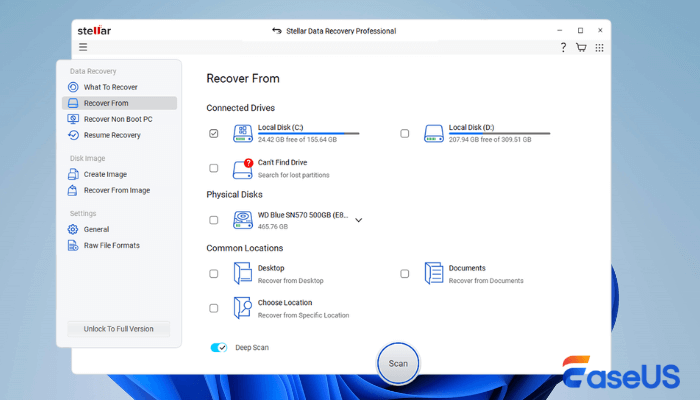
Stellar Data Recovery provides functions such as photo, video, document, RAW recovery, partition recovery, and disk mirroring and covers mainstream file systems such as NTFS, FAT, exFAT, APFS, and HFS/HFS+. Functional coverage is not equal to the recovery effect in complex scenarios: in this test, the recovery rate of repeated photos is 15%, high-definition video is 0%, the RAW recovery rate is 4.93%, and the preview performance of large-volume media samples is limited.
✅Pros:
- It fully supports common scenarios such as accidental deletion, formatting, partition loss, RAW, file system damage, and system crash. It can cover a variety of requirements, ranging from simple accidental deletion to more complex disk failures;
- It is compatible with SD, USB, hard disk, and other storage media, and supports a large number of camera RAW formats such as CR2, CR3, NEF, ARW, ORF, RAF, RW2, which is friendly to photography users;
- The professional version of Stellar and Toolkit provides RAID 0, 5, and 6 data recovery and virtual RAID reconstruction capabilities, which can further cover the needs of NAS and RAID data recovery.
❌Cons
- In this difficult test, the performance was weak: The complete recovery rate in the RAW FAT table damage test was only 4.93%, the scanning took a long time, and there was no response many times; The preview of large-volume pictures and video samples was not completed, and the experience was limited. It can still be used normally in the case of a single-file deletion by mistake.
📌Summary
Stellar Data Recovery has a wide range of functions, but this test does not support positioning it as an equalization scheme for complex camera card recovery: repeated shooting of photos, high-definition videos, and RAW scenes are all weak, and the scanning speed, preview limit, and result presentation will further reduce the actual usability. It is better suited to verify version capabilities before processing mild, single-file recovery tasks.
7. PhotoRec | Free and Open Source, but Best for Technical Users
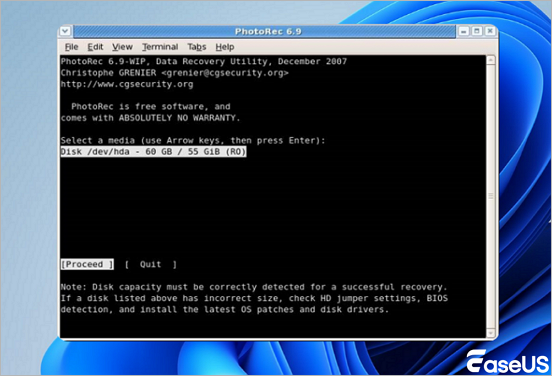
PhotoRec is a free, open-source data recovery tool developed by CGSecurity, focusing on file recovery techniques. It recovers files even if the file system is completely corrupted. It works by scanning raw disk data and recognizing file signatures, so it is very effective on formatted or corrupted SD cards. It also supports recovery of microSD cards and other memory cards.
✅Pros:
- Completely free and open source: PhotoRec does not set the common recovery capacity limit of commercial software; it is completely free and open source, and the underlying file signature retrieval has a certain effect, with no payment threshold.
- It can still work even if the file system is damaged: it has a certain effect in the RAW fragment extraction (82.98%) at the pure bottom layer. PhotoRec will bypass the file system and directly analyze the underlying data of the disk. Therefore, even if the partition becomes RAW, the file system is damaged, or the directory information is lost, it can try to retrieve the data through the file signature.
- File format coverage is very wide: official data show that it supports more than 480 file extensions, covering common photos, videos, documents, and compressed files such as JPEG, PNG, RAW, MP4, PDF, Office, ZIP, etc.
❌Cons
- The main process of PhotoRec is partial to the command line. The supporting PhotoRec provides a basic graphical interface, but file preview is still not supported in this test;
- All the recovered files have lost their original names and folders. After recovery, the data needs to be manually identified one by one. The efficiency of needle-in-a-haystack is extremely low and is not suitable for photographers with precious time.
📌Summary
The positioning of PhotoRec is very clear: it is not a consumer-grade data recovery software that emphasizes the interface, directory structure, and operating experience, but a free open-source underlying recovery tool that relies on file signature scanning. Its greatest value is that even if the file system has been severely damaged, it cannot even recognize the partition normally, it is still possible to bypass the file system and search the underlying file directly. The official also makes it clear that PhotoRec can continue to recover deleted files in severely damaged file systems.
8. Recuva | Simple Free Recovery for Basic Deleted Files
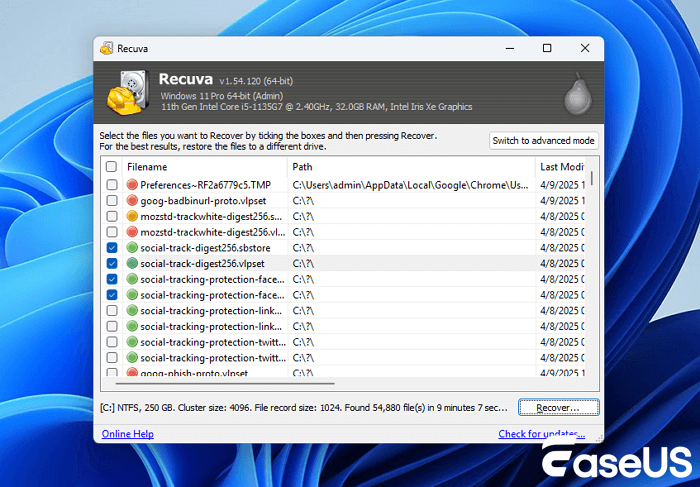
Recuva, developed by Piriform, is a free and lightweight recovery tool only for Windows. It focuses on fast retrieval and simple operation of recently deleted files. It is more suitable for the recovery of ordinary documents or pictures with a normal file system and not written repeatedly. No valid photos or videos were found in the two types of real camera card tests. Therefore, it should not be used as the first choice for camera SD card material rescue.
✅Pros:
- The free version has no recovery capacity limit: The Recuva free version can perform file recovery, unlike some competing free versions, which have capacity limits of hundreds of MB or 1GB, and are friendly to users who only need to recover a small number of files or a large number of ordinary files;
- Fast recovery speed of accidental deletion: Quick Scan can quickly search for recently deleted files, and can quickly give scanning results for hard disks, USB flash drives, and SD cards with normal file systems and just-deleted data;
❌Cons
- This RAW partition scenario failed to complete effective recovery;
- Partition damage scan directly reported an error.
- Only picture samples can be previewed; video and document samples cannot be viewed in our test. There are obvious restrictions when dealing with large-capacity camera SD card failures.
📌Summary
Recuva's product positioning is very clear: it is a free lightweight data recovery tool; the core value is to let ordinary Windows users deal with the normal file system at a lower cost, especially when your SD card has just experienced simple data loss. For key camera photos, HD videos, or SD cards that have been written repeatedly, this test does not support it as a priority.
Its biggest advantage is that the free version does not have a strict recovery capacity threshold, simple operation, or quick scan/deep scan dual mode. For the recent accidental deletion of files on health storage devices, this lightweight design is more convenient than professional software with complex functions. However, no valid files were found in this repeated photo card and high-definition video card test. Therefore, it should not be used as the first choice for camera SD card deletion.
9. UFS Explorer (UFS) | Professional Features but Limited Results in This Test
UFS Explorer is a software product targeted at professional data recovery scenarios. Its core advantage is not simple deletion and recovery but provides more in-depth recovery capabilities for RAID, NAS, complex file systems, damaged partitions, and unstable storage devices. Products are available in different versions, such as standard recovery, RAID Recovery, network RAID, and professional recovery.

✅Pros:
- The RAID / NAS Recovery capability is very outstanding: RAID Recovery can automatically read RAID metadata and rebuild RAID 0, 1, 5, 6, 10, 50, 60 arrays, and support the storage layout of a large number of NAS manufacturers, which is one of the most competitive features of UFS Explorer;
- RAID Builder has strong manual reorganization ability: when the RAID metadata is damaged, the array is reinitialized, or the controller is replaced so that the original array cannot be automatically recognized, you can manually set the disk order, block size, and other parameters to rebuild the virtual RAID with high professional controllability;
- Complete support for encrypted storage: BitLocker, BitLocker To Go, and Apple APFS encrypted volumes are supported, and data in encrypted storage can be directly accessed if you have the key or password;
❌Cons
- In the test of an abnormal file system caused by a power failure, UFS Explorer was stuck in direct startup, and the software could not enter the recovery interface normally.
- In the RAW partition test, although UFS Explorer can identify and scan the relevant storage devices, all the recovered files are displayed as 0KB, and the valid file contents cannot be obtained normally.
- UFS Explorer can find many deleted files in the FAT file system deletion test, but a large number of files do not support preview.
- If only a few mistakenly deleted photos or several Office files are recovered, its complex storage analysis and advanced recovery functions have no obvious advantages, and the use cost is higher than that of simple consumer-grade tools.
📌Summary
UFS Explorer is more suitable for data recovery technicians, IT administrators, NAS/RAID users, and advanced users with a certain storage technology foundation. If measured by professional resilience, it is a high-level tool worthy of focus in this assessment; if measured by ease of use for the average user, it is not as good as consumer products such as EaseUS Data Recovery Wizard, Recoverit, and Disk Drill.
Overall Ranking: The Best SD Card Recovery Software in 2026
Based on the six test scenarios and the five evaluation criteria: recovery quality, data presentation, preview experience, scanning performance and compatibility, and ease of use, the nine products can be ranked as follows. Keep reading to find out!
Recovery Success Rate and Catalog Reorganization Performance
The overall results show that recovery quality is not the same as the number of files returned by a scan. A program may display thousands of scan results but still recover relatively few complete, usable files. For SD card recovery, particularly when dealing with camera photos and videos, the more meaningful indicators are whether the recovered files can actually be opened or played, whether the original directory structure can be preserved, and how much manual filtering is required.
| Software | Recurring Photos | HD Camera Video Recovery | Original Directory Integrity | Duplicate File/Redundancy Rate Control | RAW Deep Scan/BPB Lost Partition Performance |
| EaseUS | ★★★★☆ (61% for high debris limit scenes, 128 complete original images; 32 percentage points higher than the second place) | ★★★★★ (91%, preview, thumbnail positioning) | ★★★★★ (Extremely high) | ★★★★★ (Almost no redundancy) | RAW scans 96.54%; BPB scenes support Lost Partition Rescue and direct recovery. |
| R-Studio | ★★★☆☆ (29%, 61 valid documents) | ☆☆☆☆☆ (0%, black screen for this video preview) | ★★★★☆ (Partial bottom extraction) | ★★★★☆ (Good) | 72.68%; Mainly scanning for documents |
| Disk Drill | ★★☆☆☆ (23%, 48 valid documents) | ★★★☆☆ (41%, this sample cannot be previewed) | ★★★☆☆ (Partial mount error) | ★★★☆☆ (More duplicate files) | 82.42%; Presented as scan results |
| Recoverit | ★★☆☆☆ (21%, thumbnail to be excluded) | ★★☆☆☆ (31%, preview only after repair) | ★★★☆☆ (There is a wrong directory for complex scenes) | ★★★☆☆ (Manual verification is required) | 68.98%; Presented as scan results |
| Tenorshare 4DDIG | ★★☆☆☆ (19%, 40 valid documents) | ☆☆☆☆☆ (0%) | ★★★☆☆ (Medium) | ★★★☆☆ (Medium) | 75.25%; Presented as scan results |
| Stellar | ★☆☆☆☆ (15%, 31 valid documents) | ☆☆☆☆☆ (0%) | ★★☆☆☆ (Restricted presentation and retrieval) | ★★☆☆☆ (Moderately weak) | 4.93%; Slow enumeration, limited results |
| UFS Explorer | ★★☆☆☆ (23%, 48 valid documents) | ☆☆☆☆☆ (0%) | ★★☆☆☆ (Limited consumer scene) | ★★☆☆☆ (Moderately weak) | N/A; Recovery results appear 0KB |
| PhotoRec | ☆☆☆☆☆ (0%) | ☆☆☆☆☆ (0%) | ☆☆☆☆☆ (No catalog presentation) | ☆☆☆☆☆ (No weight removal and screening) | 82.98%; No preview, missing name and directory |
| Recuva | ☆☆☆☆☆ (0%) | ☆☆☆☆☆ (0%) | ★☆☆☆☆ (Weak catalog ability) | ★☆☆☆☆ (Basic level) | N/A; Lost Partition Scan not supported |

Scan Speed and Efficiency Ratio Evaluation
- EaseUS: Data Presentation Speed Score(★★★★★), equipped with bitmap exclusion and in-depth mining capabilities, not only is the scanning speed among the best, but also the scanning and watching, without any sense of Caton.
- Disk Drill: Rendering Speed Score (★★★★☆), scanning is relatively fast, but there may be a slight lag when loading large result sets.
- Stellar / 4DDIG: Rendering Speed Score(★★☆☆☆), The interface stutters, and the overall process takes a long time.
Overall Ranking of Comprehensive Ladders (2026 Measured Score)
The comprehensive score is evaluated according to the recovery quality, data presentation, preview experience, scanning and compatibility, and ease of use, combined with the effective recovery results of six scenes. The number of scanned files, thumbnails, and unplayable videos is not counted separately as recovery success. Photo and video recovery stars focus on reflecting the full recovery rate and the ability to determine the right time before recovery.
Ranking Software Overall score (on a 5-point scale) One-sentence summary
| Ranking | Software | Overall Score (on a 5-point scale) | One-sentence Summary |
| 1 | EaseUS Data Recovery Wizard | 4.4/5 | Top performer across all six scenarios; achieved 61% recovery for highly fragmented photos, 91% for HD videos, and can directly recover partitions in BPB/lost-partition scenarios. |
| 2 | R-Studio | 3.6/5 | Strong BPB damage recovery and RAW scanning capabilities, but achieved 0% in the HD video recovery test and has a relatively steep learning curve for general users. |
| 3 | Disk Drill | 3.4/5 | Demonstrated some capability with HD video recovery at 41%, but photo recovery was only 23%; the video samples could not be previewed, and performance was weak with complex partition damage. |
| 4 | Wondershare Recoverit | 3.2/5 | Strong BPB damage recovery and RAW scanning capabilities, but achieved 0% in the HD video recovery test and has a relatively steep learning curve for general users. |
| 5 | Tenorshare 4DDIG | 2.7/5 | Easy to use for standard recovery workflows, but performance varied significantly on real camera cards, with no effective recovery in either the HD video or BPB damage scenarios. |
| 6 | PhotoRec | 2.4/5 | Offers decent RAW file extraction capabilities, but achieved 0% in both photo and video scenarios and provides no file preview, original filenames, or folder structure. |
| 7 | Stellar Data Recovery | 2.2/5 | Recovered only 15% of repeatedly shot photos and 0% of HD videos; preview limitations and slow scanning reduced its practical usability. |
| 8 | UFS Explorer | 1.8/5 | Successfully recovered some photo files, but achieved 0% for HD videos and produced 0KB RAW files, making it unsuitable for consumer camera cards. |
| 9 | Recuva | 1.6/5 | Failed to find valid files in either of the two real-camera-card scenarios and produced no effective results in the BPB/lost-partition scenario tested. |
Quick Shopping Guide: According to Your SD Card Failure
| User Pain Points / Failure Scenarios | Preferred Software | Reasons for Recommendation |
| Repeatedly taking photos of camera cards and deleting them by mistake; you need to retrieve photos that can be opened normally. | EaseUS Data Recovery Wizard | Achieved a 61% full-original recovery rate in the highly fragmented photo scenario, 32 percentage points higher than the second-place tool. It can identify fragmented photos and reduce the screening workload caused by thumbnails and file fragments. |
| If the HD camera video is deleted by mistake, you must first confirm whether the video can be played. | EaseUS Data Recovery Wizard | Achieved the highest 91% complete recovery rate. Its scan-stage preview and thumbnails make it easier to quickly locate the target video clips. |
| SD card prompts for formatted, BPB corruption or lost partition. | EaseUS Data Recovery Wizard | Achieved a 94.23% recovery rate in the BPB scenario. Its lost-partition recovery feature can directly restore the original partition before proceeding with data recovery. |
| SD card changes to RAW and deep scanning is required to retrieve files. | EaseUS Data Recovery Wizard | Achieved a 96.54% recovery rate in the RAW scenario and supports previewing files during scanning to verify whether they are valid and recoverable. |
| The file system is normal, a minor file deletion occurred just now, and the budget is medium. | Wondershare Recoverit | Standard FAT deletion recovery can reach 100% in light-deletion scenarios. However, it is not recommended as the first choice for recovering critical files from camera cards or HD videos. |
| IT engineer or data forensics user who requires underlying disk editing or RAID capabilities. | R-Studio | Achieved a 90.27% recovery rate for BPB parameter damage and provides strong low-level control and complex file-system handling. However, video preview and overall usability are relatively weak. |
| Zero budget; only willing to try RAW file extraction and accept no preview and manual finishing. | PhotoRec | Provides file-signature-based RAW extraction and is free and open source, but users must accept the lack of preview, original filenames, and folder structure. |
Essential Do's and Don'ts for SD Card Data Recovery (FAQ)
1. The SD card prompts that it needs to be formatted and has become RAW, can it still be recovered?
There is still a chance to recover, but writing should be stopped immediately, and you should not continue to shoot, copy, or save the recovery result on the faulty card. Formatting may alter file system metadata and increase the difficulty of subsequent recovery. You can use EaseUS Data Recovery Wizard to scan and preview first. The full recovery rate of this RAW scene is 96.54%. If the device belongs to a BPB-damaged or lost partition, you can further attempt to restore the partition directly through "Lost Partition Rescue".
2. Why do some software programs detect a large number of identical duplicate photos/videos?
Different software has different deduplication and file determination strategies. In this test, Disk Drill failed to effectively filter part of the disk history fragments, resulting in cache fragments being identified as complete files and generating many duplicate results. EaseUS Data Recovery Wizard, equipped with bitmap exclusion technology, automatically filters redundant fragments, dramatically reducing the workload of duplicate file screening.
3. Can all scanned files be fully restored with 100% integrity?
Key premise: After data loss, immediately stop using the SD card or USB flash drive and refrain from taking new photos or copying any additional files. Once the new data overwrites the original footage, the file is permanently damaged beyond repair. The repeated shooting of the camera card test also shows that even if it is not used continuously after deletion, the repeated writing of history may cause overwriting and fragmentation. The 100% result of standard FAT deletion cannot be directly applied to the real camera card. The scanning preview and the full playback/opening verification after recovery shall prevail.
4. Is it okay to restore files and save them back to the original SD card?
Absolutely prohibited. To restore files, save them to your computer's local hard drive or to a blank USB flash drive. Storing the recovered files directly back onto the faulty SD card will overwrite the unrecovered lost data, resulting in permanent data loss.
5. Why is some software not as good as EaseUS in photo and video recovery?
The difficulty of real camera card recovery is not just "scan to file name". Repeated shooting can cause historical data overwriting, fragmentation, and thumbnail retention; high-definition video requires software to properly reorganize continuous large file data and verify its playability before restoring. In this software, some products will rely on file signatures to list suspected files; it is easy to include thumbnails, fragments, or unplayable videos in the results; some products fail to provide a preview of the scanning phase in the test sample, making it difficult for users to determine whether the file is complete. In this test, EaseUS also has effective file identification, photo and video preview, and directory presentation in fragmentation scenarios and can complete partition recovery in BPB-damaged/lost partition scenarios. Therefore, it is significantly ahead of the real camera card scene with 61% photos and 91% high-definition videos.
Final Summary
Our 14-day test shows that SD card recovery performance varies significantly across different data-loss scenarios. EaseUS Data Recovery Wizard ranked first in all six tests, delivering strong results for deleted files, fragmented photos and videos, damaged partitions, and RAW SD cards. With SD Card Rescue (SDR), SmartSector Rebuild (SSR), Deep Video Reconstruct (DVR), and Lost Partition Rescue, it provides a comprehensive solution for recovering data from deleted, formatted, corrupted, inaccessible, or RAW SD cards and USB drives.
Whether you are a photographer protecting irreplaceable footage, a drone pilot recording your travels, or an office worker storing important documents, data loss can happen unexpectedly. When it does, we recommend downloading the free version of EaseUS Data Recovery Wizard to scan and preview your lost files first.
Was this page helpful?
-
Dany is an editor of EaseUS who lives and works in Chengdu, China. She focuses on writing articles about data recovery on Mac devices and PCs. She is devoted to improving her writing skills and enriching her professional knowledge. Dany also enjoys reading detective novels in her spare time. …

 Why Trust EaseUS
 Editor Reviews

20+
Years of experience

160+
Countries and regions

72 Million+
Downloads

4.9 +
Trustpilot Score






