






-
![]()
-
![]()
-
![]() SD Card Showing Wrong Size: Restore SD Card Full Capacity
SD Card Showing Wrong Size: Restore SD Card Full Capacity October 14,2026
 6 min read
 -
![]()
-
![]() How to Recover Deleted Photos & Videos from Android Without RootOctober 14,20266 min read
How to Recover Deleted Photos & Videos from Android Without RootOctober 14,20266 min read -
![]()
-
![]()
-
![]() Fix Corrupted Data and Recover Files from PSP Memory Stick | 2026October 14,20266 min read
Fix Corrupted Data and Recover Files from PSP Memory Stick | 2026October 14,20266 min read -
![]()
-
![]()
Page Table of Contents
Usually, professional recovery software is required to retrieve data from a micro SD card. EaseUS Data Recovery Wizard is a well-liked choice. The program can scan the micro SD card, locate deleted or lost files, and try to recover them. Troubleshooting techniques include checking for physical damage, attempting other hardware, or running CHKDSK, which can be helpful if the card is corrupted.
PAGE CONTENT:
How to Recover Data from a Micro SD Card
Nowadays, most digital devices use microSD cards to expand their storage capacity. As users can save files such as pictures, video files, and music files on the device, this tiny storage device is becoming increasingly popular among users worldwide. However, with the widespread use, unexpected data loss disaster happens frequently. Even if you take every precaution to avoid the accident, it may still happen one day.
Data loss from a micro SD card can be distressing, especially if the card becomes corrupted. Whether due to physical damage, formatting errors, or software glitches, recovering data from a corrupted micro SD card is possible with the right approach.
1. Choose and Install Recovery Software
To recover data from a corrupted micro SD card, start by selecting a reputable data recovery tool. Download and install the software on your computer, ensuring it's compatible with your operating system.
✍️Note: To prevent overwriting existing data, avoid installing the software directly onto the corrupted microSD card.
In this case, EaseUS Data Recovery Wizard becomes crucial for recovering your data, which contains essential information. Here, we recommend EaseUS Data Recovery Wizard - a reliable data recovery tool for micro SD cards.
It has many highlights for SD card data recovery:
- It recovers deleted, formatted, corrupted, or lost data.
- It also restores the Micro Secure Digital card's pictures, images, photos, and videos. (More than 1000 types of file types)
- It has a wizard-style interface and allows you to easily recover files from an external hard drive or a micro SD memory card.
- It supports all popular brands including SanDisk, Kingston, PNY, Lexar, Transcend, PQI, and more.
2. Launch the Software and Scan
Now, you can follow the detailed steps to recover data from a micro SD card.
🏆EaseUS SD card recovery leverages patented video fragment reconstruction technology to deeply repair video files lost due to accidental deletion, formatting, or corruption. Explicitly designed for cameras, action cameras, drones, and dashcams, it accurately restores complete and playable precious footage.
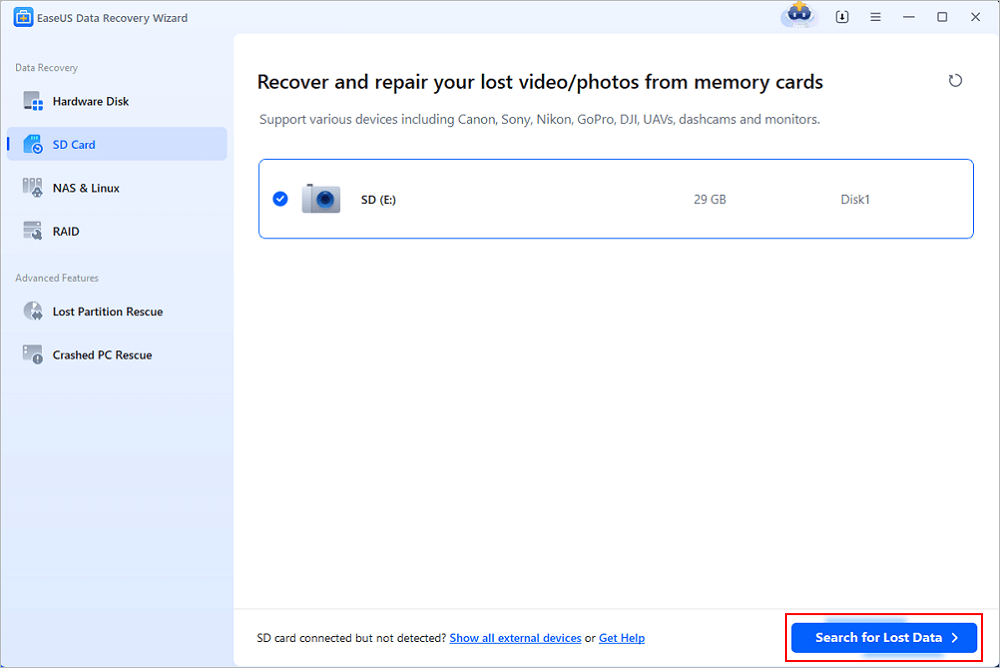
Step 1. Select the SD card to scan
- Download and install EaseUS Data Recovery Wizard on your Windows PC.
- Use the proper way to connect your SanDisk/Lexar/Transcend SD card to the computer.
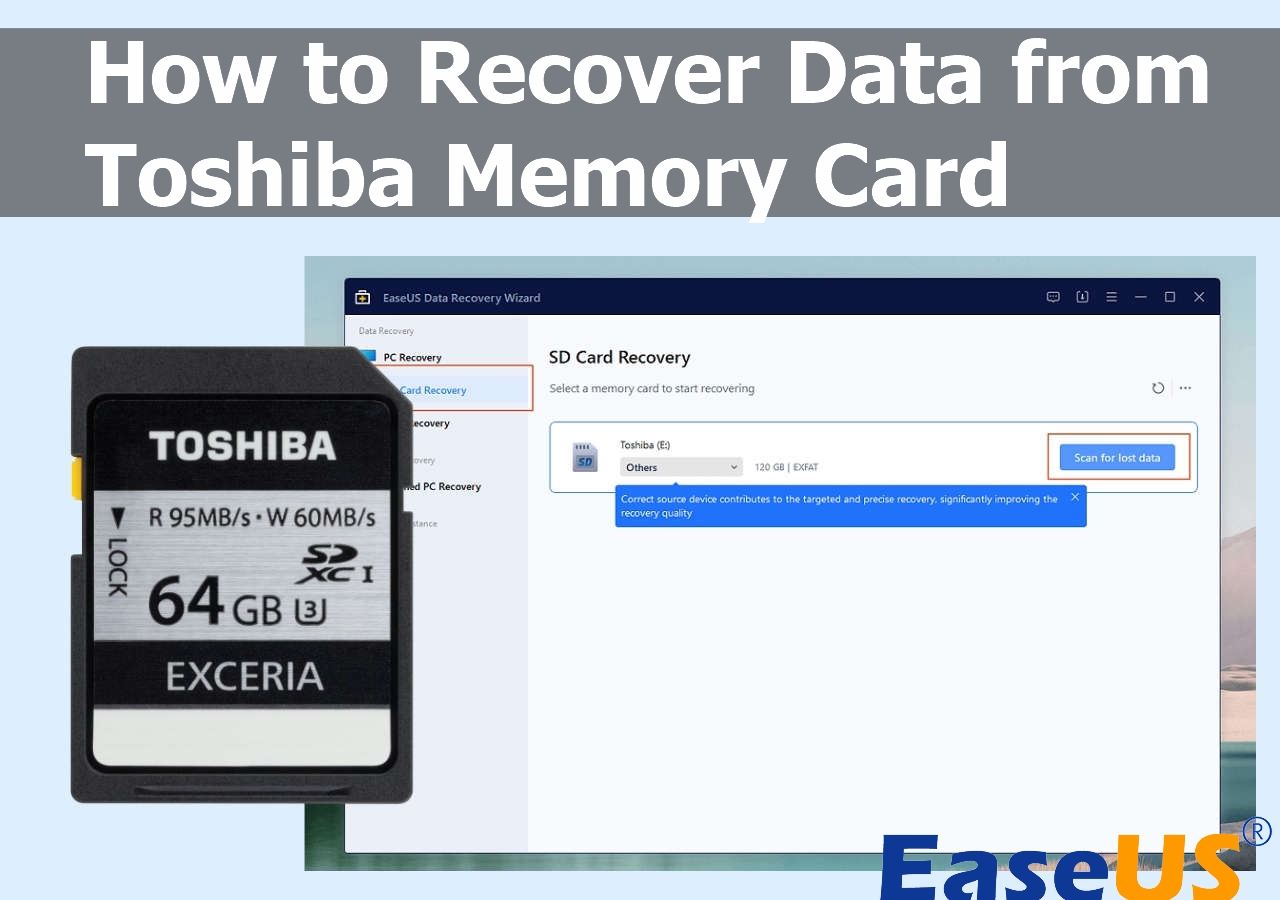
- Open EaseUS SD card recovery software and choose SD Card Recovery on the left panel. All connected drives will display here. Select your SD card and click "Scan for lost data".
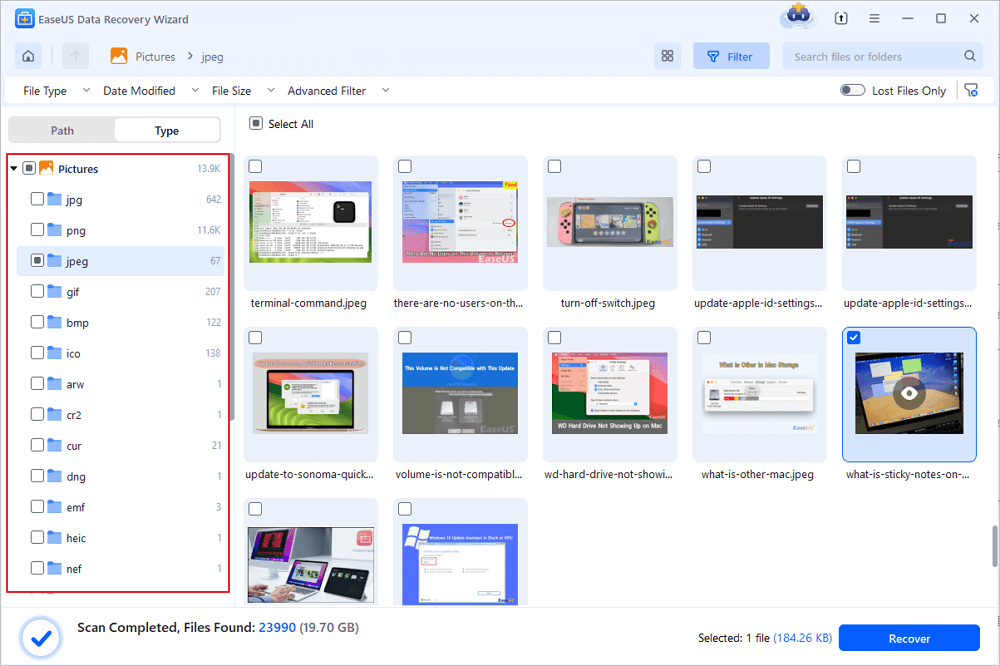
Step 2. Check for scan results
- Wait for the scanning process to complete.
- Specify one or several file types to show up, like Pictures or Videos.
- Click "Preview" to check if they are the wanted files.
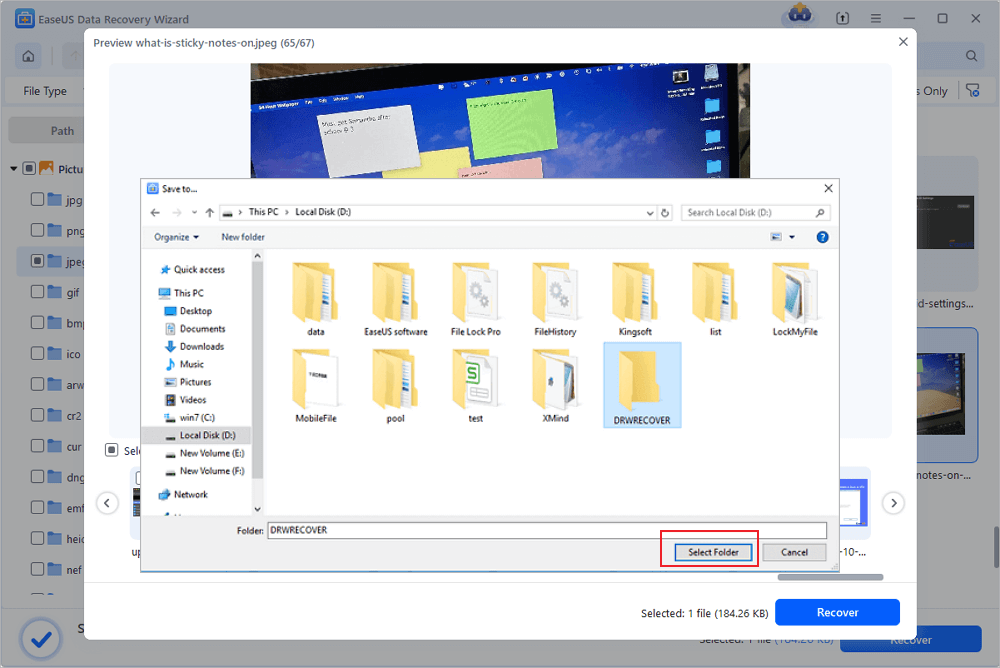
Step 3. Recover SD card data
- Preview the recovered files and click "Recover".
- Choose a different location to save the recovered files instead of the original SD card.
💡Want to know more about SD card data recovery? For example, what is the best SD card data recovery software? How to recover a damaged SD card? How to recover data from an unreadable SD card...Go for SD Card Data Recovery FAQs and restore your precious lost files.
⭐EaseUS Data Recovery Wizard - Key Features Comparison Table:
| 1️⃣Recovery Success Rate | - High success rate for deleted or formatted files. - Moderate success for corrupted cards (depends on damage severity). - Variable for physically damaged cards; professional repair may be required. |
| 2️⃣Compatible Micro SD Cards | - Supports all major brands (e.g., SanDisk, Kingston, Lexar, etc.). - Compatible with various capacities (up to 1TB or higher). |
| 3️⃣Scanning Speed | - Quick Scan: Fast, suitable for recent deletions. - Deep Scan: Slower but thorough for corrupted or formatted cards. |
| 4️⃣Supported Computer Systems | - Windows: Windows 7/8/8.1/10/11 (32-bit & 64-bit). - Mac: macOS 10.13 or later. - Linux support may vary; check the latest version for compatibility. |
3. Troubleshooting Corrupted Micro SD Cards
If the initial recovery fails or the card remains unreadable, consider these advanced steps:
- Check for Physical Damage: Visually inspect the micro SD card and the card reader for signs of damage (e.g., bent connectors, oxidation on metal contacts). Clean the card's contacts with a soft cloth or compressed air cleaner. If physical damage is severe, the card may require professional repair.
- Try Different Hardware: Connect the micro SD card to a different card reader or computer. Sometimes, compatibility issues or faulty readers cause corruption errors.
- Run CHKDSK (Windows) or Disk Utility (Mac):
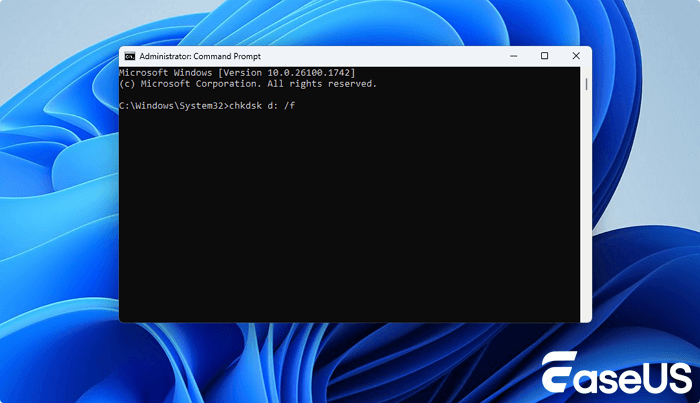
- Windows: Open Command Prompt as an administrator and enter chkdsk X: /f (replace "X" with the micro SD card's drive letter). This command scans and repairs file system errors.
- Mac: Use Disk Utility to "First Aid" the micro SD card, which detects and fixes common corruption issues.
4. Explore Professional Recovery Services
For severe physical damage (e.g., chip failure) or when software solutions fail, consider contacting data recovery labs. These services use specialized equipment to retrieve data from damaged cards, but can be costly.
Consult with EaseUS data recovery experts for one-on-one manual recovery service. We could offer the following services after a FREE diagnosis
- Repair corrupted RAID structure, unbootable Windows OS, and corrupted virtual disk files
- Recover/repair lost partitions and re-partitioned drives
- Unformat hard drives and repair RAW drives(BitLocker encrypted drives)
- Fix disks that become GPT-protected partitions
Addition: Micro SD Card VS SD Card (The Difference)
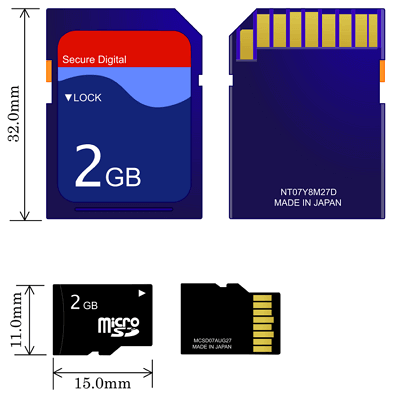
What is a micro SD card? What is an SD card? What's the difference between them? A micro SD card is a type of removable flash memory card used for storing information. It is the smallest memory card in size. It is also known as a TF card, TransFlash, or microSD.
An SD card is a proprietary non-volatile memory card format developed by the SD Card Association (SDA) for use in portable devices. The most apparent difference between them is their appearance. The standard size for an SD card is 32mm x 24mm x 1.4mm, while the measured size of a micro SD card is only 15mm x 11mm x 1mm.
Micro SD Card Recovery FAQ
If you still have some questions about Micro SD card recovery, check the quick answers below to help yourself out:
1. Can a micro SD card go bad/Corrupted?
The answer is definitely Yes. Any device could go bad. An SD, micro SD, mini SD or any other memory card can go bad. You can tell if a micro SD card is broken, corrupted, or damaged by looking for the following symptoms.
- You may receive miscellaneous error messages, such as "memory card error" or "corrupt memory card".
- Files are missing. Most of the photos or other files on your mini SD cards are missing.
- It cannot be recognized. It shows no media in Windows Disk Management or it is simply not visible at all.
- Black display in the camera. You will not be able to perform anything on your camera.
- Unknown files appear in the SD card. It appears to be an unknown file due to a virus infection.
If your micro SD card has any one of the symptoms, you know your Micro SD card is failing. You need to take action to fix your micro SD card.
2. Why does my micro SD card become corrupted?
Before finding the solutions, it is essential to understand the causes. Why does your micro SD card go bad? The reasons that cause corruption to the memory card and result in the symptoms above are:
- Abrupt removal of the memory card from your camera, computer or smartphone that interrupts the data transfer or read/write process
- Accidental deletion of entire data (music, photos, videos) from the memory card
- Virus attack or bad sectors
- Using the same card on multiple devices
- Other unknown reasons
3. How to fix a damaged SD card without losing data?
To fix your corrupted SD card, I have the following 8 tips. To fix different levels of damage, it's advisable for SD card owners to try troubleshooting methods one by one.
- Change a card reader, adapter, or USB port
- Run Windows Repair Tool
- Change a drive letter
- Run CHKDSK to check and repair the micro SD card's bad sectors
- Reinstall the SD card driver
- Format a RAW SD card
- Format a half-capacity SD Card
- Create a new SD card partition on unallocated space
Conclusion
No matter you have lost data from a corrupted SD card or formatted microSD card, you can always get data back with the help of EaseUS EaseUS Data Recovery Wizard. You need to stop using the card and remove it from your camera or phone. Then, find a PC, download and install the data recovery software and restore data. To avoid data loss, it is a good idea to back up files with a schedule. You can back up files daily, weekly or monthly. No matter what happens, you can retrieve data at any time.
After you have solved your problem, you should remember the following things to protect your micro SD card:
- Back up your micro SD card data in advance
- Never remove a memory card while turning on/off your camera or other devices
- Don't remove your memory card while saving and viewing a photograph
- Never take or view new pictures on battery low mode
- Never change your micro SD card when the camera is on.
Was this page helpful?
-
Dany is an editor of EaseUS who lives and works in Chengdu, China. She focuses on writing articles about data recovery on Mac devices and PCs. She is devoted to improving her writing skills and enriching her professional knowledge. Dany also enjoys reading detective novels in her spare time. …
 Why Trust EaseUS
 Editor Reviews

20+
Years of experience

160+
Countries and regions

72 Million+
Downloads

4.9 +
Trustpilot Score





