





-
![]()
-
![]()
-
![]() R-Studio vs EaseUS Data Recovery Wizard: Full Comparison & Review
R-Studio vs EaseUS Data Recovery Wizard: Full Comparison & Review July 23,2026
 6 min read
 -
![]() Data Recovery Software Review Hub | Tests, VS & Top PicksJuly 23,20266 min read
Data Recovery Software Review Hub | Tests, VS & Top PicksJuly 23,20266 min read -
![]()
-
![]() [Free] TestDisk for Mac - File Recovery Software ReviewJuly 23,20266 min read
[Free] TestDisk for Mac - File Recovery Software ReviewJuly 23,20266 min read -
![]() 6 Best Free Disk Drill Alternatives for Mac Data Recovery in 2026July 23,20266 min read
6 Best Free Disk Drill Alternatives for Mac Data Recovery in 2026July 23,20266 min read -
![]() 10 Best Data Recovery Software for Windows 7 Free DownloadJuly 23,20266 min read
10 Best Data Recovery Software for Windows 7 Free DownloadJuly 23,20266 min read -
![]()
-
![]() EaseUS Data Recovery Wizard 20.1 Review: Major UpdatesJuly 23,20266 min read
EaseUS Data Recovery Wizard 20.1 Review: Major UpdatesJuly 23,20266 min read
Page Table of Contents
Photo recovery software helps retrieve deleted or lost photos from various storage devices. Popular options include EaseUS Data Recovery Wizard, Recuva, Stellar Photo Recovery, Disk Drill, PhotoRec, etc., each offering unique features and recovery capabilities. You'll find a detailed comparison table, step-by-step recovery guide, and tips on when to upgrade to paid versions. Recover deleted/lost photos easily and safely—even for beginners!
PAGE CONTENT:
If you lost your photos, images, or pictures on a memory card, hard drive, SD card, or digital camera, use the reliable and best free photo recovery software to perform easy file recovery. Photo recovery software can recover your deleted or lost pictures.
The only thing you need to do - get the right free lost picture recovery tool to perform the easy data recovery process. We have tested 30+ photo recovery tools. Here is the list of the best ones that stand out. If you want to save time and see the most intuitive comparison, we recommend you skip to this table.
- 01. 👍EaseUS Data Recovery Wizard
- 02. Stellar Data Recovery
- 03. Recover My Files
- 04. Recuva
- 05. Disk Drill
- 06. PhotoRec
- 07. Remo Recover
- 08. R-Studio
- 09. Acronis Revive
- 10. Puran Data Recovery
How to Choose Free Photo Recovery Software
Photo recovery software testing statistics:
| 🔢How many photo recovery tools tested | 10 |
| 💾How many systems included | Windows 10/11, macOS |
| ⏰ How long do we test | 1 month |
| 📊Supported photo types | JPG, JPEG, PNG, BMP, GIF, SR2, WMF, RAW, SWF, SVG, etc. |
| 😒Photo loss scenarios | Deletion, formatting, device corruption/RAW, virus attack, etc. |
When choosing free photo recovery software, here are some crucial criteria to consider:
📌Effectiveness: The photo recovery program should have a high success rate in recovering lost photos from various storage media such as HDD, USB flash drives, SD cards, cameras, memory cards, etc.
👩💻Ease of use: The photo recovery software should be easy to use, even for those who are not tech-savvy. The recovery process should be straightforward and intuitive, with clear instructions and prompts.
👍Compatibility: The recovery software, including PNG and JPEG recovery, should be compatible with standard operating systems like Windows, Mac, or Linux.
⛏Features: The photo recovery tool should offer advanced features such as deep scanning, data filtering, file preview, and more.
✅Safety: The photo retrieval tool should be safe and free from viruses, malware, and spyware.
💗User reviews: Check online reviews and ratings from other users to know the software's reliability, effectiveness, and ease of use.

Camera Photo Recovery: Restore Lost Photos from Any Camera or SD Card
In this page, you will learn about digital camera photo recovery and how to recover lost digital photos, pictures, images, and videos from a memory card.

Top 1. Best Photo Recovery Software - EaseUS Data Recovery Wizard
Are you looking for a tool to recover deleted photos? EaseUS free data recovery software can help. It recovers photos lost due to various reasons. Did your corrupted devices make the last shooting session inaccessible? Do you want to recover deleted photos from a formatted hard disk? EaseUS can help. Here's why you should choose this data recovery software:
EaseUS Data Recovery Wizard Free offers up to 2 GB of free data recovery, including 500 MB available by default and an extra 1.5 GB unlocked after sharing on Facebook and X.
- It can recover deleted files on Windows 10, formatting, OS crash, or device corruption.
- This software restores more than 1000 types of files.
- It supports recovering data from a digital camera, memory card, computer hard drive, USB, and more.
EaseUS has over 72 million happy users and has received many favorable comments.

| Supported OS | Windows 10/8.1/8/7/Vista/XP, Windows Server, and macOS 10.9+ |
| Supported Image Types | PG/JPEG, TIFF/TIF, PNG, BMP, GIF, PSD, CRW, CR2, NEF, ORF, SR2, MRW, DCR, WMF, RAW, SWF, SVG, RAF, DNG, etc. |
| Ease of Use | Very easy to use |
😆Pros:
- It supports sorting photos by category.
- You can search for deleted/lost photos by extension or name.
- This software allows for identifying the source device of deleted photos and videos.
- It only takes three steps to recover lost photos from Windows 10.
😦Cons:
- The free version allows you to recover up to 2GB of data. You need to upgrade to the pro version if you have more data.
User Guide - How to Recover Deleted Photos with EaseUS
EaseUS photo recovery software is the easiest and most effective way to recover deleted photos on PC. Download this excellent data recovery software and follow the video or step-by-step guide below to get back lost photos or images.
Photo recovery software free download:
🏆 EaseUS SD card recovery leverages patented video fragment reconstruction technology to deeply repair video files lost due to accidental deletion, formatting, or corruption. Explicitly designed for cameras, action cameras, drones, and dashcams, it accurately restores complete and playable precious footage.
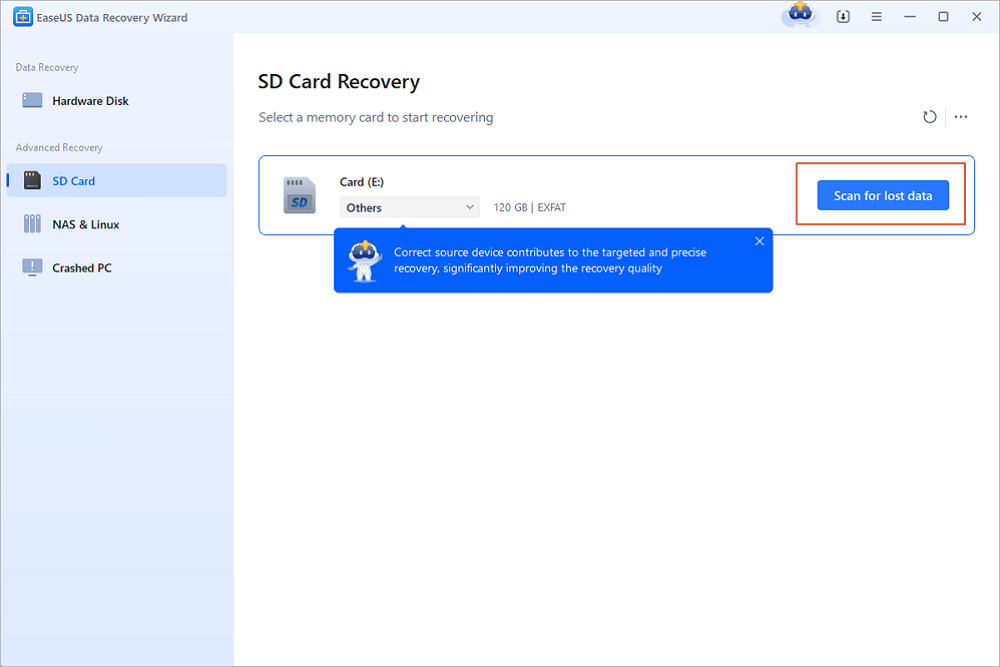
Step 1. Choose the location and start scanning
Hover on the SD card, camera, or hard drive partition where you deleted/lost pictures, then click "Scan for Lost Data".
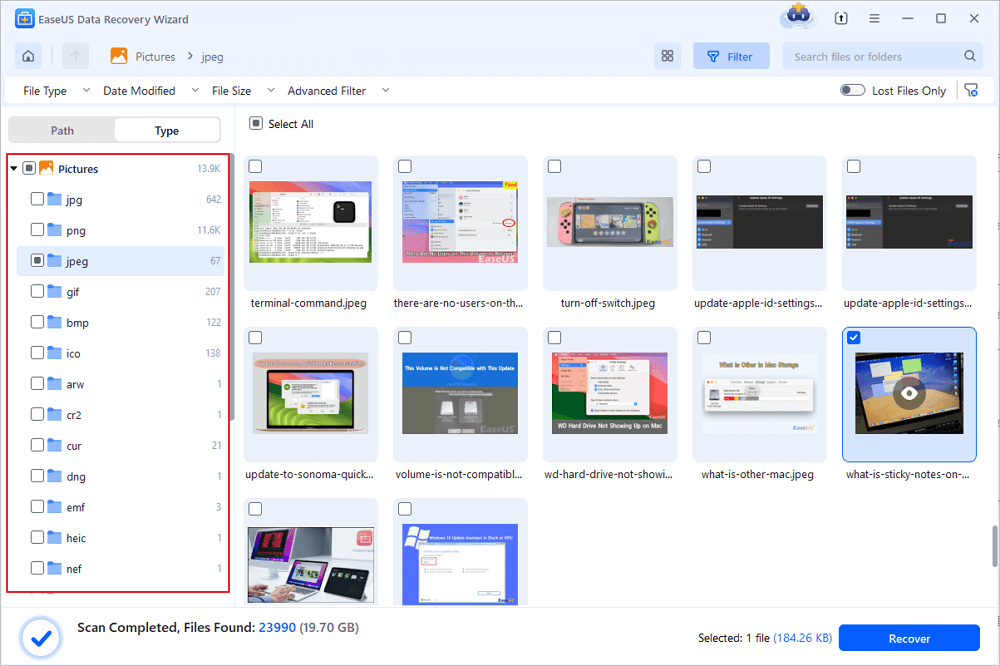
Step 2. Select the pictures you want to recover
Once the scanning completes, select "Pictures" in the left panel. If you want to locate the lost photos, click "Lost Files Only" on the top-right side. Then, you can find photos according to the devices, types, and dates.
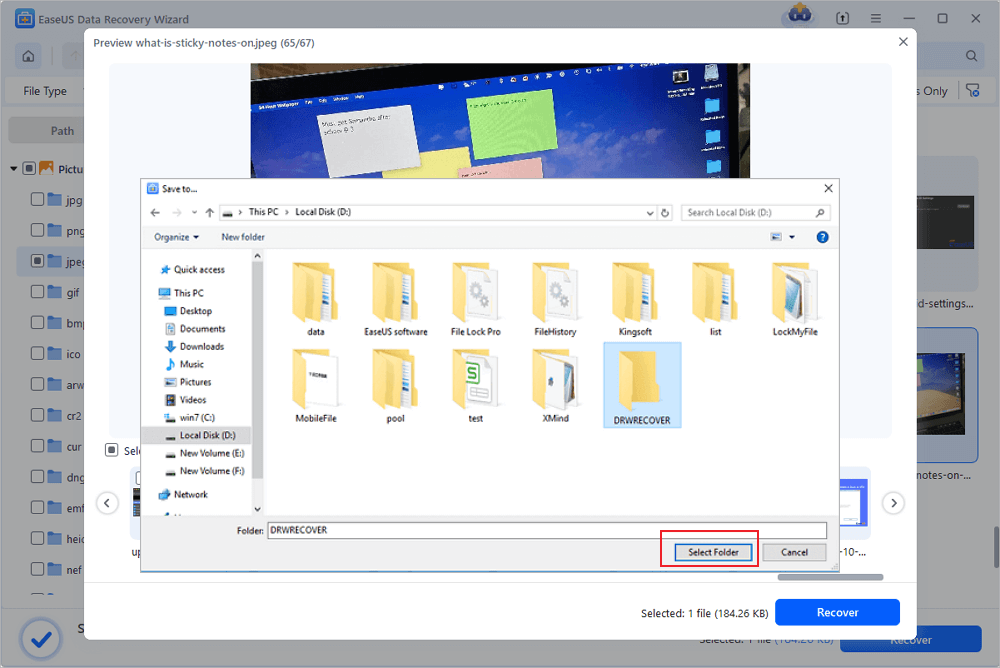
Step 3. Recover lost photos
After the preview, click "Recover" and choose another location to save the desired pictures. You can save the recovered photos your local drive, external storage device or cloud storage.
💡Want to know more about SD card data recovery? For example, what is the best SD card data recovery software? How to recover a damaged SD card? How to recover data from an unreadable SD card...Go for SD Card Data Recovery FAQs and restore your precious lost files.
thanks a lot @easeus_software
— Natuurlijk Persoon (@syeikhan_rmcf) December 15, 2019
i accidentally formatted my external hdd, thx to you i got recovered 320 GB all of my data include documents, photos and videos using EaseUS Data Recovery wizard. a very usefull app!! pic.twitter.com/VOwzBHF0pt
Share this post with your friends on SNS and help more people learn how to choose easy file recovery tools for free download!
Top 2. Stellar Photo Recovery
Stellar Photo Recovery recovers photos, videos, and audio files lost due to deletion, corruption, formatting, viruses, inaccessible drives, etc. The preview ability of Stellar Photo Recovery makes the program stand out, as it allows you to preview audio files before they are recovered.
| Supported OS | Windows 10/8/7/Vista/XP and macOS |
| Supported Image Types | CR2/CRW, RAF, K25/KDC/DCR, MRW, MOS, MEF, NEF, NRW, ORF, TGA, JPEG, TIFF, BMP, GIF, PNG, PSD, INDD, PSP, PCT, and JP2. |
| Ease of Use | Easy to use |

😆Pros:
- It has a clear interface and a simple recovery guide.
- This photo recovery software supports scanning a specific folder and searching for files from the scan results.
- It takes four steps to recover lost photos from any device.
😦Cons:
- The scanning of RAW format recovery needs improving
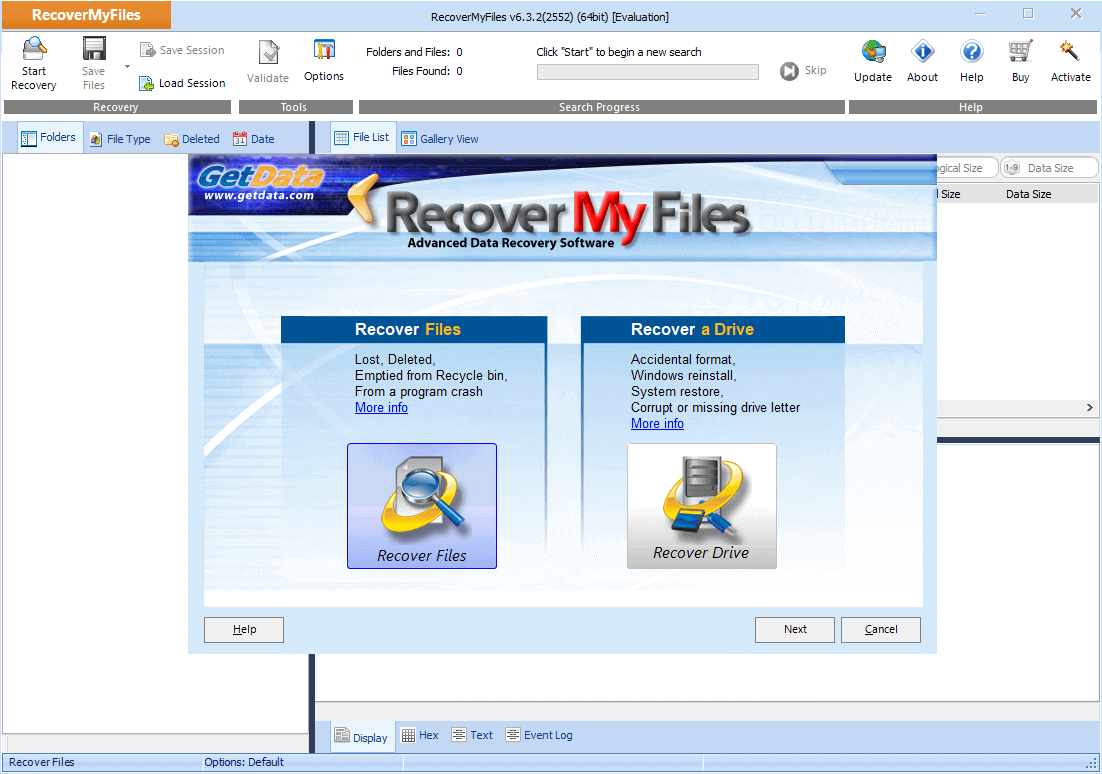
Top 3. Recover My Files
Recover My Files is one of Windows users' best DIY-free photo recovery software. This software enables users to restore photos from a hard drive, SD card, USB zip drive, floppy disk, iPod, and more. It performs well in Recycle Bin recovery, formatted data recovery, OS reinstallation recovery, RAW partition recovery, and more.
| Supported OS | Windows only |
| Supported Image Types | JPEG, TIF, TIFF, GIF, BMP, PNG, WMF, and more |
| Ease of Use | Easy to use |
😆Pros:
- Conventional storage devices like hard drives, SD cards, USBs, and iDevices like an iPod are supported.
- The software supports scanning the backup (image file) of a partition.
- You can sort files by date.
😦Cons:
- Old-fashioned software interface
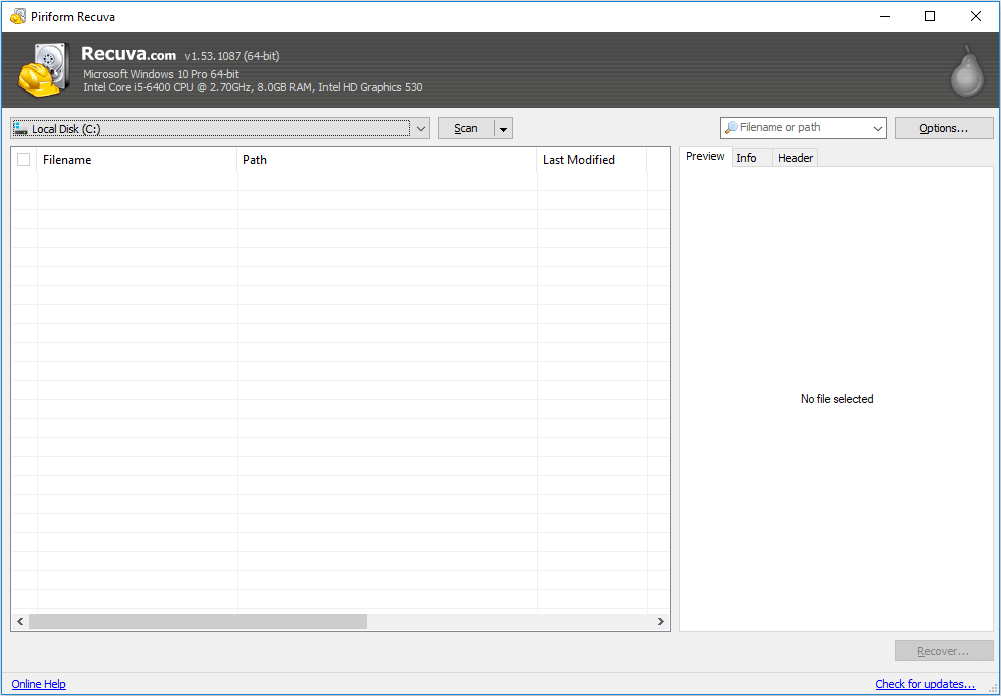
Top 4. Recuva
Recuva is free photo recovery software that can recover files that have been permanently deleted and marked as free space by the operating system. Recuva recovers files from your Windows computer, Recycle Bin, digital camera card, or MP3 player easily and quickly.
| Supported OS | Windows only |
| Supported Image Types | JPG, JPEG, TIF, TIFF, GIF, BMP, PNG, WMF, and more |
| Ease of Use | Simple to use |
😆Pros:
- This software works well in JPG file recovery.
- It has excellent privacy protection and removes tracking files.
- It has a Preview screen before the final recovery.
😦Cons:
- The free version has limited features
- There's no support for the free version
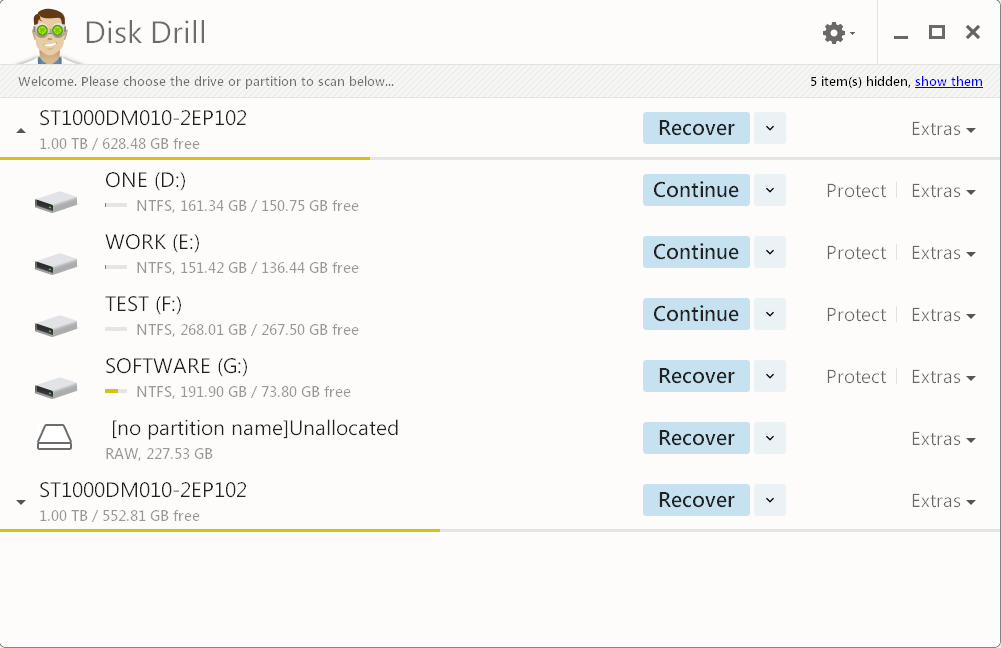
Top 5. Disk Drill
There are countless ways to lose your data. Power failure, failed boot drives, partition damage, an accidentally emptied Recycle Bin, or a virus attack. But you can get lost data or pictures back with the help of Disk Drill. It is a professional data recovery program that ranks high in the information technology industry. It works well on Windows computers and performs even better on Mac.
| Supported OS | Windows and macOS |
| Supported Image Types | PTIF, TIFF, JPG, JPEG, GIF, BMP, PNG, WMF, and more |
| Ease of Use | Easy to use |
😆Pros:
- Has auxiliary features like data protection and a backup drive
- Organizes files found by category
- Filters the results by size and data
😦Cons:
- Only free for 500MB
- The scanning takes too long compared to the previous equivalents, and fewer files are found.
If you found this blog post informative, share it with your friends and followers so they can benefit from it too.

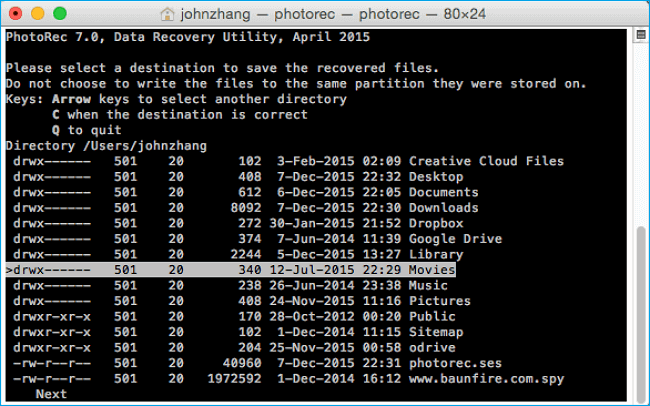
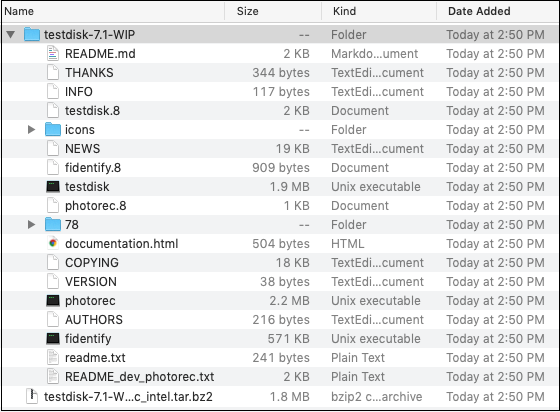
Top 6. PhotoRec
PhotoRec is a free and open-source program that works very well in data recovery on older operating systems like OS X, Linux, Free BSD, Net BSD, Open BSD, and Windows. It can retrieve data even when the file system has been corrupted.
| Supported OS | Windows/macOS/Linux |
| Supported Image Types | Commonly used photo formats |
| Ease of Use | Hard for beginners |
😆Pros:
- It supports data recovery cross-platform---Mac OS X, Windows, Linux, etc.
- It can restore data on most devices.
- This software works for many file formats and not just images.
😦Cons:
- Recovers many files but not all
- Slightly complicated usage instructions
Top 7. Remo Recover
This photo recovery software offers a complete file repair solution and data recovery for every scenario. Remo Recover thoroughly scans your drives and recovers deleted files and folders, which can be saved at any location you choose.
| Supported OS | Windows and macOS |
| Supported Image Types | Commonly used photo formats |
| Ease of Use | Easy to use |
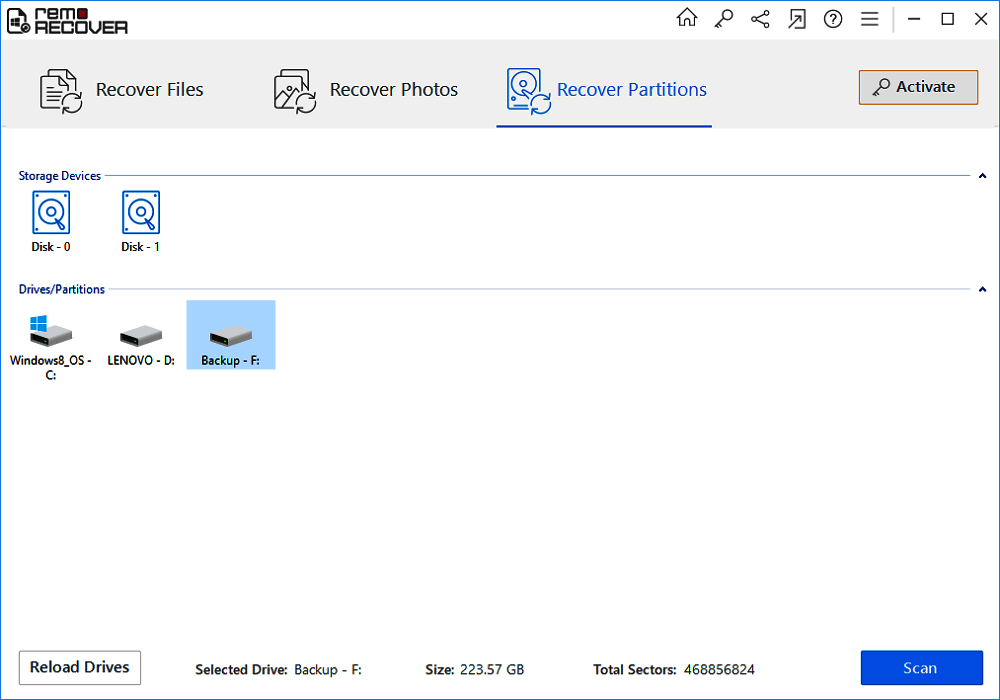
😆Pros:
- It has a high recovery rate for production images
😦Cons:
- It failed to recover any of the camera's raw images during the reformatted drive test.
Top 8. R-Studio
Equipped with the new unique data recovery technologies, R-Studio is the most comprehensive data recovery solution to recover files from NTFS, NTFS5, ReFS, FAT12/16/32, exFAT, HFS/HFS+, and APFS (Macintosh). This software works well in recovering data from various real-life data loss situations.
| Supported OS | Windows, macOS, and Linux |
| Supported Image Types | Nearly all file types |
| Ease of Use | Easy to use |
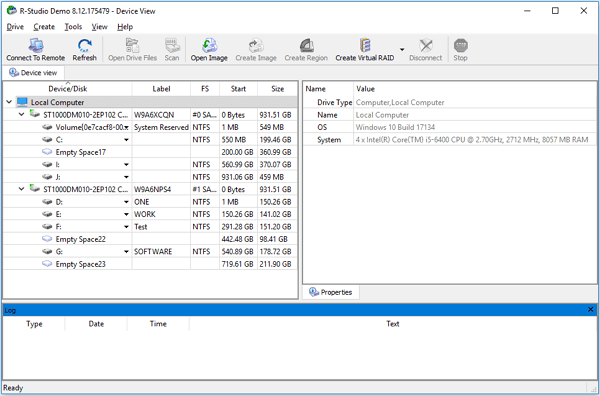
😆Pros:
- Enables data recovery from various data loss situations.
- Exclusively supports data recovery from network drives.
- Allows to create image files and recover files from image files.
- It only takes five steps to get back lost pictures.
😦Cons:
- It has an old-fashioned and relatively complex interface.
- It takes a long time for a simple scan.
Top 9. Acronis Revive
Acronis also provides us with data recovery software. Acronis Revive can recover files that are accidentally deleted or prematurely removed. Whether the file was trashed by accident, lifted by a virus, or was intentionally deleted and needed later, this powerful utility can help bring it back to life. (Note: The company has now removed the software, you cannot use this tool.)
| Supported OS | Windows only |
| Supported Image Types | Commonly used photo formats |
| Ease of Use | Hard to use |
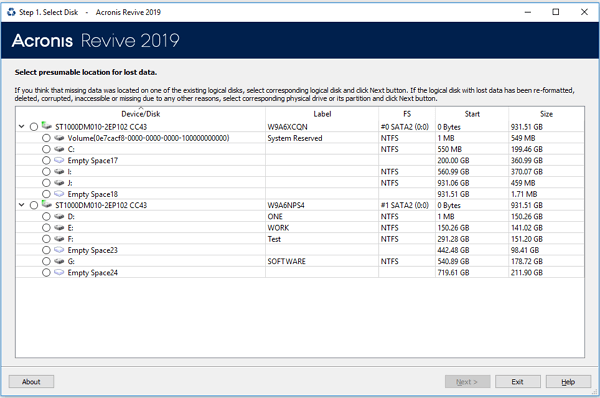
😆Pros:
- Intuitive wizard-style interface
- Recognizes localized file names
- Supports dynamic disks
- Creates an image file
😦Cons:
- It can only find and view deleted files with the free version; you must upgrade to the paid one to recover photos
Top 10. Puran Data Recovery
Puran Data Recovery is another photo recovery software worth trying. It can recover deleted photos (and videos and audio) from both computer hard drives and portable storage devices. No matter how you lose your images, you can use this software.
| Supported OS | Windows only |
| Supported Image Types | Commonly used photo formats |
| Ease of Use | Easy to use |
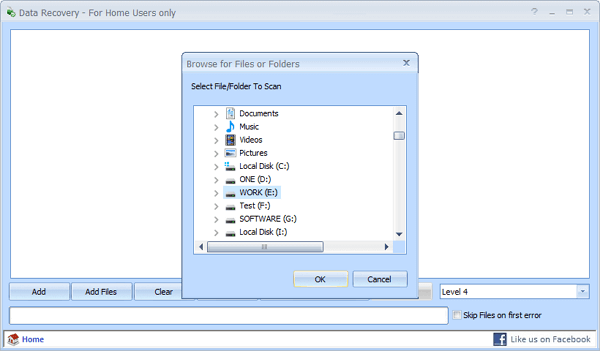
😆Pros:
- Copy entire drives or individual files and folders
- Drag and drop is supported
- Different speed levels included
😦Cons:
- You cannot preview the result
- You cannot filter the files you want to recover
Which One Is the Best for Me
How to tell which is the best professional data recovery software for you from the top 10 photo recovery software listed above? We analyzed from different criteria. You can find out more about free photo recovery software with this table:
Top 10 Free Photo Recovery Software: Key Features Comparison
| Software Name | Supported Storage Devices | Key Photo Recovery Features | Limitations of Free Version |
| 1️⃣EaseUS Data Recovery Wizard | PC hard drives, SSDs, USB drives, SD cards, cameras, NAS devices, RAID arrays | 1. Boasts a 99.7% recovery success rate, recovering photos lost due to deletion, formatting, virus attacks, and system crashes. 2. Features read-only secure recovery to avoid modifying original data. 3. Enables PE bootable disk creation for photo recovery from unbootable computers. 4. Supports remote NAS recovery without disassembling RAID arrays. |
The free version has a data recovery capacity limit (2GB); unlimited recovery requires a paid upgrade. |
| 2️⃣Stellar Photo Recovery | Internal/external HDDs, SSDs, SD cards, CF cards, digital cameras (Canon, Nikon, Sony, etc.), BitLocker-encrypted drives | 1. Recovers 1000+ multimedia formats including JPEG, TIFF, HEIC, RAW camera files, MP4, etc. 2. Offers three preview modes: classic list, file list, and deleted list. 3. Repairs corrupt photos (JPEG, RAW, etc.) and extracts thumbnails. 4. Supports photo recovery from storage devices over 6TB. |
The free version only allows preview; photo repair and unlimited recovery require paid activation. |
| 3️⃣Recover My Files | Hard drives, USB drives, memory cards, formatted or virus - infected storage devices | 1. Performs sector-level scanning to recover photos even if the file system is damaged. 2. Supports recovery of multiple photo formats like PNG, JPEG, TIFF, and GIF. 3. Allows preview of recoverable photos to confirm data integrity before recovery. |
The free version only provides file preview; full recovery requires purchasing a license. |
| 4️⃣ Recuva | PCHDDs, SSDs, USB drives, memory cards, MP3 players, digital cameras | 1. Features quick scan for recent deletions and deep scan for hard - to - find lost photos. 2. Supports preview of photos before recovery to filter desired files. 3. Recovers standard photo formats including JPEG, PNG, BMP, and TIFF. |
The free version lacks technical support; the deep scan speed is slower for large drives. |
| 5️⃣Disk Drill | Mac, Windows PCs, Linux RAIDs, Android devices, iPhones/iPads, virtual hard disks, SD cards | 1. Adapts to APFS, HFS, NTFS file systems and excels at recovering photos from lost partitions. 2. Provides photo preview and recovery probability prediction for each file. |
The free version recovers only up to 500 MB of data; full-capacity recovery requires payment. |
| 6️⃣PhotoRec | Hard disks, memory cards, CD - ROMs, digital camera storage, corrupted/formatted drives | 1. Open-source tool that uses file carving technology to recover 300+ file families (480+ extensions), including photos in JPEG, PNG, and RAW formats. 2. Reads media sector by sector, enabling recovery even if the file system is corrupted. 3. Writes recovered photos to a separate directory to avoid overwriting original data. |
Has a text-based interface that is difficult for novice users to operate; it has no visual photo preview function. |
| 7️⃣Remo Recover | HDDs, SSDs, USB drives, SD cards, and corrupt hard drives from brands like Samsung, Seagate | 1. Uses advanced deep scan to recover photos from formatted partitions and deleted/lost partitions. 2. Supports 500+ file formats, including standard photo formats and RAW camera files. 3. Has a "save recovery session" feature to resume photo recovery later without re-scanning. |
The free version only allows scanning and previewing; photo recovery requires upgrading to the paid edition. |
| 8️⃣R - Studio | Local disks, removable disks, corrupted/unbootable disks, LAN-connected devices, Linux RAIDs, Apple Fusion Drives | 1. Supports photo recovery from multiple file systems (FAT12/16/32, NTFS, HFS+, APFS, ext2/3/4). 2. Features a raw file search for photos by custom file types. 3. Recovers photos from repartitioned or severely corrupted drives with smart bad sector processing. |
The free version has limited advanced features (e.g., network recovery); full functionality is for paid professional editions. |
| 9️⃣Acronis Revive | Internal/external drives, memory cards, dynamic disks, partition - damaged HDDs | 1. Recovers photos lost due to accidental deletion, power failures, virus attacks, and bad sectors. 2. Allows preview of media files before recovery to ensure correct photo retrieval. 3. Recognizes localized file names for accurate recovery of non-English named photos. |
Only compatible with Windows systems; free trial period is limited; long-term use requires payment. |
| 🔟Puran Data Recovery | HDDs, SSDs, USB drives, memory cards, partition - damaged storage devices | 1. Adopts deep scan technology to recover photos deleted permanently or lost after formatting. 2. Supports preview of photos before recovery to verify file integrity. 3. Recovers photos along with 1000+ other file types like documents and videos. |
The free version lacks advanced features like batch photo repair and no support for encrypted drive recovery. |
Other Photo Recovery Solutions (Android or iPhone)
What if you lost photos on your smartphone? What can you do to restore lost photos from your phones easily? No matter if you are using an Android phone or iPhone, EaseUS can help you out. We have products to bring back pictures from cell phones.
For Android Users:
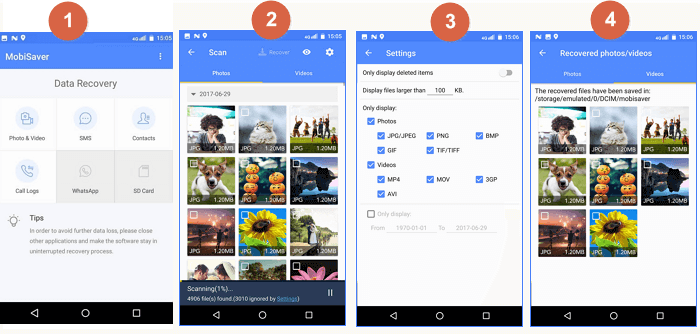
If you want to directly recover lost Android photos, videos, or other data on the phone without using a computer, the best Android data recovery app - EaseUS MobiSaver for Android, can help you.
More details: Recover Deleted or Lost Android Photos.
For iPhone Users: Recover Deleted or Lost iPhone Photos
If you want to retrieve iPhone photos, we can also help you. EaseUS MobiSaver is a tool that completely fits your need to recover lost photos from an iPhone, iPad, or iPod. All you have to do is download it and follow the instructions.
Detailed guides are given below.
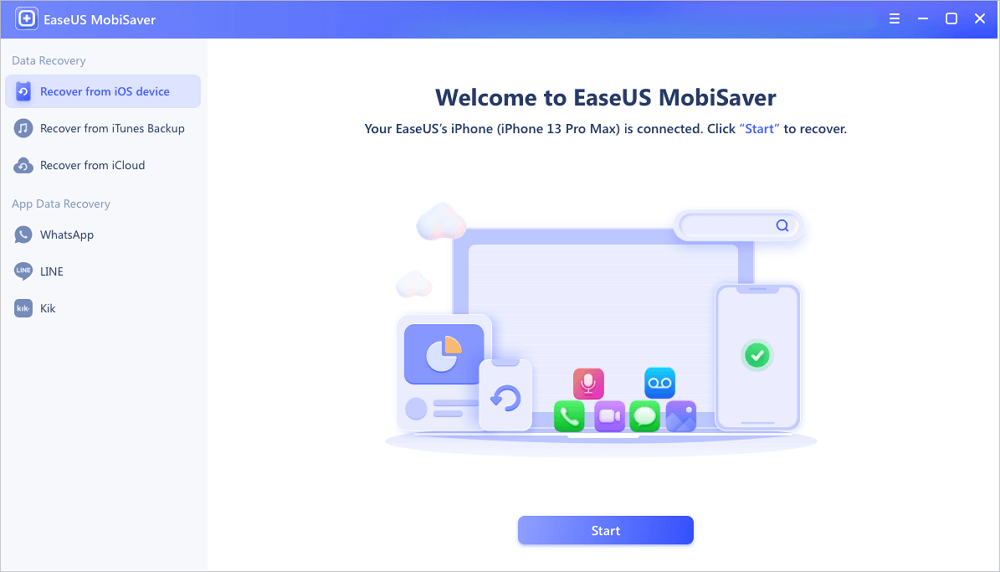
Step 1. Connect iPhone to Your PC
Launch EaseUS MobiSaver, choose "Recover from iOS Device" on the left, and click "Start".
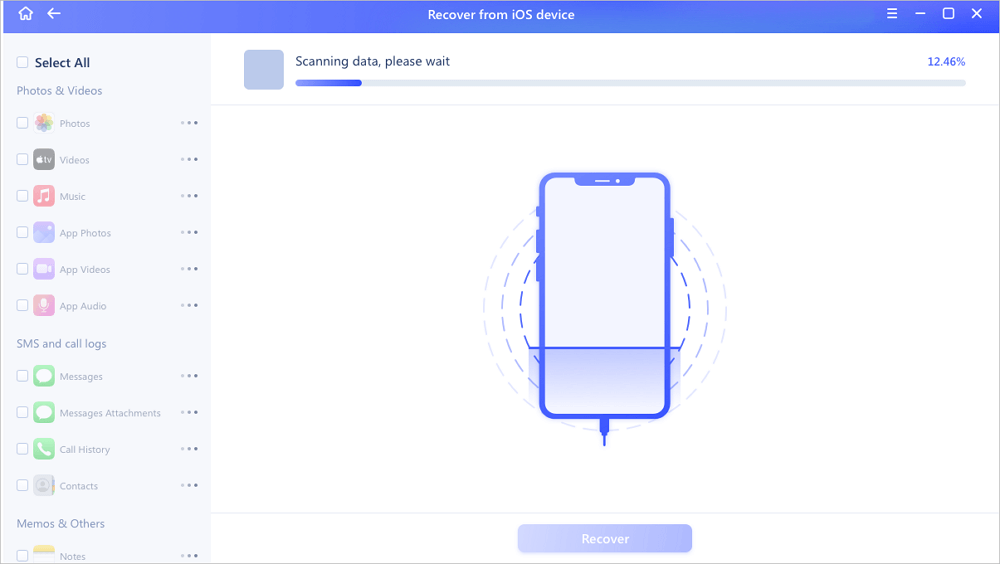
Step 2. Scan for Lost iPhone Photos
EaseUS MobiSaver will automatically scan iPhone 13/12/11/X/XR/XS/8/7/6/5/4, and find present pictures and even some lost photos for you.
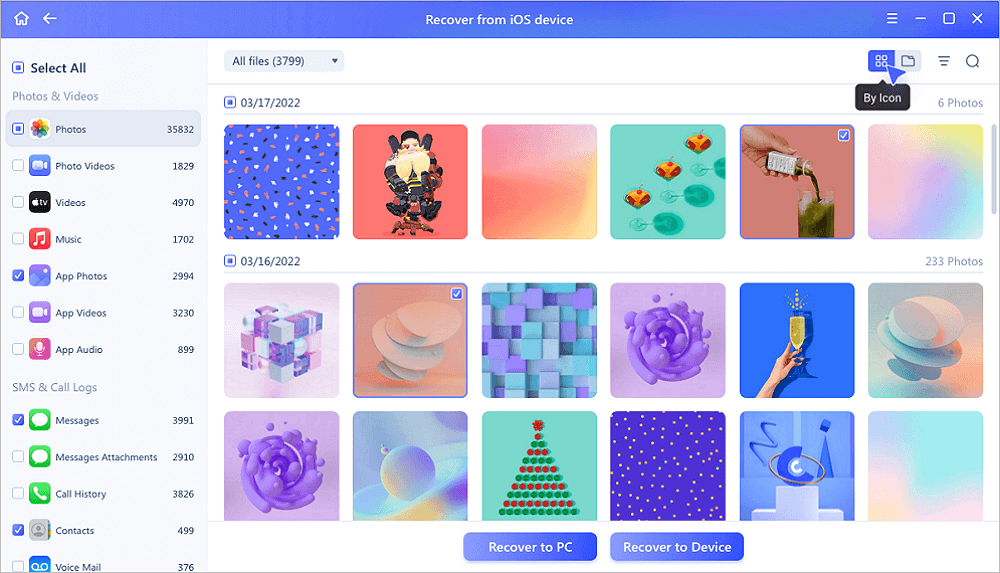
Step 3. Preview and Restore Photos
Tick the "Photos" on the left. You can clearly see the photos in your phone and select the ones you need to recover. Choose "Recover to PC" or "Recover to Device" to start recovering photos.
Relevant Reading: Why It's Possible to Recover Photos
Here is the explanation. When files are deleted from the computer, their directories disappear for the moment. However, their contents weren't immediately destroyed. Windows simply marks the hard drive space as available by changing one character in the file table. The file entry won't be displayed in My Computer or a command line DIR command, etc. Hence, If your photos have been accidentally formatted, don't be panic. Formatting a partition only erases the address table, not the data itself. There is still a chance to recuperate from a formatted partition with such a hard drive recovery tool.
In addition, if hard drives or partitions have disappeared, the data area would not be erased. It's still possible to use the same method to make a deleted photo recovery free from a lost or deleted partition. With the help of free and easy data recovery software, you can recover essential images without any technical knowledge.
Conclusion
Do not worry if you have lost precious photos from your desktop, Mac, iPhone, or Android. There is always a solution for you to get back lost or deleted pictures from any device. EaseUS free photo recovery software can help you out in your situation. The sooner you use it, the higher the chance you will get your files back.
Help us reach a wider audience by sharing this blog post on your favorite social media platform.
People Also Ask These Questions About Photo Recovery
Find reliable photo recovery software to recover photos and videos from an SD card, iPhone, or Android. Whenever you are faced with an image loss issue, tackle it with the following FAQs:
1. How do I recover photos?
To restore photos on your PC:
Step 1. Launch EaseUS Data Recovery Wizard, hover over the partition or storage device where you deleted photos and click Scan.
Step 2. Wait until the scan finishes. Then, select the deleted photos you want to recover. To locate the target photos faster, click Filter and select Pictures.
Step 3. Click Recover and choose a location on another hard drive to save the photos.
2. Which is the best photo recovery software?
Best Photo Recovery Software Our Picks:
- EaseUS data recovery software
- Stellar Data Recovery
- Recover My Files
- Recuva
- Disk Drill
- PhotoRec
- Remo Recover
- R-Studio
- Acronis Revive
- Puran Data Recovery
Among these, EaseUS free photo recovery software stands out due to its compatibility and excellence. The software can recover all kinds of multimedia files, including raster, vector, RAW camera files, videos, and audio files.
3. Can you recover deleted pictures from your phone?
If you want to recover lost Android photos, videos, or other data on the phone without using a computer, the best Android data recovery app - EaseUS MobiSaver for Android can help. Full guide>>
Also, if you want to retrieve iPhone photos, we can also help. EaseUS MobiSaver is a tool that completely fits your need of recovering lost photos from an iPhone, iPad, or iPod. All you have to do is download it and follow the details. Full guide>>
4. Can I recover deleted photos from a digital camera?
Yes, you can recover deleted photos from any brand of digital camera like Nikon, Sony, Canon, Samsung, etc., by using free photo recovery software.
Step 1. Choose the location and start scanning.
Step 2. Select the photos you want to recover.
Step 3. Recover the deleted photos.
5. Is free photo recovery software safe to use?
Yes. All software recommended in this guide is from official developers and is free of malware and adware. We suggest downloading image recovery software directly from the official website to avoid fake versions.
6. What's the maximum size of photos I can recover with free software?
Most free versions have a limit (e.g., EaseUS offers 2GB free recovery, Recuva has no size limit but fewer advanced features). Check the comparison table for details.
7. Can I recover photos from a formatted SD card with free tools?
Yes—tools like PhotoRec support photo recovery free from formatted SD cards. Use the deep scan feature for better results.
8. Why can't I find my deleted photos after scanning?
Possible reasons: the storage space was overwritten by new files, the photos were encrypted, or the storage device is damaged. Try a different free tool or consider professional data recovery services.
Was this page helpful?




 Why Trust EaseUS
 Editor Reviews









